Affiliate Disclosure: As an Amazon Associate we earn from qualifying purchases. Some links may earn us a commission at no cost to you.

Best GPUs for Content Creation 2026: 5 Picks by Workload
The best GPU for content creation in 2026 is the one that fits your heaviest job in the VRAM that workload needs, and speaks the API your software wants. For most creators that card is the RTX 5070 Ti, not the flagship most creator advice assumes you have to buy.
Below are five cards mapped by workload rather than price: Blender Cycles renders, DaVinci Resolve and Premiere timelines, and Stable Diffusion or local AI video. It starts with the decision that changes everything else, whether you need CUDA at all, and where AMD's ROCm saves real money.
Our top pick: ASUS TUF RTX 5070 Ti OC
For most creators the 5070 Ti is the honest pick: the full CUDA stack, dual NVENC encoders, and 16 GB of GDDR7 for 4K timelines and mid-weight 3D, without flagship pricing.

Quick picks
Pick | Card | Best for | Where to buy |
|---|---|---|---|
Best Overall | Mixed render, edit, and AI on a budget | ||
Best Value | 4K editing, Blender, and 4K gaming in one card | ||
Best Premium | LLMs, fine-tuning, 8K timelines, big 3D scenes | ||
Best Budget | ComfyUI, Stable Diffusion, 1080p-1440p edit | ||
Editor's Pick | Raster-heavy edit, ROCm AI, max VRAM per dollar |
Best Overall
- Card
- Best for
Mixed render, edit, and AI on a budget
- Where to buy
Best Value
- Card
- Best for
4K editing, Blender, and 4K gaming in one card
- Where to buy
Best Premium
- Card
- Best for
LLMs, fine-tuning, 8K timelines, big 3D scenes
- Where to buy
Best Budget
- Card
- Best for
ComfyUI, Stable Diffusion, 1080p-1440p edit
- Where to buy
Editor's Pick
- Card
- Best for
Raster-heavy edit, ROCm AI, max VRAM per dollar
- Where to buy
Specs at a glance
Card | VRAM | CUDA cores / CUs | Encoders |
|---|---|---|---|
16 GB GDDR7 | 8,960 CUDA | 2x NVENC | |
16 GB GDDR7 | 10,752 CUDA | 2x NVENC | |
32 GB GDDR7 | 21,760 CUDA | 3x NVENC | |
16 GB GDDR7 | 4,608 CUDA | 1x NVENC | |
24 GB GDDR6 | 96 CUs (RDNA 3) | VCN (AV1) |
- VRAM
16 GB GDDR7
- CUDA cores / CUs
8,960 CUDA
- Encoders
2x NVENC
- VRAM
16 GB GDDR7
- CUDA cores / CUs
10,752 CUDA
- Encoders
2x NVENC
- VRAM
32 GB GDDR7
- CUDA cores / CUs
21,760 CUDA
- Encoders
3x NVENC
- VRAM
16 GB GDDR7
- CUDA cores / CUs
4,608 CUDA
- Encoders
1x NVENC
- VRAM
24 GB GDDR6
- CUDA cores / CUs
96 CUs (RDNA 3)
- Encoders
VCN (AV1)
Do you actually need CUDA?
Before you compare cards, answer one question: does the software you live in require CUDA? Blender Cycles, DaVinci Resolve's neural effects, and most AI tooling lean on it heavily, which makes Nvidia the safe call. Raster-heavy editing and a growing slice of ROCm-ready tools are the exception, and that is where a 24 GB AMD card at a fraction of 5090 money becomes the smart move.
The other axis is VRAM, because memory is the ceiling that ends workflows. A render that needs 20 GB does not run slowly on a 16 GB card, it fails to fit. Size the memory to your heaviest job, then pick the cheapest card that clears both the CUDA question and the VRAM ceiling. The matrix below does exactly that.
Workload | VRAM you want | CUDA required? | Best fit |
|---|---|---|---|
LLM inference / fine-tuning, SDXL training | 24-32 GB | Strongly favored | |
4K editing, Blender, and 4K gaming | 16 GB | Yes (Cycles, neural FX) | |
Mixed render, edit, occasional AI | 16 GB | Yes | |
ComfyUI, Stable Diffusion, budget editing | 16 GB | Yes | |
Raster-heavy edit, ROCm AI, max VRAM/dollar | 24 GB | No (ROCm-OK) |
LLM inference / fine-tuning, SDXL training
- VRAM you want
24-32 GB
- CUDA required?
Strongly favored
- Best fit
4K editing, Blender, and 4K gaming
- VRAM you want
16 GB
- CUDA required?
Yes (Cycles, neural FX)
- Best fit
Mixed render, edit, occasional AI
- VRAM you want
16 GB
- CUDA required?
Yes
- Best fit
ComfyUI, Stable Diffusion, budget editing
- VRAM you want
16 GB
- CUDA required?
Yes
- Best fit
Raster-heavy edit, ROCm AI, max VRAM/dollar
- VRAM you want
24 GB
- CUDA required?
No (ROCm-OK)
- Best fit
What each creator app asks for
VRAM and API support decide more of your render time than raw core count does. Here is what the three workloads in this guide demand, and which pick clears each bar.
Blender Cycles and OptiX
Cycles runs fastest on Nvidia through OptiX, which drives the RT cores directly and cuts render times well below the plain CUDA path on the same card. AMD works through HIP, and it works honestly, but expect longer renders per dollar. Scene size picks the card: 16 GB covers most product and archviz work, 24 GB absorbs heavy sculpts and simulation caches, and 32 GB is for scenes that already failed to fit somewhere else.
DaVinci Resolve and Premiere Pro
Editing is the workload where AMD closes the gap. Resolve leans on the GPU for noise reduction, optical flow, and neural effects, and 16 GB carries 4K timelines with a normal node tree. What Nvidia still wins is export: the dual NVENC encoders on the 5070 Ti and above roughly halve H.265 and AV1 export times, which matters more than timeline scrubbing if you publish every day.
Stable Diffusion, Flux, and AI video
Local image generation is a memory problem before it is a speed problem. SDXL fits in 8 GB and is comfortable at 12 GB, Flux with stacked LoRA or ControlNet wants 16 GB, and local AI video wants 24 GB or more. The RTX 5060 Ti 16 GB is the cheapest card here that clears the Flux bar, which is why it takes the budget slot instead of the 8 GB version of the same card.
Benchmarks
Creator benchmarks are not frame rates. These three scenarios separate the picks where it matters: a CUDA render test, an AI image-generation test, and an encode test where AMD is competitive. Treat the figures as directional reviewer consensus rather than a guarantee for your exact scene.
CUDA render throughput; the 7900 XTX trails because Cycles favors Nvidia heavily.
- RTX 50902600 samples/min
- RTX 50801850 samples/min
- RTX 5070 Ti1480 samples/min
- RTX 5060 Ti (16 GB)720 samples/min
- RX 7900 XTX560 samples/min
AI image throughput; the 5090's 32 GB enables larger batches, the 5060 Ti 16 GB clears the 8 GB wall, the 7900 XTX runs via ROCm but trails.
- RTX 509046 images/min
- RTX 508031 images/min
- RTX 5070 Ti26 images/min
- RTX 5060 Ti (16 GB)13 images/min
- RX 7900 XTX9 images/min
Encode throughput; this is where AMD's VCN keeps the 7900 XTX competitive on raster edit work.
- RTX 509058 seconds
- RTX 508064 seconds
- RTX 5070 Ti70 seconds
- RX 7900 XTX82 seconds
- RTX 5060 Ti (16 GB)96 seconds
How we picked
VRAM is the ceiling that ends workflows, so we sized memory to the heaviest job rather than to the price tag. A card that is fast but out of memory is a card that cannot finish the render.
We split CUDA-required workloads from CUDA-optional ones up front, because that single fork decides whether AMD is even on the table. Blender Cycles and most AI tooling favor Nvidia; raster-heavy editing and ROCm-ready tools open the door to AMD.
We refuse to sell the 5090 as a default. It earns its place only when 32 GB does real work. And we treat the 8 GB tier as disqualified for any AI workload, full stop, weighing encoder count and software-ecosystem reality over raw teraflops.
Best Overall: ASUS TUF RTX 5070 Ti OC
Specs
Chip | GeForce RTX 5070 Ti (Blackwell) |
VRAM | 16 GB GDDR7 |
Boost clock | 2.6 GHz (OC mode) |
CUDA cores | 8,960 |
Encoders | 2x NVENC (AV1, HEVC, H.264) |
TGP | 300 W |
Length | 330 mm |
Chip
GeForce RTX 5070 Ti (Blackwell)
VRAM
16 GB GDDR7
Boost clock
2.6 GHz (OC mode)
CUDA cores
8,960
Encoders
2x NVENC (AV1, HEVC, H.264)
TGP
300 W
Length
330 mm
What it does well
The 5070 Ti is the honest entry to a serious creator rig. It carries the full CUDA stack, so Blender Cycles, DaVinci Resolve neural FX, and Premiere's Mercury Engine all accelerate the way creator software expects, and its dual NVENC encoders crush export queues and handle live AV1 streaming at the same time.
Its 16 GB of GDDR7 is comfortable for 4K editing timelines, moderate 3D scenes, and SDXL image generation without thrashing. It is the cheapest card that does not make you stop and ask which Nvidia feature you are giving up to hit the price.
What you give up
The catch is the memory pool. 16 GB is the same amount the pricier 5080 carries, so stepping up buys raw throughput, not headroom. Heavy LLM work, large SDXL training batches, or 8K render scenes will want the 5090's 32 GB instead.
Pricing has also sat above MSRP for much of the generation, so treat any deal at list price as a good one.
Who it's for
This is the mixed creator on a sane budget: someone who edits 4K, renders mid-weight 3D, and runs the occasional Stable Diffusion job, and who wants the complete Nvidia creator stack at the lowest sensible price.
Best Value: ASUS TUF RTX 5080 OC

Specs
Chip | GeForce RTX 5080 (Blackwell) |
VRAM | 16 GB GDDR7 |
Boost clock | 2.7 GHz (OC mode) |
CUDA cores | 10,752 |
Encoders | 2x NVENC (AV1, HEVC, H.264) |
TGP | 360 W |
Length | 348 mm |
Chip
GeForce RTX 5080 (Blackwell)
VRAM
16 GB GDDR7
Boost clock
2.7 GHz (OC mode)
CUDA cores
10,752
Encoders
2x NVENC (AV1, HEVC, H.264)
TGP
360 W
Length
348 mm
What it does well
The 5080 is the 4K creator card for the buyer who also wants real 4K gaming. It has meaningfully more raw CUDA throughput than the 5070 Ti, which shortens Blender Cycles renders and Resolve neural-FX passes, and the GDDR7 bandwidth shows up in export and timeline-scrub times.
In the off-hours it delivers genuine 4K 120 gaming with DLSS 4, and it carries the same full Nvidia stack as the cards below it. Its 16 GB pool stays comfortable for 4K editing and most 3D scenes.
What you give up
As with the 5070 Ti, 16 GB is the ceiling, and it is the same ceiling the cheaper card already has. Anyone whose workflow is bound by VRAM rather than compute (large local models, heavy SDXL training, 8K renders) gains nothing here and should look at the 5090.
Street pricing has run above MSRP, so the value case rests on throughput, not on a bigger memory pool.
Who it's for
This is the creator-gamer who renders and edits in 4K on weekdays and plays in 4K on weekends, and who wants more CUDA throughput than the 5070 Ti without paying halo prices.
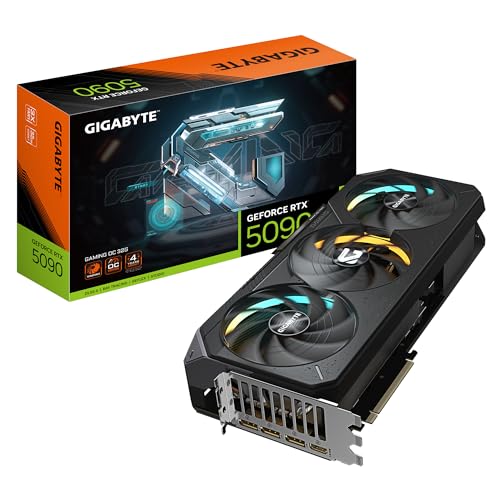
Best Premium: GIGABYTE RTX 5090 Gaming OC
Specs
Chip | GeForce RTX 5090 (Blackwell) |
VRAM | 32 GB GDDR7 |
Boost clock | 2.55 GHz (OC mode) |
CUDA cores | 21,760 |
Encoders | 3x NVENC (AV1, HEVC, H.264) |
TGP | 575 W |
Length | 340 mm |
Chip
GeForce RTX 5090 (Blackwell)
VRAM
32 GB GDDR7
Boost clock
2.55 GHz (OC mode)
CUDA cores
21,760
Encoders
3x NVENC (AV1, HEVC, H.264)
TGP
575 W
Length
340 mm
What it does well
The 5090 is the card where the 32 GB pool stops being a spec on a box and starts being the reason to buy. It runs local LLMs, SDXL fine-tuning, and large 3D scenes that simply will not fit on a 16 GB card, and its triple NVENC encoders chew through batch exports. If you already own a 4090 and are weighing whether that 32 GB pool is worth the swap, our RTX 5090 vs RTX 4090 comparison works through the 24 GB against 32 GB line workload by workload.
Its raw CUDA core count makes it the fastest consumer render and AI card in 2026. For the buyer whose work genuinely fills the memory, nothing else in the lineup competes.
What you give up
Price and power are the tax. Street pricing runs well above an already-high MSRP because AI demand competes with creators and gamers for the same inventory, so expect to pay a premium.
The 575 W draw is its own cost. This card needs a 1,000 to 1,200 W PSU, real case airflow, and a proper 12V-2x6 cable rather than the bundled Y-adapter. For any workload that fits inside 16 GB, the uplift over a 5080 does not pay for itself.
Who it's for
This is the professional or serious hobbyist whose work is VRAM-bound: someone who runs local AI, fine-tunes models, or renders scenes a 16 GB card chokes on, and who has budgeted the full supporting cast of PSU, airflow, and cabling.
Best Budget: ASUS Prime RTX 5060 Ti OC (16 GB)

Specs
Chip | GeForce RTX 5060 Ti (Blackwell) |
VRAM | 16 GB GDDR7 |
Boost clock | 2.57 GHz (OC mode) |
CUDA cores | 4,608 |
Encoders | 1x NVENC (AV1, HEVC, H.264) |
TGP | 180 W |
Length | 281 mm |
Chip
GeForce RTX 5060 Ti (Blackwell)
VRAM
16 GB GDDR7
Boost clock
2.57 GHz (OC mode)
CUDA cores
4,608
Encoders
1x NVENC (AV1, HEVC, H.264)
TGP
180 W
Length
281 mm
What it does well
The 5060 Ti 16 GB is the sub-500-dollar on-ramp to CUDA creator work, and specifically the cheapest card that still ships with 16 GB. That memory is the whole reason to buy it: it runs SDXL and most ComfyUI graphs that an 8 GB card cannot even load.
NVENC AV1 handles export and streaming, and the low 180 W draw fits modest power supplies and small cases. It is the honest entry point for someone whose creator work is real but light, and it does that work on CUDA.
What you give up
It has only one NVENC encoder and a modest CUDA core count, so heavy render queues and large 3D scenes crawl compared to the cards above it. It is an on-ramp, not a workstation, and serious throughput wants the 5070 Ti or higher.
One firm rule: buy the 16 GB variant, never the 8 GB version. The 8 GB card cannot load the AI workloads that justify this tier in the first place.
Who it's for
This is the budget creator or AI hobbyist who wants 16 GB and CUDA under 500 dollars, runs ComfyUI and Stable Diffusion, and edits at 1080p or 1440p without heavy effects.
Editor's Pick: Sapphire Nitro+ RX 7900 XTX

Specs
Chip | Radeon RX 7900 XTX (RDNA 3) |
VRAM | 24 GB GDDR6 |
Boost clock | 2.6 GHz (Nitro+ OC) |
Compute units | 96 (RDNA 3) |
Encoders | AV1, HEVC, H.264 (VCN) |
TGP | 355 W (Nitro+ raised) |
Length | 320 mm |
Chip
Radeon RX 7900 XTX (RDNA 3)
VRAM
24 GB GDDR6
Boost clock
2.6 GHz (Nitro+ OC)
Compute units
96 (RDNA 3)
Encoders
AV1, HEVC, H.264 (VCN)
TGP
355 W (Nitro+ raised)
Length
320 mm
What it does well
The 7900 XTX is the ROCm escape hatch and the 24 GB VRAM play for the creator who refuses the CUDA tax. Its 24 GB of GDDR6 is the most memory in the buy zone outside the 5090, and its raw raster sits high for timeline scrubbing and effects preview.
ROCm on Linux now runs a real subset of AI workflows, including PyTorch and Stable Diffusion through supported forks. For a creator whose tools are AMD-friendly, it delivers a big memory pool without the Nvidia premium.
What you give up
CUDA-locked software is the catch. Blender Cycles favors Nvidia heavily, DaVinci neural FX and many AI tools assume CUDA, and ROCm setup on consumer cards is still more fragile than plugging in an Nvidia card and going.
It is also an RDNA 3 card, so it misses FSR 4, its ray tracing is the weakest of the buy zone, and its feature runway is shorter than a current-generation card's. Confirm that the specific software you live in runs on ROCm before you buy.
Who it's for
This is the Linux-comfortable creator with a ROCm-ready or raster-heavy workflow who wants 24 GB of VRAM per dollar, and who has already checked that the tools they depend on do not hard-require CUDA.
Bottom line
If you render, edit, and dabble in AI and want the complete Nvidia stack without flagship pricing, buy the ASUS TUF RTX 5070 Ti OC. It is the card most creators should land on.
If your work is genuinely VRAM-bound, with local models or 8K scenes, the GIGABYTE RTX 5090 Gaming OC is the only card that clears the ceiling. If your software does not demand CUDA, the Sapphire Nitro+ RX 7900 XTX gives you 24 GB at a fraction of the price, and the ASUS Prime RTX 5060 Ti 16 GB is the honest sub-500-dollar on-ramp.
FAQ
Do you actually need an Nvidia GPU for content creation, or will AMD work?
It depends entirely on your software. CUDA-accelerated tools like Blender Cycles, DaVinci Resolve neural FX, and most AI workflows run best, and sometimes only, on Nvidia. If your work is raster-heavy editing or uses ROCm-ready applications on Linux, an AMD card like the RX 7900 XTX can match it for far less money and give you more VRAM. Check whether the specific apps you live in require CUDA before you decide.
How much VRAM do you need for Blender, video editing, and AI?
For 4K video editing, 16 GB is comfortable. For mid-weight Blender scenes and SDXL image generation, 16 GB also works. For large local LLMs, model fine-tuning, 8K timelines, or very complex 3D scenes, you want 24 to 32 GB, since VRAM is a hard ceiling and a job that does not fit simply fails. Size memory to your heaviest workload, not your average one.
Is the RTX 5090 worth it for creators, or is it overkill?
It is worth it only when your work genuinely fills its 32 GB pool: LLM inference and fine-tuning, SDXL training, 8K editing, or heavy neural video. For those buyers it is the only consumer card that clears the ceiling. For anyone whose work fits in 16 GB, the uplift over a 5080 does not pay for itself, and the 575 W draw demands a 1,000 to 1,200 W PSU and proper cabling on top of the card's premium price.
Can you run Stable Diffusion and ComfyUI on an AMD GPU?
Yes, through ROCm on Linux with supported forks of the tools, and the RX 7900 XTX's 24 GB pool is a real advantage for large models. The catch is setup: ROCm on consumer cards is more fragile than Nvidia's CUDA path, where most tools work out of the box. If you want the smoothest AI experience, an Nvidia card like the 5060 Ti 16 GB or 5070 Ti is the lower-friction choice.
Is 16 GB of VRAM enough for 4K video editing and Stable Diffusion?
For 4K editing, yes. For Stable Diffusion at standard resolutions and most SDXL workflows, 16 GB is also enough, which is exactly why the 16 GB version of the 5060 Ti is the budget pick and the 8 GB version is not. You only outgrow 16 GB with large model fine-tuning, big batch generation, or 8K work, at which point you want the 5090's 32 GB.
What is the best budget GPU for AI image generation in 2026?
The ASUS Prime RTX 5060 Ti 16 GB is the honest budget pick. It is the cheapest card that still ships with 16 GB of VRAM, which lets it load SDXL and most ComfyUI graphs that an 8 GB card cannot, and it runs them on CUDA so the tooling just works. Avoid the 8 GB variant entirely, since it cannot load the workloads that justify buying into this tier.
Related Articles

Best High-End Graphics Cards 2026: 5 Picks, Honestly Ranked
The best high-end graphics cards of 2026, ranked by what you actually play. Why the RTX 5090 is usually the wrong buy, and the 4 cards that beat it on value.
Aug 31, 2026

Best GPUs for 4K Gaming (2026): Picks by Refresh Target
Five GPUs for 4K gaming in 2026, segmented by refresh target and workload: the 5080 buy zone, the AMD-vs-Nvidia call by tier, why the 5090 is usually wrong.
May 21, 2026

Best CPU for Video Editing and Gaming: 5 Picks for 2026
The best CPU for video editing and gaming in 2026: five picks that cut 4K render times in DaVinci Resolve and Premiere Pro without giving up gaming frames.
Aug 12, 2026

AMD vs Intel 2026: 4 Tier Matchups for Gaming & Work
AMD vs Intel for gaming in 2026, settled tier by tier: a clear winner at every price band from budget to flagship, plus a separate productivity verdict.
Aug 10, 2026

Best RTX 5090 PSU 2026: Why 1000W Isn't Enough (5 Picks)
The best PSU for an RTX 5090 is not Nvidia's 1000W floor. Transient spikes explained, five 1200W to 1500W ATX 3.1 picks, and 12V-2x6 cable notes that matter.
Aug 10, 2026