Affiliate Disclosure: As an Amazon Associate we earn from qualifying purchases. Some links may earn us a commission at no cost to you.

Best HOTAS for Microsoft Flight Simulator 2024 (2026)
The controller that fits your flying matters more than the parts count on the box. A Cessna in the pattern, an A320 on approach, and an F-16 in a dogfight want three different layouts, and for one of them a HOTAS is the wrong tool. This guide sorts the picks by the planes you actually fly and the desk space you have, then works from an entry stick up to an all-metal rig.
It finishes the same rig we build in our MSFS 2024 hardware guides, where we pick the best GPU for MSFS 2024 and the right CPU for MSFS 2024. Match the tool to the mission first, then to the budget.
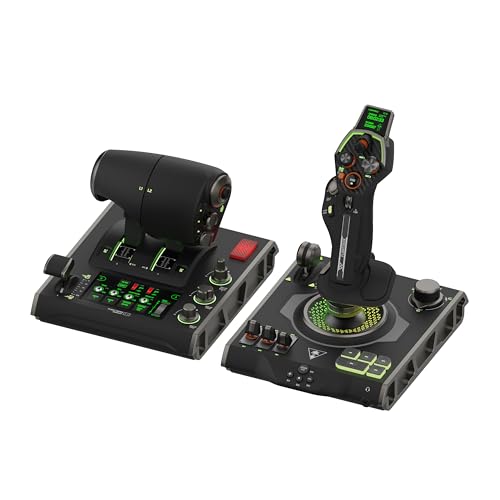
Our top pick: Turtle Beach VelocityOne Flightdeck
The Turtle Beach VelocityOne Flightdeck is the one HOTAS to buy if you want to fly the whole MSFS 2024 hangar without compromise. Dual throttle levers that split for twin engines or lock for single, fifteen axes, and an onboard touch display make it the most sim-native setup here.
Quick picks
Pick | Controller | Best for | Where to buy |
|---|---|---|---|
Best Overall | Flying everything in MSFS 2024 | ||
Best Value | Serious setup on a real budget | ||
Best Premium | Lifetime enthusiast and combat build | ||
Best Budget | First HOTAS, learning to fly | ||
Editor's Pick | MSFS plus space and combat sims |
Best Overall
- Controller
- Best for
Flying everything in MSFS 2024
- Where to buy
Best Value
- Controller
- Best for
Serious setup on a real budget
- Where to buy
Best Premium
- Controller
- Best for
Lifetime enthusiast and combat build
- Where to buy
Best Budget
- Controller
- Best for
First HOTAS, learning to fly
- Where to buy
Editor's Pick
- Controller
- Best for
MSFS plus space and combat sims
- Where to buy
Specs at a glance
Pick | Controller | Format | Sensor | Axes / controls | Platforms |
|---|---|---|---|---|---|
Best Overall | Full HOTAS (stick + dual-lever throttle) | See notes | 15 axes / 139 controls | PC (Windows 10/11) | |
Best Value | Stick (T.16000M) + TWCS throttle | H.E.A.R.T Hall-effect (stick) | 5 axes / 30 buttons | PC | |
Best Premium | Full HOTAS (metal stick + dual-lever metal throttle) | Contactless magnetic (no wear) | 55 buttons | PC | |
Best Budget | Single-hand stick + attached throttle | Potentiometer | 5 axes / 14 buttons | PC, Xbox Series X|S | |
Editor's Pick | Full HOTAS (stick + dual-lever throttle) | 16-bit non-contact (main axes) | 189 controls | PC |
Best Overall
- Controller
- Format
Full HOTAS (stick + dual-lever throttle)
- Sensor
See notes
- Axes / controls
15 axes / 139 controls
- Platforms
PC (Windows 10/11)
Best Value
- Controller
- Format
Stick (T.16000M) + TWCS throttle
- Sensor
H.E.A.R.T Hall-effect (stick)
- Axes / controls
5 axes / 30 buttons
- Platforms
PC
Best Premium
- Controller
- Format
Full HOTAS (metal stick + dual-lever metal throttle)
- Sensor
Contactless magnetic (no wear)
- Axes / controls
55 buttons
- Platforms
PC
Best Budget
- Controller
- Format
Single-hand stick + attached throttle
- Sensor
Potentiometer
- Axes / controls
5 axes / 14 buttons
- Platforms
PC, Xbox Series X|S
Editor's Pick
- Controller
- Format
Full HOTAS (stick + dual-lever throttle)
- Sensor
16-bit non-contact (main axes)
- Axes / controls
189 controls
- Platforms
PC
Stick vs full HOTAS vs yoke: which fits your flying?
Before you spend anything, decide what you fly most. The control layout that feels right in a Cessna is not the one that shines in an A320, and the one built for a dogfight is wrong for both. Aircraft type drives this choice more than budget does, and it is the first question in how to choose flight-sim peripherals.
General aviation (Cessna, light twins)
For pattern work and light singles, a stick and throttle covers everything you need: pitch, roll, yaw through a twist axis or pedals, a throttle lever, and enough buttons for flaps, gear, and trim. A yoke works here too and feels more natural for hands-on-the-column flying, but it is not required. This is the tier where a budget stick genuinely does the job, so do not over-buy.
Airliners (A320, 737, heavy tube)
Heavy-airliner captains are the exception to the HOTAS default. Real airliners use a yoke and a throttle quadrant, and a lot of tube-liner pilots are better served matching that. A HOTAS still flies an A320 fine, and a dual-lever throttle like the VelocityOne's helps with twin-engine control, but if you fly airliners almost exclusively, look hard at a yoke first. The Honeycomb Alpha is the yoke most sim pilots land on, and it pairs with a separate throttle quadrant for the full airline-desk feel. If that is the direction you are leaning, our roundup of the best flight yokes for MSFS 2024 sorts the buyable options by aircraft type and by whether they work on PC or Xbox.
Military and combat (fighters, attack)
If you fly fighters or want to cross over into combat sims, a HOTAS is the correct tool and a yoke is the wrong one. Hands-on-throttle-and-stick is literally how these aircraft are flown: weapons, countermeasures, radar, and trim all map to buttons and hats you reach without looking. Every full HOTAS below suits this, and the metal Warthog was built for exactly it.
Which one wins for your situation
Situation | Budget tier | Aircraft focus | Format | Winner |
|---|---|---|---|---|
First HOTAS, learning to fly | Budget | GA / light aircraft | Stick + attached throttle | |
Serious setup without enthusiast money | Value | GA to airliner | Hall-effect stick + separate throttle | |
One HOTAS to fly everything in MSFS | Mid-premium | GA, airliner, multi-engine | Full HOTAS + dual throttle + display | |
Lifetime enthusiast / combat-sim build | Premium | Military / hardcore MSFS | All-metal HOTAS + dual throttle | |
Flies MSFS plus space/combat sims | Mid | Cross-sim (MSFS + Elite/Star Citizen) | Full HOTAS + dual throttle + mini stick | |
Mostly heavy airliners, wants realism | Value-premium | Airliner captain | Yoke alternative (not a HOTAS) |
First HOTAS, learning to fly
- Budget tier
Budget
- Aircraft focus
GA / light aircraft
- Format
Stick + attached throttle
- Winner
Serious setup without enthusiast money
- Budget tier
Value
- Aircraft focus
GA to airliner
- Format
Hall-effect stick + separate throttle
- Winner
One HOTAS to fly everything in MSFS
- Budget tier
Mid-premium
- Aircraft focus
GA, airliner, multi-engine
- Format
Full HOTAS + dual throttle + display
- Winner
Lifetime enthusiast / combat-sim build
- Budget tier
Premium
- Aircraft focus
Military / hardcore MSFS
- Format
All-metal HOTAS + dual throttle
- Winner
Flies MSFS plus space/combat sims
- Budget tier
Mid
- Aircraft focus
Cross-sim (MSFS + Elite/Star Citizen)
- Format
Full HOTAS + dual throttle + mini stick
- Winner
Mostly heavy airliners, wants realism
- Budget tier
Value-premium
- Aircraft focus
Airliner captain
- Format
Yoke alternative (not a HOTAS)
- Winner
How we picked
Five things separate a HOTAS you keep from one you return. Sensor tech is first. Hall-effect and contactless magnetic sensors, like the ones on the T.16000M stick and the Warthog, do not drift or wear the way potentiometer sensors do, so precision holds up over years of use. A cheaper potentiometer stick is fine to learn on, but it is the part most likely to develop centering slop later.
Axis and button count has to match aircraft complexity. A GA single needs a handful of inputs; an airliner with autopilot, systems, and lights, or a fighter with weapons and countermeasures, wants thirty or more. Running out of buttons means reaching back to the keyboard mid-flight, which defeats the point. Throttle design matters just as much: a single lever is fine for one engine, but multi-engine airliners want dual levers you can split for asymmetric thrust.
Build quality and desk footprint decide whether the thing stays put and lasts. Light plastic sticks slide on a bare desk without a clamp; metal bases anchor themselves but demand real space and mounting. Finally, MSFS 2024 plug-and-play: every pick here works with the sim out of the box, but only the T.Flight Hotas One runs on Xbox as well as PC. The rest are PC-only, so console pilots have exactly one choice below.
Best Overall: Turtle Beach VelocityOne Flightdeck
Specs
Format | Full HOTAS (stick + dual-lever throttle) |
Axes | 15 |
Mappable controls | 139 |
Displays | Flight touch display + OLED HUD |
Throttle | Dual levers, locking latch (single/multi-engine) |
Stick | Height-adjustable |
Connection | USB wired |
Platforms | PC (Windows 10/11) |
Format
Full HOTAS (stick + dual-lever throttle)
Axes
15
Mappable controls
139
Displays
Flight touch display + OLED HUD
Throttle
Dual levers, locking latch (single/multi-engine)
Stick
Height-adjustable
Connection
USB wired
Platforms
PC (Windows 10/11)
What it does well
The VelocityOne Flightdeck was built in the sim era, and it shows. The dual throttle levers are the standout: lock them together for a single-engine Cessna, then split them for independent control of an A320's two engines, including the asymmetric-thrust work that single-lever kits cannot do. Fifteen axes cover flaps, trim, prop, and mixture without forcing you onto the keyboard.
The onboard touch display and OLED HUD are the other reason reviewers keep pointing MSFS pilots here. You get at-a-glance readouts and mappable menus without alt-tabbing out of the cockpit, and the height-adjustable stick fits different hand sizes. With 139 mappable controls, there is room to bind a full airliner or a combat jet and still have inputs left over.
What you give up
It is PC only, and it wants real desk space. This is a large, two-piece setup, not a stick you tuck away between sessions. The touch display and dual throttle are also a lot to learn on day one, so expect a steeper setup curve than a plug-in stick.
Because it is a newer and more complex product, it leans on firmware and app updates more than the simpler Thrustmaster kit does. Buyers have flagged that early setup and profile management take patience. It is also the priciest pick short of the Warthog, so it is overkill if you only ever fly a single-engine trainer.
Who it's for
The pilot buying one HOTAS to fly the whole MSFS 2024 hangar, from a Cessna to an A320, who wants true dual-engine throttle control and an onboard display, and has the desk space for a full setup.
Best Value: Thrustmaster T.16000M FCS HOTAS

Specs
Format | Stick (T.16000M) + TWCS throttle |
Sensor | H.E.A.R.T Hall-effect (stick) |
Axes | 5 (incl. twist rudder) |
Buttons | 30 total (stick + throttle) |
Hat switches | 2 (8-way PoV) |
Ambidextrous | Yes (swappable parts) |
Connection | USB wired |
Platforms | PC |
Format
Stick (T.16000M) + TWCS throttle
Sensor
H.E.A.R.T Hall-effect (stick)
Axes
5 (incl. twist rudder)
Buttons
30 total (stick + throttle)
Hat switches
2 (8-way PoV)
Ambidextrous
Yes (swappable parts)
Connection
USB wired
Platforms
PC
What it does well
The T.16000M stick uses H.E.A.R.T Hall-effect sensors, so its precision does not degrade the way potentiometer sticks do. That is the single biggest reason to step up from an entry stick: the accuracy you buy on day one is the accuracy you still have years later. The bundled TWCS throttle adds a long, smooth slider and a bank of extra buttons.
Thirty inputs and two 8-way hats cover an airliner's autopilot and systems or a combat jet's weapons without running dry, and the twist-rudder axis on the stick means you can fly without pedals to start. The parts are ambidextrous too, so left-handed pilots can reconfigure the stick, which is rare at any price.
What you give up
It is PC only, with no Xbox support. The stick base and throttle are still plastic, so it does not feel like the metal tier even though the sensors are excellent. The TWCS throttle is a single long lever, not a dual-engine setup, so multi-engine airliner purists lose per-engine control.
The T.A.R.G.E.T profile software has a learning curve if you want deep custom mappings. It rewards the effort once you get there, but plan to spend time with it rather than expecting turnkey profiles out of the box.
Who it's for
The pilot who wants Hall-effect precision and a proper separate throttle without paying enthusiast money, flies on PC, and is happy to start without dedicated pedals thanks to the twist-rudder axis. It is also the pick for left-handed sim pilots who want a reconfigurable stick.
Best Premium: Thrustmaster HOTAS Warthog

Specs
Format | Full HOTAS (metal stick + dual-lever metal throttle) |
Sensor | Contactless magnetic (no wear) |
Buttons | 55 programmable |
Hat switches | Multiple + 8-way PoV |
Throttle | Dual levers (multi-engine capable) |
Construction | Metal stick, throttle, and bases (14+ lb) |
Connection | USB wired |
Platforms | PC |
Format
Full HOTAS (metal stick + dual-lever metal throttle)
Sensor
Contactless magnetic (no wear)
Buttons
55 programmable
Hat switches
Multiple + 8-way PoV
Throttle
Dual levers (multi-engine capable)
Construction
Metal stick, throttle, and bases (14+ lb)
Connection
USB wired
Platforms
PC
What it does well
The Warthog is a faithful metal replica of the A-10C stick and throttle, and the build has no rival in this guide. Contactless magnetic sensors never wear, the dual-throttle quadrant maps cleanly to twin-engine flying, and 55 programmable inputs handle the deepest custom profiles you can dream up. The metal bases are heavy enough that nothing slides mid-flight.
As a lifetime buy for someone who flies constantly, this is the ceiling. It is aimed at combat sims and hardcore MSFS pilots, and it rewards that use with a stick and throttle that will outlive the PC they plug into.
What you give up
There is no twist rudder on the stick and no pedals in the box, so serious rudder control means buying pedals separately. Owners also report that the stock center spring is tuned firm for combat rather than civil flying, and many add extensions or mods to soften it for airliner work, so it is arguably overkill for a GA-only pilot.
It is the most expensive pick here and by far the heaviest, at over fourteen pounds combined. The metal build is a genuine desk-space and mounting commitment, not a controller you move around casually. It is PC only.
Who it's for
The enthusiast MSFS or combat-sim pilot who flies constantly, wants a lifetime metal buy with sensors that never wear and true dual-engine throttle control, and has the desk space, budget, and willingness to add pedals separately.
Best Budget: Thrustmaster T.Flight Hotas One

Specs
Format | Single-hand stick + attached throttle |
Sensor | Potentiometer |
Axes | 5 |
Buttons | 14 + rapid-fire trigger |
Hat switches | 1 multidirectional |
Throttle | Detachable, full-size |
Connection | USB wired |
Platforms | PC, Xbox Series X|S |
Format
Single-hand stick + attached throttle
Sensor
Potentiometer
Axes
5
Buttons
14 + rapid-fire trigger
Hat switches
1 multidirectional
Throttle
Detachable, full-size
Connection
USB wired
Platforms
PC, Xbox Series X|S
What it does well
The T.Flight Hotas One is the honest first HOTAS for almost everyone. It gives a new pilot a real throttle axis, a stick with adjustable resistance, and enough buttons to map flaps, gear, trim, and views without touching the keyboard, all for entry money. The detachable throttle sits attached for desk use or splits off for a lap setup.
For a Cessna in the pattern or a light twin, this is more than enough control. It is also the only pick here that runs on Xbox Series X and S as well as PC, and it plugs into MSFS 2024 with no driver drama.
What you give up
It uses potentiometer sensors rather than Hall-effect, so precision is coarser and long-term wear is real. Buyers have flagged stick centering and a loose throttle stop after heavy use, though third-party throttle fixes exist for exactly that. The build is plastic and light, so it can slide on a bare desk without a clamp.
It also has fewer axes and buttons than the step-up packs, so complex airliner or combat mappings run out of inputs. It is a controller to learn on and grow past, not a lifetime buy.
Who it's for
The MSFS 2024 beginner or casual GA pilot who wants a real stick and throttle for entry money, may be on Xbox rather than PC, and does not need enthusiast axis or button counts yet.
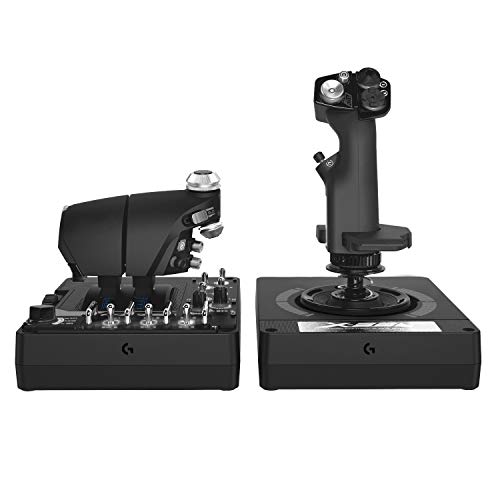
Editor's Pick: Logitech G X56 H.O.T.A.S
Specs
Format | Full HOTAS (stick + dual-lever throttle) |
Sensor | 16-bit non-contact (main axes) |
Controls | 189 programmable |
Stick springs | 4 swappable tension options |
Mini analog stick | Yes (on throttle) |
Lighting | RGB |
Connection | 2x USB wired |
Platforms | PC |
Format
Full HOTAS (stick + dual-lever throttle)
Sensor
16-bit non-contact (main axes)
Controls
189 programmable
Stick springs
4 swappable tension options
Mini analog stick
Yes (on throttle)
Lighting
RGB
Connection
2x USB wired
Platforms
PC
What it does well
The X56 is the pick for the pilot who splits time between MSFS and space or combat sims and wants the most mapping flexibility for the money. The dual-throttle design and the mini analog stick on the throttle shine in Elite Dangerous and Star Citizen as much as in an airliner, and 189 programmable controls handle the busiest cockpit you can build. Combat flying is its own shelf. If Ace Combat 8 is on your list, our best flight sticks for Ace Combat 8 guide covers the licensed options and the third-party binding question.
The four swappable stick springs let you dial tension from feather-light to firm, which is a nice touch for matching the feel to the aircraft. A low, planted base and RGB lighting round it out. It is a genuine alternative to the VelocityOne for buyers who care more about raw button count and cross-sim range than an onboard display.
What you give up
It is PC only. The 16-bit non-contact main axes are good, but the mini stick and some secondary controls are conventional, so it is not uniformly Hall-effect. Reports also flag occasional stick-drift and detent complaints on older units, and the software suite is dated next to newer tools.
It is a big two-piece footprint that wants desk room, and it has been on the market a while, so it feels a generation behind the sim-era VelocityOne in polish even though the control count is higher.
Who it's for
The multi-sim pilot who flies MSFS alongside Elite Dangerous or Star Citizen, wants the biggest programmable-control count and adjustable spring tension, and prefers raw mapping range over an onboard display.
What to skip
Skip the toy-grade sub-budget sticks that have no real throttle axis. A stick alone, with throttle bound to a slider on the base or a keyboard key, misses the point of a HOTAS: the second hand on a dedicated throttle is half the immersion and most of the control. If the budget is that tight, save a little longer for the T.Flight Hotas One rather than buying twice.
Skip a yoke if you mostly fly fighters or combat, where hands-on-throttle-and-stick is the whole point and a column just gets in the way. And skip the Warthog if you fly general aviation only. It is a superb piece of hardware, but the metal weight, the missing twist rudder, and the combat-tuned spring are built for a mission you are not flying. A stick-and-throttle does the GA job for a fraction of the desk space and cost.
Bottom line
If you are learning to fly and want one honest first buy, get the T.Flight Hotas One and grow past it later. If you want lasting precision without enthusiast money, the T.16000M FCS HOTAS is the value benchmark. If you want one controller to fly everything in MSFS 2024, the VelocityOne Flightdeck is the best all-rounder here. If you fly constantly and want a lifetime metal setup, the Warthog is the ceiling. If you split time with space and combat sims, the Logitech G X56 gives you the most mapping range. And if you fly heavy airliners almost exclusively, look at a yoke before any stick.
FAQ
Do you need a HOTAS for Microsoft Flight Simulator 2024?
No, you can fly MSFS 2024 with a mouse and keyboard or a gamepad, and plenty of pilots do. But a HOTAS gives you a real throttle axis and dedicated buttons for flaps, gear, trim, and views, which makes the sim far more immersive and easier to fly precisely. If you plan to spend real time in the cockpit, a stick and throttle is the single upgrade that changes the experience most. Start with the Best Budget pick if you are unsure.
Is a HOTAS or a yoke better for Microsoft Flight Simulator 2024?
It depends on what you fly. For general aviation and combat aircraft, a HOTAS is the natural fit, and for fighters it is clearly the right tool. For heavy airliners, a yoke and a separate throttle quadrant match how those aircraft are actually flown, so tube-liner captains are often better served by a yoke like the Honeycomb Alpha. If you fly a mix, a full HOTAS with a dual-lever throttle, like the VelocityOne Flightdeck, covers the most ground.
What is the best budget HOTAS for MSFS 2024?
The Thrustmaster T.Flight Hotas One is the best budget pick, and the one most beginners should buy first. It gives you a genuine stick and detachable throttle with enough buttons for the essentials, at entry money, and it works on both PC and Xbox. Its potentiometer sensors are coarser than the Hall-effect tier and the plastic build is light, but for learning to fly a Cessna it is more than enough control.
Does the T.Flight Hotas One work with Microsoft Flight Simulator 2024?
Yes. The T.Flight Hotas One plugs into MSFS 2024 on both PC and Xbox Series X and S with no driver drama, and the sim recognizes it out of the box. It is one of the few picks in this guide that runs on console at all, since the step-up Thrustmaster, Turtle Beach, and Logitech kits are PC only. If you fly MSFS 2024 on an Xbox, this is effectively your one HOTAS choice.
HOTAS Warthog vs T.16000M: which should you buy for flight sim?
Buy the T.16000M FCS HOTAS if you want excellent Hall-effect precision, a twist-rudder axis so you can fly without pedals, and Xbox-free PC gaming at a sane price. Buy the HOTAS Warthog if you fly constantly, want an all-metal lifetime setup with a true dual-engine throttle, and are willing to add pedals separately. The Warthog builds better and lasts longer; the T.16000M delivers most of the precision for far less and includes rudder control the Warthog leaves out.
Do you need rudder pedals with a HOTAS for flight simulator?
Not to start. Several picks, including the T.16000M and the T.Flight Hotas One, offer a twist-rudder axis on the stick that handles yaw well enough for general aviation and casual flying. Dedicated pedals add realism and finer rudder control, and they become worth it if you fly a lot, land in crosswinds, or use rudder heavily in combat. The Warthog is the one pick with no twist rudder at all, so it is the setup most likely to push you toward pedals.
Related Articles

Best CPU for MSFS 2024 in 2026: 5 X3D and Intel Picks
Best CPU for MSFS 2024: the Ryzen 7 9800X3D holds 1% lows at photogrammetry hubs where non-X3D chips stutter. Five picks by tier, plus the Intel path.
Aug 29, 2026

Best GPUs for Microsoft Flight Simulator 2024 (2026): Picks by Resolution
The best GPUs for Microsoft Flight Simulator 2024 ranked by cockpit setup: 1080p single-monitor, 1440p sweet-spot, 4K AAA, multi-monitor pro-cockpit, and VR/Pimax. With real benchmark data and honest VRAM reality.
May 25, 2026

How to Choose a Mouse, Keyboard, and Headset
A builder's framework for gaming peripherals: start with the games you play, then match shape, switch, and sound to how you actually use them.
Jun 29, 2026

How Much RAM for Battlefield 6? 16GB Is Enough (2026)
How much RAM for Battlefield 6? 16GB clears it, including 64-player Conquest. Here is when 32GB is actually worth buying, plus the kits we would pick.
Sep 30, 2026

Yeti 2 vs Yeti GX: Condenser or Dynamic Mic in 2026?
Yeti 2 vs Yeti GX: the Yeti 2 pairs a condenser array with AI denoise, while the GX dynamic capsule shrugs off room noise. Here is how to pick the right one.
Sep 29, 2026