Affiliate Disclosure: As an Amazon Associate we earn from qualifying purchases. Some links may earn us a commission at no cost to you.

Best MMO Mouse 2026: 5 MOBA and Raid Picks by Button Count
An MMO mouse moves half your hotbar to your thumb, and once the grid becomes muscle memory there's no going back. The catch is that the category sells one shape to two different players.
MMO mains need the full 12-button grid; MOBA players need four to six buttons they can hit without looking. This guide splits the picks along that line, weighs the real cost in grams, and says where the category stands in 2026 now that Corsair's Key Slider grid has had a full year against Razer's swappable plates.
Our top pick: Razer Naga V2 Pro
The Razer Naga V2 Pro swaps between 2, 6, and 12-button magnetic side plates, which makes it the only mouse here that genuinely covers MMO raids, MOBA queues, and everything else with one purchase.

Quick picks
Pick | Mouse | Side buttons | Where to buy |
|---|---|---|---|
Best Overall | Swappable 2, 6, or 12-button plates | ||
Best for Streamers | 12-grid with adjustable Key Slider | ||
Best Value | Fixed 12-grid | ||
Best Lightweight | 12 buttons, elongated layout | ||
Best for MOBA | 6-button side cluster |
Best Overall
- Mouse
- Side buttons
Swappable 2, 6, or 12-button plates
- Where to buy
Best for Streamers
- Mouse
- Side buttons
12-grid with adjustable Key Slider
- Where to buy
Best Value
- Mouse
- Side buttons
Fixed 12-grid
- Where to buy
Best Lightweight
- Mouse
- Side buttons
12 buttons, elongated layout
- Where to buy
Best for MOBA
- Mouse
- Side buttons
6-button side cluster
- Where to buy
Specs at a glance
Mouse | Weight | Sensor | Battery | Connection |
|---|---|---|---|---|
134 g | Focus Pro 30K | 150 h (300 h Bluetooth) | HyperSpeed + Bluetooth + wired | |
114 g | Marksman 33K | 150 h (500 h Bluetooth) | Slipstream + Bluetooth | |
86 g plus AA battery | Focus Pro 30K | Up to 400 h on Bluetooth | HyperSpeed + Bluetooth | |
89 g | TrueMove Air 18K | Up to 180 h | 2.4 GHz + Bluetooth | |
98 g | Marksman 26K | About 80 h | Slipstream + Bluetooth |
- Weight
134 g
- Sensor
Focus Pro 30K
- Battery
150 h (300 h Bluetooth)
- Connection
HyperSpeed + Bluetooth + wired
- Weight
114 g
- Sensor
Marksman 33K
- Battery
150 h (500 h Bluetooth)
- Connection
Slipstream + Bluetooth
- Weight
86 g plus AA battery
- Sensor
Focus Pro 30K
- Battery
Up to 400 h on Bluetooth
- Connection
HyperSpeed + Bluetooth
- Weight
89 g
- Sensor
TrueMove Air 18K
- Battery
Up to 180 h
- Connection
2.4 GHz + Bluetooth
- Weight
98 g
- Sensor
Marksman 26K
- Battery
About 80 h
- Connection
Slipstream + Bluetooth
How we picked
The grid is the product, so grid ergonomics lead: buttons your thumb can tell apart by feel, rows angled so the middle of the grid isn't a guess, and ideally some accommodation for hand size. Corsair's sliding grid and Razer's swappable plates are the two real answers to that problem; flat, uniform button panels are how misclicks happen at the worst moment. One ergonomic constraint sits outside that list: every grid on this page is built for a right thumb. If you play left-handed, the Naga Left-Handed Edition is close to the only route to a full grid, and our left-handed gaming mouse guide walks through it and the ambidextrous alternatives.
Weight is the honest tax. Standard gaming mice run 50 to 80 grams; this category runs 86 to 134, and you feel the difference in long sessions. MMO play tolerates it because large fast swipes are rare. MOBA play tolerates it less, which is one more reason the six-button picks exist.
Two practical filters round it out. Onboard profiles matter because tank, healer, and DPS characters want different maps, and switching shouldn't require vendor software running in the background. And macro rules matter: one button per action is broadly safe everywhere, while multi-step automation risks bans in several big titles; the FAQ has the per-game reality. Players whose other library is twitch shooters should cross-shop our lightweight FPS mice for the second mouse on the desk.
Two 2026 arrivals did not make the list. Mad Catz revived the MMO 7+ at CES with the old adjustable chassis and a modern sensor, but its software and support history are still unproven, and a grid mouse you cannot remap reliably is a paperweight. Logitech's G502 X Plus keeps turning up in button-count roundups on the strength of thirteen inputs, and it is a fine mouse, but eleven of those sit under the palm rather than the thumb, so it does not solve the hotbar problem this page is about.
Best Overall: Razer Naga V2 Pro
Specs
Side buttons | Swappable 2, 6, or 12-button magnetic plates |
Programmable inputs | 19, plus the adjustable HyperScroll wheel |
Sensor | Focus Pro 30K |
Switches | Gen-3 optical, rated to 90 million clicks |
Connectivity | HyperSpeed wireless, Bluetooth, wired |
Battery | Around 150 hours, roughly double on Bluetooth |
Weight | 134 g |
Side buttons
Swappable 2, 6, or 12-button magnetic plates
Programmable inputs
19, plus the adjustable HyperScroll wheel
Sensor
Focus Pro 30K
Switches
Gen-3 optical, rated to 90 million clicks
Connectivity
HyperSpeed wireless, Bluetooth, wired
Battery
Around 150 hours, roughly double on Bluetooth
Weight
134 g
What it does well
It's RTINGS' top MMO pick and Tom's Hardware called it the most versatile mouse they'd tested, and the plates are why: full grid for raid night, six buttons for MOBA queues, two for everything else, with each plate changing the grip feel less than you'd expect. Five onboard profiles mean the character-specific keymaps travel with the mouse, and the optical switches carry the highest click rating in the group, which matters when one thumb button gets pressed two hundred times a night.
What you give up
Weight and money. At 134 grams it's the heaviest pick here, enough to feel in any game with real aim demands, and it's the most expensive mouse in the category. Deep configuration also lives in Synapse, which not everyone wants resident.
Who it's for
Multi-genre players who want one mouse to cover the MMO alt, the MOBA queue, and the occasional shooter without re-buying.
Best for Streamers: Corsair Scimitar Elite Wireless SE
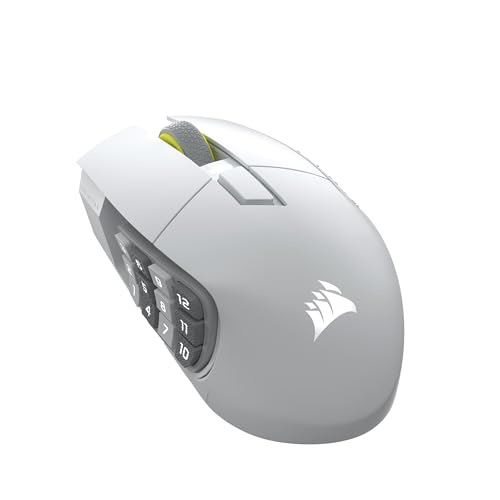
Specs
Side buttons | Fixed 12-button grid on the Key Slider rail |
Programmable inputs | 16 |
Sensor | Marksman 33K |
Connectivity | Slipstream wireless, Bluetooth |
Battery | About 150 hours, up to 500 on Bluetooth |
Weight | 114 g |
Extras | Native Elgato integration; the grid works as a virtual Stream Deck |
Side buttons
Fixed 12-button grid on the Key Slider rail
Programmable inputs
16
Sensor
Marksman 33K
Connectivity
Slipstream wireless, Bluetooth
Battery
About 150 hours, up to 500 on Bluetooth
Weight
114 g
Extras
Native Elgato integration; the grid works as a virtual Stream Deck
What it does well
This is the Computex 2025 launch that made the category interesting again; PC Gamer credited it with knocking Razer off its historic perch. The Key Slider solves the problem swappable plates don't, hand-size fit, by letting smaller hands pull the entire grid back into reach. The Stream Deck trick is genuinely useful: scene switches and audio toggles on the thumb during a stream, hotbars after it. And the Bluetooth battery figure is the best in the class by a wide margin.
What you give up
iCUE, which remains heavyweight software with a divisive reputation. The shell runs large for small hands even with the slider helping, and a few reviewers noted switch feel consistency that doesn't quite match the Naga's optical units.
Who it's for
MMO mains who know they want the full grid permanently, and streamers who can put twelve thumb buttons to work twice.
Best Value: Razer Naga V2 HyperSpeed

Specs
Side buttons | Fixed 12-button grid |
Programmable inputs | 19 |
Sensor | Focus Pro 30K |
Switches | Mechanical Gen-2 |
Connectivity | HyperSpeed wireless, Bluetooth |
Power | Single AA cell |
Battery | Up to 250 hours on the dongle, around 400 on Bluetooth |
Weight | 86 g before the battery |
Side buttons
Fixed 12-button grid
Programmable inputs
19
Sensor
Focus Pro 30K
Switches
Mechanical Gen-2
Connectivity
HyperSpeed wireless, Bluetooth
Power
Single AA cell
Battery
Up to 250 hours on the dongle, around 400 on Bluetooth
Weight
86 g before the battery
What it does well
It's the same sensor as the flagship Naga and the same grid commitment at roughly half the money, in a lighter shell. The AA design is the reason the battery numbers look like typos, and for a mouse that lives on a desk the swap-a-cell workflow is less annoying than it sounds. As pure grid-per-dollar, nothing established beats it.
What you give up
No USB-C recharging, no plate swapping, and mechanical switches with a lower click rating than the Pro's optical units. The shell also reads more functional than premium next to its flagship sibling.
Who it's for
The MMO player who already knows the 12-grid is home and wants the most economical serious way to live there.
Best Lightweight: SteelSeries Aerox 9 Wireless
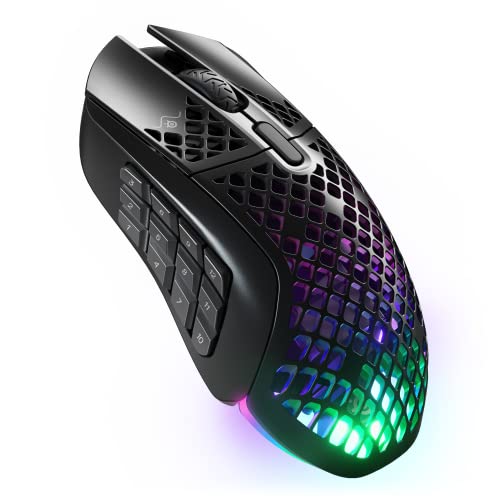
Specs
Side buttons | Twelve, in an elongated two-row layout |
Programmable inputs | 18, counting the tilt wheel |
Sensor | TrueMove Air 18K |
Build | Honeycomb shell with IP54 water and dust resistance |
Connectivity | 2.4 GHz, Bluetooth |
Battery | Up to 180 hours |
Weight | 89 g |
Side buttons
Twelve, in an elongated two-row layout
Programmable inputs
18, counting the tilt wheel
Sensor
TrueMove Air 18K
Build
Honeycomb shell with IP54 water and dust resistance
Connectivity
2.4 GHz, Bluetooth
Battery
Up to 180 hours
Weight
89 g
What it does well
It's the proof the genre doesn't have to weigh 130 grams: a full 12-button complement at 89, light enough that long raid nights stop being a forearm workout. The IP54 rating shrugs off spills that would end other mice, and a World of Warcraft edition exists for players who want the themed version of the same hardware.
What you give up
The sensor is a clear class behind the 30K-plus units elsewhere on this page, fine for hotbars, less flattering for aim-heavy hybrids. The honeycomb shell collects dust you'll eventually clean out of the inside, and Dexerto's critique of the elongated button layout is fair: the rows read less distinctly under the thumb than a true grid.
Who it's for
Long-session raiders whose wrists vote first, and anyone who's killed a mouse with a drink before.
Best for MOBA: Corsair Darkstar Wireless

Specs
Side buttons | Six-button side cluster plus body buttons |
Programmable inputs | 15 |
Sensor | Marksman 26K |
Connectivity | Slipstream wireless, Bluetooth |
Battery | Around 80 hours |
Weight | 98 g |
Side buttons
Six-button side cluster plus body buttons
Programmable inputs
15
Sensor
Marksman 26K
Connectivity
Slipstream wireless, Bluetooth
Battery
Around 80 hours
Weight
98 g
What it does well
MOBA play doesn't want a 12-grid; it wants items, wards, and summoner spells on buttons the thumb finds without thinking, and the Darkstar's sculpted six-button cluster is exactly that. Each button has its own shape and angle, so there's nothing to memorize by row and column. It aims better than the grid mice too, sitting closer to a standard ergonomic shell.
What you give up
Battery is the shortest here at around 80 hours, and one spec deserves a flag: the advertised 2,000 Hz polling tested as functionally 1,000 Hz in RTINGS' analysis, duplicate packets rather than double the rate. Six buttons also won't carry an MMO hotbar, which is the whole point of the split.
Who it's for
League, Dota, and Smite players who found the 12-grid overwhelming and want the buttons they'll use, placed where they'll hit them.
Which MMO mouse fits your game
Raid-heavy MMOs are the case the 12-button grid was built for. World of Warcraft and Final Fantasy XIV both ask for more bound actions than a keyboard's home row can reach mid-pull, so the Naga V2 Pro on its 12-plate and the Scimitar Elite Wireless SE are the two picks that actually cover a raid bar. If your hands run small, the Scimitar's sliding grid is the one to try first, and our guide to ergonomic mice for large and small hands goes deeper on the fit question.
League of Legends, Dota 2, and Smite want the opposite. Four to six thumb buttons hold your summoner spells, wards, and active items, and anything past that becomes a row you hunt for during a fight. The Darkstar Wireless is the pick here, and the six-button plate on the Naga V2 Pro gets you the same shape if you also raid. If that six-button middle ground is what you want and you would rather stay on Logitech, the G502 family covers it with a sniper button and eleven to thirteen programmable controls. Our guide to which Logitech G502 to buy sorts the four models by weight, switches and wireless.
Path of Exile and the wider ARPG shelf sit between the two. Flask and skill rotations reward eight to twelve binds without a raid bar's sprawl, so the Naga V2 HyperSpeed is the value answer and the Aerox 9 is the one to take if long sessions are what hurt. If the rest of the desk is still undecided, start with our guide to choosing a mouse, keyboard, and headset.
Bottom line
If you play across genres, buy the Razer Naga V2 Pro and swap plates as the night demands. If the full grid is permanent and you stream, the Corsair Scimitar Elite Wireless SE is the sharper buy. If money is the metric, the Naga V2 HyperSpeed delivers the grid for less. If weight bothers your wrist, the Aerox 9 is the light way in, and if you're a MOBA player, skip the grid entirely and take the Darkstar. One legacy note: the Logitech G600 is discontinued with no successor, so its longtime loyalists should start with the Naga or Scimitar lines above.
FAQ
Do MMO mice work for MOBAs like League of Legends?
They work, but they're more mouse than the genre needs. MOBA play uses four to six side buttons for items and summoner spells; a full 12-grid mostly adds weight and misclick surface. That's why the swappable six-button plate on the Naga V2 Pro and the dedicated six-button Darkstar exist, and either is the better MOBA buy than a fixed grid.
How long does the 12-button grid take to learn?
Most players report one to two weeks of regular play before the grid goes automatic. The trick is starting small: map the four to six buttons your thumb naturally rests on first, then expand outward. Trying to memorize all twelve at once is how people give up in three days.
Do heavy MMO mice cause wrist fatigue?
They can. The premium grid mice run 114 to 134 grams against 50 to 80 for standard gaming mice, and multi-hour sessions surface the difference. MMO camera control involves fewer large fast swipes than shooters, which is why the weight is tolerable, but wrist-sensitive players should start at the light end with the 89-gram Aerox 9.
Are there left-handed MMO mice?
Barely. The Razer Naga Left-Handed Edition from 2020 remains the only purpose-built option from a major brand, stock is unreliable, and no current-generation version exists as of mid-2026. It's a genuine gap in the market, and left-handed players are mostly left adapting ambidextrous mice with side buttons.
Are hardware macros allowed in WoW, FFXIV, and League?
The safe rule everywhere is one button, one action. FFXIV has a native macro system and tolerates hardware mapping; WoW prohibits automation beyond a single action per press; League treats multi-step automation as cheating. Simple remaps of an ability to a thumb button are fine across the board; recorded sequences that play themselves are where bans live.
Is the Logitech G600 still worth buying?
Not as a first choice. It's officially discontinued with no successor, remaining stock is aging 2012-era hardware, and the community that swore by it has largely migrated to the Naga V2 HyperSpeed and Scimitar lines. Its G-Shift layering trick lives on in software features from the current brands.
Related Articles

Best Gaming Mouse 2026: 5 Picks by Grip and Hand Size
The best gaming mouse for your grip and hand size: 5 tested picks, from 49g FPS flagships to MMO side-button rigs, with every spec compared side by side.
Aug 29, 2026

Best Lightweight Gaming Mice for FPS 2026: 5 Picks, 42-60g
Best lightweight gaming mice for FPS in 2026: 5 picks from 42g to 60g, matched to your grip, hand size, and game, from CS2 flick duels to Apex tracking.
Aug 29, 2026

What Gear Do LoL Pros Use in 2026? Full Peripheral Breakdown
What League of Legends pros actually use in 2026: the mouse, keyboard, monitor, mousepad, and headset Faker, Chovy, Gumayusi, and the LCK / LEC field run on tournament stage.
May 21, 2026

Best Gaming Controllers for PC 2026: 5 Drift-Free Picks
Best gaming controllers for PC in 2026: five drift-free picks, compared on layout, Hall-Effect versus TMR sticks, paddles, remapping, and polling rate.
Aug 20, 2026

What Gear Do Valorant Pros Use? 2026 Setup Breakdown
What gear Valorant pros use in 2026: the mice, monitors, keyboards, and audio behind aspas and Zekken, with VCT usage data and buyer-ready picks for ranked.
Jun 8, 2026