Affiliate Disclosure: As an Amazon Associate we earn from qualifying purchases. Some links may earn us a commission at no cost to you.

5 Best Prebuilt Gaming PCs Under $3,000 (2026): RTX 5080
Every gaming PC at this price runs the same graphics card. Spend three grand on a prebuilt today and you are getting an RTX 5080 whether you buy from Skytech, Acer, or Thermaltake. So the GPU is not the decision. The decision is what sits around it.
The CPU it is paired with sets your 1% lows. The power supply and cooler decide whether the 360W card has any headroom. The chassis decides whether all that heat goes anywhere at sustained 4K load. We ranked five prebuilt gaming PCs you can actually buy on Amazon under three grand, judged on exactly those axes and aimed at 4K.
Our top pick: Skytech Azure 3 9800X3D RTX 5080
The Skytech Azure 3 9800X3D RTX 5080 pairs the best gaming CPU available with the support cast a 360W card actually needs: a true 850W ATX 3.0 unit and a 360mm AIO. It also carries the largest review base of any RTX 5080 prebuilt in this set.

Quick picks
Pick | Build | Best for | Where to buy |
|---|---|---|---|
Best Overall | Most buyers who want the strongest gaming pairing | ||
Best Value | The 9800X3D pairing for less money | ||
Best Premium | Gamers who also do real creator work | ||
Best Compact | 4K performance in a small footprint | ||
Editor's Pick | Hybrid work-and-play buyers who want Win 11 Pro |
Best Overall
- Build
- Best for
Most buyers who want the strongest gaming pairing
- Where to buy
Best Value
- Build
- Best for
The 9800X3D pairing for less money
- Where to buy
Best Premium
- Build
- Best for
Gamers who also do real creator work
- Where to buy
Best Compact
- Build
- Best for
4K performance in a small footprint
- Where to buy
Editor's Pick
- Build
- Best for
Hybrid work-and-play buyers who want Win 11 Pro
- Where to buy
Specs at a glance
Build | CPU | GPU | RAM | Storage | Cooling |
|---|---|---|---|---|---|
Ryzen 7 9800X3D (8C/16T, 96MB 3D V-Cache) | NVIDIA RTX 5080 16GB GDDR7 | 32GB DDR5-6000 | 2TB NVMe SSD | 360mm ARGB AIO | |
Ryzen 7 9800X3D (8C/16T, 96MB 3D V-Cache) | NVIDIA RTX 5080 16GB | 32GB DDR5-6000 | 2TB NVMe Gen4 SSD | 360mm AIO | |
Intel Core Ultra 9 285K (24-core) | NVIDIA RTX 5080 16GB | 32GB DDR5 | 1TB Gen4 SSD | - | |
Ryzen 7 9800X3D (8C/16T, 96MB 3D V-Cache) | NVIDIA RTX 5080 16GB | 32GB DDR5-6000 (ToughRam) | 2TB NVMe M.2 | Liquid-cooled (LCS) | |
Ryzen 7 9800X3D (up to 5.2GHz) | NVIDIA RTX 5080 16GB GDDR7 | 32GB DDR5 | 2TB NVMe SSD | - |
- CPU
Ryzen 7 9800X3D (8C/16T, 96MB 3D V-Cache)
- GPU
NVIDIA RTX 5080 16GB GDDR7
- RAM
32GB DDR5-6000
- Storage
2TB NVMe SSD
- Cooling
360mm ARGB AIO
- CPU
Ryzen 7 9800X3D (8C/16T, 96MB 3D V-Cache)
- GPU
NVIDIA RTX 5080 16GB
- RAM
32GB DDR5-6000
- Storage
2TB NVMe Gen4 SSD
- Cooling
360mm AIO
- CPU
Intel Core Ultra 9 285K (24-core)
- GPU
NVIDIA RTX 5080 16GB
- RAM
32GB DDR5
- Storage
1TB Gen4 SSD
- Cooling
-
- CPU
Ryzen 7 9800X3D (8C/16T, 96MB 3D V-Cache)
- GPU
NVIDIA RTX 5080 16GB
- RAM
32GB DDR5-6000 (ToughRam)
- Storage
2TB NVMe M.2
- Cooling
Liquid-cooled (LCS)
- CPU
Ryzen 7 9800X3D (up to 5.2GHz)
- GPU
NVIDIA RTX 5080 16GB GDDR7
- RAM
32GB DDR5
- Storage
2TB NVMe SSD
- Cooling
-
Benchmarks
Because every pick runs the same RTX 5080, the headline averages below are about what the GPU class delivers at 4K, not about separating the builds. Where the picks actually diverge is 1% lows in CPU-bound and cache-heavy titles, which is exactly where the Ryzen 7 9800X3D pulls ahead of the Core Ultra 9 285K. Read the averages as the floor every pick clears, and the CPU sections below for the part that separates them.
Average frames per second across a mixed basket at 4K, native resolution. Every pick here uses the same RTX 5080, so this is the GPU-class floor.
- 134 FPS
- 132 FPS
One of the heaviest titles available, run native at 4K Ultra. The 1% low is where the 9800X3D's 3D V-Cache earns its place.
- RTX 5080 + 9800X3D (average)106 FPS
- RTX 5080 + 9800X3D (1% low)72 FPS
How we picked
At this tier the graphics card is a constant, so we ranked on the three things that actually change between builds. First is CPU pairing. The Ryzen 7 9800X3D's 96MB of 3D V-Cache is the single biggest lever on 1% lows at 4K, which is why four of our five picks use it. The Core Ultra 9 285K is the exception, and it earns its spot on multi-threaded work rather than peak gaming.
Second is power and cooling headroom. The RTX 5080 pulls around 360W, and a 750W supply leaves almost nothing for transient spikes. We treated an 850W ATX 3.0 unit with a native 12V-2x6 lead as the floor, and a 360mm AIO as the baseline for keeping the X3D off its thermal limit during long sessions.
Third is the chassis and its airflow. A 360W card dumps real heat, and a case that cannot move it will throttle the whole machine at sustained 4K load. We favored builds whose cooling matched their wattage, and we called out the trade-off on the compact pick where physics works against you.
Everything here ships from Amazon, so the warranty and return path is the one you already know. If you would rather assemble the parts yourself, our how to build a gaming PC framework walks through the same decisions from the DIY side.
Best Overall: Skytech Azure 3 9800X3D RTX 5080
Specs
CPU | Ryzen 7 9800X3D (8C/16T, 96MB 3D V-Cache) |
GPU | NVIDIA RTX 5080 16GB GDDR7 |
RAM | 32GB DDR5-6000 |
Storage | 2TB NVMe SSD |
PSU | 850W 80+ Gold (ATX 3.0) |
Cooling | 360mm ARGB AIO |
OS / Wi-Fi | Windows 11, Wi-Fi |
CPU
Ryzen 7 9800X3D (8C/16T, 96MB 3D V-Cache)
GPU
NVIDIA RTX 5080 16GB GDDR7
RAM
32GB DDR5-6000
Storage
2TB NVMe SSD
PSU
850W 80+ Gold (ATX 3.0)
Cooling
360mm ARGB AIO
OS / Wi-Fi
Windows 11, Wi-Fi
What it does well
Best-balanced parts list at the price. 850W ATX 3.0 PSU has the native 12V-2x6 connector the RTX 5080 wants, no adapters. 360mm AIO keeps the 9800X3D off its thermal limit where the 3D V-Cache advantage shows up. 2TB NVMe. Large, mostly positive review base.
Buyers a tier down can get most of this experience for less in our guide to the best prebuilt gaming PCs at the next budget tier down, but at this budget the 9800X3D pairing is what your money should be buying.
What you give up
A big conventional mid-tower, not a showpiece chassis. Front-panel I/O and bundled peripherals are functional, not premium. The X670-board variant of this listing has a lower review average, so confirm the standard SKU at checkout.
Who it's for
The 4K-or-high-refresh-1440p buyer who wants the strongest gaming CPU pairing available and does not want to think about whether cooling or PSU can keep up. The default recommendation for most people at this budget.
Best Value: STORMCRAFT Phantom 9800X3D RTX 5080

Specs
CPU | Ryzen 7 9800X3D (8C/16T, 96MB 3D V-Cache) |
GPU | NVIDIA RTX 5080 16GB |
RAM | 32GB DDR5-6000 |
Storage | 2TB NVMe Gen4 SSD |
Motherboard | B850 chipset |
PSU | 850W |
Cooling | 360mm AIO |
OS | Windows 11 Home |
CPU
Ryzen 7 9800X3D (8C/16T, 96MB 3D V-Cache)
GPU
NVIDIA RTX 5080 16GB
RAM
32GB DDR5-6000
Storage
2TB NVMe Gen4 SSD
Motherboard
B850 chipset
PSU
850W
Cooling
360mm AIO
OS
Windows 11 Home
What it does well
Delivers the exact gaming pairing that matters (9800X3D for 1% lows, RTX 5080 for frames) for less money than the headline pick. 2TB Gen4 NVMe and a 360mm AIO are not cut to hit the price. Includes a keyboard and mouse to get started.
What you give up
B850 board is fine for a non-overclocked X3D chip but gives up rear I/O and upgrade headroom versus a higher-tier board. Smaller review base than the Skytech. Bundled RGB peripherals are throwaway.
Buyers have flagged that the bundled RGB keyboard and mouse are throwaway, so plan to swap them. Confirm the 850W unit is ATX 3.0 with a native 12V-2x6 lead if you care about a clean cable path to the card.
Who it's for
The value-focused 4K buyer who wants the 9800X3D pairing and is happy to skip the brand-name chassis and premium board to keep the most money in their pocket.
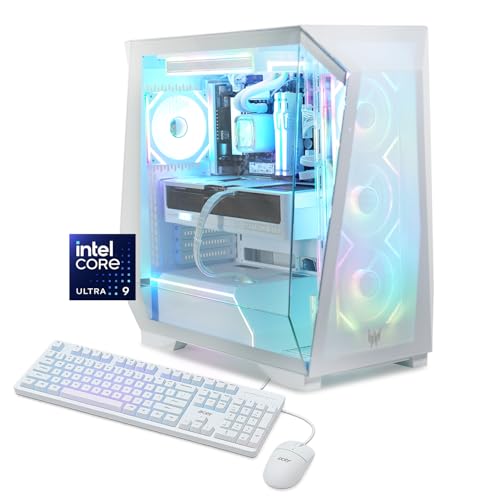
Best Premium: Acer Predator Orion 6000 285K RTX 5080
Specs
CPU | Intel Core Ultra 9 285K (24-core) |
GPU | NVIDIA RTX 5080 16GB |
RAM | 32GB DDR5 |
Storage | 1TB Gen4 SSD |
Networking | Wi-Fi 7 |
OS | Windows 11 Home |
Chassis | Predator Orion 6000 tower |
CPU
Intel Core Ultra 9 285K (24-core)
GPU
NVIDIA RTX 5080 16GB
RAM
32GB DDR5
Storage
1TB Gen4 SSD
Networking
Wi-Fi 7
OS
Windows 11 Home
Chassis
Predator Orion 6000 tower
What it does well
Strong build quality and a recognizable warranty/RMA path versus smaller system integrators. The 24-core 285K is genuinely faster than an 8-core X3D in rendering, compiling, and heavy streaming-while-gaming. Wi-Fi 7 and a clean factory build. Healthy stock.
What you give up
In pure gaming, the 285K trails the 9800X3D on 1% lows in cache-sensitive 4K titles, so you pay a premium for a CPU that is not the gaming champion. Ships with 1TB where the X3D builds bring 2TB, so budget for a second drive. Sits at the top of the price band.
The 1TB boot drive fills fast with a 4K library, so budget for a second drive early. Our best PCIe 5.0 SSDs for gaming list covers the Gen5 options if you want the fastest add-in.
Who it's for
The buyer who games but also does real creator or productivity work, and who values a big-brand warranty channel over squeezing out the last few 1% lows.
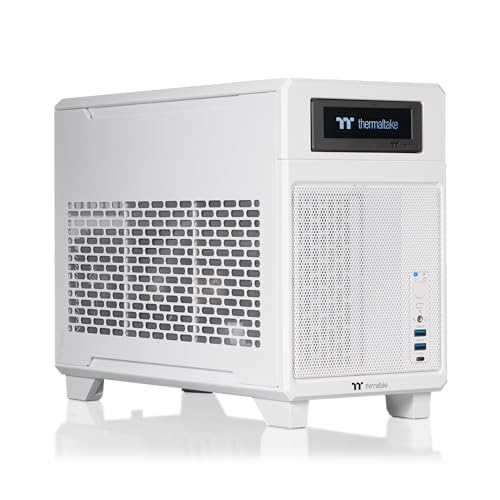
Best Compact: Thermaltake Traveler 9880S RTX 5080
Specs
CPU | Ryzen 7 9800X3D (8C/16T, 96MB 3D V-Cache) |
GPU | NVIDIA RTX 5080 16GB |
RAM | 32GB DDR5-6000 (ToughRam) |
Storage | 2TB NVMe M.2 |
Form factor | Mini-ITX |
Cooling | Liquid-cooled (LCS) |
OS | Windows 11 |
CPU
Ryzen 7 9800X3D (8C/16T, 96MB 3D V-Cache)
GPU
NVIDIA RTX 5080 16GB
RAM
32GB DDR5-6000 (ToughRam)
Storage
2TB NVMe M.2
Form factor
Mini-ITX
Cooling
Liquid-cooled (LCS)
OS
Windows 11
What it does well
No compromise on the parts that matter: same X3D + RTX 5080 + 32GB + 2TB as the full-size champion, in a footprint that fits where a tower will not. ToughRam and a liquid loop are a step above generic SI components. Genuinely portable for LAN use.
If small form factor is the whole point for you, it is worth comparing this against the field in our best Mini-ITX prebuilt gaming PCs roundup, where sustained-load thermals are the deciding factor.
What you give up
Mini-ITX means tighter thermals under marathon 4K load, fewer expansion slots, and a single M.2 path for upgrades. SFF builds run warmer and louder than an equivalent tower at the same load. Less internal room for a future GPU swap.
Who it's for
The space-constrained or LAN-going buyer who refuses to give up RTX 5080 4K performance to get a small machine, and accepts the SFF thermal trade-off.
Editor's Pick: ZOTAC MEK 9800X3D RTX 5080

Specs
CPU | Ryzen 7 9800X3D (up to 5.2GHz) |
GPU | NVIDIA RTX 5080 16GB GDDR7 |
RAM | 32GB DDR5 |
Storage | 2TB NVMe SSD |
PSU | 850W 80+ Gold |
Networking | Wi-Fi 6E |
OS | Windows 11 Pro |
CPU
Ryzen 7 9800X3D (up to 5.2GHz)
GPU
NVIDIA RTX 5080 16GB GDDR7
RAM
32GB DDR5
Storage
2TB NVMe SSD
PSU
850W 80+ Gold
Networking
Wi-Fi 6E
OS
Windows 11 Pro
What it does well
Identical gaming-relevant pairing to Best Overall, plus Windows 11 Pro at no obvious premium. 850W 80+ Gold and 2TB NVMe match the support cast of the better-known picks. ZOTAC is an established GPU maker. Solid stock.
What you give up
Smaller review base than the Skytech, so less long-tail reliability data. The MEK chassis and bundled extras are utilitarian. If you do not need Pro, you gain nothing over the cheaper picks.
Who it's for
The hybrid work-and-play buyer who games at 4K but also wants Windows 11 Pro features for a home office, in a build that does not cut any gaming-relevant corner.
What to skip in this segment
A few configurations look fine on a spec sheet and bite you under load. Skip any RTX 5080 build that pairs the card with a 750W supply. The card alone wants the better part of that budget, and transient spikes will trip an undersized unit. An 850W ATX 3.0 floor is not a luxury here.
Skip the air-cooled 9800X3D builds at this tier. The X3D chip runs into its thermal ceiling sooner without a liquid loop, and that is exactly when the 3D V-Cache advantage you paid for starts to fade. Skip the 1TB-only configurations unless you are happy managing your library, and skip anything running RAM slower than DDR5-6000, which the Ryzen platform genuinely benefits from.
How to choose a prebuilt gaming PC under three grand
Start with the CPU, because the graphics card is effectively fixed at this budget. The Ryzen 7 9800X3D and its 96MB of 3D V-Cache is the default answer for a gaming-first buyer: it is the biggest single lever on 1% lows, and 1% lows are what you actually feel as stutter. Reach for the Core Ultra 9 285K only if rendering, compiling, or streaming encode share the machine with games. Anything further down the stack is a listing saving money on the part that sets your frame pacing.
Then check the power supply, and treat 850W with an ATX 3.0 rating and a native 12V-2x6 lead as the floor. The card pulls around 360W on its own and spikes well above that for milliseconds at a time, and a 750W unit has to absorb those transients with a high-end CPU already drawing from the same budget. A build that economizes here is the one that shuts down under load rather than at the checkout. One tier up the math gets stricter rather than merely bigger: our RTX 5090 prebuilt picks are ranked on which builders ship 1200W instead of settling for the 1000W minimum.
Cooling and memory are where the remaining corners get cut. A 360mm AIO is the baseline for keeping an X3D chip off its thermal ceiling through a long session, and case airflow has to match a 360W card rather than merely look the part. For memory, DDR5-6000 is the speed the Ryzen platform genuinely wants and 32GB is the practical target. On storage, treat 2TB as the starting point, because a single 1TB drive fills fast once a 4K library lands on it.
Prebuilt or build it yourself?
Assembling the same parts yourself saves real money at this budget, usually somewhere between 15 and 25 percent once you account for the assembly, testing, and single-point warranty a system integrator bundles in. That gap is roughly the difference between a graphics card tier, or between one drive and two, in exchange for an afternoon of your time and the responsibility for anything that arrives dead.
Buy the prebuilt when you want one warranty covering every part and a machine that arrives tested. Build it yourself when you want to choose each component, when you already own a case or power supply worth carrying over, or when you would rather put the assembly premium into silicon. Our 1440p and 4K DIY build guide covers the same 4K target from the parts-list side, and our DIY build a tier down shows how far the money goes if you step back from RTX 5080 territory.
For most buyers at this tier the prebuilt wins on time rather than on price, and the five machines above are the ones where that trade is worth making. If three grand is more than you need, our prebuilt gaming PCs under $2,500 sit one step down, where the RTX 5070 Ti does the 4K work for less.
Bottom line
If you want the strongest gaming build for the money, buy the Skytech Azure 3 9800X3D RTX 5080. If you want the same silicon for less, the STORMCRAFT Phantom 9800X3D RTX 5080 is the value call. If you do real creator work alongside gaming, the Acer Predator Orion 6000 285K RTX 5080 trades 1% lows for cores and a big-brand warranty. If you need it small, the Thermaltake Traveler 9880S RTX 5080 gives up nothing but chassis room. And if you want Windows 11 Pro for a home office, the ZOTAC MEK 9800X3D RTX 5080 is the one to get.
FAQ
Is an RTX 5080 prebuilt enough for 4K gaming in 2026?
Yes. The RTX 5080 averages around 134 FPS across a mixed game basket at native 4K, and turning on DLSS 4 frame generation pushes the heaviest titles well past 200 FPS. Every pick here clears comfortable 4K frame rates. The thing that varies between them is not the average frame rate, it is how steady the 1% lows stay, which comes down to the CPU.
Does the CPU matter if every pick has the same RTX 5080?
It matters more than the spec sheet suggests. Since every build uses the same RTX 5080, the GPU is a constant. The CPU is what sets your 1% lows, especially in cache-sensitive and CPU-bound titles. That is why four of our five picks use the Ryzen 7 9800X3D, and why the one Intel build earns its spot on creator work rather than peak gaming.
Why is the Ryzen 7 9800X3D the recommended pairing over the Core Ultra 9 285K for gaming?
The 9800X3D's 96MB of 3D V-Cache is the single biggest lever on 1% lows in games. The Core Ultra 9 285K is a faster chip for rendering, compiling, and heavy multitasking thanks to its 24 cores, but in pure gaming it trails the X3D on frame consistency at 4K. Buy the 285K build if productivity is part of your day, and the 9800X3D builds if gaming is the priority.
Is 850W enough PSU for an RTX 5080 prebuilt?
850W is the floor we recommend, not a stretch. The RTX 5080 pulls around 360W, and an 850W 80+ Gold ATX 3.0 unit leaves real headroom for transient spikes and the rest of the system. A 750W supply technically works but sits on the edge, which is why we treated 850W ATX 3.0 with a native 12V-2x6 lead as the baseline.
Should I buy a prebuilt or build a $3,000 gaming PC myself?
Build it yourself if you enjoy the process and want to choose every part. You can usually get slightly more performance per dollar going DIY. Buy a prebuilt if you value the time saved, a single warranty contact, and a machine that ships assembled and tested. At this budget the prebuilt premium is small, and the Amazon return backstop is real peace of mind.
Will these prebuilts run demanding games at high frame rates without DLSS frame generation?
Yes. At native 4K the RTX 5080 already clears comfortable frame rates in most titles, and the 9800X3D keeps the 1% lows steady. The very heaviest path-traced games are where you will want DLSS 4 frame generation to stay above 100 FPS, but raster and lighter ray-traced titles run well natively. Frame generation is a bonus on top, not a crutch these builds need.
Related Articles

Best Prebuilt Gaming PCs Under $2,000 in 2026
The five best prebuilt gaming PCs under $2,000 in 2026, all running RTX 5070 + DLSS 4. Tested picks from Skytech, Alienware, and iBUYPOWER with real buyer context.
May 27, 2026

Best Mini-ITX Prebuilt Gaming PCs (2026): Compact Rigs That Actually Sustain Load
The 5 best mini-ITX prebuilt gaming PCs in 2026, ranked by thermal headroom and chassis volume, from ultra-portable 8.1L SFF to full 18L ITX systems.
May 27, 2026

Best $2,000 Gaming PC Build 2026: RTX 5080 + Ryzen 9
Build the best $2,000 gaming PC for 2026 — RTX 5080 and Ryzen 9 9900X parts list, 4K Ultra performance, streaming-ready, with a clear upgrade path.
Aug 3, 2025

How to Build a Gaming PC: A Buyer's Decision Framework
Build a gaming PC the right way: GPU-first ordering, CPU sized to match, motherboard overspend avoided, and the PSU/case rules that protect the build.
May 17, 2026

Find My PC Build (2026): Match a Gaming PC to Your Budget
Match a gaming PC to your budget, resolution, or favorite game. 14 builds with live Amazon prices — pick the door (budget, monitor, or game), land on the build.
May 12, 2026