Affiliate Disclosure: As an Amazon Associate we earn from qualifying purchases. Some links may earn us a commission at no cost to you.

How to Choose a Power Supply for Your Gaming PC (2026)
Your power supply is the one component that can take everything else in the case down with it, and it is usually the first part people cut to save money. That trade rarely ends well.
Choosing a PSU is a real decision, not a wattage lookup. You size it to how your graphics card behaves under load, pick an efficiency tier that matches how you run the machine, match the connector standard your GPU expects, and buy from a maker whose engineering you trust. This guide walks the whole decision in order so you end up with a unit you never have to think about again.
Start with your GPU, not the CPU
The graphics card sets the power floor for a gaming build, so start there. A modern GPU draws far more than a modern CPU under load, and it is the part whose demand swings hardest from moment to moment. Pick your card first, learn its rated board power, then build the rest of the power budget around it.
The CPU matters, but it is a smaller and steadier draw. If you size the supply to the processor and treat the GPU as an afterthought, you end up short on headroom exactly when the card needs it most.
How much power supply wattage you need
Add up the real draw of your parts, then leave headroom on top. A single-GPU gaming build with a mainstream card is comfortable on 750 to 850 watts. Step up to a flagship card and you want 1000 watts or more.
The headroom is not waste. It keeps the unit running in its efficient, quiet band instead of straining near its ceiling, and it leaves room for a future upgrade. If you want the full sizing math with a parts-by-parts breakdown, our guide on how much wattage you need covers it. The short version: buy a little more than today's number, not exactly it.
Efficiency: what 80 Plus and Cybenetics buy you
An efficiency rating tells you how much wall power becomes usable power and how much leaks out as heat. Higher tiers waste less, which means less heat inside the case, quieter fans, and a slightly smaller power bill over years of use.
Gold is the sweet spot for almost everyone, and it is where the best value lives. Bronze units work, but they run hotter and the savings up front rarely pay off. Platinum and Titanium shave off a little more waste and usually come on better-built units, so you are often buying the quality that rides along with the tier as much as the efficiency itself. The newer Cybenetics ratings measure the same idea with tighter, more honest testing, so treat a Cybenetics Gold or Platinum badge as a strong signal.
ATX 3.1 and the 12V-2x6 connector
This is the part people get wrong. Modern graphics cards pull sharp power spikes that last only microseconds but reach well above the card's rated draw. Older supplies were not designed for that behavior and can trip their protection or misbehave. The ATX 3.1 standard exists specifically to tolerate these spikes, and it pairs with the 12V-2x6 connector that current high-end cards use. The follow-on question is whether you need a native 12V-2x6 cable or can simply run the adapter that came in the GPU box, and the answer changes by card tier. We took the adapter-versus-native-cable call on an RTX 5070 Ti apart separately.
If you are buying or heading toward an RTX 50-series card, get a unit with native ATX 3.1 and a native 12V-2x6 cable rather than an adapter hanging off an older supply. A native cable is cleaner, safer, and one less failure point. Our roundup of the best ATX 3.1 power supplies goes deeper on the units that do this right, and if you are building around the very top of the stack, the best power supplies for an RTX 5090 covers the high-wattage end.
Modular versus non-modular power supplies
Modular means the cables detach from the supply so you only install the ones you need. Fully modular units make cable management and airflow easier and leave your case cleaner, which is why most quality supplies now ship that way.
Semi-modular keeps the essential cables fixed and lets you add the rest, which is a fine middle ground. Non-modular hard-wires everything, which is cheaper but leaves a bundle of unused cables to hide. For most builds a fully modular unit is worth it, especially in a smaller case where every spare cable fights you for room.
Brands versus makers: who actually built it
The name on the box is not always the company that engineered the unit inside. Most brands sell across quality tiers, and a single brand can offer both an excellent supply and a budget one built by a different maker to a lower standard. That is the trap. A premium line from a good brand can be a genuinely great unit, while the entry line from the same brand is something you would never put in an expensive build.
Learn the maker behind the model, not just the logo. Seasonic builds its own supplies and is a safe default. The higher Corsair lines run on strong platforms, while the cheapest ones are not the same class. Skip the bargain-bin brands entirely for anything you care about. When in doubt, a trusted maker at Gold efficiency with a long warranty is rarely a mistake.
Recommended power supplies by scenario
Those rules point at a short list of units that get the decision right. Each one below is a real ATX 3.1 supply from a maker worth trusting, sorted by the kind of build it fits. Pick the one that matches your card and your budget.
Best for most builds: Corsair RM850e 850W ATX 3.1

Specs
Wattage | 850W |
Efficiency | Cybenetics Gold (80+ Gold) |
Standard | ATX 3.1 / PCIe 5.1 |
GPU connector | Native 12V-2x6 |
Modularity | Fully modular |
Capacitors | 105°C-rated |
Warranty | 7 years |
Wattage
850W
Efficiency
Cybenetics Gold (80+ Gold)
Standard
ATX 3.1 / PCIe 5.1
GPU connector
Native 12V-2x6
Modularity
Fully modular
Capacitors
105°C-rated
Warranty
7 years
For the vast majority of gaming builds this is the unit to beat. 850 watts covers a single graphics card up to a 5070 Ti or 5080 with room to spare, the Cybenetics Gold rating keeps it cool and quiet, and the native 12V-2x6 cable plugs a 50-series card in without an adapter. It is fully modular, runs on a proven platform, and asks nothing of you after install.
You give up a little efficiency headroom compared with a Platinum unit, and 850 watts leaves less room if you later jump to a flagship card. Neither matters for the build it is aimed at. If you run one GPU up to a 5080 and want a quality supply you can forget about, start here.
Best for RTX 5090 and high-wattage builds: Corsair RM1200e 1200W ATX 3.1

Specs
Wattage | 1200W |
Efficiency | Cybenetics Platinum (80+ Gold) |
Standard | ATX 3.1 / PCIe 5.1 |
GPU connector | Native 12V-2x6 |
Modularity | Fully modular |
Capacitors | 105°C-rated |
Warranty | 7 years |
Wattage
1200W
Efficiency
Cybenetics Platinum (80+ Gold)
Standard
ATX 3.1 / PCIe 5.1
GPU connector
Native 12V-2x6
Modularity
Fully modular
Capacitors
105°C-rated
Warranty
7 years
A flagship card pulls the biggest spikes of anything in a gaming PC, and pairing one with a hungry CPU can push a build past what a mainstream supply should carry. 1200 watts of ATX 3.1 with a native 12V-2x6 cable gives that class of build both the raw headroom and the spike tolerance it wants. It is fully modular, efficient, and shares the same set-and-forget character as its smaller sibling.
It is more supply than a mainstream build needs, and the extra capacity sits idle below a 5080. That is the point though: if you are running an RTX 5090, or a 5080 behind an overclock-heavy CPU, this is the safe amount of headroom to carry.
Best quality on a budget: be quiet! Pure Power 13 M 750W

Specs
Wattage | 750W |
Efficiency | 80+ Gold (up to ~94%) |
Standard | ATX 3.1 / PCIe 5.1 |
GPU connector | Native 12V-2x6 |
Modularity | Fully modular |
Fan | Semi-passive 120mm |
Warranty | 10 years |
Wattage
750W
Efficiency
80+ Gold (up to ~94%)
Standard
ATX 3.1 / PCIe 5.1
GPU connector
Native 12V-2x6
Modularity
Fully modular
Fan
Semi-passive 120mm
Warranty
10 years
You do not have to spend flagship money to get a trustworthy supply, and this is the proof. It is genuine ATX 3.1 with a native 12V-2x6 cable, an 80 Plus Gold rating that reaches into the low nineties, a single strong 12V rail, and a quiet semi-passive fan that stays off at low load. The 10-year warranty is a real vote of confidence from the maker. It is the same unit our best PSU for RTX 5060 Ti roundup names as its value pick, where a 650W sibling takes the top slot for that card.
750 watts is a tighter ceiling, so it suits a 5060 or 5070-class card rather than something hungrier, and it leaves less room for a big GPU upgrade later. For a value build that refuses to gamble on an unknown supply, it hits the mark. Builders sizing that tier around an RTX 5070 specifically can compare the best 750W PSUs for RTX 5070 builds on efficiency tier, OEM, and connector standard.
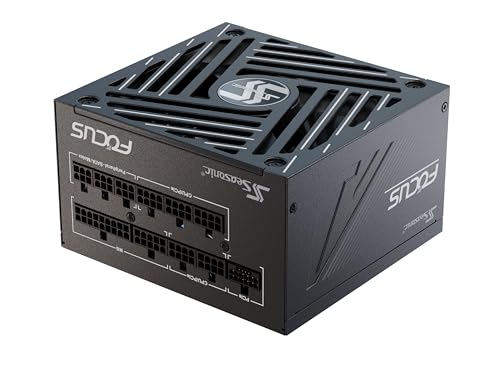
Best premium: Seasonic Focus GX-850 ATX 3.1
Specs
Wattage | 850W |
Efficiency | Cybenetics Platinum |
Standard | ATX 3.1 / PCIe 5.1 |
GPU connector | Native 12V-2x6 |
Modularity | Fully modular |
OEM | Seasonic in-house (Tier A) |
Warranty | 10 years |
Wattage
850W
Efficiency
Cybenetics Platinum
Standard
ATX 3.1 / PCIe 5.1
GPU connector
Native 12V-2x6
Modularity
Fully modular
OEM
Seasonic in-house (Tier A)
Warranty
10 years
This is the answer to the brand-versus-maker question in one unit. Seasonic builds its own supplies, so the badge and the engineering are the same trusted thing. The Focus GX-850 pairs Cybenetics Platinum efficiency with the ripple control and near-silent fan behavior Seasonic is known for, plus a 10-year warranty.
It costs more than the mainstream Corsair pick for the same 850 watts, and for a typical gamer the quality margin is real but incremental. If you want the highest-confidence unit for a long-lived build and are happy to pay for in-house engineering, this is it. One caution: several Focus GX-850 listings exist across older and newer revisions, so confirm you are getting the ATX 3.1 version.
Bottom line
The PSU is not the place to save the last few dollars. Size it to your graphics card and its spikes, not just a wattage number. Buy Gold efficiency or better, insist on native ATX 3.1 and a 12V-2x6 cable for a 50-series card, and choose a maker whose engineering you trust.
If you want one recommendation to cover most builds, the Corsair RM850e does the job without drama. For the full framework on pairing your supply with the rest of the build, see our PSU, cooler, and case guide.
FAQ
How many watts of power supply do I need for a gaming PC?
Size the supply to your graphics card, since it sets the floor. A single-GPU build with a mainstream card is comfortable on 750 to 850 watts, and a flagship card wants 1000 watts or more. Add headroom on top of your parts' real draw so the unit runs in its quiet, efficient band and has room for a future upgrade.
Is 80 Plus Gold worth it over Bronze?
For almost everyone, yes. Gold wastes less power as heat, which means a cooler case, quieter fans, and a slightly lower power bill across years of use. Bronze units work, but they run hotter and the up-front savings rarely pay off. Gold is the sweet spot where value and quality meet, which is why most supplies worth buying carry at least that rating.
What is ATX 3.1, and do I need it for an RTX 50-series GPU?
ATX 3.1 is the current supply standard built to tolerate the sharp, microsecond power spikes modern graphics cards produce, and it pairs with the 12V-2x6 connector those cards use. If you are buying or upgrading to an RTX 50-series card, get a unit with native ATX 3.1 and a native 12V-2x6 cable rather than an adapter on an older supply. It is cleaner, safer, and one less thing to fail.
Is a modular power supply worth it?
For most builds, yes. A fully modular supply lets you install only the cables you need, which makes for cleaner cable management, better airflow, and a tidier case. It matters most in smaller cases where spare cables fight you for room. Semi-modular is a fine middle ground, and non-modular is cheaper but leaves you hiding a bundle of unused cables.
Do cheaper power supplies from a good brand use the same parts as the expensive ones?
Often no. A single brand usually sells across quality tiers, and the budget line can be built by a different maker to a lower standard than the premium line. The name on the box is not a guarantee. Learn the platform behind the specific model, not just the logo, and lean toward a trusted maker at Gold efficiency with a long warranty.
How long should a power supply last?
A quality unit should comfortably outlast the rest of your build, which is why the good ones carry 7 to 10-year warranties. Treat the warranty length as a signal of how much the maker trusts its own engineering. A trustworthy supply is often the one part you carry from one build into the next, so buying well once saves you money over time.
Related Articles

How Much PSU Wattage for a Gaming PC? 9 GPU Tiers (2026)
How much PSU wattage do you need? Sized floors for 9 GeForce and Radeon tiers, why 850W is usually overkill for gaming, and an ATX 3.1 pick at each tier.
Sep 22, 2026

Best ATX 3.1 Power Supplies (2026): 5 Native 12V-2x6 Picks
Five ATX 3.1 power supplies with native 12V-2x6 connectors, Cybenetics Gold through Platinum, all 850W, plus how to spot an ATX 3.0 unit sold with an adapter.
Aug 14, 2026

Best RTX 5090 PSU 2026: Why 1000W Isn't Enough (5 Picks)
The best PSU for an RTX 5090 is not Nvidia's 1000W floor. Transient spikes explained, five 1200W to 1500W ATX 3.1 picks, and 12V-2x6 cable notes that matter.
Aug 10, 2026

How to Choose a PSU, Cooler, and Case
A builder's framework for the chassis side of a PC: size the PSU with sane headroom, match the cooler to the chip, and pick a case that fits and breathes.
Jun 29, 2026

Best Gaming Monitors for the RX 7900 XT (2026): 5 Picks
The best monitor for RX 7900 XT owners, matched to real frame rates: a 1440p QD-OLED, mini-LED value, a 34-inch ultrawide, and when 4K at 160Hz makes sense.
Oct 17, 2026