Affiliate Disclosure: As an Amazon Associate we earn from qualifying purchases. Some links may earn us a commission at no cost to you.

Is the Arc B570 Enough for 1080p in 2026? 10GB Verdict
Yes. The Arc B570 is enough for 1080p gaming in 2026. In modern DX12 and Vulkan titles it holds above 60 fps at native resolution, and it manages that even with ray tracing switched on in Cyberpunk 2077. The frame rate is not what should decide this purchase.
Three other things should. Resizable BAR has to be available on your platform. An older DX11 library is where this architecture is still weakest. And the 10GB buffer clears our 1080p minimum while sitting a step below the 12GB we prefer for high refresh. Get those right and this is the card to buy in this budget 1080p band.
At a glance
Card | VRAM | Board power | Best for | Buy |
|---|---|---|---|---|
10GB GDDR6 | 150W | Native 1080p on a tight budget | ||
12GB GDDR6 | 190W | 1080p ultra and high refresh |
- VRAM
10GB GDDR6
- Board power
150W
- Best for
Native 1080p on a tight budget
- Buy
- VRAM
12GB GDDR6
- Board power
190W
- Best for
1080p ultra and high refresh
- Buy
Is the B570 enough for 1080p?
The sufficiency question splits five ways, and the answer flips depending on which row you live in. Our framework for sizing a card to the screen in front of it is how we choose a GPU and a matching monitor, and the short version is that resolution and refresh rate set the target before any card enters the conversation.
Scenario | What happens | Better buy |
|---|---|---|
Native 1080p, modern DX12 and Vulkan titles | Holds above 60 fps without upscaling | |
1080p ultra in the heaviest 2026 releases | Buffer headroom starts to matter | |
1080p high refresh above 120 Hz | The 1% lows set the ceiling, not the average | |
Tight build budget with a 500W supply | 150W board power leaves the PSU alone | |
Planning a move to 1440p later | Only one of these has the headroom |
Native 1080p, modern DX12 and Vulkan titles
- What happens
Holds above 60 fps without upscaling
- Better buy
1080p ultra in the heaviest 2026 releases
- What happens
Buffer headroom starts to matter
- Better buy
1080p high refresh above 120 Hz
- What happens
The 1% lows set the ceiling, not the average
- Better buy
Tight build budget with a 500W supply
- What happens
150W board power leaves the PSU alone
- Better buy
Planning a move to 1440p later
- What happens
Only one of these has the headroom
- Better buy
Two rows go to the cheaper card and three go to the more expensive one. That split is the honest shape of this decision. If you are reading this because you want a 1080p machine that works now and costs as little as possible, you are in the first and fourth rows, and the B570 is your card. If any part of your plan involves ultra settings in the heaviest current releases, a high-refresh panel, or a resolution bump later, you are buying the B580 and the rest of this article is about why.
Benchmarks
Aggregate suite numbers tell this story better than any single game does, because the B570's position is consistent rather than spiky. For a wider view of the band, see our 1080p picks by refresh tier.
Average frames per second across a modern test suite at 1080p, highest settings, no upscaling.
- Arc B58087 FPS
- RTX 406076 FPS
- Arc B57071 FPS
Read the gaps rather than the absolutes. The B570 lands about 7% behind the RTX 4060 on average frames and about 11% behind it on 1% lows, which is close enough that neither card wins the comparison outright. Against its own sibling it gives up roughly 15%, a figure three independent measurements put between 12% and 18%. And it beats the Arc A770, the flagship of the previous generation, which is a reasonable thing for a budget card to do two years later.
The pick that clears 1080p: ASRock Arc B570 Challenger OC

Specs
Chip | Intel Arc B570 (Xe2 Battlemage) |
Xe2 cores | 18 |
VRAM | 10GB GDDR6 |
Memory bus | 160-bit, 380 GB/s |
Boost clock | 2600 MHz (ASRock OC) |
Memory speed | 19 Gbps |
Board power | 150W TBP |
Outputs | HDMI 2.1a, DisplayPort 2.1 |
Chip
Intel Arc B570 (Xe2 Battlemage)
Xe2 cores
18
VRAM
10GB GDDR6
Memory bus
160-bit, 380 GB/s
Boost clock
2600 MHz (ASRock OC)
Memory speed
19 Gbps
Board power
150W TBP
Outputs
HDMI 2.1a, DisplayPort 2.1
What it does well
It clears the target it was built for. Across a modern test suite at native 1080p the B570 stays above 60 fps, and that holds in Cyberpunk 2077 with ray tracing enabled, which is not a sentence anyone expected to write about a budget Intel card two generations ago. The Challenger OC's 2600 MHz boost clock is a factory bump over Intel's reference figure, and ASRock's dual-fan cooler is quiet enough that it stops being a consideration.
The 10GB buffer is the part that has aged best. This card shares a price band with 8GB cards, and two extra gigabytes matters more now than it did at launch, because texture budgets have climbed while that band has stood still. No new entrant has arrived in roughly twelve months.
Board power is 150W, which keeps the rest of the build honest. Intel recommends a 500W unit for a standard machine, so a budget builder is not paying for a GPU and a power supply in the same month. Outputs are current for the tier too, with HDMI 2.1a and DisplayPort 2.1 rather than the older display pipeline you sometimes find at this price.
What you give up
Start with the buffer, because it cuts both ways. We put the floor for 1080p high refresh at 8GB with 12GB strongly preferred, since modern titles will ask for 9 to 10GB at 1080p ultra. The B570's 10GB clears the floor and sits right at the edge of the preference. Reviewers landed in the same place and said plainly that the card would perform better with 12GB. If you want the longer version of that argument, we wrote it up in how far 8GB goes now.
Frame pacing is the weaker half of the RTX 4060 comparison. Losing 7% on averages is one thing, losing 11% on 1% lows is the thing you feel, and it shows up as the occasional hitch rather than a lower number on a chart.
Then there is the platform. Resizable BAR is not a tuning tip on Arc, it is a requirement. Intel's own guidance says the feature must be enabled for the card to perform as intended, and goes as far as pointing buyers toward other vendors when a machine cannot enable it. On a recent platform this is a BIOS toggle. On an older board it may need a firmware update first, and on some machines it is not available at all. Check before you buy, not after.
Finally, the library question. Buyers have flagged that older DX11 and DX9 titles are where Battlemage is still soft, even though drivers have improved enormously since the Alchemist era. If most of what you play shipped in the last few years, this is a non-issue. If you are working through a decade-old backlog, look up your specific games first.
Who it's for
You are building a 1080p machine on a modern platform, you play current releases, and you want the largest VRAM buffer available for the money. You are not carrying a big legacy backlog, and you have confirmed Resizable BAR is available. That buyer gets a card that does exactly what it says.
When to step up: Sparkle Arc B580 Titan OC
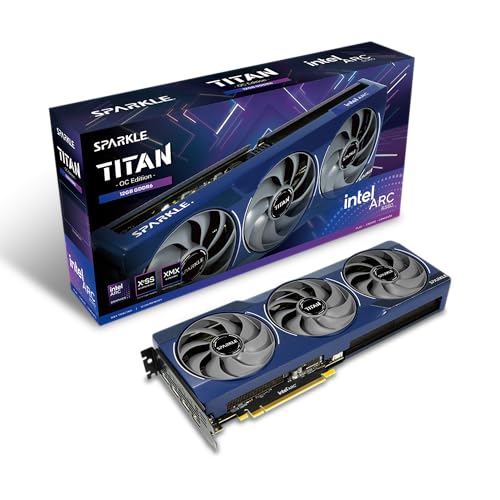
Specs
Chip | Intel Arc B580 (Xe2 Battlemage) |
Xe2 cores | 20 |
VRAM | 12GB GDDR6 |
Memory bus | 192-bit |
Board power | 190W TBP |
Cooling | Torn Cooling 2.0, dual axial fan |
Outputs | HDMI 2.1, DisplayPort 2.1 |
Chip
Intel Arc B580 (Xe2 Battlemage)
Xe2 cores
20
VRAM
12GB GDDR6
Memory bus
192-bit
Board power
190W TBP
Cooling
Torn Cooling 2.0, dual axial fan
Outputs
HDMI 2.1, DisplayPort 2.1
What it does well
Two more Xe2 cores, a wider bus, and two more gigabytes of memory add up to roughly 15% at 1080p. More usefully, the B580 hits 12GB on a 192-bit bus, which is the buffer we want for high-refresh 1080p rather than the one we tolerate. That turns "adequate in the heaviest releases" into "comfortable."
Its lead over the RTX 4060 is wider than the B570's, and it grows as you push resolution and settings. That scaling behaviour is the interesting part of Battlemage: these cards hold their value better as the workload gets heavier, which is the opposite of how 8GB cards behave.
The headroom also buys you options. A buyer who might put a 1440p panel on this machine in two years is buying a different card than one who will not.
What you give up
The step up is no longer the small one it used to be. Launch coverage treated the B580 as a near-peer upsell sitting just above the B570, and at the listings we resolved for this article the two cards are plainly in different bands. Check the live gap yourself before you assume this is a minor upcharge, because if it has widened on the day you shop, the calculation in the scenario table changes. Should your budget stretch well past it, you are no longer shopping this band and should look at what the next tier up buys.
Board power goes from 150W to 190W. That is not dramatic, but on a build with a 500W supply and a hungry CPU it is enough to matter.
The platform caveats do not improve. Resizable BAR is the same requirement, and the DX11 backlog question is the same question. Spending more on the same architecture buys frames, not driver maturity.
Who it's for
Your budget flexes past the B570, and either you play the heaviest current releases at ultra or you expect a resolution bump inside this card's life. If the 1440p plan is firm rather than hypothetical, read the B580's own 1440p verdict before you commit, because that is a different question with a more complicated answer.
Bottom line
If you want a 1080p machine that works now and costs as little as it can, buy the B570. If you run ultra settings in the heaviest current releases, buy the B580. If you game above 120 Hz, buy the B580. If Resizable BAR is unavailable on your platform, buy neither and look at frames per dollar across the stack instead. The headline answer is yes. The conditions attached to it are what decide your build, not the frame rate.
FAQ
Is the Arc B570 enough for 1080p gaming in 2026?
Yes, for native 1080p in modern DX12 and Vulkan titles. It holds above 60 fps across a current test suite and manages that with ray tracing on in Cyberpunk 2077. The conditions are that your platform supports Resizable BAR and that your library is not mostly older DX11 games. Meet both and it clears the target comfortably.
Should I buy the Arc B570 or step up to the Arc B580?
Buy the B570 for native 1080p on a tight budget. Buy the B580 if you run ultra settings in the heaviest current releases, game above 120 Hz, or expect to move to 1440p. The B580 is about 15% faster and carries 12GB instead of 10GB. Check the live price gap first, because it has widened since launch and that changes the math.
Is 10GB of VRAM enough for 1080p gaming?
For 1080p it clears the bar. We treat 8GB as the floor for high-refresh 1080p and 12GB as the preference, because modern titles ask for 9 to 10GB at ultra. The B570's 10GB sits between those, so it is adequate rather than generous. It is a meaningful step up from the 8GB cards in the same band, and a step below what the B580 offers.
Do I need Resizable BAR for the Arc B570?
Effectively yes. Intel states the feature must be enabled for Arc B-series cards to perform as intended, and recommends other graphics vendors for systems that cannot enable it. On a recent platform it is a BIOS setting. On an older board you may need a firmware update, and some machines cannot do it at all. Confirm this before buying rather than after.
What power supply and CPU does the Arc B570 need?
The card is rated at 150W board power and Intel recommends a 500W unit for a standard build, or 600W alongside a power-hungry processor. On the CPU side, something below a Core i5-9600 class part will cap the card at 1080p before it reaches its potential, so pair it with a reasonably modern processor to see what you paid for.
How does the Arc B570 compare to the RTX 4060?
They are close. The B570 gives up about 7% on average frames and about 11% on 1% lows, so the 4060 has the edge on smoothness. The B570 answers with 10GB against the 4060's 8GB, and Arc scales better as resolution and settings climb. Neither wins outright, which makes availability and the live price gap the deciding factors.
Related Articles

Is the Arc B580 Enough for 1440p in 2026? 12GB Verdict
Is the Arc B580 enough for 1440p in 2026? Its 12GB holds up at high settings with XeSS, but at current street prices the RX 9060 XT 16GB is the smarter buy.
Sep 30, 2026

Best GPUs Under $300 for 1080p Gaming (2026): 5 Picks by Tier
Best budget GPUs under $300 for 1080p gaming in 2026. Intel Arc B580 anchors the tier, with honest 8 GB warnings and clearance picks.
May 20, 2026

Is 8GB VRAM Enough for Gaming in 2026, or Do You Need 16GB?
Is 8GB VRAM enough for gaming in 2026? It holds at 1080p, cracks at 1440p, and fails at 4K. Here is when 8GB works, when you need 16GB, and what to buy.
Jul 23, 2026

Best GPUs for 1080p Gaming (2026): Picks by Refresh Tier
The best GPU for 1080p gaming in 2026, picked by refresh tier and game genre. From a budget Intel Arc card to a 240Hz esports pick, plus honest 8GB verdicts.
Jun 22, 2026

How to Choose a GPU (and a Monitor That Matches)
A buyer's framework for picking a GPU and the monitor that pairs with it. Start with the panel and work the card back.
May 17, 2026