Affiliate Disclosure: As an Amazon Associate we earn from qualifying purchases. Some links may earn us a commission at no cost to you.

Is the Arc B580 Enough for 1440p in 2026? 12GB Verdict
Short answer: yes, the Arc B580 is enough for 1440p, but only at high settings with XeSS Quality doing real work, and only if you can buy one near the price Intel first aimed at. It is a 1440p high card, not a 1440p ultra card.
That gap matters more in 2026 than it did at launch. Partner cards drifted upward while 16 GB rivals landed in the same neighborhood, and once the price gap closes, the 12 GB buffer stops being the deciding argument.
At a glance
Card | VRAM | 1440p verdict | Upscaler | Buy |
|---|---|---|---|---|
12 GB GDDR6, 192-bit | High settings with XeSS, not ultra | XeSS 2 on the XMX path | ||
16 GB GDDR6, 128-bit | High to ultra native | FSR 4 | ||
16 GB GDDR7, 128-bit | High to ultra native, ray tracing viable | DLSS 4 with frame generation |
- VRAM
12 GB GDDR6, 192-bit
- 1440p verdict
High settings with XeSS, not ultra
- Upscaler
XeSS 2 on the XMX path
- Buy
- VRAM
16 GB GDDR6, 128-bit
- 1440p verdict
High to ultra native
- Upscaler
FSR 4
- Buy
- VRAM
16 GB GDDR7, 128-bit
- 1440p verdict
High to ultra native, ray tracing viable
- Upscaler
DLSS 4 with frame generation
- Buy
Verdict: is the Arc B580 enough at 1440p?
If this is you | Is the B580 enough? | What to buy |
|---|---|---|
1440p at 60Hz to 100Hz, mixed library, high settings, B580 near its launch price | Yes | |
1440p at 144Hz and you want ultra presets without upscaling | No | |
You play ray-traced titles at 1440p | No | |
You stream with AV1 or do any CUDA creative work | No | |
The B580 you can add to a cart today costs about what a 16 GB card costs | No | |
Older platform with no Resizable BAR support | No |
1440p at 60Hz to 100Hz, mixed library, high settings, B580 near its launch price
- Is the B580 enough?
Yes
- What to buy
1440p at 144Hz and you want ultra presets without upscaling
- Is the B580 enough?
No
- What to buy
You play ray-traced titles at 1440p
- Is the B580 enough?
No
- What to buy
You stream with AV1 or do any CUDA creative work
- Is the B580 enough?
No
- What to buy
The B580 you can add to a cart today costs about what a 16 GB card costs
- Is the B580 enough?
No
- What to buy
Older platform with no Resizable BAR support
- Is the B580 enough?
No
- What to buy
Two of those rows do most of the work. The first is settings discipline: at 1440p the B580 clears high in a mixed library and falls under 60 in demanding AAA at ultra, so the card is honest at high and oversold at ultra. The second is price. The 12 GB buffer is the card's strongest argument, and it only wins the argument while the cheaper-than-16 GB framing holds. If you want the full version of that reasoning, how much VRAM 1440p needs is the longer read.
Resizable BAR is the third thing to settle before anything else. Battlemage leans on it hard, and reviewers have flagged real regressions on systems where it is off or unsupported. If your board cannot enable it, the B580 is off the table regardless of resolution, and what else clears 1440p at this budget is the better starting point.
How we read the 1440p numbers
The step-up pair on a single reviewer bench, native and without upscaling.
- 64 FPS
- 69 FPS
The Unreal Engine 5 title where the gap between the two step-up cards opens widest.
- 49 FPS
- 57 FPS
A CPU-heavy open world where the two step-up cards land close together.
- 62 FPS
- 65 FPS
Another CPU-heavy title, included because the GPU ordering still holds in it.
- 65 FPS
- 72 FPS
Those charts hold the two step-up cards because no reviewer has run the B580 against both of them in one 1440p bench. Pretending otherwise would mean inventing rows, so here is what reviewers did measure on the B580 itself. Across a 1440p suite it landed within about a percent of the RTX 4060 on average. In Cyberpunk 2077 it averaged roughly 63 fps at 1440p, close to the RTX 4060 Ti and ahead of the RX 7600. In Black Myth: Wukong at 1440p high it sits in the mid-40s native and climbs into the high-50s with XeSS Quality on.
One data point cuts the other way, and it deserves airtime: in Dying Light 2 at 1440p, GamersNexus put the B580 functionally level with the RX 9060 XT. That is the shape of this card. It is not uniformly a tier down, it is uneven, and the unevenness tracks how much a title leans on memory capacity against raw shader throughput. The same sufficiency question one tier up resolves far more cleanly.
The Arc B580 to buy if the answer is yes: Sparkle Arc B580 Titan OC
This is the partner card a reader who says yes ends up buying. The other B580 listings that surface are reseller relists at prices that answer the question for you.
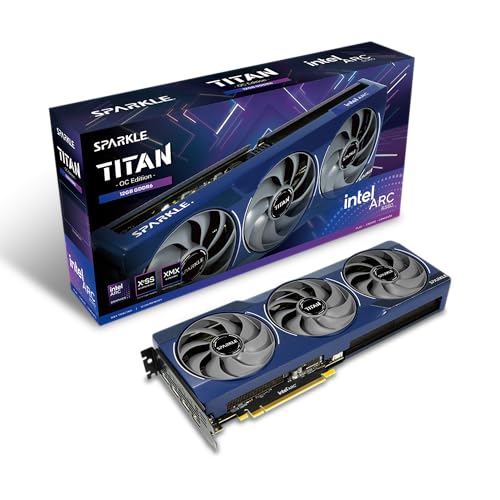
Specs
Chip | Intel Arc B580 (Xe2 Battlemage) |
VRAM | 12 GB GDDR6 |
Memory bus | 192-bit |
Board power | 190 W |
Upscaling | XeSS 2 on the XMX path |
Outputs | HDMI 2.1, DisplayPort 2.1 |
Cooling | Dual axial fan, metal backplate |
Slot height | 2-slot |
Chip
Intel Arc B580 (Xe2 Battlemage)
VRAM
12 GB GDDR6
Memory bus
192-bit
Board power
190 W
Upscaling
XeSS 2 on the XMX path
Outputs
HDMI 2.1, DisplayPort 2.1
Cooling
Dual axial fan, metal backplate
Slot height
2-slot
What it does well
The 192-bit bus and 12 GB pool are the whole pitch, and at 1440p they earn it. Texture settings are where a 1440p card usually breaks first, and this one does not break there. Set against 8 GB cards at the same price, the B580 holds a double-digit lead in the titles that lean on memory capacity, which is most of the demanding ones.
XeSS 2 is the second reason this works at 1440p. On Intel hardware it runs the XMX path rather than the DP4a fallback, so Quality mode at 1440p is genuinely usable rather than a way to make a slideshow report a bigger number. Treating XeSS Quality as the default for demanding titles is fair here in a way it is not on a competitor card.
Driver behavior has also moved a long way from the Alchemist era. Day-one support for current releases is normal now, and the catastrophic launch-day gaps that defined the first Arc generation are not the story any more.
What you give up
Ray tracing is the weak axis and no amount of settings tuning fixes it. In titles where ray tracing is mandatory rather than optional, this card is running a checkbox, not a feature. If ray tracing at 1440p is part of why you are upgrading, stop reading here and buy the NVIDIA card below.
The rest of the cost is platform tax and long-tail risk. Resizable BAR has to be on. Buyers have flagged occasional quirks in older DirectX 9 and DirectX 11 titles even after years of driver work, so a library heavy in older games is a reason to hesitate. And ultra presets at 1440p in current AAA fall under 60 native, which is exactly the configuration the launch coverage never had to answer for.
Who it's for
The 1440p 60Hz to 100Hz buyer on a modern platform who plays a broad library at high settings, treats upscaling as normal, and is buying this card because it is cheap. If any of those four things is not true, one of the two below is the better card.
Step up for native 1440p: Sapphire Pulse RX 9060 XT
This is the default answer when the B580's price advantage thins out. It is the card that removes the asterisks rather than the card that adds framerate.

Specs
Chip | AMD Radeon RX 9060 XT (RDNA 4) |
VRAM | 16 GB GDDR6 |
Memory bus | 128-bit |
Board power | 160 W class |
Upscaling | FSR 4 |
Outputs | HDMI 2.1b, three DisplayPort 2.1a |
Cooling | Dual-fan Pulse shroud |
Power connector | Single 8-pin |
Chip
AMD Radeon RX 9060 XT (RDNA 4)
VRAM
16 GB GDDR6
Memory bus
128-bit
Board power
160 W class
Upscaling
FSR 4
Outputs
HDMI 2.1b, three DisplayPort 2.1a
Cooling
Dual-fan Pulse shroud
Power connector
Single 8-pin
What it does well
It clears 1440p high in nearly everything and ultra in most of it, natively, which is the sentence the B580 cannot claim. Sixteen gigabytes closes the memory question for this generation rather than deferring it two years, and RDNA 4 raster per watt is strong enough that a single 8-pin connector carries the card.
FSR 4 is the quieter upgrade. On RDNA 4 it closed most of the distance to the NVIDIA upscaler at Quality, so the same settings discipline that makes the B580 work at 1440p buys this card headroom at ultra instead.
What you give up
Ray tracing still trails NVIDIA at this tier, and there is no CUDA, so anyone rendering, editing, or running local models is buying the wrong card to save money. The 128-bit bus is also narrower than the B580's despite the bigger pool, which is why the gap between the two narrows in a handful of titles instead of widening everywhere.
Who it's for
The 1440p 144Hz raster buyer with a library that is not ray-tracing heavy and no creative workload. Pair it with a monitor that matches this tier and the build stops having a weak link.
Step up for ray tracing and creator work: ASUS Prime RTX 5060 Ti OC
The third card exists because two of the reasons to leave the B580 behind are not about framerate at all. Ray tracing and CUDA both point here.

Specs
Chip | NVIDIA GeForce RTX 5060 Ti (Blackwell) |
VRAM | 16 GB GDDR7 |
Memory bus | 128-bit |
Board power | 180 W |
Upscaling | DLSS 4 with Multi Frame Generation |
Encode | NVENC with AV1 |
Outputs | HDMI 2.1b, three DisplayPort 2.1b |
Slot height | 2.5-slot, triple fan |
Chip
NVIDIA GeForce RTX 5060 Ti (Blackwell)
VRAM
16 GB GDDR7
Memory bus
128-bit
Board power
180 W
Upscaling
DLSS 4 with Multi Frame Generation
Encode
NVENC with AV1
Outputs
HDMI 2.1b, three DisplayPort 2.1b
Slot height
2.5-slot, triple fan
What it does well
It is the fastest of the three at 1440p on the reviewer bench above, and the lead grows in the Unreal Engine 5 titles rather than shrinking. Ray tracing at 1440p is a setting you can leave on here, and DLSS 4 at Quality is the strongest of the three upscalers by a margin that still shows in a side-by-side.
The non-gaming half is the real separator. NVENC with AV1 handles streaming without taxing the processor, and CUDA is what makes Blender, DaVinci, and local model work possible rather than painful. A machine that is not only a game console wants this card.
What you give up
You pay a real premium over the other two for a raster lead that runs from single digits to the mid teens depending on the title, which is a poor trade for a pure raster gamer. The 8 GB version of this same card also exists, and it has no business in a 1440p recommendation, so check the memory figure on the listing before you buy.
Who it's for
The 1440p buyer who plays ray-traced titles, streams with AV1, or does any work that touches CUDA. For everyone else at this resolution, the Radeon card above is the better value and the argument is not close.
Bottom line
If you can buy an Arc B580 near its launch framing and you play at 1440p high with XeSS on, it is enough, and the 12 GB buffer will age better than any 8 GB card sold against it. If the B580 you can add to a cart costs roughly what a 16 GB card costs, buy the Sapphire Pulse RX 9060 XT instead. If you play ray-traced titles or do creative work, buy the ASUS Prime RTX 5060 Ti. And if your board cannot turn on Resizable BAR, the B580 is not a candidate at any price.
One thing not to do: wait. A faster Battlemage card has been rumored for long enough that buying nothing has cost people more than buying the wrong card would have. Pick from what is on shelves, and if you are still weighing resolution against card tier, the GPU and display framework is the place to start.
FAQ
Is the Intel Arc B580 good enough for 1440p gaming in 2026?
Yes, with two conditions. Target high settings rather than ultra, and treat XeSS Quality as normal in demanding titles. On that configuration the card holds playable framerates across a broad library at 1440p. The conditions that break it are ray-traced titles, ultra presets without upscaling, and a purchase price that has drifted up to where 16 GB cards live.
Is 12GB of VRAM enough for 1440p?
For this generation, yes. Twelve gigabytes clears 1440p high textures in current releases with room left, which is the specific failure that makes 8 GB cards stutter and pop textures at the same resolution. Sixteen gigabytes buys more runway, and that runway is worth paying for if the price gap is small. What you should not do is drop to 8 GB to save a little, because a memory ceiling cannot be tuned away later.
Is the Arc B580 better than the RTX 5060 at 1440p?
At 1440p the B580's larger memory pool is the deciding factor against an 8 GB RTX 5060, and it shows up most in the texture-heavy titles that define 1440p. The RTX 5060 answers back with stronger ray tracing, DLSS, and NVENC, so a buyer who streams or plays ray-traced titles can still prefer it. For raster gaming at 1440p on a mixed library, the Intel card is the more sensible buy of the two.
Does the Arc B580 need Resizable BAR?
Effectively yes. Battlemage depends on Resizable BAR to perform as reviewed, and systems where it is disabled or unsupported see losses large enough to change which card you should buy. Check that your motherboard exposes the setting and that it is enabled in the firmware before ordering. If it is not available, choose a Radeon or GeForce card instead.
How does XeSS compare to DLSS and FSR at 1440p?
On Intel hardware XeSS 2 runs its XMX path and is genuinely competitive at Quality, which is why it counts as a real buying lever on this card. The NVIDIA upscaler is still the strongest of the three at the same preset, and FSR 4 on RDNA 4 sits between them. The important caveat is that XeSS on non-Intel cards falls back to a slower path and should not be factored into those recommendations.
Should I wait for the Intel Arc B770 instead?
No. A larger Battlemage card has been rumored long enough that waiting has cost buyers more time than the upgrade would likely be worth, and nothing about the rumor is a shipping product you can order. Buy the B580 for what it does today, or buy a step-up card. If a faster Arc does arrive, the sensible move is to wait for independent reviews on the games you actually play rather than pre-ordering on a specification sheet.
Related Articles

RTX 5060 vs RX 9060 XT (2026): 8GB vs 16GB Decides It
RTX 5060 vs RX 9060 XT: the 8GB card is the trap. AMD wins 1080p frames and 16GB of VRAM, NVIDIA wins DLSS 4 and ray tracing. Here is which one to buy.
Sep 8, 2026

RTX 5060 Ti for 1440p: Enough, or Step Up to 5070? (2026)
The RTX 5060 Ti 16GB clears 1440p high refresh in most games, but ray tracing and heavier titles shift the math fast. Here's when to step up to a 5070.
Jul 25, 2026

Best GPUs Under $400 for 1440p Gaming (2026): 3 Picks
Three GPUs under or right at $400 for 1440p gaming, ranked by the VRAM ladder: 16GB, 12GB, 8GB. Honest street pricing and a straight answer on 8GB at 1440p.
Jun 20, 2026

How Much VRAM Do You Need for Gaming? (2026 Guide)
How much VRAM do you need for gaming in 2026? A per-resolution VRAM tier guide for 1080p, 1440p, and 4K, with GPU picks at every tier from 8GB to 16GB.
Jun 18, 2026

How to Choose a GPU (and a Monitor That Matches)
A buyer's framework for picking a GPU and the monitor that pairs with it. Start with the panel and work the card back.
May 17, 2026