Affiliate Disclosure: As an Amazon Associate we earn from qualifying purchases. Some links may earn us a commission at no cost to you.

RTX 2060 to RTX 5060 Ti: Is the Upgrade Worth It in 2026?
If your RTX 2060 stutters when textures load in, the upgrade to an RTX 5060 Ti 16GB is worth it. If it still pushes more frames than your monitor can show, it is not, and the money belongs in the panel instead.
Two gates decide this, and neither is the raw frame rate gap. The first is the 6 GB memory ceiling, which shows up as frame-time spikes and texture pop-in rather than a low average. The second is DLSS 4 Multi Frame Generation, which no Turing card can run at any settings level. Work through both gates and the answer stops being a guess.
At a glance
Spec | RTX 2060 (what you own) | |
|---|---|---|
VRAM | 6 GB GDDR6 | 16 GB GDDR7 |
Memory bus | 192-bit | 128-bit |
Board power | 160 W | 180 W |
Power connector | Single 8-pin PCIe | Single 8-pin PCIe |
Frame generation | Not available on Turing | DLSS 4 Multi Frame Generation |
Ray tracing hardware | First-generation RT cores | Fourth-generation RT cores |
Realistic target | 1080p with settings dialled back | 1080p high refresh and 1440p high |
VRAM
- RTX 2060 (what you own)
6 GB GDDR6
- RTX 5060 Ti 16GB (the upgrade)
16 GB GDDR7
Memory bus
- RTX 2060 (what you own)
192-bit
- RTX 5060 Ti 16GB (the upgrade)
128-bit
Board power
- RTX 2060 (what you own)
160 W
- RTX 5060 Ti 16GB (the upgrade)
180 W
Power connector
- RTX 2060 (what you own)
Single 8-pin PCIe
- RTX 5060 Ti 16GB (the upgrade)
Single 8-pin PCIe
Frame generation
- RTX 2060 (what you own)
Not available on Turing
- RTX 5060 Ti 16GB (the upgrade)
DLSS 4 Multi Frame Generation
Ray tracing hardware
- RTX 2060 (what you own)
First-generation RT cores
- RTX 5060 Ti 16GB (the upgrade)
Fourth-generation RT cores
Realistic target
- RTX 2060 (what you own)
1080p with settings dialled back
- RTX 5060 Ti 16GB (the upgrade)
1080p high refresh and 1440p high
Verdict: is the RTX 2060 to RTX 5060 Ti upgrade worth it?
Yes in two situations, no in two others. Both yes cases come down to memory. Once a game wants more than 6 GB at your settings, the card starts pulling assets across the bus from system memory, and what you feel is stutter rather than a lower average. That is the whole argument for the 16 GB step, and it is the same argument behind whether 8GB is enough in 2026.
The raw performance side holds up too. TechSpot measured the RTX 5060 Ti 16GB at 79 fps at 1440p in Cyberpunk 2077, level with an RTX 4070 and an RX 7700 XT. A 2060 in that test is nowhere near. Be careful with the exact multiplier at 1080p, though. On a 2019-era CPU some of that gap gets absorbed by the platform before the GPU ever sees it, so a 2060 owner still running an older six-core should expect less than the charts promise.
The no cases are about where the bottleneck sits. A 2060 pushing well past 200 fps in an esports title onto a 60 Hz panel is not short of GPU. Neither is a machine that hitches when you alt-tab with 16 GB of system memory and a browser open. Both of those are cheaper problems, and fixing the cheap problem first is the order of operations that saves the most money. If you are on a 3060 instead, the 3060 version of this question lands differently.
Your situation | What changes | Verdict | Buy |
|---|---|---|---|
1080p esports on a 60 Hz or 144 Hz panel | Frames you already have that the panel cannot show | Keep the 2060, buy the monitor | |
1080p AAA with texture pop-in and frame-time spikes | 6 GB to 16 GB ends the spill into system memory | Upgrade | |
Moving to 1440p high refresh | 1440p high becomes a target instead of a compromise | Upgrade | |
Raster-first library, no ray tracing, no creative work | Same memory answer for less money | Upgrade, go AMD | |
Hitching when you alt-tab, 16 GB of system memory | System memory stops being the overflow bottleneck | Keep the 2060, buy the RAM |
1080p esports on a 60 Hz or 144 Hz panel
- What changes
Frames you already have that the panel cannot show
- Verdict
Keep the 2060, buy the monitor
- Buy
1080p AAA with texture pop-in and frame-time spikes
- What changes
6 GB to 16 GB ends the spill into system memory
- Verdict
Upgrade
- Buy
Moving to 1440p high refresh
- What changes
1440p high becomes a target instead of a compromise
- Verdict
Upgrade
- Buy
Raster-first library, no ray tracing, no creative work
- What changes
Same memory answer for less money
- Verdict
Upgrade, go AMD
- Buy
Hitching when you alt-tab, 16 GB of system memory
- What changes
System memory stops being the overflow bottleneck
- Verdict
Keep the 2060, buy the RAM
- Buy
Upgrade pick: ASUS Prime RTX 5060 Ti 16GB OC
The 16 GB SKU is the only version of this card that answers the question a 2060 owner is asking.

Specs
Chip | GeForce RTX 5060 Ti (Blackwell) |
VRAM | 16 GB GDDR7 |
Memory bus | 128-bit |
Board power | 180 W |
Power connector | Single 8-pin PCIe |
Cooling | Dual axial fans, 2.5 slots |
Outputs | DisplayPort 2.1b, HDMI 2.1 |
Upscaling | DLSS 4 with Multi Frame Generation |
Chip
GeForce RTX 5060 Ti (Blackwell)
VRAM
16 GB GDDR7
Memory bus
128-bit
Board power
180 W
Power connector
Single 8-pin PCIe
Cooling
Dual axial fans, 2.5 slots
Outputs
DisplayPort 2.1b, HDMI 2.1
Upscaling
DLSS 4 with Multi Frame Generation
What it does well
The memory jump is the headline. Going from 6 GB to 16 GB means current AAA titles stop spilling textures into system memory at 1080p and 1440p, and the frame-time graph flattens out. That is a different kind of improvement from a higher average FPS, and it is the one a 2060 owner notices in the first hour.
Raw throughput lands where you would want it for this tier. TechSpot put the card at 79 fps at 1440p in Cyberpunk 2077, which is RTX 4070 territory, and that is with no upscaling doing the work. Turn on DLSS 4 Quality and 1440p high becomes comfortable in most current releases rather than a compromise.
The install is the easy part. Board power sits at 180 W on a single 8-pin connector, which is the same feed a reference 2060 used. A 550 W supply in decent health should take this card without a swap or an adapter, though a unit that has been running since 2019 deserves a look at its age before you trust it. If the 5060 Ti is not the right fit for your build, our ranked list of the best GPU upgrade for an RTX 2060 covers four more cards with the same power and CPU checks.
What you give up
The 128-bit bus is the limit of the design. Push to 4K or lean on path tracing and the card runs out of bandwidth before it runs out of memory, so treat 1440p as the honest ceiling. Fourth-generation RT cores help, but they do not change the resolution this card is built around.
The bigger risk is the shelf. Nvidia ships an 8 GB card under almost the same name, and for a buyer whose entire reason to upgrade is a memory ceiling, the 8 GB SKU undoes the upgrade on day one. Confirm the box says 16 GB before you check anything else. Street pricing has also been running well above list, which is the strongest argument for waiting a cycle.
Who it's for
A 2060 owner on a 1080p high-refresh or 1440p panel who plays current AAA, has already hit texture stutter, and wants DLSS 4 Multi Frame Generation on the table. If you are unsure whether this card carries 1440p for your library, whether the 5060 Ti is enough for 1440p goes through it game by game.
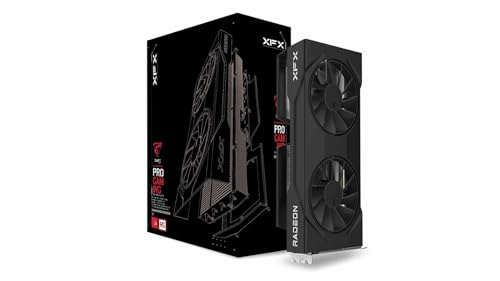
Same money, more raster: XFX Swift RX 9060 XT OC
Same memory answer, same single 8-pin, usually less money at the register.
Specs
Chip | Radeon RX 9060 XT (RDNA 4) |
VRAM | 16 GB GDDR6 |
Memory bus | 128-bit |
Board power | 160 W |
Power connector | Single 8-pin PCIe |
Cooling | Dual axial fans |
Outputs | DisplayPort 2.1a, HDMI 2.1b |
Upscaling | FSR 4 with Fluid Motion Frames |
Chip
Radeon RX 9060 XT (RDNA 4)
VRAM
16 GB GDDR6
Memory bus
128-bit
Board power
160 W
Power connector
Single 8-pin PCIe
Cooling
Dual axial fans
Outputs
DisplayPort 2.1a, HDMI 2.1b
Upscaling
FSR 4 with Fluid Motion Frames
What it does well
16 GB of GDDR6 solves the same problem the Nvidia card solves, and RDNA 4 lands within a few percent of the 5060 Ti in multi-game raster averages. Tom's Hardware put the gap at roughly 5 percent. For a raster-first library that is a rounding error, and the price difference is not.
FSR 4 closed most of the upscaling gap on this generation. Quality mode at 1440p is genuinely usable now in a way FSR 3 never was, so upscaling is no longer a reason to default to Nvidia at this tier. Board power is lower too, at 160 W through the same single 8-pin your 2060 already uses.
What you give up
Ray tracing is where the gap opens. Third-generation RT silicon loses to Blackwell in path-traced titles, and TechSpot's Cyberpunk ray-tracing testing put the 5060 Ti around 14 percent ahead at 1440p with upscaling. If your library leans on heavy RT, that is the number that matters. The full 5060 Ti against 9060 XT comparison works through it.
You also give up the ecosystem pieces. No DLSS 4 Multi Frame Generation, no CUDA for Blender or Stable Diffusion, and NVENC AV1 still has the edge for streamers. The CUDA tax is real, and it flips this recommendation entirely if any creative work is in the picture.
Who it's for
A raster-first 2060 owner whose library is light on ray tracing, who has no creative or AI workload, and who would rather keep the difference in their pocket than pay for features they will not turn on.
Skip the GPU, buy the monitor: ASUS TUF Gaming VG27AQ3A
A lot of 2060 owners are still running a 1080p 60 Hz panel, which means the card is already producing frames nobody ever sees.

Specs
Panel | 27 inch Fast IPS |
Resolution | 2560 x 1440 |
Refresh rate | 180 Hz |
Response time | 1 ms GtG |
Adaptive sync | G-SYNC Compatible, FreeSync Premium |
Color | 130% sRGB |
Inputs | 2x HDMI, 1x DisplayPort 1.4 |
Panel
27 inch Fast IPS
Resolution
2560 x 1440
Refresh rate
180 Hz
Response time
1 ms GtG
Adaptive sync
G-SYNC Compatible, FreeSync Premium
Color
130% sRGB
Inputs
2x HDMI, 1x DisplayPort 1.4
What it does well
1440p at 180 Hz on a Fast IPS panel is the single biggest perceived change available to most 2060 builds, and it costs a fraction of a GPU. The 2060 will hold high refresh at 1080p in esports titles today, and the panel is still the right panel after you eventually swap the card. Displays outlive two GPU generations, which is why the monitor goes first when the complaint is smoothness.
G-SYNC Compatible and FreeSync Premium both work, so the adaptive sync story is fine whichever card you end up on. If you do buy the 5060 Ti later, monitors that pair with the 5060 Ti covers the rest of the tier.
What you give up
The 2060 will not drive 1440p high in current AAA. Buying this panel first means running 1080p on a 1440p screen, or dropping settings hard, until the GPU follows. That is a deliberate trade rather than a free win, and it only makes sense if your current complaint is refresh rate rather than texture stutter.
Who it's for
A 2060 owner still on 1080p 60 Hz whose games run fine but feel choppy. Fix the display, then revisit the GPU next cycle. How to choose a GPU and a matching monitor covers the pairing logic in more depth.
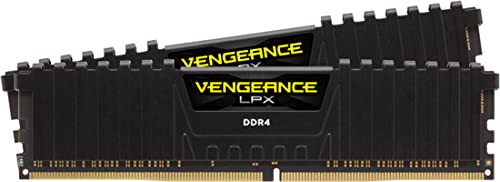
Skip the GPU, buy the RAM: Corsair Vengeance LPX 32GB
A 2060-era build is almost always a 16 GB DDR4 machine, and 16 GB is where memory overflow turns into a system-wide hitch.
Specs
Capacity | 32 GB (2 x 16 GB) |
Type | DDR4 |
Speed | 3600 MT/s |
Timings | CL18-22-22-42 |
Voltage | 1.35 V |
Profile | XMP 2.0 |
Form factor | Low profile DIMM |
Capacity
32 GB (2 x 16 GB)
Type
DDR4
Speed
3600 MT/s
Timings
CL18-22-22-42
Voltage
1.35 V
Profile
XMP 2.0
Form factor
Low profile DIMM
What it does well
When a 6 GB card runs out of memory, the overflow lands in system RAM. With 16 GB total and a browser, a chat client, and a game all competing, that overflow has nowhere to go and the hitching compounds. Doubling to 32 GB does not raise your average frame rate, but it cleans up the 1% lows in open-world titles and it stops alt-tab from costing you a second and a half.
3600 MT/s is the sensible speed on the AM4 and late Intel DDR4 boards these builds typically use, and the low-profile heat spreader clears tower coolers without a fight. Buyers have flagged clearance problems with taller kits under large air coolers, so the shorter shape is doing real work here.
What you give up
This buys you nothing in a GPU-bound scene. If your games are already smooth and the complaint is a low average frame rate at ultra settings, more system memory is the wrong purchase and the GPU is the right one. Check that your board is DDR4 before ordering. A 2060 build almost certainly is, but the two standards are not interchangeable.
Who it's for
A 2060 owner on 16 GB who streams, alt-tabs, or plays open-world titles that swap, and whose symptom is a hitch rather than a low frame rate.
Bottom line
If your 2060 is stuttering in current AAA at 1080p or 1440p, buy the ASUS Prime RTX 5060 Ti 16GB OC. If your library is raster-first and you want the same memory for less, buy the XFX Swift RX 9060 XT OC. If your games run fine and you are still on a 1080p 60 Hz panel, buy the ASUS TUF Gaming VG27AQ3A and keep the 2060 another year.
If the symptom is hitching when you alt-tab rather than low frame rates, buy the Corsair Vengeance LPX 32GB kit and spend nothing on a GPU. The one thing not to do is buy the 8 GB version of the 5060 Ti, which fails the exact problem you are upgrading to fix.
FAQ
Is the RTX 2060 still good in 2026?
For 1080p esports it is still fine. Counter-Strike 2, Valorant, Overwatch and similar titles run well above most refresh targets on a 2060, and the 6 GB buffer is not a limiter there. Where it falls down is current AAA at medium or higher textures, because 6 GB saturates and the card starts pulling assets from system memory. The symptom is stutter and texture pop-in rather than a low average frame rate. If your library is mostly competitive shooters, keep it.
How much faster is the RTX 5060 Ti than the RTX 2060?
Reviewer suites that still carry both cards are scarce, so treat any single multiplier with suspicion. What is measurable is the destination rather than the ratio. TechSpot recorded the RTX 5060 Ti 16GB at 79 fps at 1440p in Cyberpunk 2077, which puts it level with an RTX 4070, and a 2060 does not reach that class of result at 1440p. Expect roughly a doubling in current AAA, and expect less than that at 1080p if your CPU is from the same era as the 2060.
Do I need a new power supply to upgrade from an RTX 2060?
Usually not. A reference RTX 2060 draws about 160 W through a single 8-pin connector, and the RTX 5060 Ti sits at 180 W through the same single 8-pin. That difference does not change your supply class, so a healthy 550 W unit that ran the 2060 will run the 5060 Ti. The caveat is age rather than wattage. A supply that has been in service since 2019 is worth checking, because capacitor wear shows up as instability long before a headroom problem does.
Is 6GB of VRAM enough for 1080p gaming in 2026?
Not at ultra textures in current AAA. Several recent open-world releases push past 6 GB at 1080p with high or ultra texture settings, and once that happens the card streams assets from system memory and the frame times spike. The practical workaround is dropping textures one notch, which usually saves a gigabyte or two with little visible loss. That works, and it is free. It is also the exact compromise a 16 GB card removes, which is why the memory step is the real reason to upgrade.
Can the RTX 2060 use DLSS 4 Multi Frame Generation?
No. Multi Frame Generation needs the Blackwell hardware path, and Turing cards have no route to it at any settings level. That makes it a capability gate rather than a performance tier, which is why it belongs in an upgrade decision separately from frame rate. Keep the technology in proportion, though. Frame generation multiplies smoothness when the base frame rate is already good. It turns 60 into 120, never 30 into 120, and below a 60 fps base you feel the latency and see the artifacts.
Should I buy the 8GB or the 16GB RTX 5060 Ti?
The 16 GB card, without hesitation, if you are coming from a 2060. The two SKUs share a name and sit next to each other on the shelf, and the 8 GB version is the one purchase that undoes the whole upgrade. You would be leaving a 6 GB memory ceiling only to land just above it, and current AAA titles already push past 8 GB at 1440p ultra. Read the box, confirm 16 GB, and ignore the gap in price.
Related Articles

RTX 3060 to RTX 5060 Ti: Is the Upgrade Worth It in 2026?
Is an RTX 3060 to RTX 5060 Ti upgrade worth it in 2026? Real 1440p fps gains, the 16GB VRAM case, the 128-bit catch, and a cheaper card to buy instead.
Sep 5, 2026

Is 8GB VRAM Enough for Gaming in 2026, or Do You Need 16GB?
Is 8GB VRAM enough for gaming in 2026? It holds at 1080p, cracks at 1440p, and fails at 4K. Here is when 8GB works, when you need 16GB, and what to buy.
Jul 23, 2026

RTX 5060 Ti for 1440p: Enough, or Step Up to 5070? (2026)
The RTX 5060 Ti 16GB clears 1440p high refresh in most games, but ray tracing and heavier titles shift the math fast. Here's when to step up to a 5070.
Jul 25, 2026

RTX 5060 Ti vs RX 9060 XT: 8GB vs 16GB Verdict for 2026
RTX 5060 Ti vs RX 9060 XT: we call the winner at 1080p and at 1440p, and say when the 8GB SKUs are a trap. Straight buy advice for 2026, no spec-sheet filler.
Sep 8, 2026

RX 6600 XT to RX 9060 XT: Worth It for 70% More FPS? (2026)
Upgrading RX 6600 XT to RX 9060 XT? It runs about 70% faster and is worth it, but only the 16GB card. The 8GB trap, PCIe 3.0 boards, and when to hold instead.
Oct 28, 2026