Affiliate Disclosure: As an Amazon Associate we earn from qualifying purchases. Some links may earn us a commission at no cost to you.

RTX 5060 Ti for 1440p: Enough, or Step Up to 5070? (2026)
Yes, mostly. The RTX 5060 Ti 16GB clears 1440p high refresh in the games most people play, and its 16GB of VRAM quietly beats the pricier RTX 5070's 12GB on paper. That is not a typo. It is the whole tension this article resolves.
The catch shows up in heavier AAA titles, where the 5070's extra compute pulls ahead by a real and widening margin even in raster, before ray tracing enters the picture at all. If your library leans that way, the step up earns its price. If it does not, save the difference.
At a glance
Both cards target the same 1440p buyer, just from different directions. The RTX 5060 Ti 16GB leads with memory and price. The RTX 5070 leads with raw compute and ray-tracing horsepower. Neither number tells the whole story on its own, which is why the scenario breakdown below matters more than either spec sheet. AMD asks the same question one tier down: our RX 9060 XT vs RX 9070 sufficiency breakdown covers whether the cheaper Radeon card clears 1440p on its own.
If you are speccing the rest of a 1440p build around either card, the GPU and monitor buying guide covers how to pair the resolution target with the rest of the platform.
VRAM | 16GB GDDR7 | 12GB GDDR7 |
Best for | 1440p high refresh, raster and RT-light libraries | 1440p ultra, RT-heavy AAA |
Verdict | Enough for most buyers | Worth it for RT-heavy libraries |
VRAM
- MSI RTX 5060 Ti 16GB Ventus 2X OC
16GB GDDR7
- MSI RTX 5070 Ventus 3X OC
12GB GDDR7
Best for
- MSI RTX 5060 Ti 16GB Ventus 2X OC
1440p high refresh, raster and RT-light libraries
- MSI RTX 5070 Ventus 3X OC
1440p ultra, RT-heavy AAA
Verdict
- MSI RTX 5060 Ti 16GB Ventus 2X OC
Enough for most buyers
- MSI RTX 5070 Ventus 3X OC
Worth it for RT-heavy libraries
Is the 5060 Ti enough? The 1440p verdict by scenario
The honest answer changes depending on what you play, so here is the verdict broken out by the scenarios that matter. If you play mostly esports titles or raster-heavy AAA games, the 5060 Ti 16GB is the right call and the extra spend on the 5070 buys very little you would notice. If ray tracing or path tracing is a real part of your library, the calculus flips.
Scenario | Winner |
|---|---|
1440p 144Hz esports or competitive library | MSI RTX 5060 Ti 16GB Ventus 2X OC |
1440p ultra, mixed raster and RT-light AAA | MSI RTX 5060 Ti 16GB Ventus 2X OC |
1440p ultra, RT-heavy or path-traced AAA | MSI RTX 5070 Ventus 3X OC |
1440p ultra RT plus future 4K headroom, or creative and CUDA work | MSI RTX 5070 Ti Ventus 3X PZ OC |
1440p 144Hz esports or competitive library
- Winner
MSI RTX 5060 Ti 16GB Ventus 2X OC
1440p ultra, mixed raster and RT-light AAA
- Winner
MSI RTX 5060 Ti 16GB Ventus 2X OC
1440p ultra, RT-heavy or path-traced AAA
- Winner
MSI RTX 5070 Ventus 3X OC
1440p ultra RT plus future 4K headroom, or creative and CUDA work
- Winner
MSI RTX 5070 Ti Ventus 3X PZ OC
Benchmarks at 1440p
Numbers below come directly from Tom's Hardware and GamersNexus review charts at 1440p, not estimates. Raster performance alone already shows a real, widening gap as you move up the stack: roughly 24 percent from the 5060 Ti 16GB to the 5070, and roughly 59 percent from the 5060 Ti 16GB to the 5070 Ti. Ray tracing tends to widen that gap further, since it leans harder on compute the 5060 Ti simply has less of.
Even without ray tracing, the RTX 5070 Ti is nearly 60 percent ahead of the 5060 Ti 16GB here.
- 68 FPS
- 89 FPS
- 108 FPS
1% lows: 86 / 110 / 110 fps respectively. All three clear a smooth 1440p experience here; the gap is about headroom, not playability.
- 109 FPS
- 151 FPS
- 171 FPS
The most VRAM-relevant title in this basket, and the 1% lows scale normally on every card here (roughly 70 to 80 percent of the average): 37 to 38 fps on the 5060 Ti 16GB, 44 fps on the 5070, 49 fps on the 5070 Ti. No VRAM cliff shows up on the 5070's 12GB at 1440p in this title today.
- 47 FPS
- 62 FPS
- 74 FPS
Worth stating plainly: the RTX 5070's 12GB is not currently bottlenecking it in this basket, including in Stalker 2, the title most likely to expose a VRAM ceiling. The 5060 Ti's extra 4GB is insurance against where texture budgets are heading over the next few years, not a fix for a problem the 5070 has today. Esports and lighter UE5 titles are not included above because neither card struggles to clear high-refresh targets in them; the gap that matters lives in AAA raster and ray tracing, shown here.
If you are also weighing the non-Ti RTX 5060 to save more, our RTX 5060 vs RTX 5060 Ti comparison covers whether that further step down still holds up at 1440p.
The 1440p pick that clears the bar: MSI RTX 5060 Ti 16GB Ventus 2X OC

Specs
Chip | NVIDIA GeForce RTX 5060 Ti (GB206) |
VRAM | 16GB GDDR7 |
Memory bus | 128-bit (28 Gbps) |
Boost clock | Approximately 2.57 GHz (Ventus 2X OC Plus) |
TGP | 180W |
Cooling | Dual-fan, 2-slot |
Outputs | HDMI 2.1b, DisplayPort 2.1b |
Chip
NVIDIA GeForce RTX 5060 Ti (GB206)
VRAM
16GB GDDR7
Memory bus
128-bit (28 Gbps)
Boost clock
Approximately 2.57 GHz (Ventus 2X OC Plus)
TGP
180W
Cooling
Dual-fan, 2-slot
Outputs
HDMI 2.1b, DisplayPort 2.1b
What it does well
This is the card that answers the headline question. At 1440p high settings, the 5060 Ti 16GB clears the vast majority of current titles without leaning on aggressive upscaling, and the 16GB buffer keeps texture-heavy games comfortable well past the point an 8GB or 12GB card starts choking.
DLSS 4's transformer model does real work here. Quality mode at 1440p is close enough to native that it is a legitimate setting to leave on, not a crutch to hide behind, and it buys the 5060 Ti extra breathing room in the handful of titles that push it.
The 180W TGP also means this card is easy to feed. A midrange PSU and a case with decent airflow are all it asks for, which keeps the rest of the build's budget free for the parts that matter more day to day, like the monitor.
The 28 Gbps GDDR7 memory chips are also a real generational jump over the previous RTX 4060 Ti's GDDR6, and that extra bandwidth is a big part of why this card holds together at 1440p instead of falling back to a 1080p-only recommendation. Nvidia positions it as a maxed-out 1080p card with ray tracing headroom, but the memory bandwidth alone makes 1440p a legitimate use case once you dial in the right settings.
Long term, the 16GB buffer is the part of this card that ages best. Textures keep getting bigger with every AAA release, and a card that runs out of VRAM stutters no matter how strong its compute is. This is the one spec on this card that will matter more, not less, over the next two or three years. The same logic applies one tier down: our 1080p sufficiency breakdown walks through when the base RTX 5060 8GB buffer becomes the limiting factor instead.
For a deeper walkthrough of how much memory matters at each resolution, see our VRAM buying guide.
What you give up
The honest tradeoff is heavier AAA titles, in raster and even more so once ray tracing is on. Cyberpunk 2077 at 1440p ultra already trails the 5070 by about a quarter in pure raster, and Stalker 2 shows a similar gap. If that is the bulk of your library, the extra spend on the RTX 5070 buys a real, felt difference, not a marketing one.
It is also worth being honest about frame generation math. Multi-frame gen can turn a 60fps base into 120, but it cannot turn 30 into 120 without the input lag and artifacts showing. In the titles where this card is already below 60fps native, treat MFG numbers as a smoothness bonus, not a performance floor.
None of this makes the card a bad buy. It makes it a specific buy: strong for raster and RT-light libraries, weaker for the handful of AAA showcases built around full path tracing. Know which bucket you fall into before you decide.
Who it's for
The 1440p 144Hz buyer whose library is mostly raster or RT-light, who wants VRAM headroom for the next few years of releases without paying for ray-tracing horsepower they will not use every session.
Also a strong fit for anyone upgrading from an older 8GB card who felt that VRAM ceiling firsthand. Going from 8GB to 16GB solves a real, specific pain point that a straight FPS number does not capture.
If you are coming from an RTX 3060 specifically, our RTX 3060 upgrade guide covers the jump in more detail.
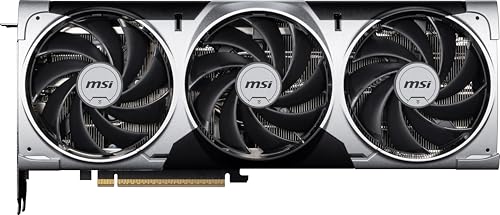
Step up if RT-heavy games are your library: MSI RTX 5070 Ventus 3X OC
Specs
Chip | NVIDIA GeForce RTX 5070 |
VRAM | 12GB GDDR7 |
Memory bus | 192-bit |
Boost clock | 2557 MHz (Ventus 3X OC) |
TGP | 250W |
Cooling | Triple-fan, 2.5-slot |
Outputs | DisplayPort 2.1a x3, HDMI 2.1b |
Chip
NVIDIA GeForce RTX 5070
VRAM
12GB GDDR7
Memory bus
192-bit
Boost clock
2557 MHz (Ventus 3X OC)
TGP
250W
Cooling
Triple-fan, 2.5-slot
Outputs
DisplayPort 2.1a x3, HDMI 2.1b
What it does well
The RTX 5070 is roughly a quarter faster than the 5060 Ti 16GB in Cyberpunk 2077 at 1440p ultra raster, and a similar margin ahead in Stalker 2 and Baldur's Gate 3. Turn ray tracing on and that gap tends to widen further, since RT leans harder on the compute the 5070 simply has more of.
It is still a comfortable 1440p ultra card for a mixed library, handling moderate ray tracing with DLSS Quality without much drama, and it is the more balanced pick if your games swing between raster-heavy and RT-heavy.
The 250W TGP and triple-fan cooler give it more thermal and acoustic headroom than the 5060 Ti, which matters if you are running it in a case with tighter airflow or you care about keeping fan noise down under sustained load.
For the deeper spec-by-spec breakdown of exactly where that gap comes from, see our RTX 5060 Ti vs RTX 5070 comparison.
What you give up
Here is the part most coverage glosses over: 12GB is genuinely the smaller VRAM buffer of the two cards in this article, and it is the loudest editorial complaint of this entire GPU generation. This card should have shipped with 16GB at its price. It is not a dealbreaker for most 1440p libraries today, but it is worth confirming your own games are not the exception before paying the premium for less memory.
This is also the classic middle-tier trap: spend more, get less memory, and end up straddling two tiers instead of clearly winning one. If you are not going to use the extra RT performance, that VRAM cut is a real cost with nothing offsetting it.
At 250W, this card also asks more of your power supply than the 5060 Ti. Our PSU sizing guide for RTX 5070 builds walks through the headroom you need.
Who it's for
The 1440p buyer who plays a genuinely RT-heavy or path-traced library right now and wants the extra headroom immediately, not as a someday upgrade.
Also a reasonable pick for buyers who want one card to comfortably straddle both raster esports titles and heavier single-player AAA games without compromise on either end.
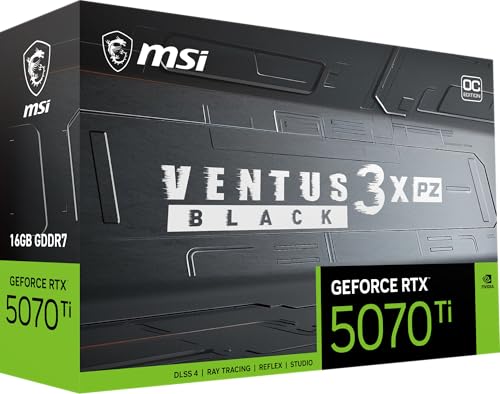
Go further for 1440p ultra plus RT or creative work: MSI RTX 5070 Ti Ventus 3X PZ OC
Specs
Chip | NVIDIA GeForce RTX 5070 Ti |
VRAM | 16GB GDDR7 |
Memory bus | 256-bit |
Boost clock | 2482 MHz (Ventus 3X PZ OC Black) |
TGP | 300W |
Cooling | Triple-fan |
Outputs | DisplayPort 2.1a x3, HDMI 2.1b |
Chip
NVIDIA GeForce RTX 5070 Ti
VRAM
16GB GDDR7
Memory bus
256-bit
Boost clock
2482 MHz (Ventus 3X PZ OC Black)
TGP
300W
Cooling
Triple-fan
Outputs
DisplayPort 2.1a x3, HDMI 2.1b
What it does well
This is quietly the best-value card in the current 50-series stack, matching last generation's RTX 4080 Super and comfortably clearing 1440p ultra with heavy ray tracing or path tracing on without leaning hard on DLSS Performance mode. The 16GB VRAM buffer also removes the memory-anxiety conversation entirely.
If you do any real creative or AI work alongside gaming, Blender, Stable Diffusion, or DaVinci Resolve with neural effects, the CUDA tax is real and this tier is where it starts paying for itself.
It is also the cleanest upgrade path if you think a 4K monitor is in your future. This card will not max out 4K in every title, but it handles 4K with DLSS Quality far more gracefully than either card above it, so you are not throwing money away if your resolution target moves up in a year or two. If you are already eyeing that jump, our breakdown of whether the RTX 5070 Ti is actually enough for 4K walks through that exact upgrade call, including when the RTX 5080 is worth the premium.
If 1440p ultrawide is more your speed than standard 1440p, our best GPUs for 1440p ultrawide roundup covers how this tier holds up at the wider resolution.
What you give up
It costs real money over the RTX 5070, and most 1440p-only buyers whose library is not RT-heavy will not feel the difference in day-to-day play. The 300W TGP also asks more of the PSU and case airflow than either card above it, so budget accordingly.
It is also overkill if 1440p high refresh in a raster-heavy library is genuinely all you need. Paying for headroom you will not use is the same mistake in the other direction as under-buying, and the 5060 Ti 16GB already covers that use case well.
Who it's for
1440p buyers eyeing an eventual 4K monitor, ray-tracing and path-tracing enthusiasts, or anyone doing genuine creative or AI work on the side.
Also the right call for buyers who plan to keep the card for four or more years and want a real margin of performance headroom rather than a card that is already at its ceiling on day one. Buyers who eventually outgrow this tier entirely and start eyeing the flagship end should read our RTX 5090 vs RTX 5080 gaming verdict before assuming the priciest card is the right upgrade.
Bottom line
If your library is mostly raster or RT-light and you game at 1440p high refresh, buy the MSI RTX 5060 Ti 16GB Ventus 2X OC. It clears 1440p today and its 16GB VRAM buffer ages better than the 5070's 12GB.
If ray tracing or path tracing shows up in the games you play most, buy the MSI RTX 5070 Ventus 3X OC. The performance gap in those titles is real, not marketing.
If you want 1440p ultra with heavy RT and zero VRAM anxiety, or you do creative or AI work on the side, buy the MSI RTX 5070 Ti Ventus 3X PZ OC.
Do not buy the RTX 5070 on the assumption that frame generation will erase the gap. It will not turn a sub-60fps base into a smooth 120.
FAQ
Can the RTX 5060 Ti run 1440p at high settings?
Yes, in the majority of current titles. The 16GB GDDR7 buffer and DLSS 4 Quality mode keep it comfortable at 1440p high settings in raster and RT-light games. Ray tracing and path-traced AAA titles are where it slows down the most, and that gap is exactly what pushes some buyers toward the RTX 5070 instead.
Is the RTX 5060 Ti 16GB or the RTX 5070 better for 1440p?
It depends on the library. The RTX 5070 is roughly 25 to 35 percent faster overall and pulls further ahead in ray-traced titles, but the RTX 5060 Ti 16GB carries more VRAM. For raster-heavy or RT-light libraries, the 5060 Ti is enough. For RT-heavy libraries, the 5070 earns its price, and neither answer is wrong once you know which bucket you fall into.
Is the RTX 5060 Ti good enough for 1440p 144Hz?
Yes, for most esports and RT-light titles it clears 1440p 144Hz comfortably. Heavier ray-traced AAA games will fall short of 144fps native, though DLSS Quality closes much of that gap without a meaningful image-quality cost at 1440p.
How much faster is the RTX 5070 than the 5060 Ti at 1440p?
Roughly 25 to 35 percent faster overall at 1440p, with the gap widening to well over that in ray-traced and path-traced titles like Cyberpunk 2077, where the 5070's extra compute matters most. In esports and lighter titles, the two cards are much closer than that headline number suggests.
Does the RTX 5060 Ti's extra VRAM matter more than the RTX 5070's extra performance?
For most current 1440p libraries, the 5070's raw performance advantage matters more day to day. But the 5060 Ti's 16GB buffer is the safer long-term bet against future VRAM-hungry titles, especially since the 5070's 12GB is already the tighter buffer of the two cards in this comparison, which is an unusual reversal for this generation.
Is the RTX 5070 Ti worth it over the RTX 5060 Ti for 1440p gaming?
Only if you want 1440p ultra with heavy ray tracing, are eyeing a future 4K monitor, or do real creative or AI work on the side. For straightforward 1440p high-refresh gaming without heavy RT, the 5060 Ti 16GB delivers most of the experience for meaningfully less money, and the 5070 Ti's extra headroom goes mostly unused.
Related Articles

RTX 5060 Ti vs RTX 5070 (2026): 16GB or 30% More FPS?
RTX 5060 Ti vs RTX 5070: the 5070 runs about 30% faster, the 5060 Ti packs 16GB. See which wins at 1080p, 1440p, 4K and with ray tracing, and who buys each.
Sep 10, 2026

RTX 5060 vs RTX 5060 Ti: Which Should You Buy in 2026?
Nvidia's 8GB RTX 5060 against the 16GB RTX 5060 Ti, decided on the VRAM axis, not core count. Pick by resolution, texture headroom, ray tracing, and longevity.
Jun 18, 2026

Best GPUs for 1440p Ultrawide (3440x1440) in 2026: 5 Picks
The best GPU for 1440p ultrawide gaming, matched to your 3440x1440 panel: 5 picks for 2026 from a 100Hz RX 9070 to a 240Hz QD-OLED RTX 5080 and 5K2K 5090.
Oct 16, 2026

How Much VRAM Do You Need for Gaming? (2026 Guide)
How much VRAM do you need for gaming in 2026? A per-resolution VRAM tier guide for 1080p, 1440p, and 4K, with GPU picks at every tier from 8GB to 16GB.
Jun 18, 2026

Best GPUs for Baldur's Gate 3 (2026): 5 Picks by Resolution
Best GPU for Baldur's Gate 3 by resolution, with measured Ultra FPS for all 5 picks, the VRAM you need, and why Act 3's Lower City is a CPU problem first.
Oct 22, 2026