Affiliate Disclosure: As an Amazon Associate we earn from qualifying purchases. Some links may earn us a commission at no cost to you.

Are Dual-Mode Monitors Worth It? 4 Picks by Tier (2026)
Yes, at 27 inches. No, at 32 inches and flagship pricing. Dual mode lets one panel run 4K at a high refresh rate or drop to 1080p at a much higher one, and the switch itself is clean, because 4K to 1080p is exact pixel doubling. What decides whether it is worth paying for is pixel density in that second mode.
A 27-inch panel lands at 82 pixels per inch in 1080p mode, close to a 24-inch esports monitor. A 32-inch panel falls to 69, coarser than anything you would buy on purpose. Four picks below, one for each tier, including the panel to buy instead.
At a glance
Monitor | Size and panel | Native mode | High-refresh mode | PPI in that mode | Buy |
|---|---|---|---|---|---|
27-inch IPS | 4K 180Hz | 1080p 360Hz | 82 | ||
27-inch IPS | 4K 80Hz | 1080p 310Hz | 82 | ||
32-inch WOLED | 4K 240Hz | 1080p 480Hz | 69 | ||
27-inch WOLED | 1440p 480Hz | Single mode | 109 |
- Size and panel
27-inch IPS
- Native mode
4K 180Hz
- High-refresh mode
1080p 360Hz
- PPI in that mode
82
- Buy
- Size and panel
27-inch IPS
- Native mode
4K 80Hz
- High-refresh mode
1080p 310Hz
- PPI in that mode
82
- Buy
- Size and panel
32-inch WOLED
- Native mode
4K 240Hz
- High-refresh mode
1080p 480Hz
- PPI in that mode
69
- Buy
- Size and panel
27-inch WOLED
- Native mode
1440p 480Hz
- High-refresh mode
Single mode
- PPI in that mode
109
- Buy
Is dual mode enough for you?
Your situation | Is dual mode enough? | Winner |
|---|---|---|
Mixed library on one desk, 4K single-player plus competitive shooters | Yes, at 27 inches | |
Competitive-first, 4K only for desktop and slower titles | Yes, and cheaply | |
You want the finest 32-inch 4K OLED and treat 480Hz as a bonus | Yes, with eyes open | |
You are buying the 480Hz mode specifically | No, buy native 1440p 480Hz | |
You mostly play single-player at 4K and rarely touch esports | No, buy the best plain 4K panel |
Mixed library on one desk, 4K single-player plus competitive shooters
- Is dual mode enough?
Yes, at 27 inches
- Winner
Competitive-first, 4K only for desktop and slower titles
- Is dual mode enough?
Yes, and cheaply
- Winner
You want the finest 32-inch 4K OLED and treat 480Hz as a bonus
- Is dual mode enough?
Yes, with eyes open
- Winner
You are buying the 480Hz mode specifically
- Is dual mode enough?
No, buy native 1440p 480Hz
- Winner
You mostly play single-player at 4K and rarely touch esports
- Is dual mode enough?
No, buy the best plain 4K panel
- Winner
How the modes compare
What each panel gives you in the mode it switches to for competitive play.
- ASUS ROG Swift PG27AQDP (1440p native)109 PPI
- LG UltraGear 27G810A (1080p mode)82 PPI
- ASUS TUF Gaming VG27UQEL5A (1080p mode)82 PPI
- LG UltraGear 32GS95UE (1080p mode)69 PPI
The PG27AQDP reaches the same ceiling as the flagship dual-mode panel without switching modes.
- LG UltraGear 32GS95UE (1080p mode)480 Hz
- ASUS ROG Swift PG27AQDP (1440p native)480 Hz
- LG UltraGear 27G810A (1080p mode)360 Hz
- ASUS TUF Gaming VG27UQEL5A (1080p mode)310 Hz
What dual mode actually does
The switch works because 3840x2160 and 1920x1080 are related by exactly two in each direction. When the panel drops to 1080p it maps every logical pixel onto a square block of four physical pixels, with no interpolation involved. That is why 1080p on a 4K dual-mode panel does not look like the soft, smeared result you get running a non-integer resolution on a fixed-pixel display. Edges stay hard. Text stays legible. Nothing is being guessed at.
Sharpness and density are different problems, though, and integer scaling only solves the first one. It cannot invent pixels. A 27-inch 4K panel carries 163 pixels per inch; drop it to 1080p and you are looking at 82. A 32-inch 4K panel starts at 138 and falls to 69. For scale, the 24-inch 1080p monitors competitive players have used for a decade sit at 92, and a 27-inch 1440p panel sits at 109.
Those numbers are the whole argument. At 27 inches the 1080p mode lands just under a standard 24-inch esports panel, a trade a competitive player will make without thinking about it. At 32 inches it lands well below anything sold as a gaming monitor, so the mode reads as a fallback rather than a second display. Size, not price, is what determines whether the feature earns its keep. Our guide to choosing a gaming monitor walks through the rest of the panel decision.
One practical note that catches buyers out: the switch is not automatic. You press a hotkey or open the on-screen menu, the panel re-negotiates the link, and then you change resolution in Windows to match. It takes a few seconds and it is not something you do mid-match. Treat dual mode as two configurations you move between, not as something the machine handles for you. The display is also the part of a build people underspend on hardest, which is worth remembering when a second mode arrives for very little extra.
Best dual-mode overall: LG UltraGear 27G810A

Specs
Panel | 27-inch Fast IPS |
Native mode | 4K 3840x2160 at 180Hz |
Dual mode | 1080p at 360Hz |
Pixel density | 163 PPI native, 82 PPI in dual mode |
Response | 1ms GtG |
HDR | VESA DisplayHDR 400 |
Sync | G-Sync Compatible, FreeSync Premium |
Connectivity | HDMI 2.1, DisplayPort |
Panel
27-inch Fast IPS
Native mode
4K 3840x2160 at 180Hz
Dual mode
1080p at 360Hz
Pixel density
163 PPI native, 82 PPI in dual mode
Response
1ms GtG
HDR
VESA DisplayHDR 400
Sync
G-Sync Compatible, FreeSync Premium
Connectivity
HDMI 2.1, DisplayPort
What it does well
This is the tier where the maths stops being an argument. 4K at 180Hz is a genuine single-player target rather than a spec-sheet number, and the 1080p 360Hz mode arrives on the same panel without pushing the price into flagship territory.
The 27-inch size does the heavy lifting. At 82 PPI the competitive mode sits within a few percent of the 24-inch 1080p panels competitive play has run on for years, so switching modes changes what the monitor is for rather than downgrading what it is. 360Hz clears the refresh ceiling of every mainstream shooter, and the 1ms IPS response keeps that number honest in motion.
HDMI 2.1 means the console path works, which matters more than it sounds. A PS5 or Series X can drive 4K at 120Hz here and the dual-mode toggle stays out of the way. G-Sync Compatible and FreeSync Premium cover both GPU vendors, so the panel does not lock you to a card.
What you give up
DisplayHDR 400 on an IPS panel is a label, not a feature. Blacks lift in a dark room, highlights have nowhere to go, and next to either OLED in this article the contrast gap is obvious the moment a game turns the lights off. If HDR matters to you, this is not the panel.
360Hz is short of the 480Hz ceiling the top of the market advertises, and 4K at 180Hz asks a lot of a graphics card. A GPU that cannot feed it will spend most of its life running upscaled, which is workable but worth knowing before you buy the refresh rate rather than the resolution. Whether you need the higher ceiling at all is its own question.
Who it's for
The mixed-genre player with one desk. You run single-player games at 4K where detail matters and competitive shooters where frames matter, you do not want two monitors, and you are not prepared to spend flagship money to solve it. This pick answers that with the fewest compromises of the four.
Best cheap dual-mode: ASUS TUF Gaming VG27UQEL5A
Specs
Panel | 27-inch Fast IPS |
Native mode | 4K 3840x2160 at 80Hz |
Dual mode | 1080p at 310Hz |
Pixel density | 163 PPI native, 82 PPI in dual mode |
Response | 0.3ms |
Color | 120% sRGB |
Extras | Extreme Low Motion Blur, built-in speakers |
Warranty | 3 years |
Panel
27-inch Fast IPS
Native mode
4K 3840x2160 at 80Hz
Dual mode
1080p at 310Hz
Pixel density
163 PPI native, 82 PPI in dual mode
Response
0.3ms
Color
120% sRGB
Extras
Extreme Low Motion Blur, built-in speakers
Warranty
3 years
What it does well
The interesting thing about this panel is not what it does, it is what it costs. 310Hz at 82 PPI is the same competitive mode the expensive dual-mode monitors sell, delivered at the bottom of the 4K market. That is the clearest sign the feature has stopped being a luxury.
Extreme Low Motion Blur matters more here than the marketing name suggests. IPS at 310Hz would otherwise smear enough to eat the benefit of the refresh rate, and the backlight strobing sharpens moving edges noticeably at the cost of some brightness. At this price that is a reasonable trade.
The three-year warranty runs longer than most of this category offers, and 120% sRGB coverage is enough for gaming and general desktop work. If your competitive library is the priority and your 4K use is spreadsheets, browsers, and slower single-player titles, very little here goes to waste.
What you give up
4K at 80Hz is the compromise, and it is not a small one. That ceiling is fine for desktop work, strategy games, and anything you would happily play at 60, but it is not a 4K gaming mode the way the other three picks are. If both halves of the dual-mode promise carry equal weight for you, this is the wrong panel.
The ceiling is also permanent. Buyers have flagged it as the spec they wish they had weighted more heavily, because no future graphics card can raise it. Colour coverage stops at sRGB too, so this is not a panel for content work. If 4K high-refresh is the half you care about, the 4K 240Hz OLED options are the honest comparison.
Who it's for
The competitive-first buyer who wants a sharp 4K desktop and does not need high-refresh 4K gaming. It is also the sensible way to find out whether you will use a second mode at all before spending real money on one.
Best premium dual-mode: LG UltraGear 32GS95UE
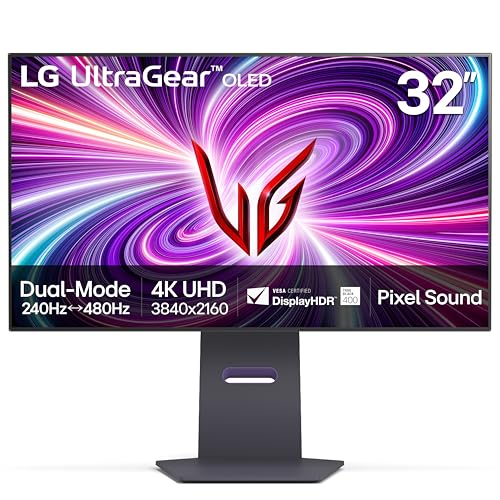
Specs
Panel | 32-inch WOLED |
Native mode | 4K 3840x2160 at 240Hz |
Dual mode | 1080p at 480Hz |
Pixel density | 138 PPI native, 69 PPI in dual mode |
Response | 0.03ms GtG |
HDR | DisplayHDR True Black 400 |
Sync | G-Sync Compatible, FreeSync Premium Pro |
Connectivity | HDMI 2.1, DisplayPort |
Panel
32-inch WOLED
Native mode
4K 3840x2160 at 240Hz
Dual mode
1080p at 480Hz
Pixel density
138 PPI native, 69 PPI in dual mode
Response
0.03ms GtG
HDR
DisplayHDR True Black 400
Sync
G-Sync Compatible, FreeSync Premium Pro
Connectivity
HDMI 2.1, DisplayPort
What it does well
Judged as a 32-inch 4K OLED, this is close to the finest gaming display available. Per-pixel emissive black gives contrast no IPS panel in this article can approach, 0.03ms response makes motion look like the refresh rate promises, and 240Hz at native 4K needs no qualification at all.
The details separate it from a spec sheet. Hardware calibration support, a fully adjustable stand, HDMI 2.1 on both inputs, and integrated speakers that are usable rather than an insult. It was the first monitor to ship dual mode and the implementation still works as described: one hotkey, a clean handoff, 480Hz on the other side.
If you want a single display that handles 4K single-player gaming at a high refresh rate and occasionally turns into a competitive panel, nothing here does the first half better. Our OLED buying guide covers the panel-technology case in more depth.
What you give up
The 1080p mode is where the argument turns. At 32 inches it lands at 69 PPI, well below a 24-inch 1080p panel and well below anything a buyer would choose on purpose. You are paying flagship money in part for a feature the panel size undercuts, and there are 32-inch 4K 240Hz OLEDs without dual mode that ask for noticeably less.
The mode switch also changes more than resolution. Bit-depth handling drops and some HDR behaviour changes with it, and reports suggest that catches people who expected a resolution-only toggle. It is OLED as well, so static desktop content carries burn-in exposure an IPS panel does not.
Who it's for
Someone buying the finest 32-inch 4K OLED they can and treating 480Hz as an occasional bonus. If the 480Hz mode is the reason you are reading this, the next pick is the better answer.
Skip dual mode and buy this: ASUS ROG Swift PG27AQDP

Specs
Panel | 27-inch WOLED |
Native mode | 1440p 2560x1440 at 480Hz |
Dual mode | None, single mode by design |
Pixel density | 109 PPI |
Response | 0.03ms GtG |
HDR | DisplayHDR True Black |
Sync | G-Sync Compatible, FreeSync Premium Pro |
Connectivity | HDMI 2.1, DisplayPort |
Panel
27-inch WOLED
Native mode
1440p 2560x1440 at 480Hz
Dual mode
None, single mode by design
Pixel density
109 PPI
Response
0.03ms GtG
HDR
DisplayHDR True Black
Sync
G-Sync Compatible, FreeSync Premium Pro
Connectivity
HDMI 2.1, DisplayPort
What it does well
This is the panel that makes the dual-mode question worth asking properly. It runs 1440p at 480Hz natively, matching the highest competitive refresh rate in this article while carrying 109 pixels per inch instead of 69. Same frames, forty percent more density, no hotkey.
Single mode is a feature rather than a limitation. Every game gets the full refresh rate and the full resolution, nothing needs reconfiguring between a ranked session and a story campaign, and there is no second display profile to maintain. WOLED response times make 480Hz mean something in motion instead of reading as a number on a box.
For a competitive player this is the honest recommendation. Frame generation is off in that context anyway, so the frames have to be native, and 1440p is where a strong card can produce them in volume. If 1440p is where you land, our 1440p 240Hz roundup covers the cheaper end of the same idea.
What you give up
There is no 4K mode. Desktop text at 109 PPI is visibly softer than 4K at 163, and single-player games lose the detail step a 4K panel gives them. If half of what you wanted from dual mode was the 4K half, this pick does not deliver it, and the resolution question is worth reading before you decide it does not matter.
480fps at 1440p is also GPU-bound long before it is panel-bound in anything but esports titles. Buyers have flagged paying for refresh headroom their card cannot reach. OLED burn-in exposure applies here the same way it does on the LG. The same arithmetic decides the tier above it. Whether 500Hz is enough or you need 1000Hz turns on the frame rate your PC sustains, not the number printed on the panel.
Who it's for
The competitive-first player buying the refresh rate, and anyone who has run the dual-mode numbers and found they only ever wanted one of the two modes. If 480Hz sounds like more headroom than your card will ever use, step down a tier rather than stepping across to dual mode.
Bottom line
If you play a mixed library on one desk, buy the LG UltraGear 27G810A. If your budget is tight and 4K is mostly a desktop resolution for you, buy the ASUS TUF Gaming VG27UQEL5A. If you want the finest 32-inch 4K OLED and the 480Hz mode is a bonus rather than the point, buy the LG UltraGear 32GS95UE with the pixel-density trade in mind. If 480Hz is the point, buy the ASUS ROG Swift PG27AQDP and skip dual mode entirely. And if the choice is between a halo graphics card and a better panel, the panel wins more often than builders expect; pairing the two properly is the decision underneath all four picks.
FAQ
What is dual mode on a gaming monitor?
Dual mode is a panel-level feature that lets one monitor run at two different resolution and refresh-rate combinations. A 4K panel might run 3840x2160 at 240Hz in one mode and 1920x1080 at 480Hz in the other. You switch with a hotkey or an on-screen menu option, then match the resolution in your display settings. It is not the same as changing resolution in Windows on an ordinary monitor, because the panel re-negotiates the link to expose the higher refresh rate the lower resolution allows.
Does switching to 1080p on a 4K monitor look blurry?
Not the way a non-integer resolution does. 3840x2160 is exactly twice 1920x1080 in each direction, so the panel maps each 1080p pixel onto a square block of four physical pixels with no interpolation. Edges stay hard and text stays legible. What does change is pixel density: a 27-inch panel goes from 163 pixels per inch to 82, and a 32-inch panel from 138 to 69. The image is sharp for its resolution. It is simply a lower resolution spread across the same area.
Is 1080p 480Hz actually worth it over 1440p 240Hz?
For most players, no. 1440p at 240Hz carries 109 pixels per inch on a 27-inch panel against 82 for 1080p, and 240Hz is already past the point where most people reliably tell the difference. The case for 1080p 480Hz is narrow: a competitive player whose graphics card can genuinely produce 400 or more frames in the titles they play. If that describes you, a native 1440p 480Hz panel is a better answer than a 1080p mode on a 4K one.
Which monitors have dual mode in 2026?
The category has spread across the whole stack. At the top, the LG UltraGear 32GS95UE and the ASUS ROG Swift PG32UCDP run 4K at 240Hz or 1080p at 480Hz on OLED. In the middle, IPS panels like the LG UltraGear 27G810A pair 4K 180Hz with 1080p 360Hz. At the bottom, the ASUS TUF Gaming VG27UQEL5A does 4K 80Hz or 1080p 310Hz. What was a single flagship feature two years ago now spans four price tiers.
Does dual mode work with consoles?
Partly. A PS5 or Xbox Series X connected over HDMI 2.1 uses whichever mode the monitor is currently set to, so the 4K high-refresh mode works normally. The very high 1080p modes are a different matter, because consoles do not output 360Hz or 480Hz and there is nothing to feed them. Treat dual mode as a PC feature that does not break console compatibility rather than one consoles benefit from. Check that the panel supports 4K at 120Hz over HDMI if console play matters to you.
Related Articles

Best 4K 240Hz OLED Gaming Monitors 2026: 6 Picks Compared
The best 4K 240Hz OLED gaming monitors, ranked: which 27 and 32 inch QD-OLED and WOLED panels are worth buying, and which RTX 5090 pairing needs DP 2.1a.
Sep 13, 2026

Is 240Hz Enough, or Do You Need 500Hz at 1440p? (2026)
Is 240Hz enough, or do you need 500Hz for competitive play? The answer is the frame rate your rig sustains at 1440p. Here is the bar and the monitor to buy.
Aug 10, 2026

Best 1440p 240Hz Gaming Monitors (2026): 5 Picks by Panel
Five of the best 1440p 240Hz gaming monitors for 2026, picked by panel tech and GPU pairing: QD-OLED, WOLED, and IPS options for every budget and room.
Jun 21, 2026

Do You Need a 4K Monitor for Gaming? 1440p Wins in 2026
Skip 4K unless your GPU is a 5080 or better. See the GPU-tier decision matrix, real benchmarks, and three 1440p and 4K monitor picks that fit your budget.
Jul 30, 2026

How to Choose a Gaming Monitor: 2026 Buyer's Guide
How to choose a gaming monitor in 2026: match resolution, refresh rate, and panel type to your GPU so you never overpay for pixels your card cannot push.
Jul 19, 2026