Affiliate Disclosure: As an Amazon Associate we earn from qualifying purchases. Some links may earn us a commission at no cost to you.

Is 500Hz Enough, or Do You Need 1000Hz? (2026 Verdict)
500Hz is enough. For effectively every player asking this question, refresh rate is no longer the thing holding back their aim, and the jump to 1000Hz buys a one millisecond frame window that almost nobody can feed.
The 1000Hz tier is also gated. LG's 25G590B needs DisplayPort 2.1 UHBR20, Windows 11, and an RTX 50-series or recent Radeon card, so a large share of the people weighing it cannot drive the panel they are considering. Here is the math, the hardware gate, and what to buy instead.
At a glance
Monitor | Panel | Refresh | Frame window | Buy |
|---|---|---|---|---|
27 in QD-OLED, 1440p | 500Hz | 2.0 ms | ||
24.1 in Super TN, 1080p | 610Hz | 1.64 ms | ||
25 in IPS, 1080p | 1000Hz | 1.0 ms |
- Panel
27 in QD-OLED, 1440p
- Refresh
500Hz
- Frame window
2.0 ms
- Buy
- Panel
24.1 in Super TN, 1080p
- Refresh
610Hz
- Frame window
1.64 ms
- Buy
- Panel
25 in IPS, 1080p
- Refresh
1000Hz
- Frame window
1.0 ms
- Buy
Where each tier wins
Scenario | What decides it | Winner |
|---|---|---|
Ranked CS2 or Valorant on an RTX 50-series rig | You can feed four figures at 1080p and you own the UHBR20 output | |
Ranked play on an RTX 40-series or older card | No UHBR20 output, so 1000Hz is not reachable at any price | |
One monitor for ranked play and everything else | 1440p and OLED pixel response matter more than the last millisecond | |
Chasing the lowest frame window you can genuinely hit | 1080p keeps the frame rate high enough for the panel to matter |
Ranked CS2 or Valorant on an RTX 50-series rig
- What decides it
You can feed four figures at 1080p and you own the UHBR20 output
- Winner
Ranked play on an RTX 40-series or older card
- What decides it
No UHBR20 output, so 1000Hz is not reachable at any price
- Winner
One monitor for ranked play and everything else
- What decides it
1440p and OLED pixel response matter more than the last millisecond
- Winner
Chasing the lowest frame window you can genuinely hit
- What decides it
1080p keeps the frame rate high enough for the panel to matter
- Winner
The frame time math
How long each tier holds a frame on screen before the next one arrives. Lower is better.
- 240Hz4.16 ms
- 360Hz2.78 ms
- 500Hz2 ms
- 610Hz1.64 ms
- 1000Hz1 ms
Refresh rate is a frame window. At 240Hz a new frame lands every 4.16 ms. At 500Hz it lands every 2 ms. At 1000Hz it lands every 1 ms. The ladder is linear in Hertz and it is not linear in what you feel.
Climbing from 360Hz to 500Hz shaved 0.78 ms off the window. Climbing from 500Hz to 1000Hz shaves 1.00 ms. That reads like the bigger win until you notice it takes a doubling of refresh rate to get there, and that every rung below it was cheaper per millisecond. Reviewers testing the 25G590B measured a real latency reduction at very high frame rates while reporting that the visible motion clarity gain past 500Hz was marginal on this IPS panel.
If you want the cheapest honest entry to this conversation, the 240Hz tier still covers most of the distance.
Can your PC feed 1000fps?
Live match averages at 1080p low settings on a top tier X3D processor, not built in benchmark runs.
- Counter-Strike 2850 FPS
- Valorant1500 FPS
A 1000Hz panel only matters if your PC hands it a thousand frames a second. In live competitive matches on a top tier X3D processor at 1080p low, CS2 sustains somewhere around 850 fps and Valorant runs higher. The four figure CS2 numbers that circulate came from liquid nitrogen overclocking runs on built in benchmarks, not from ranked games.
Drop to a mainstream 2026 esports build and the picture shifts again. The same class of processor paired with a mid tier card lands nearer 450 fps in CS2 and 550 fps in Valorant. Those are fine numbers. They are also roughly half of what the panel wants, which means the monitor spends most of its time repeating frames. The GPU side of the equation is the part buyers skip, and our GPU and display pairing guide walks the rest of it.
Then there is the connector. The 25G590B runs its full refresh over DisplayPort 2.1 UHBR20 and nothing else. DisplayPort 2.1 on a spec sheet is not a single capability: the standard carries UHBR10 at 40 Gbps, UHBR13.5 at 54 Gbps, and UHBR20 at 80 Gbps, and only the top tier has the headroom to carry 1080p at 1000Hz without compression. LG lists RTX 50-series and selected Radeon RX 7000 and RX 9000 cards, plus Windows 11. If your card predates that list, the panel is not a stretch goal. It is unreachable.
How we picked
Three questions, in order. What does the extra refresh buy in milliseconds? Can the reader's hardware feed it? And does the panel technology make that difference visible once it arrives?
The first question is arithmetic, and the arithmetic favours the lower rung every time you climb. The second is where this tier falls apart, because sustaining four figure frame rates is a processor problem and the connector requirement is a second gate stacked on top. The third is why a 500Hz QD-OLED reads as the bigger upgrade than a 1000Hz IPS: pixel response and contrast do more for perceived motion clarity than the last millisecond of frame pacing.
We have walked this ladder twice already, at 144Hz to 240Hz and at 240Hz to 500Hz. The pattern holds each time.
Enough for almost everyone: Samsung Odyssey OLED G6 (G60SF)
The pick for the reader who asked the question and wants to stop thinking about it.

Specs
Panel | 27 in QD-OLED |
Resolution | 2560 x 1440 |
Refresh rate | 500Hz |
Response time | 0.03 ms GtG |
Frame window at max refresh | 2.0 ms |
HDR | VESA DisplayHDR TrueBlack 500 |
Adaptive sync | G-Sync Compatible, FreeSync Premium Pro |
Warranty | 3 years |
Panel
27 in QD-OLED
Resolution
2560 x 1440
Refresh rate
500Hz
Response time
0.03 ms GtG
Frame window at max refresh
2.0 ms
HDR
VESA DisplayHDR TrueBlack 500
Adaptive sync
G-Sync Compatible, FreeSync Premium Pro
Warranty
3 years
What it does well
Reviewers put its motion handling at the top of the 1440p class, and the reason is pixel response rather than refresh alone. A 0.03 ms gray to gray transition means the panel is never the component smearing the image. At 500Hz the frame window is 2 ms, and QD-OLED is quick enough that the window is what you see rather than a number on a box.
It runs over a standard DisplayPort connection on any modern card, so there is no connector homework and no support list to cross check. At 1440p it stays useful the moment you close the shooter, which no 1080p esports panel manages. DisplayHDR TrueBlack 500 and a three year warranty round it out.
What you give up
It sits at the top of the 1440p class on price, and 1440p at 500Hz is a far harder frame feed target than 1080p. A mid tier card spends most of its time well under the ceiling, which is the same criticism that lands on the 1000Hz panel, one rung lower.
QD-OLED still asks for care with static HUD elements over long sessions. Buyers have flagged the naming as its own hazard: Samsung ships a G60SD at 360Hz and a G61SH on a different panel, and only the G60SF is the 500Hz SKU.
Who it's for
The player who wants one monitor for ranked play and everything else, on a machine that can push several hundred frames at 1440p. Our gaming monitor buyer's guide covers the rest of the shortlist.
The 1080p competitive alternate: ASUS ROG Strix XG248QSG Ace
If the argument is that you need more than 500Hz, this panel makes it without the hardware gate.
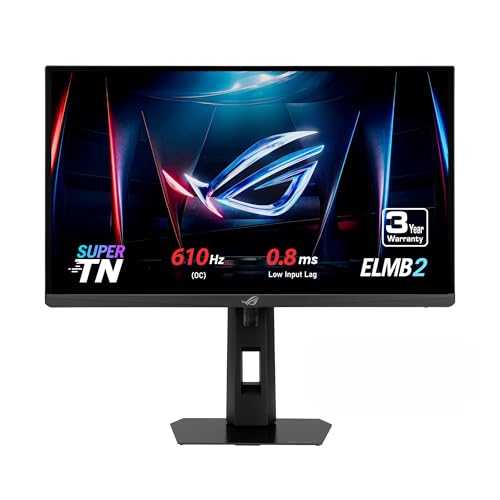
Specs
Panel | 24.1 in Super TN |
Resolution | 1920 x 1080 |
Refresh rate | 610Hz (overclocked) |
Response time | 0.1 ms GtG |
Frame window at max refresh | 1.64 ms |
Input lag | 0.8 ms (GameFast) |
Color | approx 92% DCI-P3 |
Brightness | approx 450 nits SDR, 525 nits HDR |
Panel
24.1 in Super TN
Resolution
1920 x 1080
Refresh rate
610Hz (overclocked)
Response time
0.1 ms GtG
Frame window at max refresh
1.64 ms
Input lag
0.8 ms (GameFast)
Color
approx 92% DCI-P3
Brightness
approx 450 nits SDR, 525 nits HDR
What it does well
610Hz over a standard DisplayPort connection clears the 500Hz tier on hardware competitive players already own. The frame window lands at 1.64 ms, and ASUS quotes 0.8 ms of input lag through its GameFast path, the lowest figure in the esports class.
1080p is also the resolution where a strong processor genuinely sustains four figure frame rates in Source 2 and Valorant, so the panel and the PC are aimed at the same target. Colour coverage around 92 percent of DCI-P3 is better than the super fast TN class usually manages. It sits alongside the panels Valorant pros run.
What you give up
Super TN viewing angles and contrast are a visible step down from OLED, and nothing about a 24.1 inch 1080p display is versatile. You are buying competitive equipment rather than a screen.
It also costs what a far more capable 1440p panel costs. And the 610Hz figure is an overclocked mode rather than the native panel rate, so reports suggest the headline number needs a toggle in the on screen menu before you get it.
Who it's for
The ranked CS2 or Valorant player who sits close, plays at low settings, and treats the monitor as part of the kit rather than as furniture.
The step up: LG UltraGear 25G590B
The first native 1000Hz panel, and the only pick here that arrives with a hardware checklist attached.

Specs
Panel | 25 in IPS |
Resolution | 1920 x 1080 |
Refresh rate | 1000Hz native (1100Hz overclock) |
Frame window at max refresh | 1.0 ms |
Connectivity | DisplayPort 2.1 UHBR20, HDMI 2.1 |
GPU requirement | RTX 50-series, or Radeon RX 7000/9000 with UHBR20 |
OS requirement | Windows 11 |
Adaptive sync | G-Sync Compatible, FreeSync Premium |
Panel
25 in IPS
Resolution
1920 x 1080
Refresh rate
1000Hz native (1100Hz overclock)
Frame window at max refresh
1.0 ms
Connectivity
DisplayPort 2.1 UHBR20, HDMI 2.1
GPU requirement
RTX 50-series, or Radeon RX 7000/9000 with UHBR20
OS requirement
Windows 11
Adaptive sync
G-Sync Compatible, FreeSync Premium
What it does well
UHBR20 carries an uncompressed 1080p signal at 1000Hz, with roughly 77 Gbps of effective payload against the 80 Gbps raw figure. That matters. The 1 ms frame window is real rather than a compressed approximation of one. Reviewers do measure a latency reduction at these frame rates, and an 1100Hz overclock mode exists for players who want the floor under the floor.
For a player who already owns the right card and already sustains four figure frame rates, this is the only panel that delivers the tier. Nothing else ships native 1000Hz yet.
What you give up
The requirements rule out a large share of buyers before price enters the conversation. DisplayPort 2.1 UHBR20, Windows 11, and an RTX 50-series or recent Radeon card is a narrow window, and a graphics card box that says DisplayPort 2.1 does not confirm UHBR20.
Reviewers found the visible motion clarity gain past 500Hz marginal on this IPS panel while the latency reduction was perceptible, which is a narrower win than the spec sheet implies. IPS contrast against a QD-OLED is not a contest. And you are paying flagship money for a 1080p display. The dual mode panels that promise 1440p at 500Hz and 1080p at 1000Hz are previewed rather than shipping, so they are not an alternative yet.
Who it's for
The competitive player who already owns an RTX 50-series or RX 7000 or RX 9000 card with UHBR20 output, runs Windows 11, and sustains four figure frame rates in the game they play.
Bottom line
If you are asking whether 500Hz is enough, it is. Buy the Samsung Odyssey OLED G6 (G60SF) and you get the fastest motion clarity in the 1440p class plus a monitor that still works when you are not in a ranked queue. If you play 1080p competitively and want past 500Hz without a hardware audit, the ASUS ROG Strix XG248QSG Ace reaches 610Hz on the card you already own. If you run an RTX 50-series rig, sustain four figure frame rates, and want the 1 ms window, the LG UltraGear 25G590B is the only panel that ships it. Everyone else is paying for a frame window their PC cannot fill.
FAQ
Can you actually see the difference between 500Hz and 1000Hz?
Some players report a difference in feel, and reviewers testing the first native 1000Hz panel did measure lower latency at very high frame rates. What they did not find was a clear jump in visible motion clarity past 500Hz on that IPS panel.
The frame window moves from 2 ms to 1 ms, a smaller absolute change than any rung below it. If you cannot pick a 500Hz panel out of a lineup against 360Hz, the next rung will not change that.
What GPU do you need to hit 1000fps?
Frame rates that high in CS2 and Valorant are a processor problem before they are a graphics card problem. Both titles are heavily CPU bound at 1080p low settings, which is why a top tier X3D chip is the part that moves the number.
A mainstream 2026 esports build lands nearer 450 to 550 fps in those titles. Sustaining four figures in live matches takes the fastest available processor, not just a fast card.
Does a 1000Hz monitor require DisplayPort 2.1?
Yes, and specifically the UHBR20 tier of it. DisplayPort 2.1 covers three bandwidth levels: UHBR10 at 40 Gbps, UHBR13.5 at 54 Gbps, and UHBR20 at 80 Gbps. Only UHBR20 has the headroom to carry 1080p at 1000Hz without compression.
A graphics card that advertises DisplayPort 2.1 may implement only a lower tier, so check the specific UHBR level rather than the version number on the box.
Is a dual-mode 1000Hz monitor better than a native 1000Hz one?
Dual mode panels trade resolution for refresh, typically running 1440p at 500Hz and switching to 1080p at 1000Hz. On paper that is more flexible than a fixed 1080p panel.
In practice the 1000Hz dual mode wave from AOC, Philips and AntGamer has been previewed rather than shipped, so there is nothing to buy yet. As a purchase decision today it is not a live option, whatever the spec sheets promise.
Do pro CS2 and Valorant players use 1000Hz monitors?
Not yet in any meaningful number. Pro setups cluster in the 240Hz to 500Hz range because that is where tournament hardware and personal rigs both sit, and because those panels have been available long enough to standardise on.
The 1000Hz tier is weeks old and carries a connector requirement most event hardware does not meet. Expect adoption to follow the GPU generation rather than the panel launch.
Does 1000Hz work on an RTX 40-series or RX 6000-series card?
No. LG lists RTX 50-series and selected Radeon RX 7000 and RX 9000 cards as supported, along with Windows 11, because the full refresh rate needs DisplayPort 2.1 UHBR20 output.
An RTX 40-series or RX 6000-series card does not provide it. You can still run the panel at a lower refresh rate, which makes it an expensive way to own a 1080p display.
Related Articles

Is 240Hz Enough or Do You Need 500Hz? The 400 FPS Bar (2026)
Is 240Hz enough, or do you need 500Hz? Only if your rig holds 400+ fps at 1440p. See the frame time math, per-game fps bars, and the monitor to buy either way.
Oct 19, 2026

Is 144Hz Enough, or Do You Need 240Hz for Gaming? (2026)
Is 144Hz enough for gaming, or do you need 240Hz? Our verdict, the monitor to buy at each tier, and the frame rate your GPU has to sustain to earn it.
Aug 7, 2026

Are Dual-Mode Monitors Worth It? 4 Picks by Tier (2026)
Are dual-mode monitors worth it? At 27 inches, yes: the 1080p mode stays sharp. At 32 inches you pay halo money for 69 PPI. Four picks, one for each tier.
Oct 25, 2026

Best 1080p 240Hz Gaming Monitors 2026: 5 Picks + GPU Guide
The best 1080p 240Hz gaming monitors for 2026, from the budget Fast IPS floor to the 540Hz halo, plus which GPU actually drives 240Hz in CS2 and Valorant.
Sep 10, 2026

How to Choose a GPU (and a Monitor That Matches)
A buyer's framework for picking a GPU and the monitor that pairs with it. Start with the panel and work the card back.
May 17, 2026