Affiliate Disclosure: As an Amazon Associate we earn from qualifying purchases. Some links may earn us a commission at no cost to you.

Best 144Hz Gaming Monitors 2026: 5 Picks, 144 vs 180Hz
Searching for a 144Hz gaming monitor in 2026 is really shorthand for the value tier. 165Hz and 180Hz IPS panels are the mainstream floor now, and 240Hz is the upgrade, so almost nothing worth buying stops at exactly 144. The real decision is resolution, and which one your GPU can feed at high frames.
These five picks split that decision in two. The 1080p budget floor is where a cheap card pushes well past 144 fps and the goal is the lowest-cost credible high-refresh panel. The 1440p sweet spot is where 27-inch IPS panels now sit at prices that used to buy a 1080p screen. Pick the resolution your GPU matches, then take the panel that fits. If the resolution you land on is 4K, that tier plays by different rules at high refresh. Our guide to the best 4K 144Hz gaming monitors covers the panels and the cards that can hold them there.
Our top pick: ASUS TUF VG27AQ3A
The ASUS TUF VG27AQ3A is the safe default: a 27-inch 1440p Fast IPS panel at 180Hz that buys the sweet-spot resolution and a high-refresh ceiling for the price a decent 1080p screen used to command.

Quick picks
Pick | Monitor | Resolution and tier | Where to buy |
|---|---|---|---|
Best Overall | 1440p, sweet-spot default | ||
Best Value | 1440p, ergonomic stand | ||
Best Budget | 1080p, budget VA floor | ||
Best 1080p IPS | 1080p, competitive IPS | ||
Editor's Pick | 1440p, feature-forward value |
Best Overall
- Monitor
- Resolution and tier
1440p, sweet-spot default
- Where to buy
Best Value
- Monitor
- Resolution and tier
1440p, ergonomic stand
- Where to buy
Best Budget
- Monitor
- Resolution and tier
1080p, budget VA floor
- Where to buy
Best 1080p IPS
- Monitor
- Resolution and tier
1080p, competitive IPS
- Where to buy
Editor's Pick
- Monitor
- Resolution and tier
1440p, feature-forward value
- Where to buy
Specs at a glance
Monitor | Resolution | Panel | Refresh | Adaptive sync | Stand |
|---|---|---|---|---|---|
1440p (QHD) | Fast IPS | 180 Hz | FreeSync Premium + G-SYNC | Tilt only | |
1440p (QHD) | IPS | 180 Hz (OC 200) | G-SYNC + FreeSync | Height/tilt/pivot | |
1080p (FHD) | VA | 165 Hz | FreeSync Premium | Tilt only | |
1080p (FHD) | IPS | 180 Hz | FreeSync Premium | Tilt only | |
1440p (QHD) | QD SuperSpeed IPS | 200 Hz (OC 210) | FreeSync Premium + G-SYNC | Height/tilt/swivel/pivot |
- Resolution
1440p (QHD)
- Panel
Fast IPS
- Refresh
180 Hz
- Adaptive sync
FreeSync Premium + G-SYNC
- Stand
Tilt only
- Resolution
1440p (QHD)
- Panel
IPS
- Refresh
180 Hz (OC 200)
- Adaptive sync
G-SYNC + FreeSync
- Stand
Height/tilt/pivot
- Resolution
1080p (FHD)
- Panel
VA
- Refresh
165 Hz
- Adaptive sync
FreeSync Premium
- Stand
Tilt only
- Resolution
1080p (FHD)
- Panel
IPS
- Refresh
180 Hz
- Adaptive sync
FreeSync Premium
- Stand
Tilt only
- Resolution
1440p (QHD)
- Panel
QD SuperSpeed IPS
- Refresh
200 Hz (OC 210)
- Adaptive sync
FreeSync Premium + G-SYNC
- Stand
Height/tilt/swivel/pivot
How we picked
Five things decide this purchase, and the first is the reframe most buyers arrive without.
Is 144Hz still worth it in 2026?
144Hz is no longer the high-refresh aspiration. It is the value tier. The mainstream IPS floor moved to 165Hz and 180Hz, and 240Hz is now the enthusiast step. Every panel below ships at 165Hz or higher because there is almost no reason to buy a screen capped at exactly 144 in 2026. The refresh number you were chasing is now cheap, so the money goes toward resolution and panel quality instead. Nobody should pay a premium to land on exactly 144Hz, and nobody competitive at 1080p should settle for it either. The high-refresh question is solved at this price. The resolution question is the one that matters. If you are still mapping the 1080p tier, our 1080p gaming monitor guide and the 1080p 240Hz tier cover the steps on either side of this one. If the tier itself is the question rather than the panel, our guide to whether 144Hz is enough or you need 240Hz works through the frame-time math and the graphics card that has to feed either one.
How much refresh is worth paying for
The jump that changes how a game feels is 60 to 144. Every step above it is smaller than the one before. Going from 144Hz to 165Hz is close to invisible in normal play, and 165Hz to 180Hz is smaller still, which is why neither should decide the purchase on its own. Take them when they cost nothing, and most current IPS panels hand them over for nothing. Refresh becomes a real decision again at 240Hz, and that step earns its money in competitive 1080p shooters where frame times are already low enough for the gap to register. So the order at this tier is resolution first, panel type second, refresh last. A 1440p panel at 165Hz beats a 1080p panel at 180Hz for almost everyone reading this, and buying refresh you cannot see costs you the resolution you would have noticed. If the refresh tier is settled and the resolution question is what is left, our best gaming monitors guide names a winner for each resolution and panel class.
1080p budget floor vs 1440p sweet spot
This is the real decision. 1080p is the budget floor: a 24-inch high-refresh panel pairs with a cheap GPU, keeps the most money in the build, and pushes well past 144 fps in nearly everything at that resolution. 1440p is the sweet spot: a 27-inch panel gives the resolution jump that matters more than the last few hertz, and those panels now cost what 1080p screens cost a couple of years ago. The split comes down to the GPU and the library. A budget esports build belongs on 1080p. A mainstream build that touches AAA belongs on 1440p. If your 1440p budget is tight, the 1440p sub-300 guide is the next stop.
Can your GPU actually feed the panel?
A high-refresh panel is only worth the refresh if the card feeds it. At 1080p, an RTX 4060, RTX 5060, RX 7600, or Arc B580 class card clears 144 fps in most esports titles and many AAA games, so the budget panels match cheap hardware cleanly. At 1440p, the bar rises: an RTX 5060 Ti 16GB, RX 9060 XT 16GB, RTX 5070, or RX 9070 class card is the floor for holding high frames in most titles. Buy the resolution your card can drive. A 1440p panel on a 1080p-class GPU spends most of its time below its own refresh ceiling. The GPU side is mapped in our best GPUs for 1080p gaming.
IPS vs VA at the budget floor
The two 1080p picks split on panel type, and it is a real choice rather than a price ladder. VA gives deeper contrast, so dark scenes look genuinely black instead of gray, which suits single-player and mixed use. IPS gives cleaner dark-to-dark motion, which matters in twitch FPS where VA panels smear, plus wider viewing angles and more accurate color. The budget VA pick is the contrast choice. The 1080p IPS pick is the competitive-motion choice. The price gap between them is small, so pick the panel type your library wants, not the cheaper sticker.
Best Overall: ASUS TUF VG27AQ3A
The default 144Hz-class pick. A 27-inch 1440p Fast IPS panel at 180Hz that buys the sweet-spot resolution and a refresh ceiling that outlives the 144Hz framing, for the price a decent 1080p screen used to command.
Specs
Panel | 27-inch Fast IPS, QHD 2560x1440 |
Refresh rate | 180 Hz (covers and exceeds 144 Hz) |
Response time | 1 ms GTG with ELMB Sync |
Color | 130% sRGB, HDR-10 input |
Adaptive sync | FreeSync Premium, G-SYNC Compatible |
Ports | 2x HDMI 2.0, 1x DisplayPort 1.4, audio out |
Stand | Tilt only (VESA 100x100 for arms) |
Panel
27-inch Fast IPS, QHD 2560x1440
Refresh rate
180 Hz (covers and exceeds 144 Hz)
Response time
1 ms GTG with ELMB Sync
Color
130% sRGB, HDR-10 input
Adaptive sync
FreeSync Premium, G-SYNC Compatible
Ports
2x HDMI 2.0, 1x DisplayPort 1.4, audio out
Stand
Tilt only (VESA 100x100 for arms)
What it does well
This is the panel most 144Hz searchers want once they see the price. Fast IPS at 1440p delivers the resolution jump that matters more than the last 36 hertz, and the 180Hz ceiling means the monitor will not feel dated next year. Real-world response is clean for the tier, with ELMB Sync handling motion clarity by strobing the backlight alongside variable refresh rather than forcing an either-or. Color is strong for a value panel: 130% sRGB coverage out of the box, vibrant and well balanced according to the bulk of owner feedback, good enough for light creation alongside gaming. Adaptive sync is covered both ways with FreeSync Premium and G-SYNC Compatible, so it pairs cleanly with an AMD or Nvidia card. It is the best-stocked, highest-reviewed panel in the category, which matters for a buyer who wants a safe default.
What you give up
The included stand is tilt-only, with no height or pivot adjustment, which is the most common complaint and a real limitation unless you mount it on an arm. HDR is nominal: the panel accepts an HDR-10 signal but peak brightness lands around 250 nits, so treat it as an SDR monitor with HDR as a checkbox. Buyers have flagged a panel lottery at this price point, with a minority reporting dead pixels out of the box or units that fail inside the first month. ASUS RMA is reliable, but it is friction. If your library and GPU are firmly 1080p competitive, a smaller 1080p panel at higher native refresh is the better spend.
Who it's for
The mainstream 144Hz searcher who is really shopping the 1440p sweet spot and wants one safe, well-supported default. It pairs naturally with an RTX 5060 Ti 16GB, RX 9060 XT 16GB, RTX 5070, or RX 9070 class card that can push 1440p high-refresh in most titles. Anyone stepping up from an older 1080p screen who wants the resolution jump and a refresh ceiling that holds up. Single-monitor or arm-mounted desks, given the tilt-only stand.
ASUS ships several similarly named 27-inch TUF 1440p panels. This pick is the VG27AQ3A specifically (180Hz Fast IPS). Do not confuse it with the older VG27AQ at 165Hz, the VG27AQA1A at 170Hz, the VG27AQL3A with a height-adjustable stand at a higher price, or the faster VG27AQM5A and VG27AQML1A. The listing model code is the only reliable check.
Best Value: LG UltraGear 27GS75Q-B
The value pick that fixes the top pick's one weakness. The same 1440p 180Hz IPS recipe, with a full height-and-pivot stand in the box, for the buyer who wants ergonomics without leaving the value tier.

Specs
Panel | 27-inch IPS, QHD 2560x1440 |
Refresh rate | 180 Hz native, 200 Hz overclock |
Response time | 1 ms GTG |
Color | HDR10 input, sRGB-class gamut |
Adaptive sync | G-SYNC Compatible, AMD FreeSync |
Ports | 2x HDMI 2.1, 1x DisplayPort, audio out |
Stand | Tilt, height, and pivot adjustable |
Panel
27-inch IPS, QHD 2560x1440
Refresh rate
180 Hz native, 200 Hz overclock
Response time
1 ms GTG
Color
HDR10 input, sRGB-class gamut
Adaptive sync
G-SYNC Compatible, AMD FreeSync
Ports
2x HDMI 2.1, 1x DisplayPort, audio out
Stand
Tilt, height, and pivot adjustable
What it does well
This is the same 1440p 180Hz IPS class as the top pick, with the ergonomic stand the ASUS leaves out. Height, tilt, and pivot adjustment come in the box, which is the single feature most buyers discover they miss after living with a tilt-only panel. The 180Hz native refresh overclocks to 200Hz over DisplayPort for a card that can use it, giving a little headroom above the 144 the search term implies. LG's UltraGear panels are a known quantity for response and overdrive tuning, and the gaming OSD includes the usual crosshair and black-stabilizer aids. Adaptive sync covers both vendors. For a buyer cross-shopping the ASUS and wanting the stand, this is the cleaner desk citizen at the same resolution and refresh class.
What you give up
Color volume and HDR are ordinary for the tier. The panel takes an HDR10 signal but, like the rest of this bracket, has neither the brightness nor the local dimming to make HDR meaningful, so judge it as an SDR monitor. There is no quantum-dot color expansion, so wide-gamut creators should look higher up the stack. The 200Hz overclock is a nice-to-have rather than a reason to buy, and most buyers will run it at 180. The budget-tier QC lottery applies here too, and a minority of units arrive with a stuck pixel. LG's RMA is reliable but adds friction.
Who it's for
The 1440p sweet-spot buyer who wants the top pick's resolution and refresh class but will not accept a tilt-only stand, or who plans to keep the included stand rather than buy an arm. It pairs with the same RTX 5060 Ti, RX 9060 XT, RTX 5070, or RX 9070 GPU tier. Desks where height and pivot matter: tall users, portrait-mode second monitors, and ergonomics-conscious buyers.
LG's 27-inch QHD UltraGear line has near-identical model numbers that vary by panel and stand. This pick is the 27GS75Q-B specifically, the 180Hz IPS with the full tilt, height, and pivot stand. Do not confuse it with the 27GS75QX-B, the curved 27GS60QC-B, or the older 27GR75Q-B and 27GR83Q-B. Several bundle listings repackage the same panel with cables at a markup; the bare Amazon-sold panel is the value.
Best Budget: Acer Nitro KG241Y Sbiip
The budget floor. A 23.8-inch 1080p 165Hz VA panel with thousands of owners and a price that makes 144Hz-class gaming nearly an impulse buy, for the player whose GPU and library are firmly 1080p.

Specs
Panel | 23.8-inch VA, Full HD 1920x1080 |
Refresh rate | 165 Hz (covers and exceeds 144 Hz) |
Response time | 1 ms VRB |
Color | VA contrast, sRGB-class gamut |
Adaptive sync | AMD FreeSync Premium |
Ports | 1x DisplayPort 1.2, 2x HDMI 2.0 |
Stand | Tilt only (VESA 100x100) |
Panel
23.8-inch VA, Full HD 1920x1080
Refresh rate
165 Hz (covers and exceeds 144 Hz)
Response time
1 ms VRB
Color
VA contrast, sRGB-class gamut
Adaptive sync
AMD FreeSync Premium
Ports
1x DisplayPort 1.2, 2x HDMI 2.0
Stand
Tilt only (VESA 100x100)
What it does well
This is the cheapest credible way onto the high-refresh ladder. The 165Hz refresh clears the 144 the search term implies, and the VA panel delivers contrast that IPS at this price cannot match, so dark scenes look genuinely deep rather than gray. FreeSync Premium covers tearing on AMD cards and most Nvidia cards through G-SYNC Compatible behavior. At 23.8 inches and 1080p, an RTX 4060, RTX 5060, RX 7600, or Arc B580 class card pushes well past 144 fps in most esports and many AAA titles, so the panel and a budget GPU match. With several thousand ratings it is a known, safe budget quantity. For a first build on a tight budget, this is the panel that leaves the most money for the GPU.
What you give up
VA's tradeoff is motion. The contrast is excellent, but VA panels smear on dark-to-dark transitions in a way Fast IPS does not, and competitive players chasing the cleanest motion will notice it. The 1ms figure is VRB, a strobing mode, not a true gray-to-gray response, so read it as marketing rather than spec. The stand is tilt-only. It is a 1080p panel with no resolution headroom, so a later GPU upgrade will run into the pixel ceiling. Color is sRGB-class with no wide-gamut coverage, and there is no usable HDR. Viewing angles are narrower than IPS, which matters for off-axis or shared viewing.
Who it's for
The budget 1080p builder who wants high-refresh gaming for the lowest credible price and plays a mostly esports or older-AAA library. It pairs with an RTX 4060, RTX 5060, RX 7600, or Arc B580 class GPU. First-time builders, secondary competitive panels, or anyone who would rather spend the saved money on the GPU. Buyers who value VA contrast for single-player and do not play twitch FPS at a level where VA smear costs them. If that budget is a school budget, the best monitors for college students guide covers the same high-refresh panels alongside the classwork features a dorm desk needs.
The KG241Y name covers a whole family of panels with different suffixes and panel types. This pick is the KG241Y Sbiip specifically, the VA model at 165Hz. The next pick is its IPS sibling, the KG241Y M3biip at 180Hz. There is also a KG241Y X1biip at 200Hz IPS and a KG241Y P3bip at 180Hz, plus a separate QG241Y line. Read the suffix, not just KG241Y.
Best 1080p IPS: Acer Nitro KG241Y M3biip
The 1080p IPS pick for the competitive player who wants clean motion and accurate color over VA contrast. 180Hz Fast-class IPS with 99% sRGB, at a price barely above the VA budget pick.
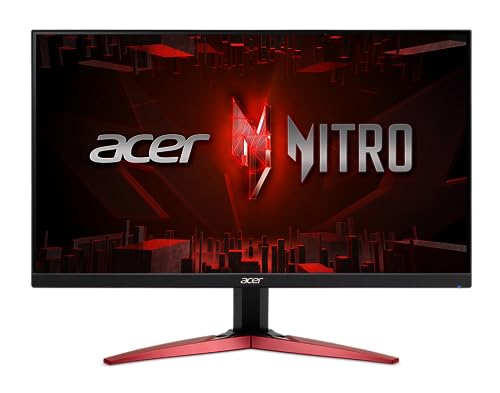
Specs
Panel | 23.8-inch IPS, Full HD 1920x1080 |
Refresh rate | 180 Hz (covers and exceeds 144 Hz) |
Response time | Up to 0.5 ms |
Color | 99% sRGB, HDR10 input |
Adaptive sync | AMD FreeSync Premium |
Ports | 1x DisplayPort 1.2, 2x HDMI 2.0 |
Stand | Tilt only (VESA 100x100) |
Panel
23.8-inch IPS, Full HD 1920x1080
Refresh rate
180 Hz (covers and exceeds 144 Hz)
Response time
Up to 0.5 ms
Color
99% sRGB, HDR10 input
Adaptive sync
AMD FreeSync Premium
Ports
1x DisplayPort 1.2, 2x HDMI 2.0
Stand
Tilt only (VESA 100x100)
What it does well
This is the 1080p panel competitive players should default to. IPS at 180Hz delivers the clean dark-to-dark motion VA cannot, which is exactly what matters in twitch FPS, and the 99% sRGB coverage means color is accurate enough for streaming overlays and light content work alongside play. The 180Hz refresh clears 144 with headroom, and a budget GPU at 1080p pushes past it comfortably in esports titles. FreeSync Premium handles tearing. At 23.8 inches the panel is the competitive size sweet spot, dense enough to look sharp and small enough to keep the whole frame in view. For a player who arrived searching 144Hz but mainly plays Valorant, CS2, or Apex seriously, this is the better 1080p choice than the VA pick, and the price gap is small.
What you give up
IPS gives up VA's contrast, so blacks look grayer in dark single-player scenes than the budget VA pick. The up-to-0.5ms figure is best-case overdrive marketing, not a sustained real-world number. HDR is input-only with no brightness to back it. The stand is tilt-only. It is still a 1080p panel with no resolution headroom for a future GPU upgrade. As with the VA sibling, the suffix matters, and there is no height adjustment. Color is sRGB-class only, with no DCI-P3 expansion for serious creators.
Who it's for
The competitive 1080p player who wants clean IPS motion and accurate color, and is willing to pay a small premium over the VA budget pick to get it. It pairs with the same RTX 4060, RTX 5060, RX 7600, or Arc B580 GPU tier. Streamers and light creators who want 99% sRGB. Anyone who plays twitch FPS where VA smear is a real cost, on a 1080p budget.
Same KG241Y suffix trap as the budget pick. This is the M3biip specifically, the IPS model at 180Hz with 99% sRGB, distinct from the Sbiip VA pick above, the X1biip at 200Hz, and the P3bip at 180Hz. Match the suffix to the panel type before you order.
Editor's Pick: Gigabyte M27Q2
The feature-forward value standout. A quantum-dot 1440p IPS panel at 200Hz with a Type-C KVM and full ergonomic stand, priced in the same value bracket as the plainer picks, for the buyer who wants the most monitor per dollar.

Specs
Panel | 27-inch Quantum Dot SuperSpeed IPS, QHD 2560x1440 |
Refresh rate | 200 Hz native, 210 Hz overclock |
Response time | 1 ms GTG |
Color | 99% DCI-P3, DisplayHDR 400 |
Adaptive sync | FreeSync Premium, G-SYNC Compatible |
Extras | Type-C KVM, USB-C with power delivery |
Stand | Height, tilt, swivel, pivot adjustable |
Panel
27-inch Quantum Dot SuperSpeed IPS, QHD 2560x1440
Refresh rate
200 Hz native, 210 Hz overclock
Response time
1 ms GTG
Color
99% DCI-P3, DisplayHDR 400
Adaptive sync
FreeSync Premium, G-SYNC Compatible
Extras
Type-C KVM, USB-C with power delivery
Stand
Height, tilt, swivel, pivot adjustable
What it does well
This is the value overachiever of the group. The quantum-dot SuperSpeed IPS panel covers 99% DCI-P3, so color is genuinely wide-gamut and noticeably more vivid than the sRGB-class panels elsewhere in this guide, which matters if you do any creative work alongside gaming. The 200Hz refresh, 210 overclocked, gives real headroom over 144. The standout feature is the Type-C KVM with power delivery: plug a laptop in over a single USB-C cable and the monitor switches keyboard and mouse between it and the desktop, a genuinely useful work-and-play feature most panels at this price skip entirely. The stand is fully ergonomic with height, tilt, swivel, and pivot, and it is Amazon-sold at a value-tier price.
What you give up
Two honest panel weaknesses surface in owner reports. Edge brightness uniformity is imperfect, most visible as slightly dimmer corners on a solid white background, which spreadsheet and document work shows more than gaming does. Off-axis viewing angles are weaker than the best IPS panels, with color shift when viewed from the sides. Neither is unusual for a value IPS, but both are real. DisplayHDR 400 is HDR in name only, as everywhere in this bracket. Buyers have flagged a QC lottery, with some reporting dead or stuck pixels, so inspect on arrival and use the return window. The aggressive matte coating can cause mild edge haze on pure white. None of this undoes the value, but the panel trades a little uniformity and viewing-angle polish for its color and feature set.
Who it's for
The buyer who wants the most features and the widest color for the money, and who values the Type-C KVM for a desk that mixes a gaming desktop with a work laptop. It pairs with the same 1440p GPU tier as the other QHD picks. Hybrid work-and-play setups, buyers who do light creative work and want 99% DCI-P3, and value hunters who want quantum-dot color without leaving the budget bracket. Single-viewer, mostly head-on desk positions, given the off-axis weakness. If that desk also hosts a laptop that travels, our guide to the best portable monitor for gaming covers the 144Hz panels that run off one USB-C cable.
Gigabyte's M27Q line is a variant minefield. This pick is the M27Q2 Amazon-sold listing, the QD SuperSpeed IPS at 200Hz with Type-C KVM. A separate third-party M27Q2 QD listing prices the same panel far higher through a marketplace seller, so confirm the shipper reads Amazon.com. Also distinct: the original M27Q at 165Hz, the M27Q X at 240Hz, the M27Q3 at 170Hz, and the OLED MO27Q2 siblings. The listing model code and the seller are the checks.
Bottom line
If you want one safe 1440p default, buy the ASUS TUF VG27AQ3A. If you want that same panel class with a full height-and-pivot stand, the LG UltraGear 27GS75Q-B is the value pick. If you are on a tight 1080p budget and want VA contrast, the Acer Nitro KG241Y Sbiip is the floor. If you play 1080p competitively and want clean IPS motion instead, step over to the Acer Nitro KG241Y M3biip. And if you want the most features and the widest color for the money, the Gigabyte M27Q2 takes the Editor's Pick. Shopping the higher-refresh tier next? Start with the 1440p 240Hz picks.
FAQ
Is 144Hz still worth it in 2026, or should you go straight to 165Hz or 240Hz?
144Hz is fine, but in 2026 it is the value floor rather than a target. The cheapest credible high-refresh IPS panels already run 165Hz or 180Hz, so you get past 144 without paying extra. Do not hunt for exactly 144Hz, and do not pay a premium for it. Spend the money on the right resolution for your GPU instead, and let the refresh number land wherever the value panel puts it.
Should you buy a 1080p 144Hz monitor or stretch to 1440p at the same price?
Match the resolution to your GPU and library. A budget esports build on a cheap card belongs on a 1080p high-refresh panel, where the frames come easily and the savings go to the GPU. A mainstream build that touches AAA belongs on 1440p, where the resolution jump matters more than the last few hertz and 27-inch panels now cost what 1080p screens used to. The Acer picks cover 1080p; the ASUS, LG, and Gigabyte cover 1440p.
What GPU do you need to actually hit 144 fps at 1080p and at 1440p?
At 1080p, an RTX 4060, RTX 5060, RX 7600, or Arc B580 class card clears 144 fps in most esports titles and many AAA games. At 1440p the bar rises to an RTX 5060 Ti 16GB, RX 9060 XT 16GB, RTX 5070, or RX 9070 class card to hold high frames in most titles. Buy the resolution your card can drive, or the panel will sit below its refresh ceiling most of the time.
Is IPS or VA better for a budget 144Hz gaming monitor?
It depends on what you play. VA gives deeper contrast, so dark single-player scenes look genuinely black, but it smears on fast dark-to-dark motion. IPS gives cleaner motion and wider viewing angles with more accurate color, which is what competitive FPS wants, at the cost of contrast. The Acer KG241Y Sbiip is the VA contrast choice; the KG241Y M3biip is the IPS motion choice. The price gap is small, so pick by library rather than sticker.
Does the difference between 144Hz, 165Hz, and 180Hz actually matter?
Barely. The jump from 60Hz to 144Hz is dramatic; the jump from 144 to 180 is marginal and hard to see in normal play. None of these picks stop at 144 anyway, so you get 165Hz or 180Hz for free at the value price. Treat the exact number as a tiebreaker, not a buying axis. Resolution and panel type change the experience far more than the last 36 hertz.
Do you need FreeSync or G-SYNC on a 144Hz monitor?
Yes, you want adaptive sync, and every pick here has it. FreeSync and G-SYNC Compatible both eliminate screen tearing by matching the panel's refresh to the GPU's frame rate, which matters most when frames dip below the refresh ceiling. The ASUS, LG, and Gigabyte picks carry both FreeSync and G-SYNC Compatible certification; the two Acer picks carry FreeSync Premium, which also works with most Nvidia cards. Either standard is fine on a modern card.
Related Articles

Best 1080p Gaming Monitors 2026: 5 Picks, 144Hz to 540Hz
The best 1080p gaming monitors for 2026, from a 144Hz 27-inch AAA panel to a 540Hz esports flagship. Five picks, real tradeoffs, and which refresh tier to buy.
Sep 2, 2026

Best 1440p Gaming Monitors Under $300 (2026): 5 Picks 180Hz+
Five 1440p gaming monitors under $300, all 180Hz or faster, sorted by price band. The mini-LED upset, the IPS value floor, and the tradeoff each one makes.
Aug 11, 2026

Best 1080p 240Hz Gaming Monitors 2026: 5 Picks + GPU Guide
The best 1080p 240Hz gaming monitors for 2026, from the budget Fast IPS floor to the 540Hz halo, plus which GPU actually drives 240Hz in CS2 and Valorant.
Sep 10, 2026

Best 1440p 240Hz Gaming Monitors (2026): 5 Picks by Panel
Five of the best 1440p 240Hz gaming monitors for 2026, picked by panel tech and GPU pairing: QD-OLED, WOLED, and IPS options for every budget and room.
Jun 21, 2026

Best GPUs for 1080p Gaming (2026): Picks by Refresh Tier
The best GPU for 1080p gaming in 2026, picked by refresh tier and game genre. From a budget Intel Arc card to a 240Hz esports pick, plus honest 8GB verdicts.
Jun 22, 2026