Affiliate Disclosure: As an Amazon Associate we earn from qualifying purchases. Some links may earn us a commission at no cost to you.

Best 4K 144Hz Gaming Monitors (2026): 5 Picks, IPS vs OLED
The best 4K 144Hz gaming monitor for most buyers is the ASUS ROG Swift PG32UCDM, a 32-inch QD-OLED that clears the 144Hz bar with 240Hz to spare. Four more picks sit below it, split on the two choices that actually cost money at this tier: IPS or OLED, and 27 inches or 32.
At 4K the graphics card is the limiter, not the panel. So every pick below names the card tier it needs, native versus DLSS, and pairs it to a card from our best GPUs for 4K gaming guide.
Our top pick: ASUS ROG Swift PG32UCDM
The ASUS ROG Swift PG32UCDM is the best 4K high-refresh panel you can buy, and at 240Hz it has refresh headroom that outlasts the graphics card driving it.

Quick picks
Pick | Monitor | GPU pairing | Where to buy |
|---|---|---|---|
Best Overall | Native 4K needs an RTX 5080; RTX 5070 Ti with DLSS | ||
Best Value | RTX 5070 Ti sweet spot; native 144Hz IPS | ||
Best Premium 27-inch | RTX 5080 native; RTX 5070 Ti with DLSS | ||
Best Budget | RTX 5070 Ti or RX 9070 XT; 160Hz native | ||
Editor's Pick | RTX 5070 Ti at 4K 180Hz; dual-mode flips to FHD 360Hz |
Best Overall
- Monitor
- GPU pairing
Native 4K needs an RTX 5080; RTX 5070 Ti with DLSS
- Where to buy
Best Value
- Monitor
- GPU pairing
RTX 5070 Ti sweet spot; native 144Hz IPS
- Where to buy
Best Premium 27-inch
- Monitor
- GPU pairing
RTX 5080 native; RTX 5070 Ti with DLSS
- Where to buy
Best Budget
- Monitor
- GPU pairing
RTX 5070 Ti or RX 9070 XT; 160Hz native
- Where to buy
Editor's Pick
- Monitor
- GPU pairing
RTX 5070 Ti at 4K 180Hz; dual-mode flips to FHD 360Hz
- Where to buy
Specs at a glance
Monitor | Panel | Refresh | HDR / sync |
|---|---|---|---|
32-inch QD-OLED (3rd-gen) | 240Hz | DisplayHDR True Black 400 | |
32-inch Nano IPS | 144Hz (native) | HDR10 / DisplayHDR-class | |
27-inch QD-OLED (4th-gen) | 240Hz | ||
27-inch Super-Speed IPS | 160Hz (native) | FreeSync Premium, G-Sync Compatible | |
27-inch IPS | 180Hz at 4K / 360Hz at FHD | VESA DisplayHDR 400 |
- Panel
32-inch QD-OLED (3rd-gen)
- Refresh
240Hz
- HDR / sync
DisplayHDR True Black 400
- Panel
32-inch Nano IPS
- Refresh
144Hz (native)
- HDR / sync
HDR10 / DisplayHDR-class
- Panel
27-inch QD-OLED (4th-gen)
- Refresh
240Hz
- HDR / sync
- Panel
27-inch Super-Speed IPS
- Refresh
160Hz (native)
- HDR / sync
FreeSync Premium, G-Sync Compatible
- Panel
27-inch IPS
- Refresh
180Hz at 4K / 360Hz at FHD
- HDR / sync
VESA DisplayHDR 400
How we picked
We start with the graphics card, not the panel. At 4K the card is the limiter, so a monitor you cannot feed is wasted money. Each pick here is matched to the card tier that drives it, native where the card has the headroom and DLSS where it needs the help.
From there we split by panel and price. QD-OLED for the readers who game in a controlled-light room and want the best image, IPS for the readers who want bright-room usability, burn-in peace of mind, and a lower entry price. Every pick clears the 144Hz target, and four of the five carry headroom past it.
We kept the lineup to panels that are in stock and shipping, and we cross-checked the pairings against our RTX 5080 versus RX 9070 XT breakdown so the card recommendations hold up.
Which GPU drives 4K 144Hz right now?
Native 4K at high refresh in modern AAA games wants an RTX 5080. That card has the raster and the memory bandwidth to hold a 4K panel near its refresh ceiling without leaning on upscaling, which is why both QD-OLED picks list it first.
The RTX 5070 Ti is the realistic floor. With DLSS quality upscaling it reaches 4K high-refresh in most titles, and it sits in the sweet spot for the native 144Hz IPS pick. On the AMD side, the RX 9070 XT covers the same value tier in raster-heavy games while trailing in ray tracing.
Anything in the 1440p class belongs on a 1440p panel. If that is where your budget sits, our best gaming monitors for the RTX 5070 guide is the better starting point than a 4K panel you cannot feed.
What you need to run 4K at 144Hz
The graphics card is one gate. The cable and the port are the other, and this is where a 4K 144Hz setup quietly lands at 60Hz without the buyer ever seeing an error. Driving 3840x2160 at 144Hz with 10-bit color takes roughly 40 Gbps of uncompressed bandwidth, which is more than older display outputs carry.
HDMI 2.1 covers it natively at 48 Gbps, and it is the connection to use with a console. DisplayPort 1.4 tops out near 26 Gbps of usable video bandwidth, so it only reaches 4K 144Hz with Display Stream Compression carrying the difference. DSC is visually lossless in practice, but it has to be enabled at both ends. DisplayPort 2.1 clears the requirement outright, which is why the newest panels here list it and why it matters more on the 4K 240Hz OLED tier above this one.
Two checks before you buy. Confirm your graphics card carries the output the monitor wants, not just an output that physically fits, and use the cable that ships in the monitor box instead of an older one from a drawer. A cable built to an earlier standard negotiates down and hands you a lower refresh rate with nothing on screen to explain why.
Dual-mode panels: 4K for looks, FHD for competitive
This tier changed shape over the past year. A dual-mode panel runs 4K at high refresh for single-player nights, then switches to 1080p at a far higher refresh for competitive sessions, driving the same panel at a lower addressed resolution. One monitor covers two jobs that used to take two monitors.
Two picks in this lineup do it. The LG UltraGear 27G810A-B flips between 4K at 180Hz and FHD at 360Hz on a single button, and the Gigabyte M27UP carries the same flip at 4K 160Hz for less money. If your hours split between shooters and story games, that flexibility is worth more than the last few percent of contrast. If you only play one kind of game, buy the panel that wins at it and leave the second mode alone.
Best Overall: ASUS ROG Swift PG32UCDM
Specs
Panel | 32-inch QD-OLED (3rd-gen) |
Resolution | 3840 x 2160 (4K UHD) |
Refresh | 240Hz |
Response | 0.03ms GtG |
HDR | DisplayHDR True Black 400 |
Color | 99% DCI-P3, true 10-bit |
Ports | DisplayPort 2.1, HDMI 2.1, 90W USB-C |
Panel
32-inch QD-OLED (3rd-gen)
Resolution
3840 x 2160 (4K UHD)
Refresh
240Hz
Response
0.03ms GtG
HDR
DisplayHDR True Black 400
Color
99% DCI-P3, true 10-bit
Ports
DisplayPort 2.1, HDMI 2.1, 90W USB-C
What it does well
This is the reference 4K high-refresh panel. The QD-OLED layer gives you per-pixel black, so dark scenes in a horror game or a night drive look genuinely black instead of dark gray. The 0.03ms response makes motion read cleaner than the refresh number alone suggests.
Connectivity is the quiet win. Full HDMI 2.1 and DisplayPort 2.1 mean a single cable carries 4K at high refresh from any current GPU, no chroma compromise. The custom heatsink and graphene film are real burn-in mitigation, not a spec-sheet flourish.
At 240Hz it has headroom well past the 144Hz target. That matters because at 4K the graphics card is the ceiling, not the panel. Buy this and the monitor will outlast two GPU upgrades before you feel it holding you back.
What you give up
It is the most expensive pick here and it asks for the most graphics card. Run it off anything below an RTX 5070 Ti and you are paying for refresh you cannot feed at native 4K.
QD-OLED text fringing on a bright desktop is still something some users notice, and the glossy coating wants a room where you control the light. Reports suggest the burn-in care routines need to stay enabled to keep the panel honest over years.
Who it's for
The reader who already owns or is buying an RTX 5080-class card and wants the best 4K image money buys, with refresh headroom that survives two graphics-card generations.
Best Value: LG UltraGear 32GQ750-B

Specs
Panel | 32-inch Nano IPS |
Resolution | 3840 x 2160 (4K UHD) |
Refresh | 144Hz (native) |
Response | 1ms GtG |
HDR | HDR10 / DisplayHDR-class |
Sync | FreeSync Premium, G-Sync Compatible |
Ports | DisplayPort 1.4, HDMI 2.1 |
Panel
32-inch Nano IPS
Resolution
3840 x 2160 (4K UHD)
Refresh
144Hz (native)
Response
1ms GtG
HDR
HDR10 / DisplayHDR-class
Sync
FreeSync Premium, G-Sync Compatible
Ports
DisplayPort 1.4, HDMI 2.1
What it does well
This is the literal answer to the question. A native 4K 144Hz IPS panel, no OLED premium, no upscaling gymnastics to hit the number. IPS means no burn-in worry and the kind of bright-room usability the OLED picks cannot match.
HDMI 2.1 carries 4K 144Hz from a current GPU or a console on one cable. The 144Hz ceiling is also the most realistic 4K target for an RTX 5070 Ti to hold in real games, so the panel and the card meet in the middle.
What you give up
IPS contrast and black levels are a clear step below the OLED picks, with no per-pixel dimming to rescue dark scenes. 144Hz is the ceiling, so there is no headroom past it the way the OLED panels carry.
Stock was thin at the time of writing. If it has sold through, any native 4K 144Hz IPS panel in the same size class covers the same job.
Who it's for
The reader on an RTX 5070 Ti or RX 9070 XT who wants real native 4K 144Hz without paying the OLED tax or babysitting burn-in routines.
Best Premium 27-inch: ASUS ROG Swift PG27UCDM
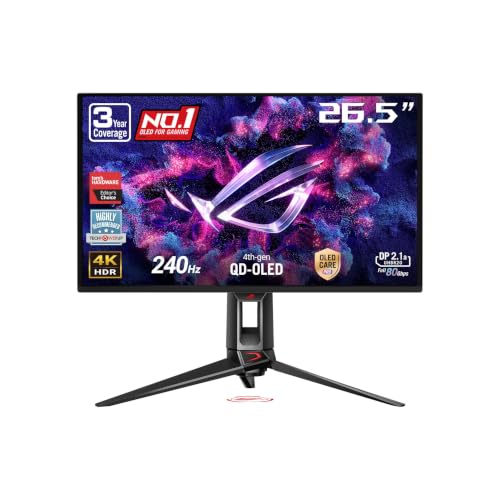
Specs
Panel | 27-inch QD-OLED (4th-gen) |
Resolution | 3840 x 2160 (4K UHD) |
Refresh | 240Hz |
Response | 0.03ms GtG |
Pixel density | about 166 PPI |
Color | 99% DCI-P3, true 10-bit |
Ports | DisplayPort 2.1a UHBR20, HDMI 2.1, USB-C |
Panel
27-inch QD-OLED (4th-gen)
Resolution
3840 x 2160 (4K UHD)
Refresh
240Hz
Response
0.03ms GtG
Pixel density
about 166 PPI
Color
99% DCI-P3, true 10-bit
Ports
DisplayPort 2.1a UHBR20, HDMI 2.1, USB-C
What it does well
This is the sharpest pick in the lineup. Packing 4K into 27 inches lands around 166 pixels per inch, so text and edges are razor-clean with no scaling tricks. You get QD-OLED motion and contrast in a footprint that fits a normal desk.
DisplayPort 2.1a UHBR20 is genuinely future-facing bandwidth, not a marketing checkbox. The Neo Proximity Sensor and the aggressive burn-in care give it real ownership perks beyond the panel itself.
What you give up
Twenty-seven inches is small for 4K, and some readers want the 32-inch real estate they will not find here. The OLED caveats carry over: glossy coating, occasional text fringing, and a preference for a controlled-light room.
You pay a premium price for the smaller size, which is a hard sell for anyone who values screen area over pixel density.
Who it's for
The competitive-leaning 4K player on an RTX 5080-class card who values pixel density and motion clarity over raw screen size.
Best Budget: Gigabyte M27UP

Specs
Panel | 27-inch Super-Speed IPS |
Resolution | 3840 x 2160 (4K UHD) |
Refresh | 160Hz (native) |
Response | 1ms GtG |
Sync | FreeSync Premium, G-Sync Compatible |
Extras | Dual-Mode, USB-C KVM |
Ports | HDMI 2.1, DisplayPort, USB-C |
Panel
27-inch Super-Speed IPS
Resolution
3840 x 2160 (4K UHD)
Refresh
160Hz (native)
Response
1ms GtG
Sync
FreeSync Premium, G-Sync Compatible
Extras
Dual-Mode, USB-C KVM
Ports
HDMI 2.1, DisplayPort, USB-C
What it does well
This is the value entry into real 4K high-refresh. The 160Hz native ceiling clears the 144Hz bar with room to spare, and IPS keeps it bright-room friendly and free of burn-in anxiety.
The USB-C KVM and the dual-mode flip let it punch above its tier. You get 4K at 160Hz for visuals, and the option to drop to a lower-resolution high-refresh mode when a session calls for it. It is the most forgiving graphics-card ask in the lineup.
What you give up
IPS contrast cannot match OLED motion or black levels, and the HDR is entry grade. The build and stand are value tier, and there is no DisplayPort 2.1 here.
Buyers have flagged that this is an SDR-first panel in practice, so set HDR expectations accordingly.
Who it's for
The reader building toward 4K on an RTX 5070 Ti or RX 9070 XT who wants the lowest-cost honest 4K high-refresh panel without an 8GB-card-style compromise.
Editor's Pick: LG UltraGear 27G810A-B

Specs
Panel | 27-inch IPS |
Resolution | 3840 x 2160 (4K UHD) |
Refresh | 180Hz at 4K / 360Hz at FHD |
Response | 1ms GtG |
HDR | VESA DisplayHDR 400 |
Sync | NVIDIA G-Sync, AMD FreeSync Premium |
Ports | HDMI 2.1, DisplayPort |
Panel
27-inch IPS
Resolution
3840 x 2160 (4K UHD)
Refresh
180Hz at 4K / 360Hz at FHD
Response
1ms GtG
HDR
VESA DisplayHDR 400
Sync
NVIDIA G-Sync, AMD FreeSync Premium
Ports
HDMI 2.1, DisplayPort
What it does well
This is the flexible pick. Dual-mode is the whole point: 4K at 180Hz for visuals, then one button to FHD at 360Hz for ranked play. It serves the reader who plays both AAA and competitive without owning two monitors.
The 180Hz at 4K is more headroom than the on-target picks carry, and the IPS panel stays bright-room friendly. For a single-monitor setup that has to do two jobs, the flexibility is the feature.
What you give up
IPS contrast trails the OLED picks, and DisplayHDR 400 is the lowest HDR tier in this guide. The dual-mode flip means accepting an FHD signal upscaled on a 4K panel for the competitive mode, which is a tradeoff, not free performance.
The 27-inch 4K density caveat applies here the same way it does to the other 27-inch picks.
Who it's for
The hybrid player on an RTX 5070 Ti who wants 4K for single-player nights and a true high-refresh FHD mode for ranked, all from one panel.
Bottom line
If you own an RTX 5080-class card and want the best 4K image, buy the ASUS ROG Swift PG32UCDM. If you want native 4K 144Hz on an RTX 5070 Ti without the OLED premium, the LG UltraGear 32GQ750-B is the value call. If you want the sharpest panel and play competitively, the 27-inch ASUS ROG Swift PG27UCDM is the pick.
On a tighter budget, the Gigabyte M27UP delivers honest 4K high-refresh for the least money. And if one monitor has to do both AAA nights and ranked sessions, the dual-mode LG UltraGear 27G810A-B flips between 4K and high-refresh FHD on a single button.
FAQ
What GPU do I need to run a 4K 144Hz monitor?
Plan for an RTX 5070 Ti as the realistic floor and an RTX 5080 if you want native 4K high-refresh in demanding AAA games. The 5070 Ti hits 4K high-refresh in most titles once you enable DLSS quality upscaling, which is why every pick here lists the graphics card it pairs with. Anything in the 1440p-class tier will leave a 4K panel idling well under its refresh ceiling.
Is 4K 144Hz worth it over 1440p for gaming?
If you have the graphics card to feed it, yes. You get the sharpness of 4K and the motion clarity of high refresh in one panel, which is the combination most single-monitor buyers are after. If your card sits below an RTX 5070 Ti, a 1440p high-refresh panel will feel faster in practice because the card can saturate it.
Do I need HDMI 2.1 or DisplayPort for 4K 144Hz?
Either works as long as the version is current. HDMI 2.1 carries 4K at high refresh on one cable and is the right choice if you also plug in a console. DisplayPort 1.4 with compression or DisplayPort 2.1 handles 4K high-refresh from a PC without issue. Every pick in this guide ships both, so match the cable to whatever your graphics card or console outputs.
Should I get a 27-inch or 32-inch 4K 144Hz monitor?
Pick 32 inches if you want screen real estate and a more relaxed pixel density, which suits mixed work and play. Pick 27 inches if you want the sharpest possible image, since 4K at 27 inches lands around 166 pixels per inch. Both sizes are represented in the picks above so you can match the footprint to your desk and viewing distance.
Is OLED or IPS better for a 4K 144Hz gaming monitor?
OLED wins on contrast, per-pixel black, and motion clarity, which is why the top pick is QD-OLED. IPS wins on bright-room usability, burn-in peace of mind, and price, which is why the value and budget picks are IPS. If you game in a controlled-light room and want the best image, go OLED. If the monitor lives in a bright space or doubles as a work display, IPS is the safer call.
Related Articles

Best GPUs for 4K Gaming (2026): Picks by Refresh Target
Five GPUs for 4K gaming in 2026, segmented by refresh target and workload: the 5080 buy zone, the AMD-vs-Nvidia call by tier, why the 5090 is usually wrong.
May 21, 2026

Best 4K 240Hz OLED Gaming Monitors 2026: 6 Picks Compared
The best 4K 240Hz OLED gaming monitors, ranked: which 27 and 32 inch QD-OLED and WOLED panels are worth buying, and which RTX 5090 pairing needs DP 2.1a.
Sep 13, 2026

Best 4K HDR Monitors 2026: 5 Picks for Gaming and Creators
The best 4K HDR monitors in 2026: five OLED picks for gaming and creator work, with real HDR you can see, panel-revision traps, and an honest budget call.
Aug 4, 2026

Best 1440p OLED Gaming Monitors (2026): QD-OLED vs WOLED Picks
The best 1440p OLED gaming monitors of 2026, from value-tier 360Hz QD-OLED to 480Hz WOLED flagship. With burn-in mitigation guidance.
May 14, 2026

RTX 5080 vs RX 9070 XT (2026): Which Flagship to Buy?
RTX 5080 vs RX 9070 XT for 2026 flagship gaming: pick the right card by resolution, ray-tracing load, DLSS 4 vs FSR 4, power draw, and your price tier.
May 16, 2026