Affiliate Disclosure: As an Amazon Associate we earn from qualifying purchases. Some links may earn us a commission at no cost to you.

Best CPUs for Star Wars: Zero Company (2026)
Star Wars: Zero Company is a turn-based squad tactics game, and turn-based tactics is the lightest kind of work you can hand a modern CPU. The recommended processor is a Ryzen 7 3700X, a chip from 2019. So the real question is not what you need to run it. It is what to buy if you are building or upgrading anyway, so the same CPU that resolves Zero Company's turns today still stays ahead of the heavy strategy and sim titles you will play for years.
Below are five picks, from a six-core baseline that just clears the spec to the best gaming chip on the market, with an honest note on each about who actually needs it.
Our top pick: Ryzen 7 9800X3D
The Ryzen 7 9800X3D is the best gaming CPU you can buy, and its stacked cache is exactly what buffers the AI and turn-resolution work that strategy games lean on. It is the pick that never becomes the bottleneck.

Quick picks
Pick | CPU | Best for | Where to buy |
|---|---|---|---|
Best Overall | High-end AM5, most future-proof | ||
Best Value X3D | Value X3D, cache for less | ||
Best Budget AM5 | Budget AM5, clears the spec | ||
Best Productivity Sidegrade | Game plus 16-core work | ||
Best Intel Hybrid | Intel all-rounder, QuickSync |
Best Overall
- CPU
- Best for
High-end AM5, most future-proof
- Where to buy
Best Value X3D
- CPU
- Best for
Value X3D, cache for less
- Where to buy
Best Budget AM5
- CPU
- Best for
Budget AM5, clears the spec
- Where to buy
Best Productivity Sidegrade
- CPU
- Best for
Game plus 16-core work
- Where to buy
Best Intel Hybrid
- CPU
- Best for
Intel all-rounder, QuickSync
- Where to buy
Specs at a glance
CPU | Cores/threads | Boost clock | L3 cache | TDP | Socket |
|---|---|---|---|---|---|
8C/16T | Up to 5.2 GHz | 96 MB (2nd-gen 3D V-Cache) | 120 W | AM5 | |
8C/16T | Up to 5.0 GHz | 96 MB (1st-gen 3D V-Cache) | 120 W | AM5 | |
6C/12T | Up to 5.1 GHz | 32 MB | 65 W | AM5 | |
16C/32T | Up to 5.7 GHz | 128 MB (3D V-Cache) | 170 W | AM5 | |
20C/20T (8P + 12E) | Up to 5.5 GHz | 30 MB | 125 W base | LGA1851 |
- Cores/threads
8C/16T
- Boost clock
Up to 5.2 GHz
- L3 cache
96 MB (2nd-gen 3D V-Cache)
- TDP
120 W
- Socket
AM5
- Cores/threads
8C/16T
- Boost clock
Up to 5.0 GHz
- L3 cache
96 MB (1st-gen 3D V-Cache)
- TDP
120 W
- Socket
AM5
- Cores/threads
6C/12T
- Boost clock
Up to 5.1 GHz
- L3 cache
32 MB
- TDP
65 W
- Socket
AM5
- Cores/threads
16C/32T
- Boost clock
Up to 5.7 GHz
- L3 cache
128 MB (3D V-Cache)
- TDP
170 W
- Socket
AM5
- Cores/threads
20C/20T (8P + 12E)
- Boost clock
Up to 5.5 GHz
- L3 cache
30 MB
- TDP
125 W base
- Socket
LGA1851
Benchmarks
Zero Company launches on August 27, 2026, so no independent reviewer benchmarks exist yet. What we can do is anchor to the official system requirements and how turn-based tactics scales on a CPU. The recommended target is 1440p 60 at high on a Ryzen 7 3700X, and every chip on this list sits well above that bar. The chart below shows the official recommended tier next to where these picks land relative to it, not measured FPS. Treat it as a clearance estimate, not a frame-rate promise.
Relative headroom above the official recommended Ryzen 7 3700X, indexed to 100. Pre-release estimate from system requirements, not measured FPS.
- Recommended tier (Ryzen 7 3700X)100 % of recommended-tier headroom
- Ryzen 5 7600135 % of recommended-tier headroom
- Core Ultra 7 265K165 % of recommended-tier headroom
- Ryzen 7 7800X3D170 % of recommended-tier headroom
- Ryzen 7 9800X3D185 % of recommended-tier headroom
- Ryzen 9 9950X3D185 % of recommended-tier headroom
How we picked
The first rule is to size the CPU to the GPU and the library, not to the loudest spec. Zero Company asks for very little, so for this game alone the right CPU is whatever clears the recommended tier and leaves budget for the graphics card. That is the case for the Ryzen 5 7600.
The second rule is where the X3D chips earn their price. The 3D V-Cache that helps Zero Company's turn resolution helps far more in the heavy CPU-pinned titles, the late-game 4X saves, the dense factory sims, the flight and racing sims. If your library leans that way, the cache is worth paying for as a long-term call. If it does not, it is headroom you will not use.
The third rule is platform. AM5 has a real upgrade runway, so a budget Ryzen 5 today can become an X3D chip later without a new board. That is why four of the five picks are AMD. The Intel option is here for the buyer who is committed to that side or who leans on QuickSync for media encode.
Every pick clears the recommended spec comfortably. The differences below are about your wider library and your budget, not about whether the game will run.
Best Overall: Ryzen 7 9800X3D
Specs
Cores/threads | 8C/16T |
Boost clock | Up to 5.2 GHz |
L3 cache | 96 MB (2nd-gen 3D V-Cache) |
TDP | 120 W |
Socket | AM5 |
Memory | DDR5 |
PCIe | PCIe 5.0 |
Cores/threads
8C/16T
Boost clock
Up to 5.2 GHz
L3 cache
96 MB (2nd-gen 3D V-Cache)
TDP
120 W
Socket
AM5
Memory
DDR5
PCIe
PCIe 5.0
What it does well
The 9800X3D is the chip to beat for gaming right now, and the reason it matters for Zero Company is the same reason it matters for any heavy strategy save: 96 MB of stacked L3 cache. Turn-based tactics does most of its CPU work between turns, when the game resolves enemy AI decisions, line-of-sight checks, and cover math across the whole map. That work loves cache, and the 9800X3D has more of it than anything else in its class.
It also runs cooler and clocks higher than the older 7800X3D, so it holds its boost longer under load. Drop it onto a current AM5 board and you have the longest upgrade runway on the market, since AMD has committed to the socket past 2027.
What you give up
Here is the honest part. Zero Company on its own does not need this chip. The game's recommended CPU is a Ryzen 7 3700X, and a current Ryzen 5 plays it identically at the settings most people run. If your library starts and ends with turn-based tactics, the 9800X3D is headroom you will never cash in.
You are also paying for gaming cache, not productivity throughput. For heavy rendering or compiling, a 16-core chip pulls ahead. The 9800X3D is a gaming specialist first.
Who it's for
Pick the 9800X3D if your library runs deep into strategy, 4X, factory sims, or flight and racing sims, and you want one CPU that never becomes the part you blame. At 1440p or 4K with a strong GPU, it is the chip that stops being a question.
Most AM5 boards built before late 2024 need a BIOS update before they will post a 9800X3D. Check your board's CPU-support list first, and use BIOS Flashback if the board has it.
Best Value X3D: Ryzen 7 7800X3D

Specs
Cores/threads | 8C/16T |
Boost clock | Up to 5.0 GHz |
L3 cache | 96 MB (1st-gen 3D V-Cache) |
TDP | 120 W |
Socket | AM5 |
Memory | DDR5 |
PCIe | PCIe 5.0 |
Cores/threads
8C/16T
Boost clock
Up to 5.0 GHz
L3 cache
96 MB (1st-gen 3D V-Cache)
TDP
120 W
Socket
AM5
Memory
DDR5
PCIe
PCIe 5.0
What it does well
The 7800X3D carries the same 96 MB of 3D V-Cache that makes the 9800X3D so good in strategy and sim titles, for less money. For Zero Company's turn-resolution loads, the cache benefit class is the same. It runs cool at 120 W and drops onto the same AM5 platform, so the upgrade path stays open.
When the price gap to the 9800X3D is wide, this is often the smarter dollar-per-frame X3D buy.
What you give up
It clocks lower than the 9800X3D and has less overclocking headroom, so it gives up a few percent in the most CPU-bound moments. It also runs a little warmer relative to its clocks.
Being the prior generation, it has a shorter platform runway ahead of it. If you plan to ride one socket for years of upgrades, the newer chip buys you more time.
Who it's for
Choose the 7800X3D if you want the X3D cache advantage for a strategy and sim heavy library but do not want to pay the latest-generation premium. It is the value pick that does not feel like a compromise.
The same pre-2024 BIOS-update caveat applies here. Reports from buyers building on older boards point to the same fix: update the BIOS before assuming a clean drop-in.
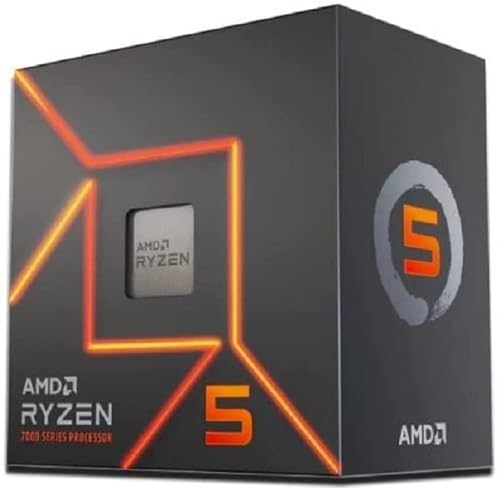
Best Budget AM5: Ryzen 5 7600
Specs
Cores/threads | 6C/12T |
Boost clock | Up to 5.1 GHz |
L3 cache | 32 MB |
TDP | 65 W |
Socket | AM5 |
Memory | DDR5 |
Cooler | Wraith Stealth included |
Cores/threads
6C/12T
Boost clock
Up to 5.1 GHz
L3 cache
32 MB
TDP
65 W
Socket
AM5
Memory
DDR5
Cooler
Wraith Stealth included
What it does well
Here is the answer nobody selling you a CPU wants to give for a game this light: six modern cores are plenty. The Ryzen 5 7600 clears Zero Company's recommended Ryzen 7 3700X tier with room to spare, and it does it at 65 W with a cooler in the box.
It also puts you on AM5, which means the upgrade to an X3D chip later is a five-minute job, not a new platform. The money you save here is money you can move to the GPU, which does far more for hitting 1440p 60 at high settings.
What you give up
There is no 3D V-Cache, so it falls behind the X3D chips in the heaviest CPU-pinned strategy and sim titles. For Zero Company that gap is invisible. For a late-game Stellaris save or a 1000-hour Factorio base, it is not.
Six cores is the floor for a modern build, not headroom. If your library is already strategy-dominant, step up to an X3D chip instead.
Who it's for
The 7600 is for the budget builder or first-time AM5 buyer who wants Zero Company to run great today and would rather spend the savings on the graphics card. It is the honest baseline, and for most people it is enough.
The non-X 7600 ships with a Wraith Stealth cooler and runs at 65 W. The 7600X trades the bundled cooler for a small clock bump, so only step up to it if the price gap is tiny.
Best Productivity Sidegrade: Ryzen 9 9950X3D

Specs
Cores/threads | 16C/32T |
Boost clock | Up to 5.7 GHz |
L3 cache | 128 MB (3D V-Cache) |
TDP | 170 W |
Socket | AM5 |
Memory | DDR5 |
PCIe | PCIe 5.0 |
Cores/threads
16C/32T
Boost clock
Up to 5.7 GHz
L3 cache
128 MB (3D V-Cache)
TDP
170 W
Socket
AM5
Memory
DDR5
PCIe
PCIe 5.0
What it does well
The 9950X3D is the one chip that refuses to choose between gaming and work. It pairs 3D V-Cache for strategy and sim gaming with 16 cores for rendering, compiling, and heavy multitasking. You get the cache benefit in Zero Company's turn resolution and full workstation throughput when you switch to your real job.
On the same AM5 platform, it is the no-compromise pick for a dual-use machine.
What you give up
For Zero Company specifically, and for pure gaming generally, this is overkill. The gaming-only 9800X3D matches it in most games for far less. You only justify the 9950X3D with a genuine multi-threaded workload.
It also pulls real power at 170 W and wants proper cooling. This is a chip you buy for the work, not for the frames.
Who it's for
Buy the 9950X3D if you are a creator or developer who games on strategy and sim titles and flatly refuses to pick between a gaming chip and a workstation chip. For everyone else, it is more than the game asks for.
The dual-CCD X3D layout relies on the scheduler parking the right cores. Keep chipset drivers current and the Xbox Game Bar installed so Windows sends games to the cache-heavy die. A fresh driver stack avoids the wrong-die performance trap that buyers have flagged.
Best Intel Hybrid: Intel Core Ultra 7 265K

Specs
Cores/threads | 20C/20T (8P + 12E) |
Boost clock | Up to 5.5 GHz |
L3 cache | 30 MB |
TDP | 125 W base |
Socket | LGA1851 |
Memory | DDR5 |
PCIe | PCIe 5.0 |
Cores/threads
20C/20T (8P + 12E)
Boost clock
Up to 5.5 GHz
L3 cache
30 MB
TDP
125 W base
Socket
LGA1851
Memory
DDR5
PCIe
PCIe 5.0
What it does well
If you are committed to Intel, the Core Ultra 7 265K is the pick. Its 8 performance cores plus 12 efficiency cores give it strong multi-threaded throughput, and the burst CPU work that turn-based tactics leans on sits well within its reach. Zero Company will not trouble it.
Its real edge is QuickSync. For some H.264 and H.265 media-encode workflows, Intel's hardware encoder still does things AMD's cannot match, which makes this a smart all-rounder for someone who games and edits.
What you give up
There is no 3D V-Cache, so it trails the X3D chips in the most CPU-pinned strategy and sim gaming. For a light tactics game the difference does not show, but for a heavy 4X library the X3D chips pull ahead. Star Citizen is the extreme version of that gap, which is why the best CPUs for Star Citizen are sized around cache before core count.
The LGA1851 socket has no announced upgrade runway, unlike AM5, so the platform is more of a one-and-done. Its transient power behavior also wants a board with real VRMs.
Who it's for
The 265K suits the buyer who is locked into Intel or who genuinely uses QuickSync, and who wants a capable all-rounder rather than a gaming-cache specialist. It handles Zero Company without thinking and earns its keep on the encode side.
Do not pair the 265K with a budget board on socket compatibility alone. Arrow Lake's transient spikes punish weak VRMs, so step up to a properly cooled Z890 or a strong B860 board. Socket compatible is not the same as build ready.
Bottom line
If Zero Company is most of what you play, buy the Ryzen 5 7600 and put the savings into your GPU. It clears the recommended spec and gets you onto AM5.
If your library runs deep into strategy and sims, buy the Ryzen 7 9800X3D, the same pick we make for heavier tactics games, since its cache is what keeps those titles smooth for years.
If you game and do real productivity work on one machine, the Ryzen 9 9950X3D is the only chip that does both without compromise. If you are committed to Intel or lean on QuickSync, the Core Ultra 7 265K is the all-rounder. For a deeper walkthrough of matching a CPU to a motherboard, see our guide below.
how to choose a CPU and motherboard.
FAQ
What CPU do you need for Star Wars: Zero Company?
Not much. The game's recommended CPU is a Ryzen 7 3700X or a Core i7-10700K, targeting 1440p 60 at high settings, and the minimum is an i5-8400 or Ryzen 5 2600X for 1080p 30 low. Any current Ryzen 5 or Core Ultra chip clears the recommended tier comfortably. The Ryzen 5 7600 is the honest baseline pick here.
Does Star Wars: Zero Company need an X3D CPU?
No. Zero Company is a turn-based tactics game, which is the lightest end of the strategy spectrum, and it does not require the 3D V-Cache that chips like the 9800X3D bring. An X3D chip is a future-proofing call for a wider sim and strategy library, not something this game demands. If Zero Company is the heaviest thing you play, save the money.
Will the Ryzen 5 7600 run Star Wars: Zero Company well?
Yes, easily. Six modern cores sit well above the recommended Ryzen 7 3700X tier, and the 7600 runs the game without breaking a sweat. It also gets you onto AM5 with a clean upgrade path to an X3D chip later, and the money you save is better spent on the GPU for hitting 1440p 60 at high.
Is Star Wars: Zero Company CPU-heavy or GPU-heavy?
It leans GPU for frame rate, like most games. The CPU work in turn-based tactics shows up between turns, when the game resolves enemy AI, line-of-sight, and cover calculations across the map, so a stronger CPU mainly shortens the wait between turns rather than raising your FPS. For smooth play at your target resolution, the GPU is the part that matters more.
Intel or AMD for Star Wars: Zero Company?
Either runs the game fine. AMD's AM5 platform wins on socket longevity and on X3D gaming cache for a strategy and sim heavy library, which is why the top picks here are Ryzen. Intel's Core Ultra 7 265K is the right call if you are committed to Intel or lean on QuickSync for media encode. For most buyers building around this game, an AM5 Ryzen chip is the simpler answer.
Related Articles

Best CPUs for Baldur's Gate 3 (2026): Five Picks by Tier
Best CPUs for Baldur's Gate 3 in 2026, picked by tier. X3D cache wins Act 3 Lower City; the budget and Intel paths still clear Acts 1 and 2 cleanly.
May 15, 2026

Best CPUs for Forza Horizon 6 (2026): Five Picks by Tier
Best CPUs for Forza Horizon 6 in 2026, picked by tier. X3D rules high-refresh freeroam crowds; the budget and Intel paths cruise 1440p fine.
May 17, 2026

How to Choose a CPU and Motherboard
The buyer's framework for picking a CPU and motherboard pair: use case first, socket second, chip tier third, then the board class that matches.
May 17, 2026

Best 1440p Prebuilt Gaming PCs (2026): 5 PSU-Checked Picks
Best 1440p prebuilt gaming PC picks for 2026, screened by GPU tier, VRAM and published PSU specs, so you know which box actually holds high-refresh 1440p.
Sep 15, 2026

RTX 5070 vs RX 9070 XT (2026): 12GB DLSS 4 vs 16GB Raster
RTX 5070 vs RX 9070 XT at 1440p in 2026: the 9070 XT leads raster with 16GB, the 5070 wins ray tracing with DLSS 4 on 12GB. Pick by the games you actually play.
Sep 15, 2026