Affiliate Disclosure: As an Amazon Associate we earn from qualifying purchases. Some links may earn us a commission at no cost to you.

Skip X3D at 1440p or 4K: 3 Ryzen Chips to Buy Instead
X3D chips do one thing better than every other Ryzen: they cut CPU-bound stutter and boost frame rates in games that lean hard on cache. That advantage is real at 1080p. It shrinks fast as resolution climbs, and at 1440p or 4K with a matched GPU, it mostly disappears.
If your monitor runs 1440p or higher, the GPU decides your frame rate in most titles, not the CPU. Buy a non-X3D Ryzen chip instead, bank the difference, and put it toward the next GPU tier. That swap does more for your actual gaming experience than the cache upgrade would.
Skip the X3D tax if you're above 1080p
The AMD Ryzen 7 7700 is the cleanest non-X3D pick for 1440p: eight cores, a 5.3GHz boost clock, and a price that leaves real budget for the GPU that sets your frame rate.

Quick picks
Pick | Chip | Best For | Buy |
|---|---|---|---|
Best Overall | 1440p 144Hz gaming with a mid-to-upper GPU | ||
Best Value | 1080p or 1440p on a tight budget | ||
Best for 4K + Productivity | 4K gaming plus real productivity work |
Best Overall
- Chip
- Best For
1440p 144Hz gaming with a mid-to-upper GPU
- Buy
Best Value
- Chip
- Best For
1080p or 1440p on a tight budget
- Buy
Best for 4K + Productivity
- Chip
- Best For
4K gaming plus real productivity work
- Buy
What X3D actually does
3D V-Cache stacks an extra 64MB of L3 cache directly on top of the compute chiplet, taking the Ryzen 7 9800X3D from the 32MB a standard Zen 5 chip carries to 96MB total. Cache is fast memory sitting right next to the cores. When a game's logic and physics fit inside that cache instead of spilling out to system RAM, the CPU stops waiting on memory fetches and frame times get both higher and steadier.
That mechanism only pays off when the CPU is the thing holding the frame rate back. In TechPowerUp's testing, the 9800X3D held an 11 percent average FPS lead over the Ryzen 7 9700X at 1080p, the resolution where the CPU still has room to matter. At 4K with a flagship GPU in the same suite, the gap between the top processors collapsed to something the reviewers called minimal.
TechSpot ran the same story on Cyberpunk 2077: Phantom Liberty specifically. At 1080p, the 9800X3D was 32 percent faster than a Ryzen 7 7700X. At 4K with upscaling turned on, that lead fell to 5 percent, and the overall average across their test suite narrowed to roughly 1.4 percent. The chip didn't get slower. The GPU just became the part doing the limiting.
This is the overweighted call in builder circles: CPU obsession at 1440p and up, specifically the X3D tax. A Ryzen 5 7600 or Ryzen 7 7700 paired with a strong GPU lands within single-digit percentage points of a 9800X3D in the overwhelming majority of titles once you're past 1080p. Buyers pay the full X3D premium up front, then run the chip behind a GPU that can't feed it enough resolution-scaled work to show the difference. If you want that pairing math done for you, our guide to the best CPU for 1440p gaming maps each GPU tier and refresh target to one chip, X3D or not.
That savings has an obvious home. If your current GPU is the actual bottleneck at 1440p, the money the X3D chip would have cost buys a real jump in GPU tier, and that's the upgrade that shows up in every game, not just the cache-sensitive ones.
Do you need X3D at your resolution?
Resolution | What sets your frame rate | Does X3D help | Buy instead |
|---|---|---|---|
1080p high refresh (144Hz+) | CPU, especially in esports titles run at low settings | Yes, meaningfully | The 9800X3D if you're chasing 240Hz+ in competitive shooters |
1440p | GPU, in the large majority of titles | Rarely | AMD Ryzen 7 7700 or Ryzen 5 7600 |
4K | GPU, almost always | Almost never | AMD Ryzen 7 9700X or Ryzen 7 7700 |
1080p high refresh (144Hz+)
- What sets your frame rate
CPU, especially in esports titles run at low settings
- Does X3D help
Yes, meaningfully
- Buy instead
The 9800X3D if you're chasing 240Hz+ in competitive shooters
1440p
- What sets your frame rate
GPU, in the large majority of titles
- Does X3D help
Rarely
- Buy instead
AMD Ryzen 7 7700 or Ryzen 5 7600
4K
- What sets your frame rate
GPU, almost always
- Does X3D help
Almost never
- Buy instead
AMD Ryzen 7 9700X or Ryzen 7 7700
Specs at a glance
Chip | Cores / Threads | Boost Clock | L3 Cache | TDP |
|---|---|---|---|---|
6 / 12 | 5.1 GHz | 32 MB | 65W | |
8 / 16 | 5.3 GHz | 32 MB | 65W | |
8 / 16 | 5.5 GHz | 32 MB | 65W | |
8 / 16 | 5.2 GHz | 96 MB (3D V-Cache) | 120W |
- Cores / Threads
6 / 12
- Boost Clock
5.1 GHz
- L3 Cache
32 MB
- TDP
65W
- Cores / Threads
8 / 16
- Boost Clock
5.3 GHz
- L3 Cache
32 MB
- TDP
65W
- Cores / Threads
8 / 16
- Boost Clock
5.5 GHz
- L3 Cache
32 MB
- TDP
65W
- Cores / Threads
8 / 16
- Boost Clock
5.2 GHz
- L3 Cache
96 MB (3D V-Cache)
- TDP
120W
Benchmarks
Counter-Strike 2 is the one genuinely CPU-bound scenario in this comparison at any resolution, because competitive players deliberately run low settings to chase the frame ceiling. The X3D lead holds here regardless of monitor resolution. Valorant runs even lighter than CS2, so its own sufficiency math skews further from X3D; see Do You Need X3D for Valorant? for the game-specific breakdown.
Competitive/low settings, the CPU-bound scenario where X3D's cache advantage shows up at any resolution.
- 631 FPS
- 770 FPS
Outside esports, the gap narrows fast. TechPowerUp measured the 9800X3D's average lead over the 9700X at 11 percent at 1080p across its game suite, then found the difference between the top processors minimal once the same chips ran at 4K behind an RTX 4090. TechSpot saw the identical pattern in Cyberpunk 2077: Phantom Liberty, where the 9800X3D's 32 percent lead over a Ryzen 7 7700X at 1080p fell to 5 percent at 4K with upscaling enabled. For the game-by-game split between those two chips, see our Ryzen 7 9700X vs 9800X3D comparison.
Streamers and content creators who also game weigh the trade differently, since the extra cores on a higher-tier X3D chip help the encode pass as much as the game itself. If that's your situation, our 9950X3D vs 7950X3D breakdown covers the split-workload case this article doesn't.
Best Overall: AMD Ryzen 7 7700
Specs
Cores / Threads | 8 / 16 |
Base / Boost Clock | 3.8 GHz / 5.3 GHz |
L3 Cache | 32 MB |
TDP | 65W |
Socket | AM5 |
Integrated Graphics | Radeon Graphics |
Cores / Threads
8 / 16
Base / Boost Clock
3.8 GHz / 5.3 GHz
L3 Cache
32 MB
TDP
65W
Socket
AM5
Integrated Graphics
Radeon Graphics
What it does well
Eight cores and a 5.3GHz boost clock feed any GPU up to a 4080-class card at 1440p without becoming the limiting factor in the large majority of titles.
It runs cool and quiet at 65W TDP, so a mid-tier air cooler handles it without drama, and the AM5 socket keeps a future upgrade path open.
What you give up
It loses to the 9800X3D in genuinely CPU-bound scenarios: sim racing, grand strategy late game, dense MMO raid content, and 1080p 240Hz esports where the frame ceiling is set by the chip, not the graphics card.
Console-port-heavy libraries and well-optimized engines show almost no gap either way, so if your library skews that direction the 7700 gives up nothing at all.
Who it's for
1440p 144Hz gamers running a mid-to-upper-tier GPU who want zero CPU bottleneck without paying the X3D premium. If a strategy or sim title occasionally shows up in your library, the 7700 still runs it fine, just not at the absolute frame ceiling.
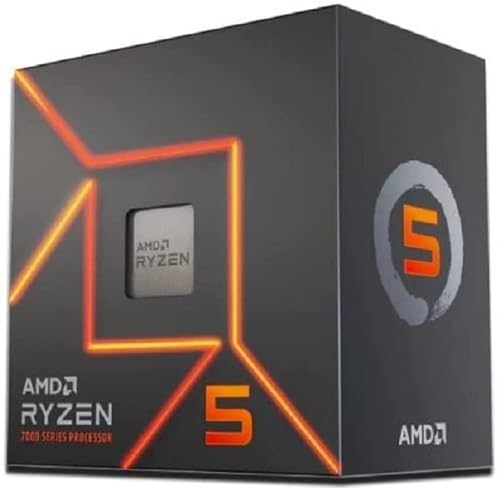
Best Value: AMD Ryzen 5 7600
Specs
Cores / Threads | 6 / 12 |
Base / Boost Clock | 3.8 GHz / 5.1 GHz |
L3 Cache | 32 MB |
TDP | 65W |
Socket | AM5 |
Integrated Graphics | Radeon Graphics |
Cores / Threads
6 / 12
Base / Boost Clock
3.8 GHz / 5.1 GHz
L3 Cache
32 MB
TDP
65W
Socket
AM5
Integrated Graphics
Radeon Graphics
What it does well
Six cores is still more than most game engines use at once, and it doesn't bottleneck a 1080p or 1440p build paired with a mid-range GPU.
It's the cheapest legitimate non-X3D entry on AM5, which frees the most budget of any pick here for the GPU line item that moves your frame rate.
What you give up
Two fewer cores than the 7700 shows up in heavier multitasking, like streaming while gaming or background video encoding, and in the handful of core-hungry sims.
It's the pick most likely to become the bottleneck if you later drop in a flagship GPU, so it fits a budget-to-midrange build better than a future 4090-class upgrade path.
Who it's for
Budget-conscious 1080p or 1440p builders who want every spare dollar routed to the GPU instead of the CPU. It's also the right call for a first gaming PC where the GPU tier hasn't been decided yet and flexibility on that line item matters more than headroom here.
Best for 4K and Light Productivity: AMD Ryzen 7 9700X

Specs
Cores / Threads | 8 / 16 |
Base / Boost Clock | 3.8 GHz / 5.5 GHz |
L3 Cache | 32 MB |
TDP | 65W |
Socket | AM5 |
Integrated Graphics | Radeon Graphics |
Cores / Threads
8 / 16
Base / Boost Clock
3.8 GHz / 5.5 GHz
L3 Cache
32 MB
TDP
65W
Socket
AM5
Integrated Graphics
Radeon Graphics
What it does well
Zen 5's IPC gain over the 7000-series chips shows up in single-thread-heavy productivity work, and the 5.5GHz boost clock is essentially free at the same 65W TDP as the 7700.
It handles light productivity, Premiere exports, Blender viewport previews, compiling code, alongside gaming better than the 7700 without paying the X3D cache tax.
What you give up
The IPC gain over the 7700 is close to invisible in games at 1440p and especially 4K, where the GPU is already the limit, so a gaming-only buyer gets little from the upgrade.
It costs roughly the same as the 7700 for gaming-equivalent results, so the case for it rests entirely on the productivity side, not the frame counter.
Who it's for
4K gamers who also do real productivity work on the side and want headroom the 7700 doesn't have. If "I'll do video editing" actually means opening Premiere on real footage rather than the occasional phone clip, this is the chip that backs that up.
When X3D Is Still the Right Call: AMD Ryzen 7 9800X3D

Specs
Cores / Threads | 8 / 16 |
Base / Boost Clock | 4.7 GHz / 5.2 GHz |
L3 Cache | 96 MB (3D V-Cache) |
TDP | 120W |
Socket | AM5 |
Integrated Graphics | None |
Cores / Threads
8 / 16
Base / Boost Clock
4.7 GHz / 5.2 GHz
L3 Cache
96 MB (3D V-Cache)
TDP
120W
Socket
AM5
Integrated Graphics
None
What it does well
The extra 64MB of stacked L3 cache keeps game logic and physics off main memory almost entirely, which holds a real, repeatable FPS and 1% low advantage in sim racing, flight sim, grand strategy late game, dense MMO raid content, and Escape from Tarkov.
It's the only chip in this comparison that meaningfully raises the ceiling for 1080p 240Hz+ competitive players running a top-tier GPU, exactly the audience CS2's numbers above showcase.
What you give up
It runs at 120W TDP against 65W for every non-X3D chip here, so it needs a better cooler and pulls more from the PSU for a gain that never shows up if a GPU is doing the bottlenecking instead.
None of that cache advantage survives contact with a 4070 Super at 4K. Pair this chip with anything short of a flagship GPU at high resolution and you've bought a cache upgrade the game never gets to use.
Who it's for
1080p 240Hz+ competitive players with a top-tier GPU, sim racers, flight simmers, grand strategy players, and dense-MMO raiders, anywhere the CPU, not the GPU, sets the frame ceiling. Everyone else in this article should buy one of the three chips above instead.
Still deciding whether the step-down cache chip is worth it for your specific library? Our 7800X3D buying breakdown covers the same CPU-bound-versus-GPU-bound test applied to the previous-generation X3D chip, and the reasoning carries over one for one.
Bottom line
If you game at 1440p or 4K on a mid-to-upper GPU, buy the AMD Ryzen 7 7700 and spend the difference on the GPU tier above the one you were about to buy. If your budget is tighter, the AMD Ryzen 5 7600 gives up almost nothing at those resolutions and frees even more cash for the graphics card. If you also do real productivity work alongside gaming, the AMD Ryzen 7 9700X earns its price over the 7700.
Buy the AMD Ryzen 7 9800X3D only if you're chasing 1080p 240Hz+ in competitive shooters, or you live in sim racing, flight sim, grand strategy, or dense MMO content where the CPU genuinely sets the frame ceiling. Everyone planning to keep a build for years should still route the extra budget to GPU, RAM, and storage headroom, not a CPU cache upgrade that ages out the moment the GPU gets replaced.
For the rest of the platform decision, chipset and motherboard tier included, see our guide to choosing a CPU and motherboard.
FAQ
Is X3D worth it for 1440p gaming?
Usually not. At 1440p the GPU sets your frame rate in the large majority of titles, so a Ryzen 7 7700 lands within single-digit percentage points of a Ryzen 7 9800X3D. X3D still earns its price if your library leans heavily into sim racing, grand strategy, or dense MMO content, where the CPU stays the limiting factor even at 1440p.
Does X3D make a difference at 4K?
Barely. Reviewer testing at 4K with a flagship GPU shows the gap between top Ryzen chips narrowing to roughly 1 to 5 percent depending on the title, down from double-digit leads at 1080p. At 4K the GPU is almost always the bottleneck, so a cheaper non-X3D chip delivers essentially the same frame rate.
What CPU should I buy instead of X3D for 1440p?
The AMD Ryzen 7 7700 is the cleanest swap for most 1440p builds. If budget is tight, the AMD Ryzen 5 7600 gives up very little at that resolution. If you also run real productivity workloads alongside gaming, the AMD Ryzen 7 9700X adds headroom the 7700 doesn't have.
Is the Ryzen 7 9800X3D a waste of money at 4K?
For a pure gaming build behind anything short of a flagship GPU, yes, the cache advantage rarely survives contact with a GPU-bound frame rate at 4K. It's not wasted if you're also chasing 1080p 240Hz esports on a second monitor, or your library includes sim racing or grand strategy titles that stay CPU-bound regardless of resolution.
When does X3D matter most?
When the CPU, not the GPU, sets your frame ceiling: 1080p 240Hz+ competitive shooters with a top-tier GPU, sim racing, flight simulation, grand strategy late game, dense MMO raid content, and Escape from Tarkov. Outside those scenarios, route the budget to GPU, RAM, or storage instead.
Related Articles

Is the Ryzen 7 7800X3D Still Worth It in 2026 vs 9800X3D?
Is the Ryzen 7 7800X3D still worth it in 2026? With the 7700X3D now reviewed and the 9800X3D 7 to 13 percent ahead, here is who should buy and who should wait.
Aug 15, 2026

Best GPUs for 1440p Ultrawide (3440x1440) in 2026: 5 Picks
The best GPU for 1440p ultrawide gaming, matched to your 3440x1440 panel: 5 picks for 2026 from a 100Hz RX 9070 to a 240Hz QD-OLED RTX 5080 and 5K2K 5090.
Oct 16, 2026

Ryzen 9 7950X3D vs 9950X3D: Which 16-Core X3D Wins in 2026?
Ryzen 9 7950X3D vs 9950X3D: which 16-core X3D to buy in 2026. Gaming and productivity benchmarks, power draw, and a straight call for upgraders and builders.
Sep 1, 2026

How to Choose a CPU and Motherboard
The buyer's framework for picking a CPU and motherboard pair: use case first, socket second, chip tier third, then the board class that matches.
May 17, 2026

Best Gaming Gifts for Him (Holiday 2026): 5 Safe Picks
Christmas and holiday gaming gifts for him: one headset that works on most setups, two mice and a chair, plus the fit risks to check before you buy one.
Oct 29, 2026