Affiliate Disclosure: As an Amazon Associate we earn from qualifying purchases. Some links may earn us a commission at no cost to you.

Best Curved Gaming Monitors 2026: 5 Picks by Curve Radius
For most buyers the best curved gaming monitor is the Samsung Odyssey G7 32-inch, and the best curved ultrawide is the Alienware AW3423DWF. Everything after that is a choice between two things, not one: aspect ratio, and how hard the screen bends. Aspect ratio means a standard 16:9 screen or a wider 21:9 or 32:9 ultrawide. Curve radius means the tightness of the bend, from an aggressive 1000R wrap to a subtle 1800R.
Get those two right and the curve disappears into the game. Get them wrong and straight lines bow on your spreadsheet all day. Below we split the picks into standard-aspect and ultrawide so you compare like for like, after a quick gut-check on whether curved is even the right call for you.
Our top pick: Samsung Odyssey G7 32"
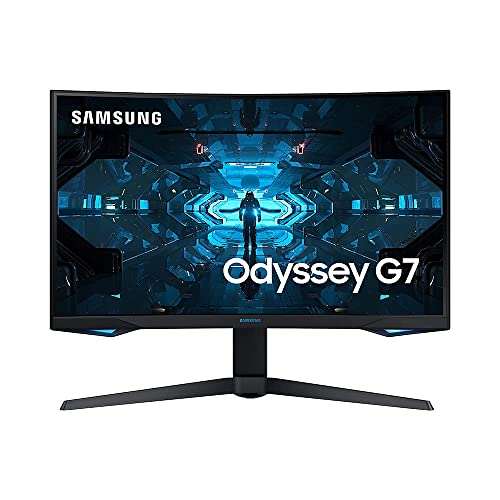
The Samsung Odyssey G7 32" is the standard-aspect curved monitor to beat: a 16:9 1440p VA panel with the most aggressive 1000R wrap on the list and a 240 Hz refresh a mid-range GPU can feed.
Quick picks
Pick | Monitor | Curve + panel | Where to buy |
|---|---|---|---|
Best Overall | 32" VA, 1000R, 240 Hz | ||
Best Value | 27" Rapid VA, 1000R, 170 Hz | ||
Best Ultrawide | 34" QD-OLED, 1800R, 165 Hz | ||
Best Premium | 34" WOLED, 800R, 240 Hz | ||
Best Super-Ultrawide | 49" QD-OLED, 1800R, 144 Hz |
Best Overall
- Monitor
- Curve + panel
32" VA, 1000R, 240 Hz
- Where to buy
Best Value
- Monitor
- Curve + panel
27" Rapid VA, 1000R, 170 Hz
- Where to buy
Best Ultrawide
- Monitor
- Curve + panel
34" QD-OLED, 1800R, 165 Hz
- Where to buy
Best Premium
- Monitor
- Curve + panel
34" WOLED, 800R, 240 Hz
- Where to buy
Best Super-Ultrawide
- Monitor
- Curve + panel
49" QD-OLED, 1800R, 144 Hz
- Where to buy
Specs at a glance
Pick | Monitor | Panel + curve | Resolution | Refresh |
|---|---|---|---|---|
Best Overall | VA (QD), 1000R | 2560 x 1440 (16:9) | 240 Hz | |
Best Value | Rapid VA (QD), 1000R | 2560 x 1440 (16:9) | 170 Hz | |
Best Ultrawide | QD-OLED, 1800R | 3440 x 1440 (21:9) | 165 Hz | |
Best Premium | WOLED, 800R | 3440 x 1440 (21:9) | 240 Hz | |
Best Super-Ultrawide | QD-OLED, 1800R (32:9) | 5120 x 1440 (32:9) | 144 Hz |
Best Overall
- Monitor
- Panel + curve
VA (QD), 1000R
- Resolution
2560 x 1440 (16:9)
- Refresh
240 Hz
Best Value
- Monitor
- Panel + curve
Rapid VA (QD), 1000R
- Resolution
2560 x 1440 (16:9)
- Refresh
170 Hz
Best Ultrawide
- Monitor
- Panel + curve
QD-OLED, 1800R
- Resolution
3440 x 1440 (21:9)
- Refresh
165 Hz
Best Premium
- Monitor
- Panel + curve
WOLED, 800R
- Resolution
3440 x 1440 (21:9)
- Refresh
240 Hz
Best Super-Ultrawide
- Monitor
- Panel + curve
QD-OLED, 1800R (32:9)
- Resolution
5120 x 1440 (32:9)
- Refresh
144 Hz
Should you actually buy curved?
Curved earns its keep when the screen is big enough that the edges start to fall outside your natural field of view. On a 32-inch 16:9 panel, and on every ultrawide, the bend pulls those far corners back toward you so the whole image sits at a more even viewing distance. That is the immersion people talk about, and it is real. If you sit close to a large screen and play a lot of single-player or sim titles, curved is the right call. Our guide to choosing a GPU and matching monitor walks through how screen size and viewing distance interact.
Flat is the honest answer in a few cases. If your screen is 27 inches or smaller in 16:9, the curve does little because the edges were already close. If you do serious photo, video, or CAD work where perfectly straight reference lines matter, an aggressive curve fights you. And if you run a multi-monitor array, curved side panels rarely line up cleanly. There is no shame in flat. Buy the curve for the immersion, not because a spec sheet told you to.
What about 4K curved? It exists, but it is a narrower field than the flat 4K market. Most 32-inch 4K OLED panels ship flat, so the curved 4K options cluster around a handful of 1700R to 1800R models, and at 32 inches that gentle bend is closer to a comfort feature than a true immersion one. Our picks below stay at 1440p and ultrawide 1440p because that is where curved panels are both fastest and best value today. If 4K is a hard requirement, start from resolution and treat the curve as a bonus rather than the deciding spec.
Curve radius decision-tree: 1000R vs 1500R vs 1800R
The R number is the radius of the circle the screen would form if you extended the curve all the way around, measured in millimeters. A 1000R screen traces a circle one meter across, so it bends hard. An 1800R screen traces a circle 1.8 meters across, so the bend is gentle. Smaller number, tighter wrap.
Match the radius to the size and the job. On a standard 16:9 monitor, an aggressive 1000R wrap like the Samsung and MSI standard-aspect picks maximizes immersion because the panel is not very wide to begin with. On a 34-inch ultrawide, a subtle 1800R like the Alienware keeps straight lines mostly honest while still curving the wide field toward you, which is why it doubles as a productivity screen. An 800R ultrawide like the LG bends the hardest of the bunch, for players who want the field to wrap and do not mind the distortion on a spreadsheet.
1500R sits in the middle and shows up on plenty of panels, though none of our picks use it. The rule holds regardless: the wider the screen, the gentler the radius you generally want, so the far edges bend toward you without warping everything in between.
How we picked
We picked aspect ratio first, then radius, then panel technology, in that order. Aspect ratio decides how much desk you need and how horizontal your games and work feel. Radius decides how the curve reads at your size. Panel technology, VA or OLED, decides contrast, motion clarity, and price. Getting the order right keeps you from paying OLED money for a curve that is wrong for your desk.
Every pick is matched to a realistic GPU. A 1440p 16:9 panel at high refresh is a mid-range card's job, while 3440x1440 and 5120x1440 climb steeply and want an upper-tier GPU to hold their refresh ceilings. We call out the pairing on each pick, and our GPUs for 1440p ultrawide gaming guide goes deeper on the ultrawide side.
For the OLED picks we weighed panel care honestly. Modern QD-OLED and WOLED panels have pixel-shift, logo dimming, and cleaning routines that reduce burn-in risk, and the ones we chose carry multi-year burn-in warranties. That is protection, not a guarantee, so we flag the hygiene habits on each OLED pick rather than pretending the concern is gone.
Best Overall: Samsung Odyssey G7 32"
Specs
Panel | 32" VA (Quantum Dot), aggressive 1000R curve |
Resolution | 2560 x 1440 (WQHD, 16:9) |
Refresh | 240 Hz |
Response | 1 ms GtG |
HDR | DisplayHDR 600 |
Contrast | ~2500:1 native (VA deep blacks) |
Sync | G-Sync Compatible, FreeSync Premium Pro |
Panel
32" VA (Quantum Dot), aggressive 1000R curve
Resolution
2560 x 1440 (WQHD, 16:9)
Refresh
240 Hz
Response
1 ms GtG
HDR
DisplayHDR 600
Contrast
~2500:1 native (VA deep blacks)
Sync
G-Sync Compatible, FreeSync Premium Pro
What it does well
The 1000R curve is the most immersive standard-aspect wrap you can buy, and on a 32-inch 16:9 panel it is enough to pull the corners back into your field of view. VA contrast does the rest, with deep native blacks that IPS cannot match, so dark scenes have real depth instead of the grey glow you get on lesser panels.
240 Hz at 1440p is a feedable target. An RTX 5070 or RX 9070 pushes most titles at high settings close to that ceiling, and a 5060 Ti or 9060 XT still gets you a fast, smooth experience. Color and brightness are strong for VA, and the stand tilts, swivels, and adjusts for height.
What you give up
VA response is slower than OLED or fast IPS. In the hardest fast-motion tests, dark-scene smearing shows up, where trailing pixels lag behind as one dark area moves into another. It is the classic VA tradeoff, and no amount of overdrive fully erases it.
The 1000R curve bows straight lines noticeably, which is great for games and distracting for a spreadsheet. And because this is a 16:9 panel, the immersion comes from the curve, not from extra horizontal real estate. You are not getting the wider canvas an ultrawide gives you.
Who it's for
This is for the buyer who wants the classic curved gaming experience at 1440p on a single 16:9 screen, plays a mix of single-player and multiplayer, and pairs a card in the RTX 5060 Ti to 5070 or RX 9060 XT to 9070 range.
One caution: buy the standard LC32G75TQSNXZA listing, not a Renewed unit or the flat G70D IPS variant, which are easy to confuse in search.
Best Value: MSI MAG 275CQRF QD

Specs
Panel | 27" Rapid VA (Quantum Dot), 1000R curve |
Resolution | 2560 x 1440 (QHD, 16:9) |
Refresh | 170 Hz |
Response | 1 ms GtG (Rapid VA) |
Color | Quantum Dot wide gamut, HDR Ready |
Contrast | high native VA contrast |
Sync | FreeSync Premium; height + tilt adjustable |
Panel
27" Rapid VA (Quantum Dot), 1000R curve
Resolution
2560 x 1440 (QHD, 16:9)
Refresh
170 Hz
Response
1 ms GtG (Rapid VA)
Color
Quantum Dot wide gamut, HDR Ready
Contrast
high native VA contrast
Sync
FreeSync Premium; height + tilt adjustable
What it does well
Rapid VA is the key here. It cuts the smearing that plagues ordinary VA while keeping the deep blacks, so you get most of the contrast benefit with less of the motion penalty. Quantum Dot widens the color gamut past plain VA, giving richer, more saturated color than a budget panel usually delivers.
170 Hz is plenty for a 27-inch 1440p screen, and an RTX 5060 Ti or RX 9060 XT feeds it comfortably at high settings. MSI backs it with a 3-year warranty and a height-adjustable stand, which is a real step up from the sub-brand competition that skimps on both.
What you give up
27 inches is smaller than the 32-inch overall pick, so the 1000R curve wraps a narrower field. HDR is entry-level HDR Ready rather than true local dimming, so do not expect punchy highlights. And 170 Hz trails the 240 Hz tier for the hardest esports use.
It is still a VA panel, so OLED-grade motion clarity is off the table. Rapid VA narrows the gap but does not close it. If pixel-perfect motion in fast shooters is your top priority, the OLED picks below are where you look.
Who it's for
This is the value buyer who wants a curved 1440p monitor from a recognized brand, cares about warranty and color over raw refresh, and pairs an RTX 5060 or 5060 Ti or an RX 9060 XT.
MSI ships several near-identical MAG 27-inch curved SKUs, so confirm the exact 1000R 170 Hz 275CQRF QD before you check out.
Best Ultrawide: Alienware AW3423DWF

Specs
Panel | 34" QD-OLED, subtle 1800R curve |
Resolution | 3440 x 1440 (UWQHD, 21:9) |
Refresh | 165 Hz |
Response | 0.1 ms GtG |
Color | 99.3% DCI-P3, Delta E < 2 |
HDR | VESA DisplayHDR True Black 400 |
Warranty | 3-year burn-in coverage |
Panel
34" QD-OLED, subtle 1800R curve
Resolution
3440 x 1440 (UWQHD, 21:9)
Refresh
165 Hz
Response
0.1 ms GtG
Color
99.3% DCI-P3, Delta E < 2
HDR
VESA DisplayHDR True Black 400
Warranty
3-year burn-in coverage
What it does well
QD-OLED delivers per-pixel contrast and color that VA cannot approach. Every pixel makes its own light, so blacks are true black and colors pop with 99.3% DCI-P3 coverage. Step up from a 16:9 VA panel to this and the difference in a dark scene is immediate.
The 1800R curve is gentle enough for productivity yet immersive for gaming, which is what makes a 34-inch ultrawide such an easy everyday screen. The 0.1 ms response ends motion smear entirely, and the 3-year burn-in warranty is genuine peace of mind on an OLED panel.
What you give up
165 Hz trails the 240 Hz QD-OLED tier, so the hardest esports players will want the premium pick instead. QD-OLED blacks also lift slightly in a bright room, so a little bias lighting behind the monitor keeps the contrast looking its best.
21:9 needs a wider desk than 16:9. It is not a huge jump from a 32-inch panel, but measure your space before you commit, and remember OLED burn-in hygiene applies. Vary your content, let the pixel-refresh cycles run, and the warranty has your back.
Who it's for
This is the buyer graduating from 16:9 to their first ultrawide OLED, playing mostly single-player and mixed use, pairing an RTX 5070 or 5070 Ti or an RX 9070 or 9070 XT.
Do not confuse the AW3423DWF, the FreeSync 165 Hz model here, with the pricier AW3423DW, which uses a G-Sync module and runs 175 Hz.
Best Premium: LG 34GS95QE

Specs
Panel | 34" WOLED, aggressive 800R curve |
Resolution | 3440 x 1440 (UWQHD, 21:9) |
Refresh | 240 Hz |
Response | 0.03 ms GtG |
HDR | DisplayHDR True Black 400 |
Connectivity | HDMI 2.1, DisplayPort 1.4 |
Sync | G-Sync Compatible, FreeSync Premium Pro |
Panel
34" WOLED, aggressive 800R curve
Resolution
3440 x 1440 (UWQHD, 21:9)
Refresh
240 Hz
Response
0.03 ms GtG
HDR
DisplayHDR True Black 400
Connectivity
HDMI 2.1, DisplayPort 1.4
Sync
G-Sync Compatible, FreeSync Premium Pro
What it does well
This is the most aggressive curve on the list. The 800R radius wraps the 21:9 field further than any 1800R rival, so the far edges bend hard toward you and the game surrounds you more completely. If maximum wrap is what you are after on an ultrawide, nothing here beats it.
It is also the fastest. 240 Hz OLED motion clarity is the best in the guide, the 0.03 ms response is effectively instant, and HDMI 2.1 plus a full ergonomic stand round it out. OLED contrast and color are reference-grade, so it is both the most immersive and the quickest ultrawide on the list.
What you give up
This is a WOLED panel, and its color saturation trails QD-OLED slightly. In some content you may notice a faint tint that the QD-OLED picks do not show. It is subtle, but side by side with the Alienware it is there.
The aggressive 800R curve is polarizing for spreadsheet and design work, distorting straight lines more than a 1800R panel. And 240 Hz at 3440x1440 asks more of your GPU than the 165 Hz picks, so plan on a stronger card to use that refresh.
Who it's for
This is the enthusiast who wants the most immersive and fastest ultrawide, values the aggressive 800R wrap, and pairs an RTX 5070 Ti or 5080 or an RX 9070 XT to feed 240 Hz. Upscaling helps the 5070 Ti hold the line.
The real SKU is 34GS95QE, in a -B black or -W white finish. If a listing reads 34GS95UE, that is a typo for the same panel; confirm the QE.
Best Super-Ultrawide (49"): MSI MPG 491CQP

Specs
Panel | 49" QD-OLED, 1800R curve, 32:9 super-ultrawide |
Resolution | 5120 x 1440 (DQHD) |
Refresh | 144 Hz |
Response | 0.03 ms GtG |
HDR | VESA DisplayHDR True Black 400 |
Connectivity | HDMI 2.1, DisplayPort, USB Type-C |
Warranty | 3-year OLED burn-in coverage (OLED Care 2.0) |
Panel
49" QD-OLED, 1800R curve, 32:9 super-ultrawide
Resolution
5120 x 1440 (DQHD)
Refresh
144 Hz
Response
0.03 ms GtG
HDR
VESA DisplayHDR True Black 400
Connectivity
HDMI 2.1, DisplayPort, USB Type-C
Warranty
3-year OLED burn-in coverage (OLED Care 2.0)
What it does well
The 5120x1440 canvas is a genuine productivity and sim monster. It is effectively two 27-inch 1440p panels fused into one continuous screen with no bezel down the middle, so you can run a game and a full second workspace side by side. For flight sims and racing, the wraparound is unmatched.
QD-OLED contrast and color are reference-grade across the whole 49-inch span, the 1800R curve keeps the far edges reachable rather than warped, and USB-C plus HDMI 2.1 handle modern connectivity. MSI backs it with OLED Care 2.0 and a 3-year burn-in warranty that most 49-inch panels skip.
What you give up
144 Hz trails the 240 Hz DQHD OLEDs for the hardest esports use, though at this size and resolution most buyers care more about the canvas than the last few frames. A 49-inch 32:9 panel also needs a deep, wide desk, so check your clearance before you order.
DQHD at high settings is GPU-demanding, and some games and apps still handle 32:9 poorly, letterboxing the image or stretching the interface. It is worth checking whether your main titles support the aspect ratio before you commit to super-ultrawide.
Who it's for
This is the sim, strategy, and productivity-heavy buyer who wants the most immersive super-ultrawide, has the desk space, and pairs an RTX 5080 or 5090 or an RX 9070 XT. For the full field of that form factor, our best 49-inch super ultrawide gaming monitors guide ranks five of them by panel, curve and the graphics card each one needs.
Do not confuse the 144 Hz MPG 491CQP with the 240 Hz MPG 491CQPX; the X suffix is a different, faster panel.
Bottom line
If you want the classic curved experience on one 16:9 screen, buy the Samsung Odyssey G7 32". If you want the same idea for less, the MSI MAG 275CQRF QD is the value call. If you are stepping up to your first ultrawide OLED, the Alienware AW3423DWF is the easiest yes on the list. If you want the most aggressive wrap and 240 Hz, the LG 34GS95QE is the enthusiast pick, and if you want maximum canvas, the MSI MPG 491CQP goes 49 inches wide. Prefer flat, or want a full rundown of non-curved options? See our best gaming monitors guide for the wider field.
FAQ
Are curved gaming monitors actually worth it, or should I just get flat?
On a big enough screen, yes. Once a panel is 32 inches in 16:9, or any ultrawide, the curve pulls the far edges back into your field of view and evens out the viewing distance, which reads as genuine immersion in single-player and sim games. Below 27 inches the effect is small, and for precise design work the bent straight lines can annoy you. Buy curved for immersion on a large screen; stay flat if your screen is small or your work needs straight reference lines.
What does 1000R, 1500R, and 1800R curve radius mean, and which is best?
The R number is the radius in millimeters of the circle the curve would trace if extended all the way around. 1000R is a tight, aggressive wrap, 1800R is gentle, and 1500R sits in between. Smaller number means a harder bend. There is no single best; match the radius to size and use. Aggressive 1000R and 800R suit gaming-first setups and standard-aspect panels, while a subtle 1800R keeps a wide ultrawide usable for work.
Is a standard 16:9 curved or an ultrawide curved monitor better for gaming?
It depends on your desk and your games. A 16:9 curved panel like the Samsung Odyssey G7 32" gives you immersion from the curve without needing a wide desk, and it is easier for your GPU to feed at high refresh. An ultrawide adds real horizontal real estate that transforms sim, strategy, and single-player titles, but it needs more desk space and a stronger card. Multiplayer-first players often prefer 16:9; immersion-first players lean ultrawide.
What GPU do I need for a curved ultrawide gaming monitor?
Roughly, the wider the panel, the more GPU you need. A 3440x1440 ultrawide at high settings wants an RTX 5070 Ti or RX 9070 XT to hold a 165 Hz refresh comfortably, with an RTX 5070 or RX 9070 as the floor if you lean on upscaling. A 49-inch 5120x1440 super-ultrawide climbs harder still and realistically asks for an RTX 5080, with a 5090 for headroom. Standard-aspect 1440p curved panels are far easier, sitting well within mid-range card territory.
Is a curved monitor good for work and productivity, not just gaming?
It can be, with the right radius. A subtle 1800R ultrawide like the Alienware AW3423DWF keeps straight lines mostly honest while curving a wide canvas toward you, which is excellent for spreadsheets, timelines, and code side by side. Aggressive 1000R and 800R panels bow straight lines more, so they suit gaming-first setups better than design work. If you split your time evenly, a wide 1800R ultrawide is the safest choice for doing both well.
Are curved OLED gaming monitors at risk of burn-in?
Some risk exists, but it is well managed on current panels. The QD-OLED and WOLED picks here use pixel-shift, logo dimming, and automatic refresh cycles to spread wear, and each carries a multi-year burn-in warranty. That is protection rather than a guarantee, so vary your on-screen content, hide static taskbars where you can, and let the panel run its maintenance cycles. Treated that way, an OLED gaming monitor should stay clean for years.
Related Articles

Best Curved Ultrawide Gaming Monitors (2026): 34 to 45 Inch
The best curved ultrawide gaming monitors for 2026, from a 34-inch QD-OLED value champion to 45-inch 5K2K immersion. Pick your size first, then your panel.
Jun 23, 2026

Best 1440p Ultrawide Gaming Monitors 2026: 5 OLED/IPS Picks
The best 1440p ultrawide gaming monitor in 2026 is the Alienware AW3425DW QD-OLED. Five 3440x1440 picks by curve, refresh, and the GPU each one needs.
Aug 5, 2026

Best Gaming Monitors 2026: 5 Picks, Budget to 4K OLED
The best gaming monitor for your GPU and budget: five picks from the 1440p 240Hz OLED sweet spot up to 4K and ultrawide, plus when to skip the OLED tax.
Sep 7, 2026

Best Gaming Laptops for WoW Forever (2026): 5 Picks
WoW Forever needs an 8 GB DX12 GPU and 128 GB of free SSD space. These five gaming laptops clear that bar, from an RTX 5050 budget pick to an RTX 5080 raid rig.
Sep 28, 2026

Yeti 2 vs Yeti GX: Condenser or Dynamic Mic in 2026?
Yeti 2 vs Yeti GX: the Yeti 2 pairs a condenser array with AI denoise, while the GX dynamic capsule shrugs off room noise. Here is how to pick the right one.
Sep 29, 2026