Affiliate Disclosure: As an Amazon Associate we earn from qualifying purchases. Some links may earn us a commission at no cost to you.

Best Gaming Monitors 2026: 5 Picks, Budget to 4K OLED
The best gaming monitor for most 2026 builds is a 27-inch 1440p OLED at 240Hz, because that is the resolution and refresh the mainstream enthusiast graphics cards actually drive. Push past it and you are buying pixels your card cannot feed; drop below it and you are leaving frames on the table.
So this guide picks one clear winner for each kind of buyer, from the budget 1440p floor to the 4K halo and a 21:9 ultrawide, names the GPU tier each one needs, and tells you when to skip the latest panel tech instead of paying the OLED or 4K tax for a screen your card cannot feed.
Our top pick: LG UltraGear 27GX704A-B
The LG UltraGear 27GX704A-B is the one to beat: a 27-inch 1440p QD-OLED at 240Hz, sitting at the exact resolution the mainstream enthusiast GPU tier drives best.

Quick picks
Pick | Monitor | GPU pairing | Where to buy |
|---|---|---|---|
Best Overall | RTX 5070 Ti / RX 9070 XT for native 1440p high refresh | ||
Best Value | RTX 5070 / RX 9070; RTX 5060 Ti 16GB with upscaling | ||
Best Premium | RTX 5080 native 4K; RTX 5070 Ti with DLSS | ||
Best Budget | RX 9060 XT 16GB / RTX 5060 Ti 16GB | ||
Editor's Pick | RTX 5070 Ti / RX 9070 XT for native ultrawide |
Best Overall
- Monitor
- GPU pairing
RTX 5070 Ti / RX 9070 XT for native 1440p high refresh
- Where to buy
Best Value
- Monitor
- GPU pairing
RTX 5070 / RX 9070; RTX 5060 Ti 16GB with upscaling
- Where to buy
Best Premium
- Monitor
- GPU pairing
RTX 5080 native 4K; RTX 5070 Ti with DLSS
- Where to buy
Best Budget
- Monitor
- GPU pairing
RX 9060 XT 16GB / RTX 5060 Ti 16GB
- Where to buy
Editor's Pick
- Monitor
- GPU pairing
RTX 5070 Ti / RX 9070 XT for native ultrawide
- Where to buy
Specs at a glance
Pick | Monitor | Resolution / Refresh | Panel |
|---|---|---|---|
Best Overall | 1440p / 240Hz | 27" QD-OLED | |
Best Value | 1440p / 240Hz | 27" IPS | |
Best Premium | 4K / 240Hz | 27" 4K QD-OLED | |
Best Budget | 1440p / 180Hz | 27" IPS | |
Editor's Pick | 3440x1440 / 175Hz | 34" ultrawide QD-OLED |
Best Overall
- Monitor
- Resolution / Refresh
1440p / 240Hz
- Panel
27" QD-OLED
Best Value
- Monitor
- Resolution / Refresh
1440p / 240Hz
- Panel
27" IPS
Best Premium
- Monitor
- Resolution / Refresh
4K / 240Hz
- Panel
27" 4K QD-OLED
Best Budget
- Monitor
- Resolution / Refresh
1440p / 180Hz
- Panel
27" IPS
Editor's Pick
- Monitor
- Resolution / Refresh
3440x1440 / 175Hz
- Panel
34" ultrawide QD-OLED
How we picked
We start from the graphics card, not the panel. Resolution and refresh only matter if your GPU can feed them, so every pick below names the card tier it pairs with rather than chasing the highest spec on the box. A 1440p high-refresh panel is the right answer for most builds because that is where the mainstream enthusiast cards live.
Panel tech comes second. QD-OLED gives the best motion and contrast, but it carries a price premium and a burn-in conversation, so it earns its place only when the build can use it. IPS is the honest value answer at 1440p, and it stays usable in a bright room.
Then we route by use case. A competitive shooter player wants flat 16:9 and the highest refresh their card can hold. A single-player and productivity reader is better served by ultrawide immersion. A budget build wants the lowest-cost panel that does not compromise resolution. One winner per profile, cross-linked to our resolution-specific guides for the deep dive.
Which panel tech belongs in your gaming monitor
Panel tech | Motion | Contrast | Bright room | Watch out for |
|---|---|---|---|---|
QD-OLED | Class leading | Effectively infinite | Weakest, blacks lift under daylight | Burn-in routine and a clear premium |
WOLED | Class leading | Effectively infinite | Holds up better than QD-OLED under lights | Slightly softer text from the subpixel layout |
Mini-LED | Good, still an LCD ceiling | Very high inside a lit zone | Strongest, highest sustained brightness | Blooming around bright objects on dark scenes |
IPS | Good once refresh is high | Modest | Strong and consistent all day | Grey blacks, and HDR that never really lands |
QD-OLED
- Motion
Class leading
- Contrast
Effectively infinite
- Bright room
Weakest, blacks lift under daylight
- Watch out for
Burn-in routine and a clear premium
WOLED
- Motion
Class leading
- Contrast
Effectively infinite
- Bright room
Holds up better than QD-OLED under lights
- Watch out for
Slightly softer text from the subpixel layout
Mini-LED
- Motion
Good, still an LCD ceiling
- Contrast
Very high inside a lit zone
- Bright room
Strongest, highest sustained brightness
- Watch out for
Blooming around bright objects on dark scenes
IPS
- Motion
Good once refresh is high
- Contrast
Modest
- Bright room
Strong and consistent all day
- Watch out for
Grey blacks, and HDR that never really lands
Read that table as a routing step, not a ranking. QD-OLED and WOLED are the same answer for a dark room and a fast game, and the choice between them comes down to how much daylight hits your desk and how much of your day is spent reading text. Mini-LED is the pick for a bright room that still wants HDR with real punch. IPS is the one that stops being a compromise the moment the refresh rate is high enough, which is why it carries our value slot.
When to skip the latest panel tech
The spec sheet is not the buying decision. Do not pay the OLED tax on a budget build: if the money is going into the GPU, a 1440p IPS panel at 180 or 240Hz gives you the frames without the premium or the burn-in routine. The OLED upgrade is worth it later, on a build that can afford it.
Do not buy 4K if your graphics card is mid-range. A 4K panel asks for an RTX 5070 Ti at the floor and an RTX 5080 for native high refresh. Pair one with a mid-range card and you are paying for pixels the GPU cannot push, then turning the resolution down to get playable frames. Buy the resolution your card can drive.
And do not buy ultrawide for competitive shooters. Many ranked titles letterbox or stretch on 21:9, so the immersion you paid for becomes black bars or a distorted image in the games where you most want a clean view. Ultrawide is a single-player and productivity tool; for ranked play, flat 16:9 wins.
And do not chase the 480Hz and 500Hz class yet. The halo panels this cycle run dual-mode, trading resolution away to reach those numbers, and they only pay off in older esports titles where the card can actually hold a frame rate that high. In anything modern, a mainstream enthusiast card runs out of headroom long before a 240Hz panel does, so the extra refresh is a number on the box rather than frames on your screen. Buy it when your frame rate is the thing hitting the ceiling.
Best Overall: LG UltraGear 27GX704A-B
Specs
Panel | 27" QD-OLED |
Resolution | 2560 x 1440 (QHD) |
Refresh | 240Hz |
Response | 0.03ms GtG |
HDR | VESA DisplayHDR True Black 400 |
Sync | G-Sync Compatible, FreeSync Premium Pro |
Ports | HDMI 2.1, DisplayPort |
Panel
27" QD-OLED
Resolution
2560 x 1440 (QHD)
Refresh
240Hz
Response
0.03ms GtG
HDR
VESA DisplayHDR True Black 400
Sync
G-Sync Compatible, FreeSync Premium Pro
Ports
HDMI 2.1, DisplayPort
What it does well
The 27GX704A-B wins the most builds because it sits at the resolution the mainstream enthusiast GPU tier drives at high refresh. 1440p is where an RTX 5070 Ti or RX 9070 XT can push frames well past 144 and feed a 240Hz panel, instead of choking the way they would at 4K. For a deeper look at this panel class, see our 1440p OLED guide.
QD-OLED is the reason to pick this over an IPS panel of the same size and refresh. You get per-pixel black, a 0.03ms response that makes motion read faster than the number suggests, and color depth no IPS reaches at any price. G-Sync and FreeSync Premium Pro both work, so it pairs cleanly whether the build is Nvidia or AMD.
HDMI 2.1 and DisplayPort both carry 1440p at high refresh on one cable. For the reader picking a single monitor to live with for a few GPU generations, this is the panel that makes the GPU, not the screen, the thing they upgrade next.
What you give up
You pay the OLED premium over a same-size IPS panel, and the usual QD-OLED caveats apply. Text fringing on a bright desktop is real and some readers notice it on small fonts. The glossy coating wants a room you can control the light in, and you have to leave the pixel-refresh routines running.
It is 1440p, not 4K. A reader on a 5080-class card who specifically wants the sharpest possible image should look at the premium pick instead of buying high refresh at a lower resolution. If 4K high refresh is the goal instead, our guide to the best 4K 144Hz gaming monitors ranks that tier and names the graphics card each pick needs.
Who it's for
The reader on an RTX 5070 Ti, RX 9070 XT, or a similar mainstream-enthusiast card who wants the best image their GPU can feed at high refresh. This is the pick for the build that put its money into the graphics card and wants a monitor that does not waste it.
Best Value: LG UltraGear 27GR83Q-B

Specs
Panel | 27" IPS |
Resolution | 2560 x 1440 (QHD) |
Refresh | 240Hz |
Response | 1ms GtG |
HDR | VESA DisplayHDR 400 |
Sync | G-Sync Compatible, AMD FreeSync Premium |
Ports | HDMI 2.1, DisplayPort |
Panel
27" IPS
Resolution
2560 x 1440 (QHD)
Refresh
240Hz
Response
1ms GtG
HDR
VESA DisplayHDR 400
Sync
G-Sync Compatible, AMD FreeSync Premium
Ports
HDMI 2.1, DisplayPort
What it does well
The 27GR83Q-B chases the same 1440p 240Hz target as the overall pick, just on IPS instead of OLED, and that swap saves real money with no burn-in worry. It is one of the most reviewed 1440p gaming panels on the market, so its behavior is a known quantity rather than a gamble. If you want to compare the field, our 27-inch 1440p high-FPS guide digs into the IPS options.
IPS keeps it usable in a bright room in a way the OLED picks cannot match, and HDMI 2.1 carries 1440p high refresh from a current GPU or a console on a single cable. For most buyers this is the honest value answer to the gaming-monitor question.
What you give up
IPS contrast and black levels are a clear step below the OLED picks, with the usual IPS glow in dark scenes and no per-pixel dimming. DisplayHDR 400 is entry-grade HDR, so treat this as an SDR-first panel and turn HDR off in most games.
You are trading the OLED motion-clarity wow factor for durability and a lower price. That is the right trade for a lot of builds, but it is a trade.
Who it's for
The reader who wants real 1440p 240Hz without the OLED premium, plays in a bright room, or simply does not want to think about burn-in. It is the default pick for a mainstream build that is spending its budget on the GPU.
Best Premium: ASUS ROG Swift PG27UCDM
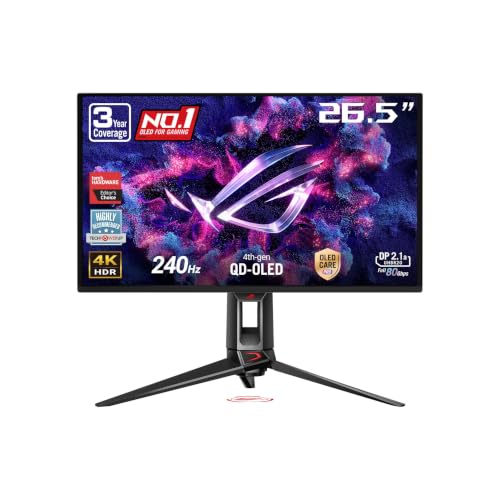
Specs
Panel | 27" QD-OLED (4th-gen) |
Resolution | 3840 x 2160 (4K UHD) |
Refresh | 240Hz |
Response | 0.03ms GtG |
Pixel density | ~166 PPI |
Color | 99% DCI-P3, true 10-bit |
Ports | DisplayPort 2.1a UHBR20, HDMI 2.1, USB-C |
Panel
27" QD-OLED (4th-gen)
Resolution
3840 x 2160 (4K UHD)
Refresh
240Hz
Response
0.03ms GtG
Pixel density
~166 PPI
Color
99% DCI-P3, true 10-bit
Ports
DisplayPort 2.1a UHBR20, HDMI 2.1, USB-C
What it does well
The PG27UCDM is the halo pick. 4K at 27 inches works out to roughly 166 PPI, so text and edges are razor-clean without any scaling, and you get the same QD-OLED per-pixel black and 0.03ms response as the 1440p OLED in a sharper, denser image. Our 4K OLED roundup covers the 4K OLED field in full.
DisplayPort 2.1a UHBR20 is genuinely future-facing bandwidth, the kind of port that outlasts the panel. The custom heatsink and Neo Proximity Sensor are real burn-in mitigation rather than spec-sheet decoration. For the reader whose graphics card can drive it, this is the best image in the lineup.
What you give up
It asks for the most GPU of any pick here and it is the most expensive. Run it on anything below an RTX 5070 Ti and you are leaving the panel idling at frame rates a cheaper 1440p monitor would hit easily, which means paying for resolution the card cannot feed.
27 inches is dense for 4K and some readers want 32-inch real estate instead. The same OLED caveats apply: glossy coating, text fringing, and a room where you can manage the light. If you are shopping the 4K field more broadly, our guide to the best 4K gaming monitors sorts OLED, Mini-LED and IPS by the room and the GPU each one suits.
Who it's for
The reader on an RTX 5080-class card who specifically wants 4K and the best image money buys at 27 inches, with refresh headroom that outlasts two GPU generations. If the GPU is mid-range, this is the wrong pick and the overall or value 1440p panel is the honest answer.
Best Budget: GIGABYTE GS27QA SA

Specs
Panel | 27" IPS |
Resolution | 2560 x 1440 (QHD) |
Refresh | 180Hz |
Response | 1ms MPRT |
Sync | AMD FreeSync |
Ports | HDMI, DisplayPort |
Brand | GIGABYTE (named-brand value tier) |
Panel
27" IPS
Resolution
2560 x 1440 (QHD)
Refresh
180Hz
Response
1ms MPRT
Sync
AMD FreeSync
Ports
HDMI, DisplayPort
Brand
GIGABYTE (named-brand value tier)
What it does well
The GS27QA SA is the value entry into real 1440p high refresh, and it comes from a brand you recognize instead of a no-name panel that disappears after one return window. 180Hz IPS at QHD is the resolution-and-refresh combo most mid-range GPUs pair with comfortably. Our budget 1440p monitors guide lists more options in this tier.
Keeping the monitor spend low is the whole point here: it leaves more of the build budget for the graphics card, which is where the frames come from. FreeSync handles tearing on either vendor, and for a first 1440p monitor this clears the bar without a compromise that ages badly.
What you give up
There is no OLED motion or black-level magic and no DisplayHDR rating worth quoting. The stand and build are value-tier, and 180Hz is the ceiling, so there is no headroom past it the way the 240Hz picks have.
This is a do-the-job panel, not a showpiece. If the build can stretch to the value IPS pick above, the jump to 240Hz is worth it for a fast-twitch player.
Who it's for
The reader building toward 1440p on an RX 9060 XT 16GB or RTX 5060 Ti 16GB who wants the lowest-cost honest 1440p high-refresh panel from a brand they recognize, with no 8GB-card-style compromise baked into the monitor. If the card is instead the 8GB RTX 5060, the calculus flips: our RTX 5060 monitor pairing guide makes the case for 1080p high refresh over QHD.
Editor's Pick: Samsung Odyssey OLED G8 G85SD

Specs
Panel | 34" QD-OLED, 1800R curve |
Resolution | 3440 x 1440 (UWQHD, 21:9) |
Refresh | 175Hz |
Response | 0.03ms GtG |
HDR | DisplayHDR True Black 400-class, glare-free |
Sync | G-Sync Compatible, FreeSync Premium Pro |
Warranty | 3-year (incl. burn-in coverage) |
Panel
34" QD-OLED, 1800R curve
Resolution
3440 x 1440 (UWQHD, 21:9)
Refresh
175Hz
Response
0.03ms GtG
HDR
DisplayHDR True Black 400-class, glare-free
Sync
G-Sync Compatible, FreeSync Premium Pro
Warranty
3-year (incl. burn-in coverage)
What it does well
The G85SD is the do-both pick. 34 inches of 21:9 QD-OLED is the immersion and desktop-real-estate answer for the reader who games and also edits, codes, or runs wide timelines. The curve plus the glare-free coating make it the most usable OLED in a normal room. Our curved ultrawide guide covers the 21:9 field in depth.
175Hz is plenty for single-player and sim play, and the GPU ask is lower than the 4K pick because the ultrawide pixel count sits between 1440p and 4K. An RTX 5070 Ti or RX 9070 XT feeds it natively. Samsung's 3-year warranty includes burn-in coverage, which takes a lot of the sting out of the OLED gamble.
What you give up
21:9 is a deliberate choice, not a default. Competitive shooters often letterbox or stretch on an ultrawide, so a pure esports player is better served by one of the flat 16:9 high-refresh picks. 175Hz is also lower than the 240Hz panels here. If the bend matters more to you than the aspect ratio, our curved gaming monitor guide works through 1000R, 1500R, and 1800R and says plainly when flat is the better buy.
The wide panel needs desk depth and a graphics card that can feed the extra pixels. If the build is mid-range or the reader mostly plays ranked shooters, this is the wrong shape of monitor.
Who it's for
The reader who wants one monitor for both immersive single-player gaming and real productivity, on an RTX 5070 Ti or RX 9070 XT, and values screen real estate and immersion over the last few Hz of refresh.
Where to go for deeper coverage
This hub routes you to a pick; our resolution-specific guides go deeper on each tier. If you have settled on a panel class, start there. Gaming on a PS5 or an Xbox Series X instead? Our guide to the best monitors for console gaming covers which panels carry a real HDMI 2.1 input and where console VRR holds up.
For the 1440p OLED field in full, read our 1440p OLED gaming monitors guide. For high-refresh flat panels at 27 inches, see the 27-inch 1440p high-FPS guide. If 4K is the target, our 4K 144Hz picks and 4K OLED roundup cover the GPU pairing in detail.
Chasing value? The budget 1440p monitors guide lists more options in this tier. For immersion, the curved ultrawide guide goes wide, and the 1080p picks cover esports-first builds. When you are ready to match the screen to a card, our how to choose a GPU and monitor framework ties it together. And if the panel-tech question itself is still open, our OLED vs IPS verdict breaks it down by use case.
Bottom line
If you want one screen that punches above its price for most builds, buy the LG UltraGear 27GX704A-B and let the GPU be the thing you upgrade next. If you would rather skip the OLED premium, the LG 27GR83Q-B gives you the same 1440p 240Hz target on IPS.
If your card is a 5080-class and you want the best image at 27 inches, the ASUS ROG Swift PG27UCDM is the 4K halo. On a tight budget, the GIGABYTE GS27QA SA is the honest 1440p floor. And if you game and work on the same desk, the Samsung Odyssey OLED G8 G85SD is the ultrawide that does both.
FAQ
What is the best resolution for a gaming monitor in 2026?
For most builds, 1440p is the sweet spot. It is the resolution the mainstream enthusiast GPU tier, cards like the RTX 5070 Ti and RX 9070 XT, can actually drive at high refresh, so you get sharp frames without buying a panel your card has to upscale to. Step up to 4K only if you have a 5080-class card and specifically want the sharpest image. Drop to 1080p only for esports-first builds where refresh matters more than detail.
Is an OLED gaming monitor worth it over IPS?
OLED is worth it when your build can afford the premium and you want the best motion and contrast. QD-OLED gives per-pixel black, near-instant response, and color an IPS panel cannot match. The trade is a higher price, a glossy coating that wants a controlled-light room, and a burn-in conversation you manage with pixel-refresh routines. IPS is the honest value answer: brighter rooms, no burn-in worry, and a lower price for the same resolution and refresh.
What GPU do I need for a 1440p 240Hz gaming monitor?
Plan for an RTX 5070 Ti or RX 9070 XT to drive native 1440p high refresh in most modern games. An RTX 5070 or RX 9070 holds 1440p 240Hz with quality upscaling enabled, and an RTX 5060 Ti 16GB or RX 9060 XT 16GB will get there in lighter titles. The panel is rarely the limiter at 1440p high refresh; the graphics card is, which is why each pick here names the card tier it pairs with.
Is 4K or 1440p better for gaming?
It depends entirely on your graphics card. 4K gives a sharper image but demands an RTX 5070 Ti at the floor and an RTX 5080 for native high refresh. 1440p is easier to drive, so a wider range of cards can feed it at high frame rates. If your GPU is mid-range, 1440p is the better experience because a 4K panel would idle well under its refresh ceiling. Buy the resolution your card can actually push.
Do gaming monitors get burn-in, and how do I prevent it?
OLED panels can develop burn-in over time, though modern QD-OLED monitors include mitigation that makes it unlikely for normal mixed use. Leave the pixel-refresh and screen-saver routines enabled, hide or auto-hide static taskbars and HUD elements where you can, and vary your content. Several picks here, including the Samsung Odyssey OLED G8, ship with multi-year warranties that cover burn-in, which is a real safety net. IPS panels do not have this concern at all.
Is an ultrawide monitor good for gaming?
An ultrawide is excellent for single-player and immersive gaming and for productivity, where the extra horizontal space pays off in both games and wide work timelines. It is a poor fit for competitive shooters, which often letterbox or stretch on a 21:9 panel. It also needs a graphics card that can feed the extra pixels, roughly an RTX 5070 Ti or RX 9070 XT for the 3440x1440 picks. If you mostly play ranked shooters, a flat 16:9 high-refresh panel is the better buy.
Related Articles

Best 1440p OLED Gaming Monitors (2026): QD-OLED vs WOLED Picks
The best 1440p OLED gaming monitors of 2026, from value-tier 360Hz QD-OLED to 480Hz WOLED flagship. With burn-in mitigation guidance.
May 14, 2026

Best 4K 240Hz OLED Gaming Monitors 2026: 6 Picks Compared
The best 4K 240Hz OLED gaming monitors, ranked: which 27 and 32 inch QD-OLED and WOLED panels are worth buying, and which RTX 5090 pairing needs DP 2.1a.
Sep 13, 2026

Best Curved Ultrawide Gaming Monitors (2026): 34 to 45 Inch
The best curved ultrawide gaming monitors for 2026, from a 34-inch QD-OLED value champion to 45-inch 5K2K immersion. Pick your size first, then your panel.
Jun 23, 2026

Best GPUs for 1440p Gaming (2026): 5 16GB Picks, 60-240Hz
The best GPUs for 1440p gaming in 2026: five 16GB picks matched to 60, 144, and 240 Hz targets, with real benchmarks, trade-offs, and who each card fits.
Aug 8, 2026

How to Choose a GPU (and a Monitor That Matches)
A buyer's framework for picking a GPU and the monitor that pairs with it. Start with the panel and work the card back.
May 17, 2026