Affiliate Disclosure: As an Amazon Associate we earn from qualifying purchases. Some links may earn us a commission at no cost to you.

Best Gaming Laptops Under $2,500 (2026): RTX 5080 vs 5070 Ti
A gaming laptop at this price is where the spec sheet starts lying to you. Two machines can both say RTX 5080 and deliver very different frame rates, because what matters is how much power the laptop feeds the GPU and whether the cooler can hold it.
So we ranked these picks on delivered graphics power, thermals, and panel quality, not the badge on the box. The through-line question is simple: when is the 5080 tier worth it, and when does a fully fed 5070 Ti give you almost all of it for less.
Our top pick: Lenovo Legion Pro 7i (RTX 5080)
The Legion Pro 7i pairs a full 175 W RTX 5080 with a vapor-chamber cooler built to sustain it, and tops it with the best display in the group. It is the most performance you can responsibly buy under this budget.

Quick picks
Laptop | GPU (power) | Display | Best for | Buy |
|---|---|---|---|---|
RTX 5080 (16 GB), 175 W | 16" OLED 240 Hz | Max sustained 5080 power | ||
RTX 5070 Ti (12 GB), 140 W | 16" Nebula 2.5K 240 Hz | 1440p value sweet spot | ||
RTX 5080 (16 GB), 175 W | 16" QHD+ 240 Hz | 5080 with 2 TB and TB5 | ||
RTX 5070 Ti (12 GB) | 16" WQXGA IPS 240 Hz | Lowest 5070 Ti entry | ||
RTX 5070 Ti (12 GB), 120 W | 14" 3K OLED 120 Hz | Thin-and-light you carry |
- GPU (power)
RTX 5080 (16 GB), 175 W
- Display
16" OLED 240 Hz
- Best for
Max sustained 5080 power
- Buy
- GPU (power)
RTX 5070 Ti (12 GB), 140 W
- Display
16" Nebula 2.5K 240 Hz
- Best for
1440p value sweet spot
- Buy
- GPU (power)
RTX 5080 (16 GB), 175 W
- Display
16" QHD+ 240 Hz
- Best for
5080 with 2 TB and TB5
- Buy
- GPU (power)
RTX 5070 Ti (12 GB)
- Display
16" WQXGA IPS 240 Hz
- Best for
Lowest 5070 Ti entry
- Buy
- GPU (power)
RTX 5070 Ti (12 GB), 120 W
- Display
14" 3K OLED 120 Hz
- Best for
Thin-and-light you carry
- Buy
Specs at a glance
Laptop | GPU | CPU | Display | Memory / Storage |
|---|---|---|---|---|
RTX 5080 (16 GB) | Core Ultra 9 275HX | 16" OLED 240 Hz | 32 GB / 1 TB | |
RTX 5070 Ti (12 GB) | Ryzen 9 9955HX | 16" Nebula 2.5K 240 Hz | 32 GB / 1 TB | |
RTX 5080 (16 GB) | Core Ultra 9 275HX | 16" QHD+ 240 Hz | 32 GB / 2 TB | |
RTX 5070 Ti (12 GB) | Core Ultra 9 275HX | 16" WQXGA IPS 240 Hz | 32 GB / 1 TB | |
RTX 5070 Ti (12 GB) | Ryzen AI 9 HX 370 | 14" 3K OLED 120 Hz | 32 GB / 1 TB |
- GPU
RTX 5080 (16 GB)
- CPU
Core Ultra 9 275HX
- Display
16" OLED 240 Hz
- Memory / Storage
32 GB / 1 TB
- GPU
RTX 5070 Ti (12 GB)
- CPU
Ryzen 9 9955HX
- Display
16" Nebula 2.5K 240 Hz
- Memory / Storage
32 GB / 1 TB
- GPU
RTX 5080 (16 GB)
- CPU
Core Ultra 9 275HX
- Display
16" QHD+ 240 Hz
- Memory / Storage
32 GB / 2 TB
- GPU
RTX 5070 Ti (12 GB)
- CPU
Core Ultra 9 275HX
- Display
16" WQXGA IPS 240 Hz
- Memory / Storage
32 GB / 1 TB
- GPU
RTX 5070 Ti (12 GB)
- CPU
Ryzen AI 9 HX 370
- Display
14" 3K OLED 120 Hz
- Memory / Storage
32 GB / 1 TB
How we picked
On a laptop, the GPU name is only half the story. The same chip can be configured across a wide power band, and the wattage the laptop feeds it (its TGP) often matters more than the model number. We weighted delivered power and the cooling to sustain it above everything else. If you want the full framework, our guide to choosing a GPU and a matching display walks through it.
Second, we looked at whether the display earns the GPU behind it: resolution the chip can drive, and a refresh rate you can use. A 240 Hz panel is wasted if the GPU cannot approach it, and a slow panel holds back a fast card.
Finally, we kept every pick under this budget ceiling and balanced the field across price tiers. If your number lands lower, our 1440p sweet-spot laptop picks cover the tier just below.
And if you can stretch past this ceiling, our guide to laptops that sustain the 5080 under load adds thermal headroom these machines cannot match.
Best Overall: Lenovo Legion Pro 7i (RTX 5080)
Specs
GPU | GeForce RTX 5080 Laptop, 16 GB GDDR7 |
GPU power | 175 W max graphics power |
CPU | Intel Core Ultra 9 275HX (24 cores) |
Display | 16" WQXGA OLED, 240 Hz, 500 nits |
Memory | 32 GB DDR5 |
Storage | 1 TB Gen 5 NVMe SSD |
Cooling | Coldfront vapor chamber |
GPU
GeForce RTX 5080 Laptop, 16 GB GDDR7
GPU power
175 W max graphics power
CPU
Intel Core Ultra 9 275HX (24 cores)
Display
16" WQXGA OLED, 240 Hz, 500 nits
Memory
32 GB DDR5
Storage
1 TB Gen 5 NVMe SSD
Cooling
Coldfront vapor chamber
What it does well
The Legion Pro 7i earns the top spot on delivered power. Its RTX 5080 runs at a full 175 W, and the Coldfront vapor-chamber cooler is built to hold that number under sustained load rather than spiking and backing off. That combination is what turns the 5080 badge into real frames.
The OLED panel is the best display in this group. Per-pixel contrast and near-instant response make it the one screen here you notice every time you sit down, and 240 Hz keeps fast games crisp. The Core Ultra 9 275HX has the core count to keep the GPU fed at 1440p.
What you give up
It is heavy and it runs warm. Push the 5080 hard and the fans get loud, so you will want headphones for long sessions and a flat, well-ventilated surface.
The base configuration ships with a single drive, so plan on adding storage if you install a large library. If thermals under sustained load worry you, a laptop cooling pad helps, and we cover those separately.
Who it's for
The 1440p high-refresh player who wants the full 5080 at the price ceiling and cares about panel quality more than portability.
Best Value: ASUS ROG Strix G16 (RTX 5070 Ti)

Specs
GPU | GeForce RTX 5070 Ti Laptop, 12 GB GDDR7 |
GPU power | up to 140 W graphics power |
CPU | AMD Ryzen 9 9955HX (16 cores) |
Display | 16" ROG Nebula 2.5K, 240 Hz |
Memory | 32 GB DDR5-5600 |
Storage | 1 TB PCIe Gen 4 SSD |
Cooling | Tri-fan, liquid metal |
GPU
GeForce RTX 5070 Ti Laptop, 12 GB GDDR7
GPU power
up to 140 W graphics power
CPU
AMD Ryzen 9 9955HX (16 cores)
Display
16" ROG Nebula 2.5K, 240 Hz
Memory
32 GB DDR5-5600
Storage
1 TB PCIe Gen 4 SSD
Cooling
Tri-fan, liquid metal
What it does well
The Strix G16 is where the money makes the most sense. Its RTX 5070 Ti is fed up to 140 W, so it holds high clocks instead of leaving performance on the table, and the Ryzen 9 9955HX is a genuine 16-core part that keeps up in CPU-bound titles. For 1440p ultra you are giving up very little versus the 5080 machines while paying less.
The Nebula 2.5K panel at 240 Hz is a strong match for this GPU. You get the resolution this GPU is meant to drive and the refresh rate to use it in competitive games.
What you give up
The 12 GB frame buffer is the ceiling. It is plenty at 1440p, but 4K texture packs and a few of the heaviest modern titles can brush against it. If you plan to game at 4K often, the 5080 picks give you more headroom. For a ranking built only around that higher tier, our guide to the best RTX 5080 gaming laptops sorts every full-power option by the GPU power its chassis sustains.
The display is a fast IPS-class Nebula panel, not OLED, so black levels do not match the Legion or the Zephyrus.
Who it's for
The reader who wants 1440p ultra that lasts for years without paying the 5080 premium.
Best Premium: MSI Vector 16 HX AI (RTX 5080)

Specs
GPU | GeForce RTX 5080 Laptop, 16 GB GDDR7 |
GPU power | up to 175 W graphics power |
CPU | Intel Core Ultra 9 275HX |
Display | 16" QHD+ (2560x1600), 240 Hz |
Memory | 32 GB DDR5 |
Storage | 2 TB NVMe SSD |
Connectivity | Dual Thunderbolt 5, Wi-Fi 7 |
GPU
GeForce RTX 5080 Laptop, 16 GB GDDR7
GPU power
up to 175 W graphics power
CPU
Intel Core Ultra 9 275HX
Display
16" QHD+ (2560x1600), 240 Hz
Memory
32 GB DDR5
Storage
2 TB NVMe SSD
Connectivity
Dual Thunderbolt 5, Wi-Fi 7
What it does well
The Vector 16 HX AI is the second full-power 5080 here, also at 175 W, and it pairs that with the most storage in the group at 2 TB. If you want the top GPU tier plus room for a large install base out of the box, this is the straightforward answer.
Dual Thunderbolt 5 and Wi-Fi 7 give it the most modern I/O of any pick. That matters if you dock to a monitor, run fast external storage, or want an external-GPU path down the road.
What you give up
The panel is a fast QHD+ IPS, not OLED, so it trails the Legion on contrast. The chassis is functional rather than premium, and the design leans utilitarian.
Like the Legion, a full 175 W 5080 produces heat and fan noise under load. This is a performance machine first.
Who it's for
The buyer who wants the 5080, 2 TB of storage, and current-generation ports without stepping over budget.
Best Budget: Acer Predator Helios Neo 16 (5070 Ti)

Specs
GPU | GeForce RTX 5070 Ti Laptop, 12 GB GDDR7 |
CPU | Intel Core Ultra 9 275HX (24 cores) |
Display | 16" WQXGA (2560x1600) IPS, 240 Hz |
Memory | 32 GB DDR5 |
Storage | 1 TB SSD |
Networking | Killer Wi-Fi 6E |
Cooling | Dual-fan, liquid metal |
GPU
GeForce RTX 5070 Ti Laptop, 12 GB GDDR7
CPU
Intel Core Ultra 9 275HX (24 cores)
Display
16" WQXGA (2560x1600) IPS, 240 Hz
Memory
32 GB DDR5
Storage
1 TB SSD
Networking
Killer Wi-Fi 6E
Cooling
Dual-fan, liquid metal
What it does well
The Helios Neo 16 delivers the same 5070 Ti class as our value pick for the lowest entry point in the group. You still get the full 24-core Core Ultra 9 275HX and a 16-inch WQXGA 240 Hz panel, so the fundamentals for 1440p gaming are all here.
It is the pick that frees up the most budget for the rest of your setup, whether that goes toward a monitor, storage, or peripherals.
What you give up
You feel the savings in the finish. The chassis and keyboard are plainer than the Strix or Legion, and it uses Wi-Fi 6E rather than Wi-Fi 7.
The panel is a standard IPS rather than the tuned Nebula or an OLED, so it is functional rather than a highlight.
Who it's for
The reader who wants RTX 5070 Ti performance for the least money and does not need premium build or the newest wireless.
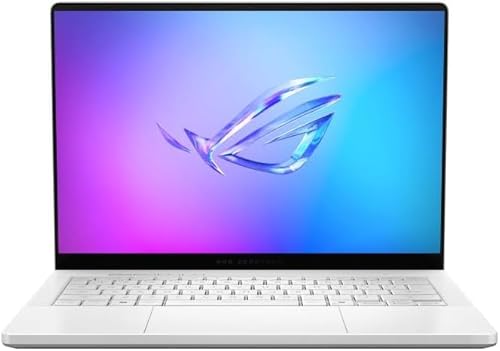
Editor's Pick: ASUS ROG Zephyrus G14 (RTX 5070 Ti)
Specs
GPU | GeForce RTX 5070 Ti Laptop, 12 GB GDDR7 |
GPU power | up to 120 W graphics power |
CPU | AMD Ryzen AI 9 HX 370 |
Display | 14" ROG Nebula 3K OLED, 120 Hz |
Memory | 32 GB LPDDR5X |
Storage | 1 TB SSD |
Weight | 3.46 lb (0.63" thin) |
GPU
GeForce RTX 5070 Ti Laptop, 12 GB GDDR7
GPU power
up to 120 W graphics power
CPU
AMD Ryzen AI 9 HX 370
Display
14" ROG Nebula 3K OLED, 120 Hz
Memory
32 GB LPDDR5X
Storage
1 TB SSD
Weight
3.46 lb (0.63" thin)
What it does well
The Zephyrus G14 is the one you actually carry. At 3.46 pounds and just over half an inch thick, it is a real gaming machine in an ultraportable body, and the 14-inch 3K Nebula OLED is stunning to look at.
The Ryzen AI 9 HX 370 is efficient and quiet, which suits the chassis. For travel, coffee-shop sessions, and a bag you carry all day, nothing else here competes.
What you give up
Portability costs power. Its RTX 5070 Ti runs at roughly 120 W, lower than the 140 W in the Strix, so the same chip name delivers fewer frames. Judge it on delivered wattage, not the badge.
The 120 Hz panel is lower refresh than the 240 Hz screens on the larger picks, and the smaller chassis has less thermal headroom for marathon sessions.
Who it's for
The player who travels and wants genuine gaming in a thin-and-light, and accepts a wattage tax in exchange for a laptop that goes everywhere.
Bottom line
If you want the most performance under the cap, buy the Lenovo Legion Pro 7i for its full-power 5080, cooling, and OLED. If value is the goal, the ASUS ROG Strix G16 gives you nearly all of the 1440p experience for less, and readers who only need the tier below should read our RTX 5070 laptop picks.
Choose the MSI Vector 16 HX AI if you want the 5080 with 2 TB and Thunderbolt 5, the Acer Predator Helios Neo 16 to spend the least for 5070 Ti frames, and the ASUS ROG Zephyrus G14 if portability outranks raw power. Match the machine to how you play, then let delivered wattage break the tie.
FAQ
Is an RTX 5080 gaming laptop worth it over a 5070 Ti?
It depends on how the laptop feeds each chip and where you game. At 1440p, a fully powered 5070 Ti at 140 W lands close to a 5080 for less money, which is why the Strix G16 is our value pick. Step up to a 5080 like the Legion Pro 7i if you game at 4K, want the extra 4 GB of VRAM headroom, or plan to keep the machine for several years.
What is TGP and why does it matter more than the GPU name on a laptop?
TGP, or total graphics power, is the wattage the laptop delivers to the GPU. The same RTX 5070 Ti can run near 120 W in a thin chassis or up to 140 W in a larger one, and more sustained power means more frames. Because manufacturers rarely print TGP on the box, two laptops with identical GPU names can perform very differently. It is the first spec we check.
Is 12 GB of VRAM enough for gaming in 2026?
For 1440p, yes. The RTX 5070 Ti picks here handle high and ultra settings comfortably at that resolution. Where 12 GB gets tight is 4K with high-resolution texture packs and a handful of the most demanding titles. If you game mostly at 4K, the 16 GB on the 5080 machines gives you more margin.
Can a laptop at this budget handle 4K gaming?
Yes, with realistic expectations and DLSS. The 5080 picks drive 4K well in most titles, especially with DLSS 4 upscaling and frame generation enabled. The 5070 Ti machines can also output to a 4K screen, but you will lean on upscaling more and drop settings in the heaviest games. Native 4K ultra without upscaling is still a step above this bracket.
Do I need the Core Ultra 9 275HX, or is a Ryzen 9 fine?
Either is more than enough to feed these GPUs. The Intel Core Ultra 9 275HX and the AMD Ryzen 9 9955HX are both high-core-count parts that keep the graphics card busy at 1440p and 4K, where the GPU is the limit anyway. Pick the laptop for its GPU power, cooling, and display first; the CPU difference will not decide your gaming experience here.
Related Articles

Best Gaming Laptops Under $2,000 (2026): 5 TGP-Ranked Picks
The best gaming laptop under $2,000 in 2026 is decided by GPU wattage, not the GPU name. Five picks ranked on real TGP, panel quality and chassis weight.
Aug 5, 2026

Best Gaming Laptops Under $3,000 (2026): 5 RTX 5080 Picks
The best gaming laptop under $3,000 in 2026 is the one that holds a full 175W RTX 5080 under load. Five picks by chassis class, ranked on sustained TGP.
Aug 20, 2026

Best RTX 5070 Gaming Laptops (2026): TGP-Ranked Picks
The best RTX 5070 gaming laptops in 2026, ranked by the TGP each chassis actually sustains. Five picks from budget to 18-inch, plus the 8GB VRAM catch.
Jul 21, 2026

Best Cooling Pads for Gaming Laptops (2026 Buyer Guide)
The best cooling pad for gaming laptops hinges on one fork: sealed-chamber turbofans that stop throttling, or quiet open-fan pads. Five picks by size.
Jul 15, 2026

How to Choose a GPU (and a Monitor That Matches)
A buyer's framework for picking a GPU and the monitor that pairs with it. Start with the panel and work the card back.
May 17, 2026