Affiliate Disclosure: As an Amazon Associate we earn from qualifying purchases. Some links may earn us a commission at no cost to you.

Best Gaming Monitors for the RTX 3050 (2026): 5 Picks
An RTX 3050 renders somewhere in the 60s to the high 70s at 1080p in demanding games, and well past 140 fps in competitive shooters. Those two numbers decide the monitor. They make a 1080p panel at 144Hz to 180Hz the right buy, they make 240Hz an esports-only purchase, and they take 1440p off the table for this card.
The five picks below are matched to what the 3050 can fill. Four are 24 inch 1080p panels. One is a 27 inch 1080p screen for readers who want size without the resolution penalty.
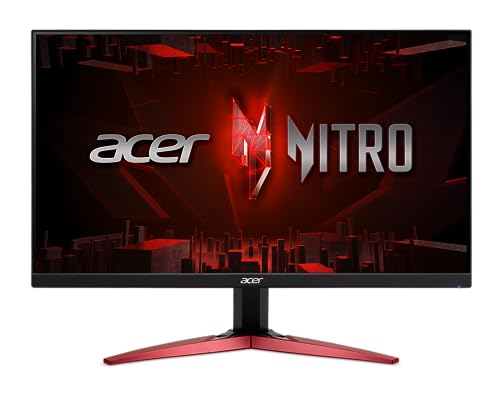
Our top pick: Acer Nitro KG241Y M3
The Acer Nitro KG241Y M3 pairs a 180Hz refresh rate with an IPS panel at 1080p, which covers both halves of how a 3050 gets used: high frame rates in esports and steady 60 to 80 fps in AAA with FreeSync Premium smoothing the gaps.
Quick picks
Pick | Monitor | Panel and refresh | Best for | Buy |
|---|---|---|---|---|
Best Overall | 24" 1080p 180Hz IPS | Mixed esports and AAA at 1080p | ||
Best Value | 24" 1080p 144Hz IPS | AAA-first players who want certified G-Sync Compatible | ||
Best Premium | 24" 1080p 240Hz Fast IPS | Competitive shooters on low settings | ||
Best Budget | 24" 1080p 144Hz VA (180Hz OC) | Budget prebuilts and first builds | ||
Editor's Pick | 27" 1080p 180Hz IPS | A bigger screen instead of 1440p |
Best Overall
- Monitor
- Panel and refresh
24" 1080p 180Hz IPS
- Best for
Mixed esports and AAA at 1080p
- Buy
Best Value
- Monitor
- Panel and refresh
24" 1080p 144Hz IPS
- Best for
AAA-first players who want certified G-Sync Compatible
- Buy
Best Premium
- Monitor
- Panel and refresh
24" 1080p 240Hz Fast IPS
- Best for
Competitive shooters on low settings
- Buy
Best Budget
- Monitor
- Panel and refresh
24" 1080p 144Hz VA (180Hz OC)
- Best for
Budget prebuilts and first builds
- Buy
Editor's Pick
- Monitor
- Panel and refresh
27" 1080p 180Hz IPS
- Best for
A bigger screen instead of 1440p
- Buy
Specs at a glance
Monitor | Size | Resolution | Refresh | Panel | Response | Adaptive sync |
|---|---|---|---|---|---|---|
23.8" | 1920 x 1080 | 180Hz | IPS | 0.5ms (min) | FreeSync Premium | |
24" | 1920 x 1080 | 120Hz (144Hz OC) | IPS | 1ms MBR | G-Sync Compatible, FreeSync | |
23.8" | 1920 x 1080 | 240Hz | Fast IPS | 0.3ms (min) | G-Sync Compatible, FreeSync Premium | |
23.8" | 1920 x 1080 | 144Hz (180Hz OC) | VA | 0.5ms MPRT | Adaptive-Sync | |
27" | 1920 x 1080 | 180Hz | IPS | 1ms MBR | FreeSync |
- Size
23.8"
- Resolution
1920 x 1080
- Refresh
180Hz
- Panel
IPS
- Response
0.5ms (min)
- Adaptive sync
FreeSync Premium
- Size
24"
- Resolution
1920 x 1080
- Refresh
120Hz (144Hz OC)
- Panel
IPS
- Response
1ms MBR
- Adaptive sync
G-Sync Compatible, FreeSync
- Size
23.8"
- Resolution
1920 x 1080
- Refresh
240Hz
- Panel
Fast IPS
- Response
0.3ms (min)
- Adaptive sync
G-Sync Compatible, FreeSync Premium
- Size
23.8"
- Resolution
1920 x 1080
- Refresh
144Hz (180Hz OC)
- Panel
VA
- Response
0.5ms MPRT
- Adaptive sync
Adaptive-Sync
- Size
27"
- Resolution
1920 x 1080
- Refresh
180Hz
- Panel
IPS
- Response
1ms MBR
- Adaptive sync
FreeSync
Benchmarks
Average frame rates for the RTX 3050 8GB in games where a high refresh panel earns its keep.
- 342 FPS
- 287 FPS
- 141 FPS
- 120 FPS
- 89 FPS
Where the card sits below the refresh ceiling of every panel in this roundup.
- 78 FPS
- 77 FPS
- 73 FPS
- 66 FPS
- 31 FPS
How we picked
Start with the card. The two tables above set the whole framework. In lighter competitive games the 3050 produces more frames than a 180Hz screen can show, and in demanding single-player games it lands between 60 and 80 fps. These are launch-era results, and newer patches and drivers move single games around, but the two tiers have held. A monitor bought for the first table is a different purchase from a monitor bought for the second.
That split points at 144Hz to 180Hz as the default. A panel in that range is never wasted in AAA and still shows a real gain over 60Hz in shooters. 240Hz only pays when most of your hours go to games like Rainbow Six Siege or CS-class shooters at low settings, which is why exactly one pick runs that fast. The panels some shoppers get pointed at, 280Hz and up, ask for frame rates this card does not produce outside the lightest titles. If you want the longer version of the refresh-rate argument, our 144Hz monitor guide walks through 144 versus 180.
Resolution is the easy call. The 3050 is a 1080p card. At 1440p its AAA results fall below 60 fps in most demanding games, and the frame buffer runs out early in recent releases. Buy a 1440p panel when you buy the next GPU, not before. The RTX 3050 to RTX 5060 upgrade breakdown covers when that step makes sense.
Two card facts finish the filter. Every RTX 3050 has a DisplayPort 1.4a and an HDMI 2.1 output on NVIDIA's reference spec, so any panel here runs at full refresh over the right cable. And every RTX 30 series card supports G-Sync Compatible mode, so adaptive sync was required on every pick. A card that swings between 60 and 140 fps needs it more than a flagship does. The 6GB version of the 3050 is a separate, slower card, and it shifts the target down to 144Hz. More on that in the FAQ.
Best Overall: Acer Nitro KG241Y M3
Specs
Size | 23.8 inch |
Resolution | 1920 x 1080 |
Refresh rate | 180Hz |
Panel | IPS |
Response | 0.5ms (min) |
Adaptive sync | AMD FreeSync Premium |
Color | 99% sRGB |
Inputs | 2x HDMI, 1x DisplayPort |
Size
23.8 inch
Resolution
1920 x 1080
Refresh rate
180Hz
Panel
IPS
Response
0.5ms (min)
Adaptive sync
AMD FreeSync Premium
Color
99% sRGB
Inputs
2x HDMI, 1x DisplayPort
What it does well
IPS at 180Hz is the combination that fits a 3050 best, and this is one of the cheapest ways to get it. Colors hold steady at an angle and stay accurate on the desktop, with 99% sRGB coverage in Acer's listing. The 0.5ms rating is a minimum figure, but in practice an IPS panel at this tier stays clean in motion where cheap VA panels smear.
The refresh ceiling is the right size. In Rainbow Six Siege and other lighter shooters the card runs past 140 fps, and 180Hz shows those extra frames. In AAA the card drops into the 60s and 70s, and FreeSync Premium keeps those swings from tearing. Turn on G-Sync Compatible in the NVIDIA Control Panel and run it over DisplayPort.
What you give up
The stand is basic. Retailer listings show tilt only, with no height adjustment, so plan on a monitor arm or a riser if your desk height is awkward. There are no speakers worth using either.
Watch the model suffix. Acer sells several KG241Y versions, and the S, M3 and X3 variants do not all use the same panel type. Buyers have flagged VA listings next to the IPS one. The M3 model in the listing title is the IPS panel this pick is built on.
Who it's for
The 3050 owner who plays a mix of competitive shooters and single-player games at 1080p and wants one panel that the card neither outruns nor leaves idle.
Best Value: LG UltraGear 24G411A-B

Specs
Size | 24 inch |
Resolution | 1920 x 1080 |
Refresh rate | 120Hz native, 144Hz overclock |
Panel | IPS |
Response | 1ms MBR, 5ms GtG |
Adaptive sync | NVIDIA G-Sync Compatible, AMD FreeSync |
HDR | HDR10 |
Inputs | HDMI, DisplayPort |
Size
24 inch
Resolution
1920 x 1080
Refresh rate
120Hz native, 144Hz overclock
Panel
IPS
Response
1ms MBR, 5ms GtG
Adaptive sync
NVIDIA G-Sync Compatible, AMD FreeSync
HDR
HDR10
Inputs
HDMI, DisplayPort
What it does well
This is the pick for the AAA side of the 3050. Its 144Hz ceiling sits just above the frame rates the card holds in Cyberpunk 2077, Far Cry 6 and Fortnite, so almost nothing the card renders goes to waste. A faster panel would mostly sit idle in those games.
It also carries NVIDIA's G-Sync Compatible certification, which most budget panels do not. That means variable refresh switches on from an NVIDIA card without manual setup, and the panel has been validated for flicker and blanking in the range where the 3050 runs most games.
What you give up
The 144Hz figure is an overclock. LG's own spec page lists the panel at 120Hz native with 144Hz as an overclock setting, so you have to enable it in the menu. The 1ms number is a motion blur reduction figure, and the gray to gray rating is 5ms, slower than the Acer above.
In esports the 3050 outruns this screen. If Siege or Valorant fills most of your week, the extra 36Hz on the Acer is worth more than the certification. The slim stand is tilt only.
Who it's for
The reader who mostly plays recent single-player and live-service games on a 3050 and wants the cheapest certified G-Sync Compatible panel that matches those frame rates.
Best Premium: ASUS TUF Gaming VG249QML5A

Specs
Size | 23.8 inch |
Resolution | 1920 x 1080 |
Refresh rate | 240Hz |
Panel | Fast IPS |
Response | 0.3ms GtG (min) |
Adaptive sync | G-Sync Compatible, FreeSync Premium |
Motion | ELMB Sync |
Inputs | 2x HDMI 2.0, 1x DisplayPort 1.4 |
Stand | Height adjustable |
Size
23.8 inch
Resolution
1920 x 1080
Refresh rate
240Hz
Panel
Fast IPS
Response
0.3ms GtG (min)
Adaptive sync
G-Sync Compatible, FreeSync Premium
Motion
ELMB Sync
Inputs
2x HDMI 2.0, 1x DisplayPort 1.4
Stand
Height adjustable
What it does well
This is the best-built panel in the roundup and the only 240Hz one. Fast IPS with a 0.3ms rating, ELMB Sync to sharpen motion while adaptive sync is on, and a height-adjustable stand put it a tier above the other picks in everything except resolution.
The 240Hz ceiling has a real use on a 3050, in a narrow lane. In PC Guide's testing the card cleared 280 fps in Rainbow Six Siege and 340 fps in CS:GO. If your settings sit on low and your hours sit in shooters, this panel shows frames the 180Hz picks throw away. It also stays useful through a GPU upgrade, which is part of what the premium buys. For the wider field at this tier, see our 1080p 240Hz monitor roundup.
What you give up
Outside esports, most of the refresh rate goes unused. In AAA the 3050 renders well under half of 240 fps, so the money spent on refresh does nothing in those games. That same money could go toward the next graphics card.
Run it over DisplayPort. The card's DisplayPort 1.4a output and the monitor's DisplayPort 1.4 input carry 240Hz at 1080p, and DisplayPort is the safer path for the full refresh rate.
Who it's for
The competitive player who runs low settings for frame rate, keeps a monitor for years, and expects to replace the 3050 before replacing the screen.
Best Budget: AOC G24B36N

Specs
Size | 23.8 inch |
Resolution | 1920 x 1080 |
Refresh rate | 144Hz native, 180Hz overclock |
Panel | VA |
Response | 0.5ms MPRT |
Adaptive sync | Adaptive-Sync |
Inputs | DisplayPort 1.4, HDMI 2.1 |
Warranty | 3 years |
Size
23.8 inch
Resolution
1920 x 1080
Refresh rate
144Hz native, 180Hz overclock
Panel
VA
Response
0.5ms MPRT
Adaptive sync
Adaptive-Sync
Inputs
DisplayPort 1.4, HDMI 2.1
Warranty
3 years
What it does well
A 3050 often arrives inside a prebuilt or a first build where the monitor gets whatever budget is left. This panel keeps the part that matters for the card: 144Hz native with adaptive sync, plus a 180Hz overclock mode for esports. That covers every AAA result in the benchmark table with headroom.
The VA panel brings deeper blacks than the IPS picks, which helps in dark single-player games. DisplayPort 1.4 and HDMI 2.1 inputs, per the listing, mean the card's outputs connect without adapters, and AOC backs it with a three-year warranty.
What you give up
Motion is the trade. AOC's own spec page rates the panel at 16ms gray to gray, and the 0.5ms headline is a motion picture response figure. Expect visible smearing in dark transitions, which is the classic weakness of budget VA. In fast shooters the IPS picks look cleaner.
It runs generic Adaptive-Sync without NVIDIA's G-Sync Compatible certification, so enable VRR manually and check for flicker in loading screens. The stand is a basic tilt design.
Who it's for
The budget prebuilt owner or first-time builder who needs a 144Hz panel with adaptive sync at the lowest possible cost and plays more single-player games than shooters.
Editor's Pick: LG UltraGear 27GS50F-B

Specs
Size | 27 inch |
Resolution | 1920 x 1080 |
Refresh rate | 180Hz |
Panel | IPS |
Response | 1ms MBR |
Adaptive sync | AMD FreeSync |
HDR | HDR10 |
Inputs | HDMI, DisplayPort |
Size
27 inch
Resolution
1920 x 1080
Refresh rate
180Hz
Panel
IPS
Response
1ms MBR
Adaptive sync
AMD FreeSync
HDR
HDR10
Inputs
HDMI, DisplayPort
What it does well
This pick answers the most common mistake 3050 owners make: buying a 27 inch 1440p panel the card cannot feed. A 27 inch screen at 1080p gives you the bigger canvas and costs the card zero frames compared with a 24 inch panel, because the pixel count is identical.
Everything else matches the top pick. It runs 180Hz on IPS with adaptive sync, which covers the 3050 in esports and AAA alike, and the three-side borderless frame makes a second monitor easier to add later. If you are shopping a tier up, the same reasoning drives our RTX 3060 monitor picks.
What you give up
Pixel density drops. At 27 inches, 1080p lands near 82 pixels per inch, so text edges soften and game UI looks chunkier than on a 24 inch screen. At normal desk depth it reads fine. Lean in and you will see the grid.
The 1ms figure is a motion blur reduction number, not gray to gray. HDR10 is a checkbox at this brightness, so it should not move the decision.
Who it's for
The reader who wants a bigger screen, sits at normal desk distance, and would otherwise talk themselves into a 1440p panel the 3050 cannot drive.
Bottom line
If you play a mix of everything at 1080p, buy the Acer Nitro KG241Y M3. If you mostly play AAA and want certified G-Sync Compatible, buy the LG UltraGear 24G411A-B. If shooters fill your week and you run low settings, buy the ASUS TUF Gaming VG249QML5A. If the monitor budget is whatever is left, buy the AOC G24B36N. If you want a 27 inch screen, buy the LG UltraGear 27GS50F-B instead of a 1440p panel. For more 1080p options across every refresh tier, see our 1080p gaming monitor guide.
FAQ
Is the RTX 3050 good for 1440p gaming?
Only in light games. Esports titles and older releases run at playable frame rates at 1440p, but demanding AAA games fall below 60 fps and recent releases push past its frame buffer. The 3050 is a 1080p card, and a 1080p monitor lets it hold 60 fps or better in nearly everything. Buy a 1440p panel alongside a faster GPU, not before one.
What refresh rate monitor should I get for an RTX 3050?
144Hz to 180Hz is the right target. The 8GB card averages roughly 66 to 78 fps in demanding games at 1080p in launch reviews, and well past 140 fps in lighter shooters. A 144Hz panel covers the first group completely, and 180Hz adds room for the second. Pair either one with adaptive sync so the frame rate swings stay smooth.
Can the RTX 3050 run a 240Hz monitor?
Yes, but the card only fills 240Hz in light competitive games at low settings. PC Guide measured it above 280 fps in Rainbow Six Siege and above 340 fps in CS:GO at 1080p. In AAA games it renders well under half that. A 240Hz panel makes sense for an esports-heavy player who plans to keep the monitor through a GPU upgrade.
Does the RTX 3050 support G-Sync monitors?
Yes. Every RTX 30 series card supports G-Sync Compatible mode, which runs variable refresh on FreeSync and Adaptive-Sync panels. Certified G-Sync Compatible monitors such as the LG UltraGear 24G411A-B switch it on automatically. Uncertified panels need it enabled in the NVIDIA Control Panel, and DisplayPort is the most reliable connection for it.
Does the RTX 3050 6GB change which monitor to buy?
Yes, it lowers the target. The 6GB version is a separate 70W card with no power connector, and TechSpot measured it 18% slower than the 8GB card across 13 games at 1080p, with TechPowerUp putting the gap near 30%. That pushes its AAA frame rates down into the 40s and 50s in heavier games. A 144Hz panel such as the LG UltraGear 24G411A-B or the AOC G24B36N is the better match.
What display outputs does the RTX 3050 have?
NVIDIA's reference spec gives the RTX 3050 DisplayPort 1.4a and HDMI 2.1 outputs, and most partner cards carry one or more of each. Either connection handles 1080p at 240Hz, so every monitor in this roundup runs at full refresh. Use DisplayPort when the monitor offers it, since adaptive sync support is most consistent there.
Related Articles

Best Monitor for RTX 3060 (2026): 5 Picks, 1080p and 1440p
The best monitor for the RTX 3060 is a 27-inch 1440p 180Hz panel run with DLSS, or a 24-inch 1080p one if you stay native. Five picks matched to the 12GB card.
Oct 14, 2026

Best Gaming Monitors for the RTX 5050 (2026): 5 Picks
The best monitor for an RTX 5050 is a 1080p 180Hz panel, not a 1440p OLED. Five picks by refresh tier, plus the frame rates the card actually holds in 2026.
Sep 7, 2026

RTX 3050 to RTX 5060 Upgrade: Is It Worth It in 2026?
Is the RTX 3050 to RTX 5060 upgrade worth it? Yes: about twice the frame rate plus DLSS 4 frame gen. But 8 GB stays 8 GB, so check the 16 GB step first.
Oct 27, 2026

Best 144Hz Gaming Monitors 2026: 5 Picks, 144 vs 180Hz
Five 144Hz gaming monitors for 1080p and 1440p, four of them IPS panels, with the GPU each one needs and a straight answer on whether 180Hz beats 144Hz.
Oct 29, 2026

How to Choose a GPU (and a Monitor That Matches)
A buyer's framework for picking a GPU and the monitor that pairs with it. Start with the panel and work the card back.
May 17, 2026