Affiliate Disclosure: As an Amazon Associate we earn from qualifying purchases. Some links may earn us a commission at no cost to you.

Best Monitor for RTX 3060 (2026): 5 Picks, 1080p and 1440p
The RTX 3060 has one thing the newer RTX 4060 and RTX 5060 do not: 12 GB of VRAM. That changes the monitor answer. In 2026 games the card runs 1080p at medium to high settings natively, and with DLSS it holds 1440p at medium settings without running out of memory the way 8 GB cards do.
So the default pick here is a 27-inch 1440p 180 Hz panel that will still make sense after your next GPU upgrade, with 24-inch 1080p options for owners who would rather stay native. Five picks, each matched to what the card drives in real games.
Our top pick: LG UltraGear 27GS75Q-B
The LG UltraGear 27GS75Q-B is a 27-inch 1440p 180 Hz IPS panel with G-SYNC Compatible certification, which covers the frame rates the 3060 produces with DLSS today and keeps paying off after the card is gone.

Quick picks
Pick | Monitor | Best for | Buy |
|---|---|---|---|
Best Overall | 1440p with DLSS, ready for a GPU upgrade | ||
Best Value | Native 1080p at the lowest sensible spend | ||
Best for Esports | Competitive shooters above 180 fps | ||
Best Budget | Contrast-first single-player on a hard budget | ||
Editor's Pick | The cheapest route to 1440p |
Best Overall
- Monitor
- Best for
1440p with DLSS, ready for a GPU upgrade
- Buy
Best Value
- Monitor
- Best for
Native 1080p at the lowest sensible spend
- Buy
Best for Esports
- Monitor
- Best for
Competitive shooters above 180 fps
- Buy
Best Budget
- Monitor
- Best for
Contrast-first single-player on a hard budget
- Buy
Editor's Pick
- Monitor
- Best for
The cheapest route to 1440p
- Buy
Specs at a glance
Monitor | Size and panel | Resolution | Refresh | Adaptive sync |
|---|---|---|---|---|
27-inch IPS | 2560 x 1440 | 180 Hz | G-SYNC Compatible | |
23.8-inch IPS | 1920 x 1080 | 180 Hz | FreeSync Premium | |
24.5-inch Fast IPS | 1920 x 1080 | 240 Hz | G-SYNC Compatible | |
23.8-inch curved VA | 1920 x 1080 | 180 Hz | Adaptive-Sync | |
27-inch curved VA | 2560 x 1440 | 180 Hz | AMD FreeSync |
- Size and panel
27-inch IPS
- Resolution
2560 x 1440
- Refresh
180 Hz
- Adaptive sync
G-SYNC Compatible
- Size and panel
23.8-inch IPS
- Resolution
1920 x 1080
- Refresh
180 Hz
- Adaptive sync
FreeSync Premium
- Size and panel
24.5-inch Fast IPS
- Resolution
1920 x 1080
- Refresh
240 Hz
- Adaptive sync
G-SYNC Compatible
- Size and panel
23.8-inch curved VA
- Resolution
1920 x 1080
- Refresh
180 Hz
- Adaptive sync
Adaptive-Sync
- Size and panel
27-inch curved VA
- Resolution
2560 x 1440
- Refresh
180 Hz
- Adaptive sync
AMD FreeSync
Benchmarks
Every number below is the RTX 3060 itself, not the monitors. These are the frame rates the panel has to absorb, and they are what set the refresh rate and resolution for each pick.
Native rendering, no upscaling. The 1440p figure shows why native high settings at 1440p are off the table in 2026 releases.
- 49 FPS
- 38 FPS
Medium settings with DLSS Balanced put 1440p within a few frames of native 1080p.
- 80 FPS
- 75 FPS
- 20 FPS
The heaviest title tested. Medium settings are the realistic target at any resolution.
- 47 FPS
- 22 FPS
- 25 FPS
How we picked
Every pick started from one question: what frame rate does the RTX 3060 produce in the games people play now, and which panel holds that range without wasting money at either end?
In modern AAA titles the answer is 45 to 80 fps at medium settings, whether that is native 1080p or 1440p with DLSS Balanced. That is the range a variable refresh window has to cover cleanly, which is why G-SYNC Compatible certification or a solid FreeSync range mattered more in this list than a big refresh number. Only competitive shooters push the card past 180 fps, so only one pick goes to 240 Hz.
Resolution is a memory question as much as a sharpness question. The 3060's 12 GB on a 192-bit bus keeps 1440p textures resident at medium to high settings, where the 8 GB RTX 4060 and 5060 start swapping. That is why the 1440p call that is wrong for the RTX 4060 monitor pairing is right here. For the GPU-side version of this argument, see whether the RTX 3060 12GB is still worth it.
Upscaling is the lever, frame generation is not. The 3060 supports DLSS Super Resolution, including the newer transformer model, but DLSS Frame Generation needs a 40-series card or newer. None of the refresh rates here assume generated frames.
The cable never limits any of this. The card carries three DisplayPort 1.4a outputs and one HDMI 2.1, comfortably enough for 1440p at 180 Hz or 1080p at 240 Hz. The card sets the ceiling, not the connector. For the full framework, see how to choose a gaming monitor and our GPU and display buying framework.
Best Overall: LG UltraGear 27GS75Q-B
1440p at 27 inches is the resolution 12 GB of VRAM can feed with DLSS, and it is the panel you keep when the 3060 goes.
Specs
Panel | 27-inch IPS |
Resolution | 2560 x 1440 |
Refresh rate | 180 Hz (200 Hz overclock) |
Response time | 1 ms GtG |
Adaptive sync | G-SYNC Compatible, FreeSync |
HDR | HDR10 |
Inputs | DisplayPort 1.4, 2x HDMI |
Stand | Height, tilt, pivot |
Panel
27-inch IPS
Resolution
2560 x 1440
Refresh rate
180 Hz (200 Hz overclock)
Response time
1 ms GtG
Adaptive sync
G-SYNC Compatible, FreeSync
HDR
HDR10
Inputs
DisplayPort 1.4, 2x HDMI
Stand
Height, tilt, pivot
What it does well
This is a monitor bought for two GPUs. Today the 3060 runs 1440p at medium settings with DLSS Balanced in the 60 to 75 fps band (Kingdom Come: Deliverance 2 lands at 75 fps there). G-SYNC Compatible certification keeps every one of those frames inside the variable refresh window, so a scene that dips into the 50s never tears.
After the next GPU upgrade, the same panel's 180 Hz ceiling (200 Hz with the overclock setting) is ready for a card that can fill it. At 27 inches, 1440p works out near 109 pixels per inch, so text and the desktop look sharp from day one.
LG also ships a real stand here: height, tilt and pivot. If you want to plan that upgrade now, the best GPU upgrade from an RTX 3060 covers which cards make the most of this panel.
What you give up
Native 1440p at high settings is out of reach for the 3060 in 2026 releases. Starfield runs 38 fps at 1440p ultra, and Kingdom Come: Deliverance 2 drops to 20 fps at 1440p max. Buying this panel means committing to DLSS and medium settings until the GPU changes.
IPS contrast reads grey in a dark room, and the HDR10 badge does not change that. One buying note: LG lists a near-identical 27GS75QX-B at a different price, and buyers have reported ordering the wrong one. The trailing model code is the only reliable identifier.
Who it's for
The 3060 owner who expects to upgrade the GPU within a couple of years, wants to buy the monitor once, and is comfortable running DLSS at 1440p until then.
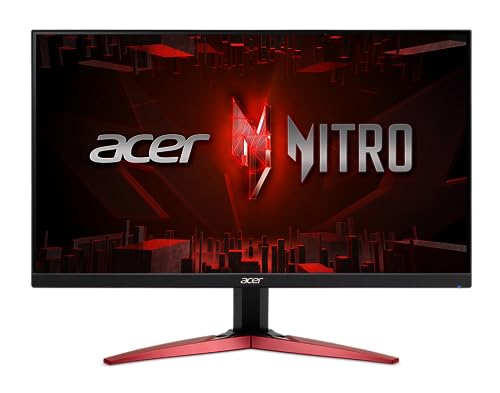
Best Value: Acer Nitro KG241Y M3
The native-resolution pairing: 24-inch 1080p at 180 Hz, where the 3060 needs no upscaler at all.
Specs
Panel | 23.8-inch IPS |
Resolution | 1920 x 1080 |
Refresh rate | 180 Hz |
Response time | 1 ms VRB |
Adaptive sync | AMD FreeSync Premium |
Inputs | DisplayPort 1.2, 2x HDMI 2.0 |
Stand | Tilt |
Panel
23.8-inch IPS
Resolution
1920 x 1080
Refresh rate
180 Hz
Response time
1 ms VRB
Adaptive sync
AMD FreeSync Premium
Inputs
DisplayPort 1.2, 2x HDMI 2.0
Stand
Tilt
What it does well
At 23.8 inches, 1080p works out near 93 pixels per inch. The pixel grid disappears at normal desk distance, which is the whole case for 24 inches over 27 at this resolution.
This is where the 3060 is most comfortable. It runs 1080p medium natively at 80 fps in Kingdom Come: Deliverance 2, and lighter or older games climb well past 100. A 180 Hz IPS panel with FreeSync Premium covers that range and leaves room for esports titles. For a wider look at this size class, see our broader 1080p monitor picks.
What you give up
The stand only tilts. FreeSync Premium is listed, but the panel is not on NVIDIA's G-SYNC Compatible list, so turn variable refresh on manually in the NVIDIA Control Panel and check for flicker in loading screens.
Acer sells the KG241Y with several suffixes at overlapping prices, and the Sbiip version uses a VA panel instead of IPS. Buyers have reported mix-ups, so check the M3biip code on the listing. And 1080p will feel small if your next GPU is a 1440p card.
Who it's for
The 3060 owner who plays at native resolution, plans to keep the card for a few more years, and wants the monitor spend kept low.
Best for Esports: ASUS TUF Gaming VG259QM5A
Competitive shooters are the one place the 3060 outruns a 180 Hz panel, so this slot goes to 240 Hz.

Specs
Panel | 24.5-inch Fast IPS |
Resolution | 1920 x 1080 |
Refresh rate | 240 Hz |
Response time | 0.3 ms GTG minimum |
Adaptive sync | G-SYNC Compatible, FreeSync Premium |
Motion handling | ELMB Sync |
Colour | 99% sRGB |
Inputs | DisplayPort 1.2, 2x HDMI 2.0 |
Panel
24.5-inch Fast IPS
Resolution
1920 x 1080
Refresh rate
240 Hz
Response time
0.3 ms GTG minimum
Adaptive sync
G-SYNC Compatible, FreeSync Premium
Motion handling
ELMB Sync
Colour
99% sRGB
Inputs
DisplayPort 1.2, 2x HDMI 2.0
What it does well
In Counter-Strike 2, Valorant and Overwatch 2 at competitive settings, the 3060 is rarely the limit; the CPU usually is. Pair it with a capable processor (see the right CPU for an RTX 3060) and frame rates sit above 180 fps, where a 240 Hz panel earns its place.
The panel backs the number up. Fast IPS with a 0.3 ms minimum GTG rating, G-SYNC Compatible certification, and ELMB Sync, which runs backlight strobing and variable refresh at the same time. At 24.5 inches the whole frame stays in view. For more panels in this class, see the 1080p 240 Hz roundup.
What you give up
In AAA games this is a 240 Hz panel fed 45 to 80 fps. You are paying for refresh rate the card only reaches in competitive titles, and the 3060 has no DLSS Frame Generation to make up the difference.
ELMB Sync costs brightness when it is on, and the stand is more basic than the top pick's. ASUS also sells several VG259 models whose Amazon titles differ by a few characters, and buyers have flagged ordering the wrong one. Read the model code.
Who it's for
Players whose main games are Counter-Strike 2, Valorant, Overwatch 2 or Rocket League, on a 3060 build with a strong enough CPU to push past 180 fps.
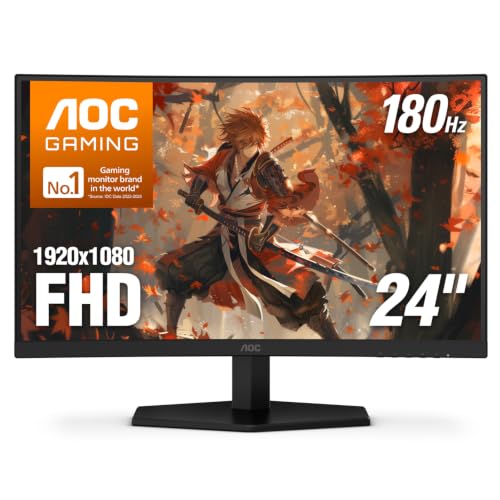
Best Budget: AOC C24G42E
The lowest-spend 180 Hz panel worth pairing with a 3060, with VA contrast that none of the IPS picks match.
Specs
Panel | 23.8-inch curved VA (1500R) |
Resolution | 1920 x 1080 |
Refresh rate | 180 Hz |
Response time | 0.5 ms MPRT |
Adaptive sync | Adaptive-Sync (FreeSync compatible) |
HDR | HDR10 |
Inputs | DisplayPort 1.4, 2x HDMI 2.0 |
Stand | Tilt |
Panel
23.8-inch curved VA (1500R)
Resolution
1920 x 1080
Refresh rate
180 Hz
Response time
0.5 ms MPRT
Adaptive sync
Adaptive-Sync (FreeSync compatible)
HDR
HDR10
Inputs
DisplayPort 1.4, 2x HDMI 2.0
Stand
Tilt
What it does well
VA contrast is the reason to buy it. Dark single-player scenes look deeper here than on any IPS panel in this list, and at the medium settings the 3060 runs, contrast does more for image quality than extra pixels would.
180 Hz with Adaptive-Sync covers the card's 1080p range, the 1500R curve is mild at 24 inches, and it is the least you can spend here without dropping to a 75 Hz office panel. The money saved can go toward a CPU or storage upgrade instead.
What you give up
Budget VA panels smear in dark, fast motion, and buyers report it most in shooters. The overdrive setting reduces it but does not remove it.
The stand tilts only, and viewing angles are narrower than IPS. Like the Acer, it is not certified G-SYNC Compatible, so enable variable refresh manually.
Who it's for
The 3060 owner on a hard budget who mostly plays single-player games, where contrast matters more than motion clarity.
Editor's Pick: LG UltraGear 27GS60QC-B
The cheapest way to get 1440p on a 3060 today, on a curved VA panel that flatters the medium settings the card will run.

Specs
Panel | 27-inch curved VA (1000R) |
Resolution | 2560 x 1440 |
Refresh rate | 180 Hz |
Response time | 1 ms MBR |
Adaptive sync | AMD FreeSync |
HDR | HDR10 |
Inputs | DisplayPort, 2x HDMI |
Stand | Tilt |
Panel
27-inch curved VA (1000R)
Resolution
2560 x 1440
Refresh rate
180 Hz
Response time
1 ms MBR
Adaptive sync
AMD FreeSync
HDR
HDR10
Inputs
DisplayPort, 2x HDMI
Stand
Tilt
What it does well
Same reasoning as the top pick, lower spend. 1440p and 180 Hz on a 27-inch curved VA panel means the 3060's 12 GB pool gets the resolution it can feed with DLSS, and the monitor survives the next GPU upgrade.
The VA panel's contrast suits single-player games at medium settings, where IPS would look flatter. For other 1440p panels at this budget, see more 1440p monitors at this budget.
What you give up
It is FreeSync only and not on NVIDIA's G-SYNC Compatible list, so variable refresh needs to be enabled manually over DisplayPort. Dark-scene smearing is the usual VA trade, and buyers have reported it on this class of panel.
The 1000R curve is aggressive at 27 inches, and the stand only tilts. It carries the same DLSS dependence at 1440p as the top pick.
Who it's for
The single-player-first 3060 owner who wants 1440p now at the lowest spend and values contrast over motion clarity.
Bottom line
If you plan to upgrade the GPU and want to buy the monitor once, buy the LG UltraGear 27GS75Q-B and run DLSS at 1440p in the meantime. If you are keeping the 3060 and playing at native resolution, buy the Acer Nitro KG241Y M3. If competitive shooters are most of your playtime, buy the ASUS TUF Gaming VG259QM5A. If budget is the hard limit, buy the AOC C24G42E. If you want 1440p at the lowest spend and prefer contrast, buy the LG UltraGear 27GS60QC-B.
FAQ
Is the RTX 3060 good for 1440p gaming?
Yes, with DLSS and medium settings. In 2026 releases the 3060 cannot hold native 1440p at high settings: Starfield runs 38 fps at 1440p ultra. With DLSS Balanced and medium settings, Kingdom Come: Deliverance 2 runs 75 fps at 1440p, close to native 1080p. Its 12 GB of VRAM is what makes 1440p workable where 8 GB cards run short. If you want native 1440p at high settings, that is a GPU upgrade, not a monitor choice.
Should I get a 1080p or 1440p monitor for the RTX 3060?
Get 1440p if you plan to upgrade the GPU within a couple of years and accept DLSS until then; the LG UltraGear 27GS75Q-B is the pick. Get 1080p if you are keeping the 3060 and want native rendering at higher settings; the Acer Nitro KG241Y M3 is the pick. A 1440p panel outlives the card, while a 1080p panel matches it today. For how the 8 GB cards change this answer, see the RTX 5060 monitor picks.
Is 144 Hz or 165 Hz enough for an RTX 3060?
For AAA games, yes. The 3060 lands at 45 to 80 fps in modern AAA at medium settings, well inside a 144 Hz or 165 Hz window. The reason this list uses 180 Hz panels is that they now sell in the same tier as older 144 Hz models, and the extra headroom helps in esports titles and after a GPU upgrade. Variable refresh support matters more than the top refresh number for this card.
Can the RTX 3060 run a 240 Hz monitor?
It can drive one, and in competitive shooters at low settings it can fill most of it, provided the CPU keeps up. In AAA games a 240 Hz panel sits mostly unused, because the 3060 produces 45 to 80 fps and has no DLSS Frame Generation to multiply that. Buy 240 Hz only if esports titles are most of your playtime; the ASUS TUF Gaming VG259QM5A is the pick here.
Does the RTX 3060 support G-SYNC monitors?
Yes. The 3060 supports G-SYNC Compatible variable refresh over DisplayPort on any VESA Adaptive-Sync or FreeSync panel, and NVIDIA enables it automatically on certified models like the LG UltraGear 27GS75Q-B and ASUS TUF Gaming VG259QM5A. Uncertified FreeSync panels usually work too, but you turn it on manually in the NVIDIA Control Panel and should check for flicker in dark loading screens.
Should I use DisplayPort or HDMI with the RTX 3060?
Use DisplayPort. The 3060's DisplayPort 1.4a outputs carry 1440p at 180 Hz and 1080p at 240 Hz with room to spare, and DisplayPort is the most reliable path for G-SYNC Compatible variable refresh. The card's HDMI 2.1 port works too, but many budget monitors have HDMI 2.0 inputs that limit refresh rate at 1440p. Save HDMI for a console or a second screen.
Related Articles

Is the RTX 3060 12GB Worth It in 2026? vs RTX 5060, Arc B580
Is the RTX 3060 12GB worth buying in 2026? For gaming, no: the Arc B580 and RTX 5060 are faster. See the one buyer the 12GB relaunch still makes sense for.
Oct 2, 2026

Best GPU Upgrade From RTX 3060: 5 Picks Ranked for 2026
The best GPU upgrade from an RTX 3060 is the RTX 5070 for most builds. Five ranked picks, real 1440p uplift per tier, and the PSU headroom each one needs.
Sep 9, 2026

Best CPU for RTX 3060 (2026): 5 Picks by Platform Tier
Choosing the best CPU for an RTX 3060 comes down to platform cost, not raw speed. Five picks across AM4, LGA1700 and AM5, and the six-core floor to clear.
Sep 20, 2026

Best Monitor for RTX 4060 (2026): 1080p and 1440p Picks
The best monitor for an RTX 4060 is a 1080p 180Hz panel for most games, with 1440p only if you run DLSS. Five picks matched to what the 8GB card drives.
Oct 13, 2026

Ryzen 7 9700X vs 9800X3D (2026): A 2% to 18% Gaming Gap
Ryzen 7 9700X vs 9800X3D: the X3D leads by 2% to 18% across 8 games. See which libraries earn the cache premium and when the 9700X plus a better GPU wins.
Oct 14, 2026