Affiliate Disclosure: As an Amazon Associate we earn from qualifying purchases. Some links may earn us a commission at no cost to you.

Best Monitors for the RX 7700 XT (2026): 5 Picks by Tier
The RX 7700 XT is a 1440p card, and the best monitor for an RX 7700 XT is built around what it renders there: about 127 fps in Counter-Strike 2, 73 in Cyberpunk 2077 and 55 in Starfield at the highest preset, with no upscaling. That spread points at 1440p, 165 to 180Hz, and FreeSync Premium to catch the dips.
The five panels below are sorted by that match, not by spec-sheet size. For the GPU side of the same decision, start with how to choose a GPU and a monitor that matches.
Our top pick: ASUS TUF Gaming VG27AQ3A
The ASUS TUF Gaming VG27AQ3A puts a 180Hz Fast IPS panel at the card's native resolution, and its FreeSync Premium range covers every frame rate in the benchmark tables below.

Quick picks
Pick | Monitor | Best for | Buy |
|---|---|---|---|
Best Overall | 1440p 180Hz all-rounder | ||
Best Value | HDR single-player on a budget | ||
Best Premium | OLED motion clarity at 1440p | ||
Best Budget | Lowest sensible 1440p spend | ||
Editor's Pick | 34-inch ultrawide immersion |
Best Overall
- Monitor
- Best for
1440p 180Hz all-rounder
- Buy
Best Value
- Monitor
- Best for
HDR single-player on a budget
- Buy
Best Premium
- Monitor
- Best for
OLED motion clarity at 1440p
- Buy
Best Budget
- Monitor
- Best for
Lowest sensible 1440p spend
- Buy
Editor's Pick
- Monitor
- Best for
34-inch ultrawide immersion
- Buy
Specs at a glance
Monitor | Panel | Resolution | Refresh | Adaptive sync | HDR |
|---|---|---|---|---|---|
Fast IPS | 2560 x 1440 | 180Hz | FreeSync Premium | HDR10 signal only | |
Mini-LED VA | 2560 x 1440 | 180Hz | Adaptive-Sync | DisplayHDR 1000 | |
Glossy WOLED | 2560 x 1440 | 240Hz | FreeSync Premium | HDR10, 1300 nits peak | |
IPS | 2560 x 1440 | 180Hz | FreeSync | None | |
Curved Fast VA | 3440 x 1440 | 240Hz | FreeSync Premium | DisplayHDR 400 |
- Panel
Fast IPS
- Resolution
2560 x 1440
- Refresh
180Hz
- Adaptive sync
FreeSync Premium
- HDR
HDR10 signal only
- Panel
Mini-LED VA
- Resolution
2560 x 1440
- Refresh
180Hz
- Adaptive sync
Adaptive-Sync
- HDR
DisplayHDR 1000
- Panel
Glossy WOLED
- Resolution
2560 x 1440
- Refresh
240Hz
- Adaptive sync
FreeSync Premium
- HDR
HDR10, 1300 nits peak
- Panel
IPS
- Resolution
2560 x 1440
- Refresh
180Hz
- Adaptive sync
FreeSync
- HDR
None
- Panel
Curved Fast VA
- Resolution
3440 x 1440
- Refresh
240Hz
- Adaptive sync
FreeSync Premium
- HDR
DisplayHDR 400
How we picked: what the RX 7700 XT feeds at 1440p
What the card renders at 2560 x 1440 with no upscaling and no frame generation.
- 127 FPS
- 109 FPS
- 96 FPS
- 73 FPS
- 72 FPS
- 63 FPS
- 55 FPS
The same games at 3840 x 2160, which is why no 4K panel made this list.
- 64 FPS
- 62 FPS
- 50 FPS
- 36 FPS
- 32 FPS
- 31 FPS
Resolution comes first. At 2560 x 1440 the RX 7700 XT stays above 90 fps in Counter-Strike 2, Modern Warfare 3 and Baldur's Gate 3, lands in the 60s and 70s in Cyberpunk 2077, Ratchet & Clank and Alan Wake 2, and dips to 55 in Starfield. Those runs use the highest preset with no upscaling on a 2023-era game set, so newer releases land lower and FSR upscaling pulls them back up.
4K is the resolution we ruled out. At 3840 x 2160 the same games fall to between 31 and 64 fps, with Alan Wake 2 and Cyberpunk 2077 near 30. With 12 GB of GDDR6 on a 192-bit bus, a native 4K panel buys you upscaling in every heavy game, so no 4K monitor made the list.
Refresh follows from that spread. A range from the 50s to the 120s is why 165 to 180Hz is the matched tier: shooters reach the top of it, and story games sit comfortably inside the variable refresh window. A 240Hz panel earns its place only if most of your hours go into esports titles at competitive settings.
The adaptive-sync badge is not interchangeable. FreeSync Premium guarantees low framerate compensation, which keeps a Starfield dip into the 40s smooth instead of torn. Base FreeSync does not promise it, and we say so on the one pick that carries it.
Outputs are the last check. The card carries DisplayPort 2.1 and HDMI 2.1, so the GPU is never the limit here; the monitor's ports are. Every pick runs its full refresh over DisplayPort, and two of them carry HDMI 2.0, which matters only if a console shares the screen.
One principle sits under all of it. The display is the part you stare at, and it is the line item that gets cut first once the tower has eaten the budget. A proper 1440p high-refresh panel does more for daily use with this card than any other upgrade. If you are still choosing a card, our RX 9070 GRE monitor guide and RX 9060 XT monitor guide cover the RDNA 4 side, and the best gaming monitors roundup covers every tier.
Best Overall: ASUS TUF Gaming VG27AQ3A
Specs
Panel | 27-inch Fast IPS, 2560 x 1440 |
Refresh | 180Hz |
Response | 1ms GtG, ELMB Sync |
Adaptive sync | FreeSync Premium, G-Sync Compatible |
Brightness | 250 nits typical |
Color | 130% sRGB |
Inputs | 1x DisplayPort, 2x HDMI |
Stand | Tilt and swivel, 100 x 100 VESA |
Panel
27-inch Fast IPS, 2560 x 1440
Refresh
180Hz
Response
1ms GtG, ELMB Sync
Adaptive sync
FreeSync Premium, G-Sync Compatible
Brightness
250 nits typical
Color
130% sRGB
Inputs
1x DisplayPort, 2x HDMI
Stand
Tilt and swivel, 100 x 100 VESA
What it does well
180Hz is the ceiling this card fills. Counter-Strike 2 and Modern Warfare 3 run past 100 fps at the highest preset and higher still at competitive settings, so the top of the range gets used. Cyberpunk 2077 and Alan Wake 2 sit in the 60s and 70s, inside the FreeSync Premium window. Nothing in this pairing is refresh you paid for and never see.
Fast IPS keeps motion clean at that refresh, and ELMB Sync strobes the backlight alongside adaptive sync to cut perceived blur further in shooters. The 130% sRGB gamut gives SDR games more saturation than most budget IPS panels manage.
What you give up
HDR is a label here. HDR10 support with 250 nits typical brightness means the panel accepts an HDR signal and does little with it, so treat it as an SDR monitor. Contrast is standard IPS, and dark scenes in Alan Wake 2 look grey next to the mini-LED and OLED picks.
The stand tilts and swivels but does not adjust for height, so a monitor arm is the fix for a low desk. Retail listings also disagree on its DisplayPort and HDMI versions. 1440p at 180Hz runs over the included DisplayPort either way, so use that cable. The 300Hz VG27AQM5A sits one model over in the same TUF line; check the suffix before you buy.
Who it's for
The RX 7700 XT owner with a mixed library who wants one 1440p panel for ranked shooters and single-player games, without paying for refresh or HDR the card cannot use.
Best Value: AOC Q27G3XMN

Specs
Panel | 27-inch VA, 2560 x 1440 |
Backlight | Mini-LED, 336 dimming zones |
Refresh | 180Hz |
HDR | DisplayHDR 1000 |
Brightness | 450 nits typical, 1000 nits peak |
Adaptive sync | Adaptive-Sync (FreeSync) |
Inputs | 1x DisplayPort 1.4, 2x HDMI 2.0 |
Stand | Height adjustable |
Panel
27-inch VA, 2560 x 1440
Backlight
Mini-LED, 336 dimming zones
Refresh
180Hz
HDR
DisplayHDR 1000
Brightness
450 nits typical, 1000 nits peak
Adaptive sync
Adaptive-Sync (FreeSync)
Inputs
1x DisplayPort 1.4, 2x HDMI 2.0
Stand
Height adjustable
What it does well
Real HDR at this tier is rare, and this is it. 336 mini-LED dimming zones behind a VA panel push highlights toward 1000 nits while holding blacks, which gives Cyberpunk 2077 and Alan Wake 2 contrast no IPS pick here can match. Those are the games where the RX 7700 XT runs 60 to 75 fps, and that is where image quality matters more than refresh.
It still runs 180Hz, so the competitive half of a library loses nothing against the Best Overall. The stand adjusts for height, which the TUF does not.
What you give up
VA response is the cost. Dark transitions smear in fast camera movement in a way the IPS and OLED picks avoid, and buyers have flagged blooming around bright objects on dark backgrounds, the usual trade with zone-based dimming.
Both HDMI ports are 2.0, so a console plugged in there will not reach the panel's full refresh; run the PC over DisplayPort 1.4. AOC's listings name Adaptive-Sync rather than a FreeSync Premium badge, so treat low framerate compensation as unconfirmed on this one.
Who it's for
The single-player buyer who wants HDR that does something and would rather spend on contrast than on a higher refresh ceiling.
Best Premium: ASUS ROG Strix OLED XG27AQDMG

Specs
Panel | 26.5-inch glossy WOLED, 2560 x 1440 |
Refresh | 240Hz |
Response | 0.03ms GtG |
Brightness | 275 nits full field, 1300 nits peak HDR |
Adaptive sync | FreeSync Premium, G-Sync Compatible |
Color | 99% DCI-P3 |
Inputs | 1x DisplayPort 1.4 (DSC), 2x HDMI 2.0 |
Panel
26.5-inch glossy WOLED, 2560 x 1440
Refresh
240Hz
Response
0.03ms GtG
Brightness
275 nits full field, 1300 nits peak HDR
Adaptive sync
FreeSync Premium, G-Sync Compatible
Color
99% DCI-P3
Inputs
1x DisplayPort 1.4 (DSC), 2x HDMI 2.0
What it does well
OLED pixel response is the upgrade you see. At 0.03ms gray-to-gray there is no smear trail behind fast motion, so the 100-plus frames this card puts out in Counter-Strike 2 and Modern Warfare 3 read as sharply as they render. 240Hz covers the card's esports ceiling with room left over.
The glossy WOLED coating gives deeper perceived blacks than matte OLED in a dim room, and a 1300-nit HDR peak with per-pixel contrast makes it the strongest HDR panel on this list. FreeSync Premium is listed, so low framerate compensation covers the heavy-game dips.
What you give up
Full-screen brightness is 275 nits, dimmer than the mini-LED pick in a bright room, and the glossy coating reflects a window behind you. Burn-in from static HUDs and taskbars is the OLED failure mode. ASUS OLED Care manages that risk; it does not remove it.
It also costs far more than the Best Overall at the same resolution, and both HDMI ports are 2.0. ASUS sells a Gen 2 model, the XG27AQDMGR, beside it, so confirm which one the listing carries.
Who it's for
The buyer with a light-controlled desk who splits time between shooters and story games and wants the panel to outlast the card. For more fast panels at this resolution, see our 1440p 240Hz monitor guide.
Best Budget: Acer Nitro KG271U N3

Specs
Panel | 27-inch IPS, 2560 x 1440 |
Refresh | 180Hz |
Response | 0.5ms (VRB) |
Adaptive sync | AMD FreeSync |
Brightness | 250 nits typical |
Color | 95% DCI-P3 |
Inputs | 1x DisplayPort, 2x HDMI |
Stand | Tilt only, VESA mountable |
Panel
27-inch IPS, 2560 x 1440
Refresh
180Hz
Response
0.5ms (VRB)
Adaptive sync
AMD FreeSync
Brightness
250 nits typical
Color
95% DCI-P3
Inputs
1x DisplayPort, 2x HDMI
Stand
Tilt only, VESA mountable
What it does well
It keeps the two specs that matter for this card, 1440p and 180Hz, and drops the rest. That is the right order of cuts. A 1080p panel would throw away the resolution the RX 7700 XT was bought for, and this one does not.
95% DCI-P3 coverage is a good gamut at this tier, and two HDMI inputs plus a DisplayPort cover a PC and a console on one screen. It mounts to a VESA arm if the stand does not suit your desk.
What you give up
The listing names AMD FreeSync, not FreeSync Premium, so low framerate compensation is not guaranteed. When Starfield dips below the panel's sync floor you may see stutter the Premium picks smooth over.
The stand tilts only, there is no meaningful HDR, and contrast is entry IPS. Acer sells the KG271U under several suffixes, including a 200Hz version and an F3 rated to 320Hz, so match the N3 suffix to the listing.
Who it's for
The buyer who spent the budget on the card and needs a 1440p panel now without a second round of spending. If you are weighing a cheaper 1080p screen instead, our 1080p gaming monitor guide shows what that tier gives up.
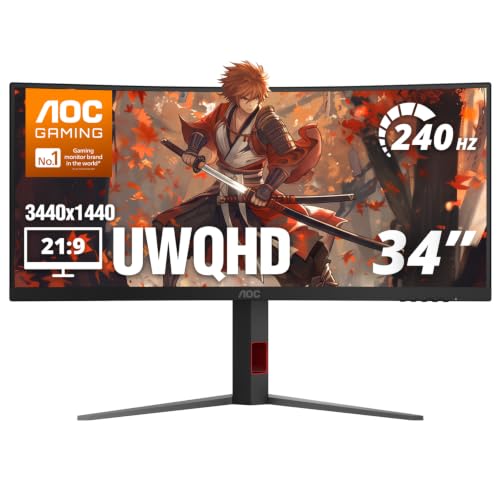
Editor's Pick: AOC CU34G4Z
Specs
Panel | 34-inch Fast VA, 3440 x 1440, 1500R curve |
Refresh | 240Hz |
Adaptive sync | FreeSync Premium |
HDR | DisplayHDR 400 |
Brightness | 450 nits typical |
Contrast | 2500:1 typical |
Inputs | 1x DisplayPort 1.4, 2x HDMI 2.1 |
Stand | Height adjustable |
Panel
34-inch Fast VA, 3440 x 1440, 1500R curve
Refresh
240Hz
Adaptive sync
FreeSync Premium
HDR
DisplayHDR 400
Brightness
450 nits typical
Contrast
2500:1 typical
Inputs
1x DisplayPort 1.4, 2x HDMI 2.1
Stand
Height adjustable
What it does well
3440 x 1440 is about a third more pixels than 16:9 1440p. The RX 7700 XT still carries that in Baldur's Gate 3 and Counter-Strike 2, and FSR upscaling brings Cyberpunk 2077 within reach. It is the largest canvas this card can drive before 4K turns every heavy game into an upscaling question.
VA contrast at 2500:1 holds dark scenes together where IPS washes them out, the 1500R curve pulls the edges into view, and FreeSync Premium covers the frame-rate swing an ultrawide brings. HDMI 2.1 on both inputs gives a console full bandwidth, and the stand adjusts for height.
What you give up
Frame rates come in below the 16:9 numbers above, because the card is pushing a third more pixels. Starfield and Alan Wake 2 will need FSR to stay smooth, and the 240Hz ceiling is headroom you reach only in lighter games.
VA smearing in dark transitions applies here too, and DisplayHDR 400 is entry HDR. Not every game handles 21:9 cleanly, so expect black bars in some titles and most cutscenes. A 34-inch curve also needs real desk depth.
Who it's for
The single-player and sim buyer who wants immersion over frame count and has the desk for a 34-inch curve.
Bottom line
If you want one panel for everything, buy the ASUS TUF Gaming VG27AQ3A. If you play mostly story games and want HDR that works, buy the AOC Q27G3XMN. If you want OLED clarity and control the light in your room, buy the ASUS ROG Strix OLED XG27AQDMG. If the card took the budget, the Acer Nitro KG271U N3 keeps 1440p and 180Hz for the least spend. If you want an ultrawide, the AOC CU34G4Z is the one this card can feed. Skip native 4K with an RX 7700 XT.
FAQ
Is the RX 7700 XT a 1440p or a 4K card?
It is a 1440p card. At 2560 x 1440 and the highest preset it runs 127 fps in Counter-Strike 2, 96 in Baldur's Gate 3, 73 in Cyberpunk 2077 and 55 in Starfield with no upscaling. At 4K the same games drop to between 31 and 64 fps, with Alan Wake 2 and Cyberpunk near 30. Buy a 1440p monitor, and treat 4K as something FSR upscaling makes possible in lighter games rather than the resolution you plan around.
What refresh rate monitor should I get for the RX 7700 XT?
Get 165 to 180Hz at 1440p. That range matches where the card lands across a mixed library, from the 50s in heavy games to past 100 fps in shooters, so you use the top of the refresh range without paying for headroom you never reach. Go to 240Hz only if most of your hours go into esports titles at competitive settings. The ASUS TUF Gaming VG27AQ3A at 180Hz is our default for that reason.
Does the RX 7700 XT need a FreeSync Premium monitor?
It is worth having. FreeSync Premium guarantees low framerate compensation, which keeps frame delivery smooth when a heavy game dips below the panel's variable refresh floor. With this card, games like Starfield and Alan Wake 2 sit in the 50s and 60s at 1440p and can dip lower, so the guarantee matters. Base FreeSync monitors such as the Acer Nitro KG271U N3 still work; they just do not promise it.
Is an OLED monitor worth it with an RX 7700 XT?
Yes, if you control the light in your room and play a mix of fast and dark games. OLED's near-instant pixel response makes the card's frames look sharper in motion, and per-pixel contrast lifts dark scenes. The costs are price, lower full-screen brightness and burn-in risk from static HUDs. The ASUS ROG Strix OLED XG27AQDMG at 240Hz is the OLED that suits this card, and 1440p keeps it inside what the GPU can feed.
Can the RX 7700 XT run a 3440 x 1440 ultrawide?
Yes. At 3440 x 1440 it pushes roughly a third more pixels than 16:9 1440p, so frame rates come in below the 1440p numbers but well above 4K. Shooters and lighter games stay high, while heavier ones like Cyberpunk 2077 and Starfield need FSR upscaling to stay smooth. A FreeSync Premium ultrawide such as the AOC CU34G4Z covers the swing. Skip 5120 x 1440 super-ultrawides with this card.
Related Articles

Best Gaming Monitors for the RX 9070 GRE (2026): 5 Picks
The best monitor for an RX 9070 GRE, matched to what 12GB on a 192-bit bus actually feeds: 1440p high refresh, QD-OLED, an ultrawide, and the 4K truth.
Aug 26, 2026

Best Monitors for the RX 9060 XT (2026): 5 Picks by Tier
Five monitors matched to the RX 9060 XT 16GB by refresh tier, from 1440p 180Hz IPS up to 240Hz QD-OLED, plus the real 1440p frame ceiling the card hits.
Aug 18, 2026

Best 1440p 240Hz Gaming Monitors (2026): 5 Picks by Panel
Five of the best 1440p 240Hz gaming monitors for 2026, picked by panel tech and GPU pairing: QD-OLED, WOLED, and IPS options for every budget and room.
Jun 21, 2026

How to Choose a GPU (and a Monitor That Matches)
A buyer's framework for picking a GPU and the monitor that pairs with it. Start with the panel and work the card back.
May 17, 2026

Ryzen 9 9900X3D vs 9950X3D: Close in Games, 27% Gap in Work
Ryzen 9 9900X3D vs 9950X3D: close at 1440p and 4K, about 27% apart in threaded work. Match the X3D chip to your workload, or skip both for the 9800X3D in 2026.
Oct 17, 2026