Affiliate Disclosure: As an Amazon Associate we earn from qualifying purchases. Some links may earn us a commission at no cost to you.

Best GPUs for Pragmata (2026): RT and Path Tracing Picks
Pragmata runs on Capcom's RE Engine, and it splits into three rendering tiers that change which GPU you should buy: raster, hardware ray tracing, and path tracing. The path-traced mode is the showcase, and it is the one with a catch. The toggle is NVIDIA-only. On a Radeon card it is grayed out entirely, with no driver path or workaround that lights it up.
So the GPU question here is not just which card is fastest. It is which tier you want to play at, and whether the path-traced look is the reason you are buying the game. Pick by the panel in front of you and the mode you care about. Here is how the tiers shake out.
Our top pick: ASUS TUF RTX 5070 Ti OC
The ASUS TUF RTX 5070 Ti OC is the comfortable 1440p path-tracing card, the point where Pragmata's heaviest mode stops being a tech demo and becomes a daily-play setting.

Quick picks
Pick | Card | Tier target | Where to buy |
|---|---|---|---|
Best Overall | 1440p path tracing | ||
Best Value | 1440p / 4K raster and RT | ||
Best Premium | 4K path tracing | ||
Best Budget | 1080p raster entry | ||
Editor's Pick | path tracing entry |
Best Overall
- Card
- Tier target
1440p path tracing
- Where to buy
Best Value
- Card
- Tier target
1440p / 4K raster and RT
- Where to buy
Best Premium
- Card
- Tier target
4K path tracing
- Where to buy
Best Budget
- Card
- Tier target
1080p raster entry
- Where to buy
Editor's Pick
- Card
- Tier target
path tracing entry
- Where to buy
Specs at a glance
Card | VRAM | Bus | Path tracing | Best tier |
|---|---|---|---|---|
16 GB GDDR7 | 256-bit | Yes (NVIDIA) | 1440p PT | |
16 GB GDDR6 | 256-bit | No (Radeon locked out) | 1440p / 4K raster and RT | |
16 GB GDDR7 | 256-bit | Yes (NVIDIA) | 4K PT | |
12 GB GDDR6 | 192-bit | No (raster-first) | 1080p raster | |
12 GB GDDR7 | 192-bit | Yes (NVIDIA) | 1440p PT entry |
- VRAM
16 GB GDDR7
- Bus
256-bit
- Path tracing
Yes (NVIDIA)
- Best tier
1440p PT
- VRAM
16 GB GDDR6
- Bus
256-bit
- Path tracing
No (Radeon locked out)
- Best tier
1440p / 4K raster and RT
- VRAM
16 GB GDDR7
- Bus
256-bit
- Path tracing
Yes (NVIDIA)
- Best tier
4K PT
- VRAM
12 GB GDDR6
- Bus
192-bit
- Path tracing
No (raster-first)
- Best tier
1080p raster
- VRAM
12 GB GDDR7
- Bus
192-bit
- Path tracing
Yes (NVIDIA)
- Best tier
1440p PT entry
Benchmarks
Two passes follow. The first is the 1440p tier most readers play at, with standard ray tracing and Quality upscaling. The second is the 4K path-tracing showcase, where the NVIDIA-only split is visible: the Radeon row in that table is standard ray tracing, because path tracing does not run on it at all. Figures are drawn from launch-window testing at TechPowerUp, Tom's Hardware, Club386, GameGPU, and wccftech.
- RTX 5080144 FPS
- RTX 5070 Ti110 FPS
- RX 9070 XT100 FPS
- RTX 5070100 FPS
- Arc B58045 FPS
- RTX 5080141 FPS
- RTX 5070 Ti90 FPS
- RTX 5070100 FPS
- RX 9070 XT (standard RT)62 FPS
How we picked
GPU choice for one game comes down to matching the card to your monitor, then deciding how much you care about the mode the game was built to show off. Pragmata's showcase is path tracing, so the framing here is honest about who gets it and what it costs.
We picked by rendering tier, not just resolution. Pragmata gives you three distinct experiences. Raster, which every card here handles. Standard hardware ray tracing, which AMD and Intel run alongside NVIDIA. And path tracing, which only NVIDIA cards can render in this title. The toggle is grayed out on Radeon, full stop, so the AMD-versus-NVIDIA decision is about feature access, not raw frames.
We treat 12 GB of VRAM as the RT-era floor. The two 12 GB NVIDIA picks here clear Pragmata comfortably at the resolutions they target, but 12 GB is the boundary rather than headroom, and a heavier ray-traced title could brush it. The budget pick is a 12 GB card on purpose, where same-price cards from NVIDIA and AMD still ship 8 GB and hit a texture wall sooner.
And we read frame generation the way it behaves. DLSS 4 and FSR 4 Frame Generation turn a good base frame rate into a great one on a high-refresh panel. They do not turn an unplayable number into a playable one. When you see a 4K path-tracing figure above 100 in this guide, the native base is the real card and the frame gen is smoothness layered on top.
For the wider 1440p picture across other titles, our 1440p GPU guide covers the tier in general, and the mid-range ray-tracing guide goes deeper on the value-RT story. For another demanding single-player title that leans on the same NVIDIA features, see our Cyberpunk 2077 GPU picks.
Best Overall: ASUS TUF RTX 5070 Ti OC
Specs
Chip | RTX 5070 Ti (Blackwell GB203) |
VRAM | 16 GB GDDR7 |
Memory bus | 256-bit |
Boost clock | ~2482 MHz (OC) |
Slots | 3.125-slot |
TGP | 300 W |
Chip
RTX 5070 Ti (Blackwell GB203)
VRAM
16 GB GDDR7
Memory bus
256-bit
Boost clock
~2482 MHz (OC)
Slots
3.125-slot
TGP
300 W
What it does well
At 1440p the RTX 5070 Ti carries Pragmata's path-traced preset into a comfortable triple-digit band with DLSS 4 Quality and 2x Frame Generation. This is the cheapest card where the path-traced mode stops being a slideshow and turns into something you actually leave switched on for the whole game. Below this tier you are dropping to Performance upscaling to get there.
The 16 GB GDDR7 framebuffer is the right size for RE Engine's ray-traced texture footprint at 1440p, with margin where 12 GB cards sit closer to the line. The TUF cooler is built for the 300 W chip without the ROG Strix price step, and the OC bin adds a small real boost-clock edge over the reference design. Motion stays clean under Frame Generation because RE Engine hands the upscaler coherent vectors to work with.
What you give up
Native 4K path tracing is not this card's home. It will reach 4K with DLSS 4 Performance and Frame Generation, but if your monitor is a 4K panel and path tracing is non-negotiable, the 5080 is the right step up. The 3.125-slot footprint is fine in most mid-towers but worth a clearance check in older or compact cases before you commit. And single-outlet path-tracing headline numbers read as upper bounds, not the daily experience, so ground your expectations on the cross-source 1440p figures.
Who it's for
This is the card for the 1440p 144 Hz player who wants Pragmata's path tracing on full without thinking about it. It is the practical floor for the path-traced look at this resolution, which makes it the default recommendation. For the deeper comparison against the AMD card one tier down, our RTX 5070 Ti versus RX 9070 XT head-to-head goes game by game.
Best Value: Sapphire Pulse RX 9070 XT

Specs
Chip | RX 9070 XT (RDNA 4, Navi 48) |
VRAM | 16 GB GDDR6 |
Memory bus | 256-bit |
Boost clock | up to ~2970 MHz |
Slots | 2.5-slot |
Board power | 304 W |
Chip
RX 9070 XT (RDNA 4, Navi 48)
VRAM
16 GB GDDR6
Memory bus
256-bit
Boost clock
up to ~2970 MHz
Slots
2.5-slot
Board power
304 W
What it does well
Pragmata is unusually kind to RDNA 4. The RX 9070 XT runs above its usual tier expectations here in both raster and standard ray tracing, and at 4K with standard RT it clears 60 FPS in reviewer runs without any upscaling. Turn on FSR 4 Performance with Frame Generation and 4K pushes well past 120 in lighter scenes. The 16 GB GDDR6 framebuffer matches the NVIDIA tier on VRAM, so it has no memory disadvantage at 1440p or 4K. The Pulse is Sapphire's quiet value SKU, with a long record of doing its job without drama.
What you give up
Here is the honest part for this article. Pragmata's path-tracing toggle is NVIDIA-only, and on this card it is grayed out entirely. There is no driver path, no community workaround, no setting that turns it on. If the path-traced look is the reason you want Pragmata, this card cannot render it. What you are buying is the raster and standard-RT experience at a strong price, which is genuinely excellent value, but it is not the showcase mode. Ray tracing at the heaviest preset also trails the NVIDIA cards.
Who it's for
This is for the 1440p or 4K player who does not need path tracing and wants the most frames per dollar, especially in a library that is not wall-to-wall ray tracing. If you are happy with raster and standard RT and FSR 4, the value here is hard to argue with.
Best Premium: ASUS TUF RTX 5080 OC

Specs
Chip | RTX 5080 (Blackwell GB203) |
VRAM | 16 GB GDDR7 |
Memory bus | 256-bit |
Boost clock | ~2617 MHz (OC) |
Slots | 3.6-slot |
TGP | 360 W |
Chip
RTX 5080 (Blackwell GB203)
VRAM
16 GB GDDR7
Memory bus
256-bit
Boost clock
~2617 MHz (OC)
Slots
3.6-slot
TGP
360 W
What it does well
The RTX 5080 is the 4K path-tracing card. Where the 5070 Ti is the 1440p floor for the mode, the 5080 carries Pragmata's path tracing at 4K with DLSS 4 Performance and Frame Generation into a comfortable band, landing well into triple digits in reviewer testing where the tier below is stretching. It has 16 GB of GDDR7, real 4K headroom, and the full Blackwell upscaling and frame-gen stack. The TUF OC cooler handles the 360 W board without the Strix premium.
What you give up
It is a big card. The 3.6-slot footprint needs genuine clearance planning, and the 360 W draw wants PSU headroom to match. For a player on a 1440p panel it is more card than the resolution asks for, since the 5070 Ti covers 1440p path tracing for less. And native 4K path tracing without upscaling is still not a current-generation reality on any single card, this one included, so even here you are leaning on DLSS to reach high-refresh 4K.
Who it's for
This is for the 4K 120 Hz buyer who wants Pragmata's path tracing at native panel resolution and has the case and power headroom for a 360 W card. If your monitor is 4K and the path-traced look is the point, this is the card the showcase was built for.
Best Budget: Sparkle Arc B580 Titan OC
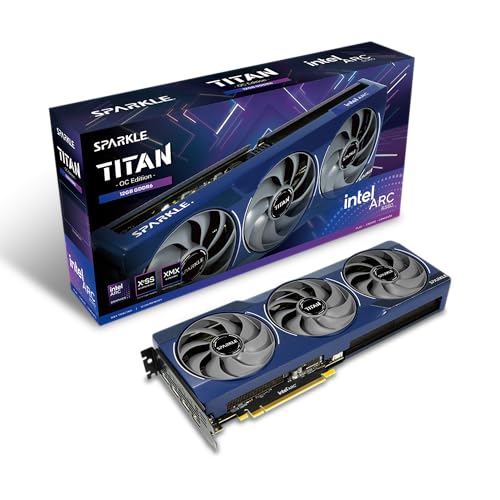
Specs
Chip | Arc B580 (Battlemage BMG-G21) |
VRAM | 12 GB GDDR6 |
Memory bus | 192-bit |
Boost clock | ~2670 MHz |
Slots | 2-slot |
Board power | 190 W |
Chip
Arc B580 (Battlemage BMG-G21)
VRAM
12 GB GDDR6
Memory bus
192-bit
Boost clock
~2670 MHz
Slots
2-slot
Board power
190 W
What it does well
The Arc B580 is the budget way into Pragmata, and it clears playable 1080p where same-price cards make you choose between frames and an 8 GB VRAM cliff. At 1080p max raster it lands in the low-50s average in reviewer testing, and enabling XeSS upscaling extends it to acceptable 1440p. The 12 GB GDDR6 framebuffer is the standout at this price, the RT-era VRAM floor on a card where NVIDIA and AMD rivals still ship 8 GB. Intel's drivers behave on this title now, and the 2-slot, 190 W design drops into small or older builds without fuss.
What you give up
This is a raster-first card. Pragmata's heavier ray-traced tiers are out of reach, and path tracing is not on the table at all. It needs upscaling to stay comfortable above 1080p, so treat it as a 1080p card that can reach 1440p with XeSS rather than a native 1440p card. Worth flagging honestly: Pragmata shipped with an Intel zero-day driver failure that has since been patched, and while Battlemage drivers are far better than the old Alchemist days, the occasional legacy DX9 or DX11 title can still surface a quirk. It rewards a buyer who plays mostly modern games.
Who it's for
This is for the 1080p high-refresh builder on a strict budget who refuses to buy an 8 GB card in 2026 and plays mostly current titles. If 1080p is your target and value matters, the B580 is the floor done right, with the VRAM the RT era demands.
Editor's Pick: MSI RTX 5070 Gaming Trio OC

Specs
Chip | RTX 5070 (Blackwell GB205) |
VRAM | 12 GB GDDR7 |
Memory bus | 192-bit |
Boost clock | ~2625 MHz (OC) |
Slots | 2.5-slot |
TGP | 250 W |
Chip
RTX 5070 (Blackwell GB205)
VRAM
12 GB GDDR7
Memory bus
192-bit
Boost clock
~2625 MHz (OC)
Slots
2.5-slot
TGP
250 W
What it does well
The RTX 5070 is the value entry into Pragmata's path-traced look, and it is the reason this card earns the Editor's Pick. DLSS 4 with Frame Generation puts it around 100 FPS at 4K with upscaling and into comfortable triple digits at 1440p, and at 1080p it clears well past 200. This is the cheapest NVIDIA card where path tracing stops being a slideshow, with the full Blackwell feature set, DLSS 4 and Multi-Frame Gen included, at the lowest price that combination makes sense.
What you give up
The 12 GB framebuffer is the known sticking point of this card's generation, and it is why this is the Editor's Pick rather than a higher slot. It is fine for Pragmata at the resolutions this card targets, but it is the floor, not headroom, and a heavier ray-traced title could brush it. Native 4K is out of reach, so the card lives on DLSS to reach 4K path tracing rather than running it raw. The 192-bit bus is the tier ceiling. If you do not specifically need path tracing, the AMD card one tier down gives you more raw value for the money.
Who it's for
This is for the 1440p player who specifically wants Pragmata's path tracing and cannot stretch to the 5070 Ti, plus the 4K player who is comfortable leaning on DLSS 4 Performance and Frame Generation. If the path-traced mode is the deciding factor and the budget is firm, this is the smallest ticket into it.
Bottom line
If you game at 1440p and want Pragmata's path tracing on full without thinking about it, buy the ASUS TUF RTX 5070 Ti OC. If you do not need path tracing and want the most raster and standard-RT frames per dollar, the Sapphire Pulse RX 9070 XT is the value play, as long as you know the path-traced mode is locked out on Radeon. If your monitor is 4K and the showcase is the point, the ASUS TUF RTX 5080 OC is the card it was built for. If you are on a 1080p budget, the Sparkle Arc B580 Titan OC is the floor done right, with the 12 GB the RT era demands. And if you want path tracing at the lowest sensible NVIDIA tier, the MSI RTX 5070 Gaming Trio OC gets you in, with the 12 GB caveat noted.
FAQ
Does Pragmata support path tracing on AMD GPUs?
No. Pragmata's path-tracing toggle is NVIDIA-only, and on Radeon cards it is grayed out entirely, confirmed on the RX 9070 XT. There is no driver path or community workaround that enables it. AMD cards still run the game's raster and standard ray-tracing modes well, with FSR 4 upscaling, but the path-traced showcase is exclusive to NVIDIA RTX hardware in this title. If the path-traced look is the reason you want Pragmata, you need an RTX card.
What GPU do you need for path tracing in Pragmata at 1440p?
The RTX 5070 Ti is the comfortable 1440p path-tracing card, carrying the mode into a triple-digit band with DLSS 4 Quality and Frame Generation. The RTX 5070 is the cheaper entry point at the same resolution if your budget is firmer. Both are NVIDIA cards, because path tracing does not run on Radeon in this game. For the cleanest 1440p path-tracing experience, the RTX 5070 Ti is the answer.
Is 12 GB of VRAM enough for Pragmata?
Yes, for Pragmata at the resolutions a 12 GB card targets. The RTX 5070 and Arc B580 both clear the game comfortably with 12 GB. The honest caveat is that 12 GB is the RT-era floor rather than headroom, and VRAM is usually the first thing to limit a card as ray-traced games get heavier. For Pragmata today it is fine. If you want more margin for the years ahead and do not need path tracing, a 16 GB card gives you the buffer.
Can the Intel Arc B580 run Pragmata?
Yes. The Arc B580 runs Pragmata at 1080p max raster in the low-50s average, and XeSS upscaling extends it to acceptable 1440p. It is a raster-first card, so the heavier ray-traced tiers and path tracing are out of reach. Worth noting that Pragmata launched with an Intel driver issue that has since been patched, and the card behaves now. For a 1080p budget build with the VRAM the RT era demands, it is a strong value pick.
What's the best GPU for Pragmata at 4K?
For 4K path tracing, the RTX 5080 is the pick, carrying the mode with DLSS 4 Performance and Frame Generation into a comfortable band where lighter cards stretch. If you do not need path tracing, the RX 9070 XT handles 4K with standard ray tracing and clears 60 FPS native in reviewer runs, then pushes well past 120 with FSR 4 and Frame Generation. So the answer depends on the mode: RTX 5080 for the path-traced showcase, RX 9070 XT for strong 4K raster and RT value.
Does Pragmata run well on the RX 9070 XT?
Very well in raster and standard ray tracing, where it runs above its usual tier expectations and clears 60 FPS at 4K with standard RT before any upscaling. FSR 4 Performance with Frame Generation pushes 4K well into the triple digits. The one thing it cannot do is path tracing, which is NVIDIA-only in this title. If you want the most raster and standard-RT performance per dollar, the 9070 XT is excellent here. If you want the path-traced mode, you need an RTX card instead.
Related Articles

Best GPUs for 1440p Gaming (2026): 5 16GB Picks, 60-240Hz
The best GPUs for 1440p gaming in 2026: five 16GB picks matched to 60, 144, and 240 Hz targets, with real benchmarks, trade-offs, and who each card fits.
Aug 8, 2026

Best Mid-Range GPUs 2026: Ray Tracing at 1080p & 1440p
Mid-range GPUs for ray tracing at 1080p and 1440p in 2026 — AMD RDNA 4 vs NVIDIA Blackwell vs Intel Arc. RX 9070, RTX 5070, Arc B580 with live pricing.
Aug 7, 2025

Best GPUs for Cyberpunk 2077 (2026): Ray Tracing Picks
Best GPUs for Cyberpunk 2077 in 2026, picked by ray tracing tier: RT Off, RT Ultra at 1440p and 4K, and Path Tracing with DLSS 4 / FSR 4.
May 9, 2026

How to Choose a GPU (and a Monitor That Matches)
A buyer's framework for picking a GPU and the monitor that pairs with it. Start with the panel and work the card back.
May 17, 2026

Is 500Hz Enough, or Do You Need 1000Hz? (2026 Verdict)
Is 500Hz enough, or do you need 1000Hz? For nearly every player 500Hz clears it. Here is the frame time math, the GPU gate, and the monitor to buy instead.
Sep 19, 2026