Affiliate Disclosure: As an Amazon Associate we earn from qualifying purchases. Some links may earn us a commission at no cost to you.

Best Laptop Sleeves for 16-Inch Gaming Laptops (2026)
A 16-inch gaming laptop is not a 16-inch MacBook. The ROG Strix G16 runs up to 1.21 inches thick at the rear and the Legion Pro 7i Gen 10 is nearly 14.4 inches wide, so the best sleeve for a 16 inch gaming laptop is one sized for that chassis, not for the number on the label.
These five picks are matched to thick gaming chassis first, then judged on corner padding and whether the charger brick has somewhere to go.
Our top pick: Smatree Elite 16-Inch Sleeve (E612)
The Smatree Elite E612 is cut for named 16-inch gaming laptops (Legion Pro 5 Gen 10, ROG Strix G16, Alienware 16 Aurora, OMEN MAX 16) rather than a generic 16-inch size, which is the whole problem with most sleeves.

Quick picks
Pick | Sleeve | Best for | Buy |
|---|---|---|---|
Best Overall | Model-matched fit for Legion, Strix and Alienware 16 | ||
Best Value | 360 padding plus a strap for carry without a backpack | ||
Best Premium | Slim magnetic sleeve for Blade 16 class laptops | ||
Best Budget | Cheapest pick with charger pockets | ||
Editor's Pick | Hard-shell crush protection for ROG Strix G16 |
Best Overall
- Sleeve
- Best for
Model-matched fit for Legion, Strix and Alienware 16
Best Value
- Sleeve
- Best for
360 padding plus a strap for carry without a backpack
Best Premium
- Sleeve
- Best for
Slim magnetic sleeve for Blade 16 class laptops
Best Budget
- Sleeve
- Best for
Cheapest pick with charger pockets
Editor's Pick
- Sleeve
- Best for
Hard-shell crush protection for ROG Strix G16
Specs at a glance
Sleeve | Type | Listed fit | Charger storage |
|---|---|---|---|
Padded zip sleeve | Legion Pro 5 Gen 10, Strix G16, Alienware 16, OMEN MAX 16 | No brick pocket listed | |
Sleeve with shoulder strap | Strix G16/G15, Legion 5, Victus 15, Nitro 5 | Large front pocket | |
Slim magnetic sleeve | Up to 16 inches, Razer Blade 16 | None | |
Side-open padded case | 15 to 16 inch, MacBook Pro 16 | 4 zipper pockets | |
Hard EVA shell with stand | Strix G16 2024/2025, TUF F16/A16, Strix Scar 16 | Not listed |
- Type
Padded zip sleeve
- Listed fit
Legion Pro 5 Gen 10, Strix G16, Alienware 16, OMEN MAX 16
- Charger storage
No brick pocket listed
- Type
Sleeve with shoulder strap
- Listed fit
Strix G16/G15, Legion 5, Victus 15, Nitro 5
- Charger storage
Large front pocket
- Type
Slim magnetic sleeve
- Listed fit
Up to 16 inches, Razer Blade 16
- Charger storage
None
- Type
Side-open padded case
- Listed fit
15 to 16 inch, MacBook Pro 16
- Charger storage
4 zipper pockets
- Type
Hard EVA shell with stand
- Listed fit
Strix G16 2024/2025, TUF F16/A16, Strix Scar 16
- Charger storage
Not listed
How we picked for thick 16-inch gaming laptops
Laptop | Footprint | Thickness | Weight |
|---|---|---|---|
ASUS ROG Strix G16 (2025) | 13.94 x 10.55 in | 0.90 to 1.21 in | 5.84 lb |
Lenovo Legion Pro 7i Gen 10 | 14.35 x 10.86 in | 0.86 to 1.05 in | 5.67 lb |
16-inch MacBook Pro (for scale) | About 14 x 9.8 in | About 0.66 in | About 4.7 lb |
ASUS ROG Strix G16 (2025)
- Footprint
13.94 x 10.55 in
- Thickness
0.90 to 1.21 in
- Weight
5.84 lb
Lenovo Legion Pro 7i Gen 10
- Footprint
14.35 x 10.86 in
- Thickness
0.86 to 1.05 in
- Weight
5.67 lb
16-inch MacBook Pro (for scale)
- Footprint
About 14 x 9.8 in
- Thickness
About 0.66 in
- Weight
About 4.7 lb
Gaming chassis are deeper and thicker than the thin 16-inch laptops most sleeves are cut for. A Legion Pro 7i is close to an inch deeper than a MacBook Pro 16, and a Strix G16 is almost twice as thick at the back. A sleeve sized for the MacBook either will not zip or stretches until the corners lose their padding.
So fit came first. We favored sleeves whose listings name specific gaming models, then checked listed interior sizes against the chassis numbers above. Corner protection came second, because a 5.7-pound laptop lands hard on a corner. Charger room came third: gaming bricks are big, and a sleeve that holds one saves a bag. If your laptop rides in a padded backpack every day, the compartment already does most of this work; our backpack picks for gaming laptops cover that route.
Best Overall: Smatree Elite 16-Inch Sleeve (E612)
Specs
Type | Padded zip sleeve |
Listed interior | 15.16 x 11.02 x 0.98 in |
Listed fits | Legion Pro 5 Gen 10, ROG Strix G16 2024/2025, Alienware 16/16X Aurora, OMEN MAX 16 |
Sizing approach | Model-matched to 16-inch gaming chassis |
Charger storage | No brick pocket listed |
Type
Padded zip sleeve
Listed interior
15.16 x 11.02 x 0.98 in
Listed fits
Legion Pro 5 Gen 10, ROG Strix G16 2024/2025, Alienware 16/16X Aurora, OMEN MAX 16
Sizing approach
Model-matched to 16-inch gaming chassis
Charger storage
No brick pocket listed
What it does well
The E612 is listed for the laptops people buy most at 16 inches: the Legion Pro 5 Gen 10, the ROG Strix G16 2024 and 2025, the Alienware 16 and 16X Aurora, and the HP OMEN MAX 16. That list is the reason it leads. Most 16-inch sleeves are drawn around a MacBook Pro and leave a gaming chassis fighting the zipper.
A retailer listing puts the interior at 15.16 by 11.02 inches. That clears the Legion Pro 7i's 14.35 by 10.86 inch footprint and leaves real slack around a Strix G16, so the laptop slides in instead of being pushed in. Pair it with one of the best 16-inch gaming laptops and it is the safest blind buy here.
What you give up
Depth is the catch. The same listing gives the interior as 0.98 inches thick, and ASUS lists the Strix G16 2025 at up to 1.21 inches at its thickest point. Padded sleeves give a little, but buyers with the thickest Strix configurations should expect a snug zip along the rear edge.
There is no brick pocket in the listing either. The charger rides in your backpack or a separate pouch.
Who it's for
Buy it if you own a Legion Pro 5, Strix G16, Alienware 16 or OMEN MAX 16 and want a sleeve that slides into a backpack and fits the chassis.
Best Value: tomtoc 360 Protective Shoulder Bag

Specs
Type | Padded sleeve with shoulder strap |
Corner protection | CornerArmor on all 4 corners |
Listed interior | 15.16 x 10.35 x 1.06 in (retailer listing) |
Front pocket | 14.96 x 8.07 in (retailer listing) |
Listed fits | ROG Strix G16/G15, Legion 5, Victus 15, Nitro 5 |
Fabric | Water-resistant recycled fabric |
Type
Padded sleeve with shoulder strap
Corner protection
CornerArmor on all 4 corners
Listed interior
15.16 x 10.35 x 1.06 in (retailer listing)
Front pocket
14.96 x 8.07 in (retailer listing)
Listed fits
ROG Strix G16/G15, Legion 5, Victus 15, Nitro 5
Fabric
Water-resistant recycled fabric
What it does well
The tomtoc 360 adds what a plain sleeve lacks: a shoulder strap and a large front pocket. Retailer listings describe CornerArmor padding on all four corners and water-resistant recycled fabric, which is the right protection for a laptop carried on its own between rooms, classes or meetings.
The front pocket is listed near 14.96 by 8.07 inches, big enough for a gaming power brick and its cable. That makes it the only pick here that can replace a bag for short trips instead of living inside one.
What you give up
Retailer listings put the interior near 15.16 by 10.35 inches. That is shallower than the 10.55-inch-deep Strix G16 2025 and the 10.86-inch-deep Legion Pro 7i Gen 10, even though tomtoc names the Strix G16 as a fit. Older, smaller 16-inch chassis are the safer match; measure the depth of yours before ordering.
It is also bulkier than a slim sleeve. Inside a backpack, the strap hardware and pocket take room you might want for other gear.
Who it's for
Buy it if you carry a 15.6-inch or compact 16-inch gaming laptop without a backpack and want the charger in the same case.
Best Premium: Razer 16-Inch Laptop Sleeve

Specs
Type | Slim padded sleeve |
Closure | Magnetic |
Edges | Reinforced |
Listed fits | Laptops up to 16 inches, including Razer Blade 16 |
Variant note | A wireless-charging version is sold separately |
Type
Slim padded sleeve
Closure
Magnetic
Edges
Reinforced
Listed fits
Laptops up to 16 inches, including Razer Blade 16
Variant note
A wireless-charging version is sold separately
What it does well
Razer's 16-inch sleeve is the cleanest-looking pick here. It closes with magnets instead of a zipper, the edges are reinforced, and the interior is padded. Razer lists it for laptops up to 16 inches, including the Blade 16, which makes it the natural match for that thinner gaming chassis.
The magnetic closure is faster than any zip and has no teeth to scratch the lid. For a laptop that comes out of a bag several times a day, that adds up.
What you give up
It is a premium price for a sleeve with no charger pocket, and it is cut for slimmer machines. Razer quotes outer dimensions around 404 by 300 millimeters for this sleeve line, so a deep Legion Pro 7i or a thick Strix G16 can be tight; check your chassis against the fit table first.
A wireless-charging version is sold separately. This listing is the plain sleeve, which is the one most buyers need.
Who it's for
Buy it if you own a Razer Blade 16 or a similarly slim 16-inch laptop and want the neatest daily sleeve, not the most protective one.
Best Budget: MOSISO 360 Protective 16-Inch Case

Specs
Type | Padded side-open case |
Pockets | 4 zipper pockets |
Listed fits | 15 to 16 inch laptops, MacBook Pro 16 |
Opening | Side zip |
Sizing approach | Generic 15 to 16 inch |
Type
Padded side-open case
Pockets
4 zipper pockets
Listed fits
15 to 16 inch laptops, MacBook Pro 16
Opening
Side zip
Sizing approach
Generic 15 to 16 inch
What it does well
The MOSISO 360 is the cheapest way to get padding plus storage. Four zipper pockets on the outside take the charger, a mouse and cables, so it holds more gear than sleeves that cost twice as much.
The side-open layout lets you pull the laptop out without unzipping the whole case, which helps at airport security or a crowded desk.
What you give up
It is sized for 15 to 16 inch laptops in general, and the listing names the MacBook Pro 16 first. Thick gaming chassis can stretch it, and a full brick pocket adds bulk to the outside. Reports suggest generic sizing is where cheap sleeves fail on gaming laptops, so check your laptop's depth and thickness against the case before you rely on it.
The padding is thinner than the hard-shell pick, so it guards against scuffs and bumps, not crush.
Who it's for
Buy it if you want the brick and laptop in one case on a tight budget and your 16-inch laptop sits at the thinner end of the gaming range.
Editor's Pick: Smatree MS100 Hard Case with Stand
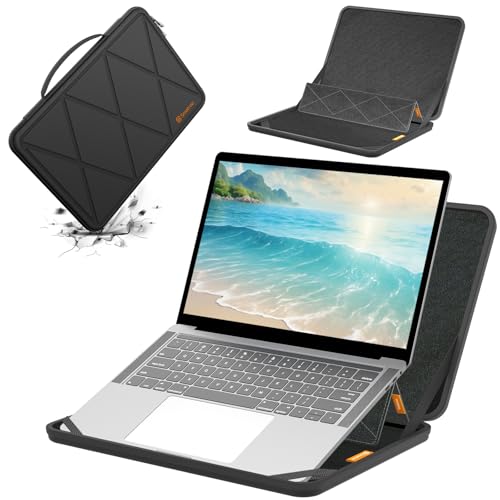
Specs
Type | Hard EVA shell case |
Extra | Built-in stand |
Listed fits | ROG Strix G16 2024/2025 (G614), TUF Gaming F16/A16 2025, Strix Scar 16 2025 |
Sizing approach | Model-matched to ASUS 16-inch chassis |
Protection | Rigid shell against crush and pressure |
Type
Hard EVA shell case
Extra
Built-in stand
Listed fits
ROG Strix G16 2024/2025 (G614), TUF Gaming F16/A16 2025, Strix Scar 16 2025
Sizing approach
Model-matched to ASUS 16-inch chassis
Protection
Rigid shell against crush and pressure
What it does well
The MS100 swaps fabric for a hard EVA shell. A rigid case spreads pressure across the lid instead of passing it straight to the screen, which matters in a packed carry-on or under other luggage. It is listed for the ROG Strix G16 2024 and 2025 (G614), the TUF Gaming F16 and A16 2025, and the Strix Scar 16 2025.
The built-in stand is a small bonus: it lifts the rear of the laptop on a desk when you set the case down open.
What you give up
Hard shells are heavier and thicker than soft sleeves, and the MS100 adds bulk on top of an already heavy laptop. The fit list is ASUS-only, so Legion and Alienware owners should look at the E612 instead.
Like the E612, no brick pocket is listed.
Who it's for
Buy it if you fly with a Strix G16 or TUF 16 and want the laptop to survive a crushed bag, and you can live with the extra weight.
Bottom line
If you own a Legion Pro 5, Strix G16, Alienware 16 or OMEN MAX 16, buy the Smatree Elite 16-Inch Sleeve (E612). If you carry the laptop without a backpack, buy the tomtoc 360 Protective Shoulder Bag and keep the brick in its front pocket. If you have a Razer Blade 16, buy the Razer 16-Inch Laptop Sleeve. If budget comes first, buy the MOSISO 360 Protective 16-Inch Case. If you fly with a Strix G16, buy the Smatree MS100 Hard Case with Stand. Adding a desk setup too? Our USB-C dock picks for gaming laptops and cooling pads round it out.
FAQ
Will a 16-inch MacBook sleeve fit a 16-inch gaming laptop?
Usually not. A 16-inch MacBook Pro is about 14 by 9.8 inches and thin, while a ROG Strix G16 2025 is 13.94 by 10.55 inches and up to 1.21 inches thick. A Legion Pro 7i Gen 10 is 14.35 by 10.86 inches. Sleeves cut for the MacBook leave a gaming chassis tight on depth and thickness, so buy one listed for your model, like the Smatree E612 or MS100.
Do I need a sleeve if my backpack has a laptop compartment?
Not always. A padded compartment covers commuting, and a sleeve adds the most when the laptop moves between bags, sits in a carry-on, or goes into a tote with no padding. If you carry the laptop on its own between rooms or classes, a sleeve with a strap, like the tomtoc 360 shoulder bag, does that job without a full backpack.
Should I get a hard case or a soft sleeve for a gaming laptop?
Pick a hard case if the laptop rides in checked luggage, a crowded overhead bin, or under other gear, since a rigid shell spreads pressure that a soft sleeve passes straight to the lid. Pick a soft sleeve for daily carry inside a backpack, where weight and thickness matter more. The hard Smatree MS100 is the better travel case and the softer E612 is the better daily one.
Can a laptop sleeve hold a gaming laptop charger?
Only some can. Gaming laptops ship with large power bricks, and a flat sleeve pocket meant for a phone charger will not take one. The MOSISO 360 has four zipper pockets and the tomtoc bag has a large front pocket, so those are the picks that keep brick and laptop together. For a slim sleeve like the Razer, plan to carry the charger in your backpack.
Is it safe to put a warm gaming laptop in a sleeve?
Let it cool first. A gaming laptop that just finished a long session can stay warm for several minutes, and a padded sleeve traps that heat around the battery. Shut it down rather than putting it to sleep, wait until the chassis feels cool, then zip it in. A sleeping laptop can also wake in the bag and heat up with no airflow.
Related Articles

Best 16-Inch Gaming Laptops (2026): 5 Picks by GPU Power
The best 16-inch gaming laptops in 2026, ranked by GPU power, screen and weight. Five picks from RTX 5060 to RTX 5090, plus which ones are easy to carry.
Nov 24, 2026

Best Backpacks for Gaming Laptops 2026: 5 That Fit 17-18"
The best backpack for a gaming laptop in 2026: a fit matrix so your 17.3 or 18-inch rig and its brick actually go in, plus the liter capacity you need.
Aug 22, 2026

Best Cooling Pads for Gaming Laptops (2026 Buyer Guide)
The best cooling pad for gaming laptops hinges on one fork: sealed-chamber turbofans that stop throttling, or quiet open-fan pads. Five picks by size.
Jul 15, 2026

Best Gaming Laptop Docking Stations 2026: 5 That Hit 165Hz
The best docking stations for gaming laptops in 2026. Which docks really drive 1440p 165Hz or 4K 120Hz, which choke on DisplayLink, and what 100W will not do.
Aug 30, 2026

Marvel Rivals Pro Gear and Settings (2026): What Pros Run
Marvel Rivals pro gear and settings for 2026: the mouse, keyboard, monitor and headset tracked pros run, their real eDPI, and which parts are worth copying.
Nov 25, 2026