Affiliate Disclosure: As an Amazon Associate we earn from qualifying purchases. Some links may earn us a commission at no cost to you.

Best OLED Gaming Monitors Under $500: 5 Picks for 2026
OLED gaming monitors now start under 500 dollars, and that is new. A year ago the cheapest 1440p QD-OLED sat closer to seven hundred, and this shelf belonged to IPS. Third-generation QD-OLED and fourth-generation Tandem WOLED both shipped in volume during 2026, and the panels they replaced fell into a bracket that used to be out of reach.
All five picks below clear 240 Hz, so refresh rate is not the decision here. What separates them is what each one surrendered to land under the cap: sustained brightness, screen coating, port count, and stand travel.
Our top pick: Alienware AW2726DM
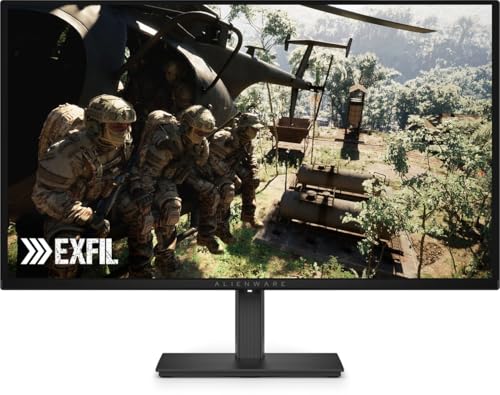
The Alienware AW2726DM is the cheapest 240 Hz QD-OLED that still ships a full ergonomic stand, and Dell covers the panel against burn-in for three years.
Quick picks
Pick | Monitor | Panel | Refresh | Best for | Buy |
|---|---|---|---|---|---|
Best Overall | QD-OLED (3rd gen) | 240 Hz | Cheapest full-ergo QD-OLED | ||
Best Value | QD-OLED | 240 Hz | PC and console on one screen | ||
Best Premium | Tandem WOLED (4th gen) | 280 Hz | Bright rooms | ||
Best Budget | QD-OLED | 240 Hz | Lowest entry price | ||
Editor's Pick | QD-OLED | 240 Hz | Desks facing a window |
Best Overall
- Monitor
- Panel
QD-OLED (3rd gen)
- Refresh
240 Hz
- Best for
Cheapest full-ergo QD-OLED
- Buy
Best Value
- Monitor
- Panel
QD-OLED
- Refresh
240 Hz
- Best for
PC and console on one screen
- Buy
Best Premium
- Monitor
- Panel
Tandem WOLED (4th gen)
- Refresh
280 Hz
- Best for
Bright rooms
- Buy
Best Budget
- Monitor
- Panel
QD-OLED
- Refresh
240 Hz
- Best for
Lowest entry price
- Buy
Editor's Pick
- Monitor
- Panel
QD-OLED
- Refresh
240 Hz
- Best for
Desks facing a window
- Buy
Specs at a glance
Monitor | Panel tech | Size | Refresh | Response | Coating | Burn-in warranty |
|---|---|---|---|---|---|---|
QD-OLED, 3rd gen | 26.5 in | 240 Hz | 0.03 ms GtG | Glossy | 3 years | |
QD-OLED | 26.5 in | 240 Hz | 0.03 ms GtG | Glossy | 3 years | |
Tandem WOLED, 4th gen | 27 in | 280 Hz | 0.03 ms GtG | Glossy RealBlack | 3 years | |
QD-OLED | 27 in | 240 Hz | 0.03 ms GtG | Glossy | 3 years, zero bright dot | |
QD-OLED | 27 in | 240 Hz | 0.03 ms GtG | Glare-free matte | 3 years |
- Panel tech
QD-OLED, 3rd gen
- Size
26.5 in
- Refresh
240 Hz
- Response
0.03 ms GtG
- Coating
Glossy
- Burn-in warranty
3 years
- Panel tech
QD-OLED
- Size
26.5 in
- Refresh
240 Hz
- Response
0.03 ms GtG
- Coating
Glossy
- Burn-in warranty
3 years
- Panel tech
Tandem WOLED, 4th gen
- Size
27 in
- Refresh
280 Hz
- Response
0.03 ms GtG
- Coating
Glossy RealBlack
- Burn-in warranty
3 years
- Panel tech
QD-OLED
- Size
27 in
- Refresh
240 Hz
- Response
0.03 ms GtG
- Coating
Glossy
- Burn-in warranty
3 years, zero bright dot
- Panel tech
QD-OLED
- Size
27 in
- Refresh
240 Hz
- Response
0.03 ms GtG
- Coating
Glare-free matte
- Burn-in warranty
3 years
How we picked these OLED gaming monitors
The cap here is a street-price cap, not a list-price cap. Every monitor on this page sat below the line on Amazon when we wrote it, and this bracket moves faster than most. Panel supply is tight going into 2027, so check the listing before you trust a slot label. One bracket down is still IPS territory, which is exactly how far OLED has fallen this year.
Panel technology splits the field. Four of the five are QD-OLED, which buys saturated color and true per-pixel black at the cost of a low sustained brightness ceiling in SDR. The fifth uses fourth-generation Tandem WOLED, which stacks emissive layers to reach far higher brightness on the same power budget. We went deeper on that trade in our 1440p OLED panel-tech guide.
Burn-in warranty used to sort the serious vendors from the rest. It does not anymore. Every pick here carries three years of panel coverage, which pushes the decision onto coating and brightness instead. Whether an OLED gaming monitor is worth it comes down to the room it lives in, not the spec sheet.
Best Overall: Alienware AW2726DM
Specs
Panel | 3rd-gen QD-OLED |
Screen size | 26.5 in |
Resolution | 2560 x 1440 |
Refresh rate | 240 Hz |
Response | 0.03 ms GtG |
SDR brightness | About 200 nits |
Coating | Glossy |
Burn-in warranty | 3 years |
Panel
3rd-gen QD-OLED
Screen size
26.5 in
Resolution
2560 x 1440
Refresh rate
240 Hz
Response
0.03 ms GtG
SDR brightness
About 200 nits
Coating
Glossy
Burn-in warranty
3 years
What it does well
Dell put a third-generation QD-OLED panel in the cheapest monitor in this class, and the subpixel layout is the reason that matters. Earlier QD-OLED had a triangular subpixel arrangement that left colored fringing on small text; the third-generation layout cleans most of that up. Browser text at 1440p on a 26.5-inch panel reads properly now.
Motion is the easy part. 240 Hz with 0.03 ms transitions means no overshoot artifacts and no black smear, which is the whole reason to leave IPS. The stand does height, tilt, swivel, and rotation into portrait. That is rare at this price even on an LCD.
What you give up
SDR brightness caps out near 200 nits. That ceiling is what bought the price, and it is the complaint that runs through every review of this panel. In a room with a lamp on it looks fine; in a room with afternoon sun on the desk it looks dim.
The coating is glossy, which multiplies the brightness problem by mirroring whatever is behind you. The port selection is bare as well: HDMI and DisplayPort, no USB hub, no USB-C, no KVM.
Who it's for
A 1440p builder in a room they can control, who wants per-pixel black and 240 Hz without paying the usual OLED premium. If your desk faces a window, skip to the matte pick further down.
Best Value: MSI MAG 272QP QD-OLED X24

Specs
Panel | QD-OLED |
Screen size | 26.5 in |
Resolution | 2560 x 1440 |
Refresh rate | 240 Hz |
Response | 0.03 ms GtG |
Video inputs | HDMI 2.1, DP 1.4a |
Motion certification | ClearMR 13000 |
Burn-in warranty | 3 years |
Panel
QD-OLED
Screen size
26.5 in
Resolution
2560 x 1440
Refresh rate
240 Hz
Response
0.03 ms GtG
Video inputs
HDMI 2.1, DP 1.4a
Motion certification
ClearMR 13000
Burn-in warranty
3 years
What it does well
MSI ships the same 240 Hz QD-OLED class as the overall pick and then adds the parts Dell cut. HDMI 2.1 is the important one: it makes this a genuine console display at 1440p 120 Hz with VRR, instead of a PC monitor a console can tolerate.
The stand is four-way with pivot and swivel. OLED Care 2.0 runs pixel shift, panel refresh, and static-element dimming on its own schedule rather than waiting for you to remember. VESA rates the panel at ClearMR 13000, which is the top motion-clarity tier currently issued.
What you give up
You pay a step up over the overall pick for the same resolution and the same refresh rate. The extra money buys ports and stand travel, not picture.
The panel carries the same SDR brightness ceiling as every other QD-OLED here, so the extra money does not buy a brighter picture. The diagonal is 26.5 inches rather than the 27 the product name implies, which costs you about half an inch of height against a true 27 in a dual-monitor setup.
Who it's for
A builder who also plugs in a PS5 or a Series X and wants one screen to serve both without a compromise on either input.
Best Premium: Gigabyte MO27Q28GR

Specs
Panel | 4th-gen Primary RGB Tandem WOLED |
Screen size | 27 in |
Resolution | 2560 x 1440 |
Refresh rate | 280 Hz |
Response | 0.03 ms GtG |
HDR peak brightness | 1500 nits |
Extras | USB-C 15 W, KVM switch |
Burn-in warranty | 3 years |
Panel
4th-gen Primary RGB Tandem WOLED
Screen size
27 in
Resolution
2560 x 1440
Refresh rate
280 Hz
Response
0.03 ms GtG
HDR peak brightness
1500 nits
Extras
USB-C 15 W, KVM switch
Burn-in warranty
3 years
What it does well
This is the only fourth-generation Tandem WOLED that lands under the cap, and it answers the one complaint that defines the rest of this page. Stacking emissive layers lets the panel push 1500 nits peak in HDR, and reviewers measured close to 600 nits on a 25 percent SDR window with variable brightness enabled. That is roughly triple what the QD-OLED picks sustain.
The rest of the sheet keeps pace. 280 Hz is the highest refresh rate in this bracket, color coverage runs 99.5 percent of DCI-P3, and the panel draws about 20 percent less power than the third-generation WOLED it replaces. Gigabyte also includes a KVM switch and a USB-C input, neither of which is common under the cap.
If you have been waiting for Tandem WOLED to reach a sane price before replacing an older panel, we worked through that timing question in buy now or wait for Tandem WOLED.
What you give up
It sits at the top of the bracket, which means the cushion under the cap is thin. One panel-price move and this pick leaves the page.
The USB-C port carries 15 W, enough for a peripheral and nowhere near enough to charge a laptop. The RealBlack coating is glossy, so it trades the brightness advantage partly back in a room with direct light behind you.
Who it's for
Anyone who games in a bright room and had written OLED off because of it. This is the pick that makes the technology work outside a controlled space.
Best Budget: AOC Q27GAZDV

Specs
Panel | QD-OLED |
Screen size | 27 in |
Resolution | 2560 x 1440 |
Refresh rate | 240 Hz |
Response | 0.03 ms GtG |
HDR | VESA True Black |
Video inputs | HDMI 2.1, DP 1.4 |
Warranty | 3 years, zero bright dot |
Panel
QD-OLED
Screen size
27 in
Resolution
2560 x 1440
Refresh rate
240 Hz
Response
0.03 ms GtG
HDR
VESA True Black
Video inputs
HDMI 2.1, DP 1.4
Warranty
3 years, zero bright dot
What it does well
AOC set the floor of this bracket and did not gut the monitor to do it. You still get a 27-inch 240 Hz QD-OLED with 0.03 ms transitions, True Black HDR certification, and G-Sync compatibility.
It also keeps the connectivity the overall pick drops. HDMI 2.1, DisplayPort 1.4, a USB 3.2 hub, and a height-adjustable stand all survive at the lowest price on the page. AOC covers the panel for three years including a zero-bright-dot clause.
What you give up
Vendor support is the thinnest here. AOC's OLED care feature set is shallower than what MSI and Gigabyte ship, and firmware updates arrive slowly.
AOC runs several near-identical Q27GAZD variants and the suffixes are easy to misread at checkout. The DV model is the one with HDMI 2.1 and the USB hub; the plain model drops both.
Who it's for
The buyer whose budget genuinely stops in the low three hundreds and who was otherwise going to settle for a 1440p IPS. If you are still weighing that call, OLED against IPS lays out where each one still wins.
Editor's Pick: Samsung Odyssey OLED G6 G61SH

Specs
Panel | QD-OLED |
Screen size | 27 in |
Resolution | 2560 x 1440 |
Refresh rate | 240 Hz |
Response | 0.03 ms GtG |
Coating | Glare-free matte |
Contrast | 1,000,000:1 |
Burn-in warranty | 3 years |
Panel
QD-OLED
Screen size
27 in
Resolution
2560 x 1440
Refresh rate
240 Hz
Response
0.03 ms GtG
Coating
Glare-free matte
Contrast
1,000,000:1
Burn-in warranty
3 years
What it does well
Every other QD-OLED on this page is glossy. Samsung's glare-free coating is the reason this one is here. Reflections are the single most common reason an OLED monitor goes back in the box, and a matte layer removes the problem without dragging you back to IPS.
The rest is competitive rather than compromised: 240 Hz, 0.03 ms, a million-to-one static contrast figure, True Black HDR certification, and Pantone validation for anyone doing color work between matches. OLED Safeguard handles pixel shift and logo detection, and Samsung covers the panel for three years.
What you give up
A matte layer scatters ambient light rather than reflecting it, which lifts perceived black level slightly in a bright room. You trade mirror reflections for a faint grey wash, and which one bothers you more is personal.
It costs more than two picks on this page that match its refresh rate exactly. You are paying for the coating, not the panel speed.
Who it's for
A desk that faces a window, or anyone who has already sent a glossy panel back once. If you are unsure whether coating or refresh rate should decide this purchase, how to choose a gaming monitor walks the order of operations.
Bottom line
If you want the most OLED for the least money, buy the Alienware AW2726DM and control the light in the room. If you game on a PC and a console from the same chair, buy the MSI MAG 272QP QD-OLED X24 for the HDMI 2.1 input. If your desk sits in daylight, buy the Gigabyte MO27Q28GR and stop fighting the brightness ceiling. If your budget stops lower, the AOC Q27GAZDV is the cheapest honest way into this panel class. If reflections are what put you off OLED the first time, the Samsung Odyssey OLED G6 G61SH is the matte answer.
Still deciding which resolution and refresh target to build around? Start with pairing a GPU with a display and let the card set the panel, not the other way around.
FAQ
Are cheap OLED gaming monitors worth it?
At this price, yes, with one condition attached. The panels in this bracket are the same QD-OLED and WOLED substrates that shipped in 900-dollar monitors two years ago, so contrast, response time, and color are not where the savings came from. What you give up is sustained brightness, port count, and sometimes stand travel. If you game in a room you can darken, a cheap OLED beats an expensive IPS on every metric you notice during play. If you game in daylight, buy the Tandem WOLED pick or stay on IPS.
Do budget OLED monitors burn in?
They can, and every vendor in this bracket now ships mitigation plus a warranty that says so. All five picks here carry three years of burn-in coverage, which is the same term the premium models get. Pixel shift, logo dimming, and scheduled panel refresh run automatically on all of them. The practical risk comes from leaving a static taskbar or a fixed HUD on screen at high brightness for thousands of hours. Hide the taskbar, let the panel run its refresh cycle, and the warranty covers the rest.
Should you buy QD-OLED or WOLED under 500 dollars?
QD-OLED wins on color saturation and on black level in a dark room, and it dominates this bracket by volume. Fourth-generation Tandem WOLED wins on brightness by a wide margin, roughly triple the sustained SDR output of the QD-OLED picks here, which matters more than color volume if your room has windows. Text rendering is close now that third-generation QD-OLED fixed most of the fringing. Pick by room lighting first and panel type second.
Is text clarity bad on a 1440p OLED?
It used to be and largely is not anymore. First-generation QD-OLED used a triangular subpixel layout that Windows subpixel rendering did not expect, which produced colored fringes on small text. Third-generation QD-OLED and fourth-generation Tandem WOLED both changed the layout, and the fringing is mostly gone. At 27 inches and 1440p you are working at roughly 109 pixels per inch, which is the same density as any 1440p IPS at that size, so sharpness is a resolution question rather than a panel question.
What refresh rate do you actually get under 500 dollars?
240 Hz is the floor now, not the ceiling. Every pick on this page runs at least 240 Hz at native 1440p, and the Tandem WOLED pick reaches 280 Hz. That is a real change from a year ago, when 165 Hz and 180 Hz panels held this price band. Driving 240 frames per second in modern titles is a separate problem, so size the GPU to the refresh target rather than assuming the panel sets your frame rate.
Related Articles

Best 1440p OLED Gaming Monitors 2026: 5 Picks to 540Hz
The best 1440p OLED gaming monitors for 2026, from 240Hz QD-OLED value picks to 540Hz Tandem WOLED, with the burn-in, port and finish catches for each one.
Nov 7, 2026

Is an OLED Gaming Monitor Worth It in 2026? Who Should Buy
Is an OLED gaming monitor worth it? Yes, at 1440p or 4K in a room you can dim. Who should buy OLED, who should get Mini-LED or IPS, and 2026 burn-in facts.
Nov 5, 2026

OLED vs IPS for Gaming 2026: Verdict + 4 OLED, 4 IPS Picks
OLED vs IPS for gaming: OLED wins motion and HDR, IPS wins bright rooms, burn-in peace of mind, and price. See which fits you, plus the best monitor of each.
Oct 4, 2026

5 Best 1440p Gaming Monitors Under $300 (2026): Mini-LED HDR
The best 1440p gaming monitors under $300 for 2026: a 336-zone Mini-LED HDR upset, 180 to 210Hz IPS value picks, and the one tradeoff each panel asks of you.
Oct 2, 2026

Buy an OLED Monitor Now or Wait for Tandem WOLED? (2026)
Tandem WOLED monitors are already on shelves, so waiting is no longer the safe call. Here is who should buy an OLED today, what to get, and who should hold.
Sep 14, 2026