Affiliate Disclosure: As an Amazon Associate we earn from qualifying purchases. Some links may earn us a commission at no cost to you.

OLED vs IPS for Gaming 2026: Verdict + 4 OLED, 4 IPS Picks
OLED is the better gaming panel if you want the sharpest motion, true blacks, and real HDR, and you can control the light in your room. IPS is the better buy if you game in a bright room, keep static work apps on screen all day, or want the most refresh rate for the money.
Neither panel wins every buyer in 2026, so this guide splits the call by how you game: competitive play, HDR immersion, mixed work and gaming, and tight budgets. Each bucket gets one OLED pick and one IPS pick, so the verdict comes with a specific monitor to buy either way.
At a glance
Trait | OLED | IPS |
|---|---|---|
Contrast / black levels | Per-pixel, true black | Backlight-based, visible "IPS glow" in the dark |
Motion clarity | 0.03ms GtG typical, near-zero smear | 0.5 to 1ms GtG typical, very good but not instant |
Peak SDR brightness | Lower; can fight bright rooms | Higher; comfortable in daylight |
Burn-in risk | Low but non-zero on static content; mitigated by pixel-shift and logo dimming | None |
Typical price premium | Meaningful step up at the same resolution and refresh rate | Cheaper at every tier |
Best for | Competitive motion clarity, HDR immersion | Mixed work and gaming, budget builds, bright rooms |
Contrast / black levels
- OLED
Per-pixel, true black
- IPS
Backlight-based, visible "IPS glow" in the dark
Motion clarity
- OLED
0.03ms GtG typical, near-zero smear
- IPS
0.5 to 1ms GtG typical, very good but not instant
Peak SDR brightness
- OLED
Lower; can fight bright rooms
- IPS
Higher; comfortable in daylight
Burn-in risk
- OLED
Low but non-zero on static content; mitigated by pixel-shift and logo dimming
- IPS
None
Typical price premium
- OLED
Meaningful step up at the same resolution and refresh rate
- IPS
Cheaper at every tier
Best for
- OLED
Competitive motion clarity, HDR immersion
- IPS
Mixed work and gaming, budget builds, bright rooms
How to decide: room, burn-in, and budget
Start with the room. OLED panels run dimmer than a good IPS panel on bright SDR content, so a sunlit desk washes them out during the day. A dim-to-moderate room is where OLED contrast and HDR look their best, while a bright office tilts the call toward IPS.
Then look at how much static content the screen shows. OLED burn-in in 2026 comes from the same bright, unmoving element sitting on screen for hours every day, not from varied gaming. Pixel shift, logo dimming, and panel refresh cycles handle most of it, and the major OLED brands now back their gaming monitors with multi-year burn-in warranties, commonly three years. If the monitor doubles as an all-day spreadsheet screen, IPS takes the question off the table.
Last, the budget. At the same resolution and refresh rate, OLED still costs meaningfully more than IPS, and the cheapest OLEDs give up brand support and HDR certification to get there. If the extra spend would come out of the GPU budget, a fast IPS panel paired with a stronger graphics card usually games better than an OLED fed by a weaker one.
Best monitor by use case
Each bucket below has an OLED winner and an IPS winner. Pick the bucket that matches how the monitor is going to get used, then buy the panel technology that fits the room and the budget.
This piece assumes the reader already knows roughly which GPU they are pairing the monitor with. For the fuller framework on matching the two, see how to choose a GPU and a monitor that matches.
Use-case bucket | OLED winner | Buy | IPS winner | Buy |
|---|---|---|---|---|
Competitive & Motion Clarity | ||||
HDR Immersion | ||||
Mixed Work + Game | ||||
Budget |
Competitive & Motion Clarity
- OLED winner
- Buy
- IPS winner
- Buy
HDR Immersion
- OLED winner
- Buy
- IPS winner
- Buy
Mixed Work + Game
- OLED winner
- Buy
- IPS winner
- Buy
Budget
- OLED winner
- Buy
- IPS winner
- Buy
Best for Competitive Play (OLED): MSI MPG 271QRX
For readers who live in Counter-Strike 2, Valorant, or Marvel Rivals, the MPG 271QRX pairs a 360Hz refresh ceiling with a 0.03ms panel, which is about as close to zero motion blur as a desk monitor gets right now.

Specs
Panel | QD-OLED |
Resolution | 2560x1440 (QHD) |
Refresh rate | 360Hz |
Response time | 0.03ms GtG |
HDR | True Black HDR 400 |
Sync | FreeSync Premium Pro, G-Sync compatible |
Ports | HDMI, DisplayPort, USB-C |
Size | 27 inch |
Panel
QD-OLED
Resolution
2560x1440 (QHD)
Refresh rate
360Hz
Response time
0.03ms GtG
HDR
True Black HDR 400
Sync
FreeSync Premium Pro, G-Sync compatible
Ports
HDMI, DisplayPort, USB-C
Size
27 inch
What it does well
Near-instant pixel response eliminates the smearing that shows up on fast pans and flick shots on slower panels. Per-pixel black keeps enemy silhouettes crisp against dark corners instead of washing out into backlight glow.
360Hz is not a marketing number here. Modern mid-to-high-end GPUs genuinely resolve that refresh ceiling at 1440p in competitive titles, and the panel keeps up with the frame rate rather than becoming the bottleneck.
What you give up
SDR desktop brightness sits well below a good IPS panel, so a sunlit room fights the screen during the day. This is the tradeoff every OLED on this list makes, not a flaw specific to this SKU.
Static taskbar or HUD elements left up for hours at a time carry a small, mostly-mitigated burn-in risk on heavy non-gaming use. Pixel-shift and logo-dimming features handle most of it, but it is worth knowing about before buying.
Who it's for
Competitive players whose one non-negotiable is motion clarity, gaming in a room where light can be controlled.
For more panels tuned to this exact use case, see our 144Hz monitor picks for additional options at this refresh tier.
Best for Competitive Play (IPS): ASUS TUF Gaming VG27AQL3A
180Hz Fast IPS with Extreme Low Motion Blur closes most of the gap to OLED motion clarity for a fraction of the price, and skips the burn-in conversation entirely.

Specs
Panel | Fast IPS |
Resolution | 2560x1440 (QHD) |
Refresh rate | 180Hz |
Response time | 1ms |
HDR | DisplayHDR 400 |
Sync | FreeSync Premium, G-Sync compatible |
Color | 130% sRGB |
Size | 27 inch |
Panel
Fast IPS
Resolution
2560x1440 (QHD)
Refresh rate
180Hz
Response time
1ms
HDR
DisplayHDR 400
Sync
FreeSync Premium, G-Sync compatible
Color
130% sRGB
Size
27 inch
What it does well
ELMB mode meaningfully sharpens fast motion for an IPS panel, which is the specific weakness IPS usually gets criticized for. 130% sRGB coverage means the panel is genuinely usable for non-gaming work too, not just games.
The price makes it an easy add-on to a competitive build without eating into GPU budget, and DisplayHDR 400 gives a modest brightness bump over entry-level panels.
What you give up
Real motion clarity and black depth still trail OLED noticeably in dark, fast-paced scenes, even with ELMB engaged. Reviewers consistently place Fast IPS a clear step behind QD-OLED panels on pure motion clarity, not a photo finish.
IPS glow, the faint backlight bleed visible at the corners in a dark room, shows up here the way it does on every IPS panel. It is a non-issue in a lit room and more noticeable at night.
Who it's for
Budget-conscious competitive players, or anyone who wants one monitor that plays games and does homework without a burn-in worry.
For a deeper lineup at this exact refresh tier, our 1440p 240Hz monitor roundup covers both panel types side by side.
Best for HDR Immersion (OLED): Samsung Odyssey OLED G8
4K QD-OLED at 240Hz is the single-player showcase panel on this list. Cyberpunk 2077 and Alan Wake 2 at path-tracing settings look like nothing an LCD panel can reproduce.

Specs
Panel | QD-OLED |
Resolution | 3840x2160 (4K) |
Refresh rate | 240Hz |
Response time | 0.03ms GtG |
HDR | DisplayHDR True Black 400 |
Sync | FreeSync Premium Pro, G-Sync compatible |
Size | 32 inch |
Panel
QD-OLED
Resolution
3840x2160 (4K)
Refresh rate
240Hz
Response time
0.03ms GtG
HDR
DisplayHDR True Black 400
Sync
FreeSync Premium Pro, G-Sync compatible
Size
32 inch
What it does well
True Black HDR delivers per-pixel contrast that no IPS panel can match, which matters most in exactly the AAA, RT-heavy titles this bucket is built around. At 32 inches, 4K is large enough to feel genuinely immersive at a normal desk distance.
240Hz keeps the panel relevant for faster titles too, so it is not a single-purpose cinematic screen. Buyers are not choosing between immersion and responsiveness here.
What you give up
Peak SDR brightness for daytime rooms is the weak point of every OLED at this size, and this panel is no exception. A north-facing office with harsh overhead light is a worse fit than a dim-to-moderate room.
A GPU that can actually push 4K at high settings is a prerequisite, not optional. Pairing this panel with a mid-tier card wastes most of what it does well.
Who it's for
Single-player and RT-heavy AAA fans with a dim-to-moderate room and a GPU that can feed 4K.
For more panels in this exact class, our 4K 240Hz OLED roundup covers the full field.
Best for HDR Immersion (IPS): LG 27G850A-B
DisplayHDR 600 gives this IPS panel real HDR punch in bright scenes, and Dual-Mode lets a reader drop to 1080p 240Hz for competitive titles without buying a second monitor.
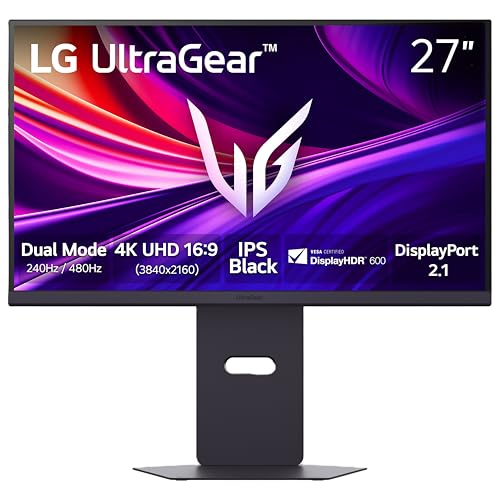
Specs
Panel | IPS (Dual-Mode) |
Resolution | 3840x2160 (4K) / 1920x1080 dual-mode |
Refresh rate | 240Hz (4K, dual-mode) |
Response time | 1ms |
HDR | DisplayHDR 600 |
Sync | FreeSync Premium Pro, G-Sync compatible |
Ports | DisplayPort 2.1, HDMI |
Size | 27 inch |
Panel
IPS (Dual-Mode)
Resolution
3840x2160 (4K) / 1920x1080 dual-mode
Refresh rate
240Hz (4K, dual-mode)
Response time
1ms
HDR
DisplayHDR 600
Sync
FreeSync Premium Pro, G-Sync compatible
Ports
DisplayPort 2.1, HDMI
Size
27 inch
What it does well
Brightness ceiling for HDR highlights genuinely beats every OLED pick in this article, which is the honest IPS advantage in HDR content: bright scenes pop harder even if dark scenes do not go as deep.
Dual-Mode is a real feature here, not a marketing checkbox. It changes native resolution and refresh rate together, so switching to 1080p delivers the full 240Hz ceiling rather than just interpolating.
What you give up
Black levels and per-pixel contrast are the honest gap versus the Samsung OLED above. Dark scenes show the IPS glow that OLED simply does not have, and this becomes obvious the moment the two panels sit side by side.
The panel uses zoned local dimming rather than per-pixel control, so halo effects can show up around bright objects on a dark background.
Who it's for
HDR fans who want the immersion case without the OLED burn-in question, or buyers who split time between competitive 1080p and cinematic 4K.
Best for Mixed Work and Gaming (IPS): LG 27GP850-B
This is the default pick for a reader who wants one screen that is genuinely good for spreadsheets and Slack all day and still holds up for gaming at night, with zero burn-in anxiety.

Specs
Panel | Nano IPS |
Resolution | 2560x1440 (QHD) |
Refresh rate | 165Hz |
Response time | 1ms |
HDR | HDR10 support |
Sync | FreeSync Premium, G-Sync compatible |
Size | 27 inch |
Panel
Nano IPS
Resolution
2560x1440 (QHD)
Refresh rate
165Hz
Response time
1ms
HDR
HDR10 support
Sync
FreeSync Premium, G-Sync compatible
Size
27 inch
What it does well
Nano IPS color accuracy makes it usable for photo work and light design, not just gaming, which matters for anyone who spends more hours working at the desk than gaming on it.
165Hz is plenty for the large majority of titles, and sustained daytime brightness makes the panel comfortable in a normally lit room instead of requiring blackout curtains.
What you give up
It is not the sharpest motion-clarity option in this article, and dark-scene contrast trails every OLED pick here. Readers who care most about competitive motion clarity should look at the Competitive bucket instead.
165Hz, while plenty for most people, is a real step down from the 240Hz-plus ceilings elsewhere in this roundup if raw refresh rate is the priority.
Who it's for
Buyers who use one screen for work and play and do not want to think about panel maintenance.
Best for Mixed Work and Gaming (OLED): Alienware AW2725DF
For readers who still want OLED picture quality on a desk that mixes browser tabs and games, this is the pick with the most complete anti-burn-in feature set in the group: pixel refresh, taskbar dimming, and logo detection.

Specs
Panel | QD-OLED |
Resolution | 2560x1440 (QHD) |
Refresh rate | 360Hz |
Response time | 0.03ms GtG |
Sync | FreeSync Premium Pro |
Ports | HDMI, DisplayPort, USB 3.2 |
Adjustability | Height/tilt/swivel/pivot |
Size | 26.7 inch |
Panel
QD-OLED
Resolution
2560x1440 (QHD)
Refresh rate
360Hz
Response time
0.03ms GtG
Sync
FreeSync Premium Pro
Ports
HDMI, DisplayPort, USB 3.2
Adjustability
Height/tilt/swivel/pivot
Size
26.7 inch
What it does well
Picture quality and motion clarity carry over from the Competitive bucket, since this is the same panel class as the MPG 271QRX. Height, tilt, swivel, and pivot adjustability suit a desk used for hours at a stretch.
The built-in anti-burn-in suite is genuinely more complete than what ships on the budget OLED pick further down, which matters specifically for a monitor that will spend real hours on static desktop content.
What you give up
Buyers should still avoid parking a static taskbar or a bright, unmoving UI element on screen for entire workdays. Reports suggest that pattern, not gaming content itself, is where OLED burn-in shows up in practice.
It carries the same daytime-brightness ceiling as every OLED on this list, so a bright office is still a worse fit than a moderately lit room.
Who it's for
Someone who wants OLED picture quality daily and is willing to vary what is on screen during long desk sessions.
For the full field of options in this panel class, our 1440p OLED roundup breaks down QD-OLED versus WOLED picks.
Best Budget Pick (OLED): INNOCN 27 QD-OLED
The cheapest real QD-OLED panel in this roundup, not a cut-rate LCD wearing OLED marketing. It shares the same panel family as monitors costing hundreds more.

Specs
Panel | QD-OLED |
Resolution | 2560x1440 (QHD) |
Refresh rate | 280Hz (240Hz via DisplayPort) |
Response time | 0.03ms GtG |
HDR | HDR400 |
Ports | HDMI, DisplayPort |
Extras | Built-in speakers |
Size | 27 inch |
Panel
QD-OLED
Resolution
2560x1440 (QHD)
Refresh rate
280Hz (240Hz via DisplayPort)
Response time
0.03ms GtG
HDR
HDR400
Ports
HDMI, DisplayPort
Extras
Built-in speakers
Size
27 inch
What it does well
Same 0.03ms response time and per-pixel contrast as the pricier OLED picks in this article, which is the whole reason to consider it over a budget IPS panel. Built-in speakers and a height-pivot stand are rare at this price tier.
280Hz over HDMI (240Hz via DisplayPort) still lands well ahead of most budget monitors, IPS or OLED.
What you give up
Build quality and firmware polish are a step behind the Tier-1 vendors elsewhere in this article, and HDR400 is the entry rung of HDR certification rather than a strong one.
Buyers going this route should expect a less established brand name and support experience than Alienware, MSI, or Samsung.
Who it's for
Buyers who want OLED picture quality on a tight budget and can live with a less established brand name.
Best Budget Pick (IPS): Acer Nitro XV271U
1440p at 180Hz at genuine budget pricing, with no compromise most buyers will notice day to day. This is the just-works budget pick with no anxiety attached.

Specs
Panel | IPS |
Resolution | 2560x1440 (QHD) |
Refresh rate | 180Hz |
Response time | 0.5ms |
Color | 95% DCI-P3 |
Sync | FreeSync Premium |
Ports | DisplayPort 1.2, 2x HDMI 2.0 |
Size | 27 inch |
Panel
IPS
Resolution
2560x1440 (QHD)
Refresh rate
180Hz
Response time
0.5ms
Color
95% DCI-P3
Sync
FreeSync Premium
Ports
DisplayPort 1.2, 2x HDMI 2.0
Size
27 inch
What it does well
Refresh rate and response time both beat what budget IPS panels offered a couple of years ago, and 95% DCI-P3 color coverage is genuinely good for the price tier.
Two HDMI ports plus DisplayPort cover a console-and-PC setup without an adapter, and the panel is a clean step up from a 1080p 75Hz display without spending OLED money.
What you give up
Peak brightness and HDR are basic here. This is not the panel for HDR-heavy AAA titles, and buyers chasing that experience should look at the HDR Immersion bucket instead.
Build materials are budget-grade plastic, which is the expected tradeoff at this price and not a surprise once the monitor is in hand.
Who it's for
Anyone who wants a real upgrade from a 1080p 75Hz panel without spending OLED money.
Benchmarks
This is a monitor comparison, not a component comparison, so "benchmarks" here means manufacturer-rated response time and refresh-rate ceiling across all eight picks rather than in-game FPS.
- MSI MPG 271QRX QD-OLED0.03 ms
- ASUS TUF Gaming VG27AQL3A1 ms
- Samsung Odyssey OLED G80.03 ms
- LG 27G850A-B UltraGear1 ms
- LG 27GP850-B UltraGear1 ms
- Alienware AW2725DF0.03 ms
- INNOCN 27 QD-OLED 2780s0.03 ms
- Acer Nitro XV271U0.5 ms
- MSI MPG 271QRX QD-OLED360 Hz
- ASUS TUF Gaming VG27AQL3A180 Hz
- Samsung Odyssey OLED G8240 Hz
- LG 27G850A-B UltraGear240 Hz
- LG 27GP850-B UltraGear165 Hz
- Alienware AW2725DF360 Hz
- INNOCN 27 QD-OLED 2780s280 Hz
- Acer Nitro XV271U180 Hz
Bottom line
OLED is the right call for competitive motion clarity and HDR-heavy single-player immersion, as long as the room lighting and budget cooperate. IPS is the right call for mixed work-and-game use, bright rooms, and tight budgets, with zero burn-in conversation. If the money side of that call is still open, our breakdown of whether an OLED gaming monitor is worth it covers the burn-in risk, where the price crossover lands, and when Mini-LED beats both.
If the room is competitive esports first, buy the MSI MPG 271QRX or the ASUS TUF Gaming VG27AQL3A depending on budget. If the priority is cinematic HDR, the Samsung Odyssey OLED G8 is the showcase pick and the LG 27G850A-B is the IPS alternative. If the monitor needs to do real work by day and gaming by night, the LG 27GP850-B is the safest single recommendation in this article.
For a tight budget, both the INNOCN QD-OLED and the Acer Nitro XV271U deliver a real 1440p high-refresh upgrade without the premium-tier price tag.
Readers set on a larger 32-inch panel specifically should also check our 32-inch 1440p roundup for size-matched picks across both panel types.
FAQ
Is OLED or IPS better for gaming in 2026?
Neither wins outright. OLED has the motion-clarity and contrast advantage, which matters most for competitive and HDR-heavy AAA gaming. IPS has the brightness and burn-in-free advantage, which matters most for mixed work-and-game use and bright rooms. Match the panel to the actual use case rather than picking one as universally best.
Is OLED burn-in still a problem for gaming monitors?
Modern OLED gaming monitors ship with pixel-shifting, logo dimming, and periodic panel refresh cycles that meaningfully reduce the risk. Gaming content, which is constantly changing, carries much lower real-world risk than static desktop use with a taskbar parked in the same spot for eight-plus hours a day. It is not zero risk, but it is far from the burn-in horror stories from a decade of OLED TVs.
Is an OLED gaming monitor worth the extra money over IPS?
For competitive motion clarity or HDR-heavy single-player gaming, yes - the difference is visible, not marginal, and shows up in every fast-paced or contrast-heavy scene. For mixed work-and-game use, a bright room, or a tight budget, a good IPS panel like the LG 27GP850-B delivers most of the day-to-day experience without the price premium or the burn-in consideration, and the gap narrows the less time is spent on dark, motion-heavy content.
Is IPS or OLED better for mixed work and gaming?
IPS. Sustained daytime brightness and zero burn-in risk make it the safer choice for a monitor that spends hours on spreadsheets, browser tabs, and static UI elements between gaming sessions. The LG 27GP850-B in this article is built specifically for that split use case, pairing accurate color for work with enough refresh rate for evening gaming.
What's the best budget OLED gaming monitor right now?
The INNOCN 27-inch QD-OLED (2780s) is the cheapest real QD-OLED panel covered in this article. It uses the same panel family as monitors costing hundreds more, with the tradeoff of a less established brand name and support experience compared to Alienware, MSI, or Samsung.
Does OLED or IPS have better motion clarity for competitive gaming?
OLED. A 0.03ms gray-to-gray response time versus roughly 0.5 to 1ms for even the fastest IPS panels means noticeably less smear on quick flicks and pans. IPS panels with Extreme Low Motion Blur modes close most of that gap, but reviewers consistently place them a clear step behind QD-OLED on pure motion clarity.
Related Articles

Is an OLED Gaming Monitor Worth It in 2026? Burn-In, 3 Picks
An OLED gaming monitor is worth it at 1440p or higher in a dim room. Where the price crossover lands, the burn-in risk in 2026, and when Mini-LED wins.
Aug 25, 2026

How to Choose a Gaming Monitor: 2026 Buyer's Guide
How to choose a gaming monitor in 2026: match resolution, refresh rate, and panel type to your GPU so you never overpay for pixels your card cannot push.
Jul 19, 2026

Best Gaming Monitors 2026: 5 Picks, Budget to 4K OLED
The best gaming monitor for your GPU and budget: five picks from the 1440p 240Hz OLED sweet spot up to 4K and ultrawide, plus when to skip the OLED tax.
Sep 7, 2026

RX 5700 XT to RX 9070 XT: Is the Upgrade Worth It? (2026)
Is the RX 5700 XT to RX 9070 XT upgrade worth it? Yes: close to triple the 1440p frame rate, ray tracing and FSR 4, plus the power supply check to run first.
Oct 27, 2026

Best PSU for RX 7900 XTX: 850W Sweet Spot, 5 Picks (2026)
The best PSU for an RX 7900 XTX is a quality 850W ATX 3.1 unit. Five vetted picks for standard, value, overclocked, 750W and SFF builds, plus the wattage math.
Oct 27, 2026