Affiliate Disclosure: As an Amazon Associate we earn from qualifying purchases. Some links may earn us a commission at no cost to you.

Best RTX 5070 Prebuilt Gaming PCs 2026: 5 PSU-Checked Picks
The best RTX 5070 prebuilt for most buyers is the iBUYPOWER Y40 with the Ryzen 7 9800X3D: it is the only machine here that pairs the card with a CPU still worth keeping after the graphics card gets swapped. Every box below carries the same GPU, so what separates them is where the rest of the money went. The RTX 5070 is a 1440p part, and at that resolution it is the limiter in almost everything you will play.
Two failure modes show up constantly at this tier: a CPU too weak to keep the card fed when a game goes processor-bound, and a CPU so expensive the buyer paid flagship money for frames the GPU was never going to produce. A third hides in the listing itself, where three of the five machines here decline to publish a power supply wattage at all. Every pick below is graded on those three points. If you are still deciding whether the 5070 is the right card at all, start with our 1440p graphics card guide.
Our top pick: iBUYPOWER Y40 RTX 5070 (9800X3D)
It is the machine that gets the one decision you cannot cheaply undo right. The 9800X3D is the CPU that will still be correct after the graphics card has been replaced, and the Y40 is a standard ATX chassis, so everything else in the box stays swappable.

Quick picks
Pick | Machine | CPU | Why it is here | Buy |
|---|---|---|---|---|
Best Overall | Ryzen 7 9800X3D | 96 MB L3 cache, AM5 upgrade path | ||
Best Value | Ryzen 7 7700X | 850 W Gold ATX 3.0, 360 mm AIO | ||
Best Premium | Core Ultra 7 265F | 2 TB storage, first-party warranty | ||
Best Budget | Ryzen 7 7700 | 850 W Gold, 65 W CPU | ||
Editor's Pick | Ryzen 9 9900X | 12 cores for encode and render work |
Best Overall
- Machine
- CPU
Ryzen 7 9800X3D
- Why it is here
96 MB L3 cache, AM5 upgrade path
- Buy
Best Value
- Machine
- CPU
Ryzen 7 7700X
- Why it is here
850 W Gold ATX 3.0, 360 mm AIO
- Buy
Best Premium
- Machine
- CPU
Core Ultra 7 265F
- Why it is here
2 TB storage, first-party warranty
- Buy
Best Budget
- Machine
- CPU
Ryzen 7 7700
- Why it is here
850 W Gold, 65 W CPU
- Buy
Editor's Pick
- Machine
- CPU
Ryzen 9 9900X
- Why it is here
12 cores for encode and render work
- Buy
Specs at a glance
Machine | CPU | Memory | Storage | Power supply | CPU cooling |
|---|---|---|---|---|---|
Ryzen 7 9800X3D | 32 GB DDR5-5200 | 1 TB NVMe | Not stated | Liquid cooler | |
Ryzen 7 7700X | 32 GB DDR5-6000 | 1 TB Gen4 NVMe | 850 W 80+ Gold | 360 mm AIO | |
Core Ultra 7 265F | 32 GB DDR5 | 2 TB SSD | Not stated | Liquid cooler | |
Ryzen 7 7700 | 32 GB DDR5-6000 | 1 TB Gen4 NVMe | 850 W 80+ Gold | Air cooler | |
Ryzen 9 9900X | 32 GB DDR5 | 1 TB PCIe 4.0 | Not stated | Air cooler |
- CPU
Ryzen 7 9800X3D
- Memory
32 GB DDR5-5200
- Storage
1 TB NVMe
- Power supply
Not stated
- CPU cooling
Liquid cooler
- CPU
Ryzen 7 7700X
- Memory
32 GB DDR5-6000
- Storage
1 TB Gen4 NVMe
- Power supply
850 W 80+ Gold
- CPU cooling
360 mm AIO
- CPU
Core Ultra 7 265F
- Memory
32 GB DDR5
- Storage
2 TB SSD
- Power supply
Not stated
- CPU cooling
Liquid cooler
- CPU
Ryzen 7 7700
- Memory
32 GB DDR5-6000
- Storage
1 TB Gen4 NVMe
- Power supply
850 W 80+ Gold
- CPU cooling
Air cooler
- CPU
Ryzen 9 9900X
- Memory
32 GB DDR5
- Storage
1 TB PCIe 4.0
- Power supply
Not stated
- CPU cooling
Air cooler
Benchmarks
This is the table that decides how much CPU is worth buying. At 1080p the 5070 has headroom to spare and the processor starts to matter. At 1440p, which is what this card is for, the GPU is doing the limiting. At native 4K it falls off a cliff and no CPU on this list changes that.
Average frame rate across a modern review suite at ultra settings, native resolution, no upscaling. The card is comfortably a 1440p part and clearly not a native 4K one.
- 154 FPS
- 133 FPS
- 44 FPS
Can an RTX 5070 prebuilt handle 4K?
Yes, with upscaling, and the table above says why. The review-suite average puts the 5070 at 44 FPS at native 4K ultra, which is not a playable target in the heaviest releases, against 133 FPS at 1440p. Set DLSS to Quality or Balanced and the card renders below native and reconstructs up, which is what moves 4K from a slideshow to a steady 60 and above in most of what you will play.
The practical read: a 5070 prebuilt is a 1440p high-refresh machine that will drive a 4K display when you want one, not a 4K machine that also does 1440p. Native 4K with ray tracing turned up is where the 12 GB buffer runs out before the shader throughput does. If 4K is the resolution you play at every day, the money is better spent a tier up. If it is a second monitor or a living-room TV, any of these five will drive it. If you are shopping by resolution rather than by graphics card, our best 1440p prebuilt gaming PC guide ranks machines across five GPU tiers against the same high-refresh target.
How we picked
The CPU pairing, not the CPU model number
A 5070 at 1440p spends most of its life as the bottleneck. That means the marginal frame from a more expensive processor is usually zero, and the money would have done more as storage or a better power supply. The exception is cache. AMD's X3D chips hold 1% lows together in simulation-heavy and competitive titles in a way core count does not replicate, which is why the top pick spends up on exactly one thing.
The other side of that argument is the upgrade. A prebuilt's motherboard and CPU are the parts you are least likely to replace, so a machine on a live socket with a strong chip stays useful through one graphics card change. A machine with a weak CPU becomes a whole new build.
The power supply the listing does not mention
Three of the five machines here do not publish a power supply wattage or efficiency rating anywhere in the listing. That is not a small omission. It is the component most likely to have been cut to hit a price, and it is the one that takes the rest of the system with it when it fails.
A 5070 build wants a quality unit in the 650 W to 750 W range with room above it. Both Skytech machines here ship 850 W 80+ Gold and say so, which is why they rank where they do despite older processors. If a listing will not tell you, ask the seller before you order.
What to skip
Skip anything pairing a 5070 with 16 GB of memory in 2026, and skip DDR4 platforms entirely at this tier. Skip listings that describe the graphics card brand as varying without naming a cooler design, unless the chassis has obvious airflow. And treat 1 TB as a starting point rather than a specification, because it is not enough for a library that includes two current AAA installs. One tier down the same trap has a different shape: the RTX 5060 Ti ships in 8 GB and 16 GB versions under one name, and our guide to the best RTX 5060 Ti prebuilt gaming PCs separates them machine by machine.
If your budget is tighter than everything here, the better move is a lower tier done properly rather than a 5070 sat behind a compromised platform. Our sub-2000 prebuilt roundup covers that ground.
RTX 5070 or RTX 5070 Ti: which prebuilt to buy
The Ti is a different chip rather than a faster bin of the same one, and it carries 16 GB of memory against the 5070's 12 GB. At 1440p that gap rarely changes the settings you can actually run today, which is why the plain 5070 is the right card for a machine that plays at 1440p and stays there. The Ti earns its premium in two specific cases: you already own a 4K display, or you keep a prebuilt long enough that the memory buffer rather than the core is what ages out first.
The trap is a Ti machine that spends the difference on the graphics card and takes it back out of the platform. A Ti paired with a 16 GB memory kit, a DDR4 board or an unpublished power supply is a worse buy than any of the five builds below. Grade the whole machine either way, and if the Ti version of a listing drops the CPU a tier to hold the same position, take the 5070.
Best Overall: iBUYPOWER Y40 RTX 5070 (9800X3D)
Specs
GPU | GeForce RTX 5070, 12 GB GDDR7 |
CPU | Ryzen 7 9800X3D (8C/16T, 96 MB L3) |
Memory | 32 GB DDR5-5200 |
Storage | 1 TB NVMe M.2 |
Chassis | iBUYPOWER Y40, tempered glass |
Cooling | Liquid CPU cooler, ARGB fans |
PSU | Not stated in listing |
OS | Windows 11 Home |
GPU
GeForce RTX 5070, 12 GB GDDR7
CPU
Ryzen 7 9800X3D (8C/16T, 96 MB L3)
Memory
32 GB DDR5-5200
Storage
1 TB NVMe M.2
Chassis
iBUYPOWER Y40, tempered glass
Cooling
Liquid CPU cooler, ARGB fans
PSU
Not stated in listing
OS
Windows 11 Home
What it does well
The 9800X3D's 96 MB of L3 is the difference between a 5070 that holds its 1% lows when an engine goes CPU-bound and one that hitches. In Counter-Strike 2, Marvel Rivals and anything built on a simulation-heavy engine, that cache is doing the work no graphics card can do for it.
At 1440p the 5070 is the limiter in almost every AAA title, so this CPU is not buying average frames today. It is buying the ability to drop a faster card into the same box in two years without the platform becoming the new problem. AM5 makes that upgrade path real rather than theoretical, and the Y40 is a normal ATX chassis with standard mounting, so a later cooler or power supply swap is an ordinary afternoon.
What you give up
1 TB fills fast when one modern install runs past 100 GB. A second drive is the first upgrade almost everyone makes here, and it should be budgeted at purchase rather than discovered later.
DDR5-5200 is a step below the 6000 kit AM5 wants, which costs a few percent in exactly the cache-sensitive titles this CPU was chosen for. More importantly, iBUYPOWER does not publish the power supply wattage or efficiency rating anywhere in the listing. Confirm it with the seller before ordering.
Who it's for
The 1440p high-refresh player who plans to keep the box for years and swap the graphics card once, and would rather over-spec the CPU now than redo the platform later.
Best Value: Skytech Azure 3 RTX 5070 (7700X)

Specs
GPU | GeForce RTX 5070, 12 GB GDDR7 |
CPU | Ryzen 7 7700X (8C/16T, 5.4 GHz boost) |
Memory | 32 GB DDR5-6000 RGB |
Storage | 1 TB Gen4 NVMe |
PSU | 850 W 80+ Gold, ATX 3.0 |
Cooling | 360 mm ARGB AIO |
Networking | Wi-Fi |
OS | Windows 11 Home |
GPU
GeForce RTX 5070, 12 GB GDDR7
CPU
Ryzen 7 7700X (8C/16T, 5.4 GHz boost)
Memory
32 GB DDR5-6000 RGB
Storage
1 TB Gen4 NVMe
PSU
850 W 80+ Gold, ATX 3.0
Cooling
360 mm ARGB AIO
Networking
Wi-Fi
OS
Windows 11 Home
What it does well
This is the only machine on the list that publishes every line item that matters and gets all of them right. 850 W of 80+ Gold on an ATX 3.0 unit is roughly double what a 5070 system pulls under sustained load, so the supply lives in the efficiency band where fans stay quiet and rail headroom absorbs transient spikes without complaint.
The 360 mm AIO matters more than it looks. The 7700X is a warm chip at stock, and moving its heat out through a radiator instead of into the case means the graphics card is breathing cooler air. DDR5-6000 is the correct speed for AM5 rather than the cheaper kit, and eight Zen 4 cores keep a 5070 fed at 1440p in every title worth naming.
What you give up
The 7700X trails the 9800X3D by a wide margin in cache-heavy games, and that gap grows rather than shrinks if a faster GPU ever goes in this box. You are buying a machine to play on now, not a platform to upgrade twice. The next rung up is worth a look before you commit: our RTX 5070 Ti prebuilt picks run the same power supply and cooling audit at the tier that adds roughly 22 percent more performance and 16 GB of memory.
Wi-Fi here is the older 802.11ac standard, not Wi-Fi 6E or 7. Storage is the same 1 TB floor as the top pick. And the Azure is a mainstream airflow chassis rather than a thermal showpiece, so the AIO is carrying most of the cooling story on its own.
Who it's for
The 1440p buyer who wants nothing about the build left as a question mark, and who values a published power supply spec over a faster CPU.
Best Premium: ASUS ROG G700 RTX 5070 (265F)

Specs
GPU | GeForce RTX 5070, 12 GB GDDR7 |
CPU | Core Ultra 7 265F (20C/20T, 30 MB L3) |
Memory | 32 GB DDR5 |
Storage | 2 TB SSD |
Cooling | Liquid CPU cooler |
I/O | 11 x USB-A, 2 x USB-C, 3 x DisplayPort, HDMI |
PSU | Not stated in listing |
OS | Windows 11 Home |
GPU
GeForce RTX 5070, 12 GB GDDR7
CPU
Core Ultra 7 265F (20C/20T, 30 MB L3)
Memory
32 GB DDR5
Storage
2 TB SSD
Cooling
Liquid CPU cooler
I/O
11 x USB-A, 2 x USB-C, 3 x DisplayPort, HDMI
PSU
Not stated in listing
OS
Windows 11 Home
What it does well
2 TB is the storage capacity the rest of this list should have shipped with, and it removes the upgrade every other pick here needs inside the first year. Twenty cores handle background load without touching the game thread, which matters more than peak clocks if the machine also does work.
The port count is unusual for a prebuilt at this tier: eleven USB-A, two USB-C and three full-size DisplayPort outputs, so a three-monitor desk works without a dock. ASUS support and a first-party warranty are a different proposition from a boutique integrator's when a whole system needs to go back.
What you give up
The Ultra 7 265F gives up meaningful gaming performance to AMD's X3D parts, and none of its twenty cores turn into frames. If the only job is games, you are paying for silicon that will sit idle.
Like the top pick, the listing does not state power supply wattage. ROG towers are proprietary enough that a later supply or radiator swap stops being a standard ATX job. And the graphics card in this box is the same one every other pick here has, so the premium is buying support, storage and I/O rather than performance.
Who it's for
The buyer who games at 1440p but also works on the machine, wants three displays and a real support contract, and does not intend to open the case.
Best Budget: Skytech Azure RTX 5070 (7700)

Specs
GPU | GeForce RTX 5070, 12 GB GDDR7 |
CPU | Ryzen 7 7700 (8C/16T, 65 W) |
Memory | 32 GB DDR5-6000 RGB |
Storage | 1 TB Gen4 NVMe |
PSU | 850 W 80+ Gold |
Cooling | Air cooler |
Networking | Wi-Fi |
OS | Windows 11 Home |
GPU
GeForce RTX 5070, 12 GB GDDR7
CPU
Ryzen 7 7700 (8C/16T, 65 W)
Memory
32 GB DDR5-6000 RGB
Storage
1 TB Gen4 NVMe
PSU
850 W 80+ Gold
Cooling
Air cooler
Networking
Wi-Fi
OS
Windows 11 Home
What it does well
The 7700 is the same eight Zen 4 cores as the 7700X inside a 65 W power budget. It runs cooler and quieter on an air cooler while giving up only a few percent of gaming performance in a workload where the graphics card is already the ceiling.
The power side is not where this build saves money. It carries the same 850 W Gold supply as the Best Value pick, and the same DDR5-6000 that AM5 wants. Eight cores with 32 GB of memory is a configuration that will not feel thin for a long time.
What you give up
This is the air-cooled pick. Over a long session the CPU sits warmer and the fan curve is more audible than the AIO builds above it, and that heat goes into the same case the graphics card is drawing from.
The 7700 gives up boost headroom to the 7700X, which shows in the handful of titles that are genuinely CPU-bound at 1440p. Storage is 1 TB again. And the real value of an AM5 machine is its upgrade path, which is the part this pick is least likely to use.
Who it's for
The buyer who wants a correctly specified 1440p machine at the lowest entry point on this list and is not chasing the last few frames.
Editor's Pick: CyberPowerPC Xtreme RTX 5070 (9900X)
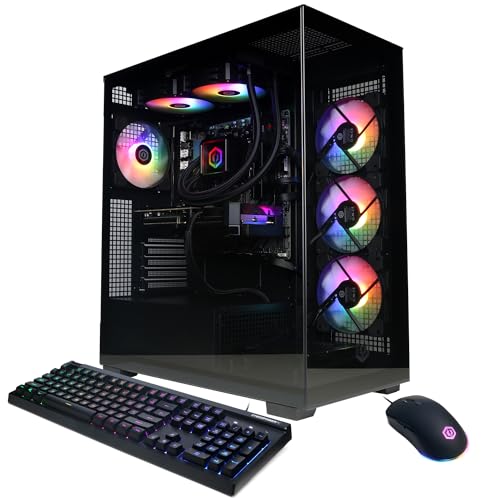
Specs
GPU | GeForce RTX 5070, 12 GB GDDR7 |
CPU | Ryzen 9 9900X (12C/24T, Zen 5) |
Memory | 32 GB DDR5 |
Storage | 1 TB PCIe 4.0 SSD |
Chassis | Gamer Xtreme, tempered glass |
Networking | Wi-Fi ready |
PSU | Not stated in listing |
OS | Windows 11 Home |
GPU
GeForce RTX 5070, 12 GB GDDR7
CPU
Ryzen 9 9900X (12C/24T, Zen 5)
Memory
32 GB DDR5
Storage
1 TB PCIe 4.0 SSD
Chassis
Gamer Xtreme, tempered glass
Networking
Wi-Fi ready
PSU
Not stated in listing
OS
Windows 11 Home
What it does well
Twelve cores and twenty-four threads mean a software encode, a compile or a video export runs without the game thread noticing. That is the actual constraint for anyone streaming from a single machine, and no amount of graphics card solves it.
Zen 5 is a current-generation core on a socket with road left, and the Gamer Xtreme is a conventional ATX build, so drives, coolers and the supply are all normal parts you can source anywhere. CyberPowerPC's US assembly and support are a known quantity rather than a gamble. For the Radeon side of the same argument, our AMD prebuilt gaming PC picks compare RX 9070 XT towers against this RTX 5070 tier directly.
What you give up
In pure gaming this is the weakest pairing logic on the list. The 9900X costs meaningfully more than the 7700X and returns no additional frames on a GPU-bound 5070 at 1440p. It also splits its cores across two chiplets, which occasionally costs performance when a game gets scheduled badly.
Storage is 1 TB, same as most of this list. And the listing does not publish the power supply specification, so the same confirm-before-you-buy caveat applies here as on the top pick.
Who it's for
The buyer who streams, edits or compiles on the same machine they game on, and wants the CPU sized for the work rather than for the graphics card.
Bottom line
If you want one machine to keep for years and upgrade the graphics card in, buy the iBUYPOWER Y40 RTX 5070 (9800X3D) and plan on adding a second drive. If you want every specification published and correct on day one, buy the Skytech Azure 3 RTX 5070 (7700X). If you also work on the machine and want a first-party warranty and 2 TB, the ASUS ROG G700 RTX 5070 (265F) is the one.
If you want the lowest entry point without compromising the power supply, the Skytech Azure RTX 5070 (7700) is a genuinely sensible build with an air cooler. And if the machine streams or renders as well as it plays, the CyberPowerPC Xtreme RTX 5070 (9900X) puts the money in cores instead of cache. For the next tier up, our RTX 5090 prebuilt guide covers where that spending stops making sense.
FAQ
Is an RTX 5070 enough for 1440p gaming in 2026?
Yes, comfortably. Across a modern review suite the RTX 5070 averages about 133 FPS at 1440p on ultra settings with no upscaling, which is more than a 144 Hz panel needs in most titles. Turn on DLSS quality in the heaviest ray-traced games and the margin gets larger. Where it runs out is native 4K, where the same suite drops to the mid-forties. If 4K is the goal, this is the wrong card and a prebuilt built around it is the wrong machine.
What CPU should you pair with an RTX 5070 prebuilt?
Anything from a Ryzen 7 7700 upward will keep a 5070 fed at 1440p, because the graphics card is the limiter in nearly every title at that resolution. The reason to spend more is not today's average frame rate. It is 1% lows in simulation-heavy and competitive games, where AMD's X3D cache genuinely helps, and it is the upgrade path, because the processor is the part of a prebuilt you are least likely to replace. Spending up on cores rather than cache only makes sense if the machine also encodes, compiles or renders.
How big a power supply does an RTX 5070 prebuilt need?
A quality unit in the 650 W to 750 W range covers a 5070 with a mainstream eight-core processor, and 850 W gives real headroom for a future card. Efficiency rating matters as much as wattage: an 80+ Gold unit running at half load stays cool and quiet, while a cheap unit near its limit does neither. The practical problem is that many prebuilt listings do not state the wattage at all. Treat that omission as a question to ask the seller rather than a detail to overlook.
Is 12 GB of VRAM enough on the RTX 5070?
At 1440p, yes, for now. Very few titles exceed 12 GB at that resolution with sensible texture settings, and DLSS reduces the footprint further. The honest caveat is that 12 GB is the specification most likely to age badly on this card, particularly in path-traced titles and at 4K with high-resolution texture packs. If you expect to keep the same graphics card for four or five years, that is the number to watch rather than the core count.
Are RTX 5070 prebuilts cheaper than building one yourself?
Usually not on parts alone, but the gap is narrower than it used to be. System integrators buy graphics cards, memory and cases at volume pricing an individual cannot reach, which offsets a good part of the assembly premium. What you are really paying for is a single warranty covering the whole machine, a support line when something fails, and not having to diagnose a build yourself. What you give up is component choice, which is exactly why the power supply and cooling specifications on the listing matter so much.
Related Articles

Best RTX 5090 Prebuilt Gaming PCs 2026: 5 PSU-Checked Picks
The best RTX 5090 prebuilt gaming PCs for 2026, ranked on PSU headroom and cooling. See which ship a 1200W supply, which cut to 1000W, and who each one suits.
Aug 28, 2026

Best Prebuilt Gaming PCs Under $2,000 in 2026
The five best prebuilt gaming PCs under $2,000 in 2026, all running RTX 5070 + DLSS 4. Tested picks from Skytech, Alienware, and iBUYPOWER with real buyer context.
May 27, 2026

Best GPU for 1440p Gaming 2026: 5 16GB Picks, 144-240Hz
The best GPU for 1440p gaming in 2026: five 16GB picks matched to 144 and 240 Hz targets, the 8GB cards to skip, and the benchmarks behind every call.
Sep 26, 2026

Best Prebuilt Gaming PCs (2026): 5 Picks, Warranty First
The best prebuilt gaming PCs in 2026: 5 picks from a 1080p budget box up to a 4K rig, judged on warranty and RMA support first, then build quality and VRAM.
Aug 18, 2026

Best CPUs for the RX 7700 XT (2026): 5 Picks by Tier
The best CPU for the RX 7700 XT keeps 1440p at 144Hz fed without overspending. Five picks by tier, plus the AM4 drop-in versus AM5 rebuild math for 2026.
Oct 18, 2026