Affiliate Disclosure: As an Amazon Associate we earn from qualifying purchases. Some links may earn us a commission at no cost to you.

Best RTX 5060 Ti Prebuilt Gaming PCs (2026): 8GB vs 16GB
Two graphics cards ship under the name RTX 5060 Ti. One holds 8 GB of memory, the other holds 16 GB, and prebuilt vendors put both behind the same three words in a product title. That single detail decides whether the tower you buy holds up at 1440p or spends the next three years trimming textures to stay smooth.
So this list ranks by memory tier first. Under that, it audits the three lines vendors bury: how much system memory came with the card, whether the storage is one drive or enough of one, and whether the power supply is named anywhere at all.
Our top pick: CyberPowerPC 8700F RTX 5060 Ti 16GB
It pairs the 16 GB card with a current AM5 platform, so the frame buffer clears 1440p today and the socket still takes a faster processor in three years.

Quick picks
Pick | System | VRAM | Best for | Buy |
|---|---|---|---|---|
Best Overall | 16 GB | 1440p high, AM5 upgrade path | ||
Best Value | 16 GB | 1440p at the lowest 16 GB entry point | ||
Best Premium | 16 GB | Longest platform runway, Zen 5 | ||
Best Budget | 8 GB | 1080p high refresh only | ||
Editor's Pick | 8 GB | 1080p buyers who need 2 TB on day one |
Best Overall
- System
- VRAM
16 GB
- Best for
1440p high, AM5 upgrade path
- Buy
Best Value
- System
- VRAM
16 GB
- Best for
1440p at the lowest 16 GB entry point
- Buy
Best Premium
- System
- VRAM
16 GB
- Best for
Longest platform runway, Zen 5
- Buy
Best Budget
- System
- VRAM
8 GB
- Best for
1080p high refresh only
- Buy
Editor's Pick
- System
- VRAM
8 GB
- Best for
1080p buyers who need 2 TB on day one
- Buy
Specs at a glance
System | GPU and VRAM | CPU | Memory | Storage | PSU listed |
|---|---|---|---|---|---|
RTX 5060 Ti, 16 GB | Ryzen 7 8700F | 16 GB DDR5 | 1 TB NVMe | Not listed | |
RTX 5060 Ti, 16 GB | Ryzen 7 5700 | 16 GB DDR4-3200 | 1 TB NVMe | 650W 80 Plus Gold | |
RTX 5060 Ti, 16 GB | Ryzen 7 9700X | DDR5, capacity not listed | NVMe, size not listed | Not listed | |
RTX 5060 Ti, 8 GB | Ryzen 5 | 16 GB | 1 TB SSD | Not listed | |
RTX 5060 Ti, 8 GB | Core Ultra 5 225F | 16 GB DDR5 | 2 TB PCIe 4.0 | Not listed |
- GPU and VRAM
RTX 5060 Ti, 16 GB
- CPU
Ryzen 7 8700F
- Memory
16 GB DDR5
- Storage
1 TB NVMe
- PSU listed
Not listed
- GPU and VRAM
RTX 5060 Ti, 16 GB
- CPU
Ryzen 7 5700
- Memory
16 GB DDR4-3200
- Storage
1 TB NVMe
- PSU listed
650W 80 Plus Gold
- GPU and VRAM
RTX 5060 Ti, 16 GB
- CPU
Ryzen 7 9700X
- Memory
DDR5, capacity not listed
- Storage
NVMe, size not listed
- PSU listed
Not listed
- GPU and VRAM
RTX 5060 Ti, 8 GB
- CPU
Ryzen 5
- Memory
16 GB
- Storage
1 TB SSD
- PSU listed
Not listed
- GPU and VRAM
RTX 5060 Ti, 8 GB
- CPU
Core Ultra 5 225F
- Memory
16 GB DDR5
- Storage
2 TB PCIe 4.0
- PSU listed
Not listed
8GB vs 16GB by resolution
Your monitor | 8 GB verdict | 16 GB verdict | What decides it |
|---|---|---|---|
1080p up to 180 Hz | Fine today | Headroom you may not need | Texture budgets at 1080p still fit inside 8 GB in most raster titles |
1440p, raster only | Workable with compromises | The correct pick | The 8 GB card drops a texture tier and gives up its 1% lows first |
1440p with ray tracing | Skip it | The only version that runs it | Reviewers measured close to a 40 percent deficit for the 8 GB card in ray-traced titles at 1440p ultra |
4K or 1440p ultrawide | Skip it | Thin even at 16 GB | The chip runs out of shading power before the memory becomes the limit |
1080p up to 180 Hz
- 8 GB verdict
Fine today
- 16 GB verdict
Headroom you may not need
- What decides it
Texture budgets at 1080p still fit inside 8 GB in most raster titles
1440p, raster only
- 8 GB verdict
Workable with compromises
- 16 GB verdict
The correct pick
- What decides it
The 8 GB card drops a texture tier and gives up its 1% lows first
1440p with ray tracing
- 8 GB verdict
Skip it
- 16 GB verdict
The only version that runs it
- What decides it
Reviewers measured close to a 40 percent deficit for the 8 GB card in ray-traced titles at 1440p ultra
4K or 1440p ultrawide
- 8 GB verdict
Skip it
- 16 GB verdict
Thin even at 16 GB
- What decides it
The chip runs out of shading power before the memory becomes the limit
Read the row that matches the monitor already on your desk, not the one you plan to buy. The 8 GB card is not broken at 1080p. It comes apart when a game asks for more memory than it holds, and ray tracing is the fastest way to get there. If your budget stretches one tier up, the RTX 5070 prebuilt tier moves the floor to 12 GB and takes the question off the table.
Benchmarks
Averages sit three frames apart; the 1% lows are where the smaller frame buffer shows, at 46 against 37.
- 57 FPS
- 54 FPS
The widest gap in the set. Texture streaming is the limiter, and the 8 GB card gives up 15 frames on the average.
- 79 FPS
- 64 FPS
Dead level at these settings, though reviewers running heavier texture presets have measured deficits closer to 25 percent.
- 48 FPS
- 48 FPS
The 8 GB card is nominally ahead here, inside run-to-run variance. Not every title cares about the split.
- 70 FPS
- 71 FPS
Three of those four are a tie, and that is the honest read on this split. Most raster titles at 1440p do not care which version you own, and anyone calling the 8 GB card unusable has not looked at Horizon Forbidden West. The Last of Us Part II is the shape of the actual problem. When a game streams textures faster than 8 GB can hold them, the average drops and the 1% lows drop harder, from 50 frames on the 16 GB card to 36 on the 8 GB one. Turn ray tracing on and the gap widens toward 40 percent. Indiana Jones and the Great Circle is the extreme case: reports suggest the 8 GB card will not run it above 1080p medium at all, while the 16 GB version scales to 4K on the identical chip.
How we picked
The graphics card is the spine of a gaming build, so it gets locked first and everything else flexes around it. The memory floors we work to: 8 GB is the minimum at 1080p high refresh with 12 GB preferred, 12 GB is the floor at 1440p with 16 GB preferred, and 16 GB is the hard minimum at 4K. The 5060 Ti straddles the 1440p line depending on which version lands in the box, which is why this list is ordered the way it is. If you are still choosing a monitor alongside the tower, start with matching the card to the display.
The power supply came next. It is the one part that can take everything else in the case with it, and it is the part prebuilt listings are quietest about. Four of the five machines here never name their unit in the product title. Only Skytech's Nebula 2 states wattage and efficiency rating together. That is not disqualifying, but it does mean treating the supply as an open item rather than a settled spec.
Storage was the third filter. One 1 TB drive stopped being enough years ago, and modern shooters push past 200 GB on their own. Four of five picks here ship a single 1 TB drive, which is exactly why the Editor's Pick has a slot: it is the only machine on the page that ships 2 TB out of the box.
The last filter is the one buyers get backwards most often. A faster processor behind a mainstream graphics card buys very little at 1440p, where the card is the limit in nearly every frame. Builds that put money into memory capacity and the frame buffer ranked above builds that put it into a headline CPU.
Best Overall: CyberPowerPC 8700F RTX 5060 Ti 16GB
Specs
GPU | GeForce RTX 5060 Ti 16GB |
VRAM | 16 GB GDDR7 |
CPU | AMD Ryzen 7 8700F (8C/16T) |
Platform | AM5 |
Memory | 16 GB DDR5 |
Storage | 1 TB NVMe SSD |
PSU | Not listed |
OS | Windows 11 Home |
GPU
GeForce RTX 5060 Ti 16GB
VRAM
16 GB GDDR7
CPU
AMD Ryzen 7 8700F (8C/16T)
Platform
AM5
Memory
16 GB DDR5
Storage
1 TB NVMe SSD
PSU
Not listed
OS
Windows 11 Home
What it does well
This is the version of the card that does not make you negotiate with the settings menu. At 1440p the 16 GB frame buffer holds high textures in the titles that punish the 8 GB version, and it holds the 1% lows steadier when a game streams a dense scene in.
The Ryzen 7 8700F is the right tier of CPU for a mainstream GPU. Eight cores keep background load off the frame time, and nothing about a 5060 Ti asks for more than that. Skipping the cache-heavy chips here saves money that went into the frame buffer instead, which is the trade that shows up on screen.
AM5 is the reason this one leads. The socket still has generations left in it, so the CPU is a swap rather than a rebuild when it eventually holds the GPU back.
What you give up
It ships 16 GB of system memory and a single 1 TB drive, both of which are floors rather than targets on a machine at this tier. The second memory kit and a second drive are the two upgrades most owners will make in the first year.
The listing never names the power supply. Reports suggest CyberPowerPC towers at this tier ship an unbranded in-house unit, and buyers have flagged the swap as their first purchase after the machine arrives. Treat the supply as an open question rather than a settled spec.
Who it's for
The 1440p buyer who wants the frame buffer that clears the resolution and a platform with a real CPU upgrade left in it.
Best Value: Skytech Nebula 2 RTX 5060 Ti 16GB
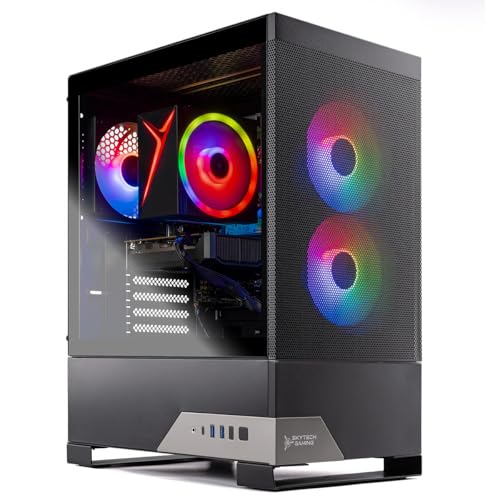
Specs
GPU | NVIDIA RTX 5060 Ti 16GB |
VRAM | 16 GB GDDR7 |
CPU | AMD Ryzen 7 5700 (8C/16T, 3.7 GHz) |
Platform | AM4 |
Memory | 16 GB DDR4-3200 |
Storage | 1 TB NVMe SSD |
PSU | 650W 80 Plus Gold |
Networking | Wi-Fi 5 |
GPU
NVIDIA RTX 5060 Ti 16GB
VRAM
16 GB GDDR7
CPU
AMD Ryzen 7 5700 (8C/16T, 3.7 GHz)
Platform
AM4
Memory
16 GB DDR4-3200
Storage
1 TB NVMe SSD
PSU
650W 80 Plus Gold
Networking
Wi-Fi 5
What it does well
It is the cheapest route onto the 16 GB card, and it is the only listing in this set that tells you what the power supply is. A 650W 80 Plus Gold unit is genuine headroom behind a card in this power class, and naming it removes the single largest unknown in prebuilt buying.
The rest of the machine is unglamorous and correct. Eight cores, 16 GB of memory, a 1 TB NVMe drive, and a card with enough memory to run 1440p high. If your budget stops before the AM5 machines start, this is the one that keeps the frame buffer intact instead of cutting it. Our under-1500 prebuilt roundup covers the wider bracket this one sits in.
What you give up
AM4 and DDR4 are the end of a road. The socket is finished, so the CPU here is the CPU forever, and DDR4-3200 gives up bandwidth that newer platforms take for granted. Buy this understanding that the whole tower is the unit of replacement in three or four years, not the CPU.
The Ryzen 7 5700 also gives up 1% lows in the CPU-heavy corners: late-game strategy turns, dense sim scenery, large multiplayer lobbies. Averages hold up; the floor is where you feel the older chip. The Wi-Fi 5 adapter is a step behind the rest of the set as well.
Who it's for
The buyer who refuses to drop to 8 GB and does not intend to keep the chassis past its graphics card.
Best Premium: ZOTAC MEK RTX 5060 Ti 16GB

Specs
GPU | GeForce RTX 5060 Ti 16GB |
VRAM | 16 GB GDDR7 |
CPU | AMD Ryzen 7 9700X (8C/16T, Zen 5) |
Platform | AM5 |
Memory | DDR5 |
Storage | NVMe SSD |
Chassis | ZOTAC MEK tower |
OS | Windows 11 |
GPU
GeForce RTX 5060 Ti 16GB
VRAM
16 GB GDDR7
CPU
AMD Ryzen 7 9700X (8C/16T, Zen 5)
Platform
AM5
Memory
DDR5
Storage
NVMe SSD
Chassis
ZOTAC MEK tower
OS
Windows 11
What it does well
The 9700X is the newest silicon in this list and the only Zen 5 part here. Paired with AM5 it gives the machine the longest runway of anything on the page: the CPU will still be feeding a graphics card two tiers above the 5060 Ti without complaint, so the card swap is the only upgrade this tower ever needs.
That matters more than it sounds. A prebuilt whose CPU ages out forces a full replacement; a prebuilt whose GPU ages out is a one-part job. If the plan is to keep this chassis through two graphics cards, see also our roundup of prebuilts worth upgrading.
What you give up
You pay the most in this set for the same graphics card everything else here runs. At 1440p the 5060 Ti is the limit in nearly every title, so the 9700X spends most of its life waiting. That is the classic inversion in prebuilt shopping: money goes to the headline CPU while the part that decides the experience stays put.
The listing is also thin on detail. Neither memory capacity nor drive size appears in the product title, so both need confirming on the listing page before you commit. On a machine at this price that is an odd thing to leave out.
Who it's for
The buyer who plans to keep the chassis through two GPU generations and wants the CPU question closed on day one.
Best Budget: Skytech Storm RTX 5060 Ti 8GB

Specs
GPU | RTX 5060 Ti 8GB |
VRAM | 8 GB GDDR7 |
CPU | AMD Ryzen 5 |
Memory | 16 GB |
Storage | 1 TB SSD |
Chassis | Skytech Storm tower |
OS | Windows 11 |
GPU
RTX 5060 Ti 8GB
VRAM
8 GB GDDR7
CPU
AMD Ryzen 5
Memory
16 GB
Storage
1 TB SSD
Chassis
Skytech Storm tower
OS
Windows 11
What it does well
At 1080p the 8 GB card is not the compromise the internet says it is. It trades frames with the 16 GB version in most raster titles, and a Ryzen 5 keeps the CPU spend proportionate to what the graphics card can use. For a buyer on a 1080p high-refresh panel who is not changing monitors soon, this is a coherent machine rather than a stripped one.
It is also the lowest cost of entry into the tier with a warranty and a phone number attached, which is worth more than the last few frames to most first-time buyers. The sub-1200 prebuilt bracket is where the alternatives live if this one drifts up in price.
What you give up
The 8 GB frame buffer is the ceiling on this machine's useful life, and it is not a ceiling you can raise. Ray-traced and texture-streaming titles at 1440p are where it comes apart, and no amount of system memory compensates for a card that has run out of its own.
Skytech also lists several near-identical Storm and Azure configurations that differ only in graphics card. Confirm the listing reads 5060 Ti and not plain 5060 before checkout, because the two sit side by side on the same vendor's storefront.
Who it's for
The 1080p high-refresh buyer who wants a warrantied tower now and accepts that 1440p is a future purchase rather than a future setting.
Editor's Pick: CyberPowerPC Gamer Xtreme VR (8GB)

Specs
GPU | GeForce RTX 5060 Ti 8GB |
VRAM | 8 GB GDDR7 |
CPU | Intel Core Ultra 5 225F (3.3 GHz) |
Memory | 16 GB DDR5 |
Storage | 2 TB PCIe 4.0 NVMe SSD |
Model | GXiVR8060A35 |
Networking | Wi-Fi ready |
OS | Windows 11 Home |
GPU
GeForce RTX 5060 Ti 8GB
VRAM
8 GB GDDR7
CPU
Intel Core Ultra 5 225F (3.3 GHz)
Memory
16 GB DDR5
Storage
2 TB PCIe 4.0 NVMe SSD
Model
GXiVR8060A35
Networking
Wi-Fi ready
OS
Windows 11 Home
What it does well
This is the only machine on the page that ships 2 TB of storage, and that is why it earns a slot. Every other pick here cut the drive to a single 1 TB unit, which a modern library outgrows almost immediately. One shooter and two open-world installs and you are back in uninstall rotation.
The rest is current and sensible: DDR5 memory, a Gen4 drive with room on it, and an Intel platform with a warranty behind it. It sits between the two other 8 GB towers and the 16 GB ones on price without feeling like a downgrade in any line except the one that matters most.
What you give up
It carries the same 8 GB ceiling as the Best Budget pick on a machine that asks for more money. If your monitor is 1440p, the storage advantage does not buy back the frames the frame buffer gives up.
Arrow Lake also trails the equivalent AMD parts in CPU-bound titles, so competitive players chasing high refresh will see it in the 1% lows. And the phrase WiFi Ready in CyberPowerPC listings has historically meant the board supports wireless rather than shipping with an adapter installed. Buyers have flagged that one repeatedly, so check the box contents.
Who it's for
The 1080p buyer with a large installed library who would otherwise be shopping for a second drive in month three.
Bottom line
If you play at 1440p, buy a 16 GB machine and stop reading. If your budget lands short of the AM5 towers, the Skytech Nebula 2 keeps the frame buffer and gives up the platform instead, which is the right order to make that cut. If you play at 1080p on a high-refresh panel and are staying there, the Skytech Storm is honest value. If you play at 1080p and your library is large, the CyberPowerPC Gamer Xtreme VR is the one that ships enough drive. And if you want the machine that will still be worth a graphics card in 2029, the ZOTAC MEK is that machine, at a price that reflects it. For the wider field beyond this graphics tier, our general prebuilt roundup covers it.
FAQ
Is the RTX 5060 Ti good for 1440p gaming?
Yes, with one condition: get the 16 GB version. The chip itself has the shading power for 1440p high in most current titles, landing in the high fifties to high seventies depending on the game. What decides the experience is memory. The 8 GB card runs the same silicon but starts dropping texture quality and 1% lows once a scene needs more than it holds. At 1080p either version is fine. At 1440p the 16 GB card is the one that behaves.
Should I get the 8GB or the 16GB RTX 5060 Ti in a prebuilt?
Buy the 16 GB version unless your monitor is 1080p and staying that way. The two cards trade frames in plain raster titles, so the averages look close in a lot of benchmark charts. The gap opens in texture-heavy and ray-traced games, where reviewers measured roughly an 18 percent average deficit for the 8 GB card at 1440p ultra and close to 40 percent in ray-traced titles specifically. The price difference between the two tiers is a fraction of the machine.
How do I know which VRAM version a prebuilt ships?
Read the graphics card line, not the memory line. Several listings in this category read something like RTX 5060 Ti, 16GB DDR5, where the 16 GB refers to system memory and the card's frame buffer is never stated. If the product title does not say 8GB or 16GB immediately next to the card name, treat the VRAM as unknown and check the specification table on the listing page before buying. A listing that will not tell you is a listing worth skipping.
What PSU wattage does an RTX 5060 Ti prebuilt need?
A 5060 Ti build is comfortable on a quality 550W to 650W unit, and 650W is the number to look for if you might drop a larger card in later. Wattage is only half the question. The efficiency rating and the manufacturer behind the unit matter more, because a supply is the one part that can take the rest of the machine with it when it fails. Only one listing in this roundup names its supply at all, which tells you how the category treats it.
Can I upgrade the GPU in an RTX 5060 Ti prebuilt later?
Usually yes, and that is the main argument for the AM5 machines here. A standard ATX tower with a normal power supply takes a larger card without drama. Two things gate it: physical clearance inside the chassis, and whether the supply has the wattage and connectors a bigger card wants. Check both before you plan on it. Small-form-factor towers and machines with proprietary supplies are where the upgrade path quietly closes.
Is 16GB of system RAM enough in an RTX 5060 Ti gaming PC?
It is enough to play everything today and it is the floor, not the target. Every machine in this roundup ships 16 GB, and going to 32 GB is the cheapest meaningful upgrade any of these owners will make. Modern shooters and open-world titles will use more than 16 GB when it is there, and background load from a browser and a voice client eats into it. If you keep the tower more than two years, plan on the second kit.
Related Articles

Best RTX 5070 Prebuilt Gaming PCs 2026: 5 PSU-Checked Picks
The best RTX 5070 prebuilt gaming PCs for 2026: 5 picks graded on CPU pairing, PSU headroom and cooling for 1440p, plus when a 5070 Ti earns the jump.
Sep 3, 2026

5 Best Prebuilt Gaming PCs Under $1500 (2026): 8GB vs 16GB
The best prebuilt gaming PC under $1500 in 2026: five RTX 5060 Ti rigs ranked for 1080p and 1440p, and the 8GB vs 16GB VRAM call that decides your buy.
Aug 2, 2026

Best Prebuilt Gaming PCs Under $1,200 (2026): 5 Picks
The best prebuilt gaming PC under $1,200 in 2026: five picks judged on the 8GB VRAM ceiling, PSU headroom, and whether the socket survives an upgrade.
Jul 20, 2026

Best Prebuilt Gaming PCs (2026): 5 Picks, Warranty First
The best prebuilt gaming PCs in 2026: 5 picks from a 1080p budget box up to a 4K rig, judged on warranty and RMA support first, then build quality and VRAM.
Aug 18, 2026

Best Upgradeable Prebuilt Gaming PCs (2026): 5 Picks
Five upgradeable prebuilt gaming PCs for 2026, each scored on power supply headroom, motherboard form factor, free RAM and M.2 slots, and GPU clearance.
Aug 14, 2026