Affiliate Disclosure: As an Amazon Associate we earn from qualifying purchases. Some links may earn us a commission at no cost to you.

Best RTX 5080 Prebuilt Gaming PCs (2026): 4K-Ready Picks
The RTX 5080 is the card that makes 4K gaming ordinary rather than a stretch. In a prebuilt, though, the card is only one of three things that decide your frame rate. The chip beside it, the power supply feeding it, and the air moving past it all matter just as much.
Every machine below carries the same GPU, so we ranked them on the parts that separate them: CPU pairing, real power headroom for a 360 W card, and cooling that holds up under a long session. If you want the tier above, see our RTX 5090 prebuilt picks.
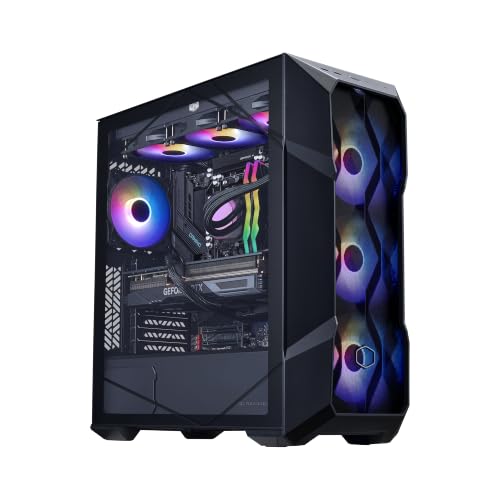
Our top pick: Cooler Master TD5 Pro (9800X3D)
It is the one build here where all three limiters are documented and all three are correct: the fastest gaming CPU you can buy, a named 850 W Gold power supply rather than an anonymous OEM unit, and a mesh-front chassis that lets the graphics card breathe.
Quick picks
Build | CPU | What it is for | Buy |
|---|---|---|---|
Ryzen 7 9800X3D | The all-round 4K and 1440p machine | ||
Ryzen 7 9800X3D | Same CPU pairing for the least outlay | ||
Ryzen 9 9950X3D | Gaming plus heavy creative work | ||
Core Ultra 7 270K Plus | Cheapest entry, three year warranty | ||
Ryzen 7 9800X3D | 4K where a tower will not fit |
- CPU
Ryzen 7 9800X3D
- What it is for
The all-round 4K and 1440p machine
- Buy
- CPU
Ryzen 7 9800X3D
- What it is for
Same CPU pairing for the least outlay
- Buy
- CPU
Ryzen 9 9950X3D
- What it is for
Gaming plus heavy creative work
- Buy
- CPU
Core Ultra 7 270K Plus
- What it is for
Cheapest entry, three year warranty
- Buy
- CPU
Ryzen 7 9800X3D
- What it is for
4K where a tower will not fit
- Buy
Specs at a glance
Build | CPU | Memory / storage | Power supply | Cooling |
|---|---|---|---|---|
Ryzen 7 9800X3D | 32 GB / 2 TB | MWE Gold 850 V3, 80+ Gold | 360 mm AIO, mesh front | |
Ryzen 7 9800X3D | 32 GB / 2 TB | 850 W, 80+ Gold | 360 mm AIO, three intake fans | |
Ryzen 9 9950X3D | 64 GB / 4 TB | 1000 W, 80+ Gold, ATX 3.0 | 360 mm ARGB AIO | |
Core Ultra 7 270K Plus | 32 GB / 2 TB | Not stated by the seller | Liquid cooled, OMEN 45L chassis | |
Ryzen 7 9800X3D | 32 GB / 2 TB | 850 W, 80+ Gold | 280 mm AIO, 18.25 litre chassis |
- CPU
Ryzen 7 9800X3D
- Memory / storage
32 GB / 2 TB
- Power supply
MWE Gold 850 V3, 80+ Gold
- Cooling
360 mm AIO, mesh front
- CPU
Ryzen 7 9800X3D
- Memory / storage
32 GB / 2 TB
- Power supply
850 W, 80+ Gold
- Cooling
360 mm AIO, three intake fans
- CPU
Ryzen 9 9950X3D
- Memory / storage
64 GB / 4 TB
- Power supply
1000 W, 80+ Gold, ATX 3.0
- Cooling
360 mm ARGB AIO
- CPU
Core Ultra 7 270K Plus
- Memory / storage
32 GB / 2 TB
- Power supply
Not stated by the seller
- Cooling
Liquid cooled, OMEN 45L chassis
- CPU
Ryzen 7 9800X3D
- Memory / storage
32 GB / 2 TB
- Power supply
850 W, 80+ Gold
- Cooling
280 mm AIO, 18.25 litre chassis
Benchmarks
Every pick here runs the same GPU, so the useful comparison is not between the builds. It is between GPU tiers, because that is the decision that sets your 4K ceiling. The numbers below are reviewer averages at native 4K with no upscaling. Turn on DLSS 4 quality and each figure moves well past 100. If you are still choosing a tier, our 4K GPU guide goes deeper.
Native 4K with no upscaling, which is the hardest case a 16 GB card faces in this title.
- 57 FPS
- 62 FPS
- 77 FPS
A traversal-heavy open world where the gap between tiers widens.
- 60 FPS
- 69 FPS
- 98 FPS
A well-optimised title showing what the tier does when nothing is fighting it.
- 119 FPS
- 135 FPS
- 186 FPS
How we picked
CPU pairing came first. A 5080 is fast enough that a mismatched chip shows up immediately, and it shows up worst at the settings people actually play. At native 4K the card binds and almost any modern CPU keeps up. Drop to 1440p, or switch on frame generation, and the CPU starts setting the ceiling. That is why four of these five builds pair the card with an X3D chip. If you want the detail on where the tiers land, our RTX 5070 Ti and RTX 5080 comparison breaks it down.
Power came second. The RTX 5080 has a 360 W board power and pulls above it in short transient spikes, so 850 W is the practical floor rather than a comfortable number. What matters as much as wattage is whether the unit ships an ATX 3.1 rating and a native 12V-2x6 connector instead of an adapter. Our 850 W PSU guide covers which units clear that bar. Any listing that will not tell you the wattage is telling you something.
Cooling and chassis came third. A 360 W card plus a 120 W class CPU puts close to 500 W of heat into a sealed box. A mesh front panel and a 360 mm radiator handle that. A restricted front panel recycles radiator exhaust back through the graphics card, and the card responds by spinning its fans harder. We favoured builds where the case and the cooler are both named parts you can look up.
Storage and warranty set the floor. Two terabytes is the minimum that survives four or five modern installs without housekeeping, and we treated anything less as a strike. On warranty we noted the term rather than scoring it, because the spread here runs from one year to three and that gap is worth real money on a machine at this price.
Best Overall: Cooler Master TD5 Pro (9800X3D)
This is the build we would buy without caveats.
Specs
CPU | Ryzen 7 9800X3D, 8 cores / 16 threads, 5.2 GHz boost |
GPU | GeForce RTX 5080, 16 GB GDDR7 |
Motherboard | Gigabyte B850, AM5 |
Memory | 32 GB DDR5-6000, 2x16 GB |
Storage | 2 TB Gen4 NVMe M.2 |
Power supply | Cooler Master MWE Gold 850 V3, 80+ Gold |
Cooling | 360 mm AIO, TD500 Mesh ARGB chassis |
Warranty | 1 year parts and labor |
CPU
Ryzen 7 9800X3D, 8 cores / 16 threads, 5.2 GHz boost
GPU
GeForce RTX 5080, 16 GB GDDR7
Motherboard
Gigabyte B850, AM5
Memory
32 GB DDR5-6000, 2x16 GB
Storage
2 TB Gen4 NVMe M.2
Power supply
Cooler Master MWE Gold 850 V3, 80+ Gold
Cooling
360 mm AIO, TD500 Mesh ARGB chassis
Warranty
1 year parts and labor
What it does well
The 9800X3D and its 96 MB of L3 cache take the processor out of the equation at every resolution. That matters most when you step down to 1440p to chase a high refresh rate, or turn on frame generation at 4K, because those are the moments the graphics card stops being the limit.
The power supply is a named model, the MWE Gold 850 V3, not an unlabelled OEM part. You can look up its reviews before you buy, which is not true of most machines in this class. The TD500 Mesh front panel is genuinely open, so the card pulls ambient air rather than warm radiator exhaust.
Storage lands at 2 TB on a Gen4 drive, which is the right floor for a machine that will hold several large installs at once. The system is assembled in the USA and comes with lifetime technical support, so there is a phone number attached to it.
What you give up
The board is a B850 rather than an X870. In practice that costs you a Gen5 M.2 slot and a thinner rear I/O panel than the premium pick, which is a fair trade at this price but worth knowing if you plan to add drives later.
Warranty is one year on parts and labour, which is short next to the three years HP puts on the OMEN. The memory arrives as two 16 GB sticks in a two-slot configuration, so moving to 64 GB later means replacing the kit rather than adding to it. And the power supply is rated 80+ Gold without a stated ATX 3.1 certification, so it sits right at the floor for this card rather than above it.
Who it's for
The 4K 120 Hz or 1440p high-refresh player who wants the fastest gaming CPU available next to the card, and who would rather not audit the power supply after the box arrives.
Best Value: ZOTAC MEK RTX 5080 (9800X3D)
Same CPU pairing as our top pick, for less.

Specs
CPU | Ryzen 7 9800X3D, 8 cores / 16 threads, 5.2 GHz boost |
GPU | ZOTAC GAMING RTX 5080, 16 GB GDDR7 |
Memory | 32 GB DDR5-6000 |
Storage | 2 TB NVMe M.2 |
Power supply | 850 W, 80+ Gold |
Cooling | 360 mm AIO, three 120 mm Infinity fans |
Networking | Wi-Fi 6E, Bluetooth 5.3, 5 Gigabit LAN |
Warranty | 1 year system, 3 year GPU |
CPU
Ryzen 7 9800X3D, 8 cores / 16 threads, 5.2 GHz boost
GPU
ZOTAC GAMING RTX 5080, 16 GB GDDR7
Memory
32 GB DDR5-6000
Storage
2 TB NVMe M.2
Power supply
850 W, 80+ Gold
Cooling
360 mm AIO, three 120 mm Infinity fans
Networking
Wi-Fi 6E, Bluetooth 5.3, 5 Gigabit LAN
Warranty
1 year system, 3 year GPU
What it does well
ZOTAC makes both the graphics card and the system, which is why the GPU carries a three year warranty instead of inheriting the one year system term. On the most expensive single component in the machine, that is the most useful warranty split on this list.
The rest of the sheet is not cut down to hit the price. You get the same 9800X3D, the same 2 TB of storage, the same 32 GB of DDR5-6000, and a stated 850 W 80+ Gold unit. Networking is a step above the tier norm with Wi-Fi 6E, Bluetooth 5.3, and a 5 Gigabit wired port. Windows ships as Pro rather than Home.
Cooling is a real 360 mm AIO with three 120 mm intake and exhaust fans rather than a token 240 mm unit, which is what a 360 W card in a sealed chassis needs.
What you give up
No motherboard model is stated anywhere in the listing. That means the chipset, the VRM design, and the M.2 slot count are all unknown until the machine is in front of you, and AM5 longevity only helps if the board can feed a future chip.
The power supply is likewise a rating rather than a model, so you cannot check its transient behaviour before buying. Wi-Fi is 6E rather than 7. The chassis is ZOTAC's own design rather than a case with published review coverage, which makes airflow harder to predict on paper.
Who it's for
The buyer who wants the 9800X3D pairing and a long warranty on the graphics card, and who is willing to trade some documentation about the surrounding parts to get there.
Best Premium: Skytech Prism 4 (9950X3D)
The one with genuine headroom, in power and in cores.

Specs
CPU | Ryzen 9 9950X3D, 16 cores / 32 threads, 5.7 GHz boost |
GPU | GeForce RTX 5080, 16 GB GDDR7 |
Motherboard | X870, AM5 |
Memory | 64 GB DDR5-6000 |
Storage | 4 TB Gen4 NVMe M.2 |
Power supply | 1000 W, 80+ Gold, ATX 3.0 |
Cooling | 360 mm ARGB AIO |
Warranty | 1 year parts and labor |
CPU
Ryzen 9 9950X3D, 16 cores / 32 threads, 5.7 GHz boost
GPU
GeForce RTX 5080, 16 GB GDDR7
Motherboard
X870, AM5
Memory
64 GB DDR5-6000
Storage
4 TB Gen4 NVMe M.2
Power supply
1000 W, 80+ Gold, ATX 3.0
Cooling
360 mm ARGB AIO
Warranty
1 year parts and labor
What it does well
The 1000 W ATX 3.0 unit is the only real power headroom on this list. It gives the card roughly 150 W of margin over the practical floor, which is exactly what you want if a step up to a 5090 class card is anywhere in the plan.
The 9950X3D keeps the 3D V-Cache that makes X3D chips fast in games and adds a second core complex for everything else. Sixteen cores and 32 threads change what the machine can do outside a game: video exports, local model work, and compiles all finish meaningfully sooner.
X870 brings back the full Gen5 storage lanes and the wider rear I/O the cheaper builds trim. With 64 GB of memory and 4 TB of storage, this is the one machine here that needs nothing added for years.
What you give up
It is by far the most expensive route to a 5080, and most of that premium buys CPU cores and storage rather than frames. At native 4K the 9950X3D and the 9800X3D finish within a couple of percent of each other, so a pure gamer is paying for capability they will never load. If that premium is the sticking point, the RTX 5070 Ti prebuilt tier sits one rung down for roughly 12 to 15 percent less performance at 1440p, and we audit the same power and cooling details there.
Warranty is still one year on parts and labour despite the price. The listing also says the graphics card brand may vary, so the specific 5080 cooler, its clock profile, and its physical length are not guaranteed before the box arrives.
Who it's for
The player who also works on the machine, editing 4K timelines, running local models, or compiling code, and who wants power headroom for whatever card comes next.
Best Budget: HP OMEN 45L RTX 5080
The cheapest way in, and the longest warranty.

Specs
CPU | Intel Core Ultra 7 270K Plus, 24 cores / 36 threads, 5.5 GHz boost |
GPU | GeForce RTX 5080, 16 GB GDDR7 |
Memory | 32 GB DDR5 |
Storage | 2 TB PCIe NVMe M.2 |
Cooling | Liquid cooled, OMEN 45L chassis |
Networking | Wi-Fi 6E, Bluetooth 5.3 |
Operating system | Windows 11 Pro |
Warranty | 3 year limited hardware |
CPU
Intel Core Ultra 7 270K Plus, 24 cores / 36 threads, 5.5 GHz boost
GPU
GeForce RTX 5080, 16 GB GDDR7
Memory
32 GB DDR5
Storage
2 TB PCIe NVMe M.2
Cooling
Liquid cooled, OMEN 45L chassis
Networking
Wi-Fi 6E, Bluetooth 5.3
Operating system
Windows 11 Pro
Warranty
3 year limited hardware
What it does well
Three years of hardware coverage against everyone else's one is a real difference on a machine at this price, and it comes with lifetime technical support and a stress test before shipping. If the thing that worries you about a prebuilt is what happens when something fails, this is the answer on this list.
The 24 core Intel part has far more multi-threaded throughput than the 8 core 9800X3D, so background encoding, streaming, and heavy multitasking all sit easier alongside a game. Storage matches the mid-tier picks at 2 TB, and Windows ships as Pro.
The OMEN 45L chassis is a known quantity with published dimensions and a documented cooling layout, which is more than several builds here offer.
What you give up
The processor is the wrong shape for games. Without 3D V-Cache, a 5080 paired with this chip gives up frames anywhere the CPU binds, and that covers most 1440p work and anything running frame generation at 4K. At native 4K the gap closes to almost nothing, so this pick only makes sense if 4K is where you will stay.
The listing does not state the power supply wattage or model, which on a 360 W card is the one specification you most want confirmed. The Core Ultra 7 270K Plus name in the listing is seller framing too. Treat the seller's Ultra 9 285K comparison as marketing rather than an Intel specification.
Who it's for
The 4K-only player who values a long warranty and a support line over the last ten percent of frames, and who is not planning to drop to 1440p to chase refresh rate.
Editor's Pick: Cooler Master NR2 Pro Mini-ITX
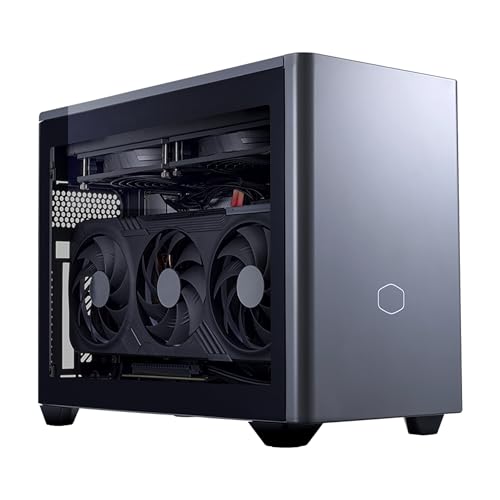
A full 5080 in the volume of a large shoebox.
Specs
CPU | Ryzen 7 9800X3D, 8 cores / 16 threads, 5.2 GHz boost |
GPU | GeForce RTX 5080, 16 GB GDDR7 |
Motherboard | Gigabyte B850I AORUS PRO, mini-ITX |
Memory | 32 GB DDR5-6000, 2x16 GB |
Storage | 2 TB Gen4 NVMe M.2 |
Power supply | 850 W, 80+ Gold |
Cooling | 280 mm AIO, NR200P Max chassis |
Volume | 18.25 litres |
CPU
Ryzen 7 9800X3D, 8 cores / 16 threads, 5.2 GHz boost
GPU
GeForce RTX 5080, 16 GB GDDR7
Motherboard
Gigabyte B850I AORUS PRO, mini-ITX
Memory
32 GB DDR5-6000, 2x16 GB
Storage
2 TB Gen4 NVMe M.2
Power supply
850 W, 80+ Gold
Cooling
280 mm AIO, NR200P Max chassis
Volume
18.25 litres
What it does well
At 18.25 litres this is roughly the size of a large shoebox, which puts a 4K machine on a desk or a console shelf without a tower footprint. Nothing was cut to make it fit: same 9800X3D, same 2 TB Gen4 drive, same 32 GB of DDR5-6000 as the full-size builds.
The motherboard is a Gigabyte B850I AORUS PRO, a specified and well-reviewed ITX board, so the upgrade path is knowable rather than a guess. The power supply is 850 W in SFX form rather than the 750 W that often gets squeezed into small builds, which matters more here than it does in a tower.
The NR200P Max chassis has years of community coverage behind it, so the thermal behaviour is documented rather than a surprise.
What you give up
Small volume and a 360 W card is a demanding combination. The graphics card runs warmer and louder here than the same parts do in the TD5 Pro, and the 280 mm radiator has less surface area than the 360 mm units elsewhere on this list.
Mini-ITX also caps what you can add: one expansion slot, two M.2 slots at most, and two memory slots that are already full. It costs more than the full-size TD5 Pro for the same core parts, which is the standard small form factor tax rather than a flaw.
Who it's for
The buyer with a desk, a console shelf, or a living room where a full tower will not go, who still wants 4K without stepping down a GPU tier.
Bottom line
If you want one answer, buy the Cooler Master TD5 Pro. It pairs the card with the fastest gaming CPU available, names its power supply, and puts both behind a mesh front panel. If you want the same pairing for less, the ZOTAC MEK gets you there with a three year warranty on the graphics card. If the machine also has to work, the Skytech Prism 4 is the only one with real power headroom and sixteen cores.
If warranty length matters more to you than the last ten percent of frames, the HP OMEN 45L is the cheapest entry and covers you for three years. And if a tower will not fit, the Cooler Master NR2 Pro puts the same silicon in 18.25 litres. Still weighing the tier? Compare against our prebuilts under three thousand and the RTX 5090 vs RTX 5080 breakdown. And if the 5080 premium is more than you want to spend, the best prebuilt gaming PCs under $2,500 show what the 5070 Ti gives up at 4K.
FAQ
Is an RTX 5080 prebuilt enough for 4K gaming in 2026?
Yes, for almost everything. At native 4K Ultra the card clears 60 FPS in current AAA titles and runs well past 100 in lighter or better-optimised ones. Turn on DLSS 4 quality upscaling and even the heaviest titles move comfortably above 100 FPS.
Where it stops being enough is native 4K with full path tracing. That is still a 5090 workload. If your target is a 4K 144 Hz panel with upscaling on, the 5080 tier is the sensible place to land.
What PSU wattage does an RTX 5080 prebuilt need?
850 W is the practical floor. The card has a 360 W board power and pulls above that in short transient spikes, and the CPU beside it adds another 120 W or so under load.
Wattage is not the whole story. An ATX 3.1 rated unit with a native 12V-2x6 connector handles those spikes far better than an older design with an adapter, whatever the number on the box says. If you plan to move to a higher tier card later, 1000 W buys you that option.
Should I get a Ryzen 7 9800X3D or an Intel Core Ultra chip in an RTX 5080 prebuilt?
For gaming, the 9800X3D. Its 96 MB of L3 cache is worth real frames in CPU-bound situations, and those situations are more common than people expect: 1440p, high refresh targets, simulation titles, and anything running frame generation.
The Intel parts win on core count, so if the machine also encodes video, streams, or compiles, the extra threads have value. At native 4K the two are close enough that the choice comes down to what else you do on the machine.
Is 16 GB of VRAM enough for 4K on the RTX 5080?
For today's titles, yes. Very few games exceed 16 GB at 4K with sensible texture settings, and DLSS reduces the framebuffer cost rather than raising it.
The honest caveat is headroom. Path tracing and very high texture packs can push past 16 GB in a handful of titles, and that pressure grows over a card's lifetime. If you keep GPUs for five years or more, it is the one specification on this card worth thinking about.
Is an RTX 5080 prebuilt better value than building it yourself?
Building it yourself is usually cheaper on parts, and you choose every component instead of accepting an unnamed power supply or motherboard. That is the real argument for doing it yourself at this tier.
A prebuilt buys you a single warranty, a working machine on day one, and someone to call. On a machine at this price the gap has narrowed, so the decision is mostly about whether you want the assembly job and the support burden.
Should I spend up to an RTX 5090 prebuilt instead?
Only for a specific reason. The 5090 is roughly 20 to 25 percent faster at 4K and it is the tier that makes native path tracing playable, but the price step is much larger than the performance step.
If you have a 4K 240 Hz panel, or you render and train as well as game, the extra silicon earns its place. For 4K 144 Hz gaming with upscaling, the 5080 is the better buy and the money is better spent on the rest of the machine.
Related Articles

Best RTX 5090 Prebuilt Gaming PCs 2026: 5 PSU-Checked Picks
The best RTX 5090 prebuilt gaming PCs for 2026, ranked on PSU headroom and cooling. See which ship a 1200W supply, which cut to 1000W, and who each one suits.
Aug 28, 2026

5 Best Prebuilt Gaming PCs Under $3,000 (2026): RTX 5080
Five RTX 5080 prebuilt gaming PCs under $3,000, ranked for 4K: which CPU pairing wins your 1% lows, why 850W is the PSU floor, and what each one gives up.
Aug 16, 2026

Best GPUs for 4K Gaming (2026): Picks by Refresh Target
Five GPUs for 4K gaming in 2026, segmented by refresh target and workload: the 5080 buy zone, the AMD-vs-Nvidia call by tier, why the 5090 is usually wrong.
May 21, 2026

Best 850W PSUs for the RTX 5080 (2026): 5 ATX 3.1 Picks
The best 850W PSU for an RTX 5080 needs ATX 3.1 and a native 12V-2x6 cable. Five picks that clear that bar, across quiet, value, budget and Titanium tiers.
Aug 11, 2026

RTX 5070 Ti vs RTX 5080 (2026): Is +17% Worth 40% More?
RTX 5070 Ti vs RTX 5080: the 5080 wins by 14.7% at 1440p and 17.5% at 4K but costs 40% more. See the benchmarks and which card your panel truly needs.
Sep 26, 2026