Affiliate Disclosure: As an Amazon Associate we earn from qualifying purchases. Some links may earn us a commission at no cost to you.

Build vs. Buy a Gaming PC in 2026: Which Wins?
Every few years the build-vs-buy answer flips, and 2026 is one of those years. For a long time the math was simple: building your own gaming PC saved you a few hundred dollars over a comparable prebuilt, so the only reason to buy one was if you didn't want to do the work. That gap has narrowed. DDR5 and GPU pricing shifted hard enough that at the bottom of the market a prebuilt can land within spitting distance of the parts alone.
This guide runs the honest math by budget tier, names what each path actually costs you, and makes a clean call at each one instead of defaulting to "always build."
The short answer
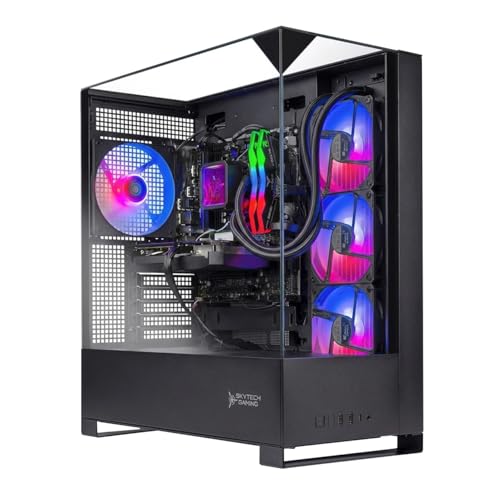
Build still wins on value at the mid and upper tiers if you're willing to spec the parts and assemble it yourself. At the entry tier, and for anyone who values a single warranty and a free weekend, buying a prebuilt has quietly become the smarter call in 2026. If you'd rather skip the whole question and get a machine that already has the right parts in it, this is the one to look at first.
The 2026 pricing reality
Two things moved. DDR5 prices climbed off their 2024 floor, and GPU pricing stayed stubborn at the tiers most gamers actually shop. When the components themselves cost more, the assembly margin a system builder charges shrinks as a share of the total. That is the whole reason the gap closed.
The catch is that prebuilt makers hit their price targets by cutting the parts you can't see in a product photo. The GPU is the spine of any gaming build, so it's the first place corners get cut. A prebuilt at a given price will routinely ship an 8 GB graphics card where a builder would put a 16 GB one. Above the strict budget end, an 8 GB card is a bad bet in 2026: modern titles already push past it at 1080p ultra, and at 1440p it ages out inside two years. The 16 GB floor is non-negotiable at this tier, which is exactly the line our 1440p GPU guide draws, and it's the first spec to check on any prebuilt.
The power supply is the second cut. Budget prebuilts love to drop in an unknown unit, and the PSU is the one part that can take everything else in the case down with it. If you're sizing one yourself, our PSU wattage guide covers how much headroom a given GPU actually wants. The third cut is storage: almost every prebuilt ships a single 1TB drive, and a modern game library fills that in a hurry. None of these are dealbreakers if you know to look for them. They're just where the price came from.
Build vs buy by budget tier
The cost comparison below assumes a tower only, not peripherals or a monitor. The value column is the honest read on where the math lands in 2026, not a blanket rule. That framing also assumes you want a tower at all. If portability is still on the table, our gaming laptop vs desktop breakdown puts hard numbers on what choosing a laptop costs in frames per dollar.
Budget tier | What DIY gets you | What a comparable prebuilt gets you | Where the value tilts in 2026 | Buy |
|---|---|---|---|---|
Entry (1080p high-refresh) | A 16 GB GPU, a known PSU, a 2TB drive if you choose well | A 16 GB GPU, a Gold PSU, a single 1TB drive, plus a warranty | Buy. The gap is smallest here and the warranty is worth it | |
Mid (1440p) | Current AM5 platform, DDR5-6000, a 16 GB GPU, room to upgrade | Same parts assembled and warrantied, often near parts cost | Close. Buy if you value the warranty; build to pocket the margin | |
Upper-mid (1440p high-refresh) | Better component quality per dollar, full control over every part | Solid, but the assembly margin grows as a share of the total | Build. The savings widen again and the control matters more | |
High (1440p+ / entry 4K) | The most performance per dollar and no compromise parts | A premium for assembly you could put toward a better GPU | Build. This is where DIY has always paid off most |
Entry (1080p high-refresh)
- What DIY gets you
A 16 GB GPU, a known PSU, a 2TB drive if you choose well
- What a comparable prebuilt gets you
A 16 GB GPU, a Gold PSU, a single 1TB drive, plus a warranty
- Where the value tilts in 2026
Buy. The gap is smallest here and the warranty is worth it
- Buy
Mid (1440p)
- What DIY gets you
Current AM5 platform, DDR5-6000, a 16 GB GPU, room to upgrade
- What a comparable prebuilt gets you
Same parts assembled and warrantied, often near parts cost
- Where the value tilts in 2026
Close. Buy if you value the warranty; build to pocket the margin
- Buy
Upper-mid (1440p high-refresh)
- What DIY gets you
Better component quality per dollar, full control over every part
- What a comparable prebuilt gets you
Solid, but the assembly margin grows as a share of the total
- Where the value tilts in 2026
Build. The savings widen again and the control matters more
- Buy
High (1440p+ / entry 4K)
- What DIY gets you
The most performance per dollar and no compromise parts
- What a comparable prebuilt gets you
A premium for assembly you could put toward a better GPU
- Where the value tilts in 2026
Build. This is where DIY has always paid off most
- Buy
When building wins
The real prize in building isn't the few hundred dollars you save. It's that you control every part, so nothing gets quietly downgraded to hit a price. You pick the GPU first and size everything else around it. You put in a Tier A power supply that won't cook the rest of the build in year three. You start with a 2TB drive instead of returning in eight months to add storage. At the mid tier and up, that control buys you genuinely better components per dollar, not just bragging rights.
Building also leaves you a platform with runway. A fresh AM5 build can take a next-generation CPU later without a new motherboard, and matching the right CPU to your GPU is the kind of call you can only make when you're choosing the parts yourself. The case and PSU you chose with a little headroom will fit the GPU you swap in three years. That upgrade path is worth real money over the life of the machine.
The honest counterpoint: building costs you time and patience. You research compatibility, you cable-manage, and when the machine doesn't post on the first try, you're the tech support. There's no single company to call when something fails six months in. If a part is dead on arrival, you handle the return yourself. For a lot of buyers that tradeoff is fine. For some it isn't, and pretending otherwise is how people end up resenting a hobby they were talked into.
When buying wins
Buying makes the most sense at the entry tier, where the price gap is smallest and the warranty carries the most weight relative to the total. You get one company responsible for the whole machine, assembly done for you, and support if it acts up. For a first-time buyer or anyone who simply doesn't want to build, that's a fair trade. If buying is where you're leaning, our roundup of budget prebuilt gaming PCs goes deeper on the entry end.
It also wins on time. If your weekends are worth more to you than the assembly margin, a prebuilt that arrives tested and ready to game is the rational choice. Stepping up a tier, our mid-range prebuilt guide covers the 1440p machines worth shortlisting. The two picks below are the prebuilts worth buying in 2026 specifically because they don't make the cuts the cheaper machines do: both ship a 16 GB GPU and a Gold-rated power supply, which is exactly where the budget options fall down.
The two prebuilts worth buying in 2026
There are a lot of prebuilts that hit a price by cutting the GPU's VRAM or the power supply. These two don't. Both are Amazon-fulfilled with a 30-day return window, both ship a 16 GB RTX 5060 Ti, and both use a Gold-rated PSU. They cover the two tiers where buying makes the most sense.
Best entry prebuilt: Skytech Nebula 2
The clean sub-budget pick that doesn't cut the graphics card's memory. Where most prebuilts at this price ship an 8 GB GPU, the Nebula 2 puts in a full 16 GB RTX 5060 Ti, which is the difference between a machine that's fine now and one that's still fine at 1440p in two years.
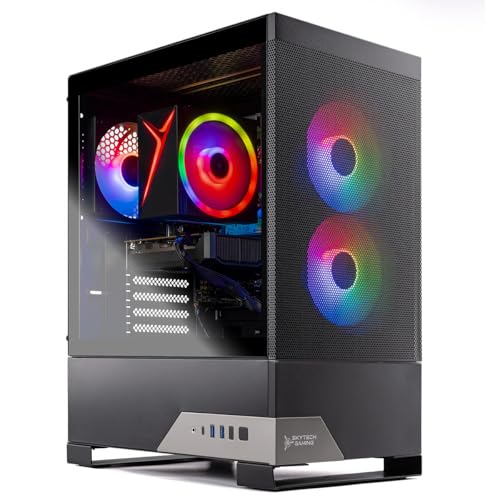
Specs
CPU | Ryzen 7 5700 (8C/16T) |
GPU | RTX 5060 Ti 16 GB |
RAM | 16 GB DDR4-3200 |
Storage | 1 TB NVMe |
PSU | 650W 80+ Gold |
Cooling | Air, ARGB |
OS | Windows 11 Home |
CPU
Ryzen 7 5700 (8C/16T)
GPU
RTX 5060 Ti 16 GB
RAM
16 GB DDR4-3200
Storage
1 TB NVMe
PSU
650W 80+ Gold
Cooling
Air, ARGB
OS
Windows 11 Home
What it does well
The spec sheet has no obvious cut corner, which is rare at this price. The 16 GB RTX 5060 Ti runs a 1080p high-refresh library at ultra without you having to think about settings, and the Gold-rated 650W power supply is a real unit, not the unknown brick that budget prebuilts usually hide. It arrives assembled, tested, and covered by a return window, so the risk of a bad first machine is low.
It's the kind of prebuilt that makes the buy-path argument for you. You're not paying for a cut GPU and an unknown PSU, then discovering it at the worst moment. The parts that matter are the right ones.
What you give up
This is a last-generation AM4 platform with 16 GB of DDR4, so there's no real upgrade runway. You won't drop a next-generation CPU into this board later, and the platform is the ceiling here rather than a starting point. The single 1TB drive is the other limit. A modern library fills that fast, so a second drive is the first thing most buyers add. Budget for one up front.
Who it's for
The first-time buyer or the "I don't want to build" buyer running a 1080p 144 to 165 Hz panel who wants a machine that works out of the box. If you'd rather have a warranty and a clean setup than save the assembly margin, this is the entry pick that doesn't make you pay for it in cut corners.
Best 1440p prebuilt: Skytech Shadow 5
This is the prebuilt that's genuinely hard to undercut on a DIY parts list right now. A current AM5 Ryzen 7 9700X, a 16 GB RTX 5060 Ti, DDR5-6000, a Gold 750W unit, and a 360 mm cooler, assembled and warrantied, lands close to what those parts cost at retail in 2026.
Specs
CPU | Ryzen 7 9700X (8C/16T) |
GPU | RTX 5060 Ti 16 GB |
RAM | 16 GB DDR5-6000 |
Storage | 1 TB NVMe |
PSU | 750W 80+ Gold |
Cooling | 360 mm AIO |
OS | Windows 11 Home |
CPU
Ryzen 7 9700X (8C/16T)
GPU
RTX 5060 Ti 16 GB
RAM
16 GB DDR5-6000
Storage
1 TB NVMe
PSU
750W 80+ Gold
Cooling
360 mm AIO
OS
Windows 11 Home
What it does well
The component choices read like a build an informed buyer would actually spec. A current AM5 platform gives you a real upgrade path, the DDR5-6000 is the sweet spot for Ryzen, and the 750W Gold power supply has headroom for a future GPU swap. The 16 GB GPU clears the VRAM floor for 1440p. This is the rare prebuilt where you're not quietly trading away the GPU or the PSU to hit a number, which is exactly why the value math is so close to building it yourself.
What you give up
It's still a single 1TB drive and only 16 GB of RAM, so a same-day storage and memory add is the likely first move. The 360 mm liquid cooler is the one part to keep an eye on long term. Reports of pump failures on budget liquid coolers a few years in are common enough that a sealed unit is the component most likely to need attention down the road, where a good air cooler would have run quietly for the life of the machine. And you are still paying assembly margin you could pocket by building. That margin is small here, which is the point, but it isn't zero.
Who it's for
The 1440p mainstream buyer who's on the fence about building, has run the numbers, and would rather have a warranty and a weekend back than save the assembly margin. If the build-vs-buy math at the mid tier comes out close for you, this is the machine that makes buying the easy choice.
Bottom line
If you want the most performance per dollar and you'll do the work, build, especially at the upper-mid and high tiers where the savings widen and the control pays off. If you want a 1440p machine without the project, buy the Skytech Shadow 5 and add a second drive. If you're a first-time buyer at 1080p who wants it to just work, buy the Skytech Nebula 2. If you're shopping the entry tier on price alone in 2026, buying is the rational call, the gap is that small. Whichever path you pick, check the GPU's VRAM, the power supply, and the storage first, because that's where the money goes. If you land on the build side, our PC building guide for 2026 walks the whole job step by step, from seating the CPU through BIOS setup and the first boot.
FAQ
Is it cheaper to build or buy a gaming PC in 2026?
At the mid and high tiers, building is still cheaper, usually by a meaningful margin once you're past the entry level. At the bottom of the market the gap has narrowed sharply in 2026, and a well-chosen prebuilt can land close enough to parts cost that the warranty and the saved time tip the math toward buying. The answer genuinely depends on your budget tier.
How much do you actually save building a gaming PC instead of buying a prebuilt?
Less than you used to. The savings scale with the budget: at the entry tier the difference can be small enough that a prebuilt with a warranty is the better deal, while at the upper-mid and high tiers building can save you a full GPU tier's worth of value. The honest rule for 2026 is that the more you spend, the more building pays off.
Are prebuilt gaming PCs worth it in 2026?
The right ones are. A prebuilt is worth it when it doesn't cut the parts that matter, a real 16 GB GPU, a Gold-rated power supply, and reasonable cooling, and when you value the single warranty and the assembled, tested machine. The picks above are worth it for exactly that reason. A prebuilt that ships an 8 GB GPU and an unknown PSU to hit a price is not.
Should a first-time builder build or buy?
If the goal is to learn and you have the patience for troubleshooting, building is a great first project and you'll understand your machine. If the goal is simply to start gaming with the least risk, buying a prebuilt with a 16 GB GPU and a warranty is the lower-stress path. Neither is wrong. Be honest with yourself about which goal you actually have.
What do prebuilt gaming PCs cut corners on?
Three places, in order. The GPU's VRAM comes first, an 8 GB card where a builder would put 16 GB. The power supply is second, an unknown-brand unit instead of a Tier A Gold one. Storage is third, a single 1TB drive you'll outgrow fast. Check those three specs on any prebuilt before anything else, because that's where the price came from.
Can you upgrade a prebuilt gaming PC later?
Usually yes, with limits. Most prebuilts use standard parts, so you can add storage and RAM easily and swap the GPU down the line. The bigger constraint is the platform: a prebuilt on a last-generation socket like AM4 won't take a next-generation CPU, while a current AM5 machine like the Shadow 5 leaves you a real upgrade path. The power supply's wattage headroom also caps how big a GPU you can drop in later.
Related Articles

Best Prebuilt Gaming PCs Truly Under $1,000 (2026): 5 Picks
The best prebuilt gaming PCs genuinely under $1,000 in 2026: five RTX towers ranked on sustained 1080p frame rates, PSU headroom, and airflow quality.
Sep 20, 2026

Best Prebuilt Gaming PCs Under $2,000 in 2026
The five best prebuilt gaming PCs under $2,000 in 2026, all running RTX 5070 + DLSS 4. Tested picks from Skytech, Alienware, and iBUYPOWER with real buyer context.
May 27, 2026

Best GPUs for 1440p Gaming (2026): 5 16GB Picks, 60-240Hz
The best GPUs for 1440p gaming in 2026: five 16GB picks matched to 60, 144, and 240 Hz targets, with real benchmarks, trade-offs, and who each card fits.
Aug 8, 2026

How to Choose a GPU (and a Monitor That Matches)
A buyer's framework for picking a GPU and the monitor that pairs with it. Start with the panel and work the card back.
May 17, 2026

Best CPUs for Gaming in 2026: Top Picks for Every Budget
The best gaming CPUs for 2026 across every budget, from the Ryzen 5 7600X to the Ryzen 9 9950X3D, with full specs and clear buying advice for every tier.
Jul 8, 2026