Affiliate Disclosure: As an Amazon Associate we earn from qualifying purchases. Some links may earn us a commission at no cost to you.

GTX 1660 Super to RTX 5060: Is the Upgrade Worth It? (2026)
Yes. If you are still running a GTX 1660 Super in 2026, the upgrade is worth doing, and it is not a close call. The card is six years old, it tops out at 6 GB, and it was locked out of DLSS from the day it shipped.
The harder question is whether the RTX 5060 is the card to land on. It is a real jump. It is also an 8 GB card in a year when 8 GB has started falling off a cliff in specific games. Here is the verdict by scenario, the benchmark numbers behind it, and the 16 GB card we would buy instead at close to the same money.
At a glance
Card | VRAM | Upscaling | Recommended PSU | Buy |
|---|---|---|---|---|
GTX 1660 Super | 6 GB GDDR6, 192-bit | None | 450 W | Your current card |
8 GB GDDR7, 128-bit | DLSS 4 plus MFG | 550 W | ||
16 GB GDDR6, 128-bit | FSR 4 | 500 W | ||
16 GB GDDR7, 128-bit | DLSS 4 plus MFG | 600 W |
GTX 1660 Super
- VRAM
6 GB GDDR6, 192-bit
- Upscaling
None
- Recommended PSU
450 W
- Buy
Your current card
- VRAM
8 GB GDDR7, 128-bit
- Upscaling
DLSS 4 plus MFG
- Recommended PSU
550 W
- Buy
- VRAM
16 GB GDDR6, 128-bit
- Upscaling
FSR 4
- Recommended PSU
500 W
- Buy
- VRAM
16 GB GDDR7, 128-bit
- Upscaling
DLSS 4 plus MFG
- Recommended PSU
600 W
- Buy
Verdict: is the GTX 1660 Super to RTX 5060 upgrade worth it?
Upgrade, yes. Buy the RTX 5060 specifically, only under conditions. The 1660 Super has no tensor cores and no RT cores, so DLSS was never available to it in any version. Moving to any 50-series card hands you a whole feature set, not just more frames, and no percentage figure captures that half of it.
What a percentage also hides is the 8 GB problem. Across most of what a 1660 Super owner plays, the RTX 5060 is a clean win, and a bigger one than the step up from the RTX 4060 it replaced. In the 2025 and 2026 titles that stream high-resolution textures hard, it is not a smaller win. It is a different outcome. That is why a 16 GB card sits in the table above at all.
If this is you | What to do | Get it |
|---|---|---|
Esports and older AAA, fixed budget | Take the RTX 5060. Your library will not reach the 8 GB ceiling. | |
Mixed library with current AAA at 1080p | Take the 16 GB Radeon. This is the case the article turns on. | |
You stream, record, or touch CUDA | Stay on NVIDIA and take 16 GB. NVENC and DLSS 4 are the reason. | |
You want four years out of this | Take the RTX 5060 Ti 16 GB. Frame buffer is what ages a card out. | |
Still on the 450 W unit that came with the case | Budget the supply before the card. Every option here asks for more. |
Esports and older AAA, fixed budget
- What to do
Take the RTX 5060. Your library will not reach the 8 GB ceiling.
- Get it
Mixed library with current AAA at 1080p
- What to do
Take the 16 GB Radeon. This is the case the article turns on.
- Get it
You stream, record, or touch CUDA
- What to do
Stay on NVIDIA and take 16 GB. NVENC and DLSS 4 are the reason.
- Get it
You want four years out of this
- What to do
Take the RTX 5060 Ti 16 GB. Frame buffer is what ages a card out.
- Get it
Still on the 450 W unit that came with the case
- What to do
Budget the supply before the card. Every option here asks for more.
- Get it
Verdict in numbers: what the benchmarks show
All three cards on one bench at 1080p Ultra with no upscaling.
- RTX 5060 8GB23 FPS
- RX 9060 XT 16GB78 FPS
- RTX 5060 Ti 16GB91 FPS
The same three cards on the same bench in a title that fits inside 8 GB.
- RTX 5060 8GB72 FPS
- RX 9060 XT 16GB87 FPS
- RTX 5060 Ti 16GB82 FPS
Two tables, one bench, and they disagree on purpose. F1 24 is the normal case: the three cards land inside a routine generational spread, and all of them sit a long way ahead of a 1660 Super. Indiana Jones is the abnormal case, and it is the one to stare at. Same settings, same rig, and the 8 GB card returns 23 frames per second where the 16 GB Radeon returns 78.
That is not a benchmark quirk. It is what running out of frame buffer looks like. The RTX 5060 has the compute to play that game and not the memory to hold its assets, and no driver update changes that. We took the longer version apart in whether a 5060 clears 1080p on its own.
How we sized this upgrade, and the PSU check
Aggregate claims for this matchup run from roughly 60 percent to roughly 140 percent faster at 1080p. Both ends are arithmetically defensible and neither is useful alone. The spread comes from game selection: a suite weighted toward esports and older AAA sits near the bottom, a suite carrying memory-limited 2025 and 2026 releases pushes to the top. Treat the window as the answer and the per-game numbers above as the detail. The same spread shows up a generation further back, where the GTX 1650 to RTX 5050 upgrade runs into identical aggregator noise and lands on the same conclusion about stepping up a rung.
The part no percentage covers is the feature gate. Turing's TU116 shipped without tensor cores, so DLSS has never run on a 1660 Super. A 50-series card adds DLSS 4 upscaling and Multi Frame Generation on top of the raster delta. Use that honestly though: frame generation turns 60 into 120, never 30 into 120, and the headline numbers at this tier lean on it hard. Our guide to sizing a GPU against your monitor covers where the math stops working.
Then the line item most upgrade posts skip. NVIDIA recommends 450 W of system power for a GTX 1660 Super, 550 W for an RTX 5060, and 600 W for an RTX 5060 Ti. AMD asks 500 W on the RX 9060 XT. If your supply is the no-name unit that shipped with the case six years ago, replace it first rather than gamble on it. A 550W-class supply that will hold up costs less than the card it protects.
One thing does not change: all four cards run on a single 8-pin PCIe connector. No 12VHPWR cable, no ATX 3.1 requirement, no adapter to source. That conversation belongs to the 5080 and 5090 and it does not follow you down here. Your CPU likely comes along fine too, though a six-year-old quad core will hold the faster two picks back.
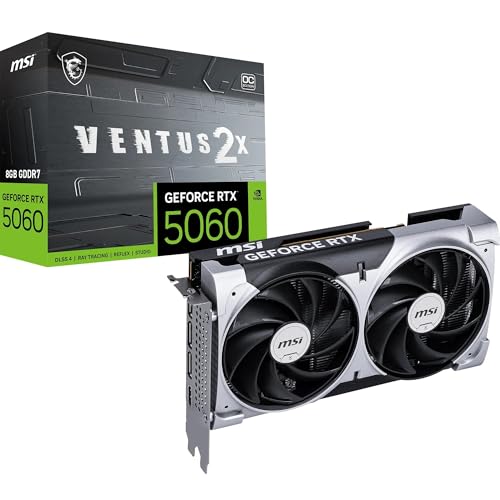
The card you asked about: MSI RTX 5060 Ventus 2X OC (8 GB)
This is the straight answer to the question, and for one specific reader it is the right answer. MSI's Ventus 2X is the sane version of the card: two fans, standard length, no premium on a cooler this tier does not need.
Specs
Chip | GB206 (Blackwell) |
VRAM | 8 GB GDDR7 |
Memory bus | 128-bit |
TGP | 145 W |
Power connector | 1x 8-pin PCIe |
Recommended system power | 550 W |
Upscaling | DLSS 4 with Multi Frame Generation |
Chip
GB206 (Blackwell)
VRAM
8 GB GDDR7
Memory bus
128-bit
TGP
145 W
Power connector
1x 8-pin PCIe
Recommended system power
550 W
Upscaling
DLSS 4 with Multi Frame Generation
What it does well
Against a 1660 Super this roughly doubles 1080p raster throughput wherever memory is not the limiter. That is a full generational move, not a half step, and GDDR7 at 28 Gbps gives it more effective bandwidth than a 128-bit bus suggests on paper.
The larger change is software. DLSS 4 upscaling, Multi Frame Generation, and the current NVENC encoder arrive at once, and none of them existed on the card being replaced. Installation is a straight swap on the same 8-pin cable, and it sits alongside our budget 1080p picks rather than above them.
What you give up
Eight gigabytes. On the bench that produced the tables above, this card returned 23 frames per second in Indiana Jones and the Great Circle at 1080p Ultra while a 16 GB Radeon on the same rig returned 78. That is not a gap you close with a settings slider, although dropping textures is exactly what you will end up doing.
It also narrows the memory bus from the 192 bits the 1660 Super had down to 128. Bandwidth still nets out higher on GDDR7, but the narrow bus is the honest caveat past 1080p. Buyers have flagged the 8 GB buffer as the first complaint, and it surfaces in two or three games rather than across a library.
Who it's for
A 1080p player with a firm ceiling on spend and a library built on esports and older AAA. If Counter-Strike, Fortnite, and games from three years ago are what gets played, the 8 GB wall never arrives and this is a large, cheap step forward.
The better upgrade at this money: PowerColor Reaper RX 9060 XT (16 GB)
This is the card we would put in a 1660 Super owner's case. It is the cheapest route to 16 GB, and 16 GB is the whole argument.

Specs
Chip | Navi 44 (RDNA 4) |
VRAM | 16 GB GDDR6 |
Memory bus | 128-bit |
TBP | 160 W |
Power connector | 1x 8-pin PCIe |
Recommended system power | 500 W |
Upscaling | FSR 4 |
Chip
Navi 44 (RDNA 4)
VRAM
16 GB GDDR6
Memory bus
128-bit
TBP
160 W
Power connector
1x 8-pin PCIe
Recommended system power
500 W
Upscaling
FSR 4
What it does well
Same bench, same settings: 78 frames per second in Indiana Jones at 1080p Ultra against 23 for the 8 GB NVIDIA card, and 87 in F1 24 against 72. The first number is memory doing the work, the second is the chip. Both point the same way.
RDNA 4 also fixed the upscaling problem AMD used to carry. FSR 4 at Quality holds up at 1080p and 1440p in a way FSR 3 never managed, so the distance to DLSS is a preference now rather than a penalty. It also asks less system power than the RTX 5060, which matters when the supply in the case is already marginal.
What you give up
No DLSS 4 and no NVENC. If you stream to Twitch, record through a capture pipeline, or run anything CUDA-shaped, skip this section and take the RTX 5060 Ti. Ray tracing still trails NVIDIA at this tier, so an RT-heavy library pushes the same direction.
The Reaper is PowerColor's value cooler rather than the Hellhound. It clears the two-fan minimum we hold every GPU to, but it works harder than a three-fan card deep into a long session. Buyers have also flagged that an 8 GB version exists under a nearly identical name, so confirm the listing says 16 GB before ordering.
Who it's for
A 1080p or entry 1440p raster player with a mixed modern library, no streaming setup, and no interest in repeating this purchase in two years.
The step-up: MSI RTX 5060 Ti Ventus 3X OC (16 GB)
If the budget stretches one more rung, this is the card that ends the argument. It is the only option here carrying the full NVIDIA feature set and a frame buffer that will not need replacing.

Specs
Chip | GB206 (Blackwell) |
VRAM | 16 GB GDDR7 |
Memory bus | 128-bit |
TGP | 180 W |
Power connector | 1x 8-pin PCIe |
Recommended system power | 600 W |
Upscaling | DLSS 4 with Multi Frame Generation |
Chip
GB206 (Blackwell)
VRAM
16 GB GDDR7
Memory bus
128-bit
TGP
180 W
Power connector
1x 8-pin PCIe
Recommended system power
600 W
Upscaling
DLSS 4 with Multi Frame Generation
What it does well
It was fastest of the three across both tables, at 91 frames per second in Indiana Jones at 1080p Ultra. More to the point, it gets there with 16 GB behind it, which removes the single reason we hesitate over the plain RTX 5060.
Everything the RTX 5060 offers in software is here too: DLSS 4, Multi Frame Generation, NVENC for streaming and recording. The Ventus 3X cooler spreads 180 W across three fans, so it stays composed through a long session where the two-fan cards audibly do not.
What you give up
Money, and possibly a power supply. NVIDIA recommends 600 W of system power here, the highest of the three, and that figure is the one most likely to turn a GPU purchase into a GPU and PSU purchase for anyone coming off a 1660 Super era build.
It is also still a 128-bit card. Treat it as a 1080p card with real headroom and a capable 1440p card at high rather than ultra. Anyone shopping it as a 1440p ultra answer is buying the wrong tier, and an 8 GB version of this same model sits at a small discount waiting for that buyer.
Who it's for
A 1660 Super owner who wants this to be the last GPU purchase for four years, or who streams, records, or leans on one DLSS-heavy game.
Bottom line
If your library is esports and older AAA and the budget is fixed, buy the RTX 5060. If you play current AAA at 1080p, buy the 16 GB Radeon. If you stream, record, or want four years out of this, buy the RTX 5060 Ti 16 GB. If your power supply is the one that came in the case, buy that first. Still weighing resolution? Start with our 1080p picks by refresh tier.
The one wrong answer is staying on the 1660 Super because a percentage looked underwhelming. Six years and a missing feature set are the real gap. If you are still unsure the timing is right at all, the general case for and against upgrading works through it.
FAQ
Is the GTX 1660 Super still good in 2026?
It still plays things. At 1080p with settings turned down it holds 60 frames per second in most esports titles and plenty of older AAA. What it cannot do is run current releases at the settings the store page implies, and it has no access to DLSS at any version because Turing's TU116 shipped without tensor cores. Six gigabytes now sits below where modern games expect to be. It is a functional card and a finished one.
Will an RTX 5060 work with a 450W power supply?
NVIDIA recommends 550 W of system power for the RTX 5060, up from 450 W for the GTX 1660 Super. A good-quality 450 W unit with a modest CPU will often run it, but that is a margin argument rather than a specification. If the supply is the one that shipped inside a budget case six years ago, replace it: capacitors age, and a unit under load since 2020 no longer delivers its label. The connector does not change, still a single 8-pin.
Do I need a new CPU if I upgrade from a GTX 1660 Super?
Usually not, though the answer turns on core count. A six-core or eight-core chip from the same era feeds any of these cards fine at 1080p. A quad core will hold the faster two picks back, especially in simulation and open-world titles that lean on threads. Check CPU load while gaming first. If the processor sits pinned while GPU utilization stays below full, the CPU is the limiter and a graphics card will not fix it.
Is 8GB of VRAM enough for 1080p gaming in 2026?
For most of a typical library, yes. For a specific and growing set of releases, no, and the failure is abrupt rather than gradual. On one published bench an 8 GB RTX 5060 returned 23 frames per second in Indiana Jones and the Great Circle at 1080p Ultra where a 16 GB card returned 78 on the same rig. Dropping texture quality recovers most of that. If you would rather not manage settings per game, buy 16 GB.
Can the GTX 1660 Super use DLSS?
No, and it never could. DLSS runs on tensor cores, and the TU116 chip in the 1660 Super shipped without them, which is also why it has no RT cores. That is a hardware boundary rather than a driver gap, so no update will change it. The card can use FSR in games that implement it, since FSR runs in software, but quality at 1080p sits well behind DLSS 4.
Should I wait for the RTX 50 Super refresh instead?
Waiting carries a cost and a payoff, and right now the cost is higher. Refresh timing has slipped through 2026 with no confirmed launch window, and refreshes normally arrive at the top of the stack first, so a 5060-class replacement would land later still. If the card in your case is holding your games back today, buying now beats waiting an unknown number of months for something that may never reach this tier.
Related Articles

RTX 5060 vs RTX 4060 (2026): 25% Faster, Worth the Upgrade?
RTX 5060 vs RTX 4060: the 5060 runs about 25% faster at 1080p and adds DLSS 4 MFG. See when a 4060 owner should upgrade, keep the card, or go 16GB instead.
Sep 26, 2026

Is the RTX 5060 Enough for 1080p? 8GB vs 5060 Ti 16GB (2026)
Is the RTX 5060 enough for 1080p? Yes for most games, with around 100fps in Hogwarts Legacy and Marvel Rivals. Here's when the 5060 Ti 16GB earns its price.
Oct 4, 2026

Should You Upgrade Your GPU in 2026? 5 Signs + What to Buy
Should you upgrade your GPU? Five signs and a 2-minute bottleneck test tell you if a new card will pay off, plus when to wait and the right pick for any budget.
Oct 7, 2026

Best GPUs Under $300 for 1080p Gaming (2026): 5 Picks by Tier
Best budget GPUs under $300 for 1080p gaming in 2026. Intel Arc B580 anchors the tier, with honest 8 GB warnings and clearance picks.
May 20, 2026

Best GPUs for 1080p Gaming (2026): Picks by Refresh Tier
The best GPU for 1080p gaming in 2026, picked by refresh tier and game genre. From a budget Intel Arc card to a 240Hz esports pick, plus honest 8GB verdicts.
Jun 22, 2026