Affiliate Disclosure: As an Amazon Associate we earn from qualifying purchases. Some links may earn us a commission at no cost to you.

Is the RTX 5060 Enough for 1080p? 8GB vs 5060 Ti 16GB (2026)
Yes. The RTX 5060 is enough for 1080p gaming for most buyers in 2026: it holds around 100fps at 1080p in Hogwarts Legacy and Marvel Rivals, and clears high refresh targets in esports titles like Counter-Strike 2. You get that without paying for a 16GB VRAM buffer most people will not use for years.
The RTX 5060 Ti 16GB earns its higher price in two specific situations: a library heavy on VRAM-hungry modern AAA titles, or a realistic plan to move up to a 1440p monitor while this card is still in the case. Outside those two cases, the base card is the smarter buy.
At a glance
Pick | Card | Best for | Buy |
|---|---|---|---|
Recommended | 1080p high refresh and most AAA at high settings | ||
Step-up | VRAM-heavy AAA and headroom toward 1440p |
Recommended
- Card
- Best for
1080p high refresh and most AAA at high settings
- Buy
Step-up
- Card
- Best for
VRAM-heavy AAA and headroom toward 1440p
- Buy
Is 1080p enough, or should you go Ti?
Scenario | Winner |
|---|---|
1080p ultra settings, VRAM-heavy AAA library | MSI Ventus 2X RTX 5060 Ti 16GB: |
1080p high-refresh esports | MSI Ventus 2X RTX 5060 OC: |
Eyeing a 1440p monitor within this card's life | MSI Ventus 2X RTX 5060 Ti 16GB: |
1080p ultra settings, VRAM-heavy AAA library
- Winner
MSI Ventus 2X RTX 5060 Ti 16GB:
1080p high-refresh esports
- Winner
MSI Ventus 2X RTX 5060 OC:
Eyeing a 1440p monitor within this card's life
- Winner
MSI Ventus 2X RTX 5060 Ti 16GB:
Recommended: MSI Ventus 2X RTX 5060 OC
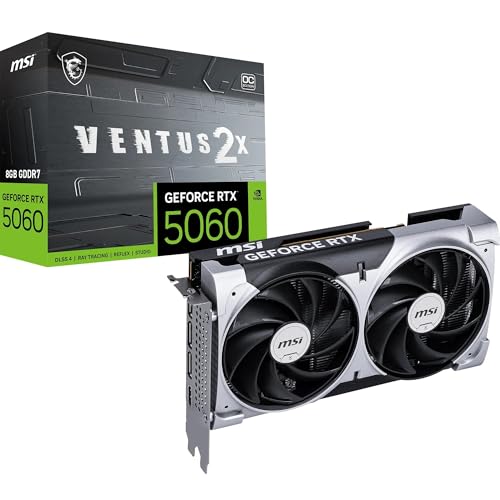
Specs
Chip | RTX 5060 (Blackwell) |
VRAM | 8GB GDDR7 |
Memory bus | 128-bit |
TGP | 145W |
Cooling | Dual-fan, 2-slot (TORX Fan 5.0) |
PCIe | Gen 5.0 |
Outputs | HDMI 2.1b, DisplayPort 2.1b |
Chip
RTX 5060 (Blackwell)
VRAM
8GB GDDR7
Memory bus
128-bit
TGP
145W
Cooling
Dual-fan, 2-slot (TORX Fan 5.0)
PCIe
Gen 5.0
Outputs
HDMI 2.1b, DisplayPort 2.1b
What it does well
The base 5060 is built for one job: clean 1080p gaming without VRAM anxiety creeping into the picture too early. In esports titles like Counter-Strike 2 and Marvel Rivals, the card comfortably clears high refresh targets since neither title leans hard on the 8GB buffer. In heavier AAA games at 1080p high settings, testing from GamersNexus and Tom's Guide both landed the card in solidly playable territory, including a 44 percent jump over the outgoing RTX 4060 in Hogwarts Legacy and a smaller but real gain in Stalker 2. If you are weighing the tier below instead, our RTX 5050 monitor picks map the same frame-rate bands onto panels a cheaper card can fill.
The dual-fan cooler stays quiet under sustained load, and the lower board power (145W) means it pairs with a smaller, cheaper PSU than the step-up card asks for. That matters more than it sounds: a lower-wattage card gives you more flexibility on the rest of the build, especially if the PSU is already spoken for by other upgrade plans.
It also fits the profile of a buyer who upgrades often. If you swap GPUs on a two-to-three-year cycle anyway, chasing every meaningful jump rather than trying to future-proof a single purchase, the base 5060 is the more honest buy: you are not stretching for headroom you will replace before you need it. The card does the job it is built for and gets out of the way. If the card you would be replacing is an RTX 4060, our RTX 5060 vs RTX 4060 upgrade breakdown works through whether the gain pays off at your refresh rate.
What you give up
The tradeoff is the 8GB VRAM buffer, and it is a real limitation, not a marketing footnote. Reports across multiple outlets flag the same pattern: modern, VRAM-heavy titles start to strain an 8GB card well before the GPU core itself runs out of steam. Indiana Jones and the Great Circle is the sharpest example, where the base 5060 cannot hold the High preset at 1080p without dropping settings or disabling path tracing entirely. If your library already includes titles in that category, the VRAM ceiling is worth understanding before you commit.
There is also no real upgrade runway here. If a 1440p monitor is anywhere in your plans over the next two to three years, this card hits its ceiling well before the CPU or the rest of the build does, and you will be shopping for a new GPU sooner than you would with the step-up pick. If 1440p is the actual target, the Arc B580's 12GB is the cheaper way to get there, with its own settings caveats.
None of this means the base card is a bad buy. It means the 8GB buffer is a scoped tradeoff, not a hidden flaw, and the scope is narrower than the marketing around 60-class cards usually admits. Buyers whose libraries stay inside esports, live-service, and last-generation-friendly AAA titles will rarely notice it. Buyers chasing new releases at high settings will notice it within a year or two.
Who it's for
This card fits the buyer with a 1080p 144Hz-or-better monitor whose library skews esports or lighter AAA, and who is not planning to touch the GPU again for three-plus years. If you are not locked into Nvidia specifically, it is also worth cross-shopping AMD's 9060 XT at this price tier before you commit. Our breakdown of whether the RX 9060 XT clears 1440p, or you need the RX 9070 step-up covers that tier in full.
Step-up: MSI Ventus 2X RTX 5060 Ti 16GB

Specs
Chip | RTX 5060 Ti (Blackwell) |
VRAM | 16GB GDDR7 |
Memory bus | 128-bit |
TGP | 180W |
Cooling | Dual-fan, 2-slot (Stormforce fans) |
PCIe | Gen 5.0 |
Outputs | HDMI 2.1b, DisplayPort 2.1b |
Chip
RTX 5060 Ti (Blackwell)
VRAM
16GB GDDR7
Memory bus
128-bit
TGP
180W
Cooling
Dual-fan, 2-slot (Stormforce fans)
PCIe
Gen 5.0
Outputs
HDMI 2.1b, DisplayPort 2.1b
What it does well
The 16GB buffer is the whole story here, and it shows up two ways. First, raw uplift: testing from TechSpot and Tom's Hardware both put the Ti roughly 15 to 25 percent ahead of the base 5060 at 1080p, with the gap widening in games that push VRAM hard. Second, and more important for a sufficiency question, the card just does not hit the same wall. For the full spec-by-spec breakdown against the base card, our RTX 5060 vs 5060 Ti comparison walks through every category that matters.
In Marvel Rivals specifically, testing has the Ti holding close to 120fps even at 1440p Ultra settings, well above what the 8GB card sustains once settings climb. That kind of margin is exactly what you are paying for: not a faster card in the abstract, but a card that does not need to compromise settings to stay smooth.
There's also a stability argument that raw averages tend to hide. A card that runs out of VRAM mid-session doesn't just lose average frame rate, it stutters, its 1% lows collapse, and textures pop in late. The 16GB buffer sidesteps that failure mode entirely in the titles where it shows up, which is a bigger quality-of-life difference than the headline uplift percentage suggests.
What you give up
The Ti costs meaningfully more than the base card for a chip still wired to the same 128-bit memory bus. That matters: this is a 1080p card with extra headroom, not a 1440p card in its own right. If you are purely playing esports at 1080p forever, the extra VRAM is money spent on a problem you will never run into. And if you are seriously considering 1440p as more than a someday plan, it is worth checking how the Ti stacks up against the RTX 5070 before you spend the difference.
Reports across 2026 also suggest street pricing on 50-series 60-class cards has been running hotter than MSRP due to sustained demand, and early-cycle stock has been thin at some retailers. Neither is a reason to skip the card if it genuinely fits your use case, but it is a reason to shop around and compare current listings rather than budgeting off launch-day numbers. If that premium pushes the Ti out of reach, Intel's side of this band is worth a look. We went through whether the Arc B570 is enough for 1080p gaming and found it clears 60 fps in modern titles, with three platform conditions attached.
Who it's for
This is the pick for a buyer whose library leans on VRAM-heavy modern AAA titles at 1080p high or ultra settings, or who is deliberately buying a tier of headroom because a 1440p monitor upgrade is realistically on the table during this card's service life. If that is you, it is worth pairing the decision with a look at monitors built around this tier rather than treating the GPU and the display as separate purchases.
Benchmarks
Coverage on this exact pairing is thinner than what you get on flagship cards, so treat the numbers below as directional rather than a lab-matched chart. In Stalker 2, a UE5 title that leans hard on VRAM and shader compilation, the base 5060 averaged 47fps at 1080p, a modest 9 percent gain over the outgoing RTX 4060. The Ti's 16GB buffer keeps the same title from cliffing the way the 8GB card can once memory pressure builds.
In Hogwarts Legacy, the base 5060 landed at 101fps average at 1080p, 44 percent ahead of the RTX 4060. The Ti's extra VRAM pays off harder in this title once ray tracing and higher texture settings enter the picture: testing on the 8GB versus 16GB split of this same chip found the larger buffer pulling up to 40 percent ahead specifically in VRAM-constrained, ray-tracing-heavy scenes, a gap driven by memory headroom rather than raw shader count. That is the pattern worth understanding before you decide how much VRAM your own settings target needs.
Marvel Rivals tells a similar story from the esports-adjacent side: the base 5060 stays just above 100fps at 1080p, while the Ti holds close to 120fps even at 1440p Ultra, well past what the 8GB card manages once you push settings. And in Indiana Jones and the Great Circle, the gap is not really about frame rate at all: the base 5060 cannot hold the High preset at 1080p without compromise, while the extra VRAM lets the Ti run the same preset intact. If your library skews toward that kind of VRAM-heavy AAA title, that is exactly the scenario the step-up card is built for.
It's worth being direct about a limitation in the data here: independent reviewers haven't published a clean, matched 1080p chart pitting these two specific cards head to head across every game in a mixed basket. What does exist, consistently, is the same shape of result across outlets: a modest raw uplift on the Ti everywhere, and a much larger gap specifically in titles that push past 8GB of VRAM at 1080p high or ultra settings. That pattern, not any single chart, is the basis for the recommendation above.
Does DLSS 4 change the answer at 1080p?
Not much, and the reason is VRAM. Both cards support DLSS 4, including Multi Frame Generation, so either one can push displayed frame rates well past what it renders natively. Upscaling lowers the internal render resolution, but it does not shrink the textures and geometry a game keeps in memory. An 8GB card that runs short on VRAM at native 1080p is still short with DLSS on.
Frame generation widens the gap rather than closing it, because it needs its own slice of VRAM. Reviews comparing the 8GB and 16GB versions of the 5060 Ti found the two cards close in most native tests, with the 8GB card falling behind in DLSS 4 testing. If you plan to lean on frame generation in new AAA releases, that is one more point for the 16GB step-up. For esports and lighter titles, the base 5060 rarely needs it.
Bottom line
If your monitor is 1080p and your library is mostly esports or lighter AAA, buy the base RTX 5060 and put the difference toward a better monitor or more storage. If VRAM-heavy modern AAA titles make up a real chunk of what you play, buy the RTX 5060 Ti 16GB instead. If a 1440p monitor is realistically on your horizon within this card's lifespan, the Ti is also the safer call. For the full framework behind picking a GPU and pairing it with the right display, our guide to choosing a GPU covers the decision in more depth. Most 1080p buyers land on the base card; the exceptions here are specific, not vague.
FAQ
Is the RTX 5060 good enough for 1080p gaming in 2026?
For most buyers, yes. The base 5060 comfortably clears 1080p high refresh esports titles and handles most AAA games at high settings without issue. The catch is VRAM-heavy modern titles, where the 8GB buffer starts to show its age. If your library leans that direction, the step-up 5060 Ti 16GB is worth the extra cost; otherwise the base card does the job.
Is the RTX 5060 Ti worth the extra money at 1080p?
Only in specific situations: a library heavy on VRAM-hungry AAA titles, or a realistic plan to move to a 1440p monitor while you still own this card. Outside those two cases, you are paying for headroom you probably will not use, and the base 5060 is the smarter buy.
Is 8GB of VRAM enough on the RTX 5060 for 1080p?
For esports and most current AAA titles at high settings, yes. But a handful of VRAM-heavy modern titles, Indiana Jones and the Great Circle among them, already push past what an 8GB buffer comfortably handles at 1080p. If your library includes titles like that, the 16GB step-up avoids the problem entirely.
Can the RTX 5060 handle 1080p at high settings and 60fps plus?
In most titles, yes. Testing puts the card well above 60fps at 1080p high settings in games like Hogwarts Legacy and Marvel Rivals, and comfortably past that mark in lighter esports titles. Heavier UE5 titles and VRAM-constrained scenes can dip closer to the 60fps line or force a settings compromise, but the card generally holds up for a 1080p high-refresh target outside the most demanding modern releases.
Should you buy the RTX 5060 now or save for the 5060 Ti 16GB?
If you are not sure your library needs the extra VRAM, buy the base 5060 now rather than waiting. The Ti's advantage is specific, VRAM headroom and a modest raw uplift, not a blanket upgrade, so there is no strong case for delaying a purchase you actually need in order to save for it.
Does the RTX 5060 Ti 16GB make sense if you might move to 1440p later?
Yes, more than most step-up purchases do. The extra VRAM and the roughly 15 to 25 percent raw performance gain give the Ti real runway toward 1440p that the base 8GB card does not have. If a monitor upgrade is a realistic plan rather than a someday idea, buying that headroom now is a reasonable call.
Related Articles

How to Choose a GPU (and a Monitor That Matches)
A buyer's framework for picking a GPU and the monitor that pairs with it. Start with the panel and work the card back.
May 17, 2026

RTX 5060 vs RTX 5060 Ti: FPS in 30 Games at 1080p and 1440p
RTX 5060 vs RTX 5060 Ti 16GB in 30 games: the Ti is about 22% faster at 1440p, and the 8GB card runs short on VRAM. See which one to buy.
Oct 25, 2026

Is 8GB VRAM Enough for Gaming in 2026, or Do You Need 16GB?
Is 8GB VRAM enough for gaming in 2026? It holds at 1080p, cracks at 1440p, and fails at 4K. Here is when 8GB works, when you need 16GB, and what to buy.
Jul 23, 2026

RTX 5060 Ti vs RTX 5070: FPS in 30 Games at 1440p
RTX 5060 Ti vs RTX 5070 in 30 games: the 5070 is about 37% faster at 1440p, the 5060 Ti packs 16GB. See FPS at 1080p, 1440p and 4K.
Oct 24, 2026

Best Gaming Monitors for the RTX 5060 Ti (2026)
Five monitors paired to the RTX 5060 Ti by resolution tier, from 1080p 180Hz to 1440p QD-OLED. Honest answer on whether the 16GB card earns a 1440p panel.
Jun 21, 2026