Affiliate Disclosure: As an Amazon Associate we earn from qualifying purchases. Some links may earn us a commission at no cost to you.

How Much RAM for Escape from Tarkov? 32GB, Not 64GB (2026)
How much RAM for Escape from Tarkov? Buy 32GB. That is the capacity that clears Streets of Tarkov with Discord, a browser and a map site still open, and it holds whether you are on a current AM5 board or still raiding on AM4.
Battlestate lists 64GB in the recommended tier for the 1.0 build. Treat that as a ceiling, not an instruction. What breaks at 16GB is not your frame rate, it is your page file, and that failure has a shape you can recognize before you spend anything.
At a glance
Capacity | Kit | What it does in Tarkov | Buy |
|---|---|---|---|
32 GB DDR5 | Clears Streets with Discord, a browser and a map site resident | ||
32 GB DDR4 | The same verdict on AM4 and LGA 1200 without a platform swap | ||
64 GB DDR5 | Headroom for OBS, overlays and creator work alongside a raid |
32 GB DDR5
- Kit
- What it does in Tarkov
Clears Streets with Discord, a browser and a map site resident
- Buy
32 GB DDR4
- Kit
- What it does in Tarkov
The same verdict on AM4 and LGA 1200 without a platform swap
- Buy
64 GB DDR5
- Kit
- What it does in Tarkov
Headroom for OBS, overlays and creator work alongside a raid
- Buy
Three kits, one verdict. The two 32GB kits are the same recommendation expressed on two platforms, so take the one your board accepts. The 64GB kit is not a better version of that answer. It is a different answer for a different workload, and in this memory market it is a long step to take on a spec sheet's say-so.
How much RAM does Escape from Tarkov actually use?
Community-reported figures at the edge of each reported band. Battlestate publishes no per-map memory numbers.
- Standard maps, game only (top of reported band)12 GB
- Streets of Tarkov, game only (reported floor)16 GB
- Streets plus Discord, browser and overlays30 GB
Standard raids are not the problem. On Customs, Factory and Woods, reported working sets sit in the 8 to 12 GB band with nothing else running. That fits inside 16GB with room left for Windows, which is why so many players insist 16GB is fine. They are right about the maps they play.
Streets of Tarkov is the outlier. It carries far more geometry and far more unique assets than the older locations, and reported usage pushes past the 16GB line on its own. Add Discord, a browser and a map site on a second monitor and the total approaches 32GB. It is the same pattern the general 16GB versus 32GB case describes across a mixed library, compressed into one map.
Carry one caveat into every usage screenshot you read. Tarkov grows its footprint to fill what is installed. Players report the game sitting near 24GB on a 32GB system and near 36GB on a 64GB system. Higher usage after an upgrade is caching, not proof the capacity was needed. For the wider view of how capacity scales across a mixed library, the general guide covers it.
Where each capacity tier lands
Scenario | Reported working set | Verdict | Kit that clears it |
|---|---|---|---|
Customs, Factory or Woods, game only | 8 to 12 GB | 16 GB holds, but Streets sits in the same map rotation | |
Streets of Tarkov, game only | past 16 GB | 16 GB starts paging, 32 GB clears it | |
Streets plus Discord, a browser and a map site | approaching 32 GB | 32 GB is the floor, not the comfort tier | |
Streaming with OBS plus overlays plus a browser stack | past 32 GB | the one case where the step-up is real | |
AM4 or LGA 1200 machine, no platform swap planned | same working set, slower fabric | 32 GB DDR4 clears it without a new board |
Customs, Factory or Woods, game only
- Reported working set
8 to 12 GB
- Verdict
16 GB holds, but Streets sits in the same map rotation
- Kit that clears it
Streets of Tarkov, game only
- Reported working set
past 16 GB
- Verdict
16 GB starts paging, 32 GB clears it
- Kit that clears it
Streets plus Discord, a browser and a map site
- Reported working set
approaching 32 GB
- Verdict
32 GB is the floor, not the comfort tier
- Kit that clears it
Streaming with OBS plus overlays plus a browser stack
- Reported working set
past 32 GB
- Verdict
the one case where the step-up is real
- Kit that clears it
AM4 or LGA 1200 machine, no platform swap planned
- Reported working set
same working set, slower fabric
- Verdict
32 GB DDR4 clears it without a new board
- Kit that clears it
The reason a memory shortfall reads as stutter rather than a lower average is mechanical. Once the working set exceeds physical memory, Windows starts paging to disk while the game is still asking for assets. The frame-time spike lands during a firefight or a loot-heavy push, which is exactly when the map is busiest. Your average barely moves. Your 1% lows fall off a cliff. If spikes survive the capacity fix, the CPU side of Tarkov frame time is the next place to look.
32GB DDR5: the capacity that clears Streets

Specs
Capacity | 32 GB (2x16 GB) |
Speed | DDR5-6000 |
Timings | CL30-38-38-96 |
Voltage | 1.35 V |
Profile | AMD EXPO |
Form factor | U-DIMM, matte black heatspreader |
Part number | F5-6000J3038F16GX2-FX5 |
Capacity
32 GB (2x16 GB)
Speed
DDR5-6000
Timings
CL30-38-38-96
Voltage
1.35 V
Profile
AMD EXPO
Form factor
U-DIMM, matte black heatspreader
Part number
F5-6000J3038F16GX2-FX5
What it does well
This kit does two jobs at once. The 32GB gets you past the Streets ceiling, and 6000 MT/s at CL30 sits on the point where AM5's Infinity Fabric runs 1:1 with the memory clock. That pairing is worth real frames in CPU-bound moments, which Tarkov produces constantly.
Two sticks matter more than the marketing does. A 2x16GB kit puts one load on the memory controller and trains cleanly on almost any AM5 board, where four sticks at the same speed often will not. EXPO is a single toggle in BIOS. If you want to see how it sits against the wider 32GB DDR5 field, the tier is deep even with supply this tight.
What you give up
It is DDR5, so it does nothing for the AM4 and LGA 1200 machines a lot of Tarkov players are still raiding on. Check the board before you click.
CL30 at 6000 is the tightest bin in this family, and it leaves stock more often than the CL36 version sharing almost the same listing title. Confirm the part number reads F5-6000J3038F16GX2-FX5. Because this is a two-stick kit, moving to 64GB later means replacing it rather than filling the empty slots.
Who it's for
You play Streets, your stutter shows up there and nowhere else, and you keep Discord and a browser open on a second screen. Buy the capacity once. Staging it as 16GB now and another 16GB later almost never happens, and mixing kits on AM5 is a separate problem you do not want.
32GB DDR4: the same verdict on an older platform
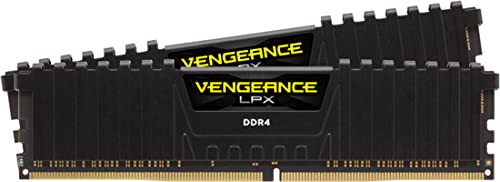
Specs
Capacity | 32 GB (2x16 GB) |
Speed | DDR4-3600 |
Timings | CL18-22-22-42 |
Voltage | 1.35 V |
Profile | Intel XMP 2.0 |
Form factor | Low-profile U-DIMM |
Part number | CMK32GX4M2D3600C18 |
Capacity
32 GB (2x16 GB)
Speed
DDR4-3600
Timings
CL18-22-22-42
Voltage
1.35 V
Profile
Intel XMP 2.0
Form factor
Low-profile U-DIMM
Part number
CMK32GX4M2D3600C18
What it does well
The capacity question does not care which socket you are on, and neither should the fix. Doubling an AM4 or LGA 1200 machine from 16GB to 32GB removes the paging behaviour without touching the board, the cooler or the CPU.
3600 CL18 is the practical target on Ryzen 3000 and 5000, where the fabric holds 1:1 at 1800 MHz without a memory-controller lottery. The low-profile heatspreader also clears tower coolers that fight taller kits, which matters in the cramped older builds this kit tends to land in.
What you give up
DDR4 is a terminal platform. This kit will not follow you to a new board, so if a rebuild is already on the calendar, put the money toward the DDR5 kit instead.
CL18 is a mid bin rather than a sharp one, and 3600 CL16 kits exist for buyers chasing the last few points of latency. On Intel 10th and 11th gen the 3600 profile sometimes needs a manual gear-1 nudge to hold. Vengeance LPX also ships in a long list of speed and timing bins under near-identical listing titles, so match CMK32GX4M2D3600C18 exactly.
Who it's for
You are on a 5600X, a 5800X3D or a 10700K, you have 16GB installed, and Streets is where the game comes apart. This is the cheapest honest fix. If raids still feel rough afterward, the display side is usually next, and GPU picks for high-FPS raids is where that conversation starts.
64GB DDR5: when the step-up is real

Specs
Capacity | 64 GB (2x32 GB) |
Speed | DDR5-6000 |
Timings | CL30-40-40-96 |
Voltage | 1.40 V |
Profile | Intel XMP 3.0 |
Form factor | Low-profile U-DIMM |
Part number | F5-6000J3040G32GX2-RS5K |
Capacity
64 GB (2x32 GB)
Speed
DDR5-6000
Timings
CL30-40-40-96
Voltage
1.40 V
Profile
Intel XMP 3.0
Form factor
Low-profile U-DIMM
Part number
F5-6000J3040G32GX2-RS5K
What it does well
There is a real version of the 64GB case, and it is not the spec sheet. If you encode locally with OBS while you raid, run overlays, and keep a browser stack alive on a second monitor, the combined working set genuinely pushes past 32GB. This is where the paging stops for good.
2x32GB keeps the two-DIMM layout that trains cleanly, so the capacity arrives without dropping into the four-stick speed cliff. The sticks are low profile, so they clear most tower coolers. The same kit covers editing and rendering work outside the game, which is the only way the cost starts to make sense.
What you give up
For gaming alone, nothing measurable. Tarkov will cache into the extra capacity and report a bigger number, and that number is not evidence you needed it.
Cost is the real counterpoint. In the 2026 memory market a 64GB DDR5 kit can outprice the graphics card sitting in the same build, which makes it the largest line item in an upgrade that was supposed to fix stutter. If you are weighing that against sitting out the market, whether to buy memory into this market at all is the piece to read first. The CL30-40 secondaries at 1.40 V are also looser than the 32GB CL30 kits.
Who it's for
Streamers, multi-boxers, and anyone whose machine does creator work between raids. If that is not you, the 32GB kit is not a compromise. It is the correct answer.
Bottom line
If you play Streets on a current board, buy the G.Skill Flare X5 32GB DDR5-6000. If you are on AM4 or LGA 1200 and not rebuilding, buy the Corsair Vengeance LPX 32GB DDR4-3600 and stop there. If you stream while you raid or edit on the same machine, the G.Skill Ripjaws S5 64GB DDR5-6000 is the one case where 64GB earns its place. Everyone else can ignore the recommended spec line. For the wider capacity and drive picture, the memory and storage pillar has the framework.
FAQ
Is 16GB enough for Escape from Tarkov?
For Customs, Factory and Woods with nothing else running, yes. Reported working sets on those maps sit in the 8 to 12 GB band, which fits comfortably. Streets of Tarkov is where 16GB stops holding: reported usage pushes past that line on its own, and adding Discord or a browser makes it worse. Streets is in everyone's rotation, so treat 16GB as the tier you are upgrading out of rather than the tier you buy into.
Does Escape from Tarkov really need 64GB of RAM?
Not for gaming. Battlestate lists 64GB in the recommended tier for the 1.0 build, but the reported working set even on Streets with background applications running approaches 32GB rather than exceeding it. The 64GB figure buys headroom the game will cache into and little else. It becomes a real recommendation only when you stack a local OBS encode, overlays and a browser session on top of the raid, or when the same machine does creator work.
Why does Tarkov stutter on Streets of Tarkov?
If the stutter starts on Streets and nowhere else, memory pressure is the first suspect. Once the working set exceeds installed capacity, Windows pages to disk mid-raid, and the resulting frame-time spikes land during the busiest moments on the map. Average frame rate barely moves, so a frame counter will not show it. Your 1% lows will. Storage speed and CPU frame time can produce similar symptoms, so rule out capacity first because it is the cheapest thing to test.
How much RAM does Tarkov actually use?
Community reports put standard maps in the 8 to 12 GB band, Streets past 16GB on its own, and Streets with Discord, a browser and overlays approaching 32GB. Those are bands rather than measurements, because Battlestate publishes no per-map memory figures. The complicating detail is that the game scales its footprint with what is installed: players report roughly 24GB in use on a 32GB system and roughly 36GB on a 64GB system. Read usage screenshots with that in mind.
Does faster RAM help in Escape from Tarkov?
Speed helps, capacity decides. On AM5, DDR5-6000 at CL30 is the point where the Infinity Fabric runs 1:1 with the memory clock, and Tarkov spends enough time CPU-bound to feel it. Pushing beyond that, to 7200 and up, buys very little for the cost. On AM4, 3600 with an 1800 MHz fabric is the equivalent target. Fix capacity first. A fast 16GB kit still pages on Streets, and no amount of MT/s solves that.
Should I upgrade RAM or my SSD first for Tarkov?
RAM, if you are still on 16GB and playing Streets. Paging is what turns a capacity shortfall into stutter, and a faster drive only makes the paging less painful rather than unnecessary. Once you are at 32GB, a modern NVMe drive is the better next spend, mostly for raid load times and map streaming. Choosing between the two on a tight budget, the capacity fix removes a failure mode while the drive upgrade removes a wait.
Related Articles

Is 16GB RAM Enough for Gaming in 2026, or Do You Need 32GB?
Is 16GB enough for gaming in 2026? For most 1080p players, yes. Here is where 32GB is worth the upgrade: 1% lows, streaming, mods, and heavy multitasking.
Aug 19, 2026

Best 32GB DDR5 Kits for Gaming (2026): AM5 vs LGA 1851 Picks by Platform
The best 32GB DDR5 kit for gaming depends on your CPU's memory controller, not the kit's spec sheet. Five picks split by AM5 EXPO 6000 vs LGA 1851 XMP 6400.
May 21, 2026

Best CPUs for Escape from Tarkov (2026): Streets-Proof Picks
The best CPU for Escape from Tarkov is the one that holds 1% lows on Streets. Five picks by tier, from a cheap AM4 drop-in up to the 9800X3D cache king.
Aug 26, 2026

Best GPUs for Escape from Tarkov (2026): Picks for High-FPS Raids
The best GPUs for Escape from Tarkov in 2026, ranked by resolution tier. Covers GPU selection, VRAM requirements, and the CPU bottleneck threshold that drives EFT FPS.
Jun 3, 2026

How to Choose RAM and Storage
A builder's framework for RAM and storage: match the platform, buy capacity over speed, and put your money in the right SSD tier.
Jun 29, 2026