Affiliate Disclosure: As an Amazon Associate we earn from qualifying purchases. Some links may earn us a commission at no cost to you.

Should You Buy RAM Now, or Wait Out the 2026 Crisis?
If you need a working PC right now, buy your RAM and stop watching the price charts. For a new build or a dead kit, memory is a small slice of the bill, and waiting for relief that is not coming soon just leaves you without a machine.
There is one situation where holding makes sense, and we will get to it. Prices climbed hard through early 2026 and are still rising, just slower. The honest read is that real relief is not on the table until late 2027. So the question is not when prices drop. It is which situation you are in, and the right capacity floor for the work you do.
Which situation are you in?
Find your row. The verdict follows from the situation you are in, not from where the price line might go next.
Your situation | Verdict | What to do |
|---|---|---|
Your kit just died, or you have no working PC | Buy now | Get the capacity floor for your use. A dead machine costs you more than the markup ever will. |
You are building or buying a whole new PC now | Buy now | RAM is a small slice of the total build. Do not hold the whole machine hostage to one part's price. |
You want to jump from 16GB to 32GB for headroom | Wait if you can | Your current kit still runs. This is the one case where timing the purchase is defensible. |
You are thinking of stockpiling before prices climb | Sit it out | Speculating on a further spike is a losing bet at these levels. See what would have to change below. |
Your kit just died, or you have no working PC
- Verdict
Buy now
- What to do
Get the capacity floor for your use. A dead machine costs you more than the markup ever will.
You are building or buying a whole new PC now
- Verdict
Buy now
- What to do
RAM is a small slice of the total build. Do not hold the whole machine hostage to one part's price.
You want to jump from 16GB to 32GB for headroom
- Verdict
Wait if you can
- What to do
Your current kit still runs. This is the one case where timing the purchase is defensible.
You are thinking of stockpiling before prices climb
- Verdict
Sit it out
- What to do
Speculating on a further spike is a losing bet at these levels. See what would have to change below.
How to read the 2026 memory market
The run-up has a cause, and it is not the crypto story from a few years ago. The memory makers pivoted wafer capacity toward high-bandwidth memory for AI accelerators, which pulled supply out of the standard DDR5 pool while demand stayed strong. That squeeze is what pushed DRAM up sharply through the first half of 2026.
The one piece of good news is a change in slope. Contract prices in the back half of 2026 are still rising, but the rate of increase has cooled from the early-year spike into the mid-teens percent range quarter over quarter. That is the first deceleration in a while. It is not a drop, and it is part of a bigger question about whether 2026 is a rough year to build at all.
What would have to happen for prices to fall
For prices to come down in a way you would feel, one of two things has to give. Either the memory makers add real wafer capacity back to the standard DRAM pool, which takes quarters to plan and build, or AI demand for high-bandwidth memory cools enough to free that capacity on its own. Neither looks likely on a short horizon.
That is why stockpiling is a bet, not a plan. You would be paying today's inflated prices to hedge against prices going a little higher, on kits that sit in a drawer burning their warranty clock while your money is tied up. Buy what your machine needs now. Do not buy what you are guessing it might need later.
The capacity floors, and the kits worth owning
Once you have decided to buy, the only question left is how much. Capacity is where people get it wrong in both directions. Below are the floors that hold up for gaming, streaming, and creative work, each with a specific kit that clears it without overpaying for speed you will never feel. If you want the deeper framework behind these calls, our guide to choosing memory and storage walks the whole cluster.
The gaming floor: 32GB DDR5-6000 CL30
Specs
Capacity | 32GB (2 x 16GB) |
Speed | DDR5-6000 |
Timing | CL30-38-38-96 |
Voltage | 1.35V |
Profile | AMD EXPO and Intel XMP |
Form factor | 288-pin U-DIMM |
Capacity
32GB (2 x 16GB)
Speed
DDR5-6000
Timing
CL30-38-38-96
Voltage
1.35V
Profile
AMD EXPO and Intel XMP
Form factor
288-pin U-DIMM
For a gaming machine, 32GB is the floor in 2026, full stop. Modern titles routinely use 9 to 12GB on their own, and once you add a browser with a stack of tabs, Discord, and a launcher or two, 16GB starts swapping to disk and you feel it as stutter. If you are torn between the two capacities, our 16GB versus 32GB breakdown settles it with the workloads that push past 16 on their own.
The G.Skill Flare X5 32GB at DDR5-6000 CL30 is the AM5 default. It runs in step with the Infinity Fabric, so you get the real gaming uplift reviewers measure over slower 5600 kits, not just a bigger number on the box. Where it gives up ground: both slots are filled with 16GB sticks, so there is no clean path to 64GB later without replacing the kit. That is fine for a pure gaming box, where 32GB is plenty.
One gotcha to flag. The EXPO profile does not enable itself. You have to switch it on in BIOS, or the kit runs at a slower default speed and quietly leaves performance on the table. This is the kit for anyone building or buying an AM5 gaming rig now, or replacing a 16GB kit that finally tapped out. Buy it once, at 32GB, and be done.
The streaming and multitasking floor: 32GB with headroom
Specs
Capacity | 32GB (2 x 16GB) |
Speed | DDR5-6000 |
Timing | CL30-36-36-76 |
Voltage | 1.40V |
Profile | Intel XMP 3.0 |
Form factor | 288-pin U-DIMM |
Capacity
32GB (2 x 16GB)
Speed
DDR5-6000
Timing
CL30-36-36-76
Voltage
1.40V
Profile
Intel XMP 3.0
Form factor
288-pin U-DIMM
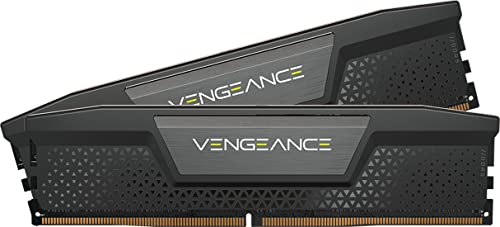
If you play and stream at the same time, 32GB is still the floor, but now it is working harder. A game, OBS with a couple of scenes, a browser full of tabs, Discord, and your alerts and overlays all sit in memory at once. 16GB cannot hold that stack without paging, and paging mid-stream shows up as dropped frames for your viewers. The Corsair Vengeance 32GB kit at DDR5-6000 CL30 gives you that headroom with a low-profile heatspreader that clears most tower coolers, which matters when the case is already packed.
What you give up is the next tier of headroom. At 32GB you are covered for streaming, but not for streaming plus heavy editing or rendering in the same session. If your workflow stacks a capture, an editor, and a game all at once, that is the line where you should look at 64GB instead. For everyone who just plays and streams, 32GB is the right call, and the extra capacity would sit unused.
The creator floor: 64GB DDR5

Specs
Capacity | 64GB (2 x 32GB) |
Speed | DDR5-6000 |
Timing | CL30-40-40-96 |
Voltage | 1.40V |
Profile | AMD EXPO and Intel XMP |
Form factor | 288-pin U-DIMM |
Capacity
64GB (2 x 32GB)
Speed
DDR5-6000
Timing
CL30-40-40-96
Voltage
1.40V
Profile
AMD EXPO and Intel XMP
Form factor
288-pin U-DIMM
Creative work is where capacity earns its keep. A 4K timeline with a few effect layers, a large Blender scene, a many-layer Photoshop file, a local AI model, or a couple of virtual machines will all push a 32GB machine into paging, and paging to an SSD is far slower than staying in memory. The Corsair Vengeance 64GB kit puts that ceiling out of reach for most creator workloads, and it does it in two 32GB sticks rather than four, which keeps the memory controller at full speed. Four-stick DDR5 configurations often force a speed drop.
The honest trade is cost. At 64GB you pay the memory-crisis premium across twice the capacity, and a pure gamer sees nothing for the extra outlay. This is a workload buy. If the machine's job is frames, stay at 32GB. If its job is timelines, renders, models, or VMs, the 64GB floor is the one that stops the work from waiting on the disk. Confirm your board supports 64GB at 6000 in two-DIMM mode first, since a few older boards want a BIOS update. Storage is living through the same squeeze on the same timeline, which is why we made a separate call on whether to buy an SSD now or wait out the NAND crunch.
Still on DDR4? The AM4 and older-Intel floor
Specs
Capacity | 32GB (2 x 16GB) |
Speed | DDR4-3600 |
Timing | CL18 |
Voltage | 1.35V |
Profile | Intel XMP 2.0 |
Form factor | 288-pin U-DIMM |
Capacity
32GB (2 x 16GB)
Speed
DDR4-3600
Timing
CL18
Voltage
1.35V
Profile
Intel XMP 2.0
Form factor
288-pin U-DIMM
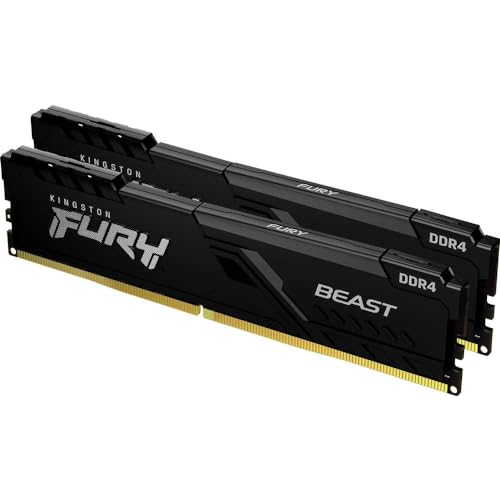
Not everyone is on DDR5. If you are running an AM4 Ryzen 5000 chip or an older Intel platform, the smart move is different: do not buy DDR5 for a board that cannot use it. DDR4-3600 at CL18 is the sweet spot for those platforms, and our DDR4 gaming kit picks go deeper on the options.
The Kingston Fury Beast 32GB kit lets a Ryzen 5000 box run its Infinity Fabric where it wants to sit, and doubling a tired 16GB machine to 32GB is the single cheapest way to buy an older rig another two years. The catch is that this is a dead-end platform. Money you put into DDR4 does not carry over to your next machine, which will be DDR5. Buy it to extend what you already have, not as an investment.
Confirm the obvious before you order. DDR4 and DDR5 are not interchangeable, and the sticks do not even fit the wrong board. If you are weighing a full platform jump instead of a memory top-up, that is a different decision, and our take on whether it is worth upgrading to DDR5 covers it.
Specs at a glance
Kit | Capacity | Speed and timing | Platform | Best for |
|---|---|---|---|---|
32GB (2 x 16GB) | DDR5-6000 CL30 | AM5 and DDR5 Intel | Gaming | |
32GB (2 x 16GB) | DDR5-6000 CL30 | AM5 and Intel | Streaming and multitasking | |
64GB (2 x 32GB) | DDR5-6000 CL30 | AM5 and Intel | Creator and workstation | |
32GB (2 x 16GB) | DDR4-3600 CL18 | AM4 and older Intel | Older-platform upgrade |
- Capacity
32GB (2 x 16GB)
- Speed and timing
DDR5-6000 CL30
- Platform
AM5 and DDR5 Intel
- Best for
Gaming
- Capacity
32GB (2 x 16GB)
- Speed and timing
DDR5-6000 CL30
- Platform
AM5 and Intel
- Best for
Streaming and multitasking
- Capacity
64GB (2 x 32GB)
- Speed and timing
DDR5-6000 CL30
- Platform
AM5 and Intel
- Best for
Creator and workstation
- Capacity
32GB (2 x 16GB)
- Speed and timing
DDR4-3600 CL18
- Platform
AM4 and older Intel
- Best for
Older-platform upgrade
Bottom line
If you need a machine now, buy the floor for your use and move on. For gaming, that is a 32GB DDR5-6000 CL30 kit. For streaming, the same 32GB with headroom to spare. For creative work, step up to 64GB. If you are still on DDR4, a 32GB DDR4-3600 kit extends the rig you have without throwing money at a dead-end platform.
The only time to wait is when your current kit still works and you are eyeing a jump from 16GB to 32GB purely for headroom. That upgrade can sit until prices ease. Everything else, buy now. If you want more gaming-kit options at the 32GB floor, our best DDR5 gaming RAM guide has the shortlist.
FAQ
Will RAM prices actually come down in 2026?
Probably not in a way you will feel this year. Contract prices in late 2026 are still rising, just more slowly than they did early in the year. The surge is losing steam, but a real drop needs either new manufacturing capacity or AI demand cooling, and neither is a short-horizon event. Most forecasts do not see meaningful relief before late 2027. Plan around today's prices rather than a rebound that keeps slipping further out.
Is 16GB still enough for gaming in 2026?
For a dedicated gaming box running one game at a time, 16GB can technically work, but it is the past floor, not the current one. Modern titles use 9 to 12GB on their own, and the moment you add a browser, Discord, and a launcher, 16GB starts paging to disk and you feel it as stutter. 32GB is the floor now. For the long version, our guide on how much RAM you need for gaming breaks it down by workload.
Should I buy 32GB now or wait and add another 16GB later?
Buy 32GB now, in a matched two-stick kit. Adding a second kit later is the plan that sounds thrifty and almost never works out. Mixing kits invites instability, matched timings are not guaranteed across separate purchases, and on AM5 populating all four slots can force a lower speed. You also have no idea what a 16GB kit will cost when you finally go looking. One 32GB kit, bought once, is the clean answer.
I am still on DDR4. Is it worth buying DDR5 RAM now?
Only if you are also changing platforms. DDR4 and DDR5 are not interchangeable and do not fit the same boards, so DDR5 does nothing for an AM4 or older Intel machine. If you are staying on your current platform, a 32GB DDR4-3600 kit is the right upgrade and the cheapest way to add life. If you are already planning a new CPU and motherboard, budget for DDR5 as part of that build rather than buying it early.
How much RAM do I need to stream and game at the same time?
32GB. A game plus OBS plus a browser plus Discord plus your overlays all live in memory at once, and 16GB cannot hold that stack without paging, which viewers see as dropped frames. 32GB gives you comfortable headroom for a play-and-stream setup. You only need to look at 64GB if you also run heavy editing or rendering in the same session as the stream.
Are DDR5-6000 CL30 kits worth it over cheaper 5600 kits right now?
On AM5, yes. DDR5-6000 at CL30 runs 1:1 with Ryzen's Infinity Fabric, and reviewers consistently measure a real single-digit gaming uplift over DDR5-5600 in CPU-bound titles. The price gap between the two is usually small, and it buys more real performance than a lot of pricier upgrades do. Where it does not matter is very high resolutions where the GPU is the limit, or casual libraries that are not CPU-bound. For most AM5 gaming builds, 6000 CL30 is the floor worth hitting.
Related Articles

How to Choose RAM and Storage
A builder's framework for RAM and storage: match the platform, buy capacity over speed, and put your money in the right SSD tier.
Jun 29, 2026

How Much RAM Do You Need for Gaming in 2026? (Guide)
How much RAM do you need for gaming in 2026? 16GB still holds up for esports, but 32GB is the real sweet spot for modern AAA. Pick the right kit by use case.
Jun 28, 2026

Is 16GB RAM Enough for Gaming in 2026? 1080p, 1440p and 4K
Is 16GB RAM enough for gaming in 2026? Yes at 1080p or 1440p with few apps open. Add Discord, OBS or a browser behind the game and 32GB stops the stutter.
Oct 14, 2026

Best 32GB DDR5 RAM for Gaming (2026): 5 AM5 & Intel Picks
The best 32GB DDR5 RAM for gaming: 5 picks, matched to your CPU. AM5 wants EXPO 6000 CL30, LGA 1851 wants XMP 6400 CL32. Pick by platform, not spec sheet.
Sep 7, 2026

Best DDR5 RAM for Gaming 2026: 5 CL30 Kits for AM5 + Intel
The best DDR5 RAM for gaming in 2026: five DDR5-6000 CL30 kits ranked for AM5 and Intel, plus EXPO vs XMP setup and whether 32GB or 64GB fits your build.
Aug 17, 2026