Affiliate Disclosure: As an Amazon Associate we earn from qualifying purchases. Some links may earn us a commission at no cost to you.

How Much RAM for Microsoft Flight Simulator 2024 (2026)
Microsoft lists 64 GB as the ideal spec for Flight Simulator 2024, and that number has pushed a lot of people into a purchase they did not need. Here is the short answer to how much RAM you need: 32 GB of fast DDR5 clears the sim for most pilots, because measured total system RAM usage while it runs does not go much past 30 GB no matter how much you install.
64 GB is a headroom buy, not a capacity buy. It is the right call if you fly study-level aircraft, load heavy add-on scenery, fly in VR, or stream while you fly. If none of that is you, put the difference toward a better graphics card instead.
Quick verdict
A 32 GB DDR5-6000 CL30 kit is the answer for the majority of sim pilots, and the Corsair Vengeance RGB DDR5 32GB is the cleanest version of it: one EXPO or XMP toggle lands the speed band the sim is measurably sensitive to, and two DIMMs is the configuration AM5 trains without a fight.

Verdict on Microsoft Flight Simulator 2024's official RAM tiers
Microsoft's tier | What Microsoft lists | What it means for you |
|---|---|---|
Minimum | 16 GB | The sim launches and flies, but you are under the recommended floor before a single add-on loads |
Recommended | 32 GB | Covers the sim's measured ceiling with normal background apps resident |
Ideal | 64 GB | Headroom so the sim keeps its full allocation with add-ons, VR, or a stream beside it |
Minimum
- What Microsoft lists
16 GB
- What it means for you
The sim launches and flies, but you are under the recommended floor before a single add-on loads
Recommended
- What Microsoft lists
32 GB
- What it means for you
Covers the sim's measured ceiling with normal background apps resident
Ideal
- What Microsoft lists
64 GB
- What it means for you
Headroom so the sim keeps its full allocation with add-ons, VR, or a stream beside it
At a glance
Kit | Capacity and speed | Who it is for | Buy |
|---|---|---|---|
32 GB (2x16 GB), DDR5-6000 CL30 | Default and stock-plus aircraft, flat screen, browser open | ||
64 GB (2x32 GB), DDR5-6000 CL30 | Study-level aircraft, heavy add-on scenery, VR, or streaming | ||
32 GB (2x16 GB), DDR4-3600 CL18 | AM4 and DDR4 Intel rigs still running 16 GB |
- Capacity and speed
32 GB (2x16 GB), DDR5-6000 CL30
- Who it is for
Default and stock-plus aircraft, flat screen, browser open
- Buy
- Capacity and speed
64 GB (2x32 GB), DDR5-6000 CL30
- Who it is for
Study-level aircraft, heavy add-on scenery, VR, or streaming
- Buy
- Capacity and speed
32 GB (2x16 GB), DDR4-3600 CL18
- Who it is for
AM4 and DDR4 Intel rigs still running 16 GB
- Buy
Verdict by how you fly
How you fly | What happens in the air | Our call |
|---|---|---|
Default and stock-plus aircraft, stock scenery, flat screen | The sim sits inside its own ceiling with room to spare | |
Study-level aircraft plus heavy add-on scenery | Add-ons live alongside the sim and eat the slack 32 GB leaves | |
VR | The runtime and compositor stay resident for the whole flight, on top of the sim | |
Streaming or a second monitor with charts and a browser | Encoder and browser tabs compete for the headroom Microsoft reserved | |
Still on AM4 or DDR4 Intel with 16 GB | Below the recommended tier, so capacity is the bottleneck rather than speed |
Default and stock-plus aircraft, stock scenery, flat screen
- What happens in the air
The sim sits inside its own ceiling with room to spare
- Our call
Study-level aircraft plus heavy add-on scenery
- What happens in the air
Add-ons live alongside the sim and eat the slack 32 GB leaves
- Our call
VR
- What happens in the air
The runtime and compositor stay resident for the whole flight, on top of the sim
- Our call
Streaming or a second monitor with charts and a browser
- What happens in the air
Encoder and browser tabs compete for the headroom Microsoft reserved
- Our call
Still on AM4 or DDR4 Intel with 16 GB
- What happens in the air
Below the recommended tier, so capacity is the bottleneck rather than speed
- Our call
How we picked
The starting point is the gap between what Microsoft publishes and what the sim does in practice. The official tiers are 16 GB minimum, 32 GB recommended, and 64 GB ideal. Measured behaviour is flatter than that: total system RAM usage while the sim runs does not exceed roughly 30 GB regardless of installed capacity. Microsoft's own framing closes the loop, describing the ideal tier as the capacity that keeps 32 GB available to the sim while everything else you run stays resident.
So the extra capacity buys smoothness, not headroom the sim will fill. PC Gamer's testing found roughly 31 percent better 1% lows on a 96 GB configuration than on 32 GB, with averages moving much less. The mechanism is the terrain pre-cache. Their peak streaming bandwidth fell from 25 Mbps on a 32 GB system to 5 Mbps on a 64 GB one, which means more of the world was already sitting in memory instead of arriving over the wire mid-flight.
Speed matters here more than it does in most games. The same testing showed a notable drop moving from 6000 MT/s to 4800 MT/s, which is why both DDR5 kits below are 6000 CL30 rather than a cheaper 5600 part. Capacity still wins the tiebreak: 32 GB at 6000 beats 16 GB at 6400 every time, and the speed argument only starts once you are over the capacity line.
Enough for most sim pilots: Corsair Vengeance RGB DDR5 32GB
Specs
Capacity | 32 GB (2x16 GB) |
Speed | DDR5-6000 |
Timings | CL30-36-36-76 |
Voltage | 1.40 V |
Profiles | AMD EXPO, Intel XMP 3.0 |
Module height | 44 mm |
Platform | AM5, LGA1851 |
Capacity
32 GB (2x16 GB)
Speed
DDR5-6000
Timings
CL30-36-36-76
Voltage
1.40 V
Profiles
AMD EXPO, Intel XMP 3.0
Module height
44 mm
Platform
AM5, LGA1851
What it does well
This kit lands exactly where the sim wants to be. DDR5-6000 at CL30 is the band the testing flags as load-bearing, and on AM5 it is also the band the memory controller runs at a 1:1 ratio without manual tuning. Set EXPO in the BIOS, reboot, done.
Two DIMMs rather than four is the other quiet win. A 2x16 kit gives the controller the easiest possible job, which matters on a platform where four-stick configurations routinely refuse to train at their rated speed.
What you give up
The RGB heat spreader stands 44 mm tall. Buyers have flagged clearance fights with wide tower air coolers, so measure before you order if you run something large over the socket. The low-profile alternative in the same family is the safer call in a tight case.
32 GB is enough, not generous. Load a study-level airliner, a payware airport, and a browser full of charts at the same time and you are working the top of the pool. Watch the Off Screen Terrain Pre-Caching slider in particular: it is the setting that decides how hard the sim leans on memory, and community reports flag Ultra as a stutter source on 32 GB systems. There is also no upgrade path here, because a 2x16 kit goes to 64 GB by being replaced rather than extended.
Who it's for
You fly default and stock-plus aircraft over stock or photogrammetry scenery, on a flat screen at 1080p or 1440p, with a browser and a chart app open beside the sim. That is most of the people asking this question, and this is the kit for them.
The step-up for add-ons and VR: Corsair Vengeance DDR5 64GB

Specs
Capacity | 64 GB (2x32 GB) |
Speed | DDR5-6000 |
Timings | CL30-36-36-76 |
Voltage | 1.40 V |
Profiles | AMD EXPO, Intel XMP 3.0 |
Module height | 34 mm |
Platform | AM5, LGA1851 |
Capacity
64 GB (2x32 GB)
Speed
DDR5-6000
Timings
CL30-36-36-76
Voltage
1.40 V
Profiles
AMD EXPO, Intel XMP 3.0
Module height
34 mm
Platform
AM5, LGA1851
What it does well
This is the tier Microsoft described. It keeps a full 32 GB available to the sim while your add-on manager, browser, voice chat, and VR runtime all stay loaded, which is the whole point of the ideal spec.
The payoff shows up in the numbers that describe smoothness rather than speed. Better 1% lows, and a large drop in live streaming bandwidth because more of the world is cached locally. Over dense photogrammetry cities that is the difference between a clean approach and a hitch on short final.
What you give up
Dual-rank 2x32 modules are harder to train at 6000 CL30 than 2x16. Plan on a BIOS update before the kit arrives, and be ready to accept a slightly looser profile if your board is stubborn. Buy it as a matched 2x32 kit, too. Adding a second 2x16 kit to the sticks you already own fills all four slots, and four-DIMM DDR5 rarely trains at 6000 on any board.
It also costs materially more at 2026 memory prices, and it will not make your average frame rate jump. The sim still refuses to report much past 30 GB in use. If you were hoping to see a bigger number in the overlay, this is not the upgrade that delivers it.
Who it's for
Study-level aircraft, payware scenery libraries, VR, or flying with a stream running. In VR especially, be honest about which wall you hit first: reports point at VRAM at least as often as system memory, and a 12 GB card at high terrain detail breaks down no matter what is in the DIMM slots.
The DDR4 holdout: Corsair Vengeance LPX DDR4 32GB
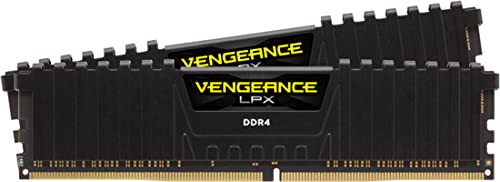
Specs
Capacity | 32 GB (2x16 GB) |
Speed | DDR4-3600 |
Timings | CL18-22-22-42 |
Voltage | 1.35 V |
Profiles | Intel XMP 2.0 |
Module height | 34 mm |
Platform | AM4, LGA1200, DDR4 LGA1700 |
Capacity
32 GB (2x16 GB)
Speed
DDR4-3600
Timings
CL18-22-22-42
Voltage
1.35 V
Profiles
Intel XMP 2.0
Module height
34 mm
Platform
AM4, LGA1200, DDR4 LGA1700
What it does well
If you are on a 5800X3D or a 10700K with 16 GB, this is the cheapest real fix available to you. Doubling capacity lifts the machine over the recommended tier for the price of two sticks rather than a board, a CPU, and a new kit.
DDR4-3600 is the right speed to buy on AM4, because it keeps the Infinity Fabric at a 1:1 ratio. The low-profile spreader also clears tower coolers, which removes the one clearance question the RGB kits raise.
What you give up
DDR4 bandwidth sits well below DDR5-6000, and this sim is one of the few that notices. You clear the capacity gate without matching what the headline configurations do, and no amount of tuning closes that gap.
There is also no route onward. Most AM4 boards will not hold four DIMMs at 3600, so 64 GB is effectively off the table, and you are spending money on a platform with nothing left in front of it. Treat this as buying two more good years, not an upgrade.
Who it's for
Anyone still on 16 GB with a capable DDR4 CPU who wants the stuttering fixed this month instead of planning a rebuild. Fix the memory now, move platform when the GPU forces the issue.
Bottom line
If you fly default aircraft over stock scenery, buy 32 GB of DDR5-6000 CL30 and stop reading. If you fly study-level airliners, payware scenery, VR, or with a stream running, buy 64 GB and treat it as a smoothness purchase. If you are on DDR4 with 16 GB, double the capacity now and leave the platform question for later.
Nobody needs 96 GB. The sim will not use it, and the returns past 64 GB are thin enough that the money belongs in a GPU or an NVMe drive. Capacity first, then speed, then everything else.
FAQ
Does MSFS 2024 actually use more than 32GB of RAM?
No. Measured total system RAM usage while the sim runs does not exceed roughly 30 GB regardless of how much you have installed. Microsoft has said the same thing in different words: the 64 GB ideal spec exists so the sim keeps about 32 GB available to itself while your browser, chart app, and voice chat stay resident. If you install 64 GB expecting the sim to fill it, Task Manager will disappoint you. The benefit arrives as fewer stalls, not a bigger number.
Is 16GB of RAM enough for Flight Simulator 2024?
It is Microsoft's stated minimum, so the sim launches and flies. It is not enough for a good experience. At 16 GB you are already under the sim's own working ceiling before a single add-on, browser tab, or chart app loads, and that is where the long loads and the stutter come from. If you are on 16 GB today, adding capacity is the cheapest meaningful upgrade available to you, and it matters more than moving to a faster kit at the same size.
Does more RAM improve MSFS 2024 frame rates or just stutter?
Mostly the stutter, and that is the part you feel. PC Gamer measured roughly 31 percent better 1% lows moving from a 32 GB configuration to a 96 GB one, while average frame rates moved far less. The mechanism is the terrain pre-cache: more memory means more scenery held locally, which is why their peak streaming bandwidth fell from 25 Mbps on 32 GB to 5 Mbps on 64 GB. Less live streaming means fewer hitches over dense terrain.
Do you need 64GB for MSFS 2024 in VR?
VR is the clearest case for stepping up. The runtime and compositor stay resident for the whole flight on top of the sim itself, so the headroom that 32 GB leaves gets consumed before you touch add-on scenery. Be honest about which wall you hit first, though. VR reports point at video memory at least as often as system memory, and a 12 GB card running high terrain detail will break down no matter how much system RAM is installed.
Does RAM speed matter for MSFS 2024?
Yes, more than it does in most games. Testing found a notable performance drop moving the same system from 6000 MT/s down to 4800 MT/s. That is why both DDR5 kits here are 6000 CL30 rather than a cheaper 5600 part, and on AM5 that band is also where the memory controller runs cleanly. Capacity still comes first. Choosing between 32 GB at 6000 and 16 GB at 6400, take the capacity every time.
How much SSD space does MSFS 2024 need?
Microsoft's most recent figure puts the install at about 30 GB, down from the 50 GB originally published, because the sim streams most of its world rather than shipping it. The ideal spec asks for roughly 50 GB of additional SSD space on top, which is where the local cache lives. Put both on an NVMe drive. A sim that streams this aggressively punishes a slow drive the same way it punishes a small memory pool.
Related Articles

Best CPU for MSFS 2024 in 2026: 5 X3D and Intel Picks
Best CPU for MSFS 2024: the Ryzen 7 9800X3D holds 1% lows at photogrammetry hubs where non-X3D chips stutter. Five picks by tier, plus the Intel path.
Aug 29, 2026

Best GPUs for Microsoft Flight Simulator 2024 (2026): Picks by Resolution
The best GPUs for Microsoft Flight Simulator 2024 ranked by cockpit setup: 1080p single-monitor, 1440p sweet-spot, 4K AAA, multi-monitor pro-cockpit, and VR/Pimax. With real benchmark data and honest VRAM reality.
May 25, 2026

How Much RAM for Star Citizen? 32GB Is the 2026 Floor
How much RAM for Star Citizen? 32GB is the real floor in 2026, not the comfort tier. CIG still lists 16GB. Here is when 64GB pays, and the SSD half of it.
Aug 29, 2026

Best 64GB DDR5 RAM 2026: 5 Kits for Creators (2x32GB)
The best 64GB DDR5 RAM kits for 4K editing, 3D, and local AI: five 2x32GB DDR5-6000 EXPO and XMP picks ranked by workload, plus why two sticks beat four on AM5.
Aug 19, 2026

How to Choose RAM and Storage
A builder's framework for RAM and storage: match the platform, buy capacity over speed, and put your money in the right SSD tier.
Jun 29, 2026