Affiliate Disclosure: As an Amazon Associate we earn from qualifying purchases. Some links may earn us a commission at no cost to you.

RTX 3060 Ti to RTX 5070: Is the Upgrade Worth It? (2026)
Here is the short answer. If your RTX 3060 Ti is driving a 1080p panel, keep it. If it is driving a 1440p panel and you have already walked textures down from ultra to high to stop the stutter, move to an RTX 5070.
The reason is memory, not raw speed. The 3060 Ti shipped with 8 GB in 2020. In July 2026 the Steam hardware survey recorded 16 GB cards at 25.90 percent, passing 8 GB at 25.32 percent for the first time. Game developers target the median, and the median moved.
Specs at a glance
Spec | RTX 3060 Ti (yours) | RTX 5070 (the upgrade) |
|---|---|---|
VRAM | 8 GB | 12 GB |
Memory type | GDDR6 | GDDR7 |
Memory bus | 256-bit | 192-bit |
Shader cores | 4,864 | 6,144 |
TGP | 200W | 250W |
Power connector | 8-pin PCIe | 12V-2x6 |
Launch | 2020 | 2025 |
VRAM
- RTX 3060 Ti (yours)
8 GB
- RTX 5070 (the upgrade)
12 GB
Memory type
- RTX 3060 Ti (yours)
GDDR6
- RTX 5070 (the upgrade)
GDDR7
Memory bus
- RTX 3060 Ti (yours)
256-bit
- RTX 5070 (the upgrade)
192-bit
Shader cores
- RTX 3060 Ti (yours)
4,864
- RTX 5070 (the upgrade)
6,144
TGP
- RTX 3060 Ti (yours)
200W
- RTX 5070 (the upgrade)
250W
Power connector
- RTX 3060 Ti (yours)
8-pin PCIe
- RTX 5070 (the upgrade)
12V-2x6
Launch
- RTX 3060 Ti (yours)
2020
- RTX 5070 (the upgrade)
2025
Two rows deserve a second look. The bus got narrower, from 256-bit down to 192-bit, and GDDR7 bandwidth is what covers the difference. The pool grew by half, and that is the row that changes what you can run. Eight gigabytes is not a hard wall in every game, but it is the first thing to give at 1440p, and how far 8 GB stretches depends more on texture settings than on the frame counter.
The power row matters too. Going from 200W to 250W is a fifty watt step, and the connector changes from an 8-pin PCIe plug to 12V-2x6. On a build specced around a 2020 card, those are two separate questions, and both have answers further down.
Where the upgrade pays off
Your setup | What is limiting you | What to buy |
|---|---|---|
1440p, modern AAA, textures already on high | The 8 GB pool, not the core | |
1440p on a fixed budget | Same ceiling, tighter board budget | |
1080p 144Hz, esports and older AAA | The panel. The card is fine. | |
Any 5070 path on a 550W to 650W unit | The power supply and its connector |
1440p, modern AAA, textures already on high
- What is limiting you
The 8 GB pool, not the core
- What to buy
1440p on a fixed budget
- What is limiting you
Same ceiling, tighter board budget
- What to buy
1080p 144Hz, esports and older AAA
- What is limiting you
The panel. The card is fine.
- What to buy
Any 5070 path on a 550W to 650W unit
- What is limiting you
The power supply and its connector
- What to buy
How to read your own situation
Work the decision in this order, and the GPU comes last.
Start with the panel. Open your display settings and read the resolution. At 1920x1080 the 3060 Ti still has headroom in almost everything that is not a path-traced showcase, and swapping it buys frames you were not short of. At 2560x1440 the card is working at the edge of its memory.
Then check what you have already given up. If you turned textures down and the stutter stopped, that was the 8 GB pool, and no driver update fixes it. If you turned textures down and nothing changed, the limit sits somewhere else and a new card will not find it. The same call for a 3070 lands differently, because the source card is faster and the memory story is identical.
Last, read the label on your power supply. A 3060 Ti-era build was commonly specced around 550W to 650W with a pair of 8-pin PCIe cables and nothing else. NVIDIA lists 650W as the system requirement for the RTX 5070. That is the floor rather than the comfortable number, and the connector question sits on top of it. We covered whether 650W clears it separately.
Upgrade now: ASUS Prime RTX 5070 OC (12 GB)

Specs
Chip | GeForce RTX 5070 (Blackwell) |
VRAM | 12 GB GDDR7, 192-bit |
Interface | PCIe 5.0 |
TGP | 250W |
Power connector | 12V-2x6 |
Slots | 2.5-slot, dual BIOS |
Outputs | HDMI 2.1, DisplayPort 2.1 |
Chip
GeForce RTX 5070 (Blackwell)
VRAM
12 GB GDDR7, 192-bit
Interface
PCIe 5.0
TGP
250W
Power connector
12V-2x6
Slots
2.5-slot, dual BIOS
Outputs
HDMI 2.1, DisplayPort 2.1
What it does well
The 12 GB GDDR7 pool is the whole reason this card is on the list. Half again as much memory as the 3060 Ti carries. At 1440p that is the difference between running ultra textures and managing them, and GDDR7 covers the narrower bus well enough that bandwidth still lands ahead of the 3060 Ti despite the 192-bit interface.
The 2.5-slot body is the other reason. A 3060 Ti has usually been living in a mid-tower specced in 2020, and plenty of current flagship boards are 3.5 slots or wider. Dual BIOS gives you a quiet profile, which is worth having on a card that pulls 250W where the old one pulled 200W.
What you give up
The bus is narrower. 192-bit against the 3060 Ti's 256-bit is a step down on paper, and GDDR7 is doing the work that makes the net result positive. If you want an upgrade that reads better on every line of the spec sheet, this is not it.
Twelve gigabytes also is not sixteen. The July 2026 Steam survey put 16 GB cards ahead of 8 GB for the first time, so the median target is moving past what this card holds. It clears 1440p today with room to spare. It is not the card you buy to stop thinking about memory for five years. Buyers have flagged that the SFF-Ready branding on ASUS Prime boards covers more than one revision, so check the listing photos against the model you think you are ordering.
Who it's for
You run 1440p, you have already walked textures back to stop stutter, and your case was built around a 2020 GPU. This is the card that fits the hole the 3060 Ti leaves.
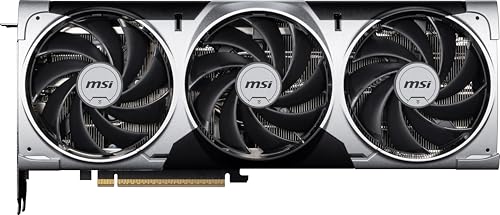
Upgrade on a budget: MSI RTX 5070 Ventus 3X OC
Specs
Chip | GeForce RTX 5070 (Blackwell) |
VRAM | 12 GB GDDR7, 192-bit |
Boost clock | 2557 MHz (Extreme Performance) |
TGP | 250W |
Power connector | 12V-2x6 |
Cooling | Triple-fan Ventus 3X |
Outputs | 3x DisplayPort 2.1a, HDMI 2.1b |
Chip
GeForce RTX 5070 (Blackwell)
VRAM
12 GB GDDR7, 192-bit
Boost clock
2557 MHz (Extreme Performance)
TGP
250W
Power connector
12V-2x6
Cooling
Triple-fan Ventus 3X
Outputs
3x DisplayPort 2.1a, HDMI 2.1b
What it does well
Same silicon, same 12 GB of GDDR7, plainer board. If the question in your head is whether the upgrade is worth the money at all, the cheapest sane 5070 is the version of that question worth answering. The triple-fan Ventus cooler holds the 2557 MHz boost under sustained load without the noise a two-fan budget board makes at 250W.
Three DisplayPort 2.1a outputs plus HDMI 2.1b covers a multi-monitor desk without adapters. That matters more than the port count suggests if you run a main 1440p panel and a second screen off the same card.
What you give up
It is a longer and thicker board than the ASUS Prime. Measure the case before you order, because the money saved on the board is not worth a card that stops the side panel closing.
Ventus is MSI's value tier and it reads like it. Plastic shroud, plain backplate, modest factory overclock headroom. None of that changes frames. It changes how the build looks through a window.
Who it's for
You have already decided to move and you want the 12 GB pool for the least money. Your case has room, and you would rather put the difference toward the panel.
Hold the GPU, fix the display: LG UltraGear 27GS75Q-B (1440p 180Hz)

Specs
Panel | 27-inch IPS |
Resolution | 2560x1440 |
Refresh | 180Hz, 200Hz overclock |
Response | 1ms |
Sync | G-SYNC Compatible, FreeSync |
HDR | HDR10 |
Stand | Tilt, height, pivot |
Panel
27-inch IPS
Resolution
2560x1440
Refresh
180Hz, 200Hz overclock
Response
1ms
Sync
G-SYNC Compatible, FreeSync
HDR
HDR10
Stand
Tilt, height, pivot
What it does well
On a 1080p 144Hz panel, the 3060 Ti is not the thing standing between you and a better looking game. The pixels are. Moving to 2560x1440 at 180Hz changes every frame you see, and it is a change the 3060 Ti can still feed in esports titles at competitive settings.
Height, tilt and pivot adjustment at this panel tier is unusual, and it is the part people keep through two or three GPU generations. G-SYNC Compatible and FreeSync are both certified, so variable refresh works whichever card ends up behind it.
What you give up
This path trades one constraint for another, and that is worth saying plainly. Once the panel is 1440p, the 8 GB pool runs out sooner in modern AAA titles than it did at 1080p. You are buying a better picture and moving the memory conversation closer, not away.
IPS contrast is flat next to VA or OLED, and HDR10 on an edge-lit IPS panel is a specification line rather than an experience. Judge it as a fast 1440p SDR panel and it holds up well.
Who it's for
Your complaint is that the screen looks dated, not that the game stutters. Or you are sequencing the spend: panel now, GPU next generation. If you go the other way and buy the card first, panels worth pairing with it are a separate question.
Before you upgrade: Corsair RM750e ATX 3.1 (750W)
Specs
Output | 750W |
Standard | ATX 3.1, PCIe 5.1 ready |
Connector | Native 12V-2x6 |
Modularity | Fully modular |
Form factor | ATX |
Transients | ATX 3.1 excursion spec |
Output
750W
Standard
ATX 3.1, PCIe 5.1 ready
Connector
Native 12V-2x6
Modularity
Fully modular
Form factor
ATX
Transients
ATX 3.1 excursion spec
What it does well
This is the pick that turns the 250W question into a non-question. The RM750e ships with a native 12V-2x6 cable, so the adapter comes out of the build entirely, and ATX 3.1 transient handling covers the power excursions a Blackwell card produces on load steps.
Fully modular helps too. You are not routing cables you will never plug in, which counts for something in a case that has had the same power supply bolted into it since 2020.
What you give up
750W is headroom for a 5070 and very little past it. If there is any chance the next card is a 5080-class board, you are buying a power supply twice, and the second one costs more than the gap between this unit and an 850W one today.
Reports suggest the RMe line carries shorter warranty coverage than Corsair's RMx tier. If the unit is meant to outlive two GPUs, read the coverage terms before you commit.
Who it's for
You are upgrading into a pre-2022 build and your current unit is 650W or below, or it has no native 12V-2x6 cable. Either of those is enough on its own.
Bottom line
If you run 1080p, keep the 3060 Ti and put the money into a 1440p panel.
If you run 1440p and you have already turned textures down, buy the ASUS Prime RTX 5070 OC. If the budget is tight, the MSI RTX 5070 Ventus 3X OC gets you the same 12 GB on a plainer board.
If your power supply is 650W or below, buy the Corsair RM750e ATX 3.1 first and the card second.
The card is the last decision in this list, not the first. How we size a GPU to a monitor is the rest of that argument.
FAQ
Is the RTX 3060 Ti still good in 2026?
At 1080p, yes. It still clears current AAA titles at high settings and it keeps plenty of margin in esports titles. The limits show up at 1440p and with ray tracing, where the 8 GB memory pool runs short before the core does. If your monitor is 1920x1080, the card is not what is holding your frame rate down.
Is 8 GB of VRAM enough for 1440p?
It depends on how much settings management you are willing to do. Eight gigabytes still runs most 1440p games at high textures, but ultra textures and ray tracing push past it, and when it overflows you get stutter and texture pop rather than a lower average frame rate. Reviewer coverage of Hogwarts Legacy found exactly that pattern on 8 GB cards, with high textures recommended over ultra. Twelve gigabytes is the practical floor for a new 1440p purchase now.
Do I need a new PSU for an RTX 5070?
NVIDIA lists 650W as the system power requirement. If your unit is 650W or above from a decent line and it can supply the connector, you are inside spec. If it is 550W or 600W, which was a common pairing for a 3060 Ti, plan on replacing it. The card pulls fifty watts more than the one it replaces, and transient spikes are what trip older units, not the average draw.
Does the RTX 5070 need a 12V-2x6 adapter?
Only if your power supply does not carry the cable natively. The card uses a 12V-2x6 connector, and most RTX 5070 boards ship with an adapter that converts from 8-pin PCIe plugs. The adapter works. A supply with a native 12V-2x6 cable removes a connection point and a cable bundle from the build, which is why an ATX 3.1 unit is the cleaner answer if you are replacing the supply anyway.
Should I wait for the RTX 5070 Super?
There is no confirmed date to wait for. Reports suggest NVIDIA is trimming 2026 gaming GPU output and that the RTX 50 Super refresh may have slipped toward CES 2027, but neither is a product you can buy. If your 1440p experience is already compromised, waiting an unknown number of months is a bet rather than a plan. If you are comfortable at 1080p today, waiting costs you nothing.
Related Articles

RTX 3070 to RTX 5070: Is the Upgrade Worth It in 2026?
Upgrading from an RTX 3070 to an RTX 5070 is worth it if 8GB of VRAM is breaking your 1440p games. When to buy, when to wait, when to fix the monitor.
Aug 5, 2026

Is 8GB VRAM Enough for Gaming in 2026, or Do You Need 16GB?
Is 8GB VRAM enough for gaming in 2026? It holds at 1080p, cracks at 1440p, and fails at 4K. Here is when 8GB works, when you need 16GB, and what to buy.
Jul 23, 2026

Is 650W Enough for an RTX 5070? Verdict for 6 Builds (2026)
Is a 650W PSU enough for an RTX 5070? Yes for 4 of 6 common builds, matching NVIDIA's 650W spec. See which CPUs need 750W and the ATX 3.1 PSU worth buying.
Oct 18, 2026

Best Gaming Monitors for RTX 5070 (2026): 1440p to 4K OLED
Five monitors paired to the RTX 5070 by resolution tier: 1440p 240Hz IPS, 4K OLED, and ultrawide. Includes DLSS 4 reality check and pairing framework.
Jun 3, 2026

Best GPU Upgrade From RTX 3060: 5 Picks Ranked for 2026
The best GPU upgrade from an RTX 3060 is the RTX 5070 for most builds. Five ranked picks, real 1440p uplift per tier, and the PSU headroom each one needs.
Sep 9, 2026