Affiliate Disclosure: As an Amazon Associate we earn from qualifying purchases. Some links may earn us a commission at no cost to you.

Best Gaming Monitors for RTX 5070 (2026): 1440p to 4K OLED
The RTX 5070 averages 133 FPS native at 1440p across a mixed game basket. Add DLSS 4 Quality mode and most competitive titles clear 200 FPS. That means the monitor decision is straightforward if you start from the GPU's actual performance tier: match the panel to what the card delivers, not to a resolution you'll be fighting to reach.
Five picks, three resolution tiers, one honest DLSS 4 caveat.
Our top pick: LG UltraGear 27GR83Q-B (27" 1440p 240Hz)
The LG 27GR83Q-B is the textbook pairing for the RTX 5070, a 240Hz IPS panel that matches the card's native 1440p delivery without DLSS assist.

Quick picks
Pick | Monitor | Best for | Buy |
|---|---|---|---|
Best Overall | 1440p 240Hz native sweet spot | ||
Best OLED | QD-OLED contrast + 360Hz headroom | ||
Best Budget | 1440p 240Hz, value IPS entry | ||
Best Ultrawide | Ultrawide 3440x1440 immersive AAA | ||
Editor's Pick (4K) | 4K OLED with DLSS 4 Quality |
Best Overall
- Monitor
- Best for
1440p 240Hz native sweet spot
- Buy
Best OLED
- Monitor
- Best for
QD-OLED contrast + 360Hz headroom
- Buy
Best Budget
- Monitor
- Best for
1440p 240Hz, value IPS entry
- Buy
Best Ultrawide
- Monitor
- Best for
Ultrawide 3440x1440 immersive AAA
- Buy
Editor's Pick (4K)
- Monitor
- Best for
4K OLED with DLSS 4 Quality
- Buy
Specs at a glance
Pick | Panel | Resolution | Refresh | Response | HDR |
|---|---|---|---|---|---|
IPS | 2560x1440 | 240Hz | 1ms GTG | DisplayHDR 400 | |
QD-OLED | 2560x1440 | 360Hz | 0.03ms | DisplayHDR True Black 400 | |
SS IPS | 2560x1440 | 240Hz | 1ms MPRT | HDR Ready (badge only) | |
Best Ultrawide: Alienware AW3423DWF (34" Ultrawide QD-OLED 165Hz) | QD-OLED | 3440x1440 | 165Hz | 0.1ms | DisplayHDR True Black 400 |
Editor's Pick (4K): LG UltraGear 32GS95UE (32" 4K OLED Dual-Mode) | WOLED (Dual Mode) | 3840x2160 / 1920x1080 | 240Hz / 480Hz | 0.03ms | DisplayHDR True Black 400 |
- Panel
IPS
- Resolution
2560x1440
- Refresh
240Hz
- Response
1ms GTG
- HDR
DisplayHDR 400
- Panel
QD-OLED
- Resolution
2560x1440
- Refresh
360Hz
- Response
0.03ms
- HDR
DisplayHDR True Black 400
- Panel
SS IPS
- Resolution
2560x1440
- Refresh
240Hz
- Response
1ms MPRT
- HDR
HDR Ready (badge only)
- Panel
QD-OLED
- Resolution
3440x1440
- Refresh
165Hz
- Response
0.1ms
- HDR
DisplayHDR True Black 400
- Panel
WOLED (Dual Mode)
- Resolution
3840x2160 / 1920x1080
- Refresh
240Hz / 480Hz
- Response
0.03ms
- HDR
DisplayHDR True Black 400
How we paired these
Three resolution tiers, three different use cases for the RTX 5070.
1440p 240Hz is the native home of this GPU. The card averages 133 FPS raster at 1440p. With DLSS 4 Quality mode, most competitive titles clear 200 FPS, which means a 240Hz or 360Hz panel can display those frames. This is the tier where the RTX 5070 performs best without needing to lean on upscaling. On a tighter budget one tier down, see our companion guide to the best gaming monitors for the RTX 5060 Ti.
4K is achievable, but comes with a condition. At 4K native, the card averages around 52 FPS at high settings. Not smooth enough for uncapped panels. Run DLSS 4 Quality mode and that rises to 90-110 FPS in most demanding AAA titles. The 4K pick in this guide is for buyers comfortable with DLSS Quality as the operating norm, not as an exception. If native 4K at high settings everywhere is the goal, the RTX 5080 tier is the right GPU. If you landed here but are building around the step-up card instead, the best gaming monitors for the RTX 5070 Ti covers that pairing on its own terms.
Ultrawide 3440x1440 sits between the two. The pixel count is higher than 1440p but far less demanding than 4K, and the RTX 5070 drives it cleanly native: 80-120 FPS in demanding AAA without heavy DLSS dependency. The AW3423DWF's 165Hz ceiling fits what the card actually delivers at this pixel count. Owners of the previous generation can use our best monitor for RTX 4070 guide, which applies the same pairing logic to the 4070 and 4070 Super.
Panel type layered on top of resolution: IPS for fast response at a mid-tier price, OLED for infinite contrast and HDR depth at a premium. Both are valid; the choice comes down to game library and budget.
Best Overall: LG UltraGear 27GR83Q-B (27" 1440p 240Hz)
Specs
Panel | 27-inch IPS |
Resolution and refresh | 2560x1440, 240Hz |
Response time | 1ms GTG (real-world 3-5ms) |
HDR | DisplayHDR 400 |
Adaptive sync | G-Sync Compatible, FreeSync Premium |
Ports | HDMI 2.1 x2, DP 1.4 |
Stand | Full ergonomic (tilt, height, pivot) |
Color gamut | 99% sRGB, approx. 95% DCI-P3 |
Panel
27-inch IPS
Resolution and refresh
2560x1440, 240Hz
Response time
1ms GTG (real-world 3-5ms)
HDR
DisplayHDR 400
Adaptive sync
G-Sync Compatible, FreeSync Premium
Ports
HDMI 2.1 x2, DP 1.4
Stand
Full ergonomic (tilt, height, pivot)
Color gamut
99% sRGB, approx. 95% DCI-P3
What it does well
Fast IPS response at 240Hz keeps motion clean in CS2, Apex, and Valorant without the smearing characteristic of VA panels at equivalent refresh. The card's DLSS 4 Quality mode output at 1440p feeds 180-220 FPS in most competitive titles. This panel shows every one of those frames.
HDMI 2.1 handles 1440p 240Hz over a single cable. The full ergonomic stand (tilt, height, pivot) is included. Monitor arm purchase is optional. G-Sync Compatible validated means tear-free across the full refresh range with RTX hardware.
What you give up
HDR. DisplayHDR 400 at roughly 400-nit peak is below the threshold where HDR changes how content looks. Native contrast at IPS-typical 1000:1 cannot match OLED dark-scene depth. Treat this as an SDR panel that accepts the HDR signal.
Some buyer reports flag unit-to-unit uniformity variance at this IPS price tier.
Who it's for
RTX 5070 buyers whose game library skews competitive or mixed-use (CS2, Apex, Cyberpunk, Hogwarts) who want the card's native 1440p performance ceiling without paying an OLED premium.
Buyers deciding between the 5070 and the 5070 Ti tier can find a breakdown in the RTX 5070 Ti vs RX 9070 XT comparison. If OLED contrast matters as much as frame rate, step up to the AW2725DF.
Best Budget: Gigabyte M27Q X (27" 1440p 240Hz IPS)

Specs
Panel | 27-inch Super-Speed IPS |
Resolution and refresh | 2560x1440, 240Hz |
Response time | 1ms MPRT |
Color gamut | 92% DCI-P3 |
Adaptive sync | FreeSync Premium |
Ports | DP 1.4, HDMI 2.0 x2, USB-C (DP alt mode), USB 3.0 x2 |
Extras | Built-in KVM switch |
Stand | Tilt only |
Panel
27-inch Super-Speed IPS
Resolution and refresh
2560x1440, 240Hz
Response time
1ms MPRT
Color gamut
92% DCI-P3
Adaptive sync
FreeSync Premium
Ports
DP 1.4, HDMI 2.0 x2, USB-C (DP alt mode), USB 3.0 x2
Extras
Built-in KVM switch
Stand
Tilt only
What it does well
Super-Speed IPS pixel response is competitive with the LG 27GR83Q-B at 240Hz for competitive gaming: clean motion in CS2 and Apex without the smearing characteristic of VA at equivalent refresh.
The built-in KVM switch (keyboard and mouse toggle between two inputs over USB) is unusual at this price tier and useful for dual-PC desk setups. USB-C with DisplayPort alt-mode handles laptop connections without an adapter. Price lands below the LG flagship.
What you give up
Tilt-only stand: height and swivel require a monitor arm, which adds to the effective cost. HDMI 2.0 limits full 240Hz to DisplayPort only.
HDR is badge-only; no real HDR performance. Panel lottery on uniformity is a real buyer complaint at this tier.
Who it's for
RTX 5070 buyers on a tighter monitor budget who want 1440p 240Hz without paying the LG or OLED premium.
Dual-PC setup owners who want the KVM without a separate switch.
Best Ultrawide: Alienware AW3423DWF (34" Ultrawide QD-OLED 165Hz)

Specs
Panel | 34-inch curved QD-OLED (1800R) |
Resolution and refresh | 3440x1440 (21:9), 165Hz |
Response time | 0.1ms GTG |
Contrast | Infinite (per-pixel OLED) |
HDR | DisplayHDR True Black 400 |
Color | 99.3% DCI-P3, factory calibrated to Delta E under 2 |
Adaptive sync | FreeSync Premium Pro, G-Sync Compatible |
Ports | DP 1.4 x1, HDMI 2.0 x2 |
Panel
34-inch curved QD-OLED (1800R)
Resolution and refresh
3440x1440 (21:9), 165Hz
Response time
0.1ms GTG
Contrast
Infinite (per-pixel OLED)
HDR
DisplayHDR True Black 400
Color
99.3% DCI-P3, factory calibrated to Delta E under 2
Adaptive sync
FreeSync Premium Pro, G-Sync Compatible
Ports
DP 1.4 x1, HDMI 2.0 x2
What it does well
QD-OLED contrast on 34 inches of curved ultrawide is an immersive-gaming combination the 27-inch picks in this article cannot reproduce. The 1800R curve on a 34-inch footprint wraps peripheral vision into the frame without the extreme size commitment of 49-inch super-ultrawides.
At 3440x1440, the RTX 5070 drives 80-120 FPS native in demanding AAA titles without heavy DLSS dependency. That is native delivery at a resolution the card handles comfortably. Factory calibration to Delta E less than 2 is a real differentiator over uncalibrated budget panels. OLED pixel response at 0.1ms keeps motion clean at 165Hz.
What you give up
The 165Hz ceiling is lower than the 240Hz IPS picks, though the RTX 5070 can't sustain 165 FPS native in demanding AAA ultrawide anyway. The ceiling rarely constrains buyers at this GPU tier.
HDMI 2.0 limits console connections to 60Hz at native ultrawide resolution. Burn-in risk applies; varied ultrawide game libraries reduce exposure compared to single-game competitive setups but don't eliminate it. Buyers report the panel's automatic brightness limiter activates on full-screen white content. This is normal OLED behavior, but noticeable on bright desktop backgrounds.
Who it's for
RTX 5070 buyers whose game library skews immersive AAA or simulation: Cyberpunk 2077, Alan Wake 2, Elden Ring, Microsoft Flight Simulator 2024, Baldur's Gate 3.
The pick for anyone who has decided on ultrawide and wants QD-OLED alongside it.
Editor's Pick (4K): LG UltraGear 32GS95UE (32" 4K OLED Dual-Mode)
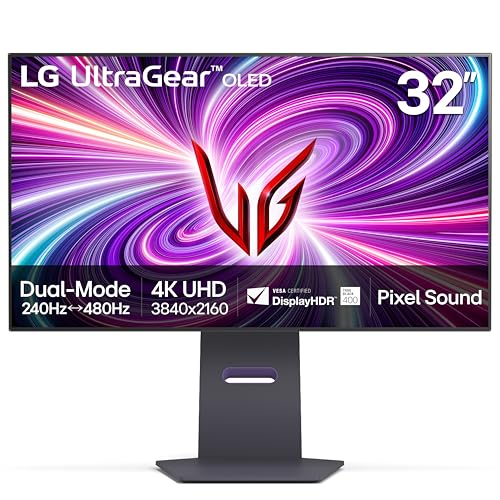
Specs
Panel | 32-inch WOLED |
Dual Mode | 3840x2160 at 240Hz or 1920x1080 at 480Hz |
Response time | 0.03ms GTG |
HDR | DisplayHDR True Black 400 |
Adaptive sync | FreeSync Premium Pro, G-Sync Compatible |
Ports | HDMI 2.1 x2, DP 1.4 |
Stand | Full ergonomic |
Color gamut | 98.5% DCI-P3 |
Panel
32-inch WOLED
Dual Mode
3840x2160 at 240Hz or 1920x1080 at 480Hz
Response time
0.03ms GTG
HDR
DisplayHDR True Black 400
Adaptive sync
FreeSync Premium Pro, G-Sync Compatible
Ports
HDMI 2.1 x2, DP 1.4
Stand
Full ergonomic
Color gamut
98.5% DCI-P3
What it does well
Dual Mode is the standout engineering feature: native 4K 240Hz OLED for immersive gaming, or native 1080p 480Hz OLED for competitive play. Both modes run at full OLED pixel response, not a software crop.
HDMI 2.1 handles 4K 240Hz over a single cable and supports PS5 and Xbox Series X at 4K 120Hz alongside PC gaming. At 32 inches, 4K WOLED hits 137 PPI, sharp for desktop use, with DisplayHDR True Black 400 that delivers on its HDR claims. With DLSS 4 Quality active, the RTX 5070 achieves 90-110 FPS in demanding AAA titles at 4K, usable and impressive for a mid-tier GPU.
What you give up
The RTX 5070's 12GB VRAM ceiling shows at 4K ultra native in VRAM-hungry 2026 titles, including Alan Wake 2 with RT and Cyberpunk 2077 with path tracing. DLSS 4 Quality mode mitigates this by rendering internally at lower resolution. Buyers who want native 4K at high settings everywhere need an RTX 5080-class GPU, not this one. Stepping up to a card without that ceiling changes the panel maths, and our picks for the best monitors for the RTX 5090 work through what a 4K 240Hz panel needs.
The Dual Mode 1080p 480Hz at 32 inches is noticeably soft at desk viewing distances. Use 4K mode as the standard and switch to FHD 480Hz only for specific competitive sessions.
Who it's for
RTX 5070 buyers who are OLED-committed, want 4K resolution, and are comfortable with DLSS 4 Quality mode as the standard operating configuration. Buyers moving up to the next card instead should start with the best gaming monitors for the RTX 5080, where the 4K refresh tiers are matched to a card with more headroom.
Buyers planning a GPU upgrade in 12-18 months who want the panel to already be at 4K OLED for when an RTX 5080-class card arrives. Our best 4K 240Hz OLED gaming monitors guide has the SKU-specific picks and DisplayPort spec traps to check before that upgrade lands.
Bottom line
The LG UltraGear 27GR83Q-B is the right pairing for most RTX 5070 buyers: 1440p 240Hz IPS, full ergo stand, HDMI 2.1, G-Sync validated, mid-tier monitor price. This is the card's native resolution tier and the pick that uses it cleanly.
For OLED contrast at 1440p, the Alienware AW2725DF is the upgrade: QD-OLED with a 360Hz ceiling and 3-year burn-in warranty. For immersive AAA at ultrawide, the Alienware AW3423DWF pairs 34-inch QD-OLED with 3440x1440 that the RTX 5070 drives natively. The LG UltraGear 32GS95UE is the 4K path. Go in knowing DLSS 4 Quality is the operating mode, not the backup plan. For sale-season pricing, the Prime Day gaming monitor deals roundup matches OLED discounts to GPU pairing recommendations.
FAQ
Is the RTX 5070 good enough for 4K gaming, or should I stick to 1440p?
4K is achievable with DLSS 4 Quality mode as the standard operating configuration. The RTX 5070 reaches 90-110 FPS in demanding AAA titles at 4K with Quality mode active, and most buyers don't notice the difference from native at 4K scale. Native 4K without upscaling lands around 52 FPS average, which isn't smooth for uncapped panels. If you want to push native 4K at high/ultra settings everywhere, the RTX 5080 tier is the better match. For pure gaming value, 1440p 240Hz native is the stronger pairing for this card.
Do I need a 240Hz monitor with the RTX 5070, or is 144Hz enough?
144Hz is a valid choice. The RTX 5070 averages 133 FPS native at 1440p, so 144Hz gets used immediately in most games without DLSS assist. The upgrade to 240Hz is about headroom: DLSS 4 Quality mode pushes competitive titles above 200 FPS, and you need a 240Hz panel to actually see those frames. If your library is mostly 60-100 FPS AAA titles, 144Hz is the budget-appropriate choice. If you're in CS2, Valorant, Apex, or Rocket League regularly, 240Hz is worth it for this GPU tier.
Is an OLED monitor worth the premium over IPS for RTX 5070 gaming?
Only if your library leans on HDR-mastered AAA. OLED's advantage is contrast: dark-scene depth in HDR-mastered titles like Alan Wake 2 and Cyberpunk 2077 looks different on OLED versus IPS. If your library skews competitive shooters where you want the panel cheap and fast, IPS is the right call. If you play a mix of HDR-capable AAA and competitive titles, the AW2725DF's 3-year burn-in warranty makes OLED more accessible than it used to be. Factor in burn-in risk if you park in one competitive game for 8+ hours daily.
Will an ultrawide 3440x1440 monitor work well with the RTX 5070?
Yes. Ultrawide 3440x1440 is roughly between 1440p and 4K in GPU load, and the RTX 5070 drives it at 80-120 FPS native in demanding AAA without heavy DLSS dependency. That matches the AW3423DWF's 165Hz ceiling well. Ultrawide game support is near-universal in current PC titles. The exception category is older or poorly-optimized games that pillarbox at 21:9. Check your specific library if that's a concern.
Does the RTX 5070 support G-Sync and FreeSync?
Yes to both. The RTX 5070 supports G-Sync natively on certified monitors and G-Sync Compatible on panels that have passed Nvidia's adaptive sync validation, which covers every pick in this article. All five monitors also support AMD FreeSync at various tiers (Premium or Premium Pro), covering both GPU vendors. Any variable-refresh panel from this list runs tear-free and stutter-free with the RTX 5070.
Related Articles

RTX 5070 vs RX 9070 XT: FPS in 30 Games at 1440p and 4K
RTX 5070 vs RX 9070 XT in 30 games: the 9070 XT leads 1440p raster by about 20%, the 5070 wins on DLSS 4 and power. See which fits your library.
Oct 24, 2026

RTX 5070 Ti vs RX 9070 XT (2026): 5% Raster, 15% RT Gap
RTX 5070 Ti vs RX 9070 XT: the 9070 XT is 5% behind at 1440p raster for far less money, the 5070 Ti wins ray tracing by 15%. Which one you should buy.
Sep 3, 2026

RTX 3050 to RTX 5060 Upgrade: Is It Worth It in 2026?
Is the RTX 3050 to RTX 5060 upgrade worth it? Yes: about twice the frame rate plus DLSS 4 frame gen. But 8 GB stays 8 GB, so check the 16 GB step first.
Oct 27, 2026

5 Best 49-Inch Gaming Monitors (2026), Matched to Your GPU
The best 49 inch gaming monitor for most buyers is the MSI MPG 491CQPX QD-OLED. Five 32:9 picks, the GPU each 5120x1440 screen needs, and which games run 32:9.
Oct 26, 2026

RX 5700 XT to RX 9070 XT: Is the Upgrade Worth It? (2026)
Is the RX 5700 XT to RX 9070 XT upgrade worth it? Yes: close to triple the 1440p frame rate, ray tracing and FSR 4, plus the power supply check to run first.
Oct 27, 2026