Affiliate Disclosure: As an Amazon Associate we earn from qualifying purchases. Some links may earn us a commission at no cost to you.

Best 32-Inch 1440p Gaming Monitors (2026)
At 32 inches, 1440p is a different tradeoff than at 27. You get more screen real estate and more immersive AAA footprint, but pixel density drops from 108 PPI to 92 PPI. That gap is noticeable if you sit close; it disappears at 70 to 90 cm. The right pick depends on where you sit, how you use the monitor, and whether you're still on a mid-range GPU that would struggle at 4K anyway.
One thing worth knowing before you shop: every 32-inch QD-OLED and WOLED panel currently on the market is 4K. If you want OLED at this size, 4K is the minimum. These five picks are the best VA and IPS options for buyers who want 32-inch 1440p specifically, without paying 4K GPU tax.
Our top pick: Samsung Odyssey G7 32 (240Hz)
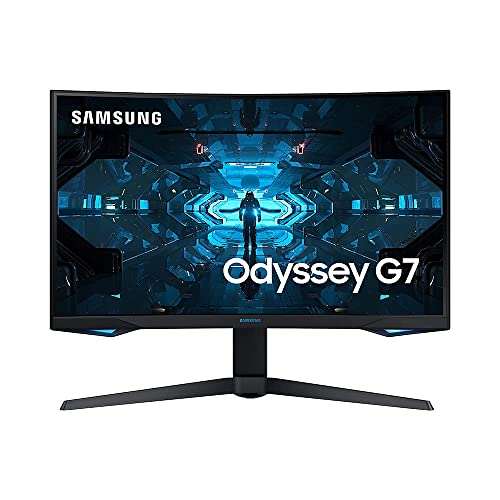
The Samsung Odyssey G7 32 is the only mainstream 32-inch 1440p panel running 240Hz with VA contrast. It earns the top slot by covering the widest range of serious gaming use cases: fast enough for competitive play, immersive enough for single-player AAA, and contrast-rich enough that HDR actually reads as HDR.
Quick picks
Pick | Monitor | Refresh tier | Where to buy |
|---|---|---|---|
Best Overall | 240Hz VA | ||
Best Value | 180Hz VA | ||
Best Split-Use | 175Hz IPS | ||
Editor's Pick | 180Hz Fast VA | ||
Best Budget | 165Hz VA |
Best Overall
- Monitor
- Refresh tier
240Hz VA
- Where to buy
Best Value
- Monitor
- Refresh tier
180Hz VA
- Where to buy
Best Split-Use
- Monitor
- Refresh tier
175Hz IPS
- Where to buy
Editor's Pick
- Monitor
- Refresh tier
180Hz Fast VA
- Where to buy
Best Budget
- Monitor
- Refresh tier
165Hz VA
- Where to buy
Specs at a glance
Monitor | Panel | Refresh | Response | HDR | Sync | USB-C | Buy |
|---|---|---|---|---|---|---|---|
VA 1000R | 240Hz | 1ms GTG | DisplayHDR 600 | G-Sync + FreeSync Pro | No | ||
VA 1000R | 180Hz | 1ms MPRT | HDR10 | FreeSync | No | ||
Fast IPS flat | 175Hz | 1ms GTG | DisplayHDR 600 | G-Sync Compat. | No | ||
Fast VA curved | 180Hz | 1ms MPRT | DisplayHDR 400 | FreeSync | 90W PD | ||
VA 1800R | 165Hz | 1ms MPRT | HDR10 | FreeSync Premium | No |
- Panel
VA 1000R
- Refresh
240Hz
- Response
1ms GTG
- HDR
DisplayHDR 600
- Sync
G-Sync + FreeSync Pro
- USB-C
No
- Buy
- Panel
VA 1000R
- Refresh
180Hz
- Response
1ms MPRT
- HDR
HDR10
- Sync
FreeSync
- USB-C
No
- Buy
- Panel
Fast IPS flat
- Refresh
175Hz
- Response
1ms GTG
- HDR
DisplayHDR 600
- Sync
G-Sync Compat.
- USB-C
No
- Buy
- Panel
Fast VA curved
- Refresh
180Hz
- Response
1ms MPRT
- HDR
DisplayHDR 400
- Sync
FreeSync
- USB-C
90W PD
- Buy
- Panel
VA 1800R
- Refresh
165Hz
- Response
1ms MPRT
- HDR
HDR10
- Sync
FreeSync Premium
- USB-C
No
- Buy
How we picked
The first question to settle with 32-inch 1440p is whether the pixel density works for your viewing distance. At 92 PPI, individual pixels start to resolve at sitting distances under 50 cm for people with good vision. At a typical gaming setup distance of 70 to 90 cm, the drop from 27-inch sharpness is a subtle softening that most buyers stop noticing within an hour. At 100 cm or more, it disappears entirely and you get the wider field of view without any tradeoff.
The second question is panel type. VA panels dominate the 32-inch 1440p market in 2026 because they deliver contrast ratios of 2,500:1 to 4,000:1 versus roughly 1,000:1 on IPS. That contrast gap is why dark scenes in games look washed out on IPS but not on VA. The tradeoff is pixel response: fast VA is genuinely competitive now, but dark-to-dark transitions on VA still lag fast IPS under 1ms GTG conditions. For single-player AAA, VA wins. For competitive esports where every millisecond of motion blur matters, IPS is the cleaner choice.
The third variable is use case split. A monitor used eight hours a day for coding or design and two hours for evening gaming wants different properties than a pure gaming display. IPS panels have wider viewing angles and better color accuracy out of the box. A flat IPS panel with 98% DCI-P3 coverage is more useful for photo editing than a 1000R VA curve. We picked one IPS option (the PG329Q) and one Fast VA with USB-C (the XG32WCS) specifically for buyers with a split workload.
Refresh rate: for this article we looked at 165Hz through 240Hz. Below 165Hz at 32 inches feels noticeably slow during fast camera pans. Above 240Hz at 1440p, GPU requirements become demanding on anything short of an RTX 4080 or RX 7900 XT. The sweet spot for most buyers is 165 to 180Hz on a mid-range GPU, or 240Hz if they already own a fast card and play competitive titles.
We excluded ultra-wide and super-ultra-wide panels (those are their own category), 4K panels at 32 inches (separate article), and any monitor not readily available from a first-party or reputable reseller with standard warranty coverage.
Best Overall: Samsung Odyssey G7 32 (240Hz)
Specs
Panel | VA (1000R curved) |
Resolution | 2560x1440 (QHD) |
Refresh rate | 240Hz |
Response time | 1ms GTG |
HDR | DisplayHDR 600 |
Sync | G-Sync Compatible + FreeSync Premium Pro |
Size | 32-inch (31.5" viewable) |
Panel
VA (1000R curved)
Resolution
2560x1440 (QHD)
Refresh rate
240Hz
Response time
1ms GTG
HDR
DisplayHDR 600
Sync
G-Sync Compatible + FreeSync Premium Pro
Size
32-inch (31.5" viewable)
What it does well
The G7 32 is the only mainstream 32-inch 1440p monitor hitting 240Hz with VA panel contrast. That combination is rare: VA delivers roughly 2,450:1 native contrast versus the 1,000:1 you get from IPS, which means dark scenes in games like Elden Ring or Control actually look dark rather than washed out. The DisplayHDR 600 certification is also load-bearing here. Most "HDR" monitors in this price tier carry DisplayHDR 400 badges but peak only around 350 nits in real-world conditions, which produces muddy HDR instead of perceptible pop. The G7 32 can sustain peak brightness near 600 nits in local-dimming zones, which earns that badge honestly.
Sync coverage is dual-certified: G-Sync Compatible and FreeSync Premium Pro. That means smooth variable refresh on both NVIDIA and AMD cards, and FreeSync Premium Pro covers VRR-over-HDMI for console users as well. The stand ergonomics are genuinely good: tilt, swivel, height adjustment, and a clean cable-management channel in the arm.
What you give up
The 1000R curvature that makes the G7 32 immersive for gaming is also what makes it annoying for documents and spreadsheets. Lines curve at the edges of the screen during desktop work. If you spend more than three hours a day on text-heavy tasks, you'll notice it. Buyers have also flagged mild eye fatigue during extended flat-surface work sessions on 1000R panels.
VA pixel response has improved, but dark-to-dark transitions still trail fast IPS. In competitive games with fast dark-background scenes, reports suggest some smearing is visible at 240Hz on VA panels versus IPS alternatives. The G7 32 is a 2020-era design: no USB-C, no KVM, older OSD. Its SDR brightness tops out around 350 nits, which is fine for typical indoor gaming but reads dim in bright rooms. And if you plan to run color-critical creative work, the factory calibration and sRGB color coverage are adequate but not exceptional.
Who it's for
The G7 32 is for buyers whose primary use case is gaming, who sit 70 to 90 cm from the screen, and who want the highest available refresh rate at this resolution and panel size. It rewards the gamer who plays single-player AAA titles where high contrast earns its keep, but also provides the 240Hz headroom for competitive play. If you already own an RTX 3080 or better and want the full 32-inch VA experience without compromising on refresh rate, this is the pick.
Best Value: LG Ultragear 32GS60QC

Specs
Panel | VA (1000R curved) |
Resolution | 2560x1440 (QHD) |
Refresh rate | 180Hz |
Response time | 1ms MPRT |
HDR | HDR10 |
Sync | AMD FreeSync |
Size | 32-inch (31.5" viewable) |
Panel
VA (1000R curved)
Resolution
2560x1440 (QHD)
Refresh rate
180Hz
Response time
1ms MPRT
HDR
HDR10
Sync
AMD FreeSync
Size
32-inch (31.5" viewable)
What it does well
The LG 32GS60QC hits the value floor for this category. It delivers the core 32-inch 1440p experience, strong VA contrast, 180Hz refresh, and a clean 1000R immersive curve at a price point that undercuts the G7 32 by a meaningful margin. For buyers who play primarily single-player AAA at relaxed settings, the 60Hz gap between 180Hz and 240Hz is not noticeable in typical gameplay. If the budget is the binding constraint rather than the screen size, the best 1440p gaming monitors under $300 work the 27-inch side of the same question, where the cap buys more refresh and pixel density than it does at 32 inches.
LG's 1000R VA panel delivers similar deep contrast to the G7 32 for dark-scene gaming. The design is clean and current-looking, with thin bezels and a stable stand. FreeSync coverage keeps VRR working smoothly on AMD cards.
What you give up
The 32GS60QC ships without G-Sync Compatible certification, which matters for NVIDIA GPU owners who want guaranteed VRR behavior. Standard FreeSync without Premium or Pro designation means no VRR-over-HDMI for console use. HDR10 is the floor HDR spec: no local dimming zones, no high peak brightness. The badge is accurate to the specification, but the visual impact is modest. There is no USB hub, no KVM, no USB-C.
One spec clarification worth noting: the 1ms response time on this panel is MPRT, not GTG. MPRT is a motion-blur reduction measurement with backlight strobing enabled; actual grey-to-grey pixel response is in the 4 to 5ms range per independent measurements, which is competitive but not as fast as the GTG number implies.
Who it's for
The 32GS60QC is for buyers who want the largest 1440p gaming panel under a tight budget, primarily game on AMD GPUs, and play single-player titles where VA contrast matters more than the fastest possible response time. It also works well as a second monitor in a dual-monitor setup where you want matched screen sizes without spending up to the G7 price.
Best Split-Use: ASUS ROG Swift PG329Q

Specs
Panel | Fast IPS (flat) |
Resolution | 2560x1440 (QHD) |
Refresh rate | 175Hz (OC) |
Response time | 1ms GTG |
HDR | DisplayHDR 600 |
Color gamut | 98% DCI-P3 |
Sync | G-Sync Compatible |
Size | 32-inch |
Panel
Fast IPS (flat)
Resolution
2560x1440 (QHD)
Refresh rate
175Hz (OC)
Response time
1ms GTG
HDR
DisplayHDR 600
Color gamut
98% DCI-P3
Sync
G-Sync Compatible
Size
32-inch
What it does well
The PG329Q is the pick for buyers who spend real time on color-sensitive work, whether that's photo editing, light video color grading, or design work, and also want a capable gaming display for evenings. Its Fast IPS panel covers 98% DCI-P3 and earns DisplayHDR 600, which is a meaningful combination: color accuracy is good enough for professional use and the panel can get bright enough that HDR content from streaming or game engines with proper HDR pipelines looks genuinely better.
The flat panel is the key differentiator versus the VA picks. Flat panels have no curvature distortion on straight lines, which makes them significantly more comfortable for long document work sessions. IPS wide viewing angles also reduce eye strain across longer shifts. G-Sync Compatible certification keeps VRR working smoothly on NVIDIA cards. The 1ms GTG response is genuinely fast, with less dark-scene smearing than VA picks.
What you give up
The IPS panel means native contrast around 1,000:1. Dark-scene immersion in games like Red Dead Redemption or anything with night sequences is noticeably less than on the VA picks. The flat panel is also less enveloping for wide-screen AAA gaming than the 1000R curve on the G7 32 or 32GS60QC.
The PG329Q is a 2021-era design. It has no USB-C, and the OSD and software feel dated versus newer options. At this price tier, buyers are paying for the color gamut and DisplayHDR 600 certification, not for cutting-edge connectivity. IPS glow can also be visible in dark-room use at the extreme corners of the panel under wide viewing angles, which is a characteristic of IPS technology rather than a defect specific to this model.
Who it's for
The PG329Q suits the buyer who needs a real creative-work monitor during the day and wants to game at 175Hz in the evenings. If color accuracy is secondary and you game in a dark room, one of the VA picks will serve better. But if you need a display that can run Lightroom and then Cyberpunk 2077 without switching screens, the PG329Q is the right shape.
Editor's Pick: ASUS ROG Strix XG32WCS

Specs
Panel | Fast VA (curved) |
Resolution | 2560x1440 (QHD) |
Refresh rate | 180Hz |
Response time | 1ms MPRT |
HDR | DisplayHDR 400 |
Connectivity | USB-C 90W PD |
Sync | FreeSync (Adaptive Sync) |
Size | 32-inch |
Panel
Fast VA (curved)
Resolution
2560x1440 (QHD)
Refresh rate
180Hz
Response time
1ms MPRT
HDR
DisplayHDR 400
Connectivity
USB-C 90W PD
Sync
FreeSync (Adaptive Sync)
Size
32-inch
What it does well
The XG32WCS earns the Editor's Pick slot because it solves a specific real-world problem: buyers using a laptop or MacBook as their primary machine who want a single USB-C cable to carry both video and 90-watt power delivery. That cable replaces a separate power brick, a separate video cable, and a separate USB hub in many setups. The convenience gap is significant.
The Fast VA panel is a step forward from the older standard VA technology used in the 32GS60QC and G7 32: better dark-to-dark pixel response while preserving the deeper contrast advantage of VA over IPS. The 3-year ASUS warranty is longer than the typical 1-year coverage on some competing options. ASUS DisplayWidget software allows OSD control from the desktop without reaching for monitor buttons. The curved panel keeps the immersive gaming experience for evening play. One note on the AI Technology processing feature in the OSD: buyers have flagged that it can over-sharpen text at default settings, making characters look artificially crisp. Disabling it in the OSD settings resolves this and the underlying panel is clean.
What you give up
The XG32WCS carries FreeSync without G-Sync Compatible certification, which means NVIDIA GPU owners may see less consistent VRR behavior depending on their card and driver version. DisplayHDR 400 is the lowest HDR tier in this lineup, and the visual impact is modest. The G7 32 and PG329Q both hit DisplayHDR 600. If HDR fidelity matters to you and you own an NVIDIA card, the G7 32 is the better-specified option.
IPS buyers who want color accuracy for creative work will find the Fast VA panel falls short of the PG329Q's 98% DCI-P3 coverage. This is a gaming-primary display with USB-C as a bonus, not a creative-work display that also games.
Who it's for
The XG32WCS is built for the laptop/MacBook user who docks at a desk and wants a single cable to a 32-inch 1440p gaming display. It also suits the casual PC gamer who wants a modern design, fresh warranty, and USB-C for a tablet or secondary device, without paying up to the G7 32's 240Hz premium. If your priority is the fastest possible refresh rate or the sharpest HDR, look at the G7 32 instead.
Best Budget: Dell S3222DGM

Specs
Panel | VA (1800R curved) |
Resolution | 2560x1440 (QHD) |
Refresh rate | 165Hz |
Response time | 1ms MPRT / 2ms GTG |
HDR | HDR10 |
Sync | AMD FreeSync Premium |
Size | 32-inch (31.5" viewable) |
Panel
VA (1800R curved)
Resolution
2560x1440 (QHD)
Refresh rate
165Hz
Response time
1ms MPRT / 2ms GTG
HDR
HDR10
Sync
AMD FreeSync Premium
Size
32-inch (31.5" viewable)
What it does well
The Dell S3222DGM is the lowest-cost route to 32-inch 1440p curved VA gaming. The 1800R curvature is noticeably more comfortable for dual-use work than the 1000R curve on the LG and Samsung picks. At 1800R, the edges don't pull inward as aggressively during document work, and straight lines look straighter across the panel. That's a real advantage for buyers who will use this monitor for both gaming and any form of text work.
The VA panel delivers 3,000:1 native contrast, which is the highest native contrast ratio in this lineup. 99% sRGB coverage is adequate for work that doesn't require wide gamut. Dell's reliability track record and service infrastructure are genuine assets at this price point, particularly compared to some budget monitor brands with less predictable warranty experiences. FreeSync Premium certification covers VRR at high refresh rates with low framerate compensation. One practical note: the stand has a narrow tilt range, and the VESA 100x100 mounting pattern is available if you want to use an aftermarket monitor arm, which solves most ergonomic limitations.
What you give up
At 165Hz, the S3222DGM is the lowest-refresh-rate monitor in the lineup. The 60Hz gap versus the 32GS60QC is perceptible in side-by-side comparison during fast camera pans, though for typical single-player gaming it's unlikely to bother most buyers. There is no USB-C, no USB hub, and no G-Sync certification. The design is from 2021 and shows it: the stand ergonomics are limited to tilt only (no height adjustment, no pivot), the bezels are thicker than current options, and the OSD is basic.
HDR10 without local dimming or high peak brightness produces modest HDR results, similar to the 32GS60QC.
Who it's for
The S3222DGM is for buyers who want the largest possible 1440p curved VA display at the lowest price in this category. It also makes an excellent second monitor in a dual-monitor setup alongside a smaller primary display. If 165Hz is sufficient for your game library (it covers everything except the fastest competitive shooters), the Dell delivers the contrast and screen size at lower cost than the rest of the lineup.
Bottom line
If you play single-player AAA games and want the best combination of refresh rate and contrast at 32 inches, buy the Samsung Odyssey G7 32 (240Hz). If your budget is tighter and you primarily game on AMD hardware, the LG Ultragear 32GS60QC delivers the core 32-inch VA experience at the floor price. If you split your time between creative work and gaming, the ASUS ROG Swift PG329Q is the only flat IPS option with DisplayHDR 600 and 98% DCI-P3 at this size. If you need USB-C single-cable docking from a laptop, the ASUS ROG Strix XG32WCS is purpose-built for that use case. And if you want the biggest 1440p display for the lowest cost and 165Hz is enough, the Dell S3222DGM is the one to buy.
FAQ
Is 32-inch 1440p too blurry compared to 27-inch 1440p?
At typical PC gaming distances of 70 to 90 cm, the PPI drop from 108 (27-inch) to 92 (32-inch) is subtle. Most buyers stop noticing within an hour of use. At 60 cm or closer, you may perceive a slight softening versus a 27-inch panel at the same resolution. At 100 cm or more, the difference disappears and the larger screen real estate becomes the dominant factor. Whether it bothers you is also a function of your vision; buyers who wear corrective lenses often notice the difference less than those with uncorrected sharp vision.
Do I need a 240Hz monitor for gaming at 32 inches, or is 165Hz enough?
For single-player AAA games, 165Hz is more than enough. The jump from 165Hz to 240Hz is perceptible primarily in competitive multiplayer games with fast movement, such as first-person shooters or battle royale titles, where lower motion blur translates to cleaner target tracking. If your game library leans toward RPGs, open-world games, or strategy titles, the 165Hz Dell S3222DGM or 180Hz LG 32GS60QC will serve you well. If you play competitive shooters regularly and own an RTX 3080 or better, the 240Hz Samsung G7 32 earns its premium.
Should I get a curved or flat 32-inch 1440p monitor?
Curved is better for gaming immersion. The 1000R curvature on the Samsung G7 32 and LG 32GS60QC wraps the display slightly around your field of vision, which works well for wide AAA scenes. The tradeoff is that the curve causes mild distortion on straight lines during desktop work, which is noticeable if you work with spreadsheets, code, or design files. The flat ASUS ROG Swift PG329Q avoids this and is more comfortable for long work sessions. The Dell S3222DGM uses a 1800R curve, which is noticeably less aggressive than 1000R and sits between flat and deeply curved in terms of immersiveness and daily-use comfort.
What GPU do I need to run 1440p at high refresh rates on a 32-inch monitor?
For 165 to 180Hz at 1440p, an RTX 4060 Ti, RTX 4070, or RX 7800 XT can hit those frame rates in most modern titles at high settings. For 240Hz at 1440p, you want an RTX 4080, RTX 5070, or RX 7900 XT to sustain frame rates near the monitor's ceiling in demanding games. At medium settings or in less GPU-intensive titles, a mid-range card like the RTX 4060 can reach 240Hz in competitive games. See our GPU guide for current recommendations paired to resolution targets.
Is 32-inch 1440p good for both gaming and work, or should I get a different size for work?
32-inch 1440p is a reasonable dual-use size if your desk has room for a monitor at 70 to 90 cm viewing distance. At that distance the pixel density is adequate for text without being cramped. The main decision factor is panel type: if work involves color-sensitive tasks, the flat IPS ASUS ROG Swift PG329Q is the right choice, with its 98% DCI-P3 coverage and flat panel for straight-line accuracy. If work is primarily text and code, any of the VA picks will do, though the 1800R Dell S3222DGM is more comfortable for long text sessions than the 1000R curved options. For a comparison of sizes optimized for high-refresh gaming, see our 27-inch 1440p gaming monitor guide.
Related Articles

Best 27-Inch Gaming Monitors (2026): 6 High-FPS Picks
The best 27-inch gaming monitors for 2026: six high-FPS picks from 180Hz IPS to 480Hz OLED, ranked by panel type, refresh rate, and what each one gives up.
Aug 4, 2026

Best Affordable Ultrawide Monitors for Immersive Gaming (2026)
The best affordable ultrawide monitors for gaming in 2026. Five picks across VA and OLED panels at 34 inch UWQHD, from budget entry to high-refresh to all-out OLED, with honest trade-off breakdowns.
Jun 9, 2026

How to Choose a GPU (and a Monitor That Matches)
A buyer's framework for picking a GPU and the monitor that pairs with it. Start with the panel and work the card back.
May 17, 2026

Best 4K HDR Monitors 2026: 5 Picks for Gaming and Creators
The best 4K HDR monitors in 2026: five OLED picks for gaming and creator work, with real HDR you can see, panel-revision traps, and an honest budget call.
Aug 4, 2026

Best GPU for Star Wars Outlaws (2026): 5 Picks by Tier
The best GPU for Star Wars Outlaws is the RTX 5070 Ti, RTX 4080-class at 1440p Ultra with ray tracing always on. Measured FPS from 1080p to 4K, plus VRAM tips.
Oct 24, 2026