Affiliate Disclosure: As an Amazon Associate we earn from qualifying purchases. Some links may earn us a commission at no cost to you.

Best 4K HDR Monitors 2026: 5 Picks for Gaming and Creators
Most monitors with HDR on the box cannot do HDR. A panel with no local dimming stretches brightness it does not have, and the result usually looks worse than leaving the setting alone.
This guide sorts the real thing from the sticker. Five monitors across gaming and creator work, chosen on what the panel can physically hold: per-pixel OLED contrast, the panel revision you are actually buying, and one budget pick whose HDR badge we will tell you to switch off.
Our top pick: ASUS ROG PG32UCDM3
The ASUS ROG PG32UCDM3 is the one to buy if you only want to read one section. It pairs a Tandem OLED panel with 4K at 240 Hz, which means it holds bright highlights longer than the single-layer OLEDs that defined this category, without giving up the per-pixel black that makes OLED worth buying in the first place.

Quick picks
Pick | Product | Best for | Buy |
|---|---|---|---|
Best Overall | One monitor that does 4K gaming and HDR content without a compromise pick | ||
Best 27-inch | Desks under about 30 inches deep, and anyone who wants maximum sharpness | ||
Best Value OLED | Best Value OLED | ||
Best for Creators | Color-critical grading and photo work that also has to game after hours | ||
Best Budget | 4K sharpness and motion on a budget, with HDR switched off |
Best Overall
- Product
- Best for
One monitor that does 4K gaming and HDR content without a compromise pick
- Buy
Best 27-inch
- Product
- Best for
Desks under about 30 inches deep, and anyone who wants maximum sharpness
- Buy
Best Value OLED
- Product
- Best for
Best Value OLED
- Buy
Best for Creators
- Product
- Best for
Color-critical grading and photo work that also has to game after hours
- Buy
Best Budget
- Product
- Best for
4K sharpness and motion on a budget, with HDR switched off
- Buy
Specs at a glance
Product | Panel type | Size | Resolution | Refresh | Real HDR? |
|---|---|---|---|---|---|
Tandem OLED | 32" | 3840 x 2160 | 240 Hz | Per-pixel, brightest highlights here | |
QD-OLED | 27" | 3840 x 2160 | 240 Hz | Per-pixel, sharpest at 163 PPI | |
QD-OLED | 32" | 3840 x 2160 | 240 Hz | Per-pixel, True Black 400 | |
OLED | 32" | 3840 x 2160 | 240 Hz | Per-pixel, color-critical | |
IPS | 27" | 3840 x 2160 | 160 Hz | None worth using, leave it off |
- Panel type
Tandem OLED
- Size
32"
- Resolution
3840 x 2160
- Refresh
240 Hz
- Real HDR?
Per-pixel, brightest highlights here
- Panel type
QD-OLED
- Size
27"
- Resolution
3840 x 2160
- Refresh
240 Hz
- Real HDR?
Per-pixel, sharpest at 163 PPI
- Panel type
QD-OLED
- Size
32"
- Resolution
3840 x 2160
- Refresh
240 Hz
- Real HDR?
Per-pixel, True Black 400
- Panel type
OLED
- Size
32"
- Resolution
3840 x 2160
- Refresh
240 Hz
- Real HDR?
Per-pixel, color-critical
- Panel type
IPS
- Size
27"
- Resolution
3840 x 2160
- Refresh
160 Hz
- Real HDR?
None worth using, leave it off
How we picked these 4K HDR monitors
The filter is whether the panel can produce a real high dynamic range image, not whether it accepts an HDR signal. Almost every 4K monitor accepts the signal.
On an OLED that means per-pixel emission: each pixel makes its own light and switches off completely, so a highlight can sit against true black with nothing between them. On an LCD it means full-array local dimming with enough zones that a bright object does not drag a glow into the darkness around it. Edge-lit panels and panels with no dimming at all cannot do either, which is why a DisplayHDR 400 badge on a conventional LCD tells you almost nothing.
We also weighted the certification tier honestly. DisplayHDR True Black 400 and True Black 500 are measured against OLED's near-zero black level, so those numbers mean more than the same figure on a backlit panel. Everything here had to be currently purchasable on Amazon, and every pick had to survive the question we ask of every display in the gaming monitor lineup: what does it give up, and to whom does that matter?
OLED or mini-LED: start with your room, not the spec sheet
This is the fork that decides more of your satisfaction than any other number on the page, and it has almost nothing to do with the monitor.
OLED wins in a room you can darken. Per-pixel contrast makes night scenes and letterboxed film look the way they were graded, with no glow around subtitles and no grey wash in the corners. What OLED cannot do is fight a window. Full-screen sustained brightness is modest by design, because lighting every pixel at once is the hardest thing an emissive panel does, and most current models are glossy enough to mirror a bright room back at you.
Mini-LED goes the other way. A dense full-array backlight can push a much brighter full-screen image, which is what you want in a sunlit office, and it does not care how long you leave a spreadsheet on screen. The trade is blooming: a bright object on a dark field lights up its dimming zone, and you see a halo. If your desk faces a window and you cannot change that, mini-LED is the honest recommendation even though every pick in this guide except the budget option is emissive.
Panel generations: the same model number is not the same monitor
This is the trap in the 4K OLED market right now, and it costs people real money.
Manufacturers revise these monitors onto newer panel stacks while keeping the model name nearly identical, separated by a single trailing character. A revision can move the certification from DisplayHDR True Black 400 to True Black 500 and raise sustained full-screen brightness, which is the difference you actually see. Buy the older revision by accident and you have bought a genuinely different monitor at the same price. Check the exact model string on the listing before you order, not the marketing name in the review you read. The same caution applies across the 4K 240Hz OLED tier and further down at 1440p, where revisions land just as quietly.
27 or 32 inches at 4K
Go by desk depth. At 4K a 27-inch panel runs about 163 pixels per inch against roughly 137 at 32 inches, so if you sit closer than about 30 inches the smaller panel reads noticeably sharper for text. Sit farther back and the 32-inch panel gives you more usable area at the same sharpness. There is a second consideration on the graphics side: driving 4K at high refresh is expensive whichever size you choose, so if you are still deciding on a card, settle that first with the RTX 5070 Ti and 5080 comparison or the RTX 5090 monitor pairings.
Best Overall: ASUS ROG PG32UCDM3
Specs
Panel type | Tandem OLED |
Panel size | 32" |
Resolution | 3840 x 2160 |
Refresh rate | 240 Hz |
Best for | One monitor that does 4K gaming and HDR content without a compromise pick |
Panel type
Tandem OLED
Panel size
32"
Resolution
3840 x 2160
Refresh rate
240 Hz
Best for
One monitor that does 4K gaming and HDR content without a compromise pick
What it does well
Tandem OLED is the reason this one leads. Stacking emissive layers lets the panel hold a bright highlight for longer than a single-layer QD-OLED manages, which is exactly where older 4K OLEDs give up: a sunlit sky or a spec highlight starts bright, then eases off as the panel protects itself. You still get per-pixel emission, so black is genuinely black and there is no dimming zone to bloom around a bright object. At 32 inches and 4K you land near 137 pixels per inch, which is enough that text stops looking like a compromise for a panel bought to play games.
What you give up
You pay a real premium over the value tier for the newer panel stack, and the gap in everyday SDR use is much smaller than the spec sheet implies. If you mostly play in a dark room and rarely touch HDR content, a last-generation 32-inch QD-OLED gets you most of the way for meaningfully less. Glossy coatings also punish bright rooms: put a window behind you and you will see yourself in the panel.
Who it's for
Buy this if you want one screen to be the best thing you own for both games and HDR video, you sit in a room you can control the light in, and you would rather not revisit the decision in two years.
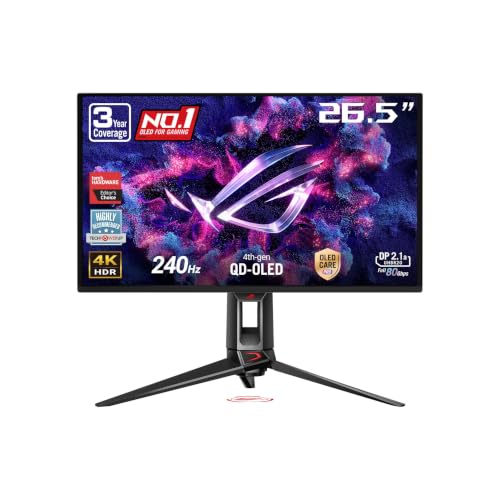
Best 27-inch: ASUS ROG PG27UCDM
Specs
Panel type | QD-OLED |
Panel size | 27" |
Resolution | 3840 x 2160 |
Refresh rate | 240 Hz |
Best for | Desks under about 30 inches deep, and anyone who wants maximum sharpness |
Panel type
QD-OLED
Panel size
27"
Resolution
3840 x 2160
Refresh rate
240 Hz
Best for
Desks under about 30 inches deep, and anyone who wants maximum sharpness
What it does well
Squeezing 4K into 27 inches puts you around 163 pixels per inch, the sharpest density in the OLED class. Text renders cleanly enough that this reads as a work monitor that happens to run at 240 Hz, which is not true of most gaming panels. The QD-OLED subpixel layout keeps color saturated at low luminance, so dark scenes hold their color instead of sliding grey. For competitive play the smaller panel is an advantage: less eye travel to track the whole frame.
What you give up
At 27 inches you will want display scaling for daily desktop work, and Windows scaling is still imperfect in older applications. You also give up screen area against the 32-inch tier for a similar outlay, which stings if you keep several windows open at once. Peak brightness on a small-window highlight is good, but full-screen sustained brightness is where QD-OLED remains modest.
Who it's for
Buy this if your desk is shallow, you read text on this screen as much as you game on it, or you play competitively and want the whole frame inside your vision.
Best Value OLED: MSI MAG 321UPX QD-OLED

Specs
Panel type | QD-OLED |
Panel size | 32" |
Resolution | 3840 x 2160 |
Refresh rate | 240 Hz |
Response time | 0.03 ms |
HDR certification | DisplayHDR True Black 400 |
Connectivity | USB Type-C with 15W, HDMI, DisplayPort |
Panel type
QD-OLED
Panel size
32"
Resolution
3840 x 2160
Refresh rate
240 Hz
Response time
0.03 ms
HDR certification
DisplayHDR True Black 400
Connectivity
USB Type-C with 15W, HDMI, DisplayPort
What it does well
This is the pick that made the 32-inch 4K OLED tier reasonable to recommend without a flinch. It carries the same core specification as panels that used to cost considerably more: 4K, 240 Hz, per-pixel contrast, and a True Black 400 certification that means something because it is measured against near-zero black rather than a backlight's best guess. The USB-C input handles a laptop on one cable for anyone who docks between work and play.
What you give up
True Black 400 sits a tier below the brightest current OLEDs, and you notice it on full-screen bright content rather than on small highlights. MSI's on-screen menu is also less pleasant to live in than ASUS's. The 15W of USB-C power delivery will keep a tablet or a light ultrabook topped up, but it will not carry a working laptop under load, so check what your machine actually draws before planning around one cable.
Who it's for
Buy this if you want the 32-inch 4K OLED experience and would rather put the difference toward a graphics card that can drive it.
Best for Creators: ASUS ProArt PA32UCDM

Specs
Panel type | OLED |
Panel size | 32" |
Resolution | 3840 x 2160 |
Refresh rate | 240 Hz |
Best for | Color-critical grading and photo work that also has to game after hours |
Panel type
OLED
Panel size
32"
Resolution
3840 x 2160
Refresh rate
240 Hz
Best for
Color-critical grading and photo work that also has to game after hours
What it does well
The ProArt line exists for people whose output has to match somebody else's screen, and this is the version of that idea built on a modern OLED panel instead of a backlight array. Per-pixel emission removes the halo that mini-LED reference displays fight constantly, which matters when you are judging a shadow against a title card. It ships as a calibration-aware panel with the factory profiles creators actually use, and the Mac-oriented connectivity means it drops into a Thunderbolt workflow without an adapter drawer.
What you give up
You pay the professional premium, and a fair amount of what you pay for is validation work rather than raw panel quality. If nothing you produce leaves your own machine, the value OLED above gives you a very similar viewing experience. OLED also remains the wrong panel for anyone who parks a static timeline interface on screen for ten hours a day without moving it.
Who it's for
Buy this if color accuracy is billable, you work in a controlled-light room, and you want the same screen to run games at 240 Hz when the day ends.
Best Budget: ASUS ROG XG27UCG

Specs
Panel type | IPS |
Panel size | 27" |
Resolution | 3840 x 2160 |
Refresh rate | 160 Hz |
Connectivity | USB-C, G-SYNC compatible |
Best for | 4K sharpness and motion on a budget, with HDR switched off |
Panel type
IPS
Panel size
27"
Resolution
3840 x 2160
Refresh rate
160 Hz
Connectivity
USB-C, G-SYNC compatible
Best for
4K sharpness and motion on a budget, with HDR switched off
What it does well
Read this pick honestly: it is here for 4K resolution and 160 Hz motion at a price the OLED tier cannot touch, not for HDR. As an SDR monitor it is a good one. IPS gives you wide viewing angles, no risk of a static interface leaving a mark, and full-screen brightness that an OLED will not match in a bright room. G-SYNC support and a USB-C input round it out for a single-cable desk. For the wider 4K field beyond HDR, our best 4K gaming monitor picks compare OLED, Mini-LED and IPS across the refresh tiers.
What you give up
The HDR badge on this class of panel is the exact thing this guide was written to warn about. Without a full-array local dimming backlight there is no way to hold a bright highlight next to a dark background, so enabling HDR raises the black floor and flattens the image. Turn it off and enjoy a sharp, fast SDR display. IPS contrast is also ordinary, so night scenes look grey next to any OLED here.
Who it's for
Buy this if you want 4K and high refresh now and treat HDR as something to upgrade into later, or if your room is too bright for OLED to make sense.
Burn-in, warranty, and how long a 4K OLED lasts
Permanent image retention is the objection that keeps people on LCD, and it deserves a straight answer rather than reassurance.
The risk is real and it is manageable. It comes from static, bright, high-contrast elements held in the same pixels for very long periods: a taskbar, a video editor's timeline, a broadcast logo. Current panels ship with pixel-shifting and periodic compensation cycles that run when you switch the monitor off, and leaving that maintenance alone rather than pulling power at the wall is most of what you have to do. Hide the taskbar, use a dark theme, and let the screen sleep.
The other half of the answer is the warranty. The major manufacturers now cover burn-in explicitly on these panels for a period stated on the product page, which is a meaningful signal about their own confidence. Read that coverage before you buy, because it varies by brand and it is the cheapest insurance in this category.
Bottom line
If you want the best 4K HDR image on this page and can control your room lighting, buy the ASUS ROG PG32UCDM3. If your desk is shallow or you read as much as you game, buy the PG27UCDM for the sharper pixel density. If you want the 32-inch OLED experience for less, the MSI MAG 321UPX gives up very little. If your color work leaves your own machine, the ProArt PA32UCDM is the one that will match somebody else's screen. And if the budget is the constraint, buy the ROG XG27UCG for its 4K sharpness and turn HDR off.
FAQ
Is DisplayHDR 400 real HDR?
On a conventional LCD, no. DisplayHDR 400 asks for a peak brightness most SDR monitors already reach and does not require local dimming, so the panel has no way to put a bright highlight next to a dark background. Enabling it usually raises the black floor and flattens the picture. DisplayHDR True Black 400 is a different specification and it is meaningful, because it is measured on an emissive panel whose black level is effectively zero. Read the word True Black, not the number.
Do I need an RTX 5080 to run a 4K 240Hz monitor?
Not to drive the panel, but to feed it. The monitor will accept the signal from far less hardware, and modern titles at 4K with upscaling and frame generation can reach high frame rates on midrange cards. Where the top-tier cards earn their keep is sustaining those rates in demanding games with ray tracing on. Buy the monitor for the years it will last, and upgrade the card when it stops keeping up.
Should I get a 27-inch or 32-inch 4K monitor?
Measure your desk. Inside about 30 inches of viewing distance the 27-inch panel's 163 pixels per inch reads sharper, which matters if you spend the day in text. Beyond that the 32-inch panel gives you more usable area without looking softer, and it is the better choice for immersion and for keeping several windows open. Neither size is better in the abstract.
Is OLED burn-in still a problem in 2026?
It is a manageable risk rather than an inevitability. Damage comes from static bright elements held for very long periods, so hiding the taskbar, running a dark theme and letting the monitor run its compensation cycle when it sleeps removes most of the exposure. The major manufacturers now cover burn-in explicitly for a stated period, which tells you something about their own confidence. Check that coverage before you buy.
Why do two monitors with the same model name look different?
Because they are different panels. Manufacturers revise these displays onto newer panel stacks while changing only a trailing character in the model string, and a revision can move the HDR certification up a tier and raise sustained brightness. Always confirm the full model string on the listing rather than trusting the marketing name from a review, especially when the price looks unusually good.
Is a 4K OLED good for content creation, or just gaming?
It is good for both, with one caveat. Per-pixel contrast removes the halo that backlit reference displays fight, which helps when you are judging shadow detail. The caveat is static interface elements: a grading timeline parked in the same place for ten hours a day is the exact wear pattern OLED dislikes. If that is your working day, either move the interface around or accept the warranty as your backstop.
Related Articles

Best 4K 240Hz OLED Gaming Monitors 2026: 6 Picks Compared
The best 4K 240Hz OLED gaming monitors, ranked: which 27 and 32 inch QD-OLED and WOLED panels are worth buying, and which RTX 5090 pairing needs DP 2.1a.
Sep 13, 2026

Best GPUs for 4K Gaming (2026): Picks by Refresh Target
Five GPUs for 4K gaming in 2026, segmented by refresh target and workload: the 5080 buy zone, the AMD-vs-Nvidia call by tier, why the 5090 is usually wrong.
May 21, 2026

Best 27-Inch Gaming Monitors (2026): 6 High-FPS Picks
The best 27-inch gaming monitors for 2026: six high-FPS picks from 180Hz IPS to 480Hz OLED, ranked by panel type, refresh rate, and what each one gives up.
Aug 4, 2026

Best 1440p Gaming Monitors Under $300 (2026): 5 Picks 180Hz+
Five 1440p gaming monitors under $300, all 180Hz or faster, sorted by price band. The mini-LED upset, the IPS value floor, and the tradeoff each one makes.
Aug 11, 2026

Best 1080p 240Hz Gaming Monitors 2026: 5 Picks + GPU Guide
The best 1080p 240Hz gaming monitors for 2026, from the budget Fast IPS floor to the 540Hz halo, plus which GPU actually drives 240Hz in CS2 and Valorant.
Sep 10, 2026