Affiliate Disclosure: As an Amazon Associate we earn from qualifying purchases. Some links may earn us a commission at no cost to you.

Best 27-Inch Gaming Monitors (2026): 6 High-FPS Picks
A 27-inch gaming monitor is the default size for a reason: it fills your field of view at normal desk distance without forcing you to move your head to track the minimap. The picks below cover 1440p at every refresh rate worth buying, plus one 4K option, and each one is here because it solves a specific problem rather than winning a spec sheet.
Our top pick: MSI MPG 271QRX QD-OLED

It is the pick that asks the fewest questions of your build. 360Hz is enough refresh rate for ranked play, QD-OLED contrast makes dark games look right, and a 1440p panel is something a mid-to-high-end GPU can keep fed.
How to choose a 27-inch gaming monitor in 2026
Three decisions do almost all the work here, and the rest is preference.
Resolution. At 27 inches, 1440p is the sweet spot: sharp enough that you stop seeing pixels, cheap enough on your GPU that high refresh rates are reachable. 4K at this size looks better but costs roughly double the GPU load for a gain that is smaller at 27 inches than at 32.
Panel type. OLED wins on contrast and motion clarity, IPS wins on text and brightness, mini-LED VA sits between them with the best HDR per dollar. If you already know you want OLED specifically, our 1440p OLED monitor picks go deeper on QD-OLED versus WOLED than this roundup does.
Refresh rate. Buy for the frame rate you actually hit, not the one on the box. 240Hz is the practical ceiling for most builds at 1440p, and 480Hz only pays off if your GPU is pushing past it. Our guide to matching a GPU to a monitor walks through the pairing if you are buying both at once.
Quick picks
Monitor | Panel and refresh | Best for | Buy |
|---|---|---|---|
QD-OLED, 360Hz | One screen for everything | ||
WOLED, 480Hz | Ranked competitive play | ||
IPS, 240Hz | Mixed work and gaming | ||
Mini-LED VA, 180Hz | HDR on a budget | ||
Fast IPS, 180Hz | First 1440p monitor | ||
QD-OLED 4K, 240Hz | Maximum image quality |
- Panel and refresh
QD-OLED, 360Hz
- Best for
One screen for everything
- Buy
- Panel and refresh
WOLED, 480Hz
- Best for
Ranked competitive play
- Buy
- Panel and refresh
IPS, 240Hz
- Best for
Mixed work and gaming
- Buy
- Panel and refresh
Mini-LED VA, 180Hz
- Best for
HDR on a budget
- Buy
- Panel and refresh
Fast IPS, 180Hz
- Best for
First 1440p monitor
- Buy
- Panel and refresh
QD-OLED 4K, 240Hz
- Best for
Maximum image quality
- Buy
Best overall: MSI MPG 271QRX QD-OLED
If you want one 27-inch monitor that handles esports and single-player games without a compromise you notice, this is the one to buy.
Specs
Panel | 27-inch QD-OLED |
Resolution | 2560 x 1440 (QHD) |
Refresh rate | 360Hz |
Response time | 0.03ms GtG |
HDR | True Black HDR 400 |
Connectivity | DisplayPort, two HDMI, USB Type-C |
Stand | Tilt, swivel, height adjust |
Panel
27-inch QD-OLED
Resolution
2560 x 1440 (QHD)
Refresh rate
360Hz
Response time
0.03ms GtG
HDR
True Black HDR 400
Connectivity
DisplayPort, two HDMI, USB Type-C
Stand
Tilt, swivel, height adjust
What it does well
QD-OLED gives you per-pixel black levels, so night scenes and dark corridors keep detail that an edge-lit panel washes into grey. The 0.03ms pixel response means motion stays clean at 360Hz instead of smearing behind fast flicks, and the difference is most obvious when you are strafing past a textured wall. 360Hz is also the point where extra refresh rate stops paying for itself on most builds, so you are buying the last increment that a strong mid-range GPU can feed in competitive titles. USB-C carries video and power on one cable, which matters if a laptop shares the desk. Colour out of the box is close enough that most people never open the OSD, and the stand adjusts far enough to sit properly on a shallow desk.
What you give up
OLED text rendering on a QHD panel is the honest weak point. Subpixel layout makes thin fonts look slightly fringed, and if you spend your working day in spreadsheets you will see it. Full-screen brightness is lower than a mini-LED panel because the automatic brightness limiter pulls back on bright scenes, so a sunlit room fights you in a way it would not fight an IPS panel. You also get the usual OLED care routine of pixel-refresh cycles and a screen saver you should leave enabled, plus a habit of hiding the taskbar.
Who it's for
Anyone who plays a mix of competitive shooters and story games on one screen, and who wants the best contrast available at 1440p without stepping up to the GPU bill that 4K brings. If your desk is in a bright room and the monitor doubles as your work screen, take the IPS pick below instead.
Best for competitive play: ASUS ROG Swift PG27AQDP

480Hz on an OLED panel is as far as 1440p motion clarity goes right now, and this is the sane way to buy it.
Specs
Panel | 27-inch WOLED |
Resolution | 2560 x 1440 (QHD) |
Refresh rate | 480Hz |
Response time | 0.03ms GtG |
Adaptive sync | Yes |
Connectivity | DisplayPort, HDMI, USB hub |
Panel
27-inch WOLED
Resolution
2560 x 1440 (QHD)
Refresh rate
480Hz
Response time
0.03ms GtG
Adaptive sync
Yes
Connectivity
DisplayPort, HDMI, USB hub
What it does well
The jump from 240Hz to 480Hz is smaller than the jump from 60Hz to 240Hz, but in tracking-heavy games it is real. Targets stay legible while your crosshair is still moving, which is the part that translates into hitting shots rather than just feeling smooth. The WOLED panel holds that clarity without the ghosting an IPS panel shows at the same rate, and because pixel response is effectively instant there is no overdrive setting to tune and no inverse ghosting to trade against. It also drops to lower refresh rates cleanly, so slower single-player games do not feel odd on it.
What you give up
You need frames to feed it. Anything short of a high-end GPU running competitive settings will leave most of that refresh rate unused, and at that point the overall pick above is the better buy for the same money. WOLED subpixel structure has the same text-fringing issue as QD-OLED, so desktop work looks no better here. Peak brightness in HDR trails the QD-OLED panels, and this is the wrong monitor to buy if HDR single-player games are what you want to show off.
Who it's for
Competitive players in CS2, Valorant, Overwatch or Apex who already run a GPU strong enough to push well past 240 frames per second at 1440p, and who lower settings for frames rather than raising them for looks. If you cannot name your average frame rate in your main game, you do not need this monitor yet. Marvel Rivals belongs on that list too, and the dedicated Marvel Rivals monitor guide works through which refresh tier your GPU can actually sustain in it.
Best IPS pick: LG UltraGear 27GR83Q-B

The pick for people who want 240Hz at 1440p and do not want to think about burn-in, text clarity, or panel care ever again. If you are still deciding where the refresh ceiling should sit, whether 240Hz is enough or you need 500Hz puts a number on the frame rate each tier actually asks for.
Specs
Panel | 27-inch IPS |
Resolution | 2560 x 1440 (QHD) |
Refresh rate | 240Hz |
Response time | 1ms GtG |
HDR | DisplayHDR 400 |
Adaptive sync | NVIDIA G-SYNC compatible, AMD FreeSync |
Panel
27-inch IPS
Resolution
2560 x 1440 (QHD)
Refresh rate
240Hz
Response time
1ms GtG
HDR
DisplayHDR 400
Adaptive sync
NVIDIA G-SYNC compatible, AMD FreeSync
What it does well
IPS gives you clean text, uniform full-screen brightness, and wide viewing angles, which makes this the easier monitor to live with if the same screen does work and gaming. There is no brightness limiter pulling back when a white document fills the panel, and no reason to hide your taskbar. 240Hz with a 1ms response is fast enough that almost nobody outside ranked play would notice the gap to an OLED, and 240Hz at 1440p is a target a mid-range card can hit in competitive titles. It carries both G-SYNC compatibility and FreeSync, so it pairs with either GPU vendor without a settings hunt, and the stand has the full range of height, tilt, pivot and swivel.
What you give up
Contrast is the trade. Blacks read as dark grey in a dim room, and DisplayHDR 400 is a label rather than a real HDR experience, so leave HDR switched off and enjoy the accurate SDR image instead. Next to an OLED it looks flat in dark scenes, and once you have seen the comparison it is hard to unsee. IPS glow in the corners is the other tax, most visible on a dark screen in a dark room.
Who it's for
Mixed-use buyers who keep a browser and a game on the same panel all day, and anyone who wants a monitor with no maintenance routine attached. It is also the safe recommendation for a shared or family machine, where nobody is going to remember to run a pixel refresh.
Best HDR value: AOC Q27G3XMN
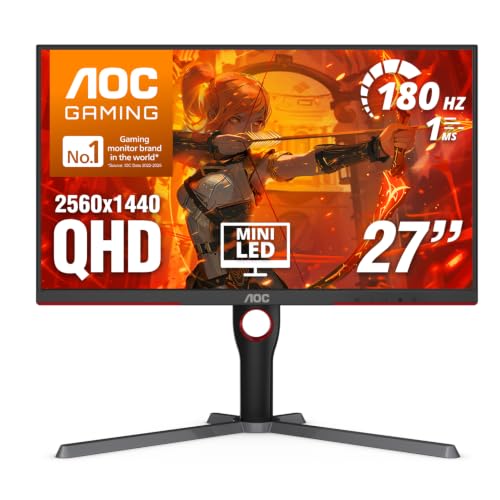
Mini-LED backlighting at this size is the cheapest way to get HDR that does something, and this panel is the reason to consider VA again.
Specs
Panel | 27-inch VA with mini-LED backlight |
Resolution | 2560 x 1440 (QHD) |
Refresh rate | 180Hz |
Response time | 1ms MPRT |
HDR | HDR1000 with local dimming zones |
Adaptive sync | Yes |
Panel
27-inch VA with mini-LED backlight
Resolution
2560 x 1440 (QHD)
Refresh rate
180Hz
Response time
1ms MPRT
HDR
HDR1000 with local dimming zones
Adaptive sync
Yes
What it does well
Local dimming zones let the backlight go dark behind dark parts of the image, so HDR highlights hit hard while black areas stay black. That is the difference between HDR being a checkbox and HDR being a reason to replay a game. Native VA contrast was already the highest of the non-OLED panel types, and zone-level backlight control widens the gap further. For single-player games with strong lighting, a night sky or a torchlit interior looks far closer to OLED than the panel type would suggest, and full-screen brightness holds up in a lit room in a way no OLED manages.
What you give up
180Hz is the ceiling, so this is not the monitor for ranked shooters. VA pixel response is the slowest of the three panel types, which shows up as dark smearing when the camera pans across shadowed geometry. Zone transitions can produce a faint halo around bright objects on dark backgrounds, most visible on subtitles and small UI elements. The local dimming also has to be left on for the HDR case to hold, and some people find the backlight adjustments distracting on desktop.
Who it's for
Single-player and open-world players who care more about how a game looks than how many frames they can push, and who want HDR that changes the image rather than a certification sticker. It is the wrong pick if your main game is competitive, and the right one if it is single-player.
Best budget pick: ASUS ROG Strix XG27ACG

The entry point into 1440p high-refresh that does not feel like a downgrade six months later.
Specs
Panel | 27-inch Fast IPS |
Resolution | 2560 x 1440 (QHD) |
Refresh rate | 180Hz |
Response time | 1ms GtG |
Adaptive sync | Yes |
Connectivity | DisplayPort, HDMI, USB Type-C |
Panel
27-inch Fast IPS
Resolution
2560 x 1440 (QHD)
Refresh rate
180Hz
Response time
1ms GtG
Adaptive sync
Yes
Connectivity
DisplayPort, HDMI, USB Type-C
What it does well
180Hz on a Fast IPS panel covers everything short of ranked competitive play, and 1440p at 27 inches is sharp enough that you stop noticing pixels within a day of switching. The step up from a 1080p 144Hz panel is the single most noticeable monitor upgrade most people make, because you gain resolution and refresh rate at the same time. USB-C is unusual at this tier and makes it a useful second screen for a work laptop without a dock. Build quality and stand adjustment are better than the price band normally allows, and it carries adaptive sync so a GPU that dips below 180 frames per second still looks smooth. Buyers working from the other direction, with the budget fixed first, get a different shortlist: the best 1440p gaming monitors under $300 all land at 27 inches for the same pixel-density reason, with the compromise the price cap forces spelled out per pick.
What you give up
No real HDR, no local dimming, and the same IPS contrast ceiling as the LG above without its 240Hz. Colour coverage is good rather than exceptional, so colour-critical work belongs on something else. If you are already running a GPU that pushes past 200 frames per second in your main game, this panel will hold you back and the LG is worth the step up.
Who it's for
First-time 1440p buyers stepping up from 1080p, and anyone building around a mid-range GPU who would rather spend the difference on the card. It is also the sensible pick for a second monitor next to one of the OLEDs above, since the panel types match closely enough not to jar. If the refresh tier is still the open question at this price, our guide to the best 144Hz gaming monitors maps the 1080p and 1440p options against the GPU each one needs.
Best 4K 27-inch: ASUS ROG Swift PG27UCDM
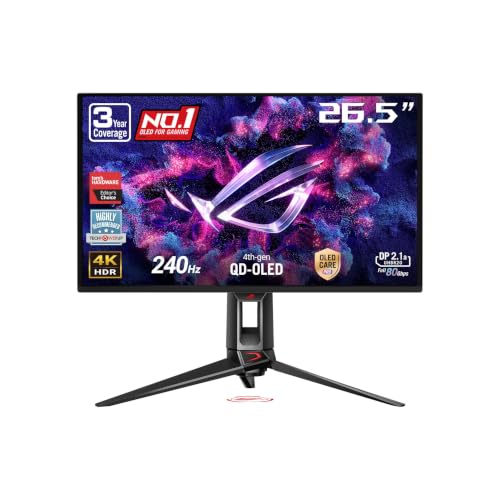
If you have the GPU for it, 4K at 27 inches is the sharpest desktop image you can buy, and this is the 27-inch panel worth the money.
Specs
Panel | 27-inch QD-OLED |
Resolution | 3840 x 2160 (4K) |
Refresh rate | 240Hz |
Response time | 0.03ms GtG |
HDR | True Black HDR 400 |
Connectivity | DisplayPort 2.1, HDMI 2.1, USB Type-C |
Panel
27-inch QD-OLED
Resolution
3840 x 2160 (4K)
Refresh rate
240Hz
Response time
0.03ms GtG
HDR
True Black HDR 400
Connectivity
DisplayPort 2.1, HDMI 2.1, USB Type-C
What it does well
At 27 inches, 4K puts pixel density high enough that antialiasing stops mattering much and text renders cleanly despite the OLED subpixel layout, which solves the one problem the 1440p OLEDs above cannot. 240Hz means you are not trading refresh rate for resolution the way 4K buyers used to, so this works as a competitive panel and a showcase panel. DisplayPort 2.1 and HDMI 2.1 both carry the full signal, so a current GPU or a console runs it without compression tricks or a resolution compromise. Contrast is the same per-pixel QD-OLED you get from the overall pick.
What you give up
It asks for a lot of GPU. Running 4K at high refresh with settings turned up is high-end hardware territory, and upscaling carries more of the load than people expect once ray tracing is on. It is the most expensive way to buy a 27-inch monitor by a wide margin, and at this size the resolution jump from 1440p is less dramatic than the same jump at 32 inches, where 1440p starts to look soft. It also inherits every OLED caveat around brightness limiting and panel care.
Who it's for
Players with a top-tier GPU who want maximum image quality on a normal-depth desk, or anyone splitting time between gaming and detail work like photo editing where pixel density pays off twice. If you are buying the monitor before the GPU, buy the overall pick and put the difference into the card.
Which 27-inch monitor should you get?
If this is you | Get this | Why | Buy |
|---|---|---|---|
You play a bit of everything on one screen | 360Hz covers ranked play and QD-OLED contrast carries the single-player nights | ||
You play ranked shooters and nothing else | 480Hz is the highest motion clarity available at 1440p | ||
The same monitor does your work day | IPS keeps text clean and needs no panel-care routine | ||
You want HDR that changes the picture | Mini-LED local dimming gets you real highlights without OLED pricing | ||
You are moving up from 1080p on a mid-range GPU | 180Hz at 1440p is the upgrade you feel, with budget left for the GPU | ||
You own a top-tier GPU and want the best image | 4K at 27 inches is the sharpest desktop picture you can buy |
You play a bit of everything on one screen
- Get this
- Why
360Hz covers ranked play and QD-OLED contrast carries the single-player nights
- Buy
You play ranked shooters and nothing else
- Get this
- Why
480Hz is the highest motion clarity available at 1440p
- Buy
The same monitor does your work day
- Get this
- Why
IPS keeps text clean and needs no panel-care routine
- Buy
You want HDR that changes the picture
- Get this
- Why
Mini-LED local dimming gets you real highlights without OLED pricing
- Buy
You are moving up from 1080p on a mid-range GPU
- Get this
- Why
180Hz at 1440p is the upgrade you feel, with budget left for the GPU
- Buy
You own a top-tier GPU and want the best image
- Get this
- Why
4K at 27 inches is the sharpest desktop picture you can buy
- Buy
What to skip
Skip 1080p at 27 inches. Pixel density drops low enough that text gets soft and game edges look chunky, and the money saved does not cover the annoyance. If your GPU only has the headroom for 1080p, buy a smaller panel instead. The same reasoning governs a fixed-spec box: our best monitor picks for the Steam Machine show what a 28 compute unit console-style PC can feed at each resolution.
Skip refresh rates your GPU cannot reach. A 480Hz panel fed 140 frames per second is a 140Hz monitor with a higher sticker price. Check what your card does in the games you play first; our 1080p 240Hz picks exist for exactly the builds that are better served by a smaller, faster panel.
Skip curved panels at this size. Curvature earns its keep at 32 inches and on ultrawides, where the screen edges sit meaningfully further from your eyes. At 27 inches it mostly adds distortion to straight lines in desktop use. If you are shopping the bend itself rather than the size, our guide to the best curved gaming monitors sorts the standard-aspect and ultrawide picks by curve radius so you can see where 1000R actually pays off.
Skip HDR400 as a buying reason. On an edge-lit panel it is a certification, not a feature. Either buy a panel with per-pixel or zone-level dimming, or treat HDR as a bonus you will leave switched off.
Bottom line
If you want one monitor that does everything, buy the MSI MPG 271QRX QD-OLED. If you only play ranked shooters, buy the ASUS ROG Swift PG27AQDP. If the screen also does your job, buy the LG UltraGear 27GR83Q-B. If HDR matters more than refresh rate, buy the AOC Q27G3XMN. If you are on a budget, the ASUS ROG Strix XG27ACG is the one that still feels current in two years.
Buying a bigger panel or a different resolution instead? Our wider gaming monitor roundup covers the picks by size and panel type.
FAQ
Is 27 inches too big for 1440p?
No. 27 inches at 1440p lands around 109 pixels per inch, which is sharp at a normal desk distance of roughly two feet. That is the density most people describe as the point where they stop seeing individual pixels in game edges and in text. 1440p only starts to look soft once you go past 27 inches, which is why 32-inch buyers get pushed toward 4K instead. If you sit unusually close, or you are coming from a high-density laptop screen, you may notice the difference for a week before it stops registering.
Do I need OLED, or is IPS still fine in 2026?
IPS is still fine, and it is the better choice if the monitor does double duty as a work screen. OLED wins clearly on contrast and on motion clarity, and in a dark room the gap is large enough that going back is unpleasant. What OLED costs you is text sharpness from the subpixel layout, full-screen brightness in a lit room, and a small ongoing panel-care routine you have to leave enabled. The short version: buy OLED if the screen is mostly for games and the room is not bright, and buy IPS if it is your work monitor that also plays games.
What GPU do I need for 1440p at 240Hz?
It depends entirely on which games, and the honest answer splits in two. For competitive titles like CS2, Valorant or Overwatch at lowered settings, a current mid-range card gets you past 240 frames per second without much tuning. For recent AAA games at high settings, expect to sit somewhere between 90 and 150 frames per second even on strong hardware, and expect to lean on upscaling to hold that. Buy the monitor for the games you play most rather than the ones you play occasionally, because the refresh rate you never reach is refresh rate you paid for and did not use.
Is 4K worth it on a 27-inch monitor?
Only if your GPU has room to spare. At 27 inches the sharpness gain over 1440p is real but modest, because 1440p is already dense enough at this size, while the rendering cost is close to double. That trade makes sense on a top-tier card and makes no sense on a mid-range one, where the same money moved into the GPU buys you more. At 32 inches the calculation flips completely, since 1440p starts to look soft at that size and 4K becomes the sensible default rather than a luxury.
Does OLED burn-in still matter for a gaming monitor?
Less than it used to, but it has not gone away, and anyone telling you it is a solved problem is overselling. Current panels run pixel-refresh cycles, logo dimming and taskbar protection, and the warranties on gaming OLEDs now cover burn-in for a few years, which is the manufacturers telling you what they think the risk is. The case that still bites people is a static element left on screen for hours every day at high brightness: a fixed game HUD, a streaming overlay, or a desktop with a permanent taskbar. Vary what is on screen, leave the protections enabled, and you are unlikely to see it.
How many Hz can I actually use?
Whatever your frame rate reaches, plus a little headroom for the games you have not bought yet. A monitor cannot show frames your GPU does not render, so a 480Hz panel on a build that produces 150 frames per second behaves like a 150Hz panel with a higher sticker price. The useful test is to check your average frame rate in the game you play most, then buy one tier above it. Match the refresh rate to your real frame rates, and put the money you save into the graphics card, which is the part that raises those frame rates.
Related Articles

Best Gaming Monitors 2026: 5 Picks, Budget to 4K OLED
The best gaming monitor for your GPU and budget: five picks from the 1440p 240Hz OLED sweet spot up to 4K and ultrawide, plus when to skip the OLED tax.
Sep 7, 2026

Best 1440p OLED Gaming Monitors (2026): QD-OLED vs WOLED Picks
The best 1440p OLED gaming monitors of 2026, from value-tier 360Hz QD-OLED to 480Hz WOLED flagship. With burn-in mitigation guidance.
May 14, 2026

Best 4K 240Hz OLED Gaming Monitors 2026: 6 Picks Compared
The best 4K 240Hz OLED gaming monitors, ranked: which 27 and 32 inch QD-OLED and WOLED panels are worth buying, and which RTX 5090 pairing needs DP 2.1a.
Sep 13, 2026

Best 1080p 240Hz Gaming Monitors 2026: 5 Picks + GPU Guide
The best 1080p 240Hz gaming monitors for 2026, from the budget Fast IPS floor to the 540Hz halo, plus which GPU actually drives 240Hz in CS2 and Valorant.
Sep 10, 2026

How to Choose a GPU (and a Monitor That Matches)
A buyer's framework for picking a GPU and the monitor that pairs with it. Start with the panel and work the card back.
May 17, 2026