Affiliate Disclosure: As an Amazon Associate we earn from qualifying purchases. Some links may earn us a commission at no cost to you.

Best CPU for RTX 3060 (2026): 5 Picks by Platform Tier
You own an RTX 3060, a game keeps dropping frames in the busy parts, and a forum told you the CPU is the problem. Sometimes it is. Usually the fix is cheaper than the thread suggested.
The honest answer for an RTX 3060 is a six-core chip with a boost clock near 4 GHz. Above that line the card runs out of headroom before the processor does, so what you are really choosing is a platform: stay on AM4, step onto LGA1700, or rebuild on AM5 for the GPU that replaces this one.
Our top pick: AMD Ryzen 5 5600
Most people reading this already have an AM4 board. The Ryzen 5 5600 is the cheapest chip that clears the six-core floor on that socket, which turns the whole upgrade into one part and one BIOS flash.

Quick picks
Pick | CPU | Platform | Best for | Buy |
|---|---|---|---|---|
Best Overall | AM4 drop-in | Most RTX 3060 owners | ||
Best Value | LGA1700, DDR4 or DDR5 | New build reusing DDR4 | ||
Best Premium | AM5, DDR5 | Rebuild once, upgrade the GPU later | ||
Best Budget | AM4 drop-in | Escaping a quad-core on a tight budget | ||
Editor's Pick | AM4 drop-in | Gaming plus streaming or background work |
Best Overall
- CPU
- Platform
AM4 drop-in
- Best for
Most RTX 3060 owners
- Buy
Best Value
- CPU
- Platform
LGA1700, DDR4 or DDR5
- Best for
New build reusing DDR4
- Buy
Best Premium
- CPU
- Platform
AM5, DDR5
- Best for
Rebuild once, upgrade the GPU later
- Buy
Best Budget
- CPU
- Platform
AM4 drop-in
- Best for
Escaping a quad-core on a tight budget
- Buy
Editor's Pick
- CPU
- Platform
AM4 drop-in
- Best for
Gaming plus streaming or background work
- Buy
Specs at a glance
CPU | Cores / threads | Boost clock | L3 cache | TDP | Socket | PCIe | Memory |
|---|---|---|---|---|---|---|---|
6 / 12 | 4.4 GHz | 32 MB | 65 W | AM4 | 4.0 | DDR4-3200 | |
6 P-cores / 12 | 4.4 GHz | 18 MB | 65 W | LGA1700 | 5.0 and 4.0 | DDR4 or DDR5 | |
6 / 12 | 5.1 GHz | 32 MB | 65 W | AM5 | 5.0 | DDR5 | |
6 / 12 | 4.2 GHz | 16 MB | 65 W | AM4 | 3.0 | DDR4-3200 | |
8 / 16 | 4.6 GHz | 32 MB | 65 W | AM4 | 4.0 | DDR4-3200 |
- Cores / threads
6 / 12
- Boost clock
4.4 GHz
- L3 cache
32 MB
- TDP
65 W
- Socket
AM4
- PCIe
4.0
- Memory
DDR4-3200
- Cores / threads
6 P-cores / 12
- Boost clock
4.4 GHz
- L3 cache
18 MB
- TDP
65 W
- Socket
LGA1700
- PCIe
5.0 and 4.0
- Memory
DDR4 or DDR5
- Cores / threads
6 / 12
- Boost clock
5.1 GHz
- L3 cache
32 MB
- TDP
65 W
- Socket
AM5
- PCIe
5.0
- Memory
DDR5
- Cores / threads
6 / 12
- Boost clock
4.2 GHz
- L3 cache
16 MB
- TDP
65 W
- Socket
AM4
- PCIe
3.0
- Memory
DDR4-3200
- Cores / threads
8 / 16
- Boost clock
4.6 GHz
- L3 cache
32 MB
- TDP
65 W
- Socket
AM4
- PCIe
4.0
- Memory
DDR4-3200
How we picked CPUs for the RTX 3060
The floor comes first. Six cores and twelve threads at roughly 4 GHz is where modern games stop stuttering on scheduling and start being limited by the card. Every pick below clears that line. Nothing below it made the list, which is why you will not find a four-core here even though several still sell.
After the floor, the question flips from speed to resolution. At 1080p a stronger processor can pull ahead, but only once the graphics card can keep up with it. TechSpot ran the Ryzen 5 5600 and the Core i5-12400F across four graphics tiers and found the Intel chip's lead appeared only at RTX 3080 and RTX 3090 Ti class. On an RTX 3060 the two delivered the same frame rate in Cyberpunk 2077 and God of War. If you want the mechanism rather than the result, how a bottleneck shows up in practice covers it.
So the real variable is platform cost. A drop-in keeps you to one purchase. LGA1700 and AM5 both mean a board, and AM5 means a memory kit as well. We weighted that cost against how long you plan to keep the card, because choosing a CPU and motherboard together is the actual decision here.
One more filter: the 3D V-Cache chips are off the list. They earn their premium in sim racing, flight sim, strategy and dense MMO content, and even there a reader still on this card gets more from replacing the 3060 itself. If you are unsure whether the card is worth building around at all, whether the 3060 12GB still holds up makes that call separately.
Best Overall: AMD Ryzen 5 5600
Specs
Cores / threads | 6 / 12 |
Boost clock | 4.4 GHz |
L3 cache | 32 MB |
TDP | 65 W |
Socket | AM4 |
PCIe | 4.0 |
Memory | DDR4-3200 |
Cooler | Wraith Stealth included |
Cores / threads
6 / 12
Boost clock
4.4 GHz
L3 cache
32 MB
TDP
65 W
Socket
AM4
PCIe
4.0
Memory
DDR4-3200
Cooler
Wraith Stealth included
What it does well
Full 32 MB of L3, a 4.4 GHz boost and PCIe 4.0, all at 65 W with a Wraith Stealth in the box. On a B550 board it is a straight swap. On a B450 it is a BIOS flash and then a straight swap.
Paired with an RTX 3060 it does the job the card asks of it. At 1080p high and at 1440p it feeds frames as fast as anything more expensive on this page, and the full 32 MB cache keeps 1% lows steady in the open-world and strategy titles where a smaller cache starts to show.
What you give up
AM4 is finished. The socket tops out around the 5800X3D, so this board will never see a current-generation chip. Buy the 5600 knowing the platform is the last stop rather than a waypoint.
There is also the flash. Plenty of B450 and X470 boards shipped before Zen 3 existed, and buyers have flagged repeatedly that the chip will not post until the BIOS is updated. Do that with the old processor still installed.
Who it's for
If you are running a Ryzen 1600, 2600, 3600 or any four-core on an AM4 board, play at 1080p or 1440p, and want the stutter gone for the smallest outlay, this is the pick. Nothing else here is a better use of the money.
Best Value: Intel Core i5-12400F

Specs
Cores / threads | 6 P-cores / 12 |
Turbo clock | 4.4 GHz |
L3 cache | 18 MB |
Base power | 65 W |
Socket | LGA1700 |
PCIe | 5.0 and 4.0 |
Memory | DDR4 or DDR5 |
Integrated graphics | None |
Cores / threads
6 P-cores / 12
Turbo clock
4.4 GHz
L3 cache
18 MB
Base power
65 W
Socket
LGA1700
PCIe
5.0 and 4.0
Memory
DDR4 or DDR5
Integrated graphics
None
What it does well
Six full performance cores with no efficiency cores to schedule around, and a 4.4 GHz turbo. In the TechSpot scaling run it matched the Ryzen 5 5600 frame for frame on an RTX 3060, and pulled ahead only once the graphics card was two tiers stronger.
The reason it is the value pick is the board market. LGA1700 launched with DDR4 support and those boards never went away, so a B660 lets you carry an existing memory kit into a new platform instead of buying DDR5 alongside everything else. For the wider field at this tier, the sub-200 CPU picks go broader.
What you give up
The F suffix means no integrated graphics. If the card ever dies you have no display output to diagnose with, which turns a simple fault into a genuinely annoying afternoon.
LGA1700 is also at the end of its run. The ceiling above this chip is a 14600K, and after that the socket is done. You get one upgrade rather than a generation of them.
Who it's for
Buy this if you are replacing an Intel 8th to 10th generation build, or assembling a machine around a secondhand RTX 3060 and want to reuse a DDR4 kit rather than start the memory budget over.
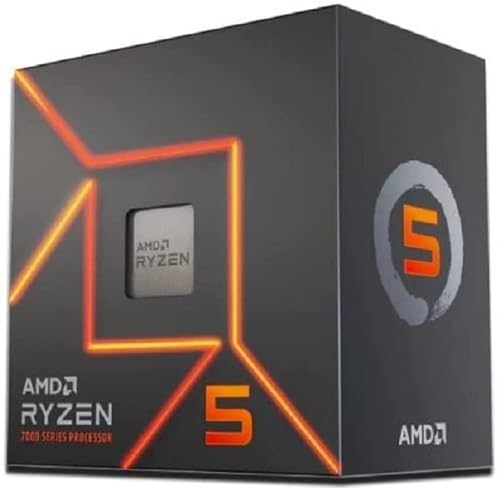
Best Premium: AMD Ryzen 5 7600
Specs
Cores / threads | 6 / 12 |
Boost clock | 5.1 GHz |
L3 cache | 32 MB |
TDP | 65 W |
Socket | AM5 |
PCIe | 5.0 |
Memory | DDR5 |
Cooler | Wraith Stealth included |
Cores / threads
6 / 12
Boost clock
5.1 GHz
L3 cache
32 MB
TDP
65 W
Socket
AM5
PCIe
5.0
Memory
DDR5
Cooler
Wraith Stealth included
What it does well
Zen 4 at 5.1 GHz, 32 MB of L3, PCIe 5.0, 65 W, and a cooler in the box. As a gaming chip it is comfortably the fastest six-core on this page.
None of that is why it is on the list. AM5 is the reason. AMD has committed to the socket past 2027, so the board you buy today is the board that takes whatever chip and whatever card come next. Rebuild once now instead of twice later.
What you give up
The chip is the small half of the bill. AM5 forces a new motherboard and a DDR5 kit, and the RTX 3060 will not produce one extra frame for either of them. You are pre-paying for a machine you do not own yet.
That makes it the easiest pick here to get wrong. If the 3060 is staying for the long haul, this is money that should have gone nowhere near a processor.
Who it's for
Take this one if the 3060 is a placeholder you already intend to replace inside two years, and you would rather do the messy part of a rebuild once instead of twice.
Best Budget: AMD Ryzen 5 5500
Specs
Cores / threads | 6 / 12 |
Boost clock | 4.2 GHz |
L3 cache | 16 MB |
TDP | 65 W |
Socket | AM4 |
PCIe | 3.0 |
Memory | DDR4-3200 |
Cooler | Wraith Stealth included |
Cores / threads
6 / 12
Boost clock
4.2 GHz
L3 cache
16 MB
TDP
65 W
Socket
AM4
PCIe
3.0
Memory
DDR4-3200
Cooler
Wraith Stealth included
What it does well
Six cores, twelve threads, a 4.2 GHz boost and a cooler in the box, on the same AM4 socket as the 5600. It clears the floor, which is the only question that matters at this tier.
In GPU-bound scenes, which is most scenes on an RTX 3060, it tracks the chips above it closely enough that you would need a frame counter to tell them apart. If you want 1080p picks without a fixed card in mind, our 1080p CPU picks widen the field.
What you give up
The cache is halved. 16 MB of L3 against the 5600's 32 MB is the real gap between them, and Tom's Hardware measured the 5600 around 12 percent ahead in aggregate. That difference lands hardest on 1% lows in sims, strategy and open-world traversal.
It is also PCIe 3.0 only. An RTX 3060 runs on that link without drama, but a stronger card on the same board later gives up a little, and the board is the part you were trying to keep.
Who it's for
This is for the reader escaping a quad-core on the tightest budget, who wants every spare bit of the upgrade money sitting in the graphics card fund instead.
Editor's Pick: AMD Ryzen 7 5700X

Specs
Cores / threads | 8 / 16 |
Boost clock | 4.6 GHz |
L3 cache | 32 MB |
TDP | 65 W |
Socket | AM4 |
PCIe | 4.0 |
Memory | DDR4-3200 |
Cooler | Not included |
Cores / threads
8 / 16
Boost clock
4.6 GHz
L3 cache
32 MB
TDP
65 W
Socket
AM4
PCIe
4.0
Memory
DDR4-3200
Cooler
Not included
What it does well
Eight cores and sixteen threads at 65 W, full 32 MB of L3, and the same AM4 drop-in path as the 5600. As a gaming chip on an RTX 3060 it ties the 5600, and that is fine, because gaming is not what the extra cores are for.
They are for everything running alongside the game. Software encoding for a stream, a screen share in Discord, a browser holding thirty tabs, a compile in the background. Those are the loads that make a six-core hitch. If you are already on a 5600 and wondering what comes next, the step up from a 5600 covers the whole ladder.
What you give up
For a machine that only games, this is money spent on nothing. The 5600 produces the same frames on this card, and the honest recommendation is to buy the cheaper chip.
It also arrives without a cooler, unlike the 5600 and the 5500, so the real gap between them is wider than the two listings suggest.
Who it's for
Pick this if one box has to game and stream at the same time, or if heavy background work keeps running while you play.
Bottom line
If you are on an AM4 board and just want the stutter gone, buy the AMD Ryzen 5 5600. If the budget is tighter than that, the AMD Ryzen 5 5500 clears the same floor. If you are building fresh and want to reuse DDR4, take the Intel Core i5-12400F. If the RTX 3060 is on its way out within two years, the AMD Ryzen 5 7600 buys the platform rather than the frames. And if the machine streams as well as games, the AMD Ryzen 7 5700X is the one upgrade here that the card cannot render pointless.
FAQ
Will a Ryzen 5 5600 bottleneck an RTX 3060?
No. The Ryzen 5 5600 has six cores, twelve threads and a 4.4 GHz boost, which is comfortably past what an RTX 3060 can keep up with at 1080p and 1440p. In practice the card runs out of headroom first in nearly every modern title. If frame rates still feel low after the swap, the limit is the graphics card, the settings, or the memory speed, not the processor.
What CPU bottlenecks the RTX 3060?
Anything below six cores and roughly a 4 GHz boost clock. Older quad-cores such as the Ryzen 3 1200, Intel's 7th generation i5 parts, and even the Ryzen 5 1600 in dense scenes will hold the card back. It usually shows up as stutter in busy areas rather than a lower average frame rate, which is why an average frame counter alone can miss it. Six fast cores is the line, and every pick on this page clears it.
Is a Ryzen 5 5500 enough for an RTX 3060?
Yes, with one caveat. The Ryzen 5 5500 clears the six-core floor and keeps an RTX 3060 fed in most games. Its 16 MB of L3 cache is half what the 5600 carries, and Tom's Hardware measured the 5600 around 12 percent ahead overall, with the gap widening in sims, strategy titles and open-world traversal. If your library leans that way, spend the small difference and take the 5600 instead.
Do I need an X3D CPU for an RTX 3060?
No. The extra cache on a 3D V-Cache chip pays off when the processor is the limit, which on an RTX 3060 happens rarely and mostly at low settings. Sim racing, flight sim, heavy strategy and dense MMO content are the genuine exceptions, and even there a reader on this card gets more from a graphics upgrade than from cache. Put the difference in the GPU fund.
Should I upgrade my CPU or my GPU first with an RTX 3060?
The graphics card, in almost every case. Once you are past six cores at roughly 4 GHz, the RTX 3060 is the part setting your frame rate, so replacing it is the change you will feel. The exception is a machine still running a quad-core, where the processor is genuinely holding things back and the cheap fix comes first. Watch which one is pinned during a bad moment before you decide.
Does the RTX 3060 need PCIe 4.0?
No. The RTX 3060 12GB runs on a PCIe 4.0 x16 link but performs about the same on a PCIe 3.0 x16 slot, which is why the PCIe 3.0 limit on the Ryzen 5 5500 is a footnote rather than a reason to skip it. The consideration is the next card rather than this one: a much stronger GPU on a PCIe 3.0 board gives up slightly more.
Related Articles

Best GPU Upgrade From RTX 3060: 5 Picks Ranked for 2026
The best GPU upgrade from an RTX 3060 is the RTX 5070 for most builds. Five ranked picks, real 1440p uplift per tier, and the PSU headroom each one needs.
Sep 9, 2026

CPU and GPU Bottleneck Explained: How to Check Yours
A CPU GPU bottleneck means one part holds the other back and costs you frames. Here is how to check yours with free tools, plus what to upgrade to fix it.
Jun 26, 2026

Is the RTX 3060 12GB Worth It in 2026? vs RTX 5060, Arc B580
Is the RTX 3060 12GB worth buying in 2026? For gaming, no: the Arc B580 and RTX 5060 are faster. See the one buyer the 12GB relaunch still makes sense for.
Oct 2, 2026

Best CPU Under $200 for Gaming 2026: 5 Picks, AM5 vs LGA1700
The best CPU under $200 for gaming in 2026 is a platform bet: AM5 keeps your upgrade path open, while LGA1700 ends here. 5 picks, ranked by who each fits.
Aug 17, 2026

How to Choose a CPU and Motherboard
The buyer's framework for picking a CPU and motherboard pair: use case first, socket second, chip tier third, then the board class that matches.
May 17, 2026