Affiliate Disclosure: As an Amazon Associate we earn from qualifying purchases. Some links may earn us a commission at no cost to you.

Best Gaming Laptops for Cyberpunk 2077 (2026): 4 Picks
Cyberpunk 2077 runs on almost any current gaming laptop. What changes from one laptop to the next is which settings you get to turn on, and CD Projekt Red's own spec sheet draws those lines by video memory: 8 GB for 1080p High, 12 GB for ray tracing at Ultra, and 16 GB for RT Overdrive, the path-traced mode.
So we ranked laptops by the tier they clear, not by the badge on the lid. Four picks, all sold and shipped by Amazon.com, from a full-power RTX 5060 to an RTX 5080 with 16 GB.
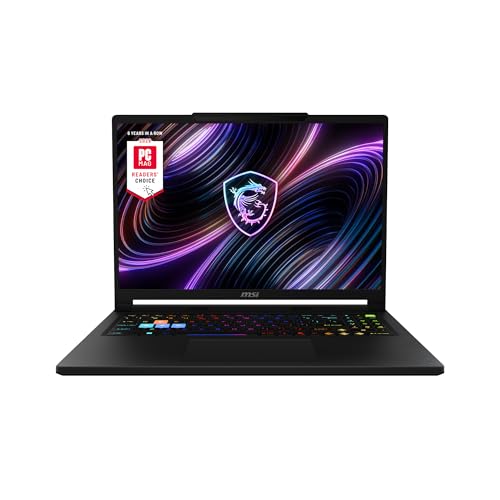
Our top pick: MSI Raider A16 HX RTX 5080
The Raider A16 HX is the only pick that clears CDPR's path tracing line on both counts: 16 GB of VRAM on a 175 W RTX 5080 and 32 GB of system memory, with a 16-core Ryzen 9 behind it.
Quick picks
Pick | Laptop | Best for | Buy |
|---|---|---|---|
Best Overall | Path tracing at 1600p with 16 GB of VRAM | ||
Best Value | 12 GB of VRAM, the RT Ultra line, for the least money | ||
Best Budget | CDPR's 1080p High sheet, line for line | ||
Editor's Pick | Night City on the couch, in a thin 1.9 kg chassis |
Best Overall
- Laptop
- Best for
Path tracing at 1600p with 16 GB of VRAM
Best Value
- Laptop
- Best for
12 GB of VRAM, the RT Ultra line, for the least money
Best Budget
- Laptop
- Best for
CDPR's 1080p High sheet, line for line
Editor's Pick
- Laptop
- Best for
Night City on the couch, in a thin 1.9 kg chassis
Specs at a glance
Laptop | GPU | CPU | Display | Memory | Storage |
|---|---|---|---|---|---|
RTX 5080 Laptop, 16 GB, 175 W | Ryzen 9 8940HX, 16 cores | 16in 2560 x 1600, 240 Hz | 32 GB DDR5 | 2 TB | |
RTX 5070 Ti Laptop, 12 GB, 115 W | Ryzen AI 7 350, 8 cores | 16in 2560 x 1600, 180 Hz | 16 GB DDR5 | 1 TB | |
RTX 5060 Laptop, 8 GB, 115 W | Core i7-14650HX, 16 cores | 16in 1920 x 1200, 165 Hz | 16 GB DDR5 | 1 TB | |
RTX 5070 Laptop, 8 GB, 85 W | Ryzen AI 7 350, 8 cores | 16in 2560 x 1600, 165 Hz | 32 GB DDR5 | 1 TB |
- GPU
RTX 5080 Laptop, 16 GB, 175 W
- CPU
Ryzen 9 8940HX, 16 cores
- Display
16in 2560 x 1600, 240 Hz
- Memory
32 GB DDR5
- Storage
2 TB
- GPU
RTX 5070 Ti Laptop, 12 GB, 115 W
- CPU
Ryzen AI 7 350, 8 cores
- Display
16in 2560 x 1600, 180 Hz
- Memory
16 GB DDR5
- Storage
1 TB
- GPU
RTX 5060 Laptop, 8 GB, 115 W
- CPU
Core i7-14650HX, 16 cores
- Display
16in 1920 x 1200, 165 Hz
- Memory
16 GB DDR5
- Storage
1 TB
- GPU
RTX 5070 Laptop, 8 GB, 85 W
- CPU
Ryzen AI 7 350, 8 cores
- Display
16in 2560 x 1600, 165 Hz
- Memory
32 GB DDR5
- Storage
1 TB
How we picked: CDPR's VRAM ladder
Tier | Target | GPU (VRAM) | Memory | Our picks |
|---|---|---|---|---|
Minimum | 1080p Low, 30 fps | GTX 1060 6GB or RX 580 (6 GB) | 12 GB | All four |
Recommended | 1080p High, 60 fps | RTX 2060 Super or RX 5700 XT (8 GB) | 16 GB | All four |
RT Ultra | 1080p RT Ultra, 60 fps | RTX 3080 Ti or RX 7900 XTX (12 GB) | 20 GB | Raider A16 HX on both lines; Nitro 16S AI on VRAM |
RT Overdrive | 2160p path tracing, 60 fps with Frame Generation | RTX 4080 (16 GB) | 24 GB | Raider A16 HX |
Minimum
- Target
1080p Low, 30 fps
- GPU (VRAM)
GTX 1060 6GB or RX 580 (6 GB)
- Memory
12 GB
- Our picks
All four
Recommended
- Target
1080p High, 60 fps
- GPU (VRAM)
RTX 2060 Super or RX 5700 XT (8 GB)
- Memory
16 GB
- Our picks
All four
RT Ultra
- Target
1080p RT Ultra, 60 fps
- GPU (VRAM)
RTX 3080 Ti or RX 7900 XTX (12 GB)
- Memory
20 GB
- Our picks
Raider A16 HX on both lines; Nitro 16S AI on VRAM
RT Overdrive
- Target
2160p path tracing, 60 fps with Frame Generation
- GPU (VRAM)
RTX 4080 (16 GB)
- Memory
24 GB
- Our picks
Raider A16 HX
We started from CD Projekt Red's current requirements page, which covers the base game and Phantom Liberty from Update 2.0 on. Every tier asks for 70 GB on an SSD, and the two ray tracing tiers ask for NVMe. The table above is that sheet, cut down to the lines that decide a laptop.
The pattern in it is the whole buying guide. Each step up in settings asks for more video memory: 8 GB for High, 12 GB for RT Ultra, 16 GB for Overdrive. CDPR lists the Overdrive target with Frame Generation on, so even a 16 GB card leans on DLSS to get there. A laptop GPU cannot borrow memory it does not have, which is why we read the VRAM figure before anything else on a spec sheet.
System memory follows the same ladder. The ray tracing tiers ask for 20 GB and 24 GB, so a 16 GB laptop sits below both lines even when its graphics chip clears them. That matters for the Best Value pick, and we say so in its section.
Then we checked power. The same chip can run at very different wattages from one chassis to the next, so we noted the maximum graphics power for each laptop from the maker or from Notebookcheck. Our GPU picks for Cyberpunk 2077 cover the desktop side of the same question.
Last, the seller. Every listing here was sold and shipped by Amazon.com when we checked, not by a marketplace reseller, so the configuration on the page is the one that arrives. Buy-box sellers change, so check who is selling before you order.
Best Overall: MSI Raider A16 HX RTX 5080
Specs
CPU | AMD Ryzen 9 8940HX (16 cores, 32 threads) |
GPU | GeForce RTX 5080 Laptop, 16 GB GDDR7 |
Max graphics power | 175 W (Notebookcheck spec listing) |
Display | 16 in QHD+ (2560 x 1600), 240 Hz, 16:10 |
Memory | 32 GB DDR5 |
Storage | 2 TB NVMe SSD |
Weight | About 2.45 kg |
Model | B8WI-023US |
CPU
AMD Ryzen 9 8940HX (16 cores, 32 threads)
GPU
GeForce RTX 5080 Laptop, 16 GB GDDR7
Max graphics power
175 W (Notebookcheck spec listing)
Display
16 in QHD+ (2560 x 1600), 240 Hz, 16:10
Memory
32 GB DDR5
Storage
2 TB NVMe SSD
Weight
About 2.45 kg
Model
B8WI-023US
What it does well
Sixteen gigabytes of VRAM is the reason this one leads. It is the amount CDPR lists for RT Overdrive, and no other pick here has it. Path tracing is the setting Cyberpunk is known for, and this is the only laptop here with the memory to run it at the Raider's native 2560 by 1600, with DLSS doing the upscaling and Frame Generation on, as CDPR's own target assumes.
Notebookcheck's listing puts this RTX 5080 at 175 W, the top of the laptop range, and the Ryzen 9 8940HX brings 16 cores and 32 threads. That is the same class of processor as the Core i9-12900 and Ryzen 9 7900X CDPR names for its ray tracing tiers, so the CPU side of the sheet is covered too.
It ships with 32 GB of DDR5 and a 2 TB NVMe drive, which covers the 24 GB Overdrive line and leaves room for Phantom Liberty and a pile of mods without juggling installs.
What you give up
Weight and noise. At about 2.45 kg before the power brick, this is a desk machine that travels, not a laptop you carry every day. A 175 W GPU in a 16-inch chassis also means loud fans under load, so plan on headphones for long sessions.
It also costs the most here by a wide margin. If you are happy with ray tracing at Ultra rather than full path tracing, the Best Value pick gets you 12 GB of VRAM for a lot less.
Who it's for
The player who bought Cyberpunk to see it with path tracing on, wants Phantom Liberty at high settings at 1600p, and plays mostly at a desk. If you want one laptop that never makes you choose between ray tracing modes, this is the one. Our RTX 5080 laptop picks cover other chassis at the same tier.
Best Value: Acer Nitro 16S AI RTX 5070 Ti

Specs
CPU | AMD Ryzen AI 7 350 (8 cores, 16 threads) |
GPU | GeForce RTX 5070 Ti Laptop, 12 GB GDDR7 |
Max graphics power | 115 W (Notebookcheck listing, same chassis) |
Display | 16 in WQXGA (2560 x 1600) IPS, 180 Hz |
Memory | 16 GB DDR5 |
Storage | 1 TB PCIe Gen 4 SSD |
Model | AN16S-61-R5FY |
CPU
AMD Ryzen AI 7 350 (8 cores, 16 threads)
GPU
GeForce RTX 5070 Ti Laptop, 12 GB GDDR7
Max graphics power
115 W (Notebookcheck listing, same chassis)
Display
16 in WQXGA (2560 x 1600) IPS, 180 Hz
Memory
16 GB DDR5
Storage
1 TB PCIe Gen 4 SSD
Model
AN16S-61-R5FY
What it does well
Twelve gigabytes for a lot less money. The Nitro 16S AI is the cheapest laptop sold by Amazon.com that carries an RTX 5070 Ti, and 12 GB is the VRAM figure CDPR lists for RT Ultra. That makes it the entry point for ray traced reflections and lighting without the texture swapping an 8 GB card runs into.
A Notebookcheck listing for the same chassis puts this RTX 5070 Ti at 115 W, and the 2560 by 1600 screen at 180 Hz gives DLSS a high base resolution to upscale toward. Frame Generation gives that refresh rate something to do when you want it.
What you give up
Memory and processor. It ships with 16 GB of DDR5, below the 20 GB CDPR lists for RT Ultra, so with Discord and a browser open you are working with less headroom than the sheet assumes. The Ryzen AI 7 350 has 8 cores, half the count of the HX chips in the Overall and Budget picks, and busy districts lean on the CPU.
Neither is fatal, but both are real. Treat RT Ultra on this laptop as reachable rather than comfortable, and close background apps before a long session.
Who it's for
The player who wants ray tracing on and a sharp 1600p panel, but not at path tracing prices, and who is fine closing the browser before launching the game. Our RTX 5070 Ti laptop picks list more machines at this tier.
Best Budget: ASUS ROG Strix G16 RTX 5060

Specs
CPU | Intel Core i7-14650HX (16 cores, 24 threads) |
GPU | GeForce RTX 5060 Laptop, 8 GB GDDR7 |
Max graphics power | 115 W (100 W + 15 W Dynamic Boost) |
Display | 16 in FHD+ (1920 x 1200), 165 Hz, 16:10 |
Memory | 16 GB DDR5 |
Storage | 1 TB PCIe Gen 4 SSD |
Model | G615JMR-AS74 |
CPU
Intel Core i7-14650HX (16 cores, 24 threads)
GPU
GeForce RTX 5060 Laptop, 8 GB GDDR7
Max graphics power
115 W (100 W + 15 W Dynamic Boost)
Display
16 in FHD+ (1920 x 1200), 165 Hz, 16:10
Memory
16 GB DDR5
Storage
1 TB PCIe Gen 4 SSD
Model
G615JMR-AS74
What it does well
This is CDPR's recommended 1080p High tier, matched line for line. The RTX 5060 carries 8 GB of GDDR7, the VRAM figure the sheet asks for, and the laptop ships with the 16 GB of memory that tier lists. The 16-core Core i7-14650HX clears the Core i7-12700 CDPR names by a wide margin.
ASUS rates the GPU at 115 W (100 W plus 15 W of Dynamic Boost), the full-power end of the RTX 5060 range. The 1920 by 1200 panel at 165 Hz is also the right match for an 8 GB card, since 1080p class resolutions are where 8 GB stays comfortable.
What you give up
Ray tracing, mostly. Eight gigabytes is the High line, not the RT Ultra line, so expect to keep ray tracing low or off and to lean on DLSS to hold 60 fps in dense areas. Path tracing is out of reach for any 8 GB laptop.
Sixteen gigabytes of system memory is the floor, and the FHD+ screen is the softest here. Neither is a problem at 1080p High, which is what this laptop is for.
Who it's for
The player who wants the full Night City experience at 1080p High for the least money, and cares more about a steady frame rate than ray traced reflections. Our RTX 5060 laptop picks and gaming laptops under 1000 go further down the price ladder.
Editor's Pick: GIGABYTE AERO X16 RTX 5070

Specs
CPU | AMD Ryzen AI 7 350 (8 cores, 16 threads) |
GPU | GeForce RTX 5070 Laptop, 8 GB |
Max graphics power | 85 W (Notebookcheck review unit) |
Display | 16 in WQXGA (2560 x 1600), 165 Hz, 16:10 |
Memory | 32 GB DDR5 |
Storage | 1 TB SSD |
Weight | About 1.9 kg |
CPU
AMD Ryzen AI 7 350 (8 cores, 16 threads)
GPU
GeForce RTX 5070 Laptop, 8 GB
Max graphics power
85 W (Notebookcheck review unit)
Display
16 in WQXGA (2560 x 1600), 165 Hz, 16:10
Memory
32 GB DDR5
Storage
1 TB SSD
Weight
About 1.9 kg
What it does well
This is the pick for playing away from a desk. The AERO X16 weighs about 1.9 kg, thin for a 16-inch laptop with an RTX 5070, and its 2560 by 1600 screen at 165 Hz gives DLSS a sharp target to upscale toward.
It ships with 32 GB of DDR5, which Notebookcheck notes is upgradeable. That covers CDPR's 20 GB RT Ultra memory line even though the GPU does not, so the system side never becomes the bottleneck.
What you give up
Power and VRAM. The RTX 5070 ran at 85 W in Notebookcheck's review unit, well below the 115 W most 16-inch chassis give the same chip, and it has 8 GB of VRAM. In Cyberpunk that means High settings with DLSS rather than ray tracing at Ultra.
The Ryzen AI 7 350 is an 8-core chip, so crowded districts will dip more than on the HX picks. This is a laptop you choose for the chassis and accept the settings it gives you.
Who it's for
The player who wants to work through the campaign on the couch or on the road, values a light 16-inch machine over the last few settings, and is happy at High without ray tracing. Our thin and light gaming laptop picks cover the rest of this category.
Bottom line
If you want path tracing, buy the MSI Raider A16 HX RTX 5080: it is the only pick with the 16 GB of VRAM CDPR lists for RT Overdrive. If ray tracing at Ultra is enough, buy the Acer Nitro 16S AI RTX 5070 Ti and live with 16 GB of memory. If you want 1080p High for the least money, buy the ASUS ROG Strix G16 RTX 5060. If the laptop has to travel, buy the GIGABYTE AERO X16 RTX 5070 and skip ray tracing. For other games on the same hardware, see our laptop picks for GTA 6.
FAQ
Can a laptop run Cyberpunk 2077?
Yes. Any current gaming laptop with a dedicated GPU and 8 GB of VRAM clears CD Projekt Red's recommended 1080p High tier, and every pick here does. What separates laptops is the ray tracing tiers: RT Ultra asks for 12 GB of VRAM and RT Overdrive, the path-traced mode, asks for 16 GB. You also need 70 GB free on an SSD.
What are the Cyberpunk 2077 laptop requirements?
CDPR's minimum is a Core i7-6700 or Ryzen 5 1600, 12 GB of memory and a 6 GB GTX 1060 for 1080p Low at 30 fps. The recommended tier is a Core i7-12700 or Ryzen 7 7800X3D, 16 GB of memory and an 8 GB RTX 2060 Super for 1080p High at 60 fps. Every tier needs Windows 10 64-bit, DirectX 12 and 70 GB on an SSD.
How much VRAM do you need for Cyberpunk 2077 path tracing on a laptop?
CDPR lists 16 GB of VRAM and 24 GB of system memory for RT Overdrive, measured with Frame Generation on. On a laptop that means an RTX 5080 or above, like the MSI Raider A16 HX in our Best Overall slot. A 12 GB RTX 5070 Ti can run path tracing at lower resolutions, but 12 GB is CDPR's RT Ultra line, not its Overdrive line.
Is an RTX 5060 laptop enough for Cyberpunk 2077?
For 1080p High, yes. A full-power RTX 5060 like the one in the ASUS ROG Strix G16 has the 8 GB of VRAM CDPR lists for that tier. It is not enough for ray tracing at Ultra or for path tracing, which ask for 12 GB and 16 GB. Keep ray tracing low or off and use DLSS to hold 60 fps in dense areas.
How much RAM do you need for Cyberpunk 2077 on a laptop?
Sixteen gigabytes covers the 1080p High tier. CDPR lists 20 GB for RT Ultra and 24 GB for RT Overdrive, so in practice that means a 32 GB laptop if you plan to use ray tracing. The Raider A16 HX and AERO X16 ship with 32 GB; the Nitro 16S AI and Strix G16 ship with 16 GB.
Should you turn on frame generation in Cyberpunk 2077 on a laptop?
On a high refresh screen, usually yes, as long as the base frame rate is already playable. CDPR's own Overdrive target assumes Frame Generation is on. It raises the frame count but adds some input latency, so it feels best when the game already runs near 60 fps before it kicks in. On an 8 GB laptop at High, it is a nice extra rather than a fix.
Related Articles

Best GPUs for Cyberpunk 2077 Path Tracing (2026): 5 Picks
Best GPUs for Cyberpunk 2077 path tracing in 2026: which card makes Overdrive playable at 1080p, 1440p or 4K with DLSS 4 frame gen, plus RT Ultra and AMD picks.
Oct 9, 2026

Best Gaming Laptops for GTA 6 on PC (2027): 5 Picks
The best laptop for GTA 6 on PC, matched to our predicted specs, with GPU wattage per tier. Five Amazon-sold picks from RTX 5060 to RTX 5080 for play and work.
Nov 10, 2026

Best RTX 5080 Gaming Laptops (2026): 5 TGP-Ranked Picks
The best RTX 5080 gaming laptops in 2026, ranked by the GPU power each chassis can sustain. Five picks from 16-inch OLED to 18-inch, plus the 5080 Ti myth.
Oct 8, 2026

Best RTX 5070 Ti Gaming Laptops (2026): TGP-Ranked Picks
The best RTX 5070 Ti gaming laptops of 2026, ranked by the GPU power each chassis sustains. Five picks from 14 to 16 inches, plus the 32GB RAM call to make.
Oct 30, 2026

Best Gaming Laptops for Baldur's Gate 3 (2026): 4 Picks
The best laptop for Baldur's Gate 3 needs CPU headroom for Act 3's Lower City, 16 GB of RAM and a 150 GB SSD. Four Amazon-sold picks, RTX 5060 to 5070 Ti.
Nov 21, 2026