Affiliate Disclosure: As an Amazon Associate we earn from qualifying purchases. Some links may earn us a commission at no cost to you.

Best GPUs for Space Marine 2 (2026): 5 Picks by Resolution
Space Marine 2 asks two different things of your graphics card. In the open set pieces it scales with GPU power like any modern shooter. In the swarm fights, where hundreds of Tyranids pile onto the screen at once, the CPU sets the frame rate and a faster GPU stops helping.
So the right card depends on your resolution and your processor together. The five picks below are sorted by the frame rate each one can hold, every one carries 16 GB of VRAM, and How we picked shows where GPU spend stops paying off.
Our top pick: Sapphire Pulse RX 9070 XT (16 GB)
The Sapphire Pulse RX 9070 XT reaches the frame rate a current six- or eight-core CPU can feed at 1440p ultra, and it ran this game better than the RTX 5070 Ti in TechSpot's head-to-head testing.

Quick picks
Pick | GPU | Target it holds | Buy |
|---|---|---|---|
Best Overall | 1440p ultra, native, up to the CPU ceiling | ||
Best Value | 1440p high to ultra on a 60 to 100 Hz panel | ||
Best Premium | 4K ultra, native or with DLSS 4 Quality | ||
Best Budget | 1080p ultra, 1440p high | ||
Editor's Pick | 1080p ultra, 1440p with DLSS 4 Quality |
Best Overall
- GPU
- Target it holds
1440p ultra, native, up to the CPU ceiling
- Buy
Best Value
- GPU
- Target it holds
1440p high to ultra on a 60 to 100 Hz panel
- Buy
Best Premium
- GPU
- Target it holds
4K ultra, native or with DLSS 4 Quality
- Buy
Best Budget
- GPU
- Target it holds
1080p ultra, 1440p high
- Buy
Editor's Pick
- GPU
- Target it holds
1080p ultra, 1440p with DLSS 4 Quality
- Buy
Specs at a glance
GPU | VRAM | Memory bus | Board power | Upscaling |
|---|---|---|---|---|
16 GB GDDR6 | 256-bit | 304 W | FSR 4 | |
16 GB GDDR6 | 256-bit | 220 W | FSR 4 | |
16 GB GDDR7 | 256-bit | 360 W | DLSS 4 | |
16 GB GDDR6 | 128-bit | 160 W | FSR 4 | |
16 GB GDDR7 | 128-bit | 180 W | DLSS 4 |
- VRAM
16 GB GDDR6
- Memory bus
256-bit
- Board power
304 W
- Upscaling
FSR 4
- VRAM
16 GB GDDR6
- Memory bus
256-bit
- Board power
220 W
- Upscaling
FSR 4
- VRAM
16 GB GDDR7
- Memory bus
256-bit
- Board power
360 W
- Upscaling
DLSS 4
- VRAM
16 GB GDDR6
- Memory bus
128-bit
- Board power
160 W
- Upscaling
FSR 4
- VRAM
16 GB GDDR7
- Memory bus
128-bit
- Board power
180 W
- Upscaling
DLSS 4
How we picked
Saber's official spec sheet sets a low bar. The minimum is a GTX 1060 or RX 580 with 6 GB for 1080p low at 30 FPS. The recommended tier, an RTX 3070 or RX 6800 XT with a Ryzen 7 5800X or Core i7-12700 and 16 GB of RAM, targets 1080p ultra at 60 FPS. Both tiers need an SSD with 75 GB free.
The number that shapes this list is the CPU ceiling. In TechSpot's horde battle test at 1080p medium on an RTX 5090, a Ryzen 7 9800X3D reached about 130 FPS, while a Ryzen 5 7600X and a Ryzen 7 5800X3D both sat near 90 FPS. The swarm scenes are where drops show up, and no GPU upgrade moves them. If you are not sure which part limits your current rig, here is how to check which part is holding you back.
That ceiling sets a different stopping point at each resolution. At 1080p, most cards on this list get close to a Ryzen 5 class chip's limit, so extra money does more on the processor. At 1440p ultra, the RX 9070 XT lands right around the 90 FPS line, and buying more GPU only pays with an X3D chip behind it; these CPUs that lift the horde ceiling at 1440p are where to look. At 4K the GPU is the limit again: TechSpot measured a 5800X3D and a 9800X3D identically, at about 90 FPS on an RTX 5090 at 4K ultra.
Every pick has 16 GB. The game streams high-resolution environment textures and huge sprite counts, and 8 GB cards are the first to lose headroom as settings climb. It is the same reason we steer buyers off 8 GB cards in general; here is why 8 GB cards run out of room first.
Frame generation is not on the list of fixes. It turns 60 FPS into 120 on a fast panel, but it never turns a CPU-limited horde fight into a smooth one, and it adds input lag in exactly the moments that matter. Every card here is judged on its native or Quality-upscaled frame rate.
The per-card FPS figures quoted for the AMD picks are AMD's own numbers, at 1440p max settings with ray tracing off. The relative results and the CPU scaling come from TechSpot's testing.
Best Overall: Sapphire Pulse RX 9070 XT (16 GB)
Specs
Chip | Navi 48 (RDNA 4) |
VRAM | 16 GB GDDR6 |
Memory bus | 256-bit |
Board power | 304 W |
Power connectors | 2x 8-pin |
Interface | PCIe 5.0 x16 |
Upscaling | FSR 4 |
Chip
Navi 48 (RDNA 4)
VRAM
16 GB GDDR6
Memory bus
256-bit
Board power
304 W
Power connectors
2x 8-pin
Interface
PCIe 5.0 x16
Upscaling
FSR 4
What it does well
This is one of the few current releases where RDNA 4 beats Nvidia's next tier up. TechSpot measured the RX 9070 XT 17% ahead of the RTX 5070 Ti at 1440p and 36% ahead at 4K on launch drivers. A later GeForce driver narrowed Blackwell's deficit, and the 9070 XT still finished ahead of the RTX 5070 in that retest.
AMD's own figure is 93 FPS at 1440p max settings with ray tracing off. That number matters because it lands right around the roughly 90 FPS a Ryzen 5 class CPU holds in the horde fights. GPU and CPU run out of headroom at about the same point, which is what a balanced 1440p build looks like in this game.
The 16 GB of GDDR6 on a 256-bit bus keeps the ultra texture setting off the worry list, and FSR 4 Quality is there to push a 165 Hz panel harder in the open areas. For cards at this resolution beyond one game, see our 1440p picks across the whole market.
What you give up
Board power sits around 304 W, and Pulse boards run long. Buyers have flagged clearance problems in compact cases, so measure before ordering and check that an older 650 W supply has the headroom.
Past the CPU ceiling, the extra raster goes unused. On a Ryzen 5 class chip, the swarm sections cap the frame rate no matter how much GPU sits behind them. FSR 4 is good at Quality, but DLSS 4 is still the cleaner upscaler if you plan to lean on one.
Who it's for
The 1440p buyer with a 144 Hz panel and a current six- or eight-core CPU who wants ultra settings without upscaling.
Best Value: ASRock Challenger RX 9070 OC (16 GB)

Specs
Chip | Navi 48 (RDNA 4) |
VRAM | 16 GB GDDR6 |
Memory bus | 256-bit |
Boost clock | 2520 MHz |
Board power | 220 W |
Interface | PCIe 5.0 x16 |
Upscaling | FSR 4 |
Chip
Navi 48 (RDNA 4)
VRAM
16 GB GDDR6
Memory bus
256-bit
Boost clock
2520 MHz
Board power
220 W
Interface
PCIe 5.0 x16
Upscaling
FSR 4
What it does well
AMD lists the RX 9070 at 79 FPS at 1440p max settings with ray tracing off, about 15% behind the XT. In this game that gap shrinks where it counts. When the horde arrives and the CPU becomes the limit, both cards get pulled toward the same ceiling.
It keeps the full 16 GB on a 256-bit bus, the same memory setup as the XT, while board power drops to around 220 W. That lets it run on a 650 W supply, and the triple-fan Challenger cooler with its 0 dB idle mode stays quiet in a mid-tower.
What you give up
It will not hold 1440p ultra above 90 FPS in the open-area set pieces, so a 165 Hz panel shows the gap to the XT. The Challenger cooler does the job, but it is the plainest board on this list, with none of the extras premium partner cards add.
Amazon listings for this card sit next to RX 9070 XT listings with near-identical names. Buyers have flagged ordering the wrong one, so confirm the non-XT Challenger before checkout.
Who it's for
The 1440p buyer on a 60 to 100 Hz panel who wants high or ultra settings from a card that fits a modest power supply.
Best Premium: ASUS TUF RTX 5080 OC (16 GB)

Specs
Chip | GB203 (Blackwell) |
VRAM | 16 GB GDDR7 |
Memory bus | 256-bit |
Board power | 360 W |
Power connector | 1x 16-pin (12V-2x6) |
Slot width | 3.6-slot |
Upscaling | DLSS 4 with Multi Frame Generation |
Chip
GB203 (Blackwell)
VRAM
16 GB GDDR7
Memory bus
256-bit
Board power
360 W
Power connector
1x 16-pin (12V-2x6)
Slot width
3.6-slot
Upscaling
DLSS 4 with Multi Frame Generation
What it does well
4K is the one resolution where Space Marine 2 stays GPU-bound, so it is the one place a top-tier card pays for itself. TechSpot found a 5800X3D and a 9800X3D identical at about 90 FPS on an RTX 5090 at 4K ultra. The CPU stops mattering there.
The RTX 4080 Super averaged about 60 FPS at 4K ultra in TechSpot's launch testing, and the 5080 sits a step above it. DLSS 4 Quality at 4K looks close enough to native that it works as a resolution choice, not a compromise, and it is the cleanest route past 60 toward a 120 Hz panel. Our dedicated 4K picks cover the wider field.
What you give up
Price and size. The TUF cooler is 3.6 slots thick, which rules out small cases, and the board wants a 16-pin connector and a power supply with real headroom.
Blackwell ran this game poorly at launch. TechSpot flagged it, Nvidia acknowledged the issue, and a later driver closed most of the gap, so stay on a current driver. At 1440p this card goes underused unless the CPU is a 9800X3D class chip.
Who it's for
The 4K buyer with a 120 Hz or faster panel who wants ultra settings and has the case room and power supply for a large card.
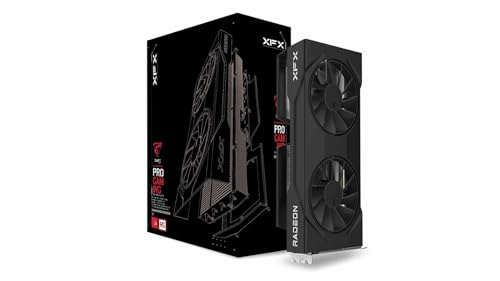
Best Budget: XFX Swift RX 9060 XT OC (16 GB)
Specs
Chip | Navi 44 (RDNA 4) |
VRAM | 16 GB GDDR6 |
Memory bus | 128-bit |
Board power | 160 W |
Power connector | 1x 8-pin |
Interface | PCIe 5.0 x8 |
Upscaling | FSR 4 |
Chip
Navi 44 (RDNA 4)
VRAM
16 GB GDDR6
Memory bus
128-bit
Board power
160 W
Power connector
1x 8-pin
Interface
PCIe 5.0 x8
Upscaling
FSR 4
What it does well
Saber's recommended spec, an RTX 3070 or RX 6800 XT, targets 1080p ultra at 60 FPS. AMD lists the RX 9060 XT 16GB at 57 FPS at 1440p max settings, so 1080p ultra clears that recommended target with room to spare.
Take the 16 GB version. The game streams large environment textures, and 8 GB cards are the first to lose headroom. Board power around 160 W on a single 8-pin connector means almost any modern supply works, and at 1080p the card gets close to the frame rate a Ryzen 5 class CPU can feed in the horde fights.
What you give up
1440p ultra sits below 60 FPS, so plan on high settings or FSR 4 Quality at that resolution. The 128-bit bus becomes the limit as resolution climbs, and 4K is not a target for this card.
An 8 GB RX 9060 XT exists with near-identical listing photos. Buyers have flagged mixing them up, so check the memory size on the listing.
Who it's for
The 1080p 144 Hz buyer, or a 1440p player happy with high settings, working with a tight budget and a modest power supply.
Editor's Pick: ASUS Dual RTX 5060 Ti OC (16 GB)

Specs
Chip | GB206 (Blackwell) |
VRAM | 16 GB GDDR7 |
Memory bus | 128-bit |
Board power | 180 W |
Power connector | 1x 8-pin |
Slot width | 2.5-slot |
Upscaling | DLSS 4 with Multi Frame Generation |
Chip
GB206 (Blackwell)
VRAM
16 GB GDDR7
Memory bus
128-bit
Board power
180 W
Power connector
1x 8-pin
Slot width
2.5-slot
Upscaling
DLSS 4 with Multi Frame Generation
What it does well
This is the Nvidia option, and the reason to buy it is DLSS 4. Quality mode at 1440p is the cleanest upscaling on this list, and it is how this card reaches 1440p in Space Marine 2. The RTX 4060 Ti 16GB it replaces averaged about 81 FPS at 1080p ultra in TechSpot's launch testing, and the 5060 Ti is a step up from it.
It draws around 180 W, fits a 2.5-slot space, and carries NVENC for anyone recording or streaming co-op sessions. If you are torn between this and the Best Budget pick, read the full RTX 5060 Ti vs RX 9060 XT comparison.
What you give up
Raster per dollar trails the AMD cards above it, and Blackwell's launch-window weakness in this game means the driver version matters. Native 1440p ultra is out of reach without upscaling.
Multi Frame Generation will not fix horde-fight drops, because those come from the CPU. An 8 GB RTX 5060 Ti shares the product name, and buyers have flagged ordering the wrong one.
Who it's for
The 1080p or 1440p buyer who streams or records, or who wants DLSS 4 across a wider library than this one game.
Bottom line
If you play at 1440p on a current six- or eight-core CPU, buy the Sapphire Pulse RX 9070 XT. If you want most of that result for less power, buy the ASRock Challenger RX 9070 OC. If you play at 4K, buy the ASUS TUF RTX 5080 OC, because 4K is the only resolution where this game stays GPU-bound. If you play at 1080p, buy the XFX Swift RX 9060 XT OC and put the difference toward the CPU, since the processor is what lifts the horde-fight frame rate.
Already running a 9800X3D? These GPUs matched to a 9800X3D go further, and our guide on how to choose a GPU and a monitor that matches covers the rest of the decision.
FAQ
What GPU do you need for Space Marine 2 at 1440p?
For 1440p ultra at or near 90 FPS, an RX 9070 XT class card is the target: AMD lists it at 93 FPS at 1440p max settings with ray tracing off. The RX 9070 lands around 79 FPS by the same measure, which suits a 60 to 100 Hz panel. Below that, the RX 9060 XT 16GB needs high settings or FSR 4 Quality at 1440p. Whichever card you pick, the horde fights cap at your CPU's limit, roughly 90 FPS on a Ryzen 5 class chip.
Is Space Marine 2 CPU or GPU bound?
Both, depending on the scene. Open set pieces scale with the GPU like any modern shooter. The swarm fights are heavily CPU-bound: TechSpot's horde test showed a Ryzen 7 9800X3D at about 130 FPS against about 90 FPS for a Ryzen 5 7600X, both paired with an RTX 5090. At 4K the balance flips back and the GPU becomes the limit again. That is why the right GPU for this game depends on your processor and resolution together.
Why does Space Marine 2 drop FPS in big horde fights?
Large hordes load the CPU, not the graphics card. The game runs hundreds of enemies at once, and that AI and animation work lands on the processor. If your frame rate falls in those fights while GPU usage drops below full load, the CPU is the limit and a faster graphics card will not help. A faster CPU, ideally an X3D chip, raises that ceiling. Frame generation adds smoothness on top but does not make those moments more responsive.
Is 8 GB of VRAM enough for Space Marine 2?
It runs, but it is the wrong amount to buy today. Saber's recommended spec lists an 8 GB card for 1080p ultra, which makes 8 GB the floor rather than a comfortable target. The game streams large environment textures, and 8 GB cards are the first to run out of headroom as resolution or texture quality goes up. Every pick in this guide has 16 GB, which keeps the ultra texture setting available at 1440p and 4K.
Can you run Space Marine 2 at 4K?
Yes, with the right card. At 4K the game is GPU-bound rather than CPU-bound, so the graphics card sets the frame rate. In TechSpot's launch testing an RTX 4080 Super averaged about 60 FPS at 4K ultra and an RTX 4090 about 81 FPS. The RTX 5080 sits a step above the 4080 Super, and DLSS 4 Quality is the cleanest way to push toward a 120 Hz panel. Mid-range cards like the RX 9060 XT are not 4K cards in this game.
What are the Space Marine 2 PC system requirements?
The official minimum is a GeForce GTX 1060 or Radeon RX 580 with 6 GB of VRAM, a Ryzen 5 2600X or Core i5-8600K, and 8 GB of RAM, aimed at 1080p low at 30 FPS. The recommended spec is an RTX 3070 or RX 6800 XT with 8 GB of VRAM, a Ryzen 7 5800X or Core i7-12700, and 16 GB of RAM for 1080p ultra at 60 FPS. Both tiers need DirectX 12 and an SSD with 75 GB free.
Related Articles

CPU and GPU Bottleneck Explained: How to Check Yours
A CPU GPU bottleneck means one part holds the other back and costs you frames. Here is how to check yours with free tools, plus what to upgrade to fix it.
Jun 26, 2026

Best GPU for 1440p Gaming 2026: 5 16GB Picks, 144-240Hz
The best GPU for 1440p gaming in 2026: five 16GB picks matched to 144 and 240 Hz targets, the 8GB cards to skip, and the benchmarks behind every call.
Sep 26, 2026

Best GPUs for 4K Gaming (2026): Picks by Refresh Target
Five GPUs for 4K gaming in 2026, segmented by refresh target and workload: the 5080 buy zone, the AMD-vs-Nvidia call by tier, why the 5090 is usually wrong.
May 21, 2026

Best GPUs for the Ryzen 7 9800X3D (2026): by Monitor Tier
Best GPUs to pair with the Ryzen 7 9800X3D — picks by monitor tier and use case, from 1080p competitive to 4K without bottlenecking the V-cache.
May 9, 2026

How to Choose a GPU (and a Monitor That Matches)
A buyer's framework for picking a GPU and the monitor that pairs with it. Start with the panel and work the card back.
May 17, 2026