Affiliate Disclosure: As an Amazon Associate we earn from qualifying purchases. Some links may earn us a commission at no cost to you.

Best GPU for Ryzen 5 9600X (2026): 5 Picks by Monitor Tier
The best GPU for a Ryzen 5 9600X depends on one thing first: your monitor. The 9600X is a 6-core, 12-thread Zen 5 chip on AM5, fast enough to feed a high-end card at 1440p and 4K, but at 1080p in CPU-heavy games it runs out of headroom before the fastest GPUs do.
So these picks go by monitor tier and stop at the point where more GPU stops paying off on six cores. Every pick carries at least 12 GB of VRAM, there is no 8 GB card here, and there is no RTX 5090.
Our top pick: Sapphire Pulse RX 9070 XT
The Sapphire Pulse RX 9070 XT is the card we would put in most 9600X builds: 16 GB of VRAM and raster speed within a few percent of the RTX 5070 Ti, at the 1440p tier where the 9600X keeps up comfortably.

Quick picks
Pick | Graphics card | Best for | Buy |
|---|---|---|---|
Best Overall | 1440p at 144 Hz and up | ||
Best Value | 1080p high refresh | ||
Best Premium | 1440p ultra, RT and entry 4K | ||
Best Budget | Entry 1080p on a tight budget | ||
Editor's Pick | Streaming and DLSS at 1080p or 1440p |
Best Overall
- Graphics card
- Best for
1440p at 144 Hz and up
- Buy
Best Value
- Graphics card
- Best for
1080p high refresh
- Buy
Best Premium
- Graphics card
- Best for
1440p ultra, RT and entry 4K
- Buy
Best Budget
- Graphics card
- Best for
Entry 1080p on a tight budget
- Buy
Editor's Pick
- Graphics card
- Best for
Streaming and DLSS at 1080p or 1440p
- Buy
Specs at a glance
Graphics card | VRAM | Board power | PCIe link | Monitor tier |
|---|---|---|---|---|
16 GB GDDR6 | 304 W | 5.0 x16 | 1440p high refresh | |
16 GB GDDR6 | 160 W | 5.0 x16 | 1080p high refresh | |
16 GB GDDR7 | 300 W | 5.0 x16 | 1440p ultra, entry 4K | |
12 GB GDDR6 | 190 W | 4.0 x8 | 1080p | |
16 GB GDDR7 | 180 W | 5.0 x8 | 1080p and 1440p |
- VRAM
16 GB GDDR6
- Board power
304 W
- PCIe link
5.0 x16
- Monitor tier
1440p high refresh
- VRAM
16 GB GDDR6
- Board power
160 W
- PCIe link
5.0 x16
- Monitor tier
1080p high refresh
- VRAM
16 GB GDDR7
- Board power
300 W
- PCIe link
5.0 x16
- Monitor tier
1440p ultra, entry 4K
- VRAM
12 GB GDDR6
- Board power
190 W
- PCIe link
4.0 x8
- Monitor tier
1080p
- VRAM
16 GB GDDR7
- Board power
180 W
- PCIe link
5.0 x8
- Monitor tier
1080p and 1440p
Benchmarks
Native rendering, no upscaling or frame generation.
- 131 FPS
- 69 FPS
Average frame rate. The RTX 5060 Ti figure is derived from TechSpot's reported 17% lead over the RX 9060 XT.
- 399 FPS
- 331 FPS
Relative raster performance at launch drivers.
- 100 %
- 94 %
These are reviewer numbers from a fast test CPU, so read them as GPU ceilings. On a 9600X they hold at 1440p in most games; at 1080p the faster cards land lower in CPU-heavy titles. We did not find same-rig reviewer data for the Arc B580 against these cards, so it sits out of the charts rather than getting a guessed number. If you have not settled on a monitor yet, our guide to how to choose a GPU and monitor matches resolution and refresh rate to a card tier.
How we picked a GPU for the Ryzen 5 9600X
We start from the monitor, then size the card to the point where the CPU becomes the limit. With six Zen 5 cores, the 9600X handles 1440p and 4K well because the GPU does most of the work there. At 1080p in esports and simulation titles, the CPU sets the frame rate earlier, so a very fast card turns into wasted spend. Our Ryzen 5 9600X gaming review covers where that limit shows up.
VRAM is the second filter. Every pick has 12 GB or more, and four of five have 16 GB. An 8 GB card at this tier chokes on texture settings within a year or two, and that problem does not go away with a driver update.
Third, the platform. AM5 boards give every pick a PCIe 4.0 or 5.0 slot, so the x8 cards here lose nothing measurable. If you are still choosing a board, our B650 boards for the 9600X all carry a full x16 slot.
Last, the ceiling. We stop at the RTX 5070 Ti. An RTX 5080 on a 9600X mostly buys 4K headroom, and the RTX 5090 is out of scope. If you want the fastest possible card, the V-cache chip in our GPU picks for the 9800X3D is the better partner.
Best Overall: Sapphire Pulse RX 9070 XT
Specs
Chip | Radeon RX 9070 XT (RDNA 4, 64 CUs) |
VRAM | 16 GB GDDR6, 256-bit |
Boost clock | Up to 2970 MHz |
Board power | 304 W |
Power connectors | 2x 8-pin PCIe |
Interface | PCIe 5.0 x16 |
Outputs | 2x HDMI 2.1b, 2x DisplayPort 2.1a |
Chip
Radeon RX 9070 XT (RDNA 4, 64 CUs)
VRAM
16 GB GDDR6, 256-bit
Boost clock
Up to 2970 MHz
Board power
304 W
Power connectors
2x 8-pin PCIe
Interface
PCIe 5.0 x16
Outputs
2x HDMI 2.1b, 2x DisplayPort 2.1a
What it does well
The RX 9070 XT trades blows with the RTX 5070 Ti in raster. TechSpot's 18-game 1440p average at launch had it about 6% behind, and in Cyberpunk 2077: Phantom Liberty at 1440p ultra it ran 131 fps natively. That is the tier where a 9600X stays out of the way, so you get nearly everything the card can do.
The 16 GB pool sits on a 256-bit bus, which keeps 1440p ultra textures comfortable for years. FSR 4 Quality mode is now good at 1440p, so you have a real upscaling option when a heavy game needs it.
The Pulse SKU specifically runs AMD reference clocks with a plain cooler and no RGB markup. It powers through two standard 8-pin connectors, so there is no 12V-2x6 adapter involved.
What you give up
Ray tracing is the gap. In path-traced titles the Nvidia cards pull ahead, and FSR frame generation is less polished than DLSS 4. If your library is Cyberpunk path tracing and Alan Wake 2, look at the Best Premium pick.
Board power is 304 W, so plan on a quality 750 W unit rather than reusing an old 600 W supply. Stock has been uneven and street pricing moves week to week; check the live price before you commit.
Who it's for
Buy it if you game on a 1440p monitor at 144 Hz or higher, play mostly raster AAA and shooters, and do no CUDA work. For more options at this resolution, see our best GPUs for 1440p.
Best Value: PowerColor Reaper RX 9060 XT (16 GB)

Specs
Chip | Radeon RX 9060 XT (RDNA 4, 32 CUs) |
VRAM | 16 GB GDDR6, 128-bit |
Boost clock | Up to 3130 MHz |
Board power | 160 W |
Power connectors | 1x 8-pin PCIe |
Interface | PCIe 5.0 x16 |
Chip
Radeon RX 9060 XT (RDNA 4, 32 CUs)
VRAM
16 GB GDDR6, 128-bit
Boost clock
Up to 3130 MHz
Board power
160 W
Power connectors
1x 8-pin PCIe
Interface
PCIe 5.0 x16
What it does well
The RX 9060 XT 16GB is the cheapest card we would pair with a 9600X. TechSpot found it roughly level with the RTX 5060 Ti 16GB at 1440p overall, and at 1080p it drives a high-refresh monitor in most current games.
The 160 W board power runs on one 8-pin connector and a 550 to 650 W power supply, so the rest of the build stays cheap. The Reaper is a compact, no-frills board that fits small cases.
Sixteen gigabytes at this tier is the reason it wins. Matching that VRAM on Nvidia costs noticeably more.
What you give up
The 128-bit bus shows at 1440p ultra. In Counter-Strike 2 at 1440p TechSpot measured 331 fps, with the RTX 5060 Ti about 17% ahead, and ray tracing is a clear step down from the RX 9070 XT.
Buyers have flagged that the 8 GB RX 9060 XT shares the name. Confirm you are on the 16 GB Reaper listing before you buy; the 8 GB card is the one we warn people away from.
Who it's for
Buy it for a 1080p 144 to 240 Hz monitor on a budget 9600X build, especially if you want a card that will not run out of VRAM in 18 months. Pair it with one of our DDR5 kits for the 9600X and you have a balanced 1080p machine.
Best Premium: ASUS Prime RTX 5070 Ti OC

Specs
Chip | GeForce RTX 5070 Ti (Blackwell) |
VRAM | 16 GB GDDR7, 256-bit |
Board power | 300 W |
Power connector | 1x 16-pin 12V-2x6 |
Size | 2.5-slot, SFF-Ready |
BIOS | Dual BIOS |
Interface | PCIe 5.0 x16 |
Chip
GeForce RTX 5070 Ti (Blackwell)
VRAM
16 GB GDDR7, 256-bit
Board power
300 W
Power connector
1x 16-pin 12V-2x6
Size
2.5-slot, SFF-Ready
BIOS
Dual BIOS
Interface
PCIe 5.0 x16
What it does well
The RTX 5070 Ti is the ceiling for a 9600X build. It leads this list in raster, ray tracing and upscaling quality, with DLSS 4 Quality looking close to native at 1440p and above.
Sixteen gigabytes of GDDR7 on a 256-bit bus handles 1440p ultra and entry 4K. CUDA support matters if you edit video, render in Blender or run local AI models; at any tier, that work favors Nvidia.
The ASUS Prime is a 2.5-slot SFF-Ready card with dual BIOS, so it fits mid-tower and many compact cases that triple-slot cards do not.
What you give up
At 1080p in CPU-heavy games, the 9600X caps it, and its lead over the RX 9070 XT shrinks to a few percent. TechSpot's 18-game 1440p average already had the gap at about 6%, and you pay a real premium for it.
It uses a 16-pin 12V-2x6 connector. Use a native cable from a modern ATX 3.x power supply where you can, and seat the plug fully.
Who it's for
Buy it for 1440p ultra, entry 4K with DLSS Quality, ray-traced single-player games, or any creative work. Keep the CPU cool under sustained load with one of our coolers for the 9600X.
Best Budget: Sparkle Arc B580 Titan OC
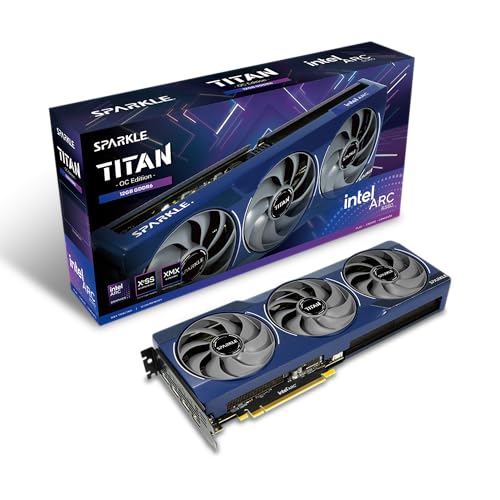
Specs
Chip | Intel Arc B580 (Battlemage, 20 Xe cores) |
VRAM | 12 GB GDDR6, 192-bit |
Board power | 190 W (Intel reference) |
Interface | PCIe 4.0 x8 |
Cooler | Torn Cooling 2.0, metal backplate |
Upscaling | XeSS 2 with frame generation |
Chip
Intel Arc B580 (Battlemage, 20 Xe cores)
VRAM
12 GB GDDR6, 192-bit
Board power
190 W (Intel reference)
Interface
PCIe 4.0 x8
Cooler
Torn Cooling 2.0, metal backplate
Upscaling
XeSS 2 with frame generation
What it does well
The Arc B580 gives you 12 GB of VRAM at a price no 8 GB Nvidia or AMD card can match on memory. At 1080p that headroom keeps texture settings high where 8 GB cards start to stutter.
XeSS 2 runs on Intel's own XMX hardware, so upscaling quality is solid, and the card includes AV1 encode for recording. The Sparkle Titan OC adds a metal backplate and a larger cooler than the reference card.
What you give up
Arc's driver overhead hurt older 6-core CPUs in reviews. Reports suggest a Zen 5 chip like the 9600X sidesteps most of it, but older DX11 titles can still be uneven.
This is a 1080p card, not a 1440p ultra card. It runs on a PCIe 4.0 x8 link, fine on any AM5 board, and street pricing often drifts above Intel's launch price.
Who it's for
Buy it if you are a first-time builder on a 1080p 144 Hz monitor and every dollar matters. If you can stretch, the Best Value pick is the safer long-term buy.
Editor's Pick: ASUS Prime RTX 5060 Ti OC (16 GB)

Specs
Chip | GeForce RTX 5060 Ti (Blackwell) |
VRAM | 16 GB GDDR7, 128-bit |
Board power | 180 W |
Power connector | 1x 8-pin PCIe |
Interface | PCIe 5.0 x8 |
Encoder | NVENC with AV1 |
Chip
GeForce RTX 5060 Ti (Blackwell)
VRAM
16 GB GDDR7, 128-bit
Board power
180 W
Power connector
1x 8-pin PCIe
Interface
PCIe 5.0 x8
Encoder
NVENC with AV1
What it does well
The RTX 5060 Ti 16GB is the Nvidia option for 9600X builders who stream or lean on DLSS 4. NVENC with AV1 encodes a clean stream with almost no hit to frame rate, which matters on a six-core CPU.
It draws 180 W through one 8-pin connector, runs quiet, and the 16 GB of GDDR7 keeps it out of the VRAM trap that sinks the 8 GB version.
What you give up
Raw raster sits near the RX 9060 XT, not near the RX 9070 XT. TechSpot measured 69 fps against the RX 9070 XT's 131 fps in Cyberpunk Phantom Liberty at 1440p ultra.
Current street pricing for the 16 GB card has drifted close to the RX 9070 XT, so check the live price before you buy it on value grounds. Avoid the 8 GB listing; it shares the name. The 16 GB OC Edition is the one to buy.
Who it's for
Buy it if you stream to Twitch or YouTube, play DLSS-heavy games at 1080p or 1440p, and want Nvidia's encoder on a 9600X build.
Bottom line
If you play at 1440p, buy the Sapphire Pulse RX 9070 XT. If you play at 1080p on a budget, buy the PowerColor Reaper RX 9060 XT (16 GB). If you want ray tracing, DLSS 4 or CUDA, buy the ASUS Prime RTX 5070 Ti OC; it is the ceiling a 9600X can use. If every dollar counts, buy the Sparkle Arc B580 Titan OC. If you stream, buy the ASUS Prime RTX 5060 Ti OC (16 GB).
Unsure whether six cores are enough for your games? Read whether a Ryzen 5 is enough before you spend more on the GPU.
FAQ
Will the Ryzen 5 9600X bottleneck an RTX 5070 Ti?
Mostly no. At 1440p and 4K the RTX 5070 Ti is the limit in most games, so the 9600X lets it run close to full speed. At 1080p in CPU-heavy esports and simulation titles, you will see the six cores cap frame rates before the card does. If you play at 1080p, the RX 9060 XT 16GB or RX 9070 XT gives you nearly the same experience for less.
Is the RTX 5070 a good GPU for the Ryzen 5 9600X?
It pairs fine on performance, but we skip it. The RTX 5070 has 12 GB of VRAM at a price where the RX 9070 XT offers 16 GB and faster raster. If you want Nvidia for ray tracing or CUDA, go up to the RTX 5070 Ti; if you want value, buy the RX 9070 XT. Landing in the middle gets you the weaker card.
Should I pair the Ryzen 5 9600X with an RTX 5080?
Only if you play at 4K. At 4K the RTX 5080 does the work and the 9600X keeps up, but at 1080p and 1440p the six-core CPU absorbs much of its lead over the RTX 5070 Ti. If you want an RTX 5080 for high refresh rates, a Ryzen 7 9800X3D is the better partner. For a 9600X, the RTX 5070 Ti is where we stop.
What PSU do I need for a Ryzen 5 9600X and RX 9070 XT?
A quality 750 W unit. The 9600X draws little power at 65 W TDP, but the RX 9070 XT is rated at 304 W of board power and can spike above that. A good 750 W ATX 3.x supply leaves headroom for those transients and for a future upgrade. The RX 9060 XT 16GB and RTX 5060 Ti 16GB are fine on 550 to 650 W.
Is an 8 GB graphics card enough for a 9600X build?
No. An 8 GB card runs out of texture memory in current AAA games, even at 1080p, and the stutter only gets worse as games get heavier. The 16 GB RX 9060 XT is the cheapest card we recommend, and the 12 GB Arc B580 is the floor. Avoid the 8 GB versions of the RX 9060 XT and RTX 5060 Ti; they share names with the 16 GB cards.
Does the Ryzen 5 9600X need a PCIe 5.0 graphics card?
No. The 9600X and AM5 boards support PCIe 5.0, but current GPUs barely use PCIe 4.0 bandwidth. The x8 cards in this list, the Arc B580 and RTX 5060 Ti, lose nothing measurable on an AM5 board. PCIe 5.0 matters more for fast NVMe drives than for the graphics card.
Related Articles

Best Motherboards for Ryzen 5 9600X (2026): Budget B650 Picks
The Ryzen 5 9600X is a 65W chip. Most boards overprice it. These B650 and B850 picks get you the features that matter without the tier-premium markup.
May 29, 2026

Best DDR5 RAM for the Ryzen 5 9600X (2026): 5 Picks
The best DDR5 RAM for the Ryzen 5 9600X in 2026: five EXPO kits picked by tier, why DDR5-6000 CL30 is the AM5 floor, and how much capacity to buy now.
Sep 3, 2026

Ryzen 5 9600X Gaming Review 2026: Benchmarks and Verdict
Our Ryzen 5 9600X gaming review: 1080p and 1440p benchmarks, multi-core and power figures, the rivals worth checking, and who should buy this Zen 5 chip.
Aug 6, 2026

Best GPUs for the Ryzen 7 9800X3D (2026): by Monitor Tier
Best GPUs to pair with the Ryzen 7 9800X3D — picks by monitor tier and use case, from 1080p competitive to 4K without bottlenecking the V-cache.
May 9, 2026

Best GPU for 1440p Gaming 2026: 5 16GB Picks, 144-240Hz
The best GPU for 1440p gaming in 2026: five 16GB picks matched to 144 and 240 Hz targets, the 8GB cards to skip, and the benchmarks behind every call.
Sep 26, 2026