Affiliate Disclosure: As an Amazon Associate we earn from qualifying purchases. Some links may earn us a commission at no cost to you.

Best microSD Express Cards for Switch 2 (2026): 256GB to 1TB
If the card in your drawer does not say microSD Express on it, the Switch 2 will not store games on it. That is the whole compatibility answer, and it catches almost everyone upgrading from the original Switch. A standard UHS-I card still slots in and still holds screenshots and video clips, but the console refuses to install or run games from it.
So the question is not whether to buy a new card. It is which one. Capacity matters more than the read-speed number printed on the package, since every card in this class already clears the bar the console cares about. Capacity is also a harder call now than it was at launch, because Express pricing has kept moving up rather than settling, so the tier you pick is the tier you live with for a while.
Our top pick: SanDisk microSD Express 512GB
It carries Nintendo licensing, it publishes a sustained write figure instead of only a burst number, and 512 GB is the capacity where most Switch 2 libraries stop hurting.

Quick picks
Pick | Card | Capacity | Best for | Buy |
|---|---|---|---|---|
Best Overall | 512 GB | One card, zero compatibility questions | ||
Best Value | 512 GB | Same capacity, lower cost per gigabyte | ||
Best Premium | 1 TB | Libraries that already outgrew 512 GB | ||
Best Budget | 256 GB | First-party libraries and tight budgets | ||
Editor's Pick | 512 GB | Sharing one card with a handheld PC |
Best Overall
- Card
- Capacity
512 GB
- Best for
One card, zero compatibility questions
- Buy
Best Value
- Card
- Capacity
512 GB
- Best for
Same capacity, lower cost per gigabyte
- Buy
Best Premium
- Card
- Capacity
1 TB
- Best for
Libraries that already outgrew 512 GB
- Buy
Best Budget
- Card
- Capacity
256 GB
- Best for
First-party libraries and tight budgets
- Buy
Editor's Pick
- Card
- Capacity
512 GB
- Best for
Sharing one card with a handheld PC
- Buy
Specs at a glance
Card | Capacity | Rated read | Rated write | Nintendo licensed |
|---|---|---|---|---|
512 GB | Up to 880 MB/s | Up to 650 MB/s | Yes | |
512 GB | Up to 890 MB/s | Up to 810 MB/s | No | |
1 TB | Up to 900 MB/s | Up to 600 MB/s | No | |
256 GB | Up to 800 MB/s | Up to 400 MB/s | Yes | |
512 GB | Up to 900 MB/s | Up to 600 MB/s | No |
- Capacity
512 GB
- Rated read
Up to 880 MB/s
- Rated write
Up to 650 MB/s
- Nintendo licensed
Yes
- Capacity
512 GB
- Rated read
Up to 890 MB/s
- Rated write
Up to 810 MB/s
- Nintendo licensed
No
- Capacity
1 TB
- Rated read
Up to 900 MB/s
- Rated write
Up to 600 MB/s
- Nintendo licensed
No
- Capacity
256 GB
- Rated read
Up to 800 MB/s
- Rated write
Up to 400 MB/s
- Nintendo licensed
Yes
- Capacity
512 GB
- Rated read
Up to 900 MB/s
- Rated write
Up to 600 MB/s
- Nintendo licensed
No
Benchmarks
Peak read speed each maker publishes for the SKU we picked.
- Lexar Play PRO 1TB900 MB/s
- Lexar Play PRO 512GB900 MB/s
- PNY microSD Express 512GB890 MB/s
- SanDisk microSD Express 512GB880 MB/s
- Samsung microSD Express 256GB800 MB/s
Peak write speed each maker publishes. Write speed is what a fresh install runs at.
- PNY microSD Express 512GB810 MB/s
- SanDisk microSD Express 512GB650 MB/s
- Lexar Play PRO 1TB600 MB/s
- Lexar Play PRO 512GB600 MB/s
- Samsung microSD Express 256GB400 MB/s
Express versus UHS-I, and what the speed buys you
The UHS-I bus tops out around 104 MB/s. microSD Express runs the card over PCIe with an NVMe command set instead, which is why the rated figures in the table above sit near 900 MB/s. On paper that is close to an order of magnitude.
On the console it shows up in load screens and texture streaming rather than in a number you watch. Testing across this class puts the spread between the fastest and slowest Express card at roughly one to six seconds per load. That is a rounding error on a purchase decision.
Rated speeds are ceilings. Independent measurement of a Nintendo-approved Express card landed around 610 to 630 MB/s sequential read and about 220 MB/s write, well under the numbers on the box. Reports suggest that pattern holds across the class, so sustained write and capacity carry more weight here than the headline read figure.
Shopping for a Steam Deck, a ROG Ally or an original Switch instead? The interface question flips, and our guide to UHS-I microSD cards for gaming handhelds is the right starting point.
How we picked
Capacity floor first. A large third-party port on this console routinely runs 50 to 70 GB installed, so 256 GB covers about three of them once system overhead takes its cut. A card that forces a weekly uninstall cycle gets replaced within the year. 512 GB is the default here; 256 GB is the budget exception.
Licensing second. Nintendo licenses SanDisk and Samsung Express cards for this console. Lexar and PNY are not, and reports through mid-2026 suggest both have shipped without compatibility problems. A license is a support guarantee rather than a technical requirement, but it is worth something on a console that hard-rejects cards it does not recognise.
Sustained write over peak read. Peak read is the number on the front of the package. Sustained write is what a 60 GB install runs at once the card's burst buffer fills. Only one card here publishes it.
Price is deliberately not a ranking axis. Express pricing moved hard through 2026, and any ordering anchored to a snapshot goes stale in weeks. The framework behind these calls is the same one in our guide to how to choose RAM and storage.
Best Overall: SanDisk microSD Express 512GB
Specs
Capacity | 512 GB |
Interface | microSD Express (PCIe/NVMe) |
Rated sequential read | Up to 880 MB/s |
Rated sequential write | Up to 650 MB/s |
Sustained write | 220 MB/s |
Speed class | U3, Class 10 |
Nintendo licensed | Yes |
Backward compatible | Yes, at UHS-I speeds |
Capacity
512 GB
Interface
microSD Express (PCIe/NVMe)
Rated sequential read
Up to 880 MB/s
Rated sequential write
Up to 650 MB/s
Sustained write
220 MB/s
Speed class
U3, Class 10
Nintendo licensed
Yes
Backward compatible
Yes, at UHS-I speeds
What it does well
Nintendo licensing removes the only real compatibility question on a console that rejects any card it does not recognise as Express. That matters less as a technical claim and more as a support one: if a licensed card misbehaves, there is somebody to escalate to.
220 MB/s sustained write is the highest published sustained figure in this group, and that is the speed a large install settles into once the burst buffer fills. SanDisk also publishes drop, X-ray and temperature ratings, which is a reasonable proxy for the card being what the label says.
What you give up
It carries the highest cost per gigabyte of the three 512 GB cards here, and the license is most of what you pay for. Rated peak read is the lowest of the non-Samsung cards, though that gap works out to a second or two per load screen.
If you never intend to move the card between devices and you are comfortable buying unlicensed, the value pick below does the same job for less money.
Who it's for
The buyer who wants one card, wants it to work the first time it goes into the slot, and never wants to think about storage again. Also the right call if you install large third-party ports rather than living on first-party Nintendo titles.
Best Value: PNY microSD Express 512GB
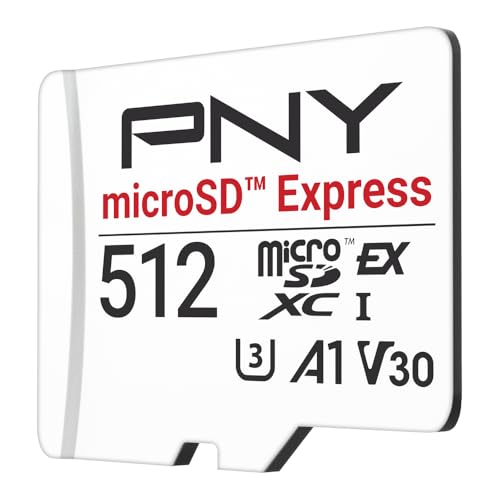
Specs
Capacity | 512 GB |
Interface | microSD Express (PCIe/NVMe) |
Rated sequential read | Up to 890 MB/s |
Rated sequential write | Up to 810 MB/s |
Speed class | U3, V30, A1 |
Nintendo licensed | No |
Warranty | Limited lifetime |
Backward compatible | Yes, at UHS-I speeds |
Capacity
512 GB
Interface
microSD Express (PCIe/NVMe)
Rated sequential read
Up to 890 MB/s
Rated sequential write
Up to 810 MB/s
Speed class
U3, V30, A1
Nintendo licensed
No
Warranty
Limited lifetime
Backward compatible
Yes, at UHS-I speeds
What it does well
810 MB/s rated write is the highest figure any card here claims, and write is the half of the equation that matters when you are pulling a fresh download onto the card. The A1 rating covers random access, which is closer to what a game engine leans on during streaming than a long sequential run.
Capacity per dollar is the real reason to buy it. At 512 GB you stop deleting games in order to install games, and that changes how the console feels to own.
What you give up
No Nintendo license. Reports through mid-2026 suggest unlicensed Express cards from established brands have worked without incident, but you are trusting the brand rather than a certification.
PNY publishes no sustained-write figure, so the rated 810 MB/s is a burst number with nothing behind it. Buyers have also flagged that this is the newest card here, and therefore the one with the shortest track record.
Who it's for
The buyer who wants 512 GB and is comfortable with an unlicensed card from a known brand. It is the right pick when capacity is the constraint and the budget is real.
Best Premium: Lexar Play PRO 1TB Express

Specs
Capacity | 1 TB |
Interface | microSD Express (PCIe 3.0, NVMe 1.3) |
Rated sequential read | Up to 900 MB/s |
Rated sequential write | Up to 600 MB/s |
Speed class | V30, UHS-I fallback |
Durability | IPX7 water resistant, shock and X-ray rated |
Warranty | Limited lifetime |
Backward compatible | Yes, at UHS-I speeds |
Capacity
1 TB
Interface
microSD Express (PCIe 3.0, NVMe 1.3)
Rated sequential read
Up to 900 MB/s
Rated sequential write
Up to 600 MB/s
Speed class
V30, UHS-I fallback
Durability
IPX7 water resistant, shock and X-ray rated
Warranty
Limited lifetime
Backward compatible
Yes, at UHS-I speeds
What it does well
1 TB is the only capacity here that removes storage management from the equation. If you keep games installed rather than re-downloading them, or a second person in the house plays on the same console, this tier stops the problem instead of postponing it.
900 MB/s rated read ties for the fastest here, and Lexar states the underlying interface (PCIe 3.0 with an NVMe 1.3 command set) rather than leaving it implied. The IPX7, shock and X-ray ratings matter more on a card that lives in a handheld and gets carried around.
What you give up
Cost per gigabyte at the 1 TB tier has not corrected the way 512 GB has, so you pay a real premium over buying two 512 GB cards. Rated write of 600 MB/s is the lowest among the unlicensed cards, and there is no Nintendo license.
If your library sits under 400 GB today, the 512 GB version of this exact card is the better purchase and the extra spend buys you nothing you will notice.
Who it's for
The buyer with a large digital library, a shared console, or a habit of keeping everything installed.
Best Budget: Samsung microSD Express 256GB

Specs
Capacity | 256 GB |
Interface | microSD Express (PCIe/NVMe) |
Rated sequential read | Up to 800 MB/s |
Rated sequential write | Up to 400 MB/s |
Thermal control | On-card temperature monitoring |
Nintendo licensed | Yes, official Switch 2 branding |
Speed class | U3 |
Backward compatible | Yes, at UHS-I speeds |
Capacity
256 GB
Interface
microSD Express (PCIe/NVMe)
Rated sequential read
Up to 800 MB/s
Rated sequential write
Up to 400 MB/s
Thermal control
On-card temperature monitoring
Nintendo licensed
Yes, official Switch 2 branding
Speed class
U3
Backward compatible
Yes, at UHS-I speeds
What it does well
It is the cheapest way onto a card the Switch 2 will accept for game storage, and it carries official Nintendo licensing rather than a compatibility claim.
Samsung embeds an on-card temperature-monitoring chip that steps speed down before the card thermally throttles. Testing suggests it holds steadier throughput across long sessions than cards with no thermal management. On a handheld played for hours in a warm room, consistency beats peak.
What you give up
256 GB is roughly three large third-party installs. Go past a handful of games and you are managing storage from the first week, and the saving against a 512 GB card evaporates the moment you buy a second one.
Rated speeds are the lowest here, and Samsung's published figures differ between retailer listings for the same SKU, which makes the specification genuinely hard to pin down.
Who it's for
The buyer whose shelf is mostly first-party Nintendo titles, which install smaller than the third-party ports. It also works if you need a card today and would rather size up later.
Editor's Pick: Lexar Play PRO 512GB Express

Specs
Capacity | 512 GB |
Interface | microSD Express (PCIe 3.0, NVMe 1.3) |
Rated sequential read | Up to 900 MB/s |
Rated sequential write | Up to 600 MB/s |
Speed class | V30, UHS-I fallback |
Durability | IPX7 water resistant, shock and X-ray rated |
Warranty | Limited lifetime |
Backward compatible | Yes, at UHS-I speeds |
Capacity
512 GB
Interface
microSD Express (PCIe 3.0, NVMe 1.3)
Rated sequential read
Up to 900 MB/s
Rated sequential write
Up to 600 MB/s
Speed class
V30, UHS-I fallback
Durability
IPX7 water resistant, shock and X-ray rated
Warranty
Limited lifetime
Backward compatible
Yes, at UHS-I speeds
What it does well
900 MB/s rated read is the top of the class, and at 512 GB it sits in the same capacity tier as the top pick and the value pick while costing less than the licensed option.
The durability ratings and the lifetime warranty make it the sensible buy if it is going to be pulled in and out of a Switch 2, a handheld PC and a card reader over the next few years.
What you give up
No Nintendo license, and rated write of 600 MB/s trails the value pick on paper. Lexar publishes no sustained-write number either, so the 900 MB/s headline tells you nothing about what a long install settles into.
The cross-device case needs a caveat too: in a Steam Deck or ROG Ally the Express interface goes unused, so buying it for speed on those machines is the wrong reason.
Who it's for
The buyer who owns a Switch 2 and a handheld PC and wants one card that moves between them. Also the pick if you want the fastest rated read at 512 GB without the license premium.
These cards also fit a Steam Deck or ROG Ally
Every card here drops into any standard microSD slot: a Steam Deck, a ROG Ally, a Legion Go, a phone, a camera. Backward compatibility is written into the microSD Express specification and it works as advertised.
What does not carry over is the speed. Those hosts have no Express controller, so the card negotiates down to UHS-I and runs at roughly a tenth of its rated throughput. An Express card in a Steam Deck is a card that works, not a card that is faster. If the Deck is what you want to speed up, an internal SSD upgrade for handhelds is the change that moves the number.
The practical case is a shared card: one 512 GB Express card lives in the Switch 2 and travels into a handheld PC for a trip. If you are still choosing which handheld to pair it with, our handheld gaming PC guide covers that decision.
What has changed since launch
The memory shortage that shaped Express pricing at launch has not eased. NAND contract pricing kept climbing through 2026 as production capacity moved toward AI datacenter demand, and card pricing followed it up rather than correcting back down. Nintendo raised the console's own US price in September for the same underlying reason. Nothing in that chain points at a correction soon, so waiting for one is a bet rather than a plan. Buy the capacity you actually need now, not the capacity you hope gets cheap.
Availability is the second problem, and it is newer than the pricing one. Stock at the 256 GB tier moves in and out at the major retailers, which makes the budget pick here the one most likely to be unavailable on the day you go looking. If the capacity you want is in stock at a sensible figure, that is the moment to take it.
The class has widened too. Independent testing since launch puts Adata's Premier Extreme near the top of the 512 GB field on sustained numbers, and it is worth watching if it settles into steady availability. At the other end, retailer house-brand Express cards have arrived at the bottom of the class. Those are not disqualified on principle, but they publish far less about sustained write than the cards above, and sustained write is the figure that decides whether a large install feels fine or feels slow. The five picks here have not moved, because nothing that would displace them clears both bars yet: measured sustained performance and stock you can actually buy.
What to skip
Skip anything sold as Express far below the rest of the class. The gap between a UHS-I card and an Express card is real silicon, so the price has a floor. Two failure modes get reported on this interface: UHS-I cards relabeled as Express, which the console refuses outright, and capacity-spoofed cards whose firmware reports more storage than the flash holds. The second is worse, because the card writes cleanly until it silently wraps and takes your saves with it.
Skip the 128 GB tier as well. It is not enough storage to be worth the slot, and the saving against 256 GB is small. Skip the idea that you need the single fastest card too, because the spread is measured in seconds. Buy the capacity. If you are kitting the console out more broadly, our roundup of docks for gaming handhelds is a reasonable next stop.
Bottom line
If you want one card and no open questions, buy the SanDisk. If you want the same 512 GB for less and you are comfortable going unlicensed, buy the PNY. If your library already spills past 512 GB, the Lexar 1TB is the only card here that fixes that rather than delaying it. If your shelf is mostly first-party Nintendo games, the Samsung 256 GB is genuinely enough. And if the card is going to move between a Switch 2 and a handheld PC, take the Lexar 512 GB.
FAQ
Will my old microSD card work with the Switch 2?
For games, no. The Switch 2 only installs and runs games from microSD Express cards, and a standard UHS-I card is rejected for that no matter how fast it is. The card is not useless: the console still uses it for screenshots and video captures. But a 1 TB UHS-I card bought for the original Switch does not carry over as game storage. Check the card body for the word Express or the EX logo before assuming either way.
What capacity microSD Express card should I buy for the Switch 2?
512 GB for most people. Large third-party ports routinely run 50 to 70 GB installed, so 256 GB covers roughly three of them once system overhead is counted. If your library is mostly first-party Nintendo titles, which install smaller, 256 GB is genuinely enough. Go to 1 TB only if you know your library is large or you keep games installed rather than re-downloading them, because cost per gigabyte is worst at that tier.
Is a microSD Express card as fast as the Switch 2 internal storage?
No, and it does not need to be. Internal storage still loads faster than any card in this class. What Express does is close the gap enough that installing to the card stops feeling like a downgrade, which was not true of UHS-I on the original Switch. Expect a few extra seconds on load screens for asset-heavy games and no meaningful difference on lighter ones. Keep the two or three games you play daily on internal storage if those seconds bother you.
Do unlicensed microSD Express cards work with the Switch 2?
Yes, in practice. Nintendo licenses SanDisk and Samsung Express cards specifically, but Lexar and PNY cards are unlicensed and reports through mid-2026 suggest both have worked without compatibility problems. The license is a support guarantee rather than a technical requirement: any card that genuinely implements the microSD Express specification should work. The risk is that if something goes wrong you rely on the card maker rather than a certification.
Can I use a microSD Express card in a Steam Deck or ROG Ally?
Yes, but not at Express speeds. Backward compatibility is part of the specification, so an Express card slots into any standard microSD reader and works normally. What it cannot do is negotiate the Express interface, because those handhelds have no controller for it. The card falls back to UHS-I and runs at roughly a tenth of its rated throughput. That makes it a fine shared card, and a poor reason to spend up if the handheld is your only device.
How do I avoid a fake or relabeled microSD Express card?
Buy a first-party brand and treat an unusually low price as a warning rather than a bargain. The two reported failure modes are UHS-I cards relabeled as Express, which the console refuses outright, and capacity-spoofed cards whose firmware reports more storage than the flash holds. Established brands publish drop, X-ray and temperature ratings; counterfeits rarely do. When a card arrives, fill it and read the files back before trusting it with a save.
Related Articles

Best microSD Cards for Steam Deck & ROG Ally: 5 Picks (2026)
The best microSD cards for Steam Deck and ROG Ally in 2026. The handheld slot caps near 104 MB/s, so we pick on A2 random reads and capacity, not box speed.
Aug 21, 2026

Best SSD for Steam Deck & ROG Ally X: 5 Picks (2026)
The best SSD for Steam Deck and ROG Ally X: five 2230 and 2280 picks matched to your handheld's slot, plus the single-sided rule that keeps the EMI shield on.
Oct 6, 2026

How to Choose RAM and Storage
A builder's framework for RAM and storage: match the platform, buy capacity over speed, and put your money in the right SSD tier.
Jun 29, 2026

Best CPU for RTX 5080 (2026): 5 Picks for 1080p, 1440p, 4K
Best CPU for RTX 5080: the Ryzen 7 9800X3D at 1080p and 1440p, a cheaper six-core at 4K. Five picks backed by measured scaling, and where extra CPU spend stops.
Nov 1, 2026

Best Gaming Monitors for WoW Forever (2026): 5 Picks
The best monitor for WoW Forever is a 34-inch 1440p ultrawide. Five picks, from a budget 27-inch to a QD-OLED, with UI scaling and burn-in calls for raiders.
Nov 2, 2026