Affiliate Disclosure: As an Amazon Associate we earn from qualifying purchases. Some links may earn us a commission at no cost to you.

Best Prebuilt PC for Phantom Blade Zero (2026): 5 Picks
Phantom Blade Zero pulled more than 830,000 players onto Steam at its launch-weekend peak, and a large share of the people who want it on PC played the demo on a PS5 and have never bought a gaming PC. If that is you, the best prebuilt PC for Phantom Blade Zero is the one that lands on the tier you want: S-GAME publishes 1440p at 60 fps as recommended, a ray tracing row, and 4K at 60 with path tracing.
All five systems below are sold by Amazon itself and sized for what the game uses in testing, not just the spec sheet. With DDR5 this expensive, a complete box is also the cheaper way in.
Our top pick: Lenovo Legion Tower 5 RTX 5070 Ti
The Lenovo Legion Tower 5 RTX 5070 Ti is the pick because its graphics card is the lowest NVIDIA tier that averaged above 60 fps at 1440p Ultra in launch testing, and Lenovo pairs it with 32 GB of memory and an X3D processor.

Quick picks
Pick | Prebuilt | Phantom Blade Zero target | Buy |
|---|---|---|---|
Best Overall | 1440p ultra with ray tracing, 4K with DLSS | ||
Best Value | 1440p high to ultra with DLSS | ||
Best Premium | 4K path tracing with DLSS | ||
Best Budget | 1080p ray tracing tier, 1440p with DLSS | ||
Editor's Pick | 1440p ultra without path tracing |
Best Overall
- Prebuilt
- Phantom Blade Zero target
1440p ultra with ray tracing, 4K with DLSS
- Buy
Best Value
- Prebuilt
- Phantom Blade Zero target
1440p high to ultra with DLSS
- Buy
Best Premium
- Prebuilt
- Phantom Blade Zero target
4K path tracing with DLSS
- Buy
Best Budget
- Prebuilt
- Phantom Blade Zero target
1080p ray tracing tier, 1440p with DLSS
- Buy
Editor's Pick
- Prebuilt
- Phantom Blade Zero target
1440p ultra without path tracing
- Buy
Specs at a glance
Prebuilt | CPU | GPU | Memory | Storage |
|---|---|---|---|---|
Ryzen 7 9800X3D | RTX 5070 Ti, 16 GB | 32 GB DDR5 | 1 TB SSD | |
Core Ultra 7 265F | RTX 5070, 12 GB | 16 GB DDR5 | 1 TB Gen4 SSD | |
Ryzen 9 9900X3D | RTX 5080, 16 GB | 32 GB DDR5 | 2 TB Gen4 SSD | |
Core Ultra 7 265 | RTX 5060 Ti | 32 GB DDR5 | 1 TB NVMe | |
Ryzen 7 7800X3D | RX 9070 XT, 16 GB | 32 GB DDR5 | 1 TB SSD |
- CPU
Ryzen 7 9800X3D
- GPU
RTX 5070 Ti, 16 GB
- Memory
32 GB DDR5
- Storage
1 TB SSD
- CPU
Core Ultra 7 265F
- GPU
RTX 5070, 12 GB
- Memory
16 GB DDR5
- Storage
1 TB Gen4 SSD
- CPU
Ryzen 9 9900X3D
- GPU
RTX 5080, 16 GB
- Memory
32 GB DDR5
- Storage
2 TB Gen4 SSD
- CPU
Core Ultra 7 265
- GPU
RTX 5060 Ti
- Memory
32 GB DDR5
- Storage
1 TB NVMe
- CPU
Ryzen 7 7800X3D
- GPU
RX 9070 XT, 16 GB
- Memory
32 GB DDR5
- Storage
1 TB SSD
How we picked a prebuilt PC for Phantom Blade Zero
Official tier | Target (upscaling on) | GPU named | Our picks |
|---|---|---|---|
Minimum | 1080p 30 fps | GTX 1660 6 GB, RX 5500 XT 8 GB | Every pick clears it |
Recommended | 1440p 60 fps | RTX 3060 Ti 8 GB, RX 6700 XT 12 GB | Every pick clears it |
Ray tracing | 1080p 60 fps | RTX 5060 8 GB | MSI Codex R2, Acer Nitro 85, Lenovo Legion Tower 5 |
Path tracing | 4K 60 fps | RTX 5080 16 GB | CyberPowerPC Gamer Supreme |
Minimum
- Target (upscaling on)
1080p 30 fps
- GPU named
GTX 1660 6 GB, RX 5500 XT 8 GB
- Our picks
Every pick clears it
Recommended
- Target (upscaling on)
1440p 60 fps
- GPU named
RTX 3060 Ti 8 GB, RX 6700 XT 12 GB
- Our picks
Every pick clears it
Ray tracing
- Target (upscaling on)
1080p 60 fps
- GPU named
RTX 5060 8 GB
- Our picks
MSI Codex R2, Acer Nitro 85, Lenovo Legion Tower 5
Path tracing
- Target (upscaling on)
4K 60 fps
- GPU named
RTX 5080 16 GB
- Our picks
CyberPowerPC Gamer Supreme
We started from S-GAME's own table. All four targets assume upscaling is switched on, so read them as DLSS numbers on an NVIDIA card rather than native resolution. The minimum and recommended rows also list 16 GB of memory and an SSD, and hard drives are not supported at any tier.
Launch testing moved the line up from there. GameGPU's benchmarks, run at native resolution with no upscaling, needed an RTX 5070 Ti or RX 9070 XT to average 60 fps at 1440p Ultra without ray tracing, and an RTX 5090 to do the same at 4K. PCGH found that frame rates nearly halve when you move from standard rendering to ray tracing. That is why the top pick sits a full tier above the recommended card, and why our best GPUs for Phantom Blade Zero guide treats upscaling as part of the plan.
Memory decided the next cut. GameGPU measured 19 to 22 GB of system memory in use at Ultra with path tracing, against an official line of 16 GB. Four of our five picks ship with 32 GB, and the one that does not gets a clear upgrade note.
Video memory stayed modest by comparison: about 9 GB at 1440p and 11 GB at 4K with path tracing on 12 and 16 GB cards. That makes 12 GB comfortable for 1440p and 16 GB the line for 4K path tracing.
Storage closes it out. The install is 145 GB, and Steam asked for about 300 GB of free space during the pre-load. Every pick here uses an SSD, and we flag the 1 TB drives you will outgrow first. Last, every system on this list is sold and shipped by Amazon.com rather than a reseller, which matters for returns if you are buying your first PC.
Best Overall: Lenovo Legion Tower 5 RTX 5070 Ti
Specs
CPU | Ryzen 7 9800X3D (8C/16T, 96 MB L3) |
GPU | GeForce RTX 5070 Ti, 16 GB GDDR7 |
Memory | 32 GB DDR5 |
Storage | 1 TB SSD |
Platform | AM5 |
OS | Windows 11 Home |
Extras | 3 months of PC Game Pass |
CPU
Ryzen 7 9800X3D (8C/16T, 96 MB L3)
GPU
GeForce RTX 5070 Ti, 16 GB GDDR7
Memory
32 GB DDR5
Storage
1 TB SSD
Platform
AM5
OS
Windows 11 Home
Extras
3 months of PC Game Pass
What it does well
The RTX 5070 Ti is the card that crossed 60 fps at 1440p Ultra in GameGPU's native-resolution testing, so it handles the recommended 1440p 60 target with room left for ray tracing. Turn on DLSS Quality and that margin goes toward ray-traced lighting or a high refresh rate, your choice.
Its 16 GB of GDDR7 covers the roughly 11 GB the game used at 4K with path tracing. That means 4K with DLSS is a real option here, not a stretch, and frame generation can layer on top for a 120Hz TV.
Lenovo pairs it with a Ryzen 7 9800X3D and 32 GB of DDR5. The large 3D V-Cache helps hold frame times steady when the game streams in new areas, and 32 GB sits above the 19 to 22 GB the game used in testing.
What you give up
The 1 TB drive is the first limit you will hit. The install alone is 145 GB, and Windows plus a couple more big releases will fill the rest within months. Budget for a second NVMe drive.
Path tracing at 4K is still beyond this card without heavy upscaling. If 4K path tracing is the whole reason you are buying, step up to the Best Premium pick.
Who it's for
The PS5 player moving to a 1440p 144Hz monitor, or a 4K TV owner happy to run DLSS, who wants one box that clears every official tier except 4K path tracing. If you want this card in a different chassis, our RTX 5070 Ti prebuilt roundup compares the alternatives.
Best Value: Acer Nitro 85 RTX 5070

Specs
CPU | Core Ultra 7 265F (20 cores) |
GPU | GeForce RTX 5070, 12 GB GDDR7 |
Memory | 16 GB DDR5 |
Storage | 1 TB Gen4 SSD |
Networking | Wi-Fi 7 |
Model | N85-600-UR35 |
OS | Windows 11 Home |
CPU
Core Ultra 7 265F (20 cores)
GPU
GeForce RTX 5070, 12 GB GDDR7
Memory
16 GB DDR5
Storage
1 TB Gen4 SSD
Networking
Wi-Fi 7
Model
N85-600-UR35
OS
Windows 11 Home
What it does well
The RTX 5070 is a full tier above the RTX 3060 Ti on S-GAME's recommended row, and it clears the RTX 5060 ray tracing row too. With DLSS on Quality, that turns the official 1440p 60 target into 1440p at high settings with frame rates to spare for a 144Hz monitor.
Its 12 GB of video memory sits above the roughly 9 GB the game used at 1440p even with path tracing on. The Core Ultra 7 265F has plenty of threads for a game that GameGPU found loads up to 16 of them.
Acer adds Wi-Fi 7 and a Gen4 SSD, and this is the least expensive RTX 5070 system we found that Amazon sells and ships itself.
What you give up
It ships with 16 GB of memory. That meets the official requirement, but GameGPU measured 19 to 22 GB in use at Ultra with path tracing. Plan on adding a matching 16 GB stick, which is a ten-minute job, or expect some hitching in busy scenes.
Twelve gigabytes is a 1440p amount. At 4K the card runs out of performance before memory, so treat this as a 1440p machine.
Who it's for
The 1440p player who wants the most frame rate per dollar and is comfortable adding a memory stick. If you would rather compare more RTX 5070 boxes, our RTX 5070 prebuilt guide has five.
Best Premium: CyberPowerPC Gamer Supreme RTX 5080

Specs
CPU | Ryzen 9 9900X3D (12C/24T) |
GPU | GeForce RTX 5080, 16 GB GDDR7 |
Memory | 32 GB DDR5 |
Storage | 2 TB PCIe 4.0 SSD |
Networking | Wi-Fi ready |
Model | SLCAI17000A3 |
OS | Windows 11 Home |
CPU
Ryzen 9 9900X3D (12C/24T)
GPU
GeForce RTX 5080, 16 GB GDDR7
Memory
32 GB DDR5
Storage
2 TB PCIe 4.0 SSD
Networking
Wi-Fi ready
Model
SLCAI17000A3
OS
Windows 11 Home
What it does well
This is the card S-GAME names for 4K at 60 fps with path tracing. The RTX 5080 carries 16 GB of GDDR7, which covers the roughly 11 GB the game used at 4K with path tracing, and it supports DLSS 4.5 with multi frame generation, the feature that makes that target reachable.
CyberPowerPC pairs it with a Ryzen 9 9900X3D, 32 GB of DDR5 and a 2 TB drive. The X3D cache matters more here than usual, because PCGH recorded traversal stutter under path tracing that repeated run after run on a Ryzen 7 5800X3D test system.
The 2 TB drive also means the game, the 300 GB pre-load window for the next big release, and a few other titles fit without juggling.
What you give up
Native 4K path tracing is still out of reach. GameGPU measured the RTX 5080 at about 25 fps there with no upscaling, so the 4K 60 target depends on DLSS and frame generation doing the heavy lifting.
The 12-core 9900X3D adds cost over an eight-core X3D chip without adding much in this game, which GameGPU found uses up to 16 threads. You are paying for the GPU and the drive, and the extra cores are a bonus for streaming or editing.
Who it's for
The 4K 120Hz TV or OLED owner who wants path tracing turned on and is fine letting DLSS carry it. For more RTX 5080 options, see our RTX 5080 prebuilt picks.
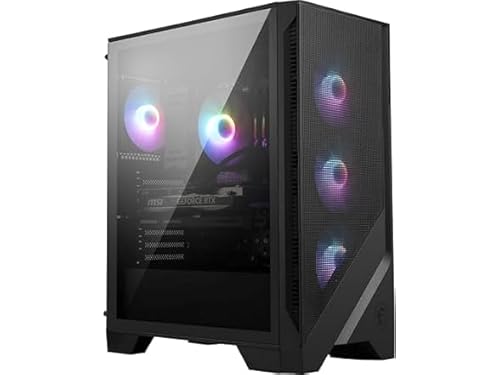
Best Budget: MSI Codex R2 RTX 5060 Ti
Specs
CPU | Core Ultra 7 265 (20 cores) |
GPU | GeForce RTX 5060 Ti (8 GB on most A2NVM7 configs) |
Memory | 32 GB DDR5 |
Storage | 1 TB M.2 NVMe SSD |
PSU | 80+ Gold |
Cooling | Air cooler |
Networking | Wi-Fi 7 |
Model | A2NVM7-455US |
CPU
Core Ultra 7 265 (20 cores)
GPU
GeForce RTX 5060 Ti (8 GB on most A2NVM7 configs)
Memory
32 GB DDR5
Storage
1 TB M.2 NVMe SSD
PSU
80+ Gold
Cooling
Air cooler
Networking
Wi-Fi 7
Model
A2NVM7-455US
What it does well
The RTX 5060 Ti clears both the recommended row and the RTX 5060 ray tracing row, so 1080p with ray tracing at 60 fps and 1440p with DLSS are both in range. That is a big step up from the PS5's fixed modes for a lower buy-in than the rest of this list.
MSI ships it with 32 GB of DDR5, which is rare at this level and covers the 19 to 22 GB the game used in testing. A Gold-rated power supply and a Core Ultra 7 265 round it out.
What you give up
MSI sells this Codex R2 family with both 8 GB and 16 GB RTX 5060 Ti cards under near-identical names, and most A2NVM7 configurations list 8 GB. Confirm the video memory on the listing before you buy. An 8 GB card is fine at 1080p but limits texture settings at 1440p.
Path tracing is not a realistic setting here, and the 1 TB drive will need a partner once your library grows. Our RTX 5060 Ti prebuilt guide lists 16 GB configurations if you want that headroom.
Who it's for
The first-time PC buyer on a 1080p 144Hz monitor or a 1440p 60Hz screen who wants ray tracing on and enough memory to never think about it.
Editor's Pick: Lenovo Legion Tower 5 RX 9070 XT

Specs
CPU | Ryzen 7 7800X3D (8C/16T, 96 MB L3) |
GPU | Radeon RX 9070 XT, 16 GB GDDR6 |
Memory | 32 GB DDR5 |
Storage | 1 TB SSD |
Platform | AM5 |
OS | Windows 11 Home |
CPU
Ryzen 7 7800X3D (8C/16T, 96 MB L3)
GPU
Radeon RX 9070 XT, 16 GB GDDR6
Memory
32 GB DDR5
Storage
1 TB SSD
Platform
AM5
OS
Windows 11 Home
What it does well
The RX 9070 XT matched the RTX 5070 Ti as the lowest cards to average 60 fps at 1440p Ultra without ray tracing in GameGPU's testing. If you play with ray tracing off, which is how most people will run a fast action game at high refresh, this is the 1440p pick.
It carries 16 GB of GDDR6, so 4K with upscaling has the memory it needs, and the Ryzen 7 7800X3D brings the same large cache as our top pick for steadier frame times. Lenovo ships it with 32 GB of DDR5.
What you give up
Ray tracing is the trade. In GameGPU's ray tracing tests, an RX 9070 XT was needed just to average 60 fps at 1080p, and NVIDIA's DLSS 4.5 frame generation, the headline feature of the 4K path tracing tier, is not available on Radeon.
Like the top pick, it ships with a 1 TB drive, so plan for a second SSD.
Who it's for
The 1440p high-refresh player who wants maximum frame rate with ray tracing off and a 16 GB card for the long run. Our AMD prebuilt roundup covers other Radeon systems.
Bottom line
If you want one box that clears every official tier short of 4K path tracing, buy the Lenovo Legion Tower 5 RTX 5070 Ti. If you play at 1440p and want the most frame rate per dollar, buy the Acer Nitro 85 RTX 5070 and add a 16 GB memory stick. If 4K path tracing is the point, buy the CyberPowerPC Gamer Supreme RTX 5080. If you are coming from a PS5 on a 1080p screen, the MSI Codex R2 RTX 5060 Ti covers the ray tracing tier with 32 GB of memory. If you run ray tracing off at high refresh, the Lenovo Legion Tower 5 RX 9070 XT is the pick. For more 1440p systems, see our 1440p prebuilt guide.
FAQ
What PC do I need to run Phantom Blade Zero?
S-GAME's minimum is a Ryzen 5 3600 or Core i7-8700K, 16 GB of memory, an SSD and a GTX 1660 or RX 5500 XT for 1080p at 30 fps with upscaling. The recommended tier steps up to a Ryzen 5 5600X and an RTX 3060 Ti or RX 6700 XT for 1440p at 60 fps. Every prebuilt in this guide clears the recommended tier, and the MSI Codex R2 RTX 5060 Ti is the lowest buy-in here that also clears the ray tracing row.
Is 16 GB of RAM enough for Phantom Blade Zero?
It meets the official requirement and the game will run. In GameGPU's launch testing at Ultra with path tracing, though, the game used 19 to 22 GB of system memory, so 16 GB leaves little room for Windows and a browser. That is why four of our five picks ship with 32 GB. If you buy the Acer Nitro 85, adding a second 16 GB stick is the first upgrade to make.
How much storage does Phantom Blade Zero need on PC?
The install is 145 GB and it must sit on an SSD, because hard drives are not supported. During the pre-load, Steam needed about 300 GB free to hold the download and the unpacked game at the same time. A 1 TB drive works, but with Windows and a few other large games it fills quickly, so a 2 TB drive like the one in the CyberPowerPC Gamer Supreme is the comfortable size.
What graphics card do you need for path tracing in Phantom Blade Zero?
S-GAME lists an RTX 5080 with 16 GB for 4K at 60 fps with path tracing, and that target assumes upscaling. At native 4K, GameGPU measured the RTX 5080 at about 25 fps, so DLSS and frame generation do most of the work. At 1440p, GameGPU needed an RTX 5090 to average 60 fps with path tracing at native resolution, so plan on DLSS with any card below that. Our pick for the 4K path tracing tier is the CyberPowerPC Gamer Supreme RTX 5080.
Is a gaming PC better than a PS5 for Phantom Blade Zero?
A PC lets you pick your frame rate and image quality instead of choosing between fixed console modes, and it adds ray tracing and path tracing options plus DLSS frame generation on NVIDIA cards. Every pick here clears S-GAME's recommended 1440p tier. The PS5 is cheaper and simpler. If you are buying a PC mostly for this game and want it to last, the Lenovo Legion Tower 5 RTX 5070 Ti is the one to get.
Does Phantom Blade Zero support DLSS and frame generation?
Yes. The PC version launched with DLSS 4.5, including multi frame generation on RTX 50 series cards, along with path tracing. All of S-GAME's performance targets assume an upscaler is running. Frame generation is what makes 4K path tracing practical on an RTX 5080 and smooths high refresh rates on the RTX 5070 Ti. Radeon cards like the RX 9070 XT do not get DLSS, so they suit ray tracing off play.
Related Articles

Best GPUs for Phantom Blade Zero (2026): Picks by Resolution Tier
Phantom Blade Zero launches September 9, 2026 on UE5 with Lumen, Nanite, hardware RT, and DLSS 4 confirmed. Here are the GPUs that hit 60fps+ at 1440p and 4K Quality, picked before the crowd figures it out.
May 25, 2026

Best 1440p Prebuilt Gaming PCs (2026): 5 PSU-Checked Picks
Best 1440p prebuilt gaming PC picks for 2026, screened by GPU tier, VRAM and published PSU specs, so you know which box actually holds high-refresh 1440p.
Sep 15, 2026

Best RTX 5070 Ti Prebuilt Gaming PCs (2026): 5 Picks
The best RTX 5070 Ti prebuilt gaming PCs for 1440p and 4K, with the PSU wattage and cooling audited on every pick so you know exactly what ships in the box.
Aug 25, 2026

Best RTX 5080 Prebuilt Gaming PCs (2026): 4K-Ready Picks
The best RTX 5080 prebuilt gaming PCs for 4K in 2026. We check PSU headroom, CPU pairing, and cooling on every pick so nothing bottlenecks your build.
Jul 20, 2026

Best Prebuilt PC for Gears of War: E-Day (2026): 5 Picks
The best prebuilt PC for Gears of War: E-Day, matched to its 1080p, 1440p and 4K tiers: 5 ray tracing-ready systems with the memory and SSD space it needs.
Oct 12, 2026