Affiliate Disclosure: As an Amazon Associate we earn from qualifying purchases. Some links may earn us a commission at no cost to you.

Best Prebuilt Gaming PCs Under $1,200 (2026): 5 Picks
Twelve hundred dollars is the point where a prebuilt stops being a compromise and starts being a real gaming machine. It is also the point where every builder ships the same graphics card, so the spec sheets start looking identical.
They are not identical. The difference is what happens in two years, when you want a bigger card and more memory. Four of these five towers can take that upgrade. One of them makes it easy.
Our top pick: Skytech Crystal RTX 5060 Ti
It is the only machine at the cap that pairs the faster GDDR7 card with DDR5 memory, so nothing inside is a generation behind.

Quick picks
Slot | System | GPU | CPU | Buy |
|---|---|---|---|---|
Best Overall | RTX 5060 Ti 8GB | Ryzen 5 8400F | ||
Best Value | RTX 5060 | Ryzen 5 9600X | ||
Best Premium | RTX 5060 Ti 8GB | Ryzen 7 5700 | ||
Best Budget | RTX 5060 | Ryzen 5 5500 | ||
Editor's Pick | RTX 5060 | Intel Core i5-14400F |
Best Overall
- System
- GPU
RTX 5060 Ti 8GB
- CPU
Ryzen 5 8400F
- Buy
Best Value
- System
- GPU
RTX 5060
- CPU
Ryzen 5 9600X
- Buy
Best Premium
- System
- GPU
RTX 5060 Ti 8GB
- CPU
Ryzen 7 5700
- Buy
Best Budget
- System
- GPU
RTX 5060
- CPU
Ryzen 5 5500
- Buy
Editor's Pick
- System
- GPU
RTX 5060
- CPU
Intel Core i5-14400F
- Buy
Specs at a glance
System | CPU | GPU | Memory | Storage | Power supply |
|---|---|---|---|---|---|
Ryzen 5 8400F (6C/12T, 4.7 GHz boost) | RTX 5060 Ti 8GB GDDR7 | 16 GB DDR5-6000 | 1 TB NVMe M.2 | 650 W 80+ Gold | |
Ryzen 5 9600X (6C/12T, 5.4 GHz boost, 32 MB L3) | ZOTAC RTX 5060 Twin Edge OC 8GB GDDR7 | 16 GB DDR5 | 1 TB NVMe | 650 W 80+ Gold | |
Ryzen 7 5700 (8C/16T, 4.6 GHz boost) | RTX 5060 Ti 8GB GDDR7 | 16 GB DDR4-3200 | 1 TB NVMe M.2 | 650 W 80+ Gold | |
Ryzen 5 5500 (6C/12T, 4.2 GHz boost, 16 MB L3) | RTX 5060 8GB GDDR7 | 16 GB DDR4 | 1 TB NVMe | 650 W 80+ Gold | |
Intel Core i5-14400F (10C/16T) | RTX 5060 8GB | 16 GB DDR5 | 1 TB PCIe Gen 4 SSD | Not documented by the vendor |
- CPU
Ryzen 5 8400F (6C/12T, 4.7 GHz boost)
- GPU
RTX 5060 Ti 8GB GDDR7
- Memory
16 GB DDR5-6000
- Storage
1 TB NVMe M.2
- Power supply
650 W 80+ Gold
- CPU
Ryzen 5 9600X (6C/12T, 5.4 GHz boost, 32 MB L3)
- GPU
ZOTAC RTX 5060 Twin Edge OC 8GB GDDR7
- Memory
16 GB DDR5
- Storage
1 TB NVMe
- Power supply
650 W 80+ Gold
- CPU
Ryzen 7 5700 (8C/16T, 4.6 GHz boost)
- GPU
RTX 5060 Ti 8GB GDDR7
- Memory
16 GB DDR4-3200
- Storage
1 TB NVMe M.2
- Power supply
650 W 80+ Gold
- CPU
Ryzen 5 5500 (6C/12T, 4.2 GHz boost, 16 MB L3)
- GPU
RTX 5060 8GB GDDR7
- Memory
16 GB DDR4
- Storage
1 TB NVMe
- Power supply
650 W 80+ Gold
- CPU
Intel Core i5-14400F (10C/16T)
- GPU
RTX 5060 8GB
- Memory
16 GB DDR5
- Storage
1 TB PCIe Gen 4 SSD
- Power supply
Not documented by the vendor
Benchmarks
Esports headroom on the card four of these five towers ship. The RTX 5060 Ti runs ahead of the plain 5060 by a similar margin.
- 370 FPS
- 291 FPS
Same chip, same clocks, twice the memory. This is the gap that decides how long any of these towers stays comfortable at 1440p.
- 65 FPS
- 58 FPS
How we picked
Graphics card first. At this budget that decision is nearly made for you: the RTX 5060 and the RTX 5060 Ti are the only current-generation cards that fit, and both ship with 8 GB of memory. So the card became a tiebreaker rather than the headline, and the ranking moved to what surrounds it.
Power supply second, and it is not negotiable. A 650 W 80+ Gold unit is enough to drop in a 5070-class card later without touching the tower again. An undocumented OEM unit is not, and that limit is the single most common reason a cheap prebuilt becomes disposable. The reasoning behind that rule is in our guide to choosing a GPU and a monitor that matches.
Socket third. AM5 accepts CPUs that do not exist yet. AM4 and LGA 1700 do not. If you intend to keep the machine past the warranty, that difference is worth more than a clock speed.
Memory and storage last, because both are cheap to fix. Every pick here ships 16 GB and a 1 TB NVMe drive, which is the floor rather than the goal. If your budget stretches, the step up is documented in our picks for prebuilts under fifteen hundred dollars.
Best Overall: Skytech Crystal RTX 5060 Ti
Specs
CPU | Ryzen 5 8400F (6C/12T, 4.7 GHz boost) |
GPU | RTX 5060 Ti 8GB GDDR7 |
Memory | 16 GB DDR5-6000 |
Storage | 1 TB NVMe M.2 |
Power supply | 650 W 80+ Gold |
Cooling | High-airflow air cooler, ARGB |
Wireless | Wi-Fi 5 (802.11ac) |
OS | Windows 11 Home |
CPU
Ryzen 5 8400F (6C/12T, 4.7 GHz boost)
GPU
RTX 5060 Ti 8GB GDDR7
Memory
16 GB DDR5-6000
Storage
1 TB NVMe M.2
Power supply
650 W 80+ Gold
Cooling
High-airflow air cooler, ARGB
Wireless
Wi-Fi 5 (802.11ac)
OS
Windows 11 Home
What it does well
The Crystal is the only tower in this group where the graphics card and the memory belong to the same generation. You get the RTX 5060 Ti with GDDR7 and 16 GB of DDR5 running at 6000, rather than the DDR4-3200 that most integrators still pair with a current card at this price. That matters less for peak frame rate than it does for the 1% lows, where slow memory shows up as stutter you feel rather than a number you read.
The Ryzen 5 8400F is the quiet star. Six Zen 4 cores boosting to 4.7 GHz will not win a rendering benchmark, but it feeds a 5060 Ti without breaking a sweat and it will still feed a much larger card three years from now. Behind it sits a 650 W 80+ Gold supply, which is the specification that decides whether this box has a second life.
Skytech ships it with no bloatware, a 1 TB NVMe drive, and a mesh-front case with real airflow. The keyboard and mouse in the box are throwaways. Everything that costs money to change is already right.
What you give up
The 8 GB frame buffer is the ceiling and it is a real one. Reviewers testing the same chip with 16 GB found texture pop-in in Hogwarts Legacy at 1440p Ultra and a much larger deficit in Spider-Man 2 at 1440p High. You will play those games. You will play them with textures one notch down. If the frame buffer is the line you care about, our roundup of the best RTX 5060 Ti prebuilt gaming PCs sorts the towers by VRAM tier before anything else.
Wi-Fi 5 is a generation behind both ZOTAC picks, and the 8400F has no meaningful upgrade path on its socket. Sixteen gigabytes of system memory is the floor in 2026, not a comfortable number, and Skytech does not disclose whether it arrives as one stick or two.
Who it's for
The buyer on a 1440p 144 Hz panel who wants the most graphics card the budget allows and is comfortable turning DLSS on and leaving it on. If you play mostly competitive titles and dip into single-player AAA, this is the machine.
Best Value: ZOTAC MEK Ryzen 5 9600X

Specs
CPU | Ryzen 5 9600X (6C/12T, 5.4 GHz boost, 32 MB L3) |
GPU | ZOTAC RTX 5060 Twin Edge OC 8GB GDDR7 |
Memory | 16 GB DDR5 |
Storage | 1 TB NVMe |
Power supply | 650 W 80+ Gold |
Platform | Socket AM5 |
Wireless | Wi-Fi 6E, Bluetooth 5.3 |
Warranty | 1 year system, 3 year GPU |
CPU
Ryzen 5 9600X (6C/12T, 5.4 GHz boost, 32 MB L3)
GPU
ZOTAC RTX 5060 Twin Edge OC 8GB GDDR7
Memory
16 GB DDR5
Storage
1 TB NVMe
Power supply
650 W 80+ Gold
Platform
Socket AM5
Wireless
Wi-Fi 6E, Bluetooth 5.3
Warranty
1 year system, 3 year GPU
What it does well
This is the only pick with a future. The Ryzen 5 9600X sits on Socket AM5, which means the CPU can be replaced with parts AMD has not announced yet, and it does so while boosting to 5.4 GHz with 32 MB of L3 cache behind it. Paired with 16 GB of DDR5 and a ZOTAC-built RTX 5060 Twin Edge OC, it is the most modern platform in this group by a wide margin.
ZOTAC assembles these in the United States and backs them with a one-year system warranty plus three years on the graphics card, which is unusual at this price and worth real money if the card is what fails. Wi-Fi 6E and Bluetooth 5.3 handle wireless properly. The 650 W 80+ Gold supply matches the top pick.
It also costs less than the cap, and the difference is roughly a decent 1440p monitor.
What you give up
The plain RTX 5060 is the slower of the two cards here. Against the 5060 Ti you give up somewhere around a fifth of your frame rate in demanding titles, and the 8 GB memory ceiling applies just the same. This is a machine that trades peak performance today for platform life later.
The white chassis is a taste call and the case has less front intake area than the mesh-front Skytech boxes. If you live somewhere warm and run long sessions, budget for a fan.
Who it's for
The buyer who intends to keep this tower five years and upgrade it in pieces rather than replace it. It is also the right answer for anyone who wants to put the saved money toward a display instead of the box.
If that is you, our guide to choosing a gaming monitor is the next thing to read.
Best Premium: Skytech Edge Ryzen 7 5700

Specs
CPU | Ryzen 7 5700 (8C/16T, 4.6 GHz boost) |
GPU | RTX 5060 Ti 8GB GDDR7 |
Memory | 16 GB DDR4-3200 |
Storage | 1 TB NVMe M.2 |
Power supply | 650 W 80+ Gold |
Platform | Socket AM4 |
Wireless | Wi-Fi 5 |
OS | Windows 11 Home |
CPU
Ryzen 7 5700 (8C/16T, 4.6 GHz boost)
GPU
RTX 5060 Ti 8GB GDDR7
Memory
16 GB DDR4-3200
Storage
1 TB NVMe M.2
Power supply
650 W 80+ Gold
Platform
Socket AM4
Wireless
Wi-Fi 5
OS
Windows 11 Home
What it does well
This is the most total silicon anyone will sell you at the cap. Eight Zen 3 cores and sixteen threads, plus the faster RTX 5060 Ti, in one box. If you record gameplay, run a stream overlay, or keep a browser full of tabs alive while you play, those extra cores are the difference between a smooth session and one that hitches every time an encoder wakes up.
The rest is the same competent Skytech recipe: 1 TB NVMe, 650 W 80+ Gold, mesh-front Edge chassis, no preinstalled junk. For pure gaming plus a capture workload, nothing else in this price band matches the thread count without giving up the Ti.
What you give up
The memory is DDR4-3200 and the socket is AM4. That combination is the end of a road. AMD has shipped its last new CPU for this platform, so the processor in this tower is the processor you keep. The DDR5 picks will accept a faster chip in three years; this one will not.
Zen 3 also trails Zen 4 and Zen 5 in single-thread performance, which is what most games lean on hardest. You are trading peak per-core speed for core count, and in a lot of games that trade loses.
Who it's for
The buyer who streams, records, or edits alongside gaming and cares more about threads today than about what the socket accepts in 2029. It is a deliberate short-horizon purchase, and a good one if you know that going in.
Best Budget: ZOTAC MEK Ryzen 5 5500
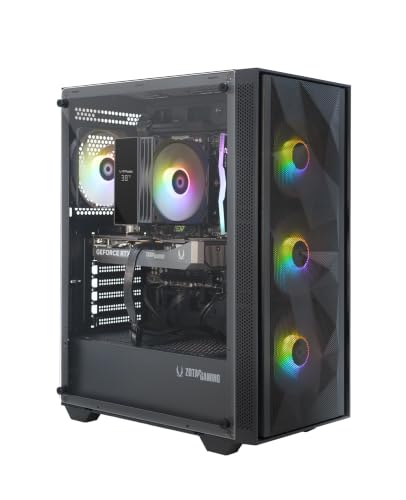
Specs
CPU | Ryzen 5 5500 (6C/12T, 4.2 GHz boost, 16 MB L3) |
GPU | RTX 5060 8GB GDDR7 |
Memory | 16 GB DDR4 |
Storage | 1 TB NVMe |
Power supply | 650 W 80+ Gold |
Platform | Socket AM4 |
Wireless | Wi-Fi 6E |
Warranty | 1 year system, 3 year GPU |
CPU
Ryzen 5 5500 (6C/12T, 4.2 GHz boost, 16 MB L3)
GPU
RTX 5060 8GB GDDR7
Memory
16 GB DDR4
Storage
1 TB NVMe
Power supply
650 W 80+ Gold
Platform
Socket AM4
Wireless
Wi-Fi 6E
Warranty
1 year system, 3 year GPU
What it does well
The cheapest honest way into a current-generation graphics card. This MEK ships the same RTX 5060 with GDDR7 as its AM5 sibling, the same 650 W 80+ Gold supply, the same three-year GPU warranty, and the same Wi-Fi 6E radio, for a meaningful amount less money.
What ZOTAC cut is the platform. The Ryzen 5 5500 is a Zen 3 part with 16 MB of L3 and DDR4 memory behind it. In practice, at 1080p with a 5060, that is fine: the card runs out of headroom before the processor does, and Counter-Strike 2 clears well past three hundred frames.
The money you do not spend here is the point. It is roughly a monitor, or the 16 GB graphics card upgrade this machine will want in a couple of years.
What you give up
The 5500 is the weakest processor in the group and it has the least cache. Move to 1440p, or pair it with a much faster card later, and it becomes the bottleneck. It is also on AM4, so the fix is a new motherboard rather than a new chip.
Some boards paired with this CPU limit the graphics slot to PCIe 3.0. On an 8 GB card that is the exact scenario where reviewers measured the sharpest frame-rate losses, because the card leans on system memory once the frame buffer fills.
Who it's for
The 1080p high-refresh buyer who would rather put the difference into a display than into the tower. If you are targeting a 1080p 165 Hz panel and playing mostly competitive titles, nothing above this is money well spent.
If you would rather buy the card yourself later, our picks for graphics cards under five hundred dollars at 1440p cover the upgrade.
Editor's Pick: Acer Nitro 60 N60-640-UR21

Specs
CPU | Intel Core i5-14400F (10C/16T) |
GPU | RTX 5060 8GB |
Memory | 16 GB DDR5 |
Storage | 1 TB PCIe Gen 4 SSD |
Chassis | 30 L tool-free with ARGB |
Wireless | Wi-Fi 6 plus Gigabit Ethernet |
OS | Windows 11 |
CPU
Intel Core i5-14400F (10C/16T)
GPU
RTX 5060 8GB
Memory
16 GB DDR5
Storage
1 TB PCIe Gen 4 SSD
Chassis
30 L tool-free with ARGB
Wireless
Wi-Fi 6 plus Gigabit Ethernet
OS
Windows 11
What it does well
Everything else here comes from a boutique integrator. This one comes from Acer, which means a national service network, a support phone number that answers, and a warranty process that does not depend on a small company still existing in year three. For a first machine, or one you are buying for someone else, that is worth more than a spec-sheet win.
The hardware holds up on its own. The Core i5-14400F brings ten cores, six performance and four efficiency, which handles background load better than the six-core AMD picks. DDR5 memory, a 1 TB PCIe Gen 4 drive, Wi-Fi 6 and gigabit ethernet round it out. The 30 L chassis is tool-free and genuinely pleasant to work inside, which is not a given at any price.
What you give up
Acer does not document the power supply the way the boutique builders do, and OEM units in this class are usually sized to the machine as shipped rather than to what you might add. Plan on replacing it before you fit a larger card.
The motherboard is an OEM design with limited BIOS control, so memory tuning and fan curves are more constrained than on the Skytech and ZOTAC boxes. Nothing here stops you gaming; it just narrows what you can change later.
Who it's for
The first-time buyer, the parent buying for a teenager, or anyone who values a support contract over the last few frames per second. It is the least adventurous pick in the group and that is exactly the point.
Bottom line
If you want the most graphics card this budget allows and you game on a 1440p panel, buy the Skytech Crystal RTX 5060 Ti. If you plan to keep the tower five years and upgrade it in pieces, buy the ZOTAC MEK Ryzen 5 9600X and accept the slightly slower card. If you stream or record while you play, the eight cores in the Skytech Edge Ryzen 7 5700 earn their keep.
If you are chasing the lowest price that still gets a current card, the ZOTAC MEK Ryzen 5 5500 is it, and the money you save belongs in a monitor. And if you want a warranty phone number more than a benchmark win, take the Acer Nitro 60. Every one of these ships 8 GB of video memory, so plan the graphics upgrade now rather than being surprised by it. If your budget has room to move, the wider prebuilt roundup across every budget covers the tiers above and below this one.
FAQ
Is a twelve hundred dollar prebuilt gaming PC good enough for 1440p?
Yes, with one condition: you run DLSS. Every prebuilt at this price ships either an RTX 5060 or an RTX 5060 Ti, and both handle 1440p comfortably in most titles once upscaling is on. Native 1440p Ultra in a heavy open-world game is where the 8 GB frame buffer starts to complain. Set textures one notch below maximum and the problem largely disappears.
Is 8 GB of VRAM enough for gaming in 2026?
At 1080p, yes, with room to spare. At 1440p it is the limiting factor in a growing number of games. Reviewers testing the RTX 5060 Ti with 8 GB against the identical chip with 16 GB measured a gap of roughly a fifth in general 1440p averages, and a far larger one in memory-hungry titles like Spider-Man 2. It is enough to buy today and the first thing you will want to change.
Should I insist on DDR5, or is DDR4 fine in a prebuilt at this price?
DDR4 is fine for frame rate and a problem for lifespan. The performance difference in games is small, often a few percent. The real issue is that DDR4 means Socket AM4 or an older Intel platform, and neither accepts a new processor. If you plan to upgrade the CPU later, DDR5 is the requirement. If you plan to replace the whole machine, save the money.
Can I upgrade the graphics card in a twelve hundred dollar prebuilt later?
In four of these five, yes. A 650 W 80+ Gold power supply has enough headroom for a 5070-class card without any other change, and all the boutique picks list one. The exception is the OEM machine, where the supply is not documented and is usually sized to the system as shipped. Check the wattage and the connector count before you buy the card.
Is it cheaper to build a PC than to buy a prebuilt at this budget?
Slightly, and less than it used to be. Integrators buy memory and drives at volume pricing that individuals cannot match, and the gap narrows further whenever component prices spike. Building still wins on part quality, because you choose the power supply and the memory rather than accepting whatever the builder sourced that month. If you want control, build. If you want it working on Saturday, buy.
How much RAM do I need in a twelve hundred dollar gaming PC?
Sixteen gigabytes is the working floor and every machine here ships exactly that. It is enough for any current game on its own. It stops being enough when you add a browser with thirty tabs, a Discord call, and streaming software on top. Thirty-two gigabytes is the comfortable number, and it is the cheapest upgrade you can make to any of these towers.
Related Articles

Best Prebuilt Gaming PCs Truly Under $1,000 (2026): 5 Picks
The best prebuilt gaming PCs genuinely under $1,000 in 2026: five RTX towers ranked on sustained 1080p frame rates, PSU headroom, and airflow quality.
Sep 20, 2026

5 Best Prebuilt Gaming PCs Under $1500 (2026): 8GB vs 16GB
The best prebuilt gaming PC under $1500 in 2026: five RTX 5060 Ti rigs ranked for 1080p and 1440p, and the 8GB vs 16GB VRAM call that decides your buy.
Aug 2, 2026

Best Prebuilt Gaming PCs (2026): 5 Picks, Warranty First
The best prebuilt gaming PCs in 2026: 5 picks from a 1080p budget box up to a 4K rig, judged on warranty and RMA support first, then build quality and VRAM.
Aug 18, 2026

How to Choose a GPU (and a Monitor That Matches)
A buyer's framework for picking a GPU and the monitor that pairs with it. Start with the panel and work the card back.
May 17, 2026

Best GPUs Under $500 for 1440p (2026): 5 Picks by VRAM
The best GPUs under $500 for 1440p, sorted by monitor pairing and VRAM ceiling. Honest street pricing, the 8GB-vs-16GB call, and which card fits your library.
May 19, 2026