Affiliate Disclosure: As an Amazon Associate we earn from qualifying purchases. Some links may earn us a commission at no cost to you.

Best PWM Fan Hubs and Controllers (2026): 5 Top Picks
Modern airflow cases mount seven to ten fans. Mainstream motherboards ship three or four chassis headers. That gap is why this product category exists, and it is why the aisle is full of near-identical black circuit boards that all claim to solve it.
The part you need depends on one number: how many fans your case holds minus how many headers your board has free. One or two over and a splitter finishes the job. Three or more and you want a powered hub taking current from the PSU instead. This guide runs that math, then names the five parts worth buying, from budget airflow cases on up to ten-fan showcase builds.
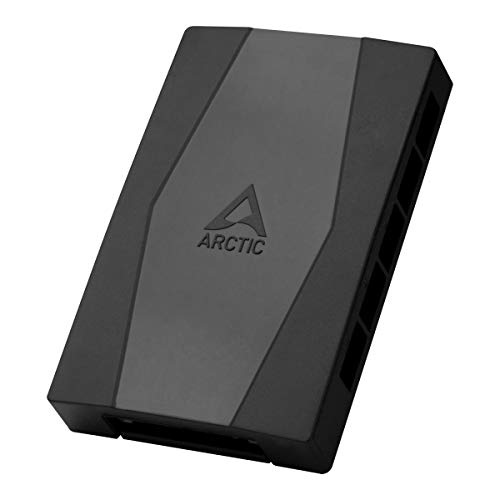
Our top pick: ARCTIC Case Fan Hub
Ten PWM ports, power off a SATA lead, and one control signal back to the motherboard. It solves the header problem completely for the cost of a single case fan.
Quick picks
Pick | Hub | Best for | Buy |
|---|---|---|---|
Best Overall | Plain PWM fans, no lighting | ||
Best Value | ARGB fans on a board short of ARGB headers | ||
Best Premium | Separate fan curves per zone | ||
Best Budget | One or two extra fans on spare headers | ||
Editor's Pick | Showcase builds at the case fan limit |
Best Overall
- Hub
- Best for
Plain PWM fans, no lighting
- Buy
Best Value
- Hub
- Best for
ARGB fans on a board short of ARGB headers
- Buy
Best Premium
- Hub
- Best for
Separate fan curves per zone
- Buy
Best Budget
- Hub
- Best for
One or two extra fans on spare headers
- Buy
Editor's Pick
- Hub
- Best for
Showcase builds at the case fan limit
- Buy
Specs at a glance
Hub | Fan ports | Lighting | Power | Fan control |
|---|---|---|---|---|
10 x 4-pin PWM | None | SATA | Motherboard PWM | |
12 groups, 4-pin PWM | 3-pin 5V ARGB, IR remote | SATA | Motherboard PWM | |
12 daisy-chained PWM fans | Addressable, via iCUE | SATA | iCUE software curves | |
3 cables, 1 to 2 each | None | Motherboard header | Motherboard PWM | |
10 x 4-pin PWM | 10 x 3-pin 5V ARGB, RF remote | SATA | Motherboard PWM |
- Fan ports
10 x 4-pin PWM
- Lighting
None
- Power
SATA
- Fan control
Motherboard PWM
- Fan ports
12 groups, 4-pin PWM
- Lighting
3-pin 5V ARGB, IR remote
- Power
SATA
- Fan control
Motherboard PWM
- Fan ports
12 daisy-chained PWM fans
- Lighting
Addressable, via iCUE
- Power
SATA
- Fan control
iCUE software curves
- Fan ports
3 cables, 1 to 2 each
- Lighting
None
- Power
Motherboard header
- Fan control
Motherboard PWM
- Fan ports
10 x 4-pin PWM
- Lighting
10 x 3-pin 5V ARGB, RF remote
- Power
SATA
- Fan control
Motherboard PWM
How we picked
Start with the header budget, not the product list. A chassis fan header on a current board is typically rated for 12W, which is 12V at 1A, and some recent boards raise that to 24W with over-current protection. A 120mm PWM fan draws somewhere between 0.1A and 1.0A depending on the model, with a common case fan landing near 0.13A. On paper a single 1A header could carry seven of those.
It cannot, and the reason is startup. A fan pulls three to six times its running current in the moment it spins up, and every fan on a header spins up at the same instant when the system powers on. Derate to 80 percent of the header rating and the honest ceiling lands at two or three fans per header on a splitter. Past that, the current has to come from somewhere else.
That is what a powered hub does. It takes fan current from the PSU over a SATA lead and sends only the PWM control signal back to the motherboard, which removes the header limit from the equation. The cost is control granularity: one hub means one signal, so every fan on it follows one curve. The case fans we recommend all behave the same way here, so the constraint is the hub rather than the fan.
Two more constraints shape the picks. First, a hub returns exactly one tachometer signal, so only one fan reports RPM and the rest go dark in monitoring. Second, addressable lighting is 3-pin at 5V while older RGB is 4-pin at 12V, the connectors look similar, and the wrong pairing destroys the device. Every combined hub below takes 5V 3-pin only, and both listings say so.
So the lineup maps to the subtraction rather than to a price ladder. One or two fans over budget gets a splitter. Three or more with plain fans gets a SATA-powered PWM hub. Three or more with lighting gets a combined unit. A build that needs genuinely independent curves per zone, which is the case in most ATX airflow cases running a radiator and a fan wall together, gets a software controller. We skipped the unbranded marketplace hubs that dominate this category, because none of them appear on an independent test bench.
Best Overall: ARCTIC Case Fan Hub
Specs
Fan ports | 10 x 4-pin PWM |
Power input | SATA from PSU |
Control source | One motherboard PWM header |
RPM reporting | One port only |
Lighting control | None |
Mounting | Adhesive backing |
Fan types supported | 4-pin PWM |
Fan ports
10 x 4-pin PWM
Power input
SATA from PSU
Control source
One motherboard PWM header
RPM reporting
One port only
Lighting control
None
Mounting
Adhesive backing
Fan types supported
4-pin PWM
What it does well
Ten ports is more than any consumer case can populate, so this is a one-time purchase no matter how the build grows. Power comes off a SATA lead straight from the PSU, which takes the entire fan wall out of the motherboard's current budget. The board still sets the curve, because the hub passes through one PWM signal from a single chassis header.
That pass-through matters more than it sounds. Nothing new gets installed, no background utility runs at boot, and the fan profile already tuned in BIOS keeps working on all ten fans. If the case is a mesh-front airflow box running a matched set of plain fans, this is the whole fix. Pair it with the Corsair 4000D fan set if the case is still running its stock set.
What you give up
Every fan on the hub obeys one curve. Intake, exhaust, and a radiator set all ramp together, so a reader who wants quiet front intakes and aggressive top exhaust needs two devices or two headers.
Only one port reports a tachometer signal, so nine of the ten fans show nothing in BIOS and nothing in monitoring software. Some boards raise a fan-error warning on a header they read as empty, which is worth knowing before the first boot. The adhesive backing is also mediocre, and plenty of builders end up mounting it with their own tape.
Who it's for
Builders with a mainstream board that shipped three or four chassis headers and a case holding six to ten plain PWM fans. If lighting is not part of the build, stop here.
Best Value: Thermalright ARGB Fan HUB X12 IR

Specs
Fan ports | 12 groups, 4-pin PWM |
Lighting ports | 3-pin 5V ARGB |
RGB types supported | 5V 3-pin only, not 12V 4-pin |
Power input | SATA from PSU |
Fan control source | One motherboard PWM header |
Lighting control | IR remote |
RPM reporting | One port only |
Fan ports
12 groups, 4-pin PWM
Lighting ports
3-pin 5V ARGB
RGB types supported
5V 3-pin only, not 12V 4-pin
Power input
SATA from PSU
Fan control source
One motherboard PWM header
Lighting control
IR remote
RPM reporting
One port only
What it does well
Mainstream boards ration ARGB headers even harder than fan headers, and shipping exactly one is common. This handles both signal types from a single SATA feed: twelve PWM groups for fan speed, 3-pin 5V ARGB distribution for lighting, and an infrared remote that drives the lighting with no motherboard header involved at all.
Decoupling lighting from motherboard software is a real benefit on boards whose ARGB utility is the worst piece of code in the build. Thermalright is also a known budget brand with a track record in cooling, not a marketplace listing that appears and vanishes. Pair it with the Lancool 207 fans if the case is still running its stock set.
What you give up
Remote-driven lighting means generic patterns rather than motherboard-synced addressable scenes. A build that wants lighting tied to Aura or Mystic Light loses that sync entirely.
The listing states that 12V 4-pin RGB is not supported, and it means it. Buyers have flagged this as the failure that kills fans in this category, because the two connector types look similar and only one of them survives the wrong header. The infrared receiver also needs line of sight, which is awkward inside a solid side panel.
Who it's for
Readers with a full set of ARGB fans and a board that shipped one ARGB header, or none, who want lighting control without another vendor utility running at startup.
Best Premium: Corsair Commander Duo

Specs
Fan capacity | 12 daisy-chained PWM fans |
Temperature sensors | Two flexible probes included |
Ecosystem | Corsair iCUE Link |
Power input | SATA from PSU |
Fan control source | iCUE software curves |
Host connection | Internal USB 2.0 header |
Lighting control | Addressable, via iCUE |
Fan capacity
12 daisy-chained PWM fans
Temperature sensors
Two flexible probes included
Ecosystem
Corsair iCUE Link
Power input
SATA from PSU
Fan control source
iCUE software curves
Host connection
Internal USB 2.0 header
Lighting control
Addressable, via iCUE
What it does well
This is the only pick here that solves the single-curve problem. Twelve daisy-chained PWM fans run under iCUE curves, and the two included temperature probes let a reader key those curves to a sensor they place themselves rather than to whatever the board happens to expose.
That is the actual reason to spend up. Front intakes can follow case ambient while radiator fans follow coolant, which no passive hub can do at any price.
What you give up
iCUE is a heavy background utility and the commitment is permanent. Uninstalling it later means the curves go with it.
It costs several times what the passive hubs cost, and the thermal result is identical for a reader who was only ever going to run one curve. It consumes an internal USB 2.0 header, which mainstream boards also ration. It is the deepest ecosystem lock-in in this lineup, and iCUE Link uses Corsair-specific connectors, so existing fans may not terminate in the right plug.
Who it's for
Builders already running iCUE for an AIO or a fan set, and builders who genuinely want independent curves per zone. Everyone else is paying for software they will not open twice.
Best Budget: Noctua NA-SYC1 chromax.Black

Specs
Type | Passive Y-splitter, no external power |
Quantity | 3 cables |
Split ratio | 1 to 2 per cable |
Connector | 4-pin PWM, 3-pin compatible |
Power source | Motherboard header |
RPM reporting | One fan per cable |
Finish | chromax.Black |
Type
Passive Y-splitter, no external power
Quantity
3 cables
Split ratio
1 to 2 per cable
Connector
4-pin PWM, 3-pin compatible
Power source
Motherboard header
RPM reporting
One fan per cable
Finish
chromax.Black
What it does well
Most readers who land on this question do not need a hub. A board with three or four chassis headers and a case holding five or six fans needs three Y-cables, and this is the pack.
Nothing draws extra power, nothing needs a SATA lead routed behind the tray, and each header keeps its own curve. That last point is the quiet advantage: splitters preserve the per-zone control a hub collapses. The cables are short enough to disappear behind the motherboard. Pair it with the Fractal North fans if the case is still running its stock set.
What you give up
Two fans per cable is a hard ceiling, and the practical ceiling per header is two or three fans once startup current is counted. This does not scale to a ten-fan build, and stacking splitters on splitters to get there is the mistake it exists to prevent.
Only one fan per cable reports RPM. Nothing here helps with lighting.
Who it's for
Readers adding one or two fans to a board that still has spare headers. If the fan count minus the spare header count is two or fewer, this is the entire answer and the rest of this article is optional reading.
Editor's Pick: Vetroo ARGB and PWM Fan Hub

Specs
Fan ports | 10 x 4-pin PWM |
Lighting ports | 10 x 3-pin 5V ARGB |
RGB types supported | 5V 3-pin only, not 12V 4-pin |
Power input | SATA from PSU |
Fan control source | One motherboard PWM header |
Lighting control | RF remote |
Mounting | Magnetic backplate |
Fan ports
10 x 4-pin PWM
Lighting ports
10 x 3-pin 5V ARGB
RGB types supported
5V 3-pin only, not 12V 4-pin
Power input
SATA from PSU
Fan control source
One motherboard PWM header
Lighting control
RF remote
Mounting
Magnetic backplate
What it does well
Ten PWM ports and ten 5V ARGB ports on one SATA-powered board is more headroom than any consumer case can consume, which means the decision never gets revisited. An RF remote runs the lighting independently of the motherboard.
The magnetic backplate is the detail worth calling out. It clamps to the steel tray instead of relying on tape, which is a genuine improvement over most of this category, including the ARCTIC pick above it. Pair it with the O11 Dynamic EVO fan plan if the case is still running its stock set.
What you give up
Vetroo is a budget brand without the independent test-bench presence of Noctua or ARCTIC, and that is a real trade rather than a technicality.
Lighting runs off the remote rather than motherboard sync, so an Aura or Mystic Light build gives that up. The hub also ships in separate black, white, and pink listings under nearly identical titles, so confirm the colorway on the product page before ordering.
Who it's for
Showcase builders running eight to ten ARGB fans in a glass case who want one device handling everything and no extra software at boot.
Bottom line
Do the subtraction before you shop. Fans the case mounts, minus chassis headers the board has free.
If the answer is one or two, buy the Noctua NA-SYC1 chromax.Black and stop. If it is three or more and the fans are plain, buy the ARCTIC Case Fan Hub. If the fans light up, the Thermalright ARGB Fan HUB X12 IR covers both signals for about the same money, and the Vetroo ARGB and PWM Fan Hub doubles the port count for a showcase build.
Only pay for the Corsair Commander Duo if separate curves per zone is a requirement you can name. Everything else here is one signal driving every fan, which is fine for most builds and a real limit for a few. If you are still speccing the rest of the chassis side, our guide to choosing a PSU, cooler, and case covers where the rest of that budget should go.
FAQ
How many fans can I run off one motherboard fan header?
Two or three, as a practical ceiling. A chassis header is typically rated for 12W, meaning 12V at 1A, and some recent boards raise that to 24W with over-current protection. A common 120mm PWM fan draws around 0.13A, so the steady-state math looks generous. Startup inrush is what closes the gap: a fan can pull three to six times its running current the moment it spins up. Treat 80 percent of the rated figure as the working ceiling and stop at three fans per header.
What is the difference between a fan hub and a fan splitter?
A splitter is a passive Y-cable. It copies one header's signal to two fans, and both fans draw their current from that same header, so the header's limit still applies. A powered hub is a separate board that takes fan current from the PSU over a SATA or Molex lead and uses the motherboard header only for the PWM control signal. That is the whole distinction: a splitter divides a header's power, a hub bypasses it.
Do I need a SATA-powered fan hub?
Count the fans the case mounts, subtract the chassis headers the board has free, and look at the difference. Zero or less means no extra hardware. One or two means a splitter. Three or more means a powered hub, because that many fans on one header runs past what the header can supply once inrush is counted. That subtraction is the entire decision.
Can one hub control both PWM fan speed and ARGB lighting?
Yes, and the combined units are the most useful shape for most builds. They carry a set of 4-pin PWM fan ports and a separate set of 3-pin ARGB lighting ports on one SATA-powered board. Check the voltage before buying: addressable RGB is 3-pin at 5V, while older RGB is 4-pin at 12V. The connectors look alike and are not interchangeable, and sending 12V into a 5V device destroys it.
Why does only one fan report its RPM after I install a hub?
Because a motherboard header can receive exactly one tachometer signal, and a hub has only one header to send it on. The hub passes the RPM reading from a single designated port and drops the rest. The other fans still spin and still respond to the PWM curve, they just report nothing. Some boards then raise a fan-error warning for a header they read as unpopulated, which is usually cleared by disabling that header's fan-fail check in BIOS.
Will every fan on a hub run at the same speed?
Every fan on one hub receives the same PWM signal, so they follow the same curve. Identical fans will land at similar speeds, while mixed models will sit at different RPMs for the same duty cycle. If intake, exhaust, and radiator fans need different behavior, split them across two headers or move to a software controller with independent channels.
Related Articles

Best PC Case Fans 2026: 5 Picks for 120mm and 140mm
The best PC case fans for 2026: five 120mm and 140mm picks by mount position, so you know exactly which fan to buy for intake, exhaust and a radiator.
Aug 17, 2026

Best Fans for the Lian Li O11 Dynamic EVO (2026): 5 Picks
Best fans for the Lian Li O11 Dynamic EVO: 5 picks matched to the top, side, and bottom brackets, plus the intake and exhaust layout that keeps temps down.
Aug 23, 2026

Best Airflow PC Cases Under $100 (2026): 5 Fan-Ready Picks
The best PC cases for airflow under $100, ranked by stock fan quality so you hit good temps without buying fans. Five picks, plus the mesh-front traps to skip.
Aug 11, 2026

Best ATX Mid-Tower Cases for Airflow (2026): Five Picks
RTX 5090 and 9950X3D builds need real airflow, not 2022 thinking. Five ATX mid-tower cases by build tier, from budget mesh to fan-forward thermal monster.
May 13, 2026

How to Choose a PSU, Cooler, and Case
A builder's framework for the chassis side of a PC: size the PSU with sane headroom, match the cooler to the chip, and pick a case that fits and breathes.
Jun 29, 2026