Affiliate Disclosure: As an Amazon Associate we earn from qualifying purchases. Some links may earn us a commission at no cost to you.

Can an RTX 5090 Really Drive 4K 240Hz? (2026 Verdict)
Yes in the games where 240Hz earns its keep, no in the games the card usually gets sold on. An RTX 5090 clears 240fps at 4K natively in CS2, Fortnite and Marvel Rivals with settings maxed. Put ray tracing on in Cyberpunk 2077 at the same resolution and it sits near 57fps, and the only route to 240 is DLSS 4 multi-frame generation stacking three synthetic frames onto every rendered one.
So the answer turns on which half of your library you care about. Below is the frame floor by game class, what frame generation costs you when you lean on it, and the case for a 5080 and a cheaper panel.
At a glance
Pick | Card or panel | What it does at 4K 240Hz | Buy |
|---|---|---|---|
The card that gets there | Native 240 and up in esports and live-service. Reaches 240 in heavy AAA only with 4x frame generation. | ||
The step-down | 4K 120 to 160 in modern AAA. Same DisplayPort 2.1b pipe, smaller frame budget behind it. | ||
The panel worth pairing | Takes 4K 240Hz 10-bit uncompressed over DisplayPort 2.1a at UHBR20. |
The card that gets there
- Card or panel
- What it does at 4K 240Hz
Native 240 and up in esports and live-service. Reaches 240 in heavy AAA only with 4x frame generation.
- Buy
The step-down
- Card or panel
- What it does at 4K 240Hz
4K 120 to 160 in modern AAA. Same DisplayPort 2.1b pipe, smaller frame budget behind it.
- Buy
The panel worth pairing
- Card or panel
- What it does at 4K 240Hz
Takes 4K 240Hz 10-bit uncompressed over DisplayPort 2.1a at UHBR20.
- Buy
Where 240Hz happens, and where it does not
Scenario | RTX 5090 | RTX 5080 | Winner |
|---|---|---|---|
CS2, Valorant and Fortnite at 4K native, max settings | Clears 240 with no upscaling | Lands in the 150 to 220 band | |
Marvel Rivals and live-service at 4K native | Clears 240 | High 80s | |
Modern AAA raster at 4K, ray tracing off | 4K 120 to 160, short of 240 | 4K 90 to 120 | |
AAA with ray tracing at 4K, frame generation off | Around 57fps | Around 50fps | |
AAA path tracing at 4K with DLSS 4 and 4x frame generation | Around 290fps on a 55 to 65fps base | Above 120fps | |
Competitive play where latency is the metric | Frame generation off, native is the number | Frame generation off |
CS2, Valorant and Fortnite at 4K native, max settings
- RTX 5090
Clears 240 with no upscaling
- RTX 5080
Lands in the 150 to 220 band
- Winner
Marvel Rivals and live-service at 4K native
- RTX 5090
Clears 240
- RTX 5080
High 80s
- Winner
Modern AAA raster at 4K, ray tracing off
- RTX 5090
4K 120 to 160, short of 240
- RTX 5080
4K 90 to 120
- Winner
AAA with ray tracing at 4K, frame generation off
- RTX 5090
Around 57fps
- RTX 5080
Around 50fps
- Winner
AAA path tracing at 4K with DLSS 4 and 4x frame generation
- RTX 5090
Around 290fps on a 55 to 65fps base
- RTX 5080
Above 120fps
- Winner
Competitive play where latency is the metric
- RTX 5090
Frame generation off, native is the number
- RTX 5080
Frame generation off
- Winner
Row four is worth stopping on. At 57 against 50 the pricier card buys seven frames, which is nothing a person feels. Ray tracing at 4K flattens the gap because both cards are already underwater. The 5090 pulls ahead only where there is headroom to pull ahead in.
Row six is the other one. In a competitive title you turn frame generation off, so the native number is the only one that counts. That is the strongest argument for the 5090 here, and it has nothing to do with the 290fps headline. If 240Hz is not yet a settled target, whether 240Hz is enough or you want 500Hz comes first.
Benchmarks
What the silicon does at 4K with ray tracing on and nothing synthetic in the pipeline.
- 57 FPS
- 50 FPS
The same game with the full DLSS 4 stack turned on, which is the only configuration that crosses 240.
- 290 FPS
- 120 FPS
A current live-service title at 4K with everything on and no upscaling in the chain.
- 240 FPS
- 88 FPS
Read the three tables in order and the answer falls out. Native ray tracing at 4K is a 50 to 60fps workload on both cards. Turn the full DLSS 4 stack on and the 5090 lands near 290 while the 5080 clears 120, both built on bases in the 30s and 50s. Drop upscaling entirely in a live-service title and only the 5090 is past 240.
That last table is where the card justifies the panel. Frame generation turns 60 into 120 and 90 into 180. It never turns 30 into 120. When you see 290fps in a path-traced scene, the 55 to 65 is the card and the rest is interpolation. Compare on native or DLSS Quality numbers, then add frame generation on top mentally. For upscaler quality rather than throughput, see our DLSS and FSR comparison.
What 4K 240Hz asks of the rest of the build
Start with the cable, because it is the part buyers skip. A 4K 240Hz 10-bit signal needs DisplayPort 2.0 or 2.1 class bandwidth to travel uncompressed, and UHBR20 at 80 Gbps clears it with room. Every RTX 50 card carries DP 2.1 at full UHBR20, which is much of why these panels get marketed against the 5090. Panels are the weaker half of that handshake. Plenty still ship DisplayPort 1.4 and lean on Display Stream Compression to fit the signal, and buyers have flagged 4K 240Hz modes going missing over DisplayPort on those panels while the same mode works over HDMI.
None of that is a picture-quality argument. DSC is visually lossless in practice and you will not spot it in a match. It is connector hygiene: fewer handshake surprises, more headroom later. If you are shopping the panel side first, our roundup of the 4K 240Hz OLED panels worth pairing with this card covers the field.
Then the supporting cast, which is not optional at 575 W. A 5090 wants a Tier-A supply in the 1,000 to 1,200 W range, a native 12V-2x6 cable rather than the Y-adapter in the box, and a case that moves air rather than one that looks like it does. Give it 32 GB of DDR5 and a current 8-core chip too. At 4K the GPU is the bottleneck in nearly everything, but esports titles at 240fps are the exception where the CPU sets the ceiling, and those are the titles you bought the refresh rate for. The pairing logic lives in our guide to matching a GPU to a panel.
The card that gets there: MSI RTX 5090 Gaming Trio OC
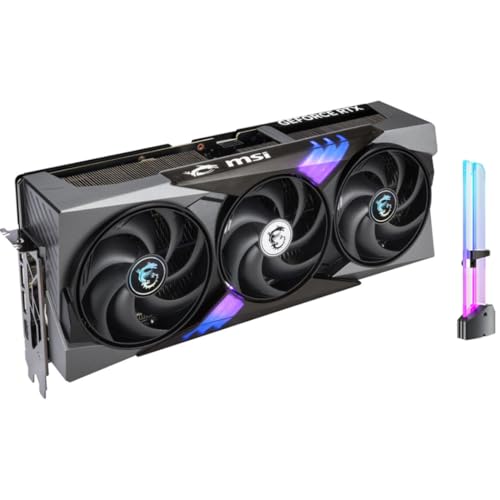
Specs
Chip | GeForce RTX 5090 |
VRAM | 32 GB GDDR7 |
Memory bus | 512-bit |
Memory speed | 28 Gbps |
Display outputs | 3x DisplayPort 2.1b, 1x HDMI 2.1b |
Board power | 575 W |
Cooling | Triple-fan air |
Chip
GeForce RTX 5090
VRAM
32 GB GDDR7
Memory bus
512-bit
Memory speed
28 Gbps
Display outputs
3x DisplayPort 2.1b, 1x HDMI 2.1b
Board power
575 W
Cooling
Triple-fan air
What it does well
This is the only consumer card that satisfies both halves of the question at once. It carries three DisplayPort 2.1b outputs, so the display pipe is never the limiter, and it produces native frame rates past 240 at 4K in the game classes where 240Hz changes how the game feels.
In CS2, Fortnite and Marvel Rivals at 4K with settings maxed it clears 240 on raster alone. No upscaling, no interpolation, no latency tax. That matters more than any headline number in a path-traced scene, because those are the titles where a competitive player would refuse frame generation anyway.
The 32 GB of GDDR7 also removes the VRAM question at 4K. Texture packs, heavy mod loads, capturing 4K HDR footage while you play: none of it puts the card near its ceiling.
What you give up
Street pricing sits well above list because AI buyers compete with gamers for the same inventory. It pulls 575 W, which drags a supply upgrade and a cable upgrade along with it. Neither shows up in a benchmark chart and both show up on the invoice.
The bigger caveat is what it cannot do. In modern path-traced AAA it does not reach 240 natively, and it is not close. Anyone expecting raster alone to fill a 240Hz panel in Cyberpunk or Alan Wake 2 has bought the wrong expectation rather than the wrong card. Our standing position on this tier is that for a gaming-only build the 5090 is overkill and the money belongs in a better monitor. That flips here, because the monitor is the premise.
Who it's for
The buyer who already owns or has ordered a 4K 240Hz panel, splits time between competitive and single-player, and wants the competitive half to be native. If your library is single-player only, the next pick does the job for less.
The step-down: MSI RTX 5080 Gaming Trio OC

Specs
Chip | GeForce RTX 5080 |
VRAM | 16 GB GDDR7 |
Memory bus | 256-bit |
Memory speed | 30 Gbps |
Display outputs | DisplayPort 2.1b, HDMI 2.1b |
Interface | PCIe 5.0 |
Cooling | TRI FROZR 4, three fans |
Chip
GeForce RTX 5080
VRAM
16 GB GDDR7
Memory bus
256-bit
Memory speed
30 Gbps
Display outputs
DisplayPort 2.1b, HDMI 2.1b
Interface
PCIe 5.0
Cooling
TRI FROZR 4, three fans
What it does well
The display pipe is identical. Same DisplayPort 2.1b, same uncompressed 4K 240Hz output, same DLSS 4 feature set including multi-frame generation. What changes is the frame budget sitting behind it, and for a lot of buyers that trade reads better than the price gap suggests.
It lands roughly 40 percent behind the 5090 at 4K raster, which still puts most modern AAA in the 4K 120 to 160 window. In Cyberpunk 2077 at 4K with full path tracing, DLSS 4 and frame generation, it clears 120fps. On a 240Hz panel with variable refresh that is a smooth, entirely reasonable experience.
What you give up
It does not reach 240 natively in anything heavier than an esports title, and in modern AAA it does not reach 240 even with frame generation on. Pair it with a 240Hz panel and you accept that most of the refresh window sits unused. Sixteen gigabytes is enough at 4K today with less runway than the 5090's 32 in texture-heavy releases.
One thing not to do: keep stepping down. The 5070 Ti gets marketed as a 4K card and it is a 1440p ultra card that reaches 4K on heavy DLSS Performance. We covered that in where the 5070 Ti lands at 4K. If the budget wants to slide that far, take a 1440p 240Hz panel with a mid-tier card instead, the trade we weigh in 1440p against 4K.
Who it's for
The buyer who wants real 4K, plays mostly single-player, and would rather spend the difference on the panel, the CPU or the supply than on the last eighty frames in a competitive title they rarely load.
The panel worth pairing: ASUS ROG Swift PG32UCDM3

Specs
Panel | 31.5-inch Tandem QD-OLED, 4th generation |
Resolution | 3840 x 2160 |
Refresh rate | 240 Hz |
Response time | 0.03 ms GtG |
Video input | DisplayPort 2.1a UHBR20, 2x HDMI 2.1, USB-C 90 W |
HDR | DisplayHDR 500 True Black, 1,000 nit peak |
Colour | 99% DCI-P3, 10-bit |
Panel
31.5-inch Tandem QD-OLED, 4th generation
Resolution
3840 x 2160
Refresh rate
240 Hz
Response time
0.03 ms GtG
Video input
DisplayPort 2.1a UHBR20, 2x HDMI 2.1, USB-C 90 W
HDR
DisplayHDR 500 True Black, 1,000 nit peak
Colour
99% DCI-P3, 10-bit
What it does well
This is the panel side of the same question. Native UHBR20 input at 80 Gbps means the 4K 240Hz 10-bit signal crosses the cable without compression and lands on the card's DP 2.1b output with the link running end to end at full rate. That removes the class of handshake failures that turn up on DisplayPort 1.4 panels driven at 240Hz.
The panel earns the pairing on its own terms too. The fourth-generation QD-OLED with the BlackShield coating pushes peak HDR brightness to around 1,000 nits, which is where OLED stops trading highlight punch for its black levels. Response of 0.03 ms keeps the display out of the way when the card delivers 240 native frames.
What you give up
It costs more than a DisplayPort 1.4 panel at the same resolution and refresh that would look identical in almost every session, because DSC really is visually lossless. You are paying for connector headroom, not a better image.
OLED still carries the usual burn-in caution if the machine doubles as a work desktop with static toolbars parked on screen all day. And 31.5 inches at 4K is a lot of desk. Sit closer than about 70 centimetres and you will be turning your head rather than your eyes.
Who it's for
The buyer specifying a 5090-class machine from scratch who wants the display chain to match the card rather than being the link that gets compressed. If the panel is already bought, none of this changes the GPU verdict above. If it is not, monitors built around the 5090 goes wider than OLED.
Bottom line
If you play competitive titles at 4K and want those frames to be real, buy the 5090. It is the only card that clears 240 natively where the latency matters.
If your 4K library is mostly single-player, buy the 5080 and put the difference into the panel and the supply. You will spend most of your time between 120 and 160 either way.
If you are building the whole chain now, pair either card with a DisplayPort 2.1 UHBR20 panel so the link is not the part doing the compromising. And if the 240 line is the only thing pulling you up a tier, read the frame generation numbers again before you commit. The base frame rate is the card. The rest is arithmetic. Our wider 4K GPU ladder covers the tiers below both of these.
FAQ
Can an RTX 5090 run 4K 240Hz natively?
In esports and current live-service titles, yes. CS2, Fortnite and Marvel Rivals all clear 240fps at 4K with settings maxed and no upscaling in the chain. In modern AAA with ray tracing on, no. Cyberpunk 2077 at 4K Ultra RT sits near 57fps on the 5090, and no consumer card of any brand is close to 240 there without frame generation.
Do you need DisplayPort 2.1 for a 4K 240Hz monitor?
Not strictly, but you want it. A 4K 240Hz 10-bit signal fits over DisplayPort 1.4 only with Display Stream Compression doing the work. DSC is visually lossless in practice, so the picture is fine. What you get from DisplayPort 2.1 at UHBR20 is 80 Gbps of raw bandwidth, an uncompressed link, and fewer mode detection oddities. Every RTX 50 card ships full UHBR20.
Is an RTX 5080 enough for a 4K 240Hz monitor?
It is enough to drive the panel correctly and enough to fill it in lighter titles. It is not enough to reach 240 in modern AAA, with or without frame generation. Expect 4K 120 to 160 in most current releases and the 150 to 220 band in esports. If most of your hours are single-player, that gap costs you very little in practice.
Does multi-frame generation count as real 240fps?
It counts as real smoothness and not as real responsiveness. Generated frames carry no new input, so a 240fps counter sitting on a 60fps base still responds like 60, and the technique adds roughly 8 to 25 ms of system latency depending on the title and the base rate. Reflex claws some of that back. In single player it is a genuine upgrade. In a competitive shooter, turn it off.
Should you buy a 4K 240Hz panel or a 4K 160Hz one?
Buy 240Hz if you play competitive titles where the card can feed it natively, because that is the only place the extra refresh converts into something you feel. If your library is single-player AAA, a 4K 160Hz panel matches what a 5080 or even a 5090 delivers there, and the money saved goes further in the supply or the CPU.
What CPU do you need to feed 4K 240Hz?
At 4K the GPU is the bottleneck in nearly every AAA title, so the CPU matters less than it does at 1080p. The exception is exactly the workload this article is about. Esports titles running past 240fps are CPU bound, so a current 8-core gaming chip with a large cache is the floor if you want those frames. Pair it with 32 GB of DDR5 and an NVMe drive.
Related Articles

Best 4K 240Hz OLED Gaming Monitors 2026: 6 Picks Compared
The best 4K 240Hz OLED gaming monitors, ranked: which 27 and 32 inch QD-OLED and WOLED panels are worth buying, and which RTX 5090 pairing needs DP 2.1a.
Sep 13, 2026

Best Gaming Monitors for the RTX 5090 (2026): 5 Picks
The best monitor for an RTX 5090 in 2026: five 4K picks sorted by DisplayPort bandwidth, refresh, and panel, so you know which one the card can really feed.
Aug 3, 2026

Best GPUs for 4K Gaming (2026): Picks by Refresh Target
Five GPUs for 4K gaming in 2026, segmented by refresh target and workload: the 5080 buy zone, the AMD-vs-Nvidia call by tier, why the 5090 is usually wrong.
May 21, 2026

Is the RTX 5070 Ti Enough for 4K? Yes, at 60 FPS (2026)
Is the RTX 5070 Ti enough for 4K? Yes: 4K 60 in most games and 61fps in Cyberpunk 2077 Ultra RT natively. See when a 4K 120Hz panel needs the RTX 5080.
Oct 7, 2026

How to Choose a GPU (and a Monitor That Matches)
A buyer's framework for picking a GPU and the monitor that pairs with it. Start with the panel and work the card back.
May 17, 2026