Affiliate Disclosure: As an Amazon Associate we earn from qualifying purchases. Some links may earn us a commission at no cost to you.

Is 1440p Enough, or Do You Need 4K for Gaming? (2026)
For most people building a gaming PC in 2026, 1440p is enough. Not a compromise, not a stepping stone to something better. It is the right target, and it stays the right target for anyone whose budget has to cover a graphics card as well as a screen.
The reason is arithmetic. A 4K panel asks your GPU to draw 8.3 million pixels per frame instead of the 3.7 million it draws at 1440p. That 2.25x pixel load shows up as roughly a third to half of your frame rate at identical settings, in every measurement below. The monitor is the cheap half of that decision. The card that feeds it is not. Go 4K for a specific reason, never by default.
At a glance
Role | Product | Why it is here | Buy |
|---|---|---|---|
1440p: the panel | 27-inch 1440p at 300 Hz, the resolution most 2026 builds should target | ||
1440p: the card | 16 GB of RDNA 4 raster, enough to clear 1440p high refresh natively | ||
4K: the panel | 4K with a dual-mode switch, for when pixel density earns its bill | ||
4K: the card | The class that 4K at high refresh genuinely requires |
1440p: the panel
- Product
- Why it is here
27-inch 1440p at 300 Hz, the resolution most 2026 builds should target
- Buy
1440p: the card
- Product
- Why it is here
16 GB of RDNA 4 raster, enough to clear 1440p high refresh natively
- Buy
4K: the panel
- Product
- Why it is here
4K with a dual-mode switch, for when pixel density earns its bill
- Buy
4K: the card
- Product
- Why it is here
The class that 4K at high refresh genuinely requires
- Buy
Is 1440p enough? Find your situation
Your situation | Is 1440p enough? | Why | Winner |
|---|---|---|---|
Competitive shooters on a 240 Hz or faster panel | Yes | Frame rate and 1% lows beat pixel count, and 4K throws away the refresh you paid for | |
A mixed AAA library at high refresh | Yes | A mid-stack card holds triple digits at 1440p native and falls near 60 at 4K in the same titles | |
Single-player AAA, image quality first | No, go 4K | Pixel density is the point when the frame rate target is 60 to 120 rather than 240 | |
Sim, flight or strategy with dense text and UI | No, go 4K | Instrument panels, unit icons and small labels are where the extra density shows up instantly | |
Sitting closer than about two and a half feet from a 27-inch panel | No, go 4K | At that distance the 1440p pixel structure becomes resolvable | |
A total build budget below the 4K graphics card floor | Yes | Buying the panel before the card is the classic mismatch, and the display simply outruns the GPU |
Competitive shooters on a 240 Hz or faster panel
- Is 1440p enough?
Yes
- Why
Frame rate and 1% lows beat pixel count, and 4K throws away the refresh you paid for
- Winner
A mixed AAA library at high refresh
- Is 1440p enough?
Yes
- Why
A mid-stack card holds triple digits at 1440p native and falls near 60 at 4K in the same titles
- Winner
Single-player AAA, image quality first
- Is 1440p enough?
No, go 4K
- Why
Pixel density is the point when the frame rate target is 60 to 120 rather than 240
- Winner
Sim, flight or strategy with dense text and UI
- Is 1440p enough?
No, go 4K
- Why
Instrument panels, unit icons and small labels are where the extra density shows up instantly
- Winner
Sitting closer than about two and a half feet from a 27-inch panel
- Is 1440p enough?
No, go 4K
- Why
At that distance the 1440p pixel structure becomes resolvable
- Winner
A total build budget below the 4K graphics card floor
- Is 1440p enough?
Yes
- Why
Buying the panel before the card is the classic mismatch, and the display simply outruns the GPU
- Winner
Benchmarks: what 4K costs you in frames
Every chart below compares one card against itself at two resolutions. That is deliberate. The question is not which card is faster. The question is what the resolution move costs, and the only clean way to measure that is one card, one driver, one bench, two settings. All of these numbers come from GamersNexus reviews. Do not read across the two cards here, because those reviews ran months apart under different drivers. If that is the comparison you want, we put the RTX 5080 and RX 9070 XT head to head separately.
Ultra preset, no upscaling. The resolution move costs 51% of the frame rate.
- 109 FPS
- 53 FPS
An Unreal Engine 5 title with ray tracing off. The resolution move costs 31%.
- 83 FPS
- 57 FPS
The resolution move costs 47% on the 1440p-class card.
- 118 FPS
- 62 FPS
The same Unreal Engine 5 test on stronger hardware. The resolution move still costs 40%.
- 97 FPS
- 58 FPS
The resolution move costs 46%, almost exactly what it cost the cheaper card.
- 149 FPS
- 81 FPS
A far lighter engine, and the resolution move still costs 48%.
- 217 FPS
- 112 FPS
Six paired measurements, two vendors, four engines, and the drop lands between 31 and 48 percent every time. Notice that the stronger card does not escape it. The RTX 5080 gives up 46% in Dying Light 2, the RX 9070 XT gives up 47% in the same test, and the lighter the engine the larger the relative hit, because a light engine was never the limiting factor at 1440p to begin with. That range is the whole argument. Moving to 4K does not cost you a settings notch. It costs you a GPU tier.
How to decide
Start with the games you play and the screen already on your desk, not with a card. Ask people what resolution they want and a lot of them say 4K reflexively, then admit the panel in front of them is a 1080p 75 Hz office monitor. The honest inputs are the one game you play most, the refresh rate you want to hold in it, and how much of the total budget is left after the tower. Those three answers decide the resolution. The rest is shopping. Our guide to how to choose a GPU and a monitor that matches walks the same sequence in more detail.
Then apply the VRAM floors, because they do not bend. 12 GB is the floor at 1440p and 16 GB is the number to prefer. At 4K, 16 GB is the minimum with no exceptions. Memory is where a card ages out first, and an 8 GB card at any resolution in 2026 is a card that starts dropping texture settings inside two years.
Weigh refresh against resolution honestly, because the panel forces the trade. A 4K 60 Hz display caps you at 60 for as long as you own it. A 1440p panel at 240 Hz or better leaves the ceiling to the graphics card, which you can replace. Competitive players should treat that as settled: our esports-focused 1440p card picks exist precisely because pixel count is the wrong thing to buy when 1% lows decide the fight.
Finally, do not buy a panel your graphics card cannot feed. The display is the part you stare at for the next five years and it is worth defending in the budget, but a screen that outruns the card behind it improves nothing at all. Upscaling helps here and frame generation does not rescue it. Frame generation turns 60 into 120. It never turns 30 into 120, and a 4K frame rate quoted with multi-frame generation on top of a 30 FPS base is a 30 FPS card with arithmetic attached.
The 1440p panel: LG UltraGear 27G640A-B

Specs
Panel size | 27-inch |
Resolution | 2560 x 1440 (QHD) |
Refresh rate | 300 Hz |
Panel type | IPS |
Response time | 1 ms |
HDR | VESA DisplayHDR 400 |
Adaptive sync | G-Sync Compatible, FreeSync Premium |
Connectivity | HDMI 2.1, DisplayPort, USB Type-C |
Panel size
27-inch
Resolution
2560 x 1440 (QHD)
Refresh rate
300 Hz
Panel type
IPS
Response time
1 ms
HDR
VESA DisplayHDR 400
Adaptive sync
G-Sync Compatible, FreeSync Premium
Connectivity
HDMI 2.1, DisplayPort, USB Type-C
What it does well
Twenty-seven inches is the size where 1440p stops being a compromise. Pixel density lands near 109 per inch, which is dense enough that desktop text is clean and game geometry holds its edges at normal desk distance. Go bigger than 27 at this resolution and the density argument starts working against you. This panel sits exactly on the line. If you want the wider field of 1440p options at this refresh tier, our 1440p 240Hz monitor roundup covers the panel technologies side by side.
The 300 Hz ceiling matters less as a number you will hit and more as a number you will never have to think about. Buy a 165 Hz panel and the display becomes the cap the first time you upgrade the card. This one leaves the ceiling to the graphics card for the life of the build.
The stand does height, tilt, swivel and pivot, which is not a given at this tier and is the difference between a monitor you position correctly and one you prop on a stack of books. USB-C alongside HDMI 2.1 means a work laptop and a console both plug in without a dock.
What you give up
DisplayHDR 400 is a certification badge rather than an HDR experience. Nothing in the 400-nit class produces real highlight separation, so if you are cross-shopping this against an OLED for HDR movies, read the tier honestly and expect SDR-with-extra-steps.
IPS contrast is IPS contrast. In a dark room, blacks read as dark grey next to any VA or OLED panel. And 300 Hz is aspirational across most of a modern library: outside esports titles, the graphics card runs out of frames long before the panel runs out of refresh.
One practical warning at checkout. LG's 2026 UltraGear model strings sit close enough together that buyers have flagged mixing them up, and the neighbouring SKUs differ in refresh rate and port loadout rather than in anything cosmetic. Read the full model code on the listing rather than the family name.
Who it's for
The buyer putting together a mid-range tower who wants one screen that handles a competitive shooter on Tuesday and a heavy single-player campaign on Saturday, without splitting the difference badly in either direction.
The 1440p card: Sapphire Pulse RX 9070 XT

Specs
Chip | Radeon RX 9070 XT (RDNA 4) |
VRAM | 16 GB GDDR6 |
Memory bus | 256-bit |
Total board power | 304 W |
Upscaling | FSR 4 |
Target resolution | 1440p high-refresh |
Cooler | Triple-fan Sapphire Pulse |
Chip
Radeon RX 9070 XT (RDNA 4)
VRAM
16 GB GDDR6
Memory bus
256-bit
Total board power
304 W
Upscaling
FSR 4
Target resolution
1440p high-refresh
Cooler
Triple-fan Sapphire Pulse
What it does well
This is the card that makes the verdict true. In GamersNexus testing the Pulse holds 118 FPS average in Dying Light 2 at 1440p High-Custom and 109 in Cyberpunk 2077: Phantom Liberty at 1440p Ultra, both native, no upscaling involved. That is what a card sized correctly for its panel looks like: it reaches the refresh band the monitor was bought for on its own merits. The rest of the tier is in our 1440p GPU picks.
The 16 GB frame buffer clears the 1440p floor with real room left over, which is the part that decides how the card feels in 2029 rather than this week. FSR 4 on RDNA 4 finally holds up at Quality, so upscaling is a genuine lever on this card instead of a line on the box.
What you give up
Ray tracing is the trade. The gap to Nvidia in RT-heavy titles is real, it is wide in the heaviest cases, and no driver update is going to close it. Anything with a CUDA path, whether that is Blender Cycles, Stable Diffusion or neural effects in DaVinci, runs worse here or not at all.
And it is a 1440p card by design. The same GamersNexus suite drops it to 53 FPS in Cyberpunk and 62 in Dying Light 2 once you move to 4K. It will output 4K. It will not hold a high refresh there, which is the entire reason this article does not tell you to buy a 4K panel and sort the card out later.
Buying one has been the awkward part. Stock has been reported thin across this generation, and Sapphire's Pulse and Nitro+ cards share nearly every token in their listing titles. Confirm the Pulse part number rather than trusting the family name.
Who it's for
The raster-first gamer at 1440p with a mostly non-ray-traced library and no creative workload. In this price band that reader gets more frames and more memory per dollar than the alternative, and gives up the features they were not going to use.
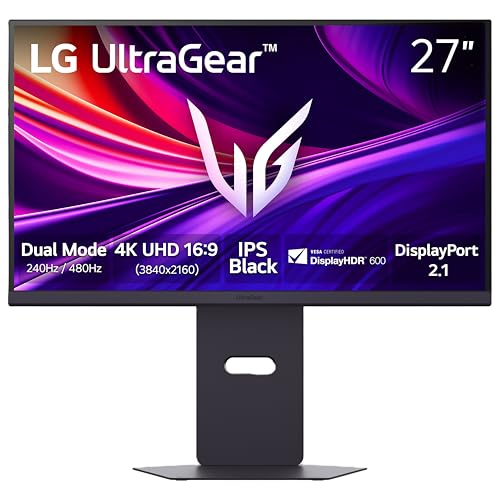
The 4K panel: LG UltraGear 27G850A-B
Specs
Panel size | 27-inch |
Resolution | 3840 x 2160 (4K UHD) |
Refresh rate | Dual-Mode, up to 240 Hz |
Panel type | IPS |
Response time | 1 ms |
HDR | VESA DisplayHDR 600 |
Adaptive sync | G-Sync Compatible, FreeSync Premium Pro |
Connectivity | HDMI, DisplayPort 2.1 |
Panel size
27-inch
Resolution
3840 x 2160 (4K UHD)
Refresh rate
Dual-Mode, up to 240 Hz
Panel type
IPS
Response time
1 ms
HDR
VESA DisplayHDR 600
Adaptive sync
G-Sync Compatible, FreeSync Premium Pro
Connectivity
HDMI, DisplayPort 2.1
What it does well
Four K on a 27-inch panel works out near 163 pixels per inch, and that is the density where small text, cockpit instruments, unit icons and distant geometry stop shimmering. This is the concrete thing you buy when you buy 4K, and it is worth being precise about: it shows up when you stop and look, not when you flick your aim. If you want the panel technology one tier up, our 4K 240Hz OLED options cover that ground.
Dual-mode is the feature that makes this a sane step-up rather than a trap. The panel switches to a lower-resolution high-refresh mode on demand, so a competitive session is not stuck rendering four times the pixels it needs. Buying 4K used to mean choosing once at checkout. It no longer does.
DisplayHDR 600 is a real tier above the 400-nit badge, with enough sustained brightness for highlights to read as highlights. DisplayPort 2.1 keeps the cable off the critical path at high refresh, which matters more at this resolution than any other.
What you give up
Scaling is the daily friction. 4K at 27 inches needs display scaling for readable desktop text, and a stubborn minority of games and older applications still handle scaling badly enough to produce blurry menus or mis-sized UI.
The bigger issue is the bill behind it. This panel is the smaller half of the 4K decision: the graphics card that feeds it costs more than the monitor does, and buying the screen first is how people end up running 4K at medium settings on a card that would have been excellent at 1440p. IPS black levels are also still IPS black levels.
Dual-mode has its own rough edge. Reports suggest the switch is exposed differently depending on the panel and its firmware, and on some units changing mode drops the signal for a few seconds while the display resets.
Who it's for
Single-player AAA, sim, flight and strategy players who sit close to a 27-inch panel, care more about how a paused frame looks than about the last 100 Hz, and have the graphics card budget to back the choice.
The 4K card: ASUS TUF RTX 5080 OC

Specs
Chip | GeForce RTX 5080 (Blackwell) |
VRAM | 16 GB GDDR7 |
Memory bus | 256-bit |
Total graphics power | 360 W |
Upscaling | DLSS 4 with Multi Frame Generation |
Target resolution | 4K high-refresh |
Cooler | Triple-fan ASUS TUF |
Chip
GeForce RTX 5080 (Blackwell)
VRAM
16 GB GDDR7
Memory bus
256-bit
Total graphics power
360 W
Upscaling
DLSS 4 with Multi Frame Generation
Target resolution
4K high-refresh
Cooler
Triple-fan ASUS TUF
What it does well
This is the honest price of the 4K answer, and naming it is the point of the section. GamersNexus measured 81 FPS average at 4K in Dying Light 2 and 118 in Resident Evil 4, both native. That is a card doing real 4K rather than a 1440p card with an upscaler bolted to the front. If you want to see the whole machine around it, our full 1440p and 4K build lists spec both sides.
DLSS 4's transformer model at Quality is genuinely difficult to separate from native at 4K, which means the practical headroom is wider than the raster numbers alone suggest. Ray tracing and CUDA are both first-class here, so the RT-heavy library and the creative workload that pushed you toward 4K in the first place are covered.
What you give up
The gap to the card above it is wide enough that this one reads as a mid-stack part wearing a halo price. The 16 GB of GDDR7 is the floor for 4K rather than headroom over it, which is a strange thing to say about a card at this tier and worth knowing before you commit.
Even this card falls under 60 at native 4K in the heaviest titles, including 58 FPS in Black Myth: Wukong at High. So 4K at high refresh in modern AAA leans on DLSS whether you planned for it or not, and the power connector wants a native cable from a modern supply rather than the bundled adapter.
Who it's for
The buyer who has already decided on 4K, plays image-quality-first single-player or ray-traced titles, or does creative work where the CUDA tax is real. Above the mid-stack there is no competing vendor this generation, so this is a choice between Nvidia parts rather than between brands.
Bottom line
If you play competitive shooters, buy 1440p and spend the difference on refresh. If your library is mixed and the budget has to cover both the screen and the card, buy 1440p. The Sapphire Pulse RX 9070 XT paired with a 300 Hz panel holds triple digits natively, which is the standard the word enough has to meet. If you play single-player AAA for the image, or you fly, drive or command armies where small text decides things, go 4K and budget for an RTX 5080 before you budget for the monitor. And if only one of the two can be bought this year, buy the card. A panel your graphics card cannot feed improves nothing.
FAQ
Can you tell the difference between 1440p and 4K while gaming?
At 27 inches and normal desk distance, yes, but less than the spec gap suggests. 1440p on a 27-inch panel is roughly 109 pixels per inch and 4K on the same size is roughly 163. The difference surfaces first in fine detail: distant foliage, small text, thin geometry edges against a bright sky. In fast motion most of it disappears. Sit closer than about two and a half feet and it becomes obvious quickly. Sit at arm's length and many players stop noticing within minutes of starting to play.
What GPU do you need for 4K gaming in 2026?
For native 4K at 60 FPS or better in modern AAA, plan on RTX 5080-class hardware. In GamersNexus testing that card lands at 81 FPS in Dying Light 2 and 58 in Black Myth: Wukong at 4K, both native, both at High presets. A mid-stack card such as the RX 9070 XT will output 4K, but the same suite puts it in the 50s and 60s in those titles, which means the settings menu or the upscaler carries the difference. Above the mid-stack there is no competing vendor this generation.
Is 1440p 144Hz better than 4K 60Hz for gaming?
For most players, yes. Refresh rate changes how the game feels in your hands on every single frame. Resolution changes how it looks when you stop and stare. A 4K 60 Hz panel also caps you at 60 for as long as you own it, which is a hard ceiling on a purchase you keep for five years or more. The exception is a library of slow single-player games where the camera drifts and image quality is the whole point. Anything with fast aim or fast camera work is better served by the higher refresh panel.
Does 4K gaming need a lot more VRAM?
More, though the jump is smaller than most people expect. Frame buffers and render targets scale with pixel count, but textures do not, and textures account for most of what fills a modern card's memory. The practical floors are 12 GB at 1440p with 16 GB preferred, and 16 GB minimum at 4K with no exceptions. The real risk is not the resolution. It is buying an 8 GB card at any resolution in 2026 and watching texture quality become the first setting you have to give up.
Is 1440p enough for a high-end GPU like an RTX 5080?
It is more than enough, and that is exactly the point. An RTX 5080 at 1440p runs 149 FPS in Dying Light 2 and 217 in Final Fantasy XIV: Dawntrail natively in GamersNexus testing. Pairing that card with a 1440p 240 Hz panel is a completely legitimate build for someone who wants high refresh in demanding titles with no upscaling at all. If the card is already bought, a 1440p panel spends those frames on refresh instead of on pixels, and for a competitive player that is the better trade.
Should you rely on upscaling to game at 4K on a mid-range card?
As a lever, yes. As a rescue, no. DLSS 4 at Quality and FSR 4 at Quality both hold up well at 4K, and factoring them into a buying decision is honest when the base frame rate is already reasonable. Frame generation is a different thing. It turns 60 into 120 and it never turns 30 into 120. A 4K figure built from a 30 FPS base with multi-frame generation stacked on top is a 30 FPS card with arithmetic attached. Compare native or Quality-mode numbers across cards first, then add the multiplier mentally.
Related Articles

How to Choose a GPU (and a Monitor That Matches)
A buyer's framework for picking a GPU and the monitor that pairs with it. Start with the panel and work the card back.
May 17, 2026

Best GPU for 1440p Gaming 2026: 5 16GB Picks, 144-240Hz
The best GPU for 1440p gaming in 2026: five 16GB picks matched to 144 and 240 Hz targets, the 8GB cards to skip, and the benchmarks behind every call.
Sep 26, 2026

RTX 5080 vs RX 9070 XT (2026): Which Flagship to Buy?
RTX 5080 vs RX 9070 XT for 2026 flagship gaming: pick the right card by resolution, ray-tracing load, DLSS 4 vs FSR 4, power draw, and your price tier.
May 16, 2026

Best 1440p 240Hz Gaming Monitors (2026): 5 Picks by Panel
Five of the best 1440p 240Hz gaming monitors for 2026, picked by panel tech and GPU pairing: QD-OLED, WOLED, and IPS options for every budget and room.
Jun 21, 2026

Ultimate 1440p & 4K Gaming PC Build Guide (2026)
Two complete 2026 PC builds: a 1440p system under $2,000 and a 4K flagship under $5,000 — full parts lists with live US pricing on every component.
Aug 3, 2025