Affiliate Disclosure: As an Amazon Associate we earn from qualifying purchases. Some links may earn us a commission at no cost to you.

Do You Need X3D for Valorant? Not Below 360Hz (2026)
No, you do not need an X3D CPU for Valorant unless you are chasing 360Hz. On a 144 to 240Hz monitor, the Ryzen 5 7600 already holds the target with room to spare, so the X3D premium buys frames your screen never shows.
Put those savings into the GPU instead. The Ryzen 7 9800X3D earns its price only if you are chasing a 360Hz ceiling with a flagship GPU, streaming while you play, or splitting time with cache-heavy games like CS2 or a strategy title, and even then its edge shows up in steadier 1% lows rather than a higher average.
At a glance
Tier | CPU | Best for | Buy |
|---|---|---|---|
Recommended Tier | Valorant-only builds on a 144-240Hz monitor | ||
Step-Up | 360Hz+ chasing, streaming, or a cache-sensitive library |
Recommended Tier
- CPU
- Best for
Valorant-only builds on a 144-240Hz monitor
- Buy
Step-Up
- CPU
- Best for
360Hz+ chasing, streaming, or a cache-sensitive library
- Buy
Is a non-X3D CPU enough for Valorant?
The answer turns on two things: your monitor's refresh rate and what else the CPU has to do. Most Valorant players land in the first two rows without realizing it. The X3D chip only starts pulling its weight once the monitor, the GPU, or the workload changes underneath it.
Scenario | Winner |
|---|---|
Solo Valorant, 144-240Hz monitor, mid-range GPU (RTX 4060-4070 class) | AMD Ryzen 5 7600 |
Budget build, putting savings toward the GPU | AMD Ryzen 5 7600 |
Chasing a 360Hz+ ceiling with a flagship GPU (RTX 4080/4090-class) | AMD Ryzen 7 9800X3D |
Streaming while playing, or a library that includes CS2, sim racing, or strategy alongside Valorant | AMD Ryzen 7 9800X3D |
Solo Valorant, 144-240Hz monitor, mid-range GPU (RTX 4060-4070 class)
- Winner
AMD Ryzen 5 7600
Budget build, putting savings toward the GPU
- Winner
AMD Ryzen 5 7600
Chasing a 360Hz+ ceiling with a flagship GPU (RTX 4080/4090-class)
- Winner
AMD Ryzen 7 9800X3D
Streaming while playing, or a library that includes CS2, sim racing, or strategy alongside Valorant
- Winner
AMD Ryzen 7 9800X3D
Benchmarks
Reviewers rarely isolate Valorant in CPU-scaling suites, because the game is too light to separate modern chips at the top end. The chart below instead shows how these two CPUs scale against each other across a broad reviewer test suite once the CPU becomes the actual constraint. That gap is the same mechanism behind steadier 1% lows in Valorant's busiest moments, multi-agent ability spam, full retakes, spike rounds, even though Valorant itself was not part of this specific test.
Treat the chart as a proxy for CPU headroom, not a Valorant score. Once frame rates on both chips already sit above what the monitor can display, the number that changes the experience is how steady those frames stay under load, and that is the exact behavior the cache is built to smooth out.
Reviewer CPU-scaling average across a broad game suite once the CPU is the limiting factor; illustrates the mechanism behind the X3D's 1% low advantage.
- 92 FPS
- 130 FPS
Recommended Tier: AMD Ryzen 5 7600
The Ryzen 5 7600 is the default answer for anyone building around Valorant specifically, and it is not a close call. See our full Valorant build guide across every budget for how the rest of the parts list shakes out.
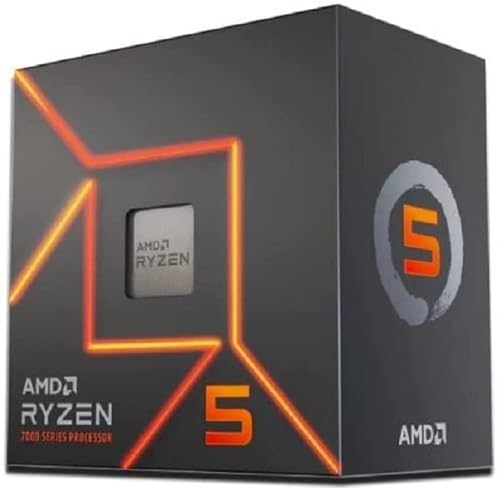
Specs
Cores / Threads | 6 / 12 |
Base / Boost Clock | 3.8 GHz / up to 5.1 GHz |
L3 Cache | 32 MB |
TDP | 65W |
Socket | AM5 |
Included Cooler | Wraith Stealth (bundled) |
Cores / Threads
6 / 12
Base / Boost Clock
3.8 GHz / up to 5.1 GHz
L3 Cache
32 MB
TDP
65W
Socket
AM5
Included Cooler
Wraith Stealth (bundled)
What it does well
Six modern Zen 4 cores and 12 threads are more headroom than Valorant's engine asks for. The game was built to run on hardware far below current mid-range parts, and this chip clears common 1080p competitive-settings targets by a wide margin on any current-gen platform, matching the picks in our best CPUs for 1080p gaming breakdown. The bundled Wraith Stealth cooler handles it without extra spend, and the chip runs cool and quiet under a workload this light.
The real payoff is not the CPU number, it is what the savings buy elsewhere. The gap between this chip and the step-up option goes almost entirely into the GPU tier or the monitor, and both of those move the actual Valorant experience more than a CPU swap does at this budget. A better panel, or a GPU that holds frame rate steady under a busy scene, does more for your aim than a chip upgrade Valorant cannot stress in the first place.
The AM5 socket also keeps a real upgrade path open. If your library changes later and starts leaning into cache-sensitive titles, or you eventually want to chase a higher refresh target, the platform supports a drop-in CPU swap down the road without a full rebuild.
Pairing is simple too. A mid-tier B650 or B850 board handles this chip without breaking a sweat, since a 65W part puts almost no load on the VRM, and a budget-tier air cooler is genuinely all it needs. None of the money saved here needs to go toward cooling or the motherboard; all of it can go toward the GPU or the monitor, which is where a Valorant player feels the upgrade.
What you give up
The honest gap shows up in 1% lows, not the average frame rate. In dense server-side moments, ability spam from five agents, a full retake push, a spike round, the 7600 can show more frame-time variance than a 3D V-Cache chip. Most players will not consciously register this at 240Hz, but it is real and it is measurable.
It also has no cache advantage if your library extends past Valorant into genuinely cache-sensitive genres. Sim racing, grand strategy, and dense MMO raid content all show a bigger, more noticeable gap between this chip and the step-up option than Valorant itself ever will.
If your monitor and GPU are already well past what Valorant demands, say a 360Hz panel behind a flagship card, the 7600 becomes the actual bottleneck in the pairing, and the frame-time variance gets easier to notice the higher that ceiling climbs. That is a narrow case, but it is a real one, and it is exactly the profile the step-up chip exists for.
Who it's for
This is the right chip for the Valorant-primary buyer on a 144 to 240Hz monitor who is not streaming and is not chasing an absolute frame-rate record on a flagship GPU. That covers most people asking this question. If that is not your situation, the step-up section below covers the specific profiles where the extra spend earns its keep.
Step-Up: AMD Ryzen 7 9800X3D
The Ryzen 7 9800X3D is not a blanket upgrade over the 7600. It is a specific answer for a specific buyer, and the specifics matter more than the sticker price. Our broader breakdown of whether the 9800X3D is worth it for gaming covers the case for it outside Valorant specifically.

Specs
Cores / Threads | 8 / 16 |
Base / Boost Clock | 4.7 GHz / up to 5.2 GHz |
L3 Cache | 96 MB (3D V-Cache) |
TDP | 120W |
Socket | AM5 |
Included Cooler | None (aftermarket cooler required) |
Cores / Threads
8 / 16
Base / Boost Clock
4.7 GHz / up to 5.2 GHz
L3 Cache
96 MB (3D V-Cache)
TDP
120W
Socket
AM5
Included Cooler
None (aftermarket cooler required)
What it does well
The 96 MB of 3D V-Cache is the whole story here. Reviewer CPU-scaling tests put this chip roughly 40 percent ahead of a non-X3D chip once the CPU becomes the bottleneck, and that gap concentrates in frame-time consistency rather than the raw average. At 360Hz and beyond, consistency is the metric that matters, since there is far less headroom to hide a stutter than there is at 144Hz.
That advantage covers two profiles directly. Chasing a 360Hz+ ceiling on a flagship GPU is exactly the case the cache was built for: enough GPU horsepower to feed the frame rate, enough monitor to display it, and a CPU that can hold the line under the busiest in-game moments instead of dipping. Streaming while playing is the second case. Encoding and gaming share the same cores on most setups, and the extra cache gives the game thread more room to stay ahead of the encoder without dropping frames.
The third profile is library breadth. If Valorant is one game in a rotation that also includes CS2, sim racing, or a dense strategy title, the step-up earns its keep across the whole library instead of just this one game. Those genres show the biggest, most consistent gap between X3D and non-X3D chips of any category reviewers test.
The extra two cores over the 7600 matter here too, not just the cache. A software encode running alongside Valorant competes directly with the game for CPU time, and eight cores give the scheduler more room to keep the game thread fed while the encoder chews through frames in the background. Hardware encoders offload most of that work on a modern GPU, but plenty of streaming setups still lean on the CPU for quality settings a hardware encoder cannot match.
What you give up
The most obvious cost is the price gap itself, and it is a real one, not a footnote. For a Valorant-only library on a 144 to 240Hz monitor, most of that premium buys frames you will never see, because the 7600 already clears the target.
There is also no bundled cooler in the box, unlike the 7600, so the step-up carries a small hidden line item most buyers do not budget for up front. Factor a cooler into the comparison before deciding this is the cheaper path to a better experience.
The 3D V-Cache also runs slightly warmer and clocks a touch lower under sustained all-core load than the standard 9800X, a known trait of stacking cache under the compute die. It does not cost meaningful gaming performance, since games rarely load every core at once, but it means the chip is a worse pick than a plain non-X3D part for anyone whose workload is heavy multi-core work rather than gaming.
Who it's for
This chip is for the buyer chasing a 360Hz+ panel with a flagship GPU already in the build, the buyer who streams while they play, or the buyer whose library extends well past Valorant into cache-sensitive genres. Outside those three profiles, the recommended tier above does the job for less.
Bottom line
If Valorant is your main game and your monitor tops out at 240Hz, buy the AMD Ryzen 5 7600 and put the difference into the GPU. If you are chasing a 360Hz+ ceiling with a flagship GPU already in the build, the AMD Ryzen 7 9800X3D earns its price. If you stream while you play, or your library reaches into CS2, sim racing, or strategy titles, the same step-up pays off across more than just Valorant. Everyone else is paying for frames they will not see.
FAQ
Does an X3D CPU improve FPS in Valorant?
Yes, but the improvement shows up mostly in 1% lows rather than the average frame rate. Valorant's engine is light enough that a non-X3D chip already clears common 1080p targets by a wide margin, so the average number barely moves. The 3D V-Cache pays off in frame-time consistency during the game's busiest moments, ability spam, full retakes, spike rounds, which is a real difference but a subtler one than a raw FPS-counter comparison suggests. If you are chasing the absolute frame ceiling on a 360Hz+ panel, that consistency is exactly what you are paying for.
Is the Ryzen 7 9800X3D overkill for Valorant?
For most Valorant-only players on a 144 to 240Hz monitor, yes. The chip's real advantage shows up once you are chasing a 360Hz+ ceiling with a flagship GPU, streaming while you play, or running a library that includes cache-sensitive titles beyond Valorant. Outside those specific cases, the premium buys frame-rate headroom the game and the monitor cannot use, and that money is better spent on the GPU tier or the monitor panel instead.
Do you need an X3D CPU for competitive gaming in general?
It depends heavily on the title. Sim racing, dense strategy games, and MMO raid content show a real, measurable gap between X3D and non-X3D chips. Lightweight esports titles like Valorant show a much smaller practical difference, since the bottleneck usually sits somewhere other than raw CPU headroom. Match the chip to your actual library rather than to competitive gaming as a category, since two games in the same competitive-shooter genre can have completely different CPU demands depending on the engine underneath.
Ryzen 5 7600 vs Ryzen 7 9800X3D for Valorant: which one is enough?
The Ryzen 5 7600 is enough for a Valorant-focused build on a typical 144 to 240Hz monitor. The 9800X3D becomes the better buy once you add a 360Hz+ panel with a flagship GPU, streaming duties, or other cache-sensitive games to the picture. Decide based on your monitor and your library, not on which chip wins the benchmark chart, since the benchmark chart is measuring a ceiling neither of you will see in a Valorant-only setup.
What CPU do you need to hit 240Hz or 360Hz in Valorant?
A modern six-core CPU like the Ryzen 5 7600 comfortably clears a 240Hz target in Valorant on any current-gen platform. Pushing toward 360Hz and beyond is where the gap starts to matter, and that is specifically where a 3D V-Cache chip like the 9800X3D holds steadier frame times instead of occasional dips. The monitor and GPU matter just as much as the CPU choice at that ceiling, so treat the three as a matched set rather than upgrading the CPU in isolation.
Related Articles

Best CPUs for 1080p Gaming (2026): 7 Picks, AMD and Intel
The best CPUs for 1080p gaming in 2026. Seven AMD and Intel picks from a budget AM4 chip to the gaming flagship, matched to 60Hz, 144Hz and 240Hz targets.
Aug 21, 2026

Ryzen 7 9700X vs 9800X3D (2026): A 2% to 18% Gaming Gap
Ryzen 7 9700X vs 9800X3D: the X3D leads by 2% to 18% across 8 games. See which libraries earn the cache premium and when the 9700X plus a better GPU wins.
Oct 14, 2026

Is the Ryzen 7 9800X3D Worth It in 2026? Buy or Skip
Is the Ryzen 7 9800X3D worth it for gaming? Yes for 360Hz shooters, sims and heavy strategy. Skip it at 1440p on a mid-tier GPU. Full 2026 verdict vs 9600X.
Aug 26, 2026

Best CPUs for Counter-Strike 2 (2026): Five Picks by Tier
Best CPUs for Counter-Strike 2 in 2026: five picks across competitive tiers from 144 Hz to 480 Hz OLED, with X3D cache analysis and 1% lows benchmarks.
May 12, 2026

Best Gifts for Gamers Who Have Everything (Holiday 2026)
Christmas and Holiday 2026 gifts for the gamer who has everything: one safe pick, five daily-use upgrades they rarely buy, and the fit risks to check first.
Oct 29, 2026